概述
[BuildContext] objects are actually [Element] objects. The [BuildContext] ,interface is used to discourage direct manipulation of [Element] objects.
翻译过来的意思就是 [BuildContext] 对象实际上是 [Element] 对象。 [BuildContext] 接口用于阻止直接操作 [Element] 对象。
根据官方的注释,我们可以知道 BuildContext 实际上就是 Element 对象,主要是为了防止开发者直接操作 Element 对象。通过源码我们也可以看到 Element 是实现了 BuildContext 这个抽象类
abstract class Element extends DiagnosticableTree implements BuildContext {}
BuildContext 的作用
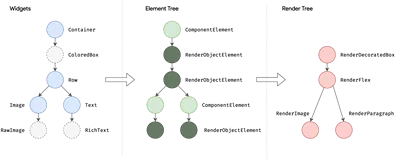
在之前的一篇文章中讲过 Element 和 Widget 对应的关系,不太清楚的可以看一下
Element 是 Widget 树中特定位置所对应的实例,Widget 的状态都会保存在 Element 当中。
那么 BuildContext 到底能干什么呢?只要是 Element 能做的事情,BuildContext 基本都能做,如:
var size = (context.findRenderObjec  var size = (context.findRenderObject() as RenderBox).size;
var local = (context.findRenderObject() as RenderBox).localToGlobal;
var widget = context.widget;t() as RenderBox).size;
例如上面通过 context 之前获取到宽高度,距离左上角的偏移,element 对应的 widget 等
因为 Elment 是继承自 BuildContext ,我们甚至可以通过 context 来直接刷新 Element 的状态,如下:
(context as Element).markNeedsBuild();
这样就可以直接对当前的 Element 进行刷新,而不必去通过 SetState,但是这种做法是极其的不推荐的。
其实在 SetState 中,最终也是调用的 markNeedsBuild 方法,如下:
void setState(VoidCallback fn) {
  assert(fn != null);
  assert(() {
    if (_debugLifecycleState == _StateLifecycle.defunct) {
     ///......
    }
    if (_debugLifecycleState == _StateLifecycle.created && !mounted) {
     ///......
    }
    return true;
  }());
  final dynamic result = fn() as dynamic;
  assert(() {
    if (result is Future) {
      ///......
      ]);
    }
    return true;
  }());
  ///最终调用
  _element!.markNeedsBuild();
}
我们在写代码的过程中还会发现一个问题,就是要更新的状态不是必须要写在 setState 里面,只要写在 setState 上面 即可,这样也没有问题,例如有些其他的响应式框架就没有这个回调,只提供了一个通知页面刷新的方法,早期的 flutter 也是如此。但是最后发现了这个问题的弊端了,如大多数人会在每个方法的后面加一个 setState,导致过度的开销,并且在删除的时候也是不知道这个这个 setState 到底有没有实际的意义,这就会造成一些不必要的麻烦。
所以 Flutter 在 setState 中加了一个回调,我们可以需要更新的状态直接放在回调里面,和状态没关系的放在外边即可。
常见的一些方法
(context as Element).findAncestorStateOfType()
沿着当前的 Element 向上寻找,直到直到一个特定的类型之后,将他的 State 返回
(context as Element).findRenderObject()
获取 Element 渲染的对象
(context as Element).findAncestorRenderObjectOfType()
向上遍历,获取与泛型对应的渲染对象
(context as Element).findAncestorWidgetOfExactType()
遍历,获取与 T 对应的 Widget
上面这些方法在源码中还是有一些使用的栗子的,例如:
Scaffold.of(context).showSnackBar()
在 Scaffold 的底部显示一个 SnackBar
static ScaffoldState of(BuildContext context) {
  assert(context != null);
  final ScaffoldState? result = context.findAncestorStateOfType<ScaffoldState>();
  if (result != null)
    return result;
//......
}
查看 of 方法,可以发现,里面使用的就是 findAncestorStateOfType 方法来获取的 Scaffold 的状态,最终来实现一些操作,
Theme.of(context).accentColor
我们可以通过如上的方法来获取一下主题颜色等,其内部实现如下:
static ThemeData of(BuildContext context) {
  final _InheritedTheme? inheritedTheme = context.dependOnInheritedWidgetOfExactType<_InheritedTheme>();
  final MaterialLocalizations? localizations = Localizations.of<MaterialLocalizations>(context, MaterialLocalizations);
  final ScriptCategory category = localizations?.scriptCategory ?? ScriptCategory.englishLike;
  final ThemeData theme = inheritedTheme?.theme.data ?? _kFallbackTheme;
  return ThemeData.localize(theme, theme.typography.geometryThemeFor(category));
}
它和上面的一样,也是找到离你最近的 _InheritedTheme,最后再将它还给你
栗子
写一个侧滑栏,通过点击按钮来实现打开 侧滑栏
class MyHomePage extends StatefulWidget {
  MyHomePage({Key key, this.title}) : super(key: key);
  final String title;
  @override
  _MyHomePageState createState() => _MyHomePageState();
}
class _MyHomePageState extends State<MyHomePage> {
  @override
  Widget build(BuildContext context) {
    return Scaffold(
      appBar: AppBar(title: Text(widget.title)),
      drawer: Drawer(),
      floatingActionButton: FloatingActionButton(onPressed: () {
        Scaffold.of(context).openDrawer();
      }),
    );
  }
}
运行代码,就会发现报错:Scaffold.of() called with a context that does not contain a Scaffold.
意思就是当前的 context 里面没有找到 Drawer,所以无法打开。
为什么呢? 因为这个 context 是当前 MyHomePage 这个层级的,在他的上层确实没有 Drawer,所以自然也就没有办法打开了。 那么如何解决呢?如下:
class _MyHomePageState extends State<MyHomePage> {
  @override
  Widget build(BuildContext context) {
    return Scaffold(
        appBar: AppBar(title: Text(widget.title)),
        drawer: Drawer(),
        floatingActionButton: Floating());
  }
}
class Floating extends StatelessWidget {
  @override
  Widget build(BuildContext context) {
    return FloatingActionButton(onPressed: () {
      Scaffold.of(context).openDrawer();
    });
  }
}
修改为如上代码即可解决。
在 Floating 中的 context 是 MyHomePage 下面的层级,所以说他的上级时候 Scaffold 的,自然也就不会报错了。
但是一般这种情况下,我们是不用多创建一个组件的,所以我们还需要一个更好的解决方案,如下:
class _MyHomePageState extends State<MyHomePage> {
  @override
  Widget build(BuildContext context) {
    return Scaffold(
        appBar: AppBar(title: Text(widget.title)),
        drawer: Drawer(),
        floatingActionButton: Builder(
          builder: (context) {
            return FloatingActionButton(onPressed: () {
              Scaffold.of(context).openDrawer();
            });
          },
        ));
  }
}
我们可以通过 Builder 来创建一个匿名的组件就可以了。