7. 生活指数
生活指数就是一些生活建议,实现的不走其实和天气预报差不太多,但是比天气预报要简单一些,因为不需要列表显示,文本即可。
① 新增API接口
根据和风天气中的文档,得知生活指数接口为:
https://free-api.heweather.net/s6/weather/lifestyle?key=3086e91d66c04ce588a7f538f917c7f4&location=福田区
在网页上访问得到返回值,生成一个实体
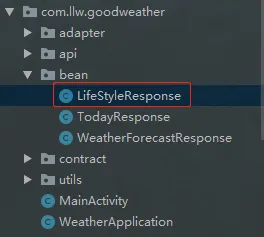
代码如下:
package com.llw.goodweather.bean;
import java.util.List;
public class LifeStyleResponse {
    private List<HeWeather6Bean> HeWeather6;
    public List<HeWeather6Bean> getHeWeather6() {
        return HeWeather6;
    }
    public void setHeWeather6(List<HeWeather6Bean> HeWeather6) {
        this.HeWeather6 = HeWeather6;
    }
    public static class HeWeather6Bean {
        /**
         * basic : {"cid":"CN101280603","location":"福田","parent_city":"深圳","admin_area":"广东","cnty":"中国","lat":"22.5410099","lon":"114.05095673","tz":"+8.00"}
         * update : {"loc":"2019-11-23 09:55","utc":"2019-11-23 01:55"}
         * status : ok
         * lifestyle : [{"type":"comf","brf":"舒适","txt":"白天不太热也不太冷,风力不大,相信您在这样的天气条件下,应会感到比较清爽和舒适。"},{"type":"drsg","brf":"热","txt":"天气热,建议着短裙、短裤、短薄外套、T恤等夏季服装。"},{"type":"flu","brf":"少发","txt":"各项气象条件适宜,无明显降温过程,发生感冒机率较低。"},{"type":"sport","brf":"适宜","txt":"天气较好,赶快投身大自然参与户外运动,尽情感受运动的快乐吧。"},{"type":"trav","brf":"适宜","txt":"天气较好,温度适宜,是个好天气哦。这样的天气适宜旅游,您可以尽情地享受大自然的风光。"},{"type":"uv","brf":"强","txt":"紫外线辐射强,建议涂擦SPF20左右、PA++的防晒护肤品。避免在10点至14点暴露于日光下。"},{"type":"cw","brf":"适宜","txt":"适宜洗车,未来持续两天无雨天气较好,适合擦洗汽车,蓝天白云、风和日丽将伴您的车子连日洁净。"},{"type":"air","brf":"中","txt":"气象条件对空气污染物稀释、扩散和清除无明显影响。"}]
         */
        private BasicBean basic;
        private UpdateBean update;
        private String status;
        private List<LifestyleBean> lifestyle;
        public BasicBean getBasic() {
            return basic;
        }
        public void setBasic(BasicBean basic) {
            this.basic = basic;
        }
        public UpdateBean getUpdate() {
            return update;
        }
        public void setUpdate(UpdateBean update) {
            this.update = update;
        }
        public String getStatus() {
            return status;
        }
        public void setStatus(String status) {
            this.status = status;
        }
        public List<LifestyleBean> getLifestyle() {
            return lifestyle;
        }
        public void setLifestyle(List<LifestyleBean> lifestyle) {
            this.lifestyle = lifestyle;
        }
        public static class BasicBean {
            /**
             * cid : CN101280603
             * location : 福田
             * parent_city : 深圳
             * admin_area : 广东
             * cnty : 中国
             * lat : 22.5410099
             * lon : 114.05095673
             * tz : +8.00
             */
            private String cid;
            private String location;
            private String parent_city;
            private String admin_area;
            private String cnty;
            private String lat;
            private String lon;
            private String tz;
            public String getCid() {
                return cid;
            }
            public void setCid(String cid) {
                this.cid = cid;
            }
            public String getLocation() {
                return location;
            }
            public void setLocation(String location) {
                this.location = location;
            }
            public String getParent_city() {
                return parent_city;
            }
            public void setParent_city(String parent_city) {
                this.parent_city = parent_city;
            }
            public String getAdmin_area() {
                return admin_area;
            }
            public void setAdmin_area(String admin_area) {
                this.admin_area = admin_area;
            }
            public String getCnty() {
                return cnty;
            }
            public void setCnty(String cnty) {
                this.cnty = cnty;
            }
            public String getLat() {
                return lat;
            }
            public void setLat(String lat) {
                this.lat = lat;
            }
            public String getLon() {
                return lon;
            }
            public void setLon(String lon) {
                this.lon = lon;
            }
            public String getTz() {
                return tz;
            }
            public void setTz(String tz) {
                this.tz = tz;
            }
        }
        public static class UpdateBean {
            /**
             * loc : 2019-11-23 09:55
             * utc : 2019-11-23 01:55
             */
            private String loc;
            private String utc;
            public String getLoc() {
                return loc;
            }
            public void setLoc(String loc) {
                this.loc = loc;
            }
            public String getUtc() {
                return utc;
            }
            public void setUtc(String utc) {
                this.utc = utc;
            }
        }
        public static class LifestyleBean {
            /**
             * type : comf
             * brf : 舒适
             * txt : 白天不太热也不太冷,风力不大,相信您在这样的天气条件下,应会感到比较清爽和舒适。
             */
            private String type;
            private String brf;
            private String txt;
            public String getType() {
                return type;
            }
            public void setType(String type) {
                this.type = type;
            }
            public String getBrf() {
                return brf;
            }
            public void setBrf(String brf) {
                this.brf = brf;
            }
            public String getTxt() {
                return txt;
            }
            public void setTxt(String txt) {
                this.txt = txt;
            }
        }
    }
}
在ApiService中增加
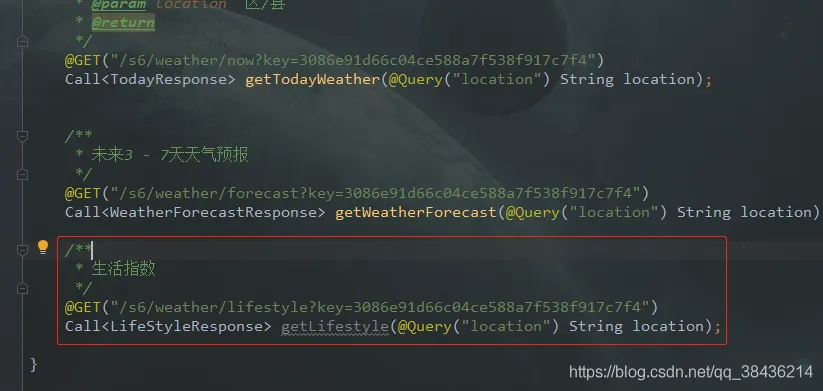
代码如下:
  /**
     * 生活指数
     */
    @GET("/s6/weather/lifestyle?key=3086e91d66c04ce588a7f538f917c7f4")
    Call<LifeStyleResponse> getLifestyle(@Query("location") String location);
记得将key的值修改为自己的Key
② 修改订阅器
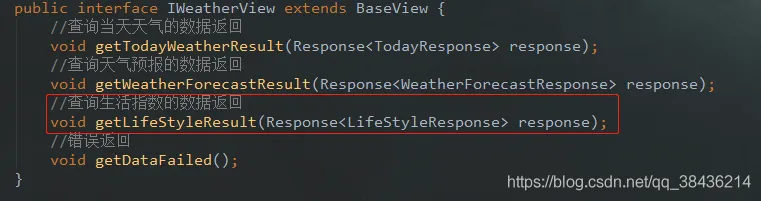
在WeatherContract新增生活指数订阅
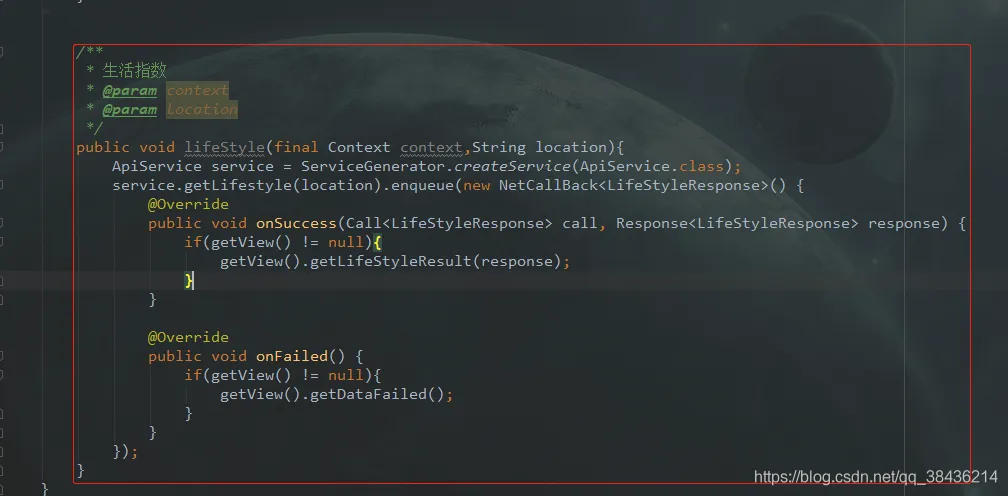
    /**
         * 生活指数
         * @param context
         * @param location
         */
        public void lifeStyle(final Context context,String location){
            ApiService service = ServiceGenerator.createService(ApiService.class);
            service.getLifestyle(location).enqueue(new NetCallBack<LifeStyleResponse>() {
                @Override
                public void onSuccess(Call<LifeStyleResponse> call, Response<LifeStyleResponse> response) {
                    if(getView() != null){
                        getView().getLifeStyleResult(response);
                    }
                }
                @Override
                public void onFailed() {
                    if(getView() != null){
                        getView().getDataFailed();
                    }
                }
            });
        }
    //查询生活指数的数据返回
        void getLifeStyleResult(Response<LifeStyleResponse> response);
③ 修改布局
这次要展示的数据会比较多,所以布局的整体要用NestedScrollView包裹起来,变成一个·可以上下滑动的布局,布局修改后的代码如下(PS:为了不出现问题,这里我贴上全部的布局代码):
<?xml version="1.0" encoding="utf-8"?>
<LinearLayout xmlns:android="http://schemas.android.com/apk/res/android"
    xmlns:app="http://schemas.android.com/apk/res-auto"
    xmlns:tools="http://schemas.android.com/tools"
    android:gravity="center"
    android:fitsSystemWindows="true"
    android:background="@drawable/pic_bg"
    android:layout_width="match_parent"
    android:layout_height="match_parent"
    tools:context=".MainActivity">
    <!--相对布局-->
    <RelativeLayout
        android:layout_width="match_parent"
        android:layout_height="match_parent">
        <!--透明度为0.3的黑色背景-->
        <LinearLayout
            android:background="#000"
            android:alpha="0.3"
            android:layout_width="match_parent"
            android:layout_height="match_parent"/>
        <!--主要的布局文件-->
        <LinearLayout
            android:orientation="vertical"
            android:layout_width="match_parent"
            android:layout_height="match_parent">
            <!--标题 沉浸式-->
            <androidx.appcompat.widget.Toolbar
                android:id="@+id/toolbar"
                android:layout_width="match_parent"
                android:layout_height="?attr/actionBarSize"
                app:contentInsetLeft="16dp"
                app:popupTheme="@style/AppTheme.PopupOverlay">
                <TextView
                    android:layout_width="wrap_content"
                    android:layout_height="wrap_content"
                    android:layout_gravity="center"
                    android:textSize="16sp"
                    android:textColor="#FFF"
                    android:text="城市天气" />
            </androidx.appcompat.widget.Toolbar>
            <!--NestedScrollView 里面只能包裹一个大的布局,
            当这个布局长度超出手机展示的部分就可以滚动,其中overScrollMode="never"
            的意思是隐藏掉滚动条到顶部和底部时的水波纹-->
            <androidx.core.widget.NestedScrollView
                android:overScrollMode="never"
                android:layout_width="match_parent"
                android:layout_height="match_parent">
                <!--天气和所在城市 -->
                <LinearLayout
                    android:gravity="center_horizontal"
                    android:orientation="vertical"
                    android:layout_width="match_parent"
                    android:layout_height="match_parent">
                    <!--天气状况-->
                    <TextView
                        android:paddingLeft="16dp"
                        android:paddingTop="12dp"
                        android:id="@+id/tv_info"
                        android:textColor="#FFF"
                        android:textSize="18sp"
                        android:layout_width="match_parent"
                        android:layout_height="wrap_content"/>
                    <!--温度-->
                    <LinearLayout
                        android:gravity="top|center_horizontal"
                        android:layout_marginTop="20dp"
                        android:orientation="horizontal"
                        android:layout_width="match_parent"
                        android:layout_height="wrap_content">
                        <TextView
                            android:id="@+id/tv_temperature"
                            android:layout_width="wrap_content"
                            android:layout_height="wrap_content"
                            android:text="0"
                            android:textColor="#FFF"
                            android:textSize="60sp" />
                        <TextView
                            android:layout_width="wrap_content"
                            android:layout_height="match_parent"
                            android:text="℃"
                            android:textColor="#FFF"
                            android:textSize="24sp" />
                    </LinearLayout>
                    <!--最高温和最低温-->
                    <TextView
                        android:layout_marginTop="12dp"
                        android:id="@+id/tv_low_height"
                        android:textColor="#FFF"
                        android:textSize="@dimen/sp_14"
                        android:layout_width="wrap_content"
                        android:layout_height="wrap_content"/>
                    <!--城市-->
                    <TextView
                        android:layout_marginTop="20dp"
                        android:id="@+id/tv_city"
                        android:textColor="#FFF"
                        android:text="城市"
                        android:textSize="20sp"
                        android:layout_width="wrap_content"
                        android:layout_height="wrap_content"/>
                    <!--上一次更新时间-->
                    <TextView
                        android:layout_marginTop="8dp"
                        android:id="@+id/tv_old_time"
                        android:textColor="#FFF"
                        android:text="上次更新时间:"
                        android:textSize="@dimen/sp_12"
                        android:layout_width="wrap_content"
                        android:layout_height="wrap_content"/>
                    <!--用于显示天气预报数据-->
                    <androidx.recyclerview.widget.RecyclerView
                        android:layout_marginTop="20dp"
                        android:id="@+id/rv"
                        android:layout_width="match_parent"
                        android:layout_height="wrap_content"/>
                    <!--用于展示生活指数的布局-->
                    <LinearLayout
                        android:orientation="vertical"
                        android:padding="20dp"
                        android:layout_width="match_parent"
                        android:layout_height="wrap_content">
                        <!--标题-->
                        <TextView
                            android:textSize="18sp"
                            android:textColor="#FFF"
                            android:text="生活建议"
                            android:layout_width="wrap_content"
                            android:layout_height="wrap_content"/>
                        <!--舒适度-->
                        <TextView
                            android:layout_marginTop="16dp"
                            android:id="@+id/tv_comf"
                            android:text="舒适度:"
                            android:textSize="@dimen/sp_14"
                            android:textColor="#FFF"
                            android:layout_width="wrap_content"
                            android:layout_height="wrap_content"/>
                        <!--旅游指数-->
                        <TextView
                            android:layout_marginTop="16dp"
                            android:id="@+id/tv_trav"
                            android:text="旅游指数:"
                            android:textSize="@dimen/sp_14"
                            android:textColor="#FFF"
                            android:layout_width="wrap_content"
                            android:layout_height="wrap_content"/>
                        <!--运动指数-->
                        <TextView
                            android:layout_marginTop="16dp"
                            android:id="@+id/tv_sport"
                            android:text="运动指数:"
                            android:textSize="@dimen/sp_14"
                            android:textColor="#FFF"
                            android:layout_width="wrap_content"
                            android:layout_height="wrap_content"/>
                        <!--洗车指数-->
                        <TextView
                            android:layout_marginTop="16dp"
                            android:id="@+id/tv_cw"
                            android:text="洗车指数:"
                            android:textSize="@dimen/sp_14"
                            android:textColor="#FFF"
                            android:layout_width="wrap_content"
                            android:layout_height="wrap_content"/>
                        <!--空气指数-->
                        <TextView
                            android:layout_marginTop="16dp"
                            android:id="@+id/tv_air"
                            android:text="空气指数:"
                            android:textSize="@dimen/sp_14"
                            android:textColor="#FFF"
                            android:layout_width="wrap_content"
                            android:layout_height="wrap_content"/>
                        <!--穿衣指数-->
                        <TextView
                            android:layout_marginTop="16dp"
                            android:id="@+id/tv_drsg"
                            android:text="穿衣指数:"
                            android:textSize="@dimen/sp_14"
                            android:textColor="#FFF"
                            android:layout_width="wrap_content"
                            android:layout_height="wrap_content"/>
                        <!--感冒指数-->
                        <TextView
                            android:layout_marginTop="16dp"
                            android:id="@+id/tv_flu"
                            android:text="感冒指数:"
                            android:textSize="@dimen/sp_14"
                            android:textColor="#FFF"
                            android:layout_width="wrap_content"
                            android:layout_height="wrap_content"/>
                    </LinearLayout>
                </LinearLayout>
            </androidx.core.widget.NestedScrollView>
        </LinearLayout>
    </RelativeLayout>
</LinearLayout>
注释已经在代码中写好了,相信你看了就明白了。接下来就是数据返回的处理,和页面数据渲染显示。
④ 数据渲染显示
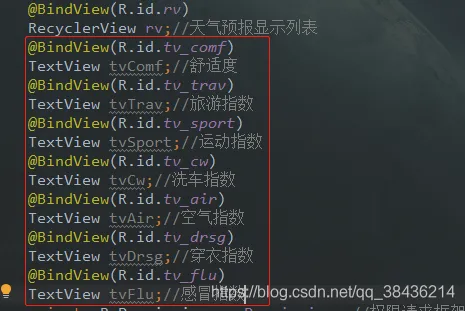
由于返回的数据可能会为空,为了使返回数据为空的时候程序不报错,这里要做判断,在模块的utils包下写一个工具类。
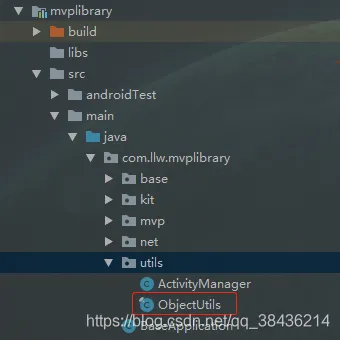
工具类代码如下:
package com.llw.mvplibrary.utils;
import android.os.Build;
import android.util.SparseArray;
import android.util.SparseBooleanArray;
import android.util.SparseIntArray;
import android.util.SparseLongArray;
import androidx.annotation.RequiresApi;
import androidx.collection.LongSparseArray;
import androidx.collection.SimpleArrayMap;
import java.lang.reflect.Array;
import java.util.Collection;
import java.util.Map;
/**
 * 空判断工具类
 */
public final class ObjectUtils {
    private ObjectUtils() {
        throw new UnsupportedOperationException("u can't instantiate me...");
    }
    /**
     * Return whether object is empty.
     *
     * @param obj The object.
     * @return {@code true}: yes<br>{@code false}: no
     */
    public static boolean isEmpty(final Object obj) {
        if (obj == null) {
            return true;
        }
        if (obj.getClass().isArray() && Array.getLength(obj) == 0) {
            return true;
        }
        if (obj instanceof CharSequence && obj.toString().length() == 0) {
            return true;
        }
        if (obj instanceof Collection && ((Collection) obj).isEmpty()) {
            return true;
        }
        if (obj instanceof Map && ((Map) obj).isEmpty()) {
            return true;
        }
        if (obj instanceof SimpleArrayMap && ((SimpleArrayMap) obj).isEmpty()) {
            return true;
        }
        if (obj instanceof SparseArray && ((SparseArray) obj).size() == 0) {
            return true;
        }
        if (obj instanceof SparseBooleanArray && ((SparseBooleanArray) obj).size() == 0) {
            return true;
        }
        if (obj instanceof SparseIntArray && ((SparseIntArray) obj).size() == 0) {
            return true;
        }
        if (Build.VERSION.SDK_INT >= Build.VERSION_CODES.JELLY_BEAN_MR2) {
            if (obj instanceof SparseLongArray && ((SparseLongArray) obj).size() == 0) {
                return true;
            }
        }
        if (obj instanceof LongSparseArray && ((LongSparseArray) obj).size() == 0) {
            return true;
        }
        if (Build.VERSION.SDK_INT >= Build.VERSION_CODES.JELLY_BEAN) {
            if (obj instanceof android.util.LongSparseArray
                    && ((android.util.LongSparseArray) obj).size() == 0) {
                return true;
            }
        }
        return false;
    }
    public static boolean isEmpty(final CharSequence obj) {
        return obj == null || obj.toString().length() == 0;
    }
    public static boolean isEmpty(final Collection obj) {
        return obj == null || obj.isEmpty();
    }
    public static boolean isEmpty(final Map obj) {
        return obj == null || obj.isEmpty();
    }
    public static boolean isEmpty(final SimpleArrayMap obj) {
        return obj == null || obj.isEmpty();
    }
    public static boolean isEmpty(final SparseArray obj) {
        return obj == null || obj.size() == 0;
    }
    public static boolean isEmpty(final SparseBooleanArray obj) {
        return obj == null || obj.size() == 0;
    }
    public static boolean isEmpty(final SparseIntArray obj) {
        return obj == null || obj.size() == 0;
    }
    public static boolean isEmpty(final LongSparseArray obj) {
        return obj == null || obj.size() == 0;
    }
    @RequiresApi(api = Build.VERSION_CODES.JELLY_BEAN_MR2)
    public static boolean isEmpty(final SparseLongArray obj) {
        return obj == null || obj.size() == 0;
    }
    @RequiresApi(api = Build.VERSION_CODES.JELLY_BEAN)
    public static boolean isEmpty(final android.util.LongSparseArray obj) {
        return obj == null || obj.size() == 0;
    }
    /**
     * Return whether object is not empty.
     *
     * @param obj The object.
     * @return {@code true}: yes<br>{@code false}: no
     */
    public static boolean isNotEmpty(final Object obj) {
        return !isEmpty(obj);
    }
    public static boolean isNotEmpty(final CharSequence obj) {
        return !isEmpty(obj);
    }
    public static boolean isNotEmpty(final Collection obj) {
        return !isEmpty(obj);
    }
    public static boolean isNotEmpty(final Map obj) {
        return !isEmpty(obj);
    }
    public static boolean isNotEmpty(final SimpleArrayMap obj) {
        return !isEmpty(obj);
    }
    public static boolean isNotEmpty(final SparseArray obj) {
        return !isEmpty(obj);
    }
    public static boolean isNotEmpty(final SparseBooleanArray obj) {
        return !isEmpty(obj);
    }
    public static boolean isNotEmpty(final SparseIntArray obj) {
        return !isEmpty(obj);
    }
    public static boolean isNotEmpty(final LongSparseArray obj) {
        return !isEmpty(obj);
    }
    @RequiresApi(api = Build.VERSION_CODES.JELLY_BEAN_MR2)
    public static boolean isNotEmpty(final SparseLongArray obj) {
        return !isEmpty(obj);
    }
    @RequiresApi(api = Build.VERSION_CODES.JELLY_BEAN)
    public static boolean isNotEmpty(final android.util.LongSparseArray obj) {
        return !isEmpty(obj);
    }
    /**
     * Return whether object1 is equals to object2.
     *
     * @param o1 The first object.
     * @param o2 The second object.
     * @return {@code true}: yes<br>{@code false}: no
     */
    public static boolean equals(final Object o1, final Object o2) {
        return o1 == o2 || (o1 != null && o1.equals(o2));
    }
    /**
     * Require the objects are not null.
     *
     * @param objects The object.
     * @throws NullPointerException if any object is null in objects
     */
    public static void requireNonNull(final Object... objects) {
        if (objects == null) throw new NullPointerException();
        for (Object object : objects) {
            if (object == null) throw new NullPointerException();
        }
    }
    /**
     * Return the nonnull object or default object.
     *
     * @param object        The object.
     * @param defaultObject The default object to use with the object is null.
     * @param <T>           The value type.
     * @return the nonnull object or default object
     */
    public static <T> T getOrDefault(final T object, final T defaultObject) {
        if (object == null) {
            return defaultObject;
        }
        return object;
    }
    /**
     * Return the hash code of object.
     *
     * @param o The object.
     * @return the hash code of object
     */
    public static int hashCode(final Object o) {
        return o != null ? o.hashCode() : 0;
    }
}
接下来调用方法请求生活指数
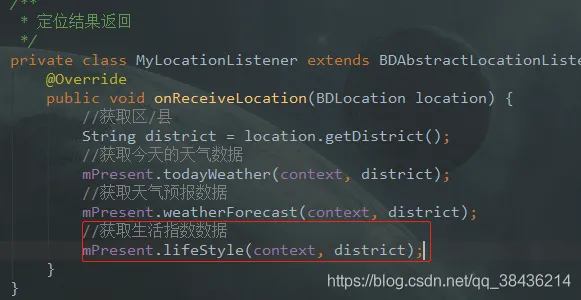
请求返回数据做处理:
  //查询生活指数,请求成功后的数据返回
    @Override
    public void getLifeStyleResult(Response<LifeStyleResponse> response) {
        if(("ok").equals(response.body().getHeWeather6().get(0).getStatus())){
            List<LifeStyleResponse.HeWeather6Bean.LifestyleBean> data = response.body().getHeWeather6().get(0).getLifestyle();
            if(!ObjectUtils.isEmpty(data)){
                for (int i = 0;i<data.size();i++){
                    if(("comf").equals(data.get(i).getType())){
                        tvComf.setText("舒适度:"+data.get(i).getTxt());
                    }else if(("drsg").equals(data.get(i).getType())){
                        tvDrsg.setText("穿衣指数:"+data.get(i).getTxt());
                    }else if(("flu").equals(data.get(i).getType())){
                        tvFlu.setText("感冒指数:"+data.get(i).getTxt());
                    }else if(("sport").equals(data.get(i).getType())){
                        tvSport.setText("运动指数:"+data.get(i).getTxt());
                    }else if(("trav").equals(data.get(i).getType())){
                        tvTrav.setText("旅游指数:"+data.get(i).getTxt());
                    }else if(("cw").equals(data.get(i).getType())){
                        tvCw.setText("洗车指数:"+data.get(i).getTxt());
                    }else if(("air").equals(data.get(i).getType())){
                        tvAir.setText("空气指数:"+data.get(i).getTxt());
                    }
                }
            }else {
                ToastUtils.showShortToast(context, "生活指数数据为空");
            }
        }else {
            ToastUtils.showShortToast(context, response.body().getHeWeather6().get(0).getStatus());
        }
    }
运行一下:
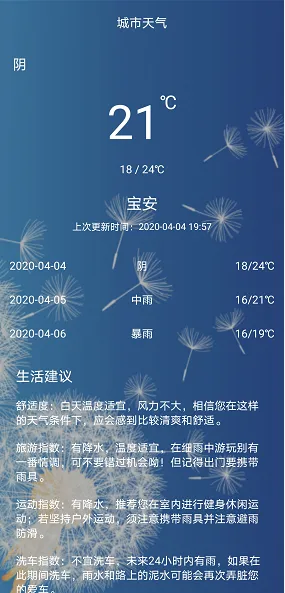
很明显数据显示不完全,然后向上滑动。
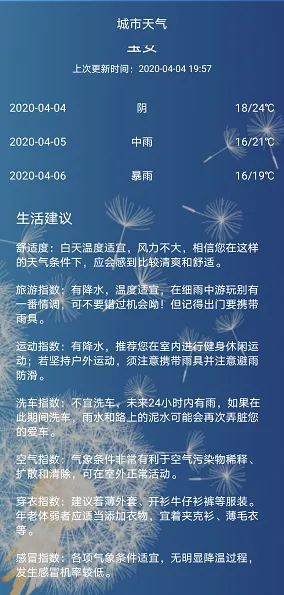
这样就完成了这个生活指数的数据显示。
但是感觉页面上好多字呀,这时候为了在视觉上舒缓,就要通过会动的东西来勾引,呸,吸引住你。比如风的数据显示,多少级的风,哪个方向,通过风车来增加页面的动。会动的风车喔。