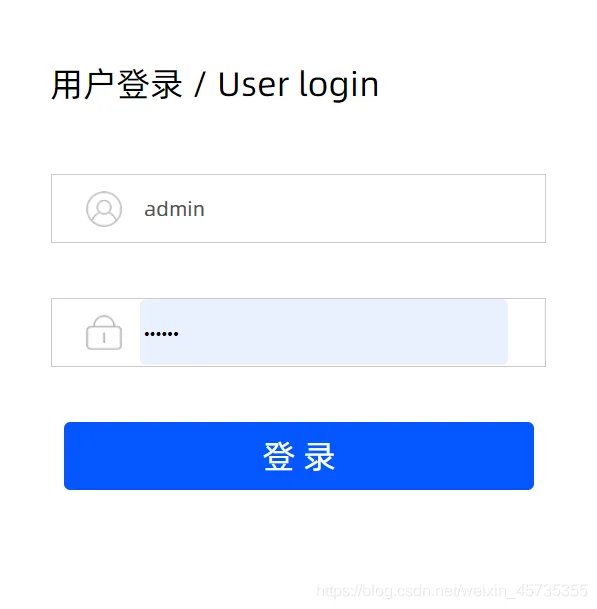
1.登录页面如图
2.业务准备
2.1.用户实体类
public class User {
    /**
     * 用户ID
     */
    private Integer id;
    /**
     * 用户账号
     */
    private String userCode;
    /**
     * 用户名
     */
    private String userName;
    /**
     * 用户密码
     */
    private String password;
    /**
     * 用户类型
     */
    private String typeCode;
    /**
     * 用户所属组(科室、公司等)
     */
    private String groupCode;
    /**
     * 用户地址
     */
    private String address;
    /**
     * 手机号
     */
    private String mobile;
    /**
     * 电话号码
     */
    private String phoneNum;
    /**
     * 邮箱
     */
    private String eMail;
    /**
     * 用户角色
     */
    private Integer roleId;
    /**
     * 锁定状态1:未锁定2:锁定
     */
    private Integer userLock;
    /**
     * 锁定时间
     */
    private Date gmtUserLock;
    /**
     * 用户更新日期
     */
    private Date gmtModified;
    /**
     * 创建时间
     */
    private Date gmtCreated;
    /**
     * 删除状态
     */
    private Integer isDel;
    public Integer getId() {
        return id;
    }
    public void setId(Integer id) {
        this.id = id;
    }
    public String getUserCode() {
        return userCode;
    }
    public void setUserCode(String userCode) {
        this.userCode = userCode;
    }
    public String getUserName() {
        return userName;
    }
    public void setUserName(String userName) {
        this.userName = userName;
    }
    public String getPassword() {
        return password;
    }
    public void setPassword(String password) {
        this.password = password;
    }
    public String getTypeCode() {
        return typeCode;
    }
    public void setTypeCode(String typeCode) {
        this.typeCode = typeCode;
    }
    public String getGroupCode() {
        return groupCode;
    }
    public void setGroupCode(String groupCode) {
        this.groupCode = groupCode;
    }
    public String getAddress() {
        return address;
    }
    public void setAddress(String address) {
        this.address = address;
    }
    public String getMobile() {
        return mobile;
    }
    public void setMobile(String mobile) {
        this.mobile = mobile;
    }
    public String getPhoneNum() {
        return phoneNum;
    }
    public void setPhoneNum(String phoneNum) {
        this.phoneNum = phoneNum;
    }
    public String getEMail() {
        return eMail;
    }
    public void setEMail(String eMail) {
        this.eMail = eMail;
    }
    public Integer getRoleId() {
        return roleId;
    }
    public void setRoleId(Integer roleId) {
        this.roleId = roleId;
    }
    public Integer getUserLock() {
        return userLock;
    }
    public void setUserLock(Integer userLock) {
        this.userLock = userLock;
    }
    public Date getGmtUserLock() {
        return gmtUserLock;
    }
    public void setGmtUserLock(Date gmtUserLock) {
        this.gmtUserLock = gmtUserLock;
    }
    public Date getGmtModified() {
        return gmtModified;
    }
    public void setGmtModified(Date gmtModified) {
        this.gmtModified = gmtModified;
    }
    public Date getGmtCreated() {
        return gmtCreated;
    }
    public void setGmtCreated(Date gmtCreated) {
        this.gmtCreated = gmtCreated;
    }
    public Integer getIsDel() {
        return isDel;
    }
    public void setIsDel(Integer isDel) {
        this.isDel = isDel;
    }
}
2.2.创建用户表
此处只展示用户表 若需要全部角色菜单等表私信或评论
CREATE TABLE `user`  (
  `id` int(11) NOT NULL AUTO_INCREMENT COMMENT '用户ID',
  `user_code` varchar(50) CHARACTER SET utf8mb4 COLLATE utf8mb4_bin NOT NULL COMMENT '用户账号',
  `user_name` varchar(50) CHARACTER SET utf8mb4 COLLATE utf8mb4_bin NOT NULL COMMENT '用户名',
  `password` varchar(35) CHARACTER SET utf8mb4 COLLATE utf8mb4_bin NOT NULL COMMENT '用户密码',
  `type_code` varchar(12) CHARACTER SET utf8mb4 COLLATE utf8mb4_bin NULL DEFAULT NULL COMMENT '用户类型',
  `group_code` varchar(12) CHARACTER SET utf8mb4 COLLATE utf8mb4_bin NULL DEFAULT NULL COMMENT '用户所属组(科室、公司等)',
  `address` text CHARACTER SET utf8mb4 COLLATE utf8mb4_bin NULL COMMENT '用户地址',
  `mobile` varchar(50) CHARACTER SET utf8mb4 COLLATE utf8mb4_bin NULL DEFAULT NULL COMMENT '手机号',
  `phone_num` varchar(50) CHARACTER SET utf8mb4 COLLATE utf8mb4_bin NULL DEFAULT NULL COMMENT '电话号码',
  `e_mail` varchar(200) CHARACTER SET utf8mb4 COLLATE utf8mb4_bin NULL DEFAULT NULL COMMENT '邮箱',
  `role_id` int(11) NULL DEFAULT NULL COMMENT '用户角色',
  `user_lock` int(1) NOT NULL COMMENT '锁定状态1:未锁定2:锁定',
  `gmt_user_lock` datetime(0) NULL DEFAULT NULL COMMENT '锁定时间',
  `gmt_modified` datetime(0) NOT NULL COMMENT '用户更新日期',
  `gmt_created` datetime(0) NOT NULL COMMENT '创建时间',
  `is_del` int(1) NOT NULL DEFAULT 1 COMMENT '删除状态  1正常  2删除',
  PRIMARY KEY (`id`) USING BTREE
) ENGINE = InnoDB AUTO_INCREMENT = 15 CHARACTER SET = utf8mb4 COLLATE = utf8mb4_bin COMMENT = '系统用户表' ROW_FORMAT = Dynamic;
3.登录业务实现
3.1.Controller
@RequestMapping("dologin")
    @ResponseBody
    public Response dologin(UserDto user, HttpServletRequest request) {
        Integer flag = -1;
        JSONObject json = new JSONObject();
        do {
            if (StringUtils.isEmpty(user.getUserCode()) || StringUtils.isEmpty(user.getPassword())) {
                // 用户信息不完整;
                break;
            }
            // 判断用户是否存在
            User userResult=new User();
            userResult.setUserCode(user.getUserCode());
            User usertemp = userService.findOne(userResult, null);
            try {
                if (usertemp == null) {
                    // 账号不存在的场合
                    flag = 0;
                    json.put("flag", flag);
                    break;
                }
                user.setPassword(MD5Utils.md5Encode(user.getPassword()));
                if (!user.getPassword().equals(usertemp.getPassword())) {
                    // 密码错误的场合
                    flag = 1;
                    json.put("flag", flag);
                    json.put("account", usertemp.getUserCode());
                } else {
                    if (usertemp.getIsDel() == 3) {
                        flag = 4;
                        json.put("flag", flag);
                    } else {
                        JSONObject jsonList = new JSONObject();
                        if(usertemp.getRoleId()!=null){
                                //单一角色
                                jsonList = menuService.queryMenuByRole(Integer.valueOf(usertemp.getRoleId()));
                        }
                        if (jsonList != null && jsonList.size() != 0 &&jsonList.getJSONArray("@menu@000").size() > 0) {
                            // 成功登录
                            HttpSession session = request.getSession();
                            // 存储用户到session
                            session.setAttribute(Constant.SESSION_USER, usertemp);
                            session.setAttribute("menu", jsonList);
                            flag = 3;
                            json.put("flag", flag);
                        } else {
                            //无一级菜单权限
                            flag = 2;
                            json.put("flag", flag);
                        }
                    }
                }
            } catch (Exception e) {
                e.printStackTrace();
            }
        } while (false);
        json.put("flag", flag);
        return Response.success(json);
    }
3.2.Service+ServiceImpl+Dao
/**
     *@Description 通过角色查询菜单表数据
     *@param
     *@return
     *@author wang hq
     */
    JSONObject queryMenuByRole(Integer roleId);
@Override
    public JSONObject queryMenuByRole(Integer roleId) {
        return setMenuJson(menuDao.queryMenuByRole(roleId));
    }
/**
     *@Description 通过角色查询菜单
     *@param
     *@return
     *@author wang hq
     */
    List<MenuDto> queryMenuByRole(@Param("roleId")  Integer roleId);
3.3.Mapper
<select id="queryMenuByRole" resultMap="menuDtoMap" parameterType="java.lang.Integer">
        SELECT DISTINCT
        m.id id,
        m.menu_parent_code menu_parent_code,
        m.menu_name menu_name,
        m.menu_code menu_code,
        m.url url,
        m.img img,
        m.sort sort,
        m.button_type button_type
        FROM
        menu m
        INNER JOIN role_relate_menu rrm ON rrm.menu_id = m.id
        AND rrm.is_del = 1
        WHERE
        m.is_del = 1
        AND rrm.role_id = #{roleId}
        ORDER BY menu_parent_code,sort
    </select>
3.4.点击登录按钮结果展示
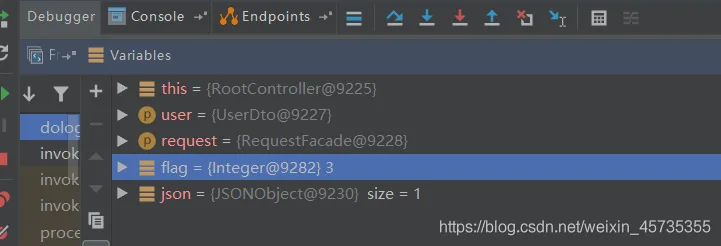
3.4.1.flag为3即为登录成功
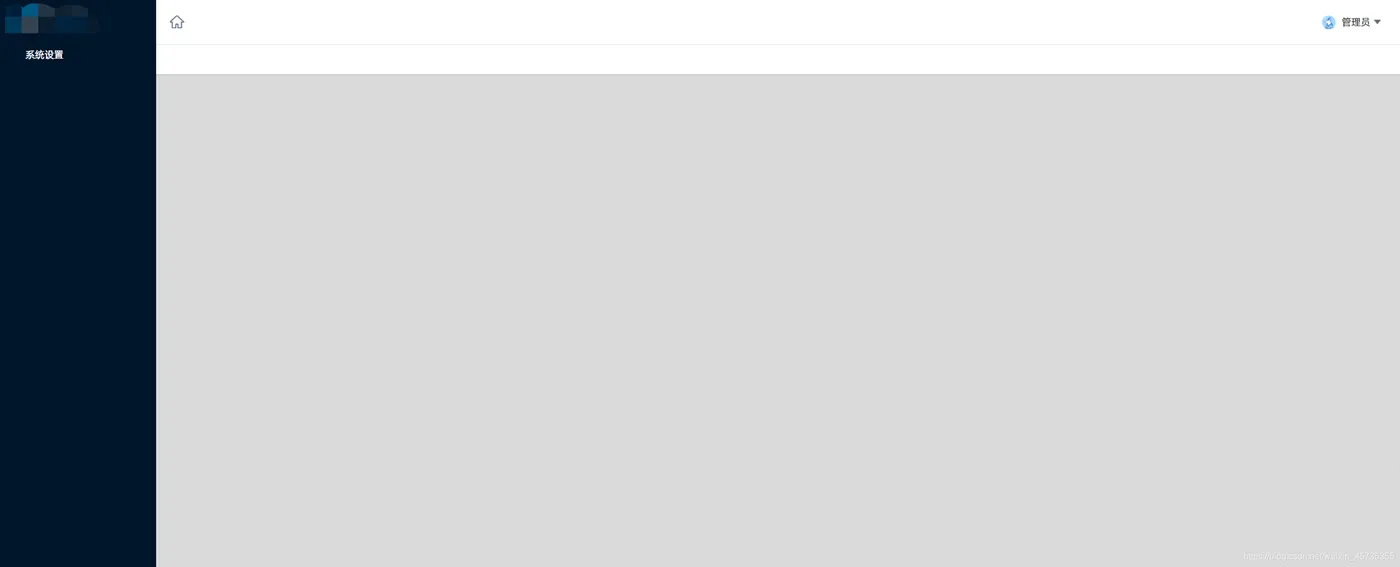
3.4.2.页面也已登录成功
4.修改密码
4.1.Controller
 // 修改密码
    @RequestMapping("updatePassword")
    @ResponseBody
    public Response updatePassword(HttpServletRequest request, String oldPassword,
                                   String newPassword) {
        Integer flag = -1;
        JSONObject json = new JSONObject();
        User user = (User) request.getSession().getAttribute(Constant.SESSION_USER);
        if (StringUtils.isNotEmpty(oldPassword)) {
            try {
                String psw = MD5Utils.md5Encode(oldPassword);
                if (psw.equals(user.getPassword())) {
                    newPassword = MD5Utils.md5Encode(newPassword);
                    User user1 = new User();
                    user1.setId(user.getId());
                    user1.setPassword(newPassword);
                    flag = userService.update(user1);
                    HttpSession session = request.getSession();
                    user.setPassword(newPassword);
                    session.setAttribute(Constant.SESSION_USER, user);
                    if (flag > 0) {
                        flag = 2;// 修改成功
                    }
                } else {
                    flag = 0;// 旧密码错误
                }
            } catch (Exception e) {
                e.printStackTrace();
            }
        }
        json.put("flag", flag);
        return Response.success(json);
    }
4.2.Service+ServiceImpl+Dao
Integer update(User user);
 @Override
    public Integer update(User user) {
        return userDao.update(user);
    }
Integer update(User user);
4.3.Mapper
<update id="update">
        update user
        <trim prefix="set" suffixOverrides=",">
            <if test="id != null">
                id = #{id},
            </if>
            <if test="userCode != null and ''!= userCode">
                user_code = #{userCode},
            </if>
            <if test="userName != null and ''!= userName">
                user_name = #{userName},
            </if>
            <if test="password != null and ''!= password">
                password = #{password},
            </if>
            <if test="typeCode != null and ''!= typeCode">
                type_code = #{typeCode},
            </if>
            <if test="groupCode != null and ''!= groupCode">
                group_code = #{groupCode},
            </if>
            <if test="address != null and ''!= address">
                address = #{address},
            </if>
            <if test="mobile != null and ''!= mobile">
                mobile = #{mobile},
            </if>
            <if test="phoneNum != null and ''!= phoneNum">
                phone_num = #{phoneNum},
            </if>
            <if test="eMail != null and ''!= eMail">
                e_mail = #{eMail},
            </if>
            <if test="roleId != null">
                role_id = #{roleId},
            </if>
            <if test="userLock != null">
                user_lock = #{userLock},
            </if>
            <if test="gmtUserLock != null">
                gmt_user_lock = #{gmtUserLock},
            </if>
            gmt_modified=now(),
            <if test="gmtCreated != null">
                gmt_created = #{gmtCreated},
            </if>
            <if test="isDel != null">
                is_del = #{isDel},
            </if>
        </trim>
        where id = #{id}
    </update>
4.4.测试
4.4.1.填写新密码与输入正确旧密码
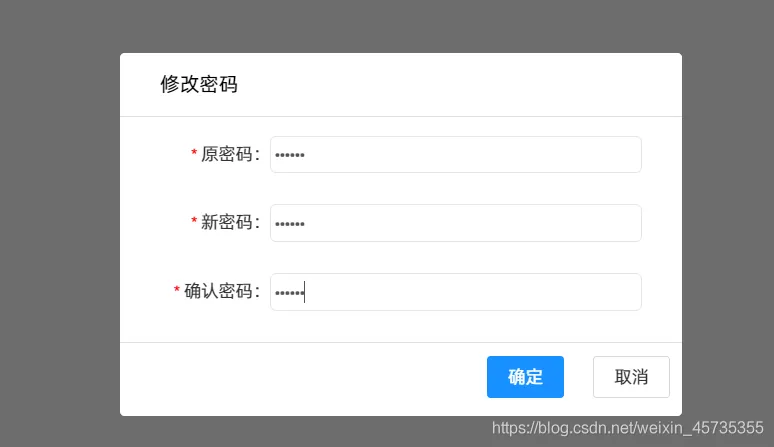
4.4.2.点击确定确认修改密码
此时返回到登录页面重新输入新密码正确登录即可
5.退出登录
// 退出登录
    @RequestMapping("loginOut")
    public String loginOut(HttpServletRequest request) {
        HttpSession session = request.getSession();
        session.removeAttribute(Constant.SESSION_USER);
        return "redirect:/login";
    }
至此 相应登录修改密码功能及代码讲解完毕 由于本文主要写后台业务代码实现 若需要前台页面Js等可私信或评论哦