更多ruoyi-nbcio功能请看演示系统
gitee源代码地址
前后端代码: https://gitee.com/nbacheng/ruoyi-nbcio
演示地址:RuoYi-Nbcio后台管理系统http://218.75.87.38:9666/
更多nbcio-boot功能请看演示系统
gitee源代码地址
后端代码: https://gitee.com/nbacheng/nbcio-boot
前端代码:https://gitee.com/nbacheng/nbcio-vue.git
在线演示(包括H5) : http://218.75.87.38:9888
今天讲一下定时捕获事件的处理
因为跟定时边界事件有点类似,所以主要上代码就可以了。
1、具体代码如下:
<template>
  <div class="panel-tab__content">
    <!--目前只处理定时捕获事件 -->
    <el-form size="mini" label-width="90px" @submit.native.prevent v-if="businessObject.eventDefinitions && businessObject.eventDefinitions[0].$type.indexOf('TimerEventDefinition') !== -1">
      <el-form-item label="事件类型">
        <el-select v-model="timeDefinitionType" @change="changeTimerType">
          <!--bpmn:TimerEventDefinition-->
          <el-option label="指定时间" value="timeDate" />
          <el-option label="持续时间" value="timeDuration" />
          <el-option label="周期执行" value="timeCycle" />
        </el-select>
      </el-form-item>
      <template v-if="timeDefinitionType != ''">
        <el-form-item label="时间设置" required>
            <el-tooltip>
              <el-input size="mini" type="string" v-model="FormalExpression" @change="updateTimeValue"></el-input>
              <template #content>
                事件类型配置说明<br>
                1.指定时间(timeDate):触发事件的时间,如:2022-12-16T11:12:16 <br>
                2.持续时间(timeDuration):指定时器之前需等待多长时间,使用ISO 8601规定的格式<br>
                 (由BPMN 2.0规定),如PT5M(等待5分钟),也支持表达式${duration},<br>
                 这样你就可以通过流程变量来影响定时器定义<br>
                3.周期执行(timeCycle):指定重复执行的间隔,可以用来定期启动流程实例,<br>
                或为超时时间发送多个提醒。timeCycle元素可以使用两种格式。<br>
                第一种是 ISO 8601 标准的格式。示例值(R3/PT5M)(重复3次,<br>
                每次间隔5分钟),或也可以用cron表达式指定timeCycle,如从整点开始,<br>
                每10分钟执行一次(0 0/10 * * * ?)<br>
              </template>
            </el-tooltip>
        </el-form-item>
      </template>
    </el-form>
  </div>
</template>
<script lang="ts" setup>
  defineOptions({ name: 'CatchEvent' })
  const props = defineProps({
    businessObject: Object,
    type: String
  })
  //const prefix = inject('prefix')
  const bpmnElement = ref(null)
  const bpmnInstances = () => (window as any)?.bpmnInstances
  const timeDefinitionType = ref('')
  const FormalExpression = ref('')
  const getElementLoop = (businessObject) => { //获取定时边界事件原有值
    console.log("getElementLoop businessObject=",businessObject)
    console.log("bpmnInstances().bpmnElement.businessObject=",bpmnInstances().bpmnElement.businessObject);
    if(businessObject.eventDefinitions && businessObject.eventDefinitions.length>0){
      if(businessObject.eventDefinitions[0].$type == 'bpmn:TimerEventDefinition') {
        if(businessObject.eventDefinitions[0].timeDuration) {
          timeDefinitionType.value = "timeDuration"
          FormalExpression.value = businessObject.eventDefinitions[0].timeDuration.body
        }
        else if(businessObject.eventDefinitions[0].timeDate) {
          timeDefinitionType.value = "timeDate"
          FormalExpression.value = businessObject.eventDefinitions[0].timeDate.body
        }
        else if(businessObject.eventDefinitions[0].timeCycle) {
          timeDefinitionType.value = "timeCycle"
            FormalExpression.value = businessObject.eventDefinitions[0].timeCycle.body
        }
      }
    }
  }
  const changeTimerType = (type) => {
    timeDefinitionType.value = type
  }
  const updateTimeValue = (value) => {
    updateTime(timeDefinitionType,value);
  }
  //时间事件定义类型修改
  const updateTime = (type,value) => {
    //获取节点的子节点 timerEventDefinition
    console.log("updatetime type=",type)
    console.log("updatetime type.value=",type.value)
    let timerEventDef = bpmnInstances().bpmnElement.businessObject.eventDefinitions[0]
    console.log("updatetime timerEventDef=",timerEventDef)
    const timeCycle = bpmnInstances().moddle.create("bpmn:FormalExpression", { body:value });
    const timeDate = bpmnInstances().moddle.create("bpmn:FormalExpression", { body:value });
    const timeDuration = bpmnInstances().moddle.create("bpmn:FormalExpression", { body:value });
    if (type.value == 'timeCycle') {
      bpmnInstances().modeling.updateModdleProperties(toRaw(bpmnElement.value),timerEventDef,{timeDate:null})
      bpmnInstances().modeling.updateModdleProperties(toRaw(bpmnElement.value),timerEventDef,{timeDuration:null})
      bpmnInstances().modeling.updateModdleProperties(toRaw(bpmnElement.value),timerEventDef,{timeCycle })
    }
    else if (type.value == 'timeDate') {
      console.log("updatetime timeDate")
      bpmnInstances().modeling.updateModdleProperties(toRaw(bpmnElement.value),timerEventDef,{timeCycle:null})
      bpmnInstances().modeling.updateModdleProperties(toRaw(bpmnElement.value),timerEventDef,{timeDuration:null})
      bpmnInstances().modeling.updateModdleProperties(toRaw(bpmnElement.value),timerEventDef,{ timeDate })
    }
    else if (type.value == 'timeDuration') {
      bpmnInstances().modeling.updateModdleProperties(toRaw(bpmnElement.value),timerEventDef,{timeDate:null})
      bpmnInstances().modeling.updateModdleProperties(toRaw(bpmnElement.value),timerEventDef,{timeCycle:null})
      bpmnInstances().modeling.updateModdleProperties(toRaw(bpmnElement.value),timerEventDef,{ timeDuration })
    }
  }
  watch(
    () => props.businessObject,
    (val) => {
      bpmnElement.value = bpmnInstances().bpmnElement
      getElementLoop(val)
    },
    { immediate: true }
  )
  onBeforeUnmount(() => {
    bpmnElement.value = null;
  })
</script>
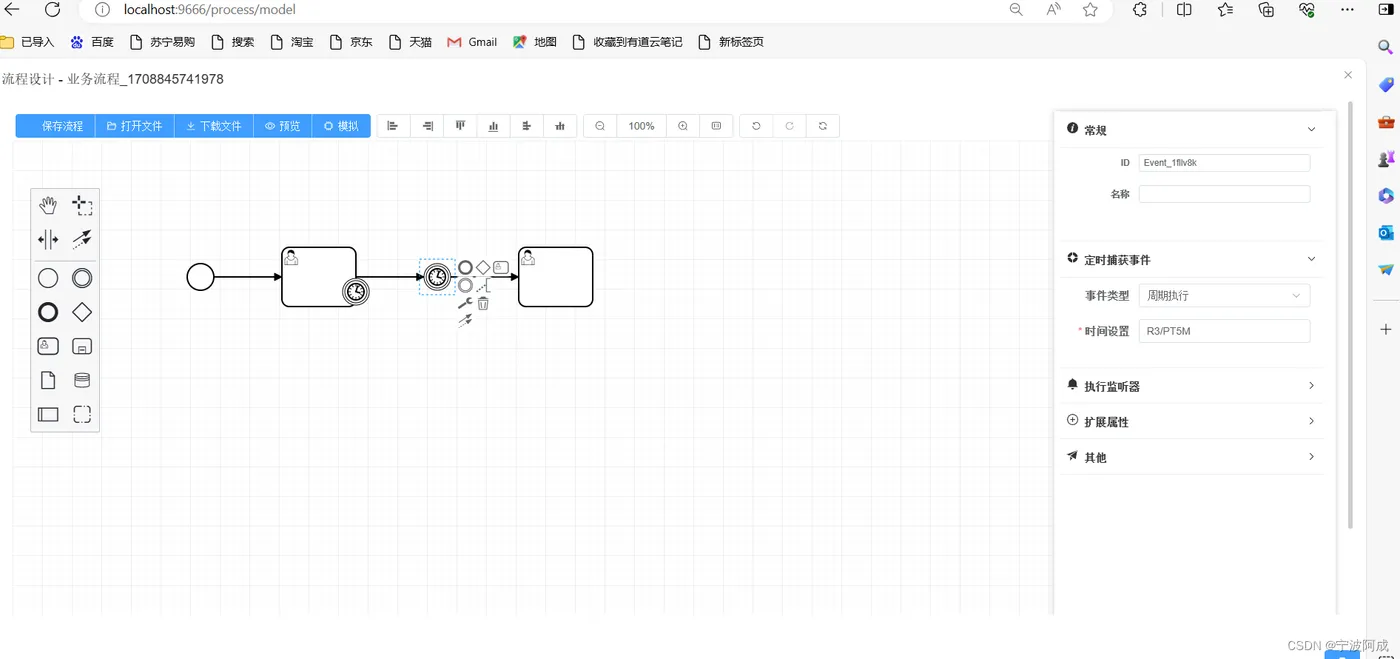
2、效果图如下:
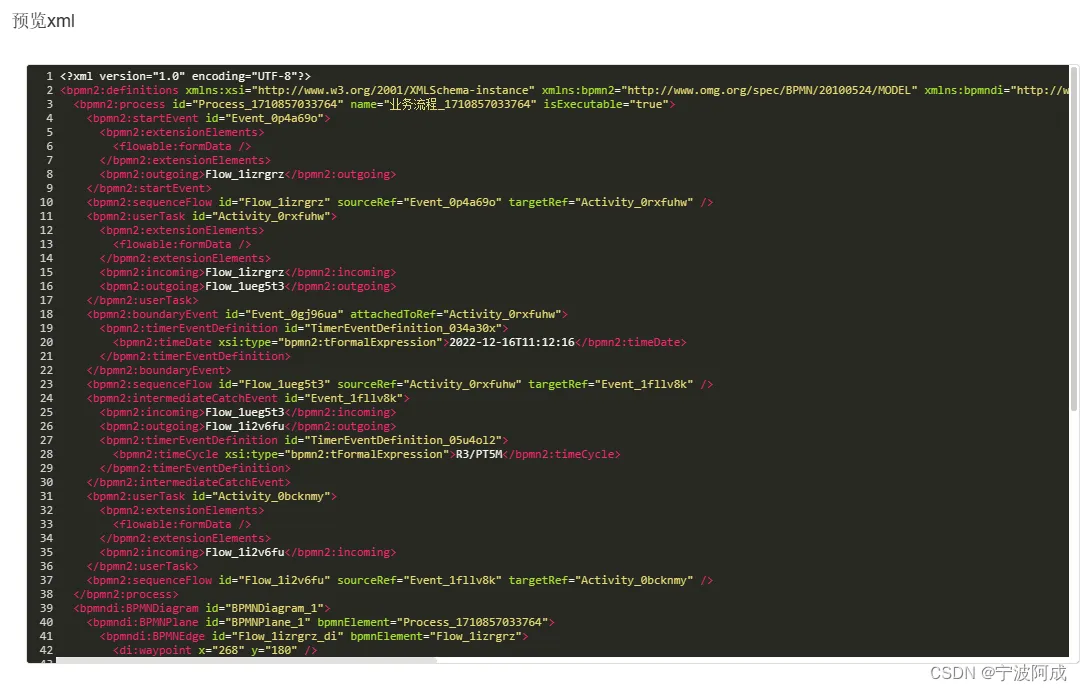
3、xml预览如下: