EasyCode是一个什么东西?
EasyCode是基于IntelliJ IDEA开发的代码生成插件,支持自定义任意模板(Java,html,js,xml)。只要是与数据库相关的代码都可以通过自定义模板来生成。支持数据库类型与java类型映射关系配置。支持同时生成生成多张表的代码。每张表有独立的配置信息。完全的个性化定义,规则由你设置。
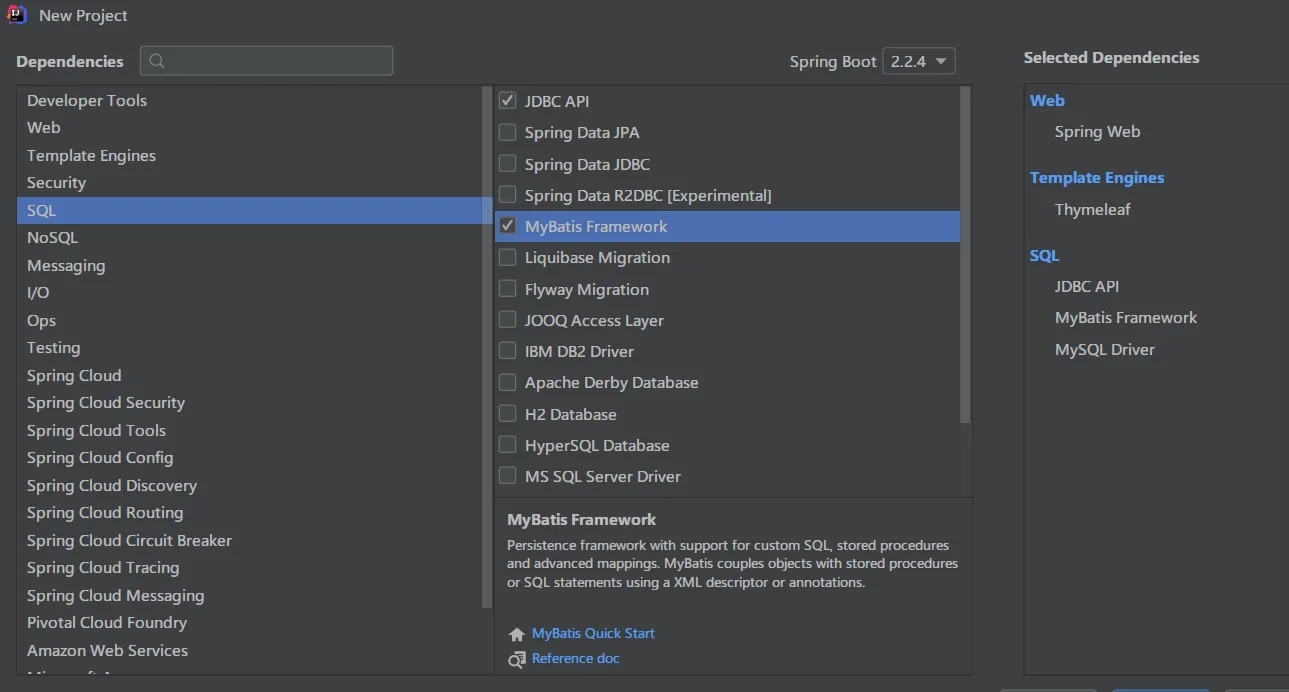
创建一个SpringBoot项目
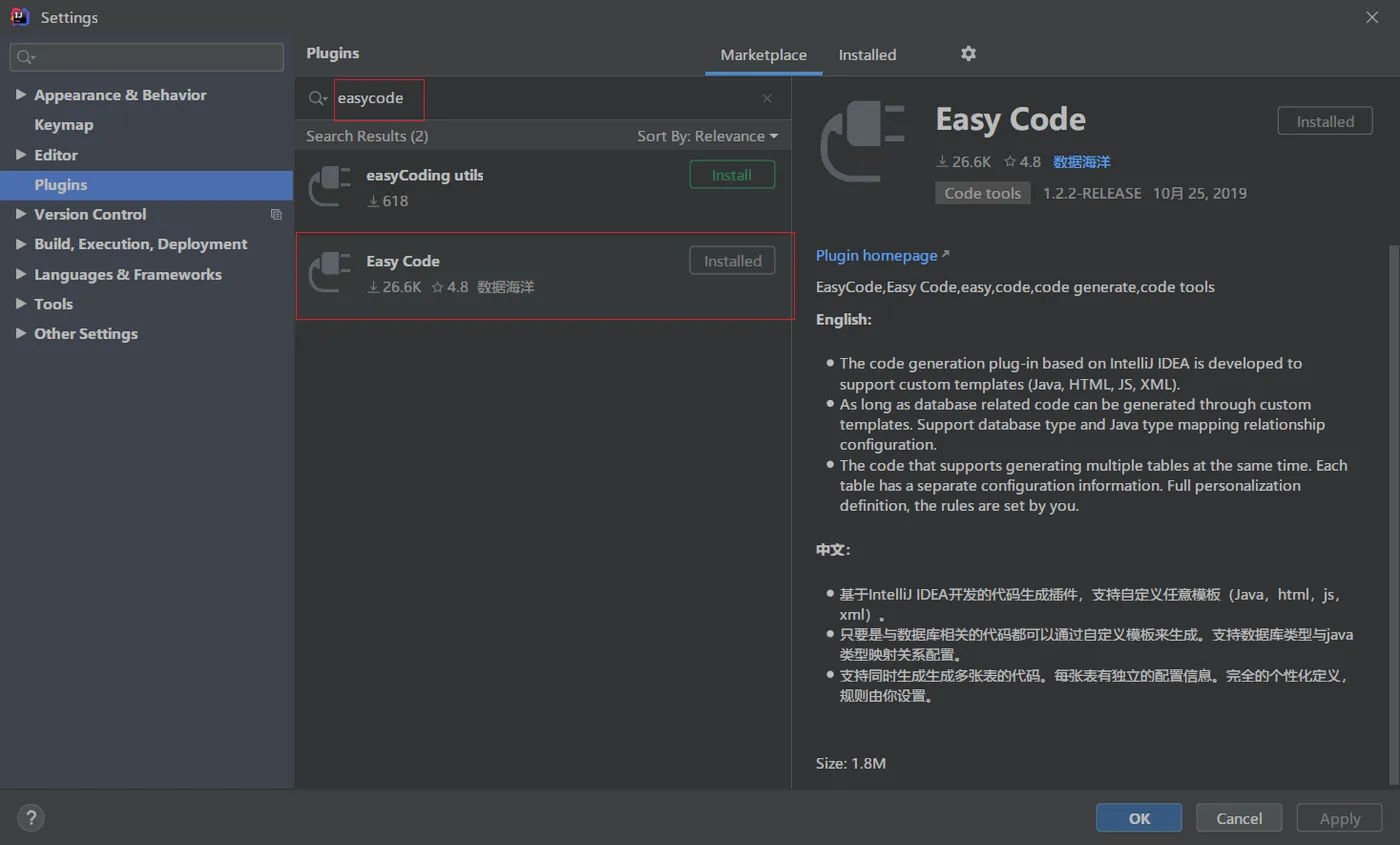
下载Easy Code
配置数据源
使用Easy Code一定要使用IDEA自带的数据库工具来配置数据源。
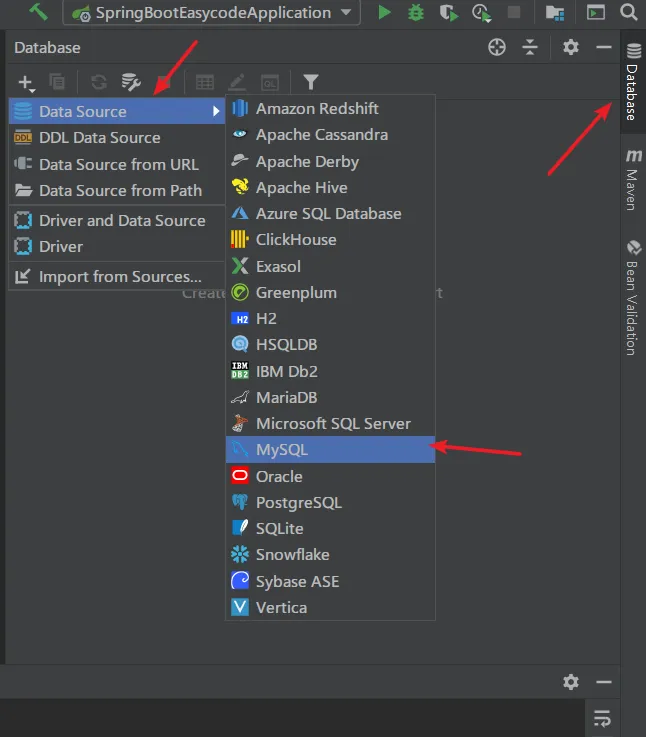
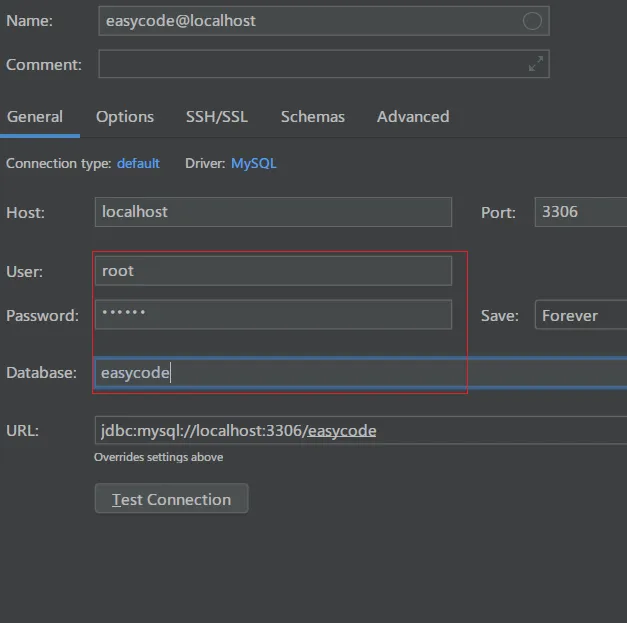
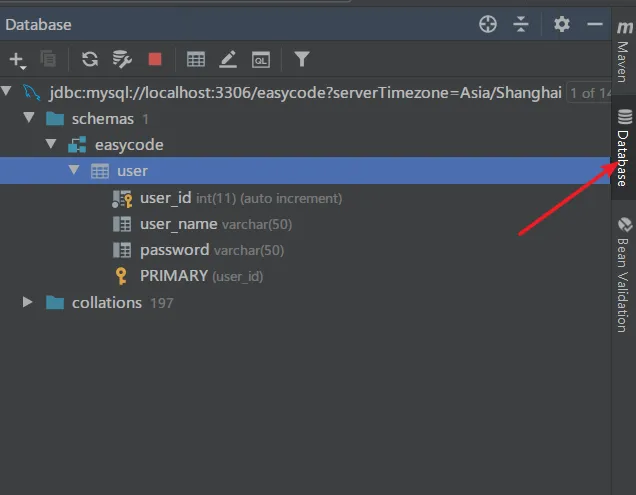
打开侧边的Database,查看效果
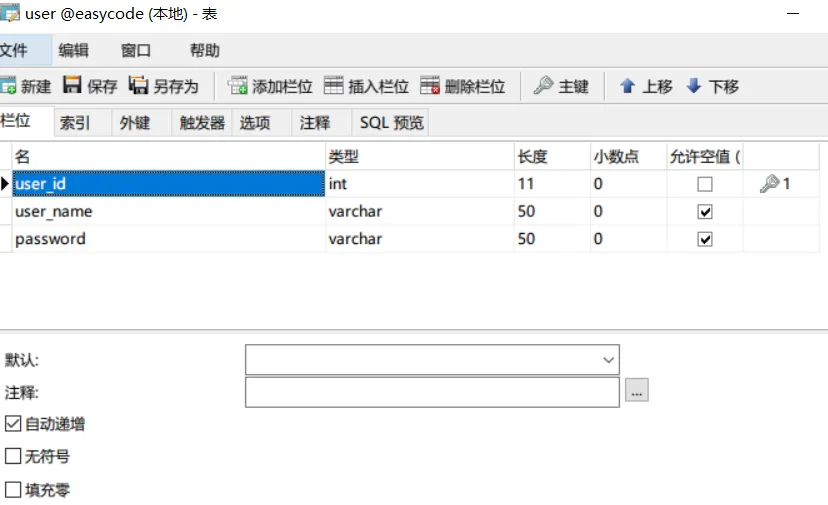
准备数据表
我这里使用Navcat工具创建了一个user表
自定义生成模板

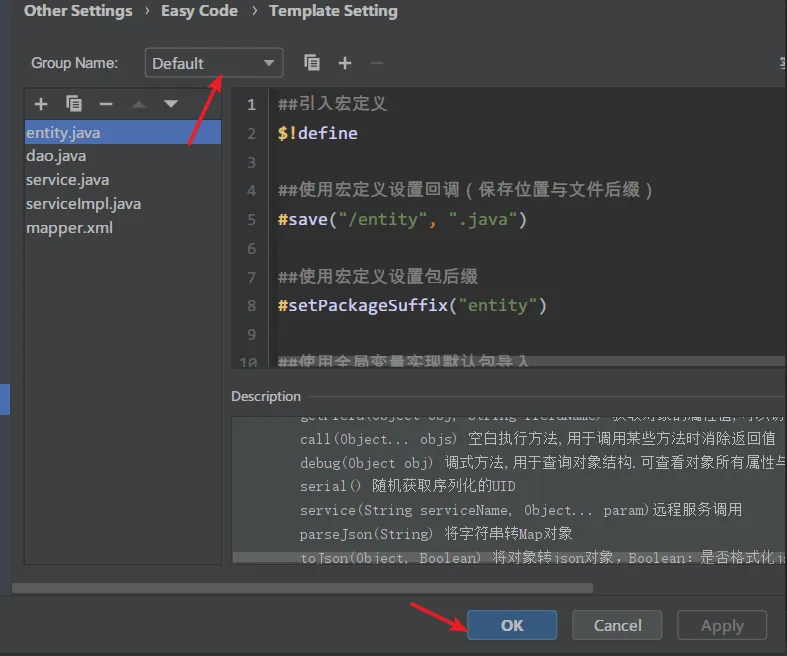
第一次安装EasyCode的时候默认的模板(服务于MyBatis)可以生成下面类型的代码
- entity.java
- dao.java
- service.java
- serviceImpl.java
- controller.java
- mapper.xml
- debug.json
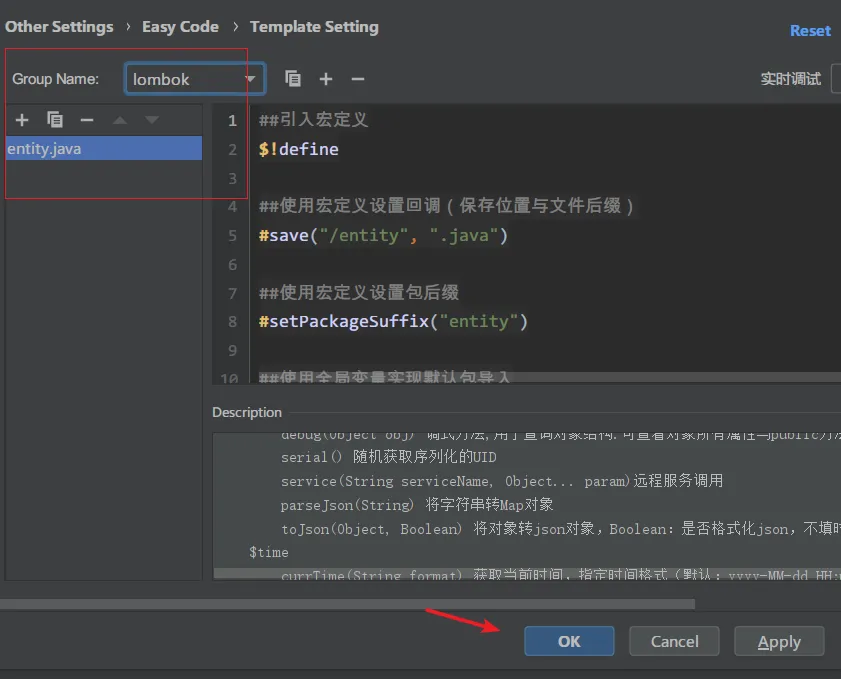
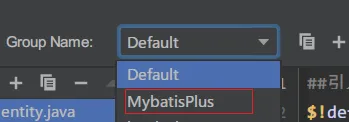
查看分组,也可以看到还可以支持生成MyBatisPlus
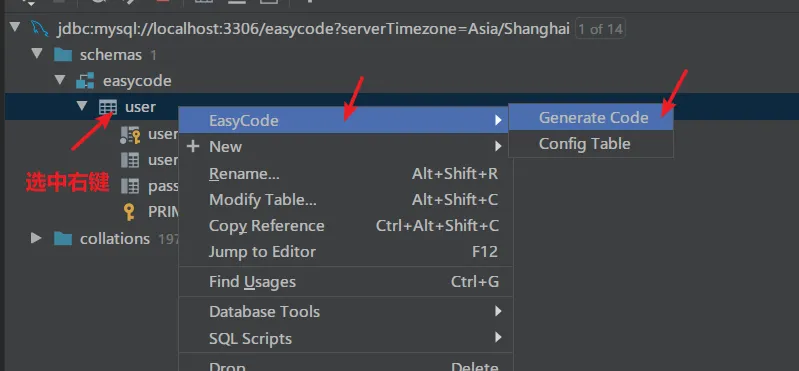
以user表为例,根据你定义的模板生成代码,文章的最后贴出我自定义的模板
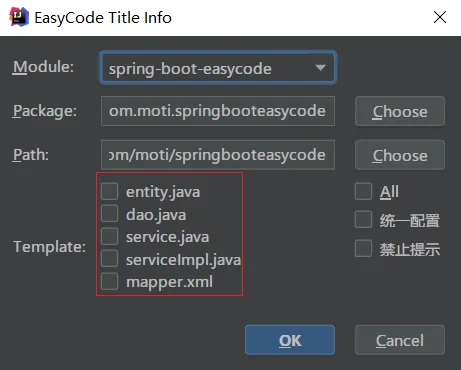
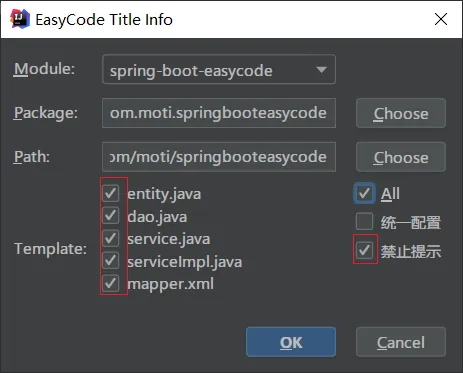
选择模板
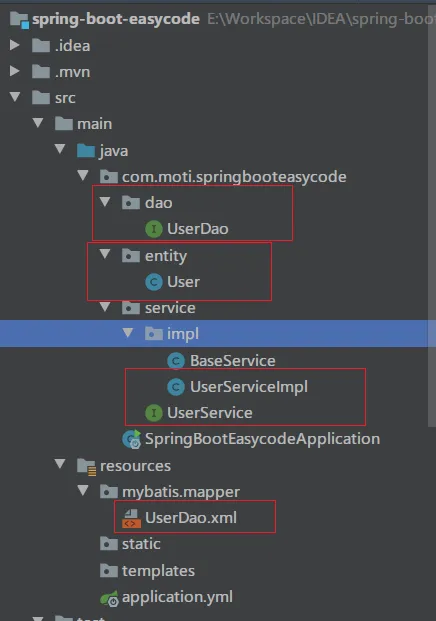
点击OK之后,就可以看到生成了这些代码
实体类层:User.java
package com.moti.springbooteasycode.entity;
import java.io.Serializable;
/**
 * (User)实体类
 *
 * @author 莫提
 * @since 2020-02-14 12:37:22
 */
public class User implements Serializable {
    private static final long serialVersionUID = 360314844000215122L;

    private Integer userId;

    private String userName;

    private String password;
    public Integer getUserId() {
        return userId;
    }
    public void setUserId(Integer userId) {
        this.userId = userId;
    }
    public String getUserName() {
        return userName;
    }
    public void setUserName(String userName) {
        this.userName = userName;
    }
    public String getPassword() {
        return password;
    }
    public void setPassword(String password) {
        this.password = password;
    }
    @Override
    public String toString() {
        return "User{" +
                "userId=" + userId +
                "userName=" + userName +
                "password=" + password +
                 '}';
    }
}
Dao层:UserDao.java
package com.moti.springbooteasycode.dao;
import com.moti.springbooteasycode.entity.User;
import org.apache.ibatis.annotations.Mapper;
import java.util.List;
 /**
 * @InterfaceName UserDao
 * @Description (User)表数据库访问层
 * @author 莫提
 * @date 2020-02-14 11:54:45
 * @Version 1.0
 **/
@Mapper
public interface UserDao {
    /**
     * @Description 添加User
     * @author 莫提
     * @date 2020-02-14 11:54:45
     * @param user 实例对象
     * @return 影响行数
     */
    int insert(User user);

    /**
     * @Description 删除User
     * @author 莫提
     * @date 2020-02-14 11:54:45
     * @param userId 主键
     * @return 影响行数
     */
    int deleteById(Integer userId);
    /**
     * @Description 查询单条数据
     * @author 莫提
     * @date 2020-02-14 11:54:45
     * @param userId 主键
     * @return 实例对象
     */
    User queryById(Integer userId);
    /**
     * @Description 查询全部数据
     * @author 莫提
     * @date 2020-02-14 11:54:45
     * 分页使用MyBatis的插件实现
     * @return 对象列表
     */
    List<User> queryAll();
    /**
     * @Description 实体作为筛选条件查询数据
     * @author 莫提
     * @date 2020-02-14 11:54:45
     * @param user 实例对象
     * @return 对象列表
     */
    List<User> queryAll(User user);
    /**
     * @Description 修改User
     * @author 莫提
     * @date 2020-02-14 11:54:45
     * @param 根据user的主键修改数据
     * @return 影响行数
     */
    int update(User user);
}
Service接口层:UserService.java
package com.moti.springbooteasycode.service;
import com.moti.springbooteasycode.entity.User;
import java.util.List;
/**
 * @InterfaceName UserService
 * @Description (User)表服务接口
 * @author 莫提
 * @date 2020-02-14 11:54:45
 * @Version 1.0
 **/
public interface UserService {
    /**
     * @Description 添加User
     * @author 莫提
     * @date 2020-02-14 11:54:45
     * @param user 实例对象
     * @return 是否成功
     */
    boolean insert(User user);
    /**
     * @Description 删除User
     * @author 莫提
     * @date 2020-02-14 11:54:45
     * @param userId 主键
     * @return 是否成功
     */
    boolean deleteById(Integer userId);
    /**
     * @Description 查询单条数据
     * @author 莫提
     * @date 2020-02-14 11:54:45
     * @param userId 主键
     * @return 实例对象
     */
    User queryById(Integer userId);
    /**
     * @Description 查询全部数据
     * @author 莫提
     * @date 2020-02-14 11:54:45
     * 分页使用MyBatis的插件实现
     * @return 对象列表
     */
    List<User> queryAll();
    /**
     * @Description 实体作为筛选条件查询数据
     * @author 莫提
     * @date 2020-02-14 11:54:45
     * @param user 实例对象
     * @return 对象列表
     */
    List<User> queryAll(User user);
    /**
     * @Description 修改数据,哪个属性不为空就修改哪个属性
     * @author 莫提
     * @date 2020-02-14 11:54:45
     * @param user 实例对象
     * @return 是否成功
     */
    boolean update(User user);
}
ServiceImpl服务接口实现层:UserServiceImpl.java
package com.moti.springbooteasycode.service.impl;
import com.moti.springbooteasycode.dao.UserDao;
import com.moti.springbooteasycode.entity.User;
import com.moti.springbooteasycode.service.UserService;
import org.springframework.beans.factory.annotation.Autowired;
import org.springframework.stereotype.Service;
import java.util.List;
 /**
 * @ClassName UserServiceImpl
 * @Description (User)表服务实现类
 * @author 莫提
 * @date 2020-02-14 11:54:45
 * @Version 1.0
 **/
@Service("userService")
public class UserServiceImpl extends BaseService implements UserService {
     @Autowired
     protected UserDao userDao;
    /**
     * @Description 添加User
     * @author 莫提
     * @date 2020-02-14 11:54:45
     * @param user 实例对象
     * @return 是否成功
     */
    @Override
    public boolean insert(User user) {
        if(userDao.insert(user) == 1){
            return true;
        }
        return false;
    }
    /**
     * @Description 删除User
     * @author 莫提
     * @date 2020-02-14 11:54:45
     * @param userId 主键
     * @return 是否成功
     */
    @Override
    public boolean deleteById(Integer userId) {
        if(userDao.deleteById(userId) == 1){
            return true;
        }
        return false;
    }
    /**
     * @Description 查询单条数据
     * @author 莫提
     * @date 2020-02-14 11:54:45
     * @param userId 主键
     * @return 实例对象
     */
    @Override
    public User queryById(Integer userId) {
        return userDao.queryById(userId);
    }
    /**
     * @Description 查询全部数据
     * @author 莫提
     * @date 2020-02-14 11:54:45
     * 分页使用MyBatis的插件实现
     * @return 对象列表
     */
    @Override
    public List<User> queryAll() {
        return userDao.queryAll();
    }
    /**
     * @Description 实体作为筛选条件查询数据
     * @author 莫提
     * @date 2020-02-14 11:54:45
     * @param user 实例对象
     * @return 对象列表
     */
    @Override
    public List<User> queryAll(User user) {
        return userDao.queryAll(user);
    }
    /**
     * @Description 修改数据,哪个属性不为空就修改哪个属性
     * @author 莫提
     * @date 2020-02-14 11:54:45
     * @param user 实例对象
     * @return 是否成功
     */
    @Override
    public boolean update(User user) {
        if(userDao.update(user) == 1){
            return true;
        }
        return false;
    }
}
Mapper映射文件:UserMapper.xml
<?xml version="1.0" encoding="UTF-8"?>
<!DOCTYPE mapper PUBLIC "-//mybatis.org//DTD Mapper 3.0//EN" "http://mybatis.org/dtd/mybatis-3-mapper.dtd">
<mapper namespace="com.moti.springbooteasycode.dao.UserDao">
    <!--user的映射结果集-->
    <resultMap type="com.moti.springbooteasycode.entity.User" id="UserMap">
        <result property="userId" column="user_id" jdbcType="INTEGER"/>
        <result property="userName" column="user_name" jdbcType="VARCHAR"/>
        <result property="password" column="password" jdbcType="VARCHAR"/>
    </resultMap>

    <!--全部字段-->
    <sql id="allColumn"> user_id, user_name, password </sql>

    <!--添加语句的字段列表-->
    <sql id="insertColumn">
        <if test="userName != null and userName != ''">
                user_name,
        </if>
        <if test="password != null and password != ''">
                password,
        </if>
    </sql>

    <!--添加语句的值列表-->
        <sql id="insertValue">
        <if test="userName != null and userName != ''">
                #{userName},
        </if>
        <if test="password != null and password != ''">
                #{password},
        </if>
    </sql>

    <!--通用对User各个属性的值的非空判断-->
    <sql id="commonsValue">
        <if test="userName != null and userName != ''">
                user_name = #{userName},
        </if>
        <if test="password != null and password != ''">
                password = #{password},
        </if>
    </sql>

    <!--新增user:哪个字段不为空就添加哪列数据,返回自增主键-->
    <insert id="insert" keyProperty="userId" useGeneratedKeys="true">
        insert into user
        <trim prefix="(" suffix=")" suffixOverrides=",">
            <include refid="insertColumn"/>
        </trim>
        <trim prefix="values (" suffix=")" suffixOverrides=",">
            <include refid="insertValue"/>
        </trim>
    </insert>

    <!--删除user:通过主键-->
    <delete id="deleteById">
        delete from user
        <where>
            user_id = #{userId}
        </where>
    </delete>

    <!--查询单个user-->
    <select id="queryById" resultMap="UserMap">
        select
        <include refid="allColumn"></include>
        from user
        <where>
            user_id = #{userId}
        </where>
    </select>
    <!--查询所有user-->
    <select id="queryAllByLimit" resultMap="UserMap">
        select
        <include refid="allColumn"></include>
        from user
    </select>
    <!--通过实体作为筛选条件查询-->
    <select id="queryAll" resultMap="UserMap">
        select
          <include refid="allColumn"></include>
        from user
        <trim prefix="where" prefixOverrides="and" suffixOverrides=",">
            <include refid="commonsValue"></include>
        </trim>
    </select>
    <!--通过主键修改数据-->
    <update id="update">
        update user
        <set>
            <include refid="commonsValue"></include>
        </set>
        <where>
            user_id = #{userId}
        </where>
    </update>
</mapper>
以上代码完全是生成出来了,从头到尾只需要点几下鼠标,是不是很神奇!
BaseService是我根据需求自己后加的
package com.moti.springbooteasycode.service.impl;
import com.moti.springbooteasycode.dao.UserDao;
import org.springframework.beans.factory.annotation.Autowired;
/**
 * @ClassName: BaseService
 * @Description: TODO
 * @author: xw
 * @date 2020/2/14 1:49
 * @Version: 1.0
 **/
public class BaseService {
    @Autowired
    protected UserDao userDao;
}
我的默认模板
注意使用我的模板的时候,需要将我上面的BaseService类添加到service.impl包下
entity.java
##引入宏定义
$!define
##使用宏定义设置回调(保存位置与文件后缀)
#save("/entity", ".java")
##使用宏定义设置包后缀
#setPackageSuffix("entity")
##使用全局变量实现默认包导入
$!autoImport
import java.io.Serializable;
##使用宏定义实现类注释信息
#tableComment("实体类")
public class $!{tableInfo.name} implements Serializable {
    private static final long serialVersionUID = $!tool.serial();
#foreach($column in $tableInfo.fullColumn)
    #if(${column.comment})/**
    * ${column.comment}
    */#end
    private $!{tool.getClsNameByFullName($column.type)} $!{column.name};
#end
#foreach($column in $tableInfo.fullColumn)
##使用宏定义实现get,set方法
#getSetMethod($column)
#end
    @Override
    public String toString() {
        return "$!{tableInfo.name}{" +
    #foreach($column in $tableInfo.fullColumn)
            "$!{column.name}=" + $!{column.name} +
    #end
             '}';
    }
}
dao.java
##定义初始变量
#set($tableName = $tool.append($tableInfo.name, "Dao"))
##设置回调
$!callback.setFileName($tool.append($tableName, ".java"))
$!callback.setSavePath($tool.append($tableInfo.savePath, "/dao"))
##拿到主键
#if(!$tableInfo.pkColumn.isEmpty())
    #set($pk = $tableInfo.pkColumn.get(0))
#end
#if($tableInfo.savePackageName)package $!{tableInfo.savePackageName}.#{end}dao;
import $!{tableInfo.savePackageName}.entity.$!{tableInfo.name};
import org.apache.ibatis.annotations.Mapper;
import org.apache.ibatis.annotations.Param;
import java.util.List;
 /**
 * @InterfaceName $!{tableName}
 * @Description $!{tableInfo.comment}($!{tableInfo.name})表数据库访问层
 * @author $!author
 * @date $!time.currTime()
 * @Version 1.0
 **/
@Mapper
public interface $!{tableName} {
    /**
     * @Description 添加$!{tableInfo.name}
     * @author $!author
     * @date $!time.currTime()
     * @param $!tool.firstLowerCase($!{tableInfo.name}) 实例对象
     * @return 影响行数
     */
    int insert($!{tableInfo.name} $!tool.firstLowerCase($!{tableInfo.name}));

    /**
     * @Description 删除$!{tableInfo.name}
     * @author $!author
     * @date $!time.currTime()
     * @param $!pk.name 主键
     * @return 影响行数
     */
    int deleteById($!pk.shortType $!pk.name);
    /**
     * @Description 查询单条数据
     * @author $!author
     * @date $!time.currTime()
     * @param $!pk.name 主键
     * @return 实例对象
     */
    $!{tableInfo.name} queryById($!pk.shortType $!pk.name);
    /**
     * @Description 查询全部数据
     * @author $!author
     * @date $!time.currTime()
     * 分页使用MyBatis的插件实现
     * @return 对象列表
     */
    List<$!{tableInfo.name}> queryAll();
    /**
     * @Description 实体作为筛选条件查询数据
     * @author $!author
     * @date $!time.currTime()
     * @param $!tool.firstLowerCase($!{tableInfo.name}) 实例对象
     * @return 对象列表
     */
    List<$!{tableInfo.name}> queryAll($!{tableInfo.name} $!tool.firstLowerCase($!{tableInfo.name}));
    /**
     * @Description 修改$!{tableInfo.name}
     * @author $!author
     * @date $!time.currTime()
     * @param 根据$!tool.firstLowerCase($!{tableInfo.name})的主键修改数据
     * @return 影响行数
     */
    int update($!{tableInfo.name} $!tool.firstLowerCase($!{tableInfo.name}));
}
service.java
##定义初始变量
#set($tableName = $tool.append($tableInfo.name, "Service"))
##设置回调
$!callback.setFileName($tool.append($tableName, ".java"))
$!callback.setSavePath($tool.append($tableInfo.savePath, "/service"))
##拿到主键
#if(!$tableInfo.pkColumn.isEmpty())
    #set($pk = $tableInfo.pkColumn.get(0))
#end
#if($tableInfo.savePackageName)package $!{tableInfo.savePackageName}.#{end}service;
import $!{tableInfo.savePackageName}.entity.$!{tableInfo.name};
import java.util.List;
/**
 * @InterfaceName $!{tableName}
 * @Description $!{tableInfo.comment}($!{tableInfo.name})表服务接口
 * @author $!author
 * @date $!time.currTime()
 * @Version 1.0
 **/
public interface $!{tableName} {
    /**
     * @Description 添加$!{tableInfo.name}
     * @author $!author
     * @date $!time.currTime()
     * @param $!tool.firstLowerCase($!{tableInfo.name}) 实例对象
     * @return 是否成功
     */
    boolean insert($!{tableInfo.name} $!tool.firstLowerCase($!{tableInfo.name}));
    /**
     * @Description 删除$!{tableInfo.name}
     * @author $!author
     * @date $!time.currTime()
     * @param $!pk.name 主键
     * @return 是否成功
     */
    boolean deleteById($!pk.shortType $!pk.name);
    /**
     * @Description 查询单条数据
     * @author $!author
     * @date $!time.currTime()
     * @param $!pk.name 主键
     * @return 实例对象
     */
    $!{tableInfo.name} queryById($!pk.shortType $!pk.name);
    /**
     * @Description 查询全部数据
     * @author $!author
     * @date $!time.currTime()
     * 分页使用MyBatis的插件实现
     * @return 对象列表
     */
    List<$!{tableInfo.name}> queryAll();
    /**
     * @Description 实体作为筛选条件查询数据
     * @author $!author
     * @date $!time.currTime()
     * @param $!tool.firstLowerCase($!{tableInfo.name}) 实例对象
     * @return 对象列表
     */
    List<$!{tableInfo.name}> queryAll($!{tableInfo.name} $!tool.firstLowerCase($!{tableInfo.name}));
    /**
     * @Description 修改数据,哪个属性不为空就修改哪个属性
     * @author $!author
     * @date $!time.currTime()
     * @param $!tool.firstLowerCase($!{tableInfo.name}) 实例对象
     * @return 是否成功
     */
    boolean update($!{tableInfo.name} $!tool.firstLowerCase($!{tableInfo.name}));
}
serviceImpl.java
##定义初始变量
#set($tableName = $tool.append($tableInfo.name, "ServiceImpl"))
##设置回调
$!callback.setFileName($tool.append($tableName, ".java"))
$!callback.setSavePath($tool.append($tableInfo.savePath, "/service/impl"))
##拿到主键
#if(!$tableInfo.pkColumn.isEmpty())
    #set($pk = $tableInfo.pkColumn.get(0))
#end
#if($tableInfo.savePackageName)package $!{tableInfo.savePackageName}.#{end}service.impl;
import $!{tableInfo.savePackageName}.entity.$!{tableInfo.name};
import $!{tableInfo.savePackageName}.dao.$!{tableInfo.name}Dao;
import $!{tableInfo.savePackageName}.service.$!{tableInfo.name}Service;
import org.springframework.stereotype.Service;
import javax.annotation.Resource;
import java.util.List;
 /**
 * @ClassName $!{tableName}
 * @Description $!{tableInfo.comment}($!{tableInfo.name})表服务实现类
 * @author $!author
 * @date $!time.currTime()
 * @Version 1.0
 **/
@Service("$!tool.firstLowerCase($!{tableInfo.name})Service")
public class $!{tableName} extends BaseService implements $!{tableInfo.name}Service {
    @Autowired
    protected $!{tableInfo.name}Dao $!tool.firstLowerCase($!{tableInfo.name})Dao;
    /**
     * @Description 添加$!{tableInfo.name}
     * @author $!author
     * @date $!time.currTime()
     * @param $!tool.firstLowerCase($!{tableInfo.name}) 实例对象
     * @return 是否成功
     */
    @Override
    public boolean insert($!{tableInfo.name} $!tool.firstLowerCase($!{tableInfo.name})) {
        if($!{tool.firstLowerCase($!{tableInfo.name})}Dao.insert($!tool.firstLowerCase($!{tableInfo.name})) == 1){
            return true;
        }
        return false;
    }
    /**
     * @Description 删除$!{tableInfo.name}
     * @author $!author
     * @date $!time.currTime()
     * @param $!pk.name 主键
     * @return 是否成功
     */
    @Override
    public boolean deleteById($!pk.shortType $!pk.name) {
        if($!{tool.firstLowerCase($!{tableInfo.name})}Dao.deleteById($!pk.name) == 1){
            return true;
        }
        return false;
    }
    /**
     * @Description 查询单条数据
     * @author $!author
     * @date $!time.currTime()
     * @param $!pk.name 主键
     * @return 实例对象
     */
    @Override
    public $!{tableInfo.name} queryById($!pk.shortType $!pk.name) {
        return $!{tool.firstLowerCase($!{tableInfo.name})}Dao.queryById($!pk.name);
    }
    /**
     * @Description 查询全部数据
     * @author $!author
     * @date $!time.currTime()
     * 分页使用MyBatis的插件实现
     * @return 对象列表
     */
    @Override
    public List<$!{tableInfo.name}> queryAll() {
        return $!{tool.firstLowerCase($!{tableInfo.name})}Dao.queryAll();
    }
    /**
     * @Description 实体作为筛选条件查询数据
     * @author $!author
     * @date $!time.currTime()
     * @param $!tool.firstLowerCase($!{tableInfo.name}) 实例对象
     * @return 对象列表
     */
    @Override
    public List<$!{tableInfo.name}> queryAll($!{tableInfo.name} $!tool.firstLowerCase($!{tableInfo.name})) {
        return $!{tool.firstLowerCase($!{tableInfo.name})}Dao.queryAll($!tool.firstLowerCase($!{tableInfo.name}));
    }
    /**
     * @Description 修改数据,哪个属性不为空就修改哪个属性
     * @author $!author
     * @date $!time.currTime()
     * @param $!tool.firstLowerCase($!{tableInfo.name}) 实例对象
     * @return 是否成功
     */
    @Override
    public boolean update($!{tableInfo.name} $!tool.firstLowerCase($!{tableInfo.name})) {
        if($!{tool.firstLowerCase($!{tableInfo.name})}Dao.update($!tool.firstLowerCase($!{tableInfo.name})) == 1){
            return true;
        }
        return false;
    }
}
mapper.xml
##引入mybatis支持
$!mybatisSupport
##设置保存名称与保存位置
$!callback.setFileName($tool.append($!{tableInfo.name}, "Dao.xml"))
$!callback.setSavePath($tool.append($modulePath, "/src/main/resources/mybatis/mapper"))
##拿到主键
#if(!$tableInfo.pkColumn.isEmpty())
    #set($pk = $tableInfo.pkColumn.get(0))
#end
<?xml version="1.0" encoding="UTF-8"?>
<!DOCTYPE mapper PUBLIC "-//mybatis.org//DTD Mapper 3.0//EN" "http://mybatis.org/dtd/mybatis-3-mapper.dtd">
<mapper namespace="$!{tableInfo.savePackageName}.dao.$!{tableInfo.name}Dao">
    <!--$!{tableInfo.obj.name}的映射结果集-->
    <resultMap type="$!{tableInfo.savePackageName}.entity.$!{tableInfo.name}" id="$!{tableInfo.name}Map">
#foreach($column in $tableInfo.fullColumn)
        <result property="$!column.name" column="$!column.obj.name" jdbcType="$!column.ext.jdbcType"/>
#end
    </resultMap>

    <!--全部字段-->
    <sql id="allColumn"> #allSqlColumn() </sql>

    <!--添加语句的字段列表-->
    <sql id="insertColumn">
#foreach($column in $tableInfo.otherColumn)
        <if test="$!column.name != null#if($column.type.equals("java.lang.String")) and $!column.name != ''#end">
                $!column.obj.name,
        </if>
#end
    </sql>

    <!--添加语句的值列表-->
        <sql id="insertValue">
#foreach($column in $tableInfo.otherColumn)
        <if test="$!column.name != null#if($column.type.equals("java.lang.String")) and $!column.name != ''#end">
                #{$!column.name},
        </if>
#end
    </sql>

    <!--通用对$!{tableInfo.name}各个属性的值的非空判断-->
    <sql id="commonsValue">
#foreach($column in $tableInfo.otherColumn)
        <if test="$!column.name != null#if($column.type.equals("java.lang.String")) and $!column.name != ''#end">
                $!column.obj.name = #{$!column.name},
        </if>
#end
    </sql>

    <!--新增$!{tableInfo.obj.name}:哪个字段不为空就添加哪列数据,返回自增主键-->
    <insert id="insert" keyProperty="$!pk.name" useGeneratedKeys="true">
        insert into $!{tableInfo.obj.name}
        <trim prefix="(" suffix=")" suffixOverrides=",">
            <include refid="insertColumn"/>
        </trim>
        <trim prefix="values (" suffix=")" suffixOverrides=",">
            <include refid="insertValue"/>
        </trim>
    </insert>

    <!--删除$!{tableInfo.obj.name}:通过主键-->
    <delete id="deleteById">
        delete from $!{tableInfo.obj.name}
        <where>
            $!pk.obj.name = #{$!pk.name}
        </where>
    </delete>

    <!--查询单个$!{tableInfo.obj.name}-->
    <select id="queryById" resultMap="$!{tableInfo.name}Map">
        select
        <include refid="allColumn"></include>
        from $!tableInfo.obj.name
        <where>
            $!pk.obj.name = #{$!pk.name}
        </where>
    </select>
    <!--查询所有$!{tableInfo.obj.name}-->
    <select id="queryAllByLimit" resultMap="$!{tableInfo.name}Map">
        select
        <include refid="allColumn"></include>
        from $!tableInfo.obj.name
    </select>
    <!--通过实体作为筛选条件查询-->
    <select id="queryAll" resultMap="$!{tableInfo.name}Map">
        select
          <include refid="allColumn"></include>
        from $!tableInfo.obj.name
        <trim prefix="where" prefixOverrides="and" suffixOverrides=",">
            <include refid="commonsValue"></include>
        </trim>
    </select>
    <!--通过主键修改数据-->
    <update id="update">
        update $!{tableInfo.obj.name}
        <set>
            <include refid="commonsValue"></include>
        </set>
        <where>
            $!pk.obj.name = #{$!pk.name}
        </where>
    </update>
</mapper>
Lombok实体类层:entity.java
##引入宏定义
$!define
##使用宏定义设置回调(保存位置与文件后缀)
#save("/entity", ".java")
##使用宏定义设置包后缀
#setPackageSuffix("entity")
##使用全局变量实现默认包导入
$!autoImport
import java.io.Serializable;
import lombok.AllArgsConstructor;
import lombok.Builder;
import lombok.Data;
##使用宏定义实现类注释信息
#tableComment("实体类")
@AllArgsConstructor
@Data
@Builder
public class $!{tableInfo.name} implements Serializable {
    private static final long serialVersionUID = $!tool.serial();
#foreach($column in $tableInfo.fullColumn)
    #if(${column.comment})/**
    * ${column.comment}
    */#end
    private $!{tool.getClsNameByFullName($column.type)} $!{column.name};
#end
}
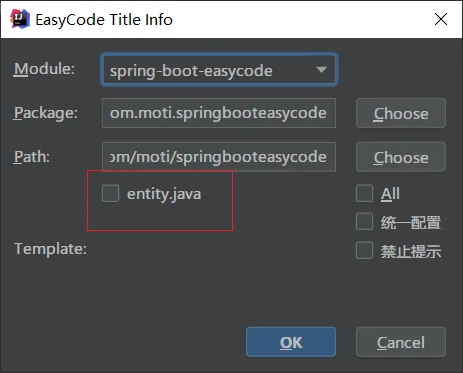
多个分组的切换
选择好分组后,点击OK,之后在Datebase视图的数据表右键选择EasyCode生成的时候会让你选择当前分组的模板