六、使用InitBinder来处理Date类型的参数
//the parameter was converted in initBinder
@RequestMapping("/date")
public String date(Date date){
    System.out.println(date);
    return "hello";
}
//At the time of initialization,convert the type "String" to type "date"
@InitBinder
public void initBinder(ServletRequestDataBinder binder){
    binder.registerCustomEditor(Date.class, new CustomDateEditor(new SimpleDateFormat("yyyy-MM-dd"),
            true));
}
七、向前台传递参数
//pass the parameters to front-end
@RequestMapping("/show")
public String showPerson(Map<String,Object> map){
    Person p =new Person();
    map.put("p", p);
    p.setAge(20);
    p.setName("jayjay");
    return "show";
}
Ps:前台可在Request域中取到"p"。
八、使用Ajax调用
//pass the parameters to front-end using ajax
@RequestMapping("/getPerson")
public void getPerson(String name,PrintWriter pw){
    pw.write("hello,"+name);
}
@RequestMapping("/name")
public String sayHello(){
    return "name";
}
前台用下面的Jquery代码调用
$(function(){
    $("#btn").click(function(){
        $.post("mvc/getPerson",{name:$("#name").val()},function(data){
            alert(data);
        });
    });
});
九、在Controller中使用redirect方式处理请求
//redirect
@RequestMapping("/redirect")
public String redirect(){
    return "redirect:hello";
}
十、文件上传
1.需要导入两个jar包
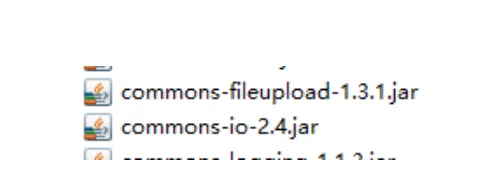
2.在SpringMVC配置文件中加入
<!-- upload settings -->
<bean id="multipartResolver"  class="org.springframework.web.multipart.commons.CommonsMultipartResolver">
    <property name="maxUploadSize" value="102400000"></property>
</bean>
3.方法代码
@RequestMapping(value="/upload",method=RequestMethod.POST)
public String upload(HttpServletRequest req) throws Exception{
    MultipartHttpServletRequest mreq = (MultipartHttpServletRequest)req;
    MultipartFile file = mreq.getFile("file");
    String fileName = file.getOriginalFilename();
    SimpleDateFormat sdf = new SimpleDateFormat("yyyyMMddHHmmss");
    FileOutputStream fos = new FileOutputStream(req.getSession().getServletContext().getRealPath("/")+
            "upload/"+sdf.format(new Date())+fileName.substring(fileName.lastIndexOf('.')));
    fos.write(file.getBytes());
    fos.flush();
    fos.close();
    return "hello";
}
4.前台form表单
<form action="mvc/upload" method="post" enctype="multipart/form-data">
  <input type="file" name="file"><br>
  <input type="submit" value="submit">
</form>
十一、使用@RequestParam注解指定参数的name
@Controller
@RequestMapping("/test")
public class mvcController1 {
    @RequestMapping(value="/param")
    public String testRequestParam(@RequestParam(value="id") Integer id,
            @RequestParam(value="name")String name){
        System.out.println(id+" "+name);
        return "/hello";
    }
}
十二、RESTFul风格的SringMVC
1.RestController
@Controller
@RequestMapping("/rest")
public class RestController {
    @RequestMapping(value="/user/{id}",method=RequestMethod.GET)
    public String get(@PathVariable("id") Integer id){
        System.out.println("get"+id);
        return "/hello";
    }
    @RequestMapping(value="/user/{id}",method=RequestMethod.POST)
    public String post(@PathVariable("id") Integer id){
        System.out.println("post"+id);
        return "/hello";
    }
    @RequestMapping(value="/user/{id}",method=RequestMethod.PUT)
    public String put(@PathVariable("id") Integer id){
        System.out.println("put"+id);
        return "/hello";
    }
    @RequestMapping(value="/user/{id}",method=RequestMethod.DELETE)
    public String delete(@PathVariable("id") Integer id){
        System.out.println("delete"+id);
        return "/hello";
    }
}
2.form表单发送put和delete请求
在web.xml中配置
<!-- configure the HiddenHttpMethodFilter,convert the post method to put or delete -->
<filter>
  <filter-name>HiddenHttpMethodFilter</filter-name>
  <filter-class>org.springframework.web.filter.HiddenHttpMethodFilter</filter-class>
</filter>
<filter-mapping>
  <filter-name>HiddenHttpMethodFilter</filter-name>
  <url-pattern>/*</url-pattern>
</filter-mapping>
在前台可以用以下代码产生请求
<form action="rest/user/1" method="post">
    <input type="hidden" name="_method" value="PUT">
    <input type="submit" value="put">
</form>
<form action="rest/user/1" method="post">
    <input type="submit" value="post">
</form>
<form action="rest/user/1" method="get">
    <input type="submit" value="get">
</form>
<form action="rest/user/1" method="post">
    <input type="hidden" name="_method" value="DELETE">
    <input type="submit" value="delete">
</form>
十三、返回json格式的字符串
1.导入以下jar包
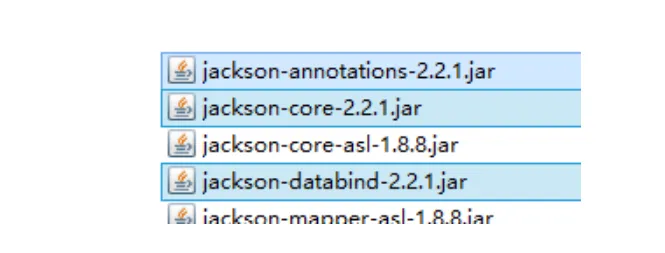
2.方法代码
@Controller
@RequestMapping("/json")
public class jsonController {
    @ResponseBody
    @RequestMapping("/user")
    public  User get(){
        User u = new User();
        u.setId(1);
        u.setName("jayjay");
        u.setBirth(new Date());
        return u;
    }
}