文章目录
Android 插件化系列文章目录
前言
一、项目结构及运行方法
1、项目结构
2、项目运行
二、宿主应用
1、拷贝工具类
2、自定义 Application
3、宿主 Activity 界面
三、插件化框架
1、反射工具类
2、插件包管理器类
3、Hook 操作类
4、Hook AMS 代理类
5、Hook Handler 代理类
6、Hook Instrumentation 代理类
7、占坑 Activity
四、插件应用
前言
本系列博客开发了一个简易 Hook 插件化框架 , 仅做学习使用 , 商业化还是使用大厂退出的成熟插件化框架 ;
源码在博客资源中 ;
一、项目结构及运行方法
1、项目结构
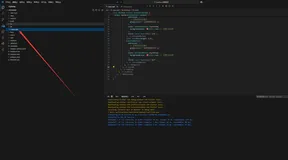
这是项目的结构图 ;
host 是宿主应用 Module ;
plugin 是插件应用 Module ;
lib_plugin_core 是插件化框架 , 是插件化依赖库 , 项目类型是 Android Library Module ;
2、项目运行
编译 plugin 插件应用 , 将编译后的 APK 安装包拷贝到宿主应用 host 的 " Plugin_Hook\host\src\main\assets " 目录下 ;
在 host 应用启动时 , 会将文件从 项目资源文件目录 " assets/plugin.apk " 拷贝到 " /data/user/0/com.example.plugin_hook/files/plugin.apk " Android 内置存储目录中 ;
运行时直接读取该内置文件中的插件包 , 加载 , 并显示插件包 APK 中的 Activity 界面 ;
GitHub 上的应用可以直接运行 , 我已经将 plugin 插件应用编译成 APK , 并拷贝到了 宿主应用的 assets 资源目录下 ;
注意拷贝后将 APK 插件包文件名修改为 plugin.apk ;
二、宿主应用
1、拷贝工具类
该工具类的作用是将 assets 资源文件拷贝到 Android 文件系统中 ;
package com.example.host;
import android.content.Context;
import java.io.BufferedReader;
import java.io.File;
import java.io.FileOutputStream;
import java.io.IOException;
import java.io.InputStream;
import java.io.InputStreamReader;
public class CommandUtils {
    /**
     * 将 Assets 中的文件拷贝到应用内置存储区域
     * @param context   上下文
     * @param assetsFilePath Assets 中的文件路径
     * @param appFilePath 应用内置存储
     * @return
     */
    public static boolean copyAssets2File(Context context, String assetsFilePath, String appFilePath) {
        // 内置存储文件对象
        File file = new File(appFilePath);
        // 确保目录存在
        File filesDirectory = file.getParentFile();
        if (!filesDirectory.exists()){
            filesDirectory.mkdirs();
        }
        // 拷贝文件
        boolean ret = false;
        InputStream is = null;
        FileOutputStream fos = null;
        try {
            is = context.getAssets().open(assetsFilePath);
            fos = new FileOutputStream(file);
            byte[] buffer = new byte[2048];
            int n;
            while ((n = is.read(buffer)) != -1) {
                fos.write(buffer, 0, n);
            }
            fos.flush();
            ret = true;
        } catch (IOException e) {
            e.printStackTrace();
        } finally {
            if (null != is) {
                try {
                    is.close();
                } catch (IOException e) {
                    e.printStackTrace();
                }
            }
            if (null != fos) {
                try {
                    fos.close();
                } catch (IOException e) {
                    e.printStackTrace();
                }
            }
        }
        return ret;
    }
    public static String inputStream2String(InputStream inputStream) {
        try {
            BufferedReader r = new BufferedReader(new InputStreamReader(inputStream));
            String str;
            StringBuilder sb = new StringBuilder();
            while ((str = r.readLine()) != null) {
                sb.append(str);
            }
            return sb.toString();
        } catch (IOException e) {
            e.printStackTrace();
        }
        return null;
    }
}
2、自定义 Application
主要用于初始化插件化框架 ;
package com.example.host;
import android.app.Application;
import android.util.Log;
import java.io.File;
import kim.hsl.plugin.PluginManager;
public class MyApplication extends Application {
    private static final String TAG = "plugin_MyApplication";
    /**
     * 插件资源, 这种方式侵入代码 , 造成开发的差异性 , 建议使用 Hook 加载插件资源
     */
    //private Resources pluginResources;
    @Override
    public void onCreate() {
        super.onCreate();
        // 如果已经存在文件, 先删除 , 防止拷贝过程中出错
        File pluginFile = new File(getFilesDir() + "/plugin.apk");
        if (pluginFile.exists()){
            pluginFile.delete();
        }
        // 先将 assets 中的插件包拷贝到 内置存储中
        CommandUtils.copyAssets2File(
                this,
                "plugin.apk",
                getFilesDir() + "/plugin.apk");
        // 将文件从 assets/plugin.apk 拷贝到 /data/user/0/com.example.plugin_hook/files/plugin.apk
        Log.i(TAG, "将文件从 assets/plugin.apk 拷贝到 " + getFilesDir() + "/plugin.apk");
        // 初始化插件包
        PluginManager.getInstance(this).init();
        Log.i(TAG, "插件化 初始化完毕");
        // 设置插件包中的资源文件, 这种方式侵入代码 , 造成开发的差异性 , 建议使用 Hook 加载插件资源
        //pluginResources = PluginManager.getInstance(this).getmResources();
    }
    /*
    // 这种方式侵入代码 , 造成开发的差异性 , 建议使用 Hook 加载插件资源
    @Override
    public Resources getResources() {
        if (pluginResources != null)
            return pluginResources;
        return super.getResources();
    }*/
}