
GIS中的离散实体有三种:点、线、面,在ArcEngine中用三种符号对应表示,分别是:MarkSymbol、LineSymbol和FillSymbol。此外还有TextSymbol用于文字标注,3DChart用来显示饼图等三维对象。
所有符号都实现ISymbol和IMapLevel接口,ISymbol定义一个符号对象的基本属性和方法,IMapLevel定义属性可以确定符号显示的图层,和图层类似,用于确定符号的叠加顺序。
一、MarkerSymbol对象
MarkerSymbol对象用于修饰点对象符号,拥有12个子类:
| Classes | Description |
|---|---|
| ArrowMarkerSymbol | 箭头形式符号,箭头的样式只有一个:esriAMSPlain |
| BarChartSymbol | Defines a bar chart symbol. |
| CharacterMarker3DSymbol (3DAnalyst) | 3D Character Marker Symbol component. |
| CharacterMarkerSymbol | 字符形式符号,用于将一个点要素显示为字符状。Characterindex属性用来确定显示的字符 |
| Marker3DSymbol (3DAnalyst) | 3D Marker Symbol component. |
| MultiLayerMarkerSymbol | 使用多个符号进行叠加生成新符号。 |
| PictureMarkerSymbol | 以图片为背景的符号,把一个点对象的外形表示为一个位图,可以指定Picture或者使用CreateMarkSymbolFromFile获取一张位图 |
| PieChartSymbol | Defines a pie chart symbol. |
| SimpleMarker3DSymbol (3DAnalyst) | Simple 3D Marker Symbol component. |
| SimpleMarkerSymbol | 简单类型点符号,有五种类型(esriSMSCircle、esriSMSSquare、esriSMSCross、esriSMSX和esriSMSDiamond) |
| StackedChartSymbol | Defines a stacked chart symbol. |
| TextMarkerSymbol (TrackingAnalyst) | Class used to create a text marker symbol used to symbolize point geometries. |
都实现IMarkerSymbol接口,定义了Angle、Color、Size、Xoffset、Yoffset。
|
1
2
3
4
5
6
7
8
9
10
11
12
13
14
15
16
17
18
19
20
21
22
23
24
25
26
27
28
29
30
31
32
33
34
35
36
37
38
39
40
41
42
43
44
45
46
47
48
49
50
51
52
53
54
55
56
57
58
59
60
61
62
63
64
65
66
67
68
69
70
71
72
73
74
75
76
77
78
79
80
81
82
83
84
85
86
87
88
89
90
91
92
93
94
95
96
97
98
99
100
101
102
103
104
105
106
107
108
109
110
111
112
113
114
115
116
117
118
119
120
121
122
123
124
125
126
127
128
129
130
131
132
133
134
135
136
137
138
139
140
141
142
143
144
145
146
147
148
149
150
151
152
153
154
155
156
157
158
159
160
161
162
163
164
165
166
167
168
169
170
171
172
173
174
175
176
177
178
179
180
181
182
183
184
185
186
187
188
189
190
191
192
193
194
195
196
197
198
199
200
201
202
203
204
205
206
207
208
209
210
211
212
213
214
215
|
private
void
simpleLineSymbolToolStripMenuItem_Click(
object
sender, EventArgs e)
{
ISimpleLineSymbol simpleLineSymbol =
new
SimpleLineSymbolClass();
simpleLineSymbol.Style = esriSimpleLineStyle.esriSLSDashDotDot;
IPolyline polyline =
new
PolylineClass();
IPoint point =
new
PointClass();
point.PutCoords(1, 1);
polyline.FromPoint = point;
point.PutCoords(10, 10);
polyline.ToPoint = point;
simpleLineSymbol.Width = 10;
IRgbColor rgbColor = getRGB(255, 0, 0);
simpleLineSymbol.Color = rgbColor;
ISymbol symbol = simpleLineSymbol
as
ISymbol;
symbol.ROP2 = esriRasterOpCode.esriROPNotXOrPen;
IActiveView activeView =
this
.axMapControl1.ActiveView;
//用activeView.ScreenDisplay进行画图
activeView.ScreenDisplay.StartDrawing(activeView.ScreenDisplay.hDC, (
short
)esriScreenCache.esriNoScreenCache);
activeView.ScreenDisplay.SetSymbol(symbol);
activeView.ScreenDisplay.DrawPolyline(polyline
as
IGeometry);
activeView.ScreenDisplay.FinishDrawing();
activeView.ScreenDisplay.FinishDrawing();
//释放资源
}
private
void
cartographicLineSymbolToolStripMenuItem_Click(
object
sender, EventArgs e)
{
ICartographicLineSymbol cartographicLineSymbol =
new
CartographicLineSymbolClass();
//制图线符号
cartographicLineSymbol.Cap = esriLineCapStyle.esriLCSButt;
cartographicLineSymbol.Join = esriLineJoinStyle.esriLJSBevel;
//连接方式
cartographicLineSymbol.Width = 10;
cartographicLineSymbol.MiterLimit = 4;
//Size threshold(阈值) for showing mitered line joins.
ILineProperties lineProperties;
lineProperties = cartographicLineSymbol
as
ILineProperties;
lineProperties.Offset = 0;
double
[] dob =
new
double
[6];
dob[0] = 0;
dob[1] = 1;
dob[2] = 2;
dob[3] = 3;
dob[4] = 4;
dob[5] = 5;
ITemplate template =
new
TemplateClass();
//定义模版
template.Interval = 1;
for
(
int
i = 0; i < dob.Length; i += 2)
{
template.AddPatternElement(dob[i], dob[i + 1]);
}
lineProperties.Template = template;
IPolyline polyline =
new
PolylineClass();
IPoint point =
new
PointClass();
point.PutCoords(1, 1);
polyline.FromPoint = point;
point.PutCoords(10, 10);
polyline.ToPoint = point;
IRgbColor rgbColor = getRGB(0, 255, 0);
cartographicLineSymbol.Color = rgbColor;
IActiveView activeView =
this
.axMapControl1.ActiveView;
activeView.ScreenDisplay.StartDrawing(activeView.ScreenDisplay.hDC, (
short
)esriScreenCache.esriNoScreenCache);
activeView.ScreenDisplay.SetSymbol(cartographicLineSymbol
as
ISymbol);
activeView.ScreenDisplay.DrawPolyline(polyline
as
IGeometry);
activeView.ScreenDisplay.FinishDrawing();
activeView.ScreenDisplay.FinishDrawing();
}
private
void
multiLayerLineSymbolToolStripMenuItem_Click(
object
sender, EventArgs e)
{
IMultiLayerLineSymbol multiLayerLineSymbol =
new
MultiLayerLineSymbolClass();
ISimpleLineSymbol simpleLineSymbol =
new
SimpleLineSymbolClass();
simpleLineSymbol.Style = esriSimpleLineStyle.esriSLSDashDotDot;
simpleLineSymbol.Width = 10;
IRgbColor rgbColor = getRGB(255, 0, 0);
simpleLineSymbol.Color = rgbColor;
ISymbol symbol = simpleLineSymbol
as
ISymbol;
symbol.ROP2 = esriRasterOpCode.esriROPNotXOrPen;
ICartographicLineSymbol cartographicLineSymbol =
new
CartographicLineSymbolClass();
cartographicLineSymbol.Cap = esriLineCapStyle.esriLCSButt;
cartographicLineSymbol.Join = esriLineJoinStyle.esriLJSBevel;
cartographicLineSymbol.Width = 10;
cartographicLineSymbol.MiterLimit = 4;
ILineProperties lineProperties;
lineProperties = cartographicLineSymbol
as
ILineProperties;
lineProperties.Offset = 0;
double
[] dob =
new
double
[6];
dob[0] = 0;
dob[1] = 1;
dob[2] = 2;
dob[3] = 3;
dob[4] = 4;
dob[5] = 5;
ITemplate template =
new
TemplateClass();
template.Interval = 1;
for
(
int
i = 0; i < dob.Length; i += 2)
{
template.AddPatternElement(dob[i], dob[i + 1]);
}
lineProperties.Template = template;
IPolyline polyline =
new
PolylineClass();
IPoint point =
new
PointClass();
point.PutCoords(1, 1);
polyline.FromPoint = point;
point.PutCoords(10, 10);
polyline.ToPoint = point;
rgbColor = getRGB(0, 255, 0);
cartographicLineSymbol.Color = rgbColor;
multiLayerLineSymbol.AddLayer(simpleLineSymbol);
multiLayerLineSymbol.AddLayer(cartographicLineSymbol);
IActiveView activeView =
this
.axMapControl1.ActiveView;
activeView.ScreenDisplay.StartDrawing(activeView.ScreenDisplay.hDC, (
short
)esriScreenCache.esriNoScreenCache);
activeView.ScreenDisplay.SetSymbol(multiLayerLineSymbol
as
ISymbol);
activeView.ScreenDisplay.DrawPolyline(polyline
as
IGeometry);
activeView.ScreenDisplay.FinishDrawing();
activeView.ScreenDisplay.FinishDrawing();
}
private
void
hashLineSymbolToolStripMenuItem_Click(
object
sender, EventArgs e)
{
IHashLineSymbol hashLineSymbol =
new
HashLineSymbolClass();
ILineProperties lineProperties = hashLineSymbol
as
ILineProperties;
lineProperties.Offset = 0;
double
[] dob =
new
double
[6];
dob[0] = 0;
dob[1] = 1;
dob[2] = 2;
dob[3] = 3;
dob[4] = 4;
dob[5] = 5;
ITemplate template =
new
TemplateClass();
template.Interval = 1;
for
(
int
i = 0; i < dob.Length; i += 2)
{
template.AddPatternElement(dob[i], dob[i + 1]);
}
lineProperties.Template = template;
hashLineSymbol.Width = 2;
hashLineSymbol.Angle = 45;
IRgbColor hashColor =
new
RgbColor();
hashColor = getRGB(0, 0, 255);
hashLineSymbol.Color = hashColor;
IPolyline polyline =
new
PolylineClass();
IPoint point =
new
PointClass();
point.PutCoords(1, 1);
polyline.FromPoint = point;
point.PutCoords(10, 10);
polyline.ToPoint = point;
IActiveView activeView =
this
.axMapControl1.ActiveView;
activeView.ScreenDisplay.StartDrawing(activeView.ScreenDisplay.hDC, (
short
)esriScreenCache.esriNoScreenCache);
activeView.ScreenDisplay.SetSymbol(hashLineSymbol
as
ISymbol);
activeView.ScreenDisplay.DrawPolyline(polyline
as
IGeometry);
activeView.ScreenDisplay.FinishDrawing();
activeView.ScreenDisplay.FinishDrawing();
}
//下面的没有看
private
void
markerLineSymbolToolStripMenuItem_Click(
object
sender, EventArgs e)
{
IArrowMarkerSymbol arrowMarkerSymbol =
new
ArrowMarkerSymbolClass();
IRgbColor rgbColor = getRGB(255, 0, 0);
arrowMarkerSymbol.Color = rgbColor
as
IColor;
arrowMarkerSymbol.Length = 10;
arrowMarkerSymbol.Width = 10;
arrowMarkerSymbol.Style = esriArrowMarkerStyle.esriAMSPlain;
IMarkerLineSymbol markerLineSymbol =
new
MarkerLineSymbolClass();
markerLineSymbol.MarkerSymbol = arrowMarkerSymbol;
rgbColor = getRGB(0, 255, 0);
markerLineSymbol.Color = rgbColor;
IPolyline polyline =
new
PolylineClass();
IPoint point =
new
PointClass();
point.PutCoords(1, 1);
polyline.FromPoint = point;
point.PutCoords(10, 10);
polyline.ToPoint = point;
IActiveView activeView =
this
.axMapControl1.ActiveView;
activeView.ScreenDisplay.StartDrawing(activeView.ScreenDisplay.hDC, (
short
)esriScreenCache.esriNoScreenCache);
activeView.ScreenDisplay.SetSymbol(markerLineSymbol
as
ISymbol);
activeView.ScreenDisplay.DrawPolyline(polyline
as
IGeometry);
activeView.ScreenDisplay.FinishDrawing();
activeView.ScreenDisplay.FinishDrawing();
}
private
void
pictureLineSymbolToolStripMenuItem_Click(
object
sender, EventArgs e)
{
IPictureLineSymbol pictureLineSymbol =
new
PictureLineSymbolClass();
//创建图片符号
//string fileName = @"E:\vs2005\第五章\lesson2\lesson2\data\qq.bmp";
string
path = Directory.GetCurrentDirectory();
string
fileName = path +
@"\qq.bmp"
;
pictureLineSymbol.CreateLineSymbolFromFile(esriIPictureType.esriIPictureBitmap, fileName);
IRgbColor rgbColor = getRGB(0, 255, 0);
pictureLineSymbol.Color = rgbColor;
pictureLineSymbol.Offset = 0;
pictureLineSymbol.Width = 10;
pictureLineSymbol.Rotate =
false
;
IPolyline polyline =
new
PolylineClass();
IPoint point =
new
PointClass();
point.PutCoords(1, 1);
polyline.FromPoint = point;
point.PutCoords(10, 10);
polyline.ToPoint = point;
IActiveView activeView =
this
.axMapControl1.ActiveView;
activeView.ScreenDisplay.StartDrawing(activeView.ScreenDisplay.hDC, (
short
)esriScreenCache.esriNoScreenCache);
activeView.ScreenDisplay.SetSymbol(pictureLineSymbol
as
ISymbol);
activeView.ScreenDisplay.DrawPolyline(polyline
as
IGeometry);
activeView.ScreenDisplay.FinishDrawing();
activeView.ScreenDisplay.FinishDrawing();
}
|
二、LineSymbol对象
用于修饰线性几何对象符号。Color和Width属性为两个唯一公共属性。
子类有:
| Classes | Description |
|---|---|
| CartographicLineSymbol | 制图线符号,实现ICatographicLineSymbol(主要设置线符号的节点属性,Join:设置线要素转折处的样式)和ILineProperties接口 |
| HashLineSymbol | 离散线符号 |
| MarkerLineSymbol | A line symbol composed of repeating markers.点线符号 |
| MultiLayerLineSymbol | A line symbol that contains one or more layers.使用重叠符号方法产生新符号 |
| PictureLineSymbol | A line symbol composed of either a BMP or an EMF picture.比如火车线路符号 |
| SimpleLine3DSymbol (3DAnalyst) | Simple 3D Line Symbol component. |
| SimpleLineSymbol | 简单线符号 |
| TextureLineSymbol (3DAnalyst) | Texture Line Symbol component.(纹理贴图线符号) |
|
1
2
3
4
5
6
7
8
9
10
11
12
13
14
15
16
17
18
19
20
21
22
23
24
25
26
27
28
29
30
31
32
33
34
35
36
37
38
39
40
41
42
43
44
45
46
47
48
49
50
51
52
53
54
55
56
57
58
59
60
61
62
63
64
65
66
67
68
69
70
71
72
73
74
75
76
77
78
79
80
81
82
83
84
85
86
87
88
89
90
91
92
93
94
95
96
97
98
99
100
101
102
103
104
105
106
107
108
109
110
111
112
113
114
115
116
117
118
119
120
121
122
123
124
125
126
127
128
129
130
131
132
133
134
135
136
137
138
139
140
141
142
143
144
145
146
147
148
149
150
151
152
153
154
155
156
157
158
159
160
161
162
163
164
165
166
167
168
169
170
171
172
173
174
175
176
177
178
179
180
181
182
183
184
185
186
187
188
189
190
191
192
193
194
195
196
197
198
199
200
201
202
203
204
205
206
207
208
209
210
211
212
213
214
215
|
private
void
simpleLineSymbolToolStripMenuItem_Click(
object
sender, EventArgs e)
{
ISimpleLineSymbol simpleLineSymbol =
new
SimpleLineSymbolClass();
simpleLineSymbol.Style = esriSimpleLineStyle.esriSLSDashDotDot;
IPolyline polyline =
new
PolylineClass();
IPoint point =
new
PointClass();
point.PutCoords(1, 1);
polyline.FromPoint = point;
point.PutCoords(10, 10);
polyline.ToPoint = point;
simpleLineSymbol.Width = 10;
IRgbColor rgbColor = getRGB(255, 0, 0);
simpleLineSymbol.Color = rgbColor;
ISymbol symbol = simpleLineSymbol
as
ISymbol;
symbol.ROP2 = esriRasterOpCode.esriROPNotXOrPen;
IActiveView activeView =
this
.axMapControl1.ActiveView;
//用activeView.ScreenDisplay进行画图
activeView.ScreenDisplay.StartDrawing(activeView.ScreenDisplay.hDC, (
short
)esriScreenCache.esriNoScreenCache);
activeView.ScreenDisplay.SetSymbol(symbol);
activeView.ScreenDisplay.DrawPolyline(polyline
as
IGeometry);
activeView.ScreenDisplay.FinishDrawing();
activeView.ScreenDisplay.FinishDrawing();
//释放资源
}
private
void
cartographicLineSymbolToolStripMenuItem_Click(
object
sender, EventArgs e)
{
ICartographicLineSymbol cartographicLineSymbol =
new
CartographicLineSymbolClass();
//制图线符号
cartographicLineSymbol.Cap = esriLineCapStyle.esriLCSButt;
cartographicLineSymbol.Join = esriLineJoinStyle.esriLJSBevel;
//连接方式
cartographicLineSymbol.Width = 10;
cartographicLineSymbol.MiterLimit = 4;
//Size threshold(阈值) for showing mitered line joins.
ILineProperties lineProperties;
lineProperties = cartographicLineSymbol
as
ILineProperties;
lineProperties.Offset = 0;
double
[] dob =
new
double
[6];
dob[0] = 0;
dob[1] = 1;
dob[2] = 2;
dob[3] = 3;
dob[4] = 4;
dob[5] = 5;
ITemplate template =
new
TemplateClass();
//定义模版
template.Interval = 1;
for
(
int
i = 0; i < dob.Length; i += 2)
{
template.AddPatternElement(dob[i], dob[i + 1]);
}
lineProperties.Template = template;
IPolyline polyline =
new
PolylineClass();
IPoint point =
new
PointClass();
point.PutCoords(1, 1);
polyline.FromPoint = point;
point.PutCoords(10, 10);
polyline.ToPoint = point;
IRgbColor rgbColor = getRGB(0, 255, 0);
cartographicLineSymbol.Color = rgbColor;
IActiveView activeView =
this
.axMapControl1.ActiveView;
activeView.ScreenDisplay.StartDrawing(activeView.ScreenDisplay.hDC, (
short
)esriScreenCache.esriNoScreenCache);
activeView.ScreenDisplay.SetSymbol(cartographicLineSymbol
as
ISymbol);
activeView.ScreenDisplay.DrawPolyline(polyline
as
IGeometry);
activeView.ScreenDisplay.FinishDrawing();
activeView.ScreenDisplay.FinishDrawing();
}
private
void
multiLayerLineSymbolToolStripMenuItem_Click(
object
sender, EventArgs e)
{
IMultiLayerLineSymbol multiLayerLineSymbol =
new
MultiLayerLineSymbolClass();
ISimpleLineSymbol simpleLineSymbol =
new
SimpleLineSymbolClass();
simpleLineSymbol.Style = esriSimpleLineStyle.esriSLSDashDotDot;
simpleLineSymbol.Width = 10;
IRgbColor rgbColor = getRGB(255, 0, 0);
simpleLineSymbol.Color = rgbColor;
ISymbol symbol = simpleLineSymbol
as
ISymbol;
symbol.ROP2 = esriRasterOpCode.esriROPNotXOrPen;
ICartographicLineSymbol cartographicLineSymbol =
new
CartographicLineSymbolClass();
cartographicLineSymbol.Cap = esriLineCapStyle.esriLCSButt;
cartographicLineSymbol.Join = esriLineJoinStyle.esriLJSBevel;
cartographicLineSymbol.Width = 10;
cartographicLineSymbol.MiterLimit = 4;
ILineProperties lineProperties;
lineProperties = cartographicLineSymbol
as
ILineProperties;
lineProperties.Offset = 0;
double
[] dob =
new
double
[6];
dob[0] = 0;
dob[1] = 1;
dob[2] = 2;
dob[3] = 3;
dob[4] = 4;
dob[5] = 5;
ITemplate template =
new
TemplateClass();
template.Interval = 1;
for
(
int
i = 0; i < dob.Length; i += 2)
{
template.AddPatternElement(dob[i], dob[i + 1]);
}
lineProperties.Template = template;
IPolyline polyline =
new
PolylineClass();
IPoint point =
new
PointClass();
point.PutCoords(1, 1);
polyline.FromPoint = point;
point.PutCoords(10, 10);
polyline.ToPoint = point;
rgbColor = getRGB(0, 255, 0);
cartographicLineSymbol.Color = rgbColor;
multiLayerLineSymbol.AddLayer(simpleLineSymbol);
multiLayerLineSymbol.AddLayer(cartographicLineSymbol);
IActiveView activeView =
this
.axMapControl1.ActiveView;
activeView.ScreenDisplay.StartDrawing(activeView.ScreenDisplay.hDC, (
short
)esriScreenCache.esriNoScreenCache);
activeView.ScreenDisplay.SetSymbol(multiLayerLineSymbol
as
ISymbol);
activeView.ScreenDisplay.DrawPolyline(polyline
as
IGeometry);
activeView.ScreenDisplay.FinishDrawing();
activeView.ScreenDisplay.FinishDrawing();
}
private
void
hashLineSymbolToolStripMenuItem_Click(
object
sender, EventArgs e)
{
IHashLineSymbol hashLineSymbol =
new
HashLineSymbolClass();
ILineProperties lineProperties = hashLineSymbol
as
ILineProperties;
lineProperties.Offset = 0;
double
[] dob =
new
double
[6];
dob[0] = 0;
dob[1] = 1;
dob[2] = 2;
dob[3] = 3;
dob[4] = 4;
dob[5] = 5;
ITemplate template =
new
TemplateClass();
template.Interval = 1;
for
(
int
i = 0; i < dob.Length; i += 2)
{
template.AddPatternElement(dob[i], dob[i + 1]);
}
lineProperties.Template = template;
hashLineSymbol.Width = 2;
hashLineSymbol.Angle = 45;
IRgbColor hashColor =
new
RgbColor();
hashColor = getRGB(0, 0, 255);
hashLineSymbol.Color = hashColor;
IPolyline polyline =
new
PolylineClass();
IPoint point =
new
PointClass();
point.PutCoords(1, 1);
polyline.FromPoint = point;
point.PutCoords(10, 10);
polyline.ToPoint = point;
IActiveView activeView =
this
.axMapControl1.ActiveView;
activeView.ScreenDisplay.StartDrawing(activeView.ScreenDisplay.hDC, (
short
)esriScreenCache.esriNoScreenCache);
activeView.ScreenDisplay.SetSymbol(hashLineSymbol
as
ISymbol);
activeView.ScreenDisplay.DrawPolyline(polyline
as
IGeometry);
activeView.ScreenDisplay.FinishDrawing();
activeView.ScreenDisplay.FinishDrawing();
}
//下面的没有看
private
void
markerLineSymbolToolStripMenuItem_Click(
object
sender, EventArgs e)
{
IArrowMarkerSymbol arrowMarkerSymbol =
new
ArrowMarkerSymbolClass();
IRgbColor rgbColor = getRGB(255, 0, 0);
arrowMarkerSymbol.Color = rgbColor
as
IColor;
arrowMarkerSymbol.Length = 10;
arrowMarkerSymbol.Width = 10;
arrowMarkerSymbol.Style = esriArrowMarkerStyle.esriAMSPlain;
IMarkerLineSymbol markerLineSymbol =
new
MarkerLineSymbolClass();
markerLineSymbol.MarkerSymbol = arrowMarkerSymbol;
rgbColor = getRGB(0, 255, 0);
markerLineSymbol.Color = rgbColor;
IPolyline polyline =
new
PolylineClass();
IPoint point =
new
PointClass();
point.PutCoords(1, 1);
polyline.FromPoint = point;
point.PutCoords(10, 10);
polyline.ToPoint = point;
IActiveView activeView =
this
.axMapControl1.ActiveView;
activeView.ScreenDisplay.StartDrawing(activeView.ScreenDisplay.hDC, (
short
)esriScreenCache.esriNoScreenCache);
activeView.ScreenDisplay.SetSymbol(markerLineSymbol
as
ISymbol);
activeView.ScreenDisplay.DrawPolyline(polyline
as
IGeometry);
activeView.ScreenDisplay.FinishDrawing();
activeView.ScreenDisplay.FinishDrawing();
}
private
void
pictureLineSymbolToolStripMenuItem_Click(
object
sender, EventArgs e)
{
IPictureLineSymbol pictureLineSymbol =
new
PictureLineSymbolClass();
//创建图片符号
//string fileName = @"E:\vs2005\第五章\lesson2\lesson2\data\qq.bmp";
string
path = Directory.GetCurrentDirectory();
string
fileName = path +
@"\qq.bmp"
;
pictureLineSymbol.CreateLineSymbolFromFile(esriIPictureType.esriIPictureBitmap, fileName);
IRgbColor rgbColor = getRGB(0, 255, 0);
pictureLineSymbol.Color = rgbColor;
pictureLineSymbol.Offset = 0;
pictureLineSymbol.Width = 10;
pictureLineSymbol.Rotate =
false
;
IPolyline polyline =
new
PolylineClass();
IPoint point =
new
PointClass();
point.PutCoords(1, 1);
polyline.FromPoint = point;
point.PutCoords(10, 10);
polyline.ToPoint = point;
IActiveView activeView =
this
.axMapControl1.ActiveView;
activeView.ScreenDisplay.StartDrawing(activeView.ScreenDisplay.hDC, (
short
)esriScreenCache.esriNoScreenCache);
activeView.ScreenDisplay.SetSymbol(pictureLineSymbol
as
ISymbol);
activeView.ScreenDisplay.DrawPolyline(polyline
as
IGeometry);
activeView.ScreenDisplay.FinishDrawing();
activeView.ScreenDisplay.FinishDrawing();
}
|
三、FillSymbol对象
用来修饰多边形等具有面积的几何形体的符号对象。只定义Color和OutLine两个属性。
| Classes | Description |
|---|---|
| ColorRampSymbol (Carto) | ESRI ColorRampSymbol for raster rendering. |
| ColorSymbol (Carto) | ESRI ColorSymbol for raster rendering. |
| DotDensityFillSymbol | Defines a dot density fill symbol, a data driven symbol commonly used with the DotDensityRenderer对象. |
| GradientFillSymbol | 渐变颜色填充符号,IntervalCount属性来设置用户所需要的颜色梯度。 |
| LineFillSymbol | 线填充符号,表现为重复的线条,可以设置线的角度,偏移量和线之间的间隔距离。 |
| MarkerFillSymbol | 点填充符号,使用一个Marker符号作为背景填充符号,实现了IMarkerFillSymbol和IFillProperties两个接口 |
| MultiLayerFillSymbol | 多层填充符号,使用多个填充符号进行叠加 |
| PictureFillSymbol | A fill symbol based on either a BMP or an EMF picture. |
| RasterRGBSymbol (Carto) | ESRI RasterRGBSymbol for raster rendering. |
| SimpleFillSymbol | A fill symbol comprised from a predefined set of styles. |
| TextureFillSymbol (3DAnalyst) | Texture Fill Symbol component. |
|
1
2
3
4
5
6
7
8
9
10
11
12
13
14
15
16
17
18
19
20
21
22
23
24
25
26
27
28
29
30
31
32
33
34
35
36
37
38
39
40
41
42
43
44
45
46
47
48
49
50
51
52
53
54
55
56
57
58
59
60
61
62
63
64
65
66
67
68
69
70
71
72
73
74
75
76
77
78
79
80
81
82
83
84
85
86
87
88
89
90
91
92
93
94
95
96
97
98
99
100
101
102
103
104
105
106
107
108
109
110
111
112
113
114
115
116
117
118
119
120
121
122
123
124
125
126
127
128
129
130
131
132
133
134
135
136
137
138
139
140
141
142
143
144
145
146
147
148
149
150
151
152
153
154
155
156
157
158
159
160
161
162
163
164
165
166
167
168
169
170
171
172
173
174
175
176
177
178
179
180
181
182
183
184
185
186
187
188
189
190
191
192
193
194
195
196
197
198
199
200
201
202
203
204
205
206
207
208
209
210
211
212
213
214
215
216
217
218
219
220
221
222
223
224
225
226
227
228
229
230
231
232
|
private
void
simpleFillSymbolToolStripMenuItem_Click(
object
sender, EventArgs e)
{
//简单填充符号
ISimpleFillSymbol simpleFillSymbol =
new
SimpleFillSymbolClass();
simpleFillSymbol.Style = esriSimpleFillStyle.esriSFSSolid;
simpleFillSymbol.Color = getRGB(255, 0, 0);
//创建边线符号
ISimpleLineSymbol simpleLineSymbol =
new
SimpleLineSymbolClass();
simpleLineSymbol.Style = esriSimpleLineStyle.esriSLSDashDotDot;
simpleLineSymbol.Color = getRGB(0, 255, 0);
simpleLineSymbol.Width = 10;
ISymbol symbol = simpleLineSymbol
as
ISymbol;
symbol.ROP2 = esriRasterOpCode.esriROPNotXOrPen;
simpleFillSymbol.Outline = simpleLineSymbol;
//创建面对象
object
Missing = Type.Missing;
IPolygon polygon =
new
PolygonClass();
IPointCollection pointCollection = polygon
as
IPointCollection;
IPoint point =
new
PointClass();
point.PutCoords(5, 5);
pointCollection.AddPoint(point,
ref
Missing,
ref
Missing);
point.PutCoords(5, 10);
pointCollection.AddPoint(point,
ref
Missing,
ref
Missing);
point.PutCoords(10, 10);
pointCollection.AddPoint(point,
ref
Missing,
ref
Missing);
point.PutCoords(10, 5);
pointCollection.AddPoint(point,
ref
Missing,
ref
Missing);
polygon.SimplifyPreserveFromTo();
IActiveView activeView =
this
.axMapControl1.ActiveView;
activeView.ScreenDisplay.StartDrawing(activeView.ScreenDisplay.hDC, (
short
)esriScreenCache.esriNoScreenCache);
activeView.ScreenDisplay.SetSymbol(simpleFillSymbol
as
ISymbol);
activeView.ScreenDisplay.DrawPolygon(polygon
as
IGeometry);
activeView.ScreenDisplay.FinishDrawing();
}
private
void
lineFillSymbolToolStripMenuItem_Click(
object
sender, EventArgs e)
{
ICartographicLineSymbol cartoLine =
new
CartographicLineSymbol();
cartoLine.Cap = esriLineCapStyle.esriLCSButt;
cartoLine.Join = esriLineJoinStyle.esriLJSMitre;
cartoLine.Color = getRGB(255, 0, 0);
cartoLine.Width = 2;
//Create the LineFillSymbo
ILineFillSymbol lineFill =
new
LineFillSymbol();
lineFill.Angle = 45;
lineFill.Separation = 10;
lineFill.Offset = 5;
lineFill.LineSymbol = cartoLine;
object
Missing = Type.Missing;
IPolygon polygon =
new
PolygonClass();
IPointCollection pointCollection = polygon
as
IPointCollection;
IPoint point =
new
PointClass();
point.PutCoords(5, 5);
pointCollection.AddPoint(point,
ref
Missing,
ref
Missing);
point.PutCoords(5, 10);
pointCollection.AddPoint(point,
ref
Missing,
ref
Missing);
point.PutCoords(10, 10);
pointCollection.AddPoint(point,
ref
Missing,
ref
Missing);
point.PutCoords(10, 5);
pointCollection.AddPoint(point,
ref
Missing,
ref
Missing);
polygon.SimplifyPreserveFromTo();
IActiveView activeView =
this
.axMapControl1.ActiveView;
activeView.ScreenDisplay.StartDrawing(activeView.ScreenDisplay.hDC, (
short
)esriScreenCache.esriNoScreenCache);
activeView.ScreenDisplay.SetSymbol(lineFill
as
ISymbol);
activeView.ScreenDisplay.DrawPolygon(polygon
as
IGeometry);
activeView.ScreenDisplay.FinishDrawing();
}
private
void
markerFillSymbolToolStripMenuItem_Click(
object
sender, EventArgs e)
{
IArrowMarkerSymbol arrowMarkerSymbol =
new
ArrowMarkerSymbolClass();
IRgbColor rgbColor = getRGB(255, 0, 0);
arrowMarkerSymbol.Color = rgbColor
as
IColor;
arrowMarkerSymbol.Length = 10;
arrowMarkerSymbol.Width = 10;
arrowMarkerSymbol.Style = esriArrowMarkerStyle.esriAMSPlain;
IMarkerFillSymbol markerFillSymbol =
new
MarkerFillSymbolClass();
markerFillSymbol.MarkerSymbol = arrowMarkerSymbol;
rgbColor = getRGB(0, 255, 0);
markerFillSymbol.Color = rgbColor;
markerFillSymbol.Style = esriMarkerFillStyle.esriMFSGrid;
IFillProperties fillProperties = markerFillSymbol
as
IFillProperties;
fillProperties.XOffset = 2;
fillProperties.YOffset = 2;
fillProperties.XSeparation = 15;
fillProperties.YSeparation = 20;
object
Missing = Type.Missing;
IPolygon polygon =
new
PolygonClass();
IPointCollection pointCollection = polygon
as
IPointCollection;
IPoint point =
new
PointClass();
point.PutCoords(5, 5);
pointCollection.AddPoint(point,
ref
Missing,
ref
Missing);
point.PutCoords(5, 10);
pointCollection.AddPoint(point,
ref
Missing,
ref
Missing);
point.PutCoords(10, 10);
pointCollection.AddPoint(point,
ref
Missing,
ref
Missing);
point.PutCoords(10, 5);
pointCollection.AddPoint(point,
ref
Missing,
ref
Missing);
polygon.SimplifyPreserveFromTo();
IActiveView activeView =
this
.axMapControl1.ActiveView;
activeView.ScreenDisplay.StartDrawing(activeView.ScreenDisplay.hDC, (
short
)esriScreenCache.esriNoScreenCache);
activeView.ScreenDisplay.SetSymbol(markerFillSymbol
as
ISymbol);
activeView.ScreenDisplay.DrawPolygon(polygon
as
IGeometry);
activeView.ScreenDisplay.FinishDrawing();
}
private
void
gradientFillSymbolToolStripMenuItem_Click(
object
sender, EventArgs e)
{
IGradientFillSymbol gradientFillSymbol =
new
GradientFillSymbolClass();
IAlgorithmicColorRamp algorithcColorRamp =
new
AlgorithmicColorRampClass();
algorithcColorRamp.FromColor = getRGB(255, 0, 0);
algorithcColorRamp.ToColor = getRGB(0, 255, 0);
algorithcColorRamp.Algorithm = esriColorRampAlgorithm.esriHSVAlgorithm;
gradientFillSymbol.ColorRamp = algorithcColorRamp;
gradientFillSymbol.GradientAngle = 45;
gradientFillSymbol.GradientPercentage = 0.9;
gradientFillSymbol.Style = esriGradientFillStyle.esriGFSLinear;
object
Missing = Type.Missing;
IPolygon polygon =
new
PolygonClass();
IPointCollection pointCollection = polygon
as
IPointCollection;
IPoint point =
new
PointClass();
point.PutCoords(5, 5);
pointCollection.AddPoint(point,
ref
Missing,
ref
Missing);
point.PutCoords(5, 10);
pointCollection.AddPoint(point,
ref
Missing,
ref
Missing);
point.PutCoords(10, 10);
pointCollection.AddPoint(point,
ref
Missing,
ref
Missing);
point.PutCoords(10, 5);
pointCollection.AddPoint(point,
ref
Missing,
ref
Missing);
polygon.SimplifyPreserveFromTo();
IActiveView activeView =
this
.axMapControl1.ActiveView;
activeView.ScreenDisplay.StartDrawing(activeView.ScreenDisplay.hDC, (
short
)esriScreenCache.esriNoScreenCache);
activeView.ScreenDisplay.SetSymbol(gradientFillSymbol
as
ISymbol);
activeView.ScreenDisplay.DrawPolygon(polygon
as
IGeometry);
activeView.ScreenDisplay.FinishDrawing();
}
private
void
pictureFillSymbolToolStripMenuItem_Click(
object
sender, EventArgs e)
{
IPictureFillSymbol pictureFillSymbol =
new
PictureFillSymbolClass();
//创建图片符号
//string fileName = @"E:\vs2005\第五章\lesson2\lesson2\data\qq.bmp";
string
path = Directory.GetCurrentDirectory();
string
fileName = path +
@"\qq.bmp"
;
pictureFillSymbol.CreateFillSymbolFromFile(esriIPictureType.esriIPictureBitmap, fileName);
pictureFillSymbol.Color = getRGB(0, 255, 0);
ISimpleLineSymbol simpleLineSymbol =
new
SimpleLineSymbolClass();
simpleLineSymbol.Style = esriSimpleLineStyle.esriSLSDashDotDot;
simpleLineSymbol.Color = getRGB(255, 0, 0);
ISymbol symbol = pictureFillSymbol
as
ISymbol;
symbol.ROP2 = esriRasterOpCode.esriROPNotXOrPen;
pictureFillSymbol.Outline = simpleLineSymbol;
pictureFillSymbol.Angle = 45;
object
Missing = Type.Missing;
IPolygon polygon =
new
PolygonClass();
IPointCollection pointCollection = polygon
as
IPointCollection;
IPoint point =
new
PointClass();
point.PutCoords(5, 5);
pointCollection.AddPoint(point,
ref
Missing,
ref
Missing);
point.PutCoords(5, 10);
pointCollection.AddPoint(point,
ref
Missing,
ref
Missing);
point.PutCoords(10, 10);
pointCollection.AddPoint(point,
ref
Missing,
ref
Missing);
point.PutCoords(10, 5);
pointCollection.AddPoint(point,
ref
Missing,
ref
Missing);
polygon.SimplifyPreserveFromTo();
IActiveView activeView =
this
.axMapControl1.ActiveView;
activeView.ScreenDisplay.StartDrawing(activeView.ScreenDisplay.hDC, (
short
)esriScreenCache.esriNoScreenCache);
activeView.ScreenDisplay.SetSymbol(pictureFillSymbol
as
ISymbol);
activeView.ScreenDisplay.DrawPolygon(polygon
as
IGeometry);
activeView.ScreenDisplay.FinishDrawing();
}
private
void
multilayerFillSymbolToolStripMenuItem_Click(
object
sender, EventArgs e)
{
IMultiLayerFillSymbol multiLayerFillSymbol =
new
MultiLayerFillSymbolClass();
IGradientFillSymbol gradientFillSymbol =
new
GradientFillSymbolClass();
IAlgorithmicColorRamp algorithcColorRamp =
new
AlgorithmicColorRampClass();
algorithcColorRamp.FromColor = getRGB(255, 0, 0);
algorithcColorRamp.ToColor = getRGB(0, 255, 0);
algorithcColorRamp.Algorithm = esriColorRampAlgorithm.esriHSVAlgorithm;
gradientFillSymbol.ColorRamp = algorithcColorRamp;
gradientFillSymbol.GradientAngle = 45;
gradientFillSymbol.GradientPercentage = 0.9;
gradientFillSymbol.Style = esriGradientFillStyle.esriGFSLinear;
ICartographicLineSymbol cartoLine =
new
CartographicLineSymbol();
cartoLine.Cap = esriLineCapStyle.esriLCSButt;
cartoLine.Join = esriLineJoinStyle.esriLJSMitre;
cartoLine.Color = getRGB(255, 0, 0);
cartoLine.Width = 2;
//Create the LineFillSymbo
ILineFillSymbol lineFill =
new
LineFillSymbol();
lineFill.Angle = 45;
lineFill.Separation = 10;
lineFill.Offset = 5;
lineFill.LineSymbol = cartoLine;
multiLayerFillSymbol.AddLayer(gradientFillSymbol);
multiLayerFillSymbol.AddLayer(lineFill);
object
Missing = Type.Missing;
IPolygon polygon =
new
PolygonClass();
IPointCollection pointCollection = polygon
as
IPointCollection;
IPoint point =
new
PointClass();
point.PutCoords(5, 5);
pointCollection.AddPoint(point,
ref
Missing,
ref
Missing);
point.PutCoords(5, 10);
pointCollection.AddPoint(point,
ref
Missing,
ref
Missing);
point.PutCoords(10, 10);
pointCollection.AddPoint(point,
ref
Missing,
ref
Missing);
point.PutCoords(10, 5);
pointCollection.AddPoint(point,
ref
Missing,
ref
Missing);
polygon.SimplifyPreserveFromTo();
IActiveView activeView =
this
.axMapControl1.ActiveView;
activeView.ScreenDisplay.StartDrawing(activeView.ScreenDisplay.hDC, (
short
)esriScreenCache.esriNoScreenCache);
activeView.ScreenDisplay.SetSymbol(multiLayerFillSymbol
as
ISymbol);
activeView.ScreenDisplay.DrawPolygon(polygon
as
IGeometry);
activeView.ScreenDisplay.FinishDrawing();
}
|
四、TextSymbol对象
用于修饰文字元素,实现ITextSymbol,ISimpleTextSymbol,IFormattedTextSymbol接口。
ITextSymbol是定义文本字符对象的主要接口,通过IFontDisp接口来设置字体的大小、粗体、斜体等。
ISimpleTextSymbol
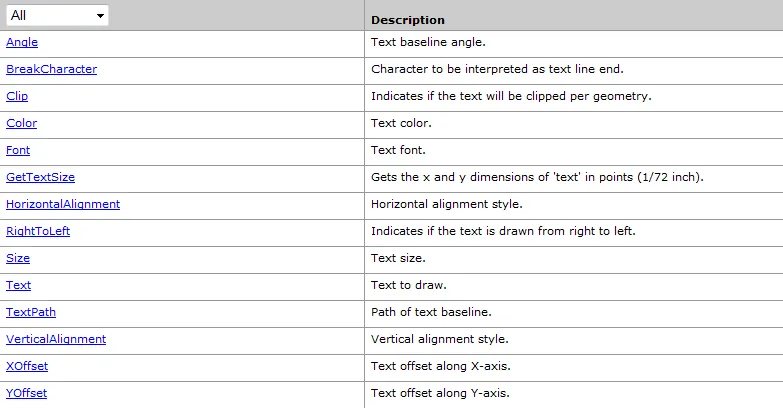
BezierTextPath对象可以让文字的路径按照贝塞尔曲线设置。
ITextPath接口提供用来计算每个字符文字路径的位置。
IFormattedTextSymbol接口用来设置背景对象、阴影等属性
|
1
2
3
4
5
6
7
8
9
10
11
12
13
14
15
16
17
18
19
20
21
22
23
24
25
26
27
28
29
30
31
32
33
34
35
36
37
38
39
40
41
42
43
44
45
46
47
48
49
50
51
52
53
54
55
56
57
58
59
60
61
62
63
64
65
66
67
68
69
70
71
72
73
74
75
76
77
78
79
80
81
82
83
84
85
86
87
88
89
90
91
92
93
94
95
96
97
98
|
private
void
textSybmolToolStripMenuItem_Click(
object
sender, EventArgs e)
{
ITextSymbol textSymbol =
new
TextSymbolClass();
System.Drawing.Font drawFont =
new
System.Drawing.Font(
"宋体"
, 16, FontStyle.Bold);
stdole.IFontDisp fontDisp = (stdole.IFontDisp)(
new
stdole.StdFontClass());
textSymbol.Font = fontDisp;
textSymbol.Color = getRGB(0, 255, 0);
textSymbol.Size = 20;
IPolyline polyline =
new
PolylineClass();
IPoint point =
new
PointClass();
point.PutCoords(1, 1);
polyline.FromPoint = point;
point.PutCoords(10, 10);
polyline.ToPoint = point;
ITextPath textPath =
new
BezierTextPathClass();
//创建简单标注
ILineSymbol lineSymbol =
new
SimpleLineSymbolClass();
lineSymbol.Color = getRGB(255, 0, 0);
lineSymbol.Width = 5;
ISimpleTextSymbol simpleTextSymbol = textSymbol
as
ISimpleTextSymbol;
simpleTextSymbol.TextPath = textPath;
object
oLineSymbol = lineSymbol;
object
oTextSymbol = textSymbol;
IActiveView activeView =
this
.axMapControl1.ActiveView;
activeView.ScreenDisplay.StartDrawing(activeView.ScreenDisplay.hDC, (
short
)esriScreenCache.esriNoScreenCache);
activeView.ScreenDisplay.SetSymbol(oLineSymbol
as
ISymbol);
activeView.ScreenDisplay.DrawPolyline(polyline
as
IGeometry);
activeView.ScreenDisplay.SetSymbol(oTextSymbol
as
ISymbol);
activeView.ScreenDisplay.DrawText(polyline
as
IGeometry,
"简单标注"
); ;
activeView.ScreenDisplay.FinishDrawing();
//创建气泡标注(两中风格,一种是有锚点,一种是marker方式)
//锚点方式
ISimpleFillSymbol simpleFillSymbol =
new
SimpleFillSymbolClass();
simpleFillSymbol.Color = getRGB(0, 255, 0);
simpleFillSymbol.Style = esriSimpleFillStyle.esriSFSSolid;
IBalloonCallout balloonCallout =
new
BalloonCalloutClass();
balloonCallout.Style = esriBalloonCalloutStyle.esriBCSRectangle;
balloonCallout.Symbol = simpleFillSymbol;
balloonCallout.LeaderTolerance = 10;
point.PutCoords(5, 5);
balloonCallout.AnchorPoint = point;
IGraphicsContainer graphicsContainer = activeView
as
IGraphicsContainer;
IFormattedTextSymbol formattedTextSymbol =
new
TextSymbolClass();
formattedTextSymbol.Color = getRGB(0, 0, 255);
point.PutCoords(10, 5);
ITextBackground textBackground = balloonCallout
as
ITextBackground;
formattedTextSymbol.Background = textBackground;
activeView.ScreenDisplay.StartDrawing(activeView.ScreenDisplay.hDC, (
short
)esriScreenCache.esriNoScreenCache);
activeView.ScreenDisplay.SetSymbol(formattedTextSymbol
as
ISymbol);
activeView.ScreenDisplay.DrawText(point
as
IGeometry,
"气泡1"
);
activeView.ScreenDisplay.FinishDrawing();
//marker方式
textSymbol =
new
TextSymbolClass();
textSymbol.Color = getRGB(255, 0, 0);
textSymbol.Angle = 0;
textSymbol.RightToLeft =
false
;
textSymbol.VerticalAlignment = esriTextVerticalAlignment.esriTVABaseline;
textSymbol.HorizontalAlignment = esriTextHorizontalAlignment.esriTHAFull;
IMarkerTextBackground markerTextBackground =
new
MarkerTextBackgroundClass();
markerTextBackground.ScaleToFit =
true
;
markerTextBackground.TextSymbol = textSymbol;
IRgbColor rgbColor =
new
RgbColorClass();
IPictureMarkerSymbol pictureMarkerSymbol =
new
PictureMarkerSymbolClass();
//string fileName = @"E:\vs2005\第五章\lesson2\lesson2\data\qq.bmp";
string
path = Directory.GetCurrentDirectory();
string
fileName = path +
@"\qq.bmp"
;
pictureMarkerSymbol.CreateMarkerSymbolFromFile(esriIPictureType.esriIPictureBitmap, fileName);
pictureMarkerSymbol.Angle = 0;
pictureMarkerSymbol.BitmapTransparencyColor = rgbColor;
pictureMarkerSymbol.Size = 20;
pictureMarkerSymbol.XOffset = 0;
pictureMarkerSymbol.YOffset = 0;
markerTextBackground.Symbol = pictureMarkerSymbol
as
IMarkerSymbol;
formattedTextSymbol =
new
TextSymbolClass();
formattedTextSymbol.Color = getRGB(255, 0, 0);
fontDisp.Size = 10;
fontDisp.Bold =
true
;
formattedTextSymbol.Font = fontDisp;
point.PutCoords(15, 5);
formattedTextSymbol.Background = markerTextBackground;
activeView.ScreenDisplay.StartDrawing(activeView.ScreenDisplay.hDC, (
short
)esriScreenCache.esriNoScreenCache);
activeView.ScreenDisplay.SetSymbol(formattedTextSymbol
as
ISymbol);
activeView.ScreenDisplay.DrawText(point
as
IGeometry,
"气泡2"
);
activeView.ScreenDisplay.FinishDrawing();
}
|
五、3DChartSymbol对象
是一个抽象类,有三个子类:BarChart(用来着色)、PieChart、StaekedChart。
它实现多个接口:IChartSymbol、IBarChartSymbol、IPieChartSymbol和IStackedSymbol等。
IChartSymbol接口主要用于计算一个ChartSymbol对象中的柱状和饼状部分的尺寸,其中Maximum值是创建3DChartSymbol对象后必须设置的一个属性,着色一般在一个要素图层上进行,因而可以从它的要素类中获得一系列的数值统计值。如果有三个数值参与着色,系统则必须对三个数值进行大小比较,找出最大的那个赋值给Maximum。Value属性用数组来设置柱状高度或饼状宽度。可以用ISymbolArray来管理多个参与着色的符号对象。
BarChartSymbol对象实现IBarChartSymbol接口,用不同类型的柱子代表一个要素中的不同属性,高度取决于属性值得大小。
PieChartSymbol对象实现IPieChartSymbol接口,用一个饼图来显示一个要素中的不同属性,不同属性按照他们的数值大小,占有不同比例的扇形区域。
StackedSymbol对象实现IStackedSymbol接口,堆积的柱子表示一个要素中的不同属性,Fixed属性为true时,每个柱子的高度都一样,false时,柱子尺寸根据要素类的属性来计算得出。
