iOS:选择器控件UIPickerView的详解和演示

简介:

选择器控件UIPickerView:

功能:它能够创建一个类似于密码锁式的单列或多列的选择菜单,用户可以通过它设置的代理来选择需要菜单中的任意的数据。例如创建日历、字体表(类型、大小、颜色)、图库等.
 
它是UIView视图的子类,而且遵从UIPickerViewDelegate协议和UIPickerViewDataSource协议。因此,选择器需要设置代理去进行操作;
设置视图控制器self为数据源代理和数据操作代理,即
@property(strong,nonatomic)UIPickerView *pickerView;
self.pickerView.dataSource = self;
self.pickerView.delegate  = self;
 
一、具体类信息:

 @protocol UIPickerViewDataSource, UIPickerViewDelegate;

 @interface UIPickerView : UIView <NSCoding>

 @property(nonatomic,assign) id<UIPickerViewDataSource> dataSource; // default is nil,设置代理

 @property(nonatomic,assign) id<UIPickerViewDelegate>   delegate;  // default is nil,设置代理

 @property(nonatomic)  BOOL showsSelectionIndicator;    // default is NO

 @property(nonatomic,readonly) NSInteger numberOfComponents; //列数


二、协议UIPickerViewDataSource

@protocol UIPickerViewDataSource<NSObject>

@required //必须要实现的方法

// 返回的列显示的数量。

- (NSInteger)numberOfComponentsInPickerView:(UIPickerView *)pickerView;

//返回行数在每个组件(每一列)

- (NSInteger)pickerView:(UIPickerView *)pickerView numberOfRowsInComponent:(NSInteger)component;

@end


三、协议UIPickerViewDelegate

@protocol UIPickerViewDelegate<NSObject>

@optional //可以选择执行的方法

//每一列组件的列宽度

- (CGFloat)pickerView:(UIPickerView *)pickerView widthForComponent:(NSInteger)component;

//每一列组件的行高度

- (CGFloat)pickerView:(UIPickerView *)pickerView rowHeightForComponent:(NSInteger)component;

// 返回每一列组件的每一行的标题内容

- (NSString *)pickerView:(UIPickerView *)pickerView titleForRow:(NSInteger)row forComponent:(NSInteger)component;

// 返回每一列组件的每一行的标题内容的属性

- (NSAttributedString *)pickerView:(UIPickerView *)pickerView attributedTitleForRow:(NSInteger)row forComponent:(NSInteger)component;

// 返回每一列组件的每一行的视图显示

- (UIView *)pickerView:(UIPickerView *)pickerView viewForRow:(NSInteger)row forComponent:(NSInteger)component reusingView:(UIView *)view;

//执行选择某列某行的操作

- (void)pickerView:(UIPickerView *)pickerView didSelectRow:(NSInteger)row inComponent:(NSInteger)component;

@end
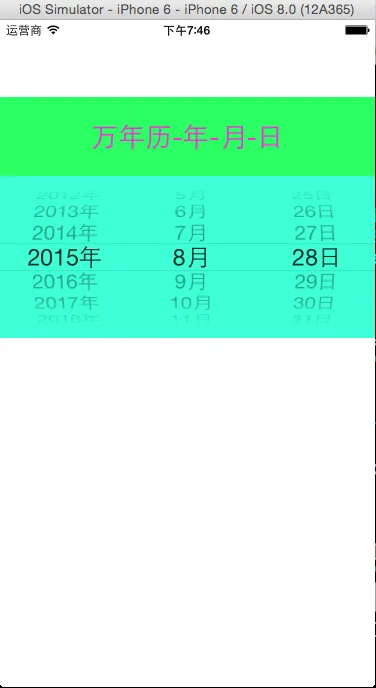
 
   
演示一:制作简单的万年历,一开始就显示当前日期
源码如下:
复制代码
1 #import <UIKit/UIKit.h>
2 
3 @interface ViewController : UIViewController<UIPickerViewDataSource,UIPickerViewDelegate>
4 @property(nonatomic,strong)NSArray *years;
5 @property(nonatomic,strong)NSArray *months;
6 @property(nonatomic,strong)NSArray *days;
7 
8 @end
复制代码
  View Code


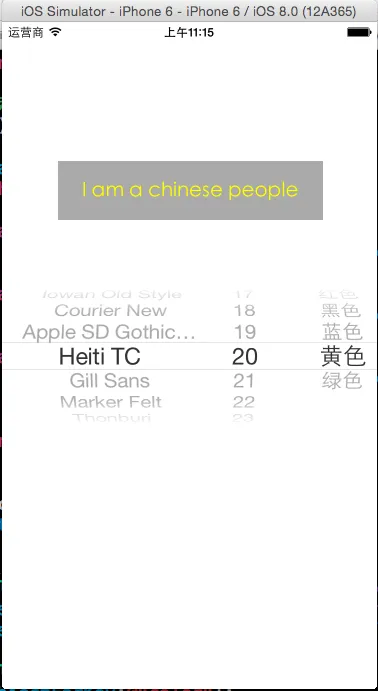
演示二:制作简单的字体表,包括字体类型、大小、颜色

源码如下:

复制代码
1 #import <UIKit/UIKit.h>
2 
3 @interface ViewController : UIViewController<UIPickerViewDataSource,UIPickerViewDelegate>
4 @property(nonatomic,strong) NSArray *fontNames;
5 @property(nonatomic,strong) NSArray *fontSizes;
6 @property(nonatomic,strong) NSArray *fontColors;
7 @end
复制代码
  View Code


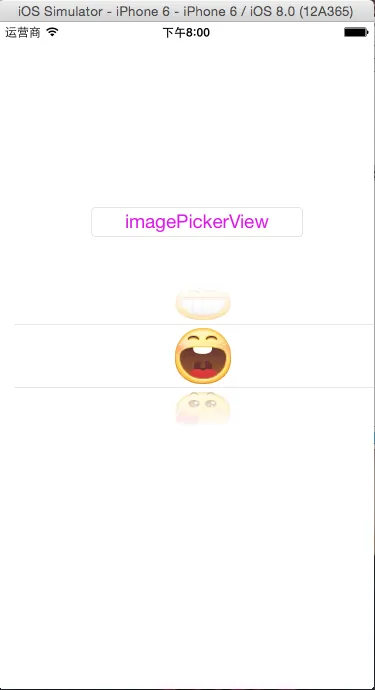
演示三:制作简单的图库浏览器

源码如下:

#import <UIKit/UIKit.h>
@interface ViewController : UIViewController<UIPickerViewDelegate,UIPickerViewDataSource>
@end
  View Code

 

程序猿神奇的手,每时每刻,这双手都在改变着世界的交互方式!


本文转自当天真遇到现实博客园博客,原文链接:http://www.cnblogs.com/XYQ-208910/p/4767710.html,如需转载请自行联系原作者
目录
相关文章
|
Web App开发 小程序 Android开发
uniapp TC-scroll-view 横向和纵向滚动 带滚动回调
422 0
|
10月前
|
缓存 安全 网络协议
借助Java,让Cloudflare API为你的网站管理加速
在数字化时代,网站与应用的稳定运行至关重要。Cloudflare API作为得力助手,可高效管理网站功能。本文深入探讨基于Java的Cloudflare API自动化操作,涵盖DNS管理、防火墙配置、缓存清理、SSL/TLS设置及Worker脚本部署等核心功能。同时,提供环境准备、认证配置、最佳实践(如请求重试与批量优化)、错误处理及安全增强措施的详细指导。通过这些步骤,构建稳定高效的自动化管理系统,助力网站稳健前行。
317 0
|
机器学习/深度学习 人工智能 算法
国内首家! 阿里云人工智能平台 PAI 通过 ITU 国际标准测评
阿里云人工智能平台 PAI 顺利通过中国信通院组织的 ITU-T AICP-GA国际标准和《智算工程平台能力要求》国内标准一致性测评,成为国内首家通过该标准的企业。阿里云人工智能平台 PAI 参与完成了智算安全、AI 能力中心、数据工程、模型开发训练、模型推理部署等全部八个能力域,共计220余个用例的测试,并100%通过测试要求,获得了 ITU 国际标准和国内可信云标准评估通过双证书。
国内首家! 阿里云人工智能平台 PAI 通过 ITU 国际标准测评
|
物联网 vr&ar Android开发
移动应用与系统:探索现代移动技术的发展趋势####
【10月更文挑战第29天】 本文深入探讨了移动应用开发和移动操作系统的最新趋势,分析了它们对日常生活和行业的影响。随着智能手机的普及和技术的进步,移动应用和操作系统不断进化,以满足用户的需求和期望。文章将通过具体案例和数据分析,揭示这一领域的创新点和未来发展方向。 ####
|
Perl
pod spec lint编译时报The 'Pods-App' target has transitive dependencies that include static binaries错误问题
336 1
|
监控 Python
`pytest-qt` 是一个用于在 Qt 应用程序中进行 GUI 测试的 pytest 插件。
|
监控 Java Linux
问题回顾:Unable to start web server; nested exception is org.springframework.boot.web.server.
解决“Unable to start web server; nested exception is org.springframework.boot.web.server.WebServerException”这一问题,关键在于细致的故障诊断和逻辑推理。从日志入手,逐步排查端口冲突、依赖问题、配置错误、资源限制、代码bug以及版本兼容性等多个方面,最终定位并解决根本原因。每一步操作都应谨慎且有针对性,确保修改一处后充分测试,避免引入新的问题。
4151 0
|
并行计算 PyTorch 算法框架/工具
NumPy 高级教程——GPU 加速
NumPy 高级教程——GPU 加速【1月更文挑战第4篇】
1545 1
|
Prometheus 监控 Cloud Native
Spring Boot中使用Micrometer进行指标监控
|
弹性计算 固态存储 调度
阿里云服务器部署配置选择全攻略,ECS实例规格、CPU内存配置
阿里云服务器部署配置选择全攻略,ECS实例规格、CPU内存配置,CPU内存、公网带宽和系统盘怎么选择?个人用户选择轻量应用服务器或ECS通用算力型u1云服务器,企业用户选择ECS计算型c7、通用型g7云服务器,阿里云百科分享阿里云服务器配置选择方法