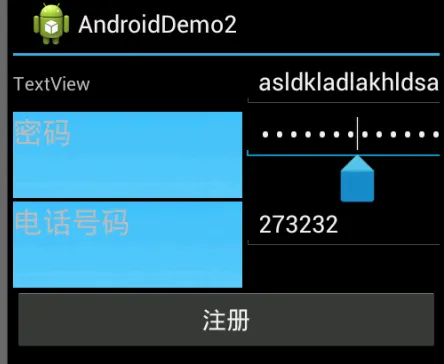
还是先上传图片把。设计的很丑,脏了大家的眼球了。实现的基本需求,没有详细的设计高度,宽度什么的。还没添加验证功能,待完善。
代码如下:
|
1
2
3
4
5
6
7
8
9
10
11
12
13
14
15
16
17
18
19
20
21
22
23
24
25
26
27
28
29
30
31
32
33
34
35
36
37
38
39
40
41
42
43
44
45
46
47
48
49
50
51
52
53
54
55
56
57
58
59
60
61
62
63
64
65
66
67
68
69
70
71
72
73
74
|
<?
xml
version="1.0" encoding="utf-8"?>
<
TableLayout
xmlns:android="http://schemas.android.com/apk/res/android"
android:layout_width="fill_parent"
android:layout_height="fill_parent"
android:orientation="vertical"
>
<
TableRow
android:id="@+id/tableRow1"
android:layout_width="wrap_content"
android:layout_height="wrap_content" >
<
TextView
android:id="@+id/textView1"
android:layout_width="wrap_content"
android:layout_height="wrap_content"
android:text="TextView" />
<
EditText
android:layout_width="fill_parent"
android:layout_height="wrap_content"
android:hint="请填写登陆账号"
android:selectAllOnFocus="true"
/>
</
TableRow
>
<
TableRow
android:id="@+id/tableRow2"
android:layout_width="wrap_content"
android:layout_height="wrap_content" >
<
TextView
android:id="@+id/textView2"
android:layout_width="wrap_content"
android:layout_height="wrap_content"
android:text="密码"
android:textSize="10pt"
android:background="@drawable/image"
/>
<
EditText
android:layout_width="fill_parent"
android:layout_height="wrap_content"
android:password="true"
/>
</
TableRow
>
<
TableRow
android:id="@+id/tableRow3"
android:layout_width="wrap_content"
android:layout_height="wrap_content" >
<
TextView
android:id="@+id/textView3"
android:layout_width="fill_parent"
android:layout_height="wrap_content"
android:text="电话号码"
android:textSize="10pt"
android:background="@drawable/image"
/>
<
EditText
android:layout_height="wrap_content"
android:layout_width="fill_parent"
android:hint="请输入您的电话号码"
android:selectAllOnFocus="true"
android:phoneNumber="true"
/>
</
TableRow
>
<
Button
android:id="@+id/button1"
android:layout_width="wrap_content"
android:layout_height="wrap_content"
android:text="注册" />
</
TableLayout
>
|
==============================================================================
本文转自被遗忘的博客园博客,原文链接:http://www.cnblogs.com/rollenholt/archive/2012/05/17/2505925.html,如需转载请自行联系原作者