我用Selenium写了一个人人网相册备份工具,亲测通过。
需要输入你的用户名、密码、相册地址。
代码如下:
using System;
using System.Collections.Generic;
using System.Linq;
using System.Text;
using System.Threading.Tasks;
using OpenQA.Selenium;
using OpenQA.Selenium.IE;
using OpenQA.Selenium.Interactions;
using OpenQA.Selenium.Support.UI;
using System.Threading;
using System.IO;
using System.Net;

namespace RenrenBackup
{
    public class Program
    {
        static void Main(string[] args)
        {
            //Configuration.
            Program pp = new Program();
            string url = "http://www.renren.com";
            string userName = "";
string pwd = "";
            string albumUrl = "";
            //Start backup.
            IWebDriver iw = new InternetExplorerDriver();
            iw = pp.Login(url, pwd, userName, iw);
            iw.Navigate().GoToUrl(albumUrl);
            pp.WaitUntilPageLoadedID(iw, "c-b-describe");
            List<string> photoUrls = new List<string>();
            var photos = iw.FindElements(By.ClassName("photo-box"));
            var count = iw.FindElement(By.Id("album-count")).Text;
            while (photos.Count() != Int32.Parse(count))
            {
                try
                {
                    String setScroll = "document.documentElement.scrollTop=" + 9000;
                    ((IJavaScriptExecutor)iw).ExecuteScript(setScroll);
                    Thread.Sleep(3000);
                    photos = iw.FindElements(By.ClassName("photo-box"));
                }
                catch (Exception ex)
                {
                    WriteLog(ex);
                }
            }
            string value;
            for (int i = 0; i < photos.Count(); i++)
            {
                value = iw.FindElements(By.XPath("//a/img[@class='p-b-item']"))[i].GetAttribute("data-viewer");
                value = value.Split(',')[4].Split('"')[3].Trim();
                photoUrls.Add(value);
            }
            pp.WriteToFile(photoUrls);
            string filePath;
            string folderPath = @Environment.GetFolderPath(Environment.SpecialFolder.DesktopDirectory) + @"\" + iw.FindElement(By.Id("album-name")).Text;
            if (!Directory.Exists(folderPath))
            {
                Directory.CreateDirectory(folderPath);
            }
            for (int i = 0; i < photoUrls.Count(); i++)
            {
                filePath = folderPath + @"\" + i + "pic.jpg";
                WebClient myWebClient = new WebClient();
                try
                {
                    myWebClient.DownloadFile(photoUrls[i], filePath);
                }
                catch (Exception ex)
                {
                    WriteLog(ex);
                }
            }
        }

        public void WriteToFile(List<string> photoUrls)
        {
            string file = @Environment.GetFolderPath(Environment.SpecialFolder.DesktopDirectory) + @"\PhotoUrls.txt";
            if (File.Exists(file))
            {
                using (StreamWriter sw = new StreamWriter(file, true))
                {
                    foreach (string photoUrl in photoUrls)
                    {
                        sw.Write(photoUrl + "\r\n");
                        sw.Flush();
                    }
                }
            }
            else
            {
                File.Create(file).Close();
                using (StreamWriter sw = new StreamWriter(file, true))
                {
                    foreach (string photoUrl in photoUrls)
                    {
                        sw.Write(photoUrl + "\r\n");
                        sw.Flush();
                    }
                }
            }
        }

        public void WriteToFile(string v)
        {
            string file = @Environment.GetFolderPath(Environment.SpecialFolder.DesktopDirectory) + @"\PhotoUrls.txt";
            if (File.Exists(file))
            {
                using (StreamWriter sw = new StreamWriter(file, true))
                {
                    sw.Write(v + "\r\n");
                    sw.Flush();
                }
            }
            else
            {
                File.Create(file).Close();
                using (FileStream fs = new FileStream(file, FileMode.Open))
                {
                    using (StreamWriter sw = new StreamWriter(fs))
                    {
                        sw.Write(v + "\r\n");
                        sw.Flush();
                    }
                }
            }
        }

        public IWebDriver Login(string url, string pwd, string userName, IWebDriver iw)
        {
            iw.Navigate().GoToUrl(url);
            WaitUntilPageLoadedID(iw, "email");
            iw.FindElement(By.Id("email")).SendKeys(userName);
            iw.FindElement(By.Id("password")).SendKeys(pwd);
            iw.FindElement(By.Id("login")).Click();
            WaitUntilPageLoadedXPath(iw, "//span[text()='我的相册']");
            return iw;
        }
        public void WaitUntilPageLoadedID(IWebDriver iw, string id)
        {
            try
            {
                iw.FindElement(By.Id(id));
            }
            catch (Exception ex)
            {
                Console.WriteLine(ex);
                Thread.Sleep(2000);
                WaitUntilPageLoadedID(iw, id);
            }
        }

        public void WaitUntilPageLoadedXPath(IWebDriver iw, string v)
        {
            try
            {
                iw.FindElement(By.XPath(v));
            }
            catch (Exception ex)
            {
                Console.WriteLine(ex.ToString());
                Thread.Sleep(1000);
                WaitUntilPageLoadedXPath(iw, v);
            }
        }

        private static void WriteLog(Exception ex)
        {
            string logUrl = Environment.GetFolderPath(Environment.SpecialFolder.DesktopDirectory) + "\\DownloadLog.txt";
            if (File.Exists(@logUrl))
            {
                using (FileStream fs = new FileStream(logUrl, FileMode.Append))
                {
                    using (StreamWriter sw = new StreamWriter(fs, Encoding.Default))
                    {
                        try
                        {
                            sw.Write(ex);
                        }
                        catch (Exception ex1)
                        {
                            WriteLog(ex1);
                        }
                        finally
                        {
                            sw.Close();
                            fs.Close();
                        }
                    }
                }
            }
            else
            {
                using (FileStream fs = new FileStream(logUrl, FileMode.CreateNew))
                {
                    using (StreamWriter sw = new StreamWriter(fs, Encoding.Default))
                    {
                        try
                        {
                            sw.Write(ex);
                        }
                        catch (Exception ex1)
                        {
                            WriteLog(ex1);
                        }
                        finally
                        {
                            sw.Close();
                            fs.Close();
                        }
                    }
                }
            }
        }
    }
}
引用如下:
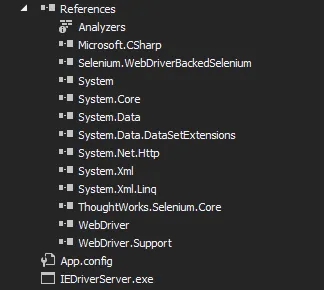
注意设置IEDriverServer.exe的属性为“Copy aLways”。
运行后会在桌面生成一个和你人人网相册同名的文件夹,下面保存的是你的相册相片。桌面还会有下载的图片的详细url列表以及如果有异常会产生的log文件。
OK,回家。