
目标
实现类似插件 wow.js 的页面滚动时,加载动画的效果( wow.js的教程详见 https://blog.csdn.net/weixin_41192489/article/details/111088137)
实现思路
根据指定元素与浏览器窗口顶部的距离是否小于浏览器窗口的高度来判断元素是否进入浏览器窗口
核心要点
1. 要动态生成ref , 避免组件复用时,出现重复的ref (注意:要在页面加载前执行,即放在created 生命周期中)
        created() {
            // 动态生成ref
            this.ref = (Math.random() * 10000000).toString(16).substr(0, 4) + (new Date()).getTime() + Math.random().toString().substr(2, 5);
        },
2. 获取浏览器窗口高度
// 获取浏览器窗口高度
this.screeHeight = document.documentElement.clientHeight
3. 在滚动事件中,实时更新浏览器窗口高度(因浏览器缩放时,浏览器窗口高度会发生变化)
4. 获取元素与浏览器窗口顶部之间的距离
// 获取元素与浏览器窗口顶部之间的距离
let targetTop = this.$refs[this.ref].getBoundingClientRect().top
s-scroll 完整代码
src/plugins/SUI/s-scroll.vue
<template>
    <div style="display: inline-block;">
        <transition
                :enter-active-class="inClass"
                :leave-active-class="outClass"
        >
            <div v-show="show" :ref="ref">
                <slot></slot>
            </div>
        </transition>
    </div>
</template>
<script>
    export default {
        props: {
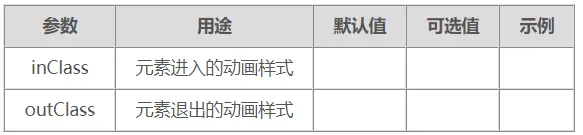
            inClass: String,
            outClass: String
        },
        data() {
            return {
                screeHeight: 0,
                ref: '',
                show: false,
            }
        },
        created() {
            // 动态生成ref
            this.ref = (Math.random() * 10000000).toString(16).substr(0, 4) + (new Date()).getTime() + Math.random().toString().substr(2, 5);
        },
        mounted() {
            this.$nextTick(
                () => {
// 获取浏览器窗口高度
this.screeHeight = document.documentElement.clientHeight
                    // 监听页面滚动事件
                    window.addEventListener("scroll", this.scrolling)
                    this.scrolling()
                }
            )
        },
        methods: {
            scrolling() {
                // 更新浏览器窗口高度
                this.screeHeight = document.documentElement.clientHeight
// 获取元素与浏览器窗口顶部之间的距离
let targetTop = this.$refs[this.ref].getBoundingClientRect().top
                // 当距离小于浏览器窗口的高度(即元素进入浏览器窗口时),开启过渡动画,显示元素
                if (targetTop < this.screeHeight) {
                    this.show = true;
                } else {
                    this.show = false;
                }
            },
        }
    }
</script>
<style scoped>
</style>
使用范例代码
<template>
    <div>
        <div class="box100">0</div>
        <div class="box100">100</div>
        <div class="box100">200</div>
        <div class="box100">300</div>
        <div class="box100">400</div>
        <div class="box100">500</div>
        <div class="box100">600</div>
        <div class="box100">700</div>
        <s-scroll
                inClass="rollIn"
                outClass="rollOut"
        >
            <div class="circle200">自定义动画</div>
        </s-scroll>
        <s-scroll
                inClass="animate__animated animate__rollIn  animate__slower"
                outClass="animate__animated animate__rollOut  animate__slower"
        >
            <div class="circle200">animate.css动画</div>
        </s-scroll>
        <div class="box100">1000</div>
        <div class="box100">1100</div>
        <div class="box100">1200</div>
    </div>
</template>
<script>
    export default {}
</script>
<style scoped>
    .box100 {
        height: 100px;
        background: #3a8ee6;
        border: 1px solid black;
    }

    .circle200 {
        height: 200px;
        width: 200px;
        background: red;
        border-radius: 50%;
        text-align: center;
        line-height: 200px;
    }

    /*滚入——从左侧*/
    @keyframes rollIn {
        0% {
            opacity: 0;
            transform: translate(-100%) rotate3d(0, 0, 1, -360deg);
        }
        100% {
            opacity: 1;
        }
    }

    /*滚出——从左侧*/
    @keyframes rollOut {
        0% {
            opacity: 1;
        }
        100% {
            opacity: 0;
            transform: translate(-100%) rotate3d(0, 0, 1, -360deg);
        }
    }

    /*滚入——从左侧*/
    /deep/ .rollIn {
        animation: rollIn 1s;
    }

    /*滚出——从左侧*/
    /deep/ .rollOut {
        animation: rollOut 1s;
    }
</style>
