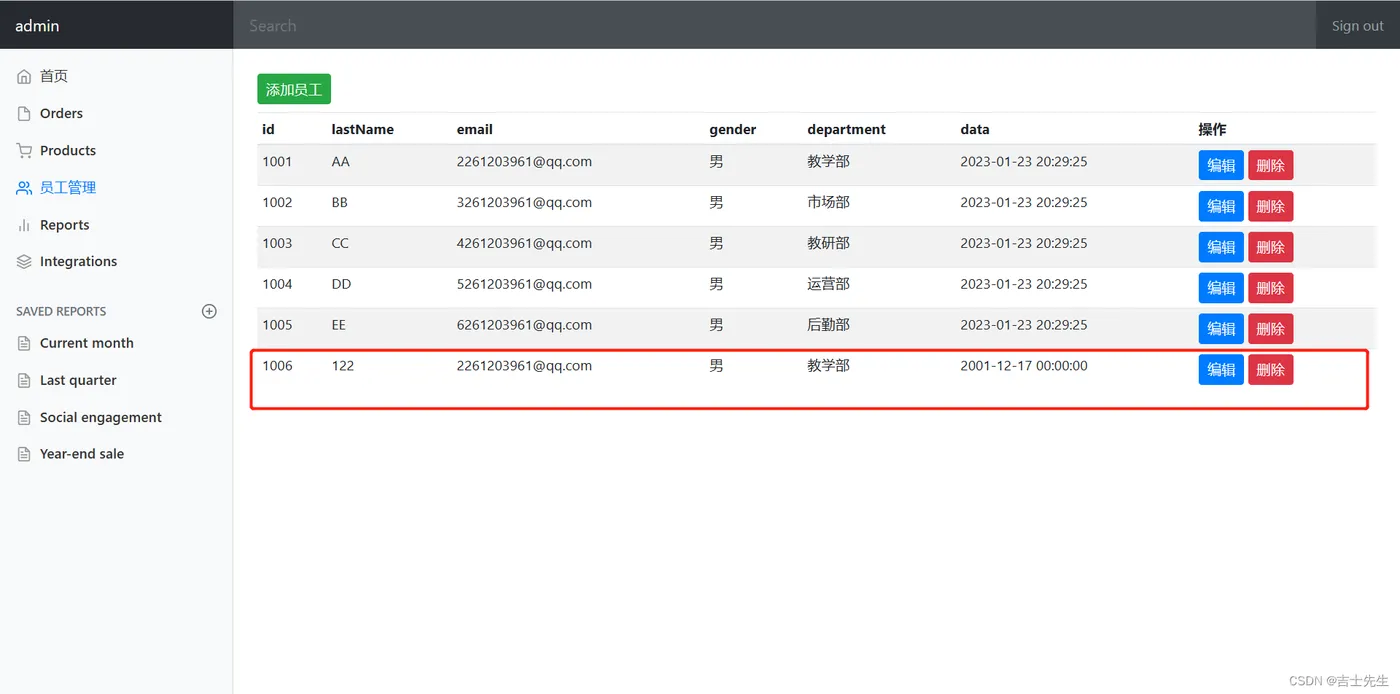
7.添加员工
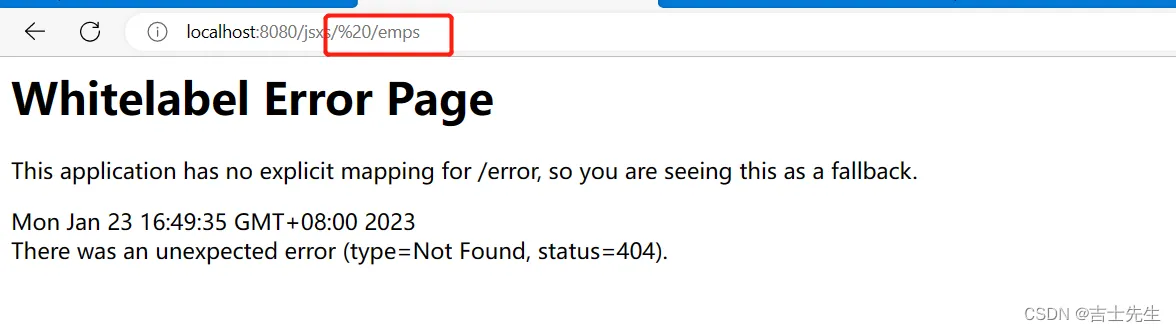
(1).重定向注意事项
重定向的时候,我们的格式是死的,我们不能添加空格
错误演示
//    这里是进行实际的业务操作  post提交
    @PostMapping("/emp")
    public String add(){
//        重定向的时候,格式是死的,不能随意添加空格,否则会报404页面
        return "redirect: /emps";
    }
正确演示
//    这里是进行实际的业务操作  post提交
    @PostMapping("/emp")
    public String add(){
//        重定向的时候,格式是死的,不能随意添加空格,否则会报404页面
        return "redirect:/emps";
    }
(2).添加员工的页面
add.html
post提交
- 我们的name属性都需要与实体类的属性名一致
- 下拉框: 我们要设置成th:text,且th:vale并且select 这个标签中要设置成name= department.id
<select class="form-control" name="department.id">
<!--           我们遍历获得到的部门数据,然后绑定text 为 DepartmentName ; value为Id -->
            <option th:each="department:${departments}" th:text="${department.getDepartmentName()}" th:value="${department.getId()}"></option>
          </select>
<!DOCTYPE html>
<!-- saved from url=(0052)http://getbootstrap.com/docs/4.0/examples/dashboard/ -->
<html lang="en" xmlns:th="http://www.thymeleaf.org">
<head>
  <meta http-equiv="Content-Type" content="text/html; charset=UTF-8">
  <meta name="viewport" content="width=device-width, initial-scale=1, shrink-to-fit=no">
  <meta name="description" content="">
  <meta name="author" content="">
  <title>Dashboard Template for Bootstrap</title>
  <!-- Bootstrap core CSS -->
  <link th:href="@{/asserts/css/bootstrap.min.css}" rel="stylesheet">
  <!-- Custom styles for this template -->
  <link th:href="@{/asserts/css/dashboard.css}" rel="stylesheet">
  <style type="text/css">
    /* Chart.js */
    @-webkit-keyframes chartjs-render-animation {
      from {
        opacity: 0.99
      }
      to {
        opacity: 1
      }
    }
    @keyframes chartjs-render-animation {
      from {
        opacity: 0.99
      }
      to {
        opacity: 1
      }
    }
    .chartjs-render-monitor {
      -webkit-animation: chartjs-render-animation 0.001s;
      animation: chartjs-render-animation 0.001s;
    }
  </style>
</head>
<body>
<!-- 顶部导航栏  -->
<div th:replace="~{commons/commons::topbar}"></div>
<div class="container-fluid">
  <div class="row">
    <!--    设置插入语句,  ~{被插入页面的名字:: th:fragment的名字 }      -->
    <div th:replace="~{commons/commons::silderbar(active='list.html')}"></div>
    <main role="main" class="col-md-9 ml-sm-auto col-lg-10 pt-3 px-4">
<!--    在这里我们使用post的提交 所以我们可以起同样的名字  -->
      <form th:action="@{/emp}" method="post">
        <div class="form-group">
          <label>LastName</label>
          <input type="text" name="lastName" class="form-control" placeholder="吉士先生">
        </div>
        <div class="form-group">
          <label>Email</label>
          <input type="email" name="email" class="form-control" placeholder="2261203961@qq.com">
        </div>
        <div class="form-group">
          <label>Gender</label><br>
          <div class="form-check form-check-inline">
            <input class="form-check-input" type="radio" name="gender" value="1">
            <label class="form-check-label">男</label>
          </div>
          <div class="form-check form-check-inline">
            <input class="form-check-input" type="radio" name="gender" value="0">
            <label class="form-check-label">女</label>
          </div>
        </div>
        <div class="form-group">
          <label>department</label>
          <!--我们在controller接受的是一个employee,所以我们需要提交的其中的一个属性-->
          <select class="form-control" name="department.id">
<!--           我们遍历获得到的部门数据,然后绑定text 为 DepartmentName ; value为Id -->
            <option th:each="department:${departments}" th:text="${department.getDepartmentName()}" th:value="${department.getId()}"></option>
          </select>
        </div>
        <div class="form-group">
          <label>Birth</label>
          <input type="text" name="data" class="form-control" placeholder="2001/12/17">
        </div>
        <button type="submit" class="btn btn-primary">添加</button>
      </form>
    </main>
  </div>
</div>
<!-- Bootstrap core JavaScript
================================================== -->
<!-- Placed at the end of the document so the pages load faster -->
<script type="text/javascript" th:src="@{/asserts/js/jquery-3.2.1.slim.min.js}"></script>
<script type="text/javascript" th:src="@{/asserts/js/popper.min.js}"></script>
<script type="text/javascript" th:src="@{/asserts/js/bootstrap.min.js}"></script>
<!-- Icons -->
<script type="text/javascript" th:src="@{/asserts/js/feather.min.js}"></script>
<script>
  feather.replace()
</script>
<!-- Graphs -->
<script type="text/javascript" th:src="@{/asserts/js/Chart.min.js}"></script>
<script>
  var ctx = document.getElementById("myChart");
  var myChart = new Chart(ctx, {
    type: 'line',
    data: {
      labels: ["Sunday", "Monday", "Tuesday", "Wednesday", "Thursday", "Friday", "Saturday"],
      datasets: [{
        data: [15339, 21345, 18483, 24003, 23489, 24092, 12034],
        lineTension: 0,
        backgroundColor: 'transparent',
        borderColor: '#007bff',
        borderWidth: 4,
        pointBackgroundColor: '#007bff'
      }]
    },
    options: {
      scales: {
        yAxes: [{
          ticks: {
            beginAtZero: false
          }
        }]
      },
      legend: {
        display: false,
      }
    }
  });
</script>
</body>
</html>
(3).controller层的实现
我们调用Emplyee里面的方法
package com.jsxs.controller;
import com.jsxs.dao.DepartmentDao;
import com.jsxs.dao.EmployeeDao;
import com.jsxs.pojo.Department;
import com.jsxs.pojo.Employee;
import org.springframework.beans.factory.annotation.Autowired;
import org.springframework.stereotype.Controller;
import org.springframework.ui.Model;
import org.springframework.web.bind.annotation.GetMapping;
import org.springframework.web.bind.annotation.PostMapping;
import org.springframework.web.bind.annotation.RequestMapping;
import org.springframework.web.bind.annotation.RestController;
import java.util.Collection;
@Controller
public class EmployeeController {
    @Autowired
    private EmployeeDao employeeDao;
    @Autowired
    private DepartmentDao departmentDao;
    @RequestMapping("/emps")
    public String Employee(Model model){
        Collection<Employee> all = employeeDao.getAll();
        model.addAttribute("list",all);
        return "emp/list";
    }
//    这里是跳转页面  get提交
    @GetMapping("/emp")
    public String addEmployee(Model model){
//        在我们跳转页面之前,我们要先查出所有的部门信息
        Collection<Department> departments = departmentDao.getDepartments();
        model.addAttribute("departments",departments);
        return "/emp/add";
    }
//    这里是进行实际的业务操作  post提交
    @PostMapping("/emp")
    public String add(Employee employee){
        employeeDao.save(employee);
        System.out.println(employee);
//        重定向的时候,格式是死的,不能随意添加空格,否则会报404页面
        return "redirect:/emps";
    }
}
(4).解决疑惑
为什么我们只需要在下拉框中选择一个部门的名字就可以实现对部门类的添加?
- 因为我们th:text获取的是名字,然而th:value获取的是部门id.并且在select提交的时候的name值是遍历后对应的部门id。所以我们上传到后端的数据将会是一个id
- 又因为我们在employeeDao中设置了save()添加部门的方法。所以我们只需要提供一个id就会生成一个部门的对象。
/**
 *  增加一个员工
  */
    public void save(Employee employee){   //我们这里接受一个数据,她的信息是--》Employee 这个类
        if (employee.getId()==null){  //假如添加的员工id为空,那么我们就进行自增的操作
            employee.setId(initID++);
        }
        // 这里是我们为员工设置部门
        employee.setDepartment(departmentDao.getDepartmentByID(employee.getDepartment().getId()));  //我们这里调用了DepartmentDao,并且调用 通过id进行查找部门的方法
        //  这个是向数据库员工表中 添加员工信息
        employees.put(employee.getId(),employee);
    }