
使用Vue实现简单的用户登录界面,登录成功以后查询账号用户类型进行相应的页面路由跳转,效果如下图所示: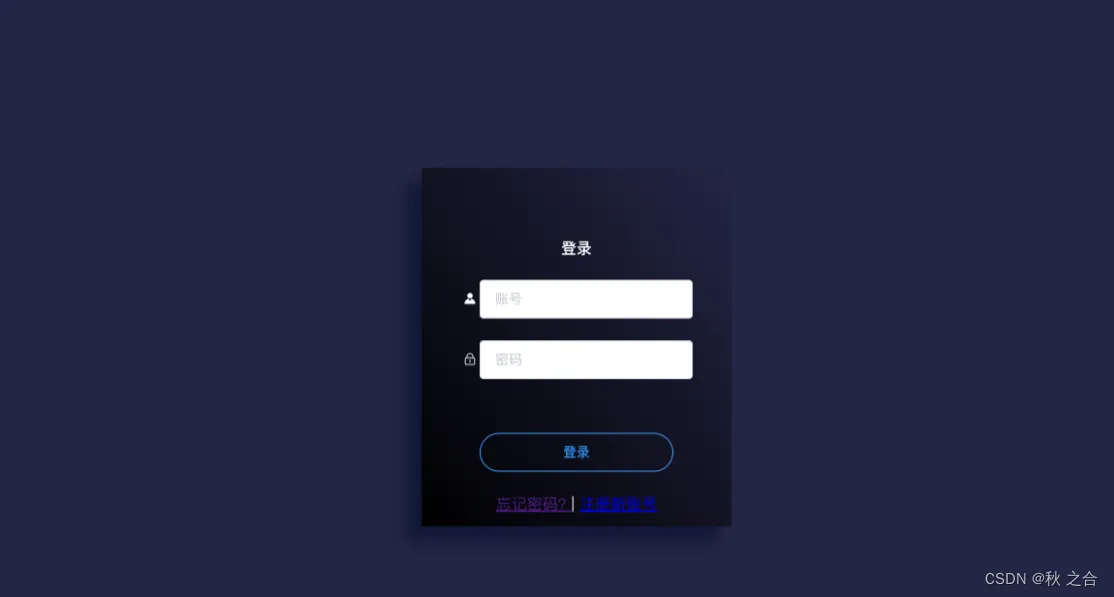
HTML部分:
<template>
  <div class="login">
    <div class="mylogin" align="center">
      <h4>登录</h4>
      <el-form
        :model="loginForm"
        :rules="loginRules"
        ref="loginForm"
        label-width="0px"
      >
        <el-form-item label="" prop="account" style="margin-top: 10px">
          <el-row>
            <el-col :span="2">
              <span class="el-icon-s-custom"></span>
            </el-col>
            <el-col :span="22">
              <el-input
                class="inps"
                placeholder="账号"
                v-model="loginForm.account"
              >
              </el-input>
            </el-col>
          </el-row>
        </el-form-item>
        <el-form-item label="" prop="passWord">
          <el-row>
            <el-col :span="2">
              <span class="el-icon-lock"></span>
            </el-col>
            <el-col :span="22">
              <el-input
                class="inps"
                type="password"
                placeholder="密码"
                v-model="loginForm.passWord"
              ></el-input>
            </el-col>
          </el-row>
        </el-form-item>
        <el-form-item style="margin-top: 55px">
          <el-button type="primary" round class="submitBtn" @click="submitForm"
            >登录
          </el-button>
        </el-form-item>
        <div class="unlogin">
          <router-link :to="{ path: '/forgetpwd' }"> 忘记密码? </router-link>
          |
          <router-link :to="{ path: '/register' }">
            <a href="register.vue" target="_blank" align="right">注册新账号</a>
          </router-link>
        </div>
      </el-form>
    </div>
  </div>
</template>
JS部分
<script>
import { mapMutations } from "vuex";
export default {
  name: "Login",
  data: function () {
    return {
      loginForm: {
        account: "",
        passWord: "",
      },
      loginRules: {
        account: [{ required: true, message: "请输入账号", trigger: "blur" }],
        passWord: [{ required: true, message: "请输入密码", trigger: "blur" }],
      },
    };
  },
  methods: {
    ...mapMutations(["changeLogin"]),
    submitForm() {
      const userAccount = this.loginForm.account;
      const userPassword = this.loginForm.passWord;
      if (!userAccount) {
        return this.$message({
          type: "error",
          message: "账号不能为空!",
        });
      }
      if (!userPassword) {
        return this.$message({
          type: "error",
          message: "密码不能为空!",
        });
      }
      console.log("用户输入的账号为:", userAccount);
      console.log("用户输入的密码为:", userPassword);
    },
  },
};
</script>
CSS部分
  .login {
    width: 100vw;
    padding: 0;
    margin: 0;
    height: 100vh;
    font-size: 16px;
    background-position: left top;
    background-color: #242645;
    color: #fff;
    font-family: "Source Sans Pro";
    position: relative;
  }
  .mylogin {
    width: 240px;
    height: 280px;
    position: absolute;
    top: 0;
    left: 0;
    right: 0;
    bottom: 0;
    margin: auto;
    padding: 50px 40px 40px 40px;
    box-shadow: -15px 15px 15px rgba(6, 17, 47, 0.7);
    opacity: 1;
    background: linear-gradient(
      230deg,
      rgba(53, 57, 74, 0) 0%,
      rgb(0, 0, 0) 100%
    );
  }
  .inps input {
    border: none;
    color: #fff;
    background-color: transparent;
    font-size: 12px;
  }
  .submitBtn {
    background-color: transparent;
    color: #39f;
    width: 200px;
  }
有反应不显示输入框问题的同学,需要在mian.js文件里面引入element UI组件库奥~,引入方式可见elementUI官网,即需要先在项目中安装ElementUI,然后在main.js文件中添加以下内容引入 Element:
//安装Element UI
npm i element-ui -S
// main.js中引入ElementUI
import ElementUI from 'element-ui';
import 'element-ui/lib/theme-chalk/index.css';
Vue.use(ElementUI);
