之前都用Sleep()来控制画面帧率,忽略了绘制画面的时间
如果绘制画面需要很长的时间,那么就不能忽略了。
并且SlQueryPerformanceCounter(&startCount);//获取起始计数,并保存在startCount里面eep()函数也不是特别准确,那么就要精准控制帧率了
🚥🚥🚥🚥🚥🚥
开始时间 结束时间 频率F
LARGE_INTEGER startCount,endCount,F;
获取计数器累加频率
QueryPerformanceFrequency(&F);
获取当前的计数值
QueryPerformanceCounter(&startCount);//获取起始计数,并保存在startCount里面
获取终止计数
QueryPerformanceCounter(&endCount);
计算时差
long long elapse=(endCount.QuadPart-startCount.QuadPart)*1000000/F.QuadPart;//根据LARGE_INTEGER的定义,elapse必须是long long 类型的
查询是否超时
while (elapse < 1000000 / 60){//最长等待时间为60帧每秒
  Sleep(1);//先休眠1ms,防止CPU使用率过高
    QueryPerformanceCounter(&endCount);
    elapse = (endCount.QuadPart - startCount.QuadPart) * 1000000 / F.QuadPart;
}
这时候如果执行代码会发现,虽然我们指定了Sleep(1),但是还是休眠了15ms
这是因为

要解决这个问题,就要加上
timeBeginPeriod(1);//改变定时器时钟分辨率为1ms
timeEndPeriod(1);
这里如果运行的话会报错,因为
timeBeginPeriod()和 timeEndPeriod()的实现在 库winmm.lib中
解决方法如下
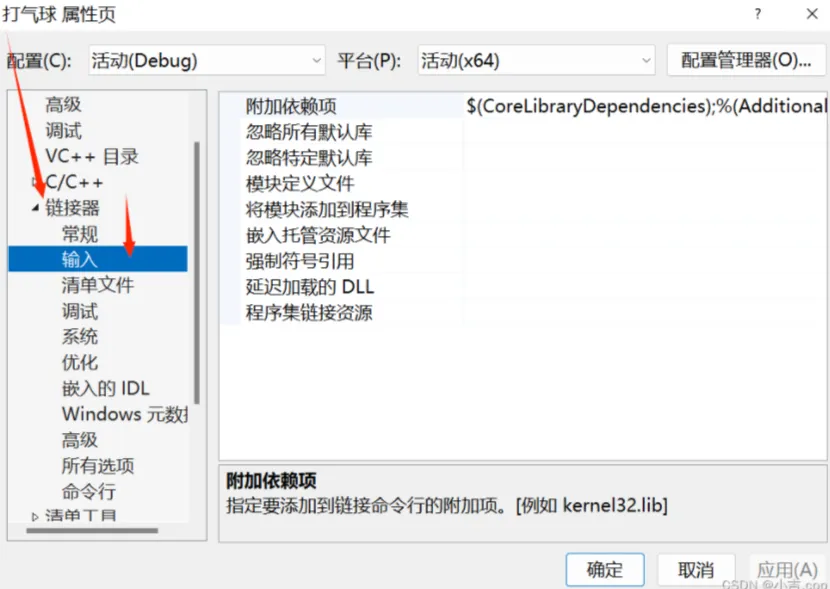

把winmm.lib添加到附加依赖项中

当然,绘制画面也得加上下面的函数
BeginBatchDraw();
EndBatchDraw();
🚥🚥🚥🚥🚥🚥
下面咱们来看一个打气球小游戏,把上面的帧率控制代码进行实操
//看着气球在画面中是分散的,其实可以把他们想象成是在一个数组里面的,然后进行操作
#include<easyx.h>
#include<stdio.h>
#include<math.h>
#define WIDTH 800//窗体宽度
#define HEIGHT 600//窗体高度
#define NUM 5//窗体中的气球数量
#define RADIUS 30//气球半径
//保存气球的各项数据
typedef struct {
  int x;
  int y;
  int r;//半径
  int v;//速度
  COLORREF color;
}balloon;
//生成气球,并初始化
balloon generateBalloon()//因为arrBalloons[]是balloon类型的,所以generateBalloon()也应该是balloon类型的
{
  balloon b;
  int m, n;
  m = 100;
  n = 700;
  b.x = rand() % (n - m + 1) + m;
  b.y = HEIGHT;
  b.r = RADIUS;
  m = 1;
  n = 3;
  b.v = rand() % (n - m + 1) + m;
  b.color = RGB(rand() % 256, rand() % 256, rand() % 256);
  return b;
}
int main()
{
  initgraph(WIDTH, HEIGHT);
  setbkcolor(WHITE);
  cleardevice();
  balloon arrBalloons[NUM];//保存目前窗体出现的气球数量
  for (int i = 0; i < NUM; i++)//给每一个气球赋值(大小,颜色)
  {
    arrBalloons[i] = generateBalloon();
  }
  int current = NUM;//当前出现的气球数量
  int mouseX = 0, mouseY = 0;//鼠标位置
  timeBeginPeriod(1);
  LARGE_INTEGER startCount, endCount, F;
  QueryPerformanceFrequency(&F);
  BeginBatchDraw();
  while (1)
  {
    QueryPerformanceCounter(&startCount);
    cleardevice();
    for (int i = 0; i < NUM; i++)//绘制气球
    {
      setfillcolor(arrBalloons[i].color);
      solidcircle(arrBalloons[i].x, arrBalloons[i].y, arrBalloons[i].r);
    }
    for (int i = 0; i < NUM; i++)//移动气球
    {
      arrBalloons[i].y -= arrBalloons[i].v;
    }
    int i = 0;
    while (i < current)
    {
      int y = arrBalloons[i].y;
      if (y < -RADIUS)//气球飞出窗体
      {
        for (int j = i; j < current - 1; j++)//删除飞出的气球
        {
          arrBalloons[j] = arrBalloons[j + 1];
        }
        current--;
      }
      else
      {
        i++;
      }
    }
    if (current < NUM)//新增气球
    {
      arrBalloons[current] = generateBalloon();
      current++;
    }
    //绘制准心
    setlinecolor(RGB(237, 178, 29));
    setlinestyle(PS_SOLID, 3);
    circle(mouseX, mouseY, 20);
    line(mouseX - 20, mouseY, mouseX + 20, mouseY);//准心使用了mouseX,mouseY,便于准心可以与鼠标指针一起移动
    line(mouseX, mouseY - 20, mouseX, mouseY + 20);
    QueryPerformanceCounter(&endCount);
    long long elapse = (endCount.QuadPart - startCount.QuadPart) * 1000000 / F.QuadPart;
    while (elapse < 1000000 / 60)//最长等待时间为60帧每秒
    {
      Sleep(1);
      ExMessage msg;
      bool isOK = peekmessage(&msg, EX_MOUSE);
      if (isOK = true)
      {
        if (msg.message == WM_MOUSEMOVE)//鼠标移动消息
        {               //更新鼠标位置
          mouseX = msg.x;
          mouseY = msg.y;
        }
        else if (msg.message == WM_LBUTTONDOWN)//鼠标点击消息
        {
          int i = 0;
          while (i < current)
          {
            int ballX = arrBalloons[i].x;
            int ballY = arrBalloons[i].y;
            int distance = (int)sqrt(pow(ballY - msg.y, 2) + pow(ballX - msg.x, 2));
            if (distance < RADIUS)//如果点击到了气球,就把气球删除
            {
              for (int j = i; j < current - 1; j++)
              {
                arrBalloons[j] = arrBalloons[j + 1];
              }
              current--;
            }
            else
            {
              i++;
            }
          }
        }
      }
      QueryPerformanceCounter(&endCount);
      elapse = (endCount.QuadPart - startCount.QuadPart) * 1000000 / F.QuadPart;
    }
    FlushBatchDraw();
  }
  EndBatchDraw();
  timeEndPeriod(1);
  closegraph();
  return 0;
}
//看着气球在画面中是分散的,其实可以把他们想象成是在一个数组里面的,然后进行操作
Code over!