补充
1.<!doctype html> 有助于浏览器正常显示网页,给浏览器说明使用的html版本,不分大小写
2.html缩写内容中,只有内的内容会显示在网页中
3.为防止中文乱码,编码格式设置为utf-8,有的浏览器编码格式为GBK,那就把编码格式设置成gbk;
一、网页基本信息
二、网页基本标签
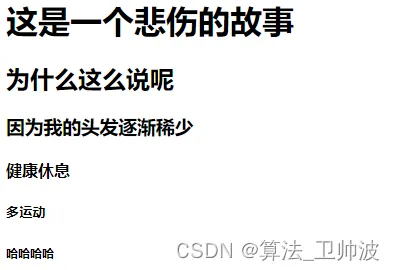
2.1 标题标签
<h1>一级标签</h1>
<h2>二级标签</h2>
<h3>三级标签</h3>
<h4>四级标签</h4>
<h5>五级标签</h5>
<h6>六级标签</h6>
效果:
2.2 段落标签
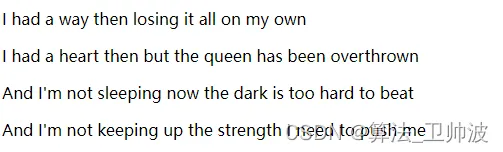
<p>I had a way then losing it all on my own</p>
<p>I had a heart then but the queen has been overthrown</p>
<p>And I'm not sleeping now the dark is too hard to beat</p>
<p>And I'm not keeping up the strength I need to push me</p>
效果
2.3 换行标签
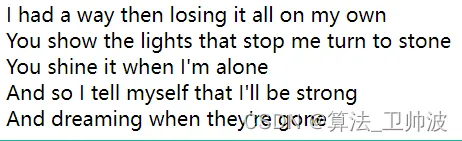
I had a way then losing it all on my own<br/>
You show the lights that stop me turn to stone<br/>
You shine it when I'm alone<br/>
And so I tell myself that I'll be strong<br/>
And dreaming when they're gone<br/>
效果:间距相对于分段小很多
2.4 水平线标签
<hr/>
效果
2.5 字体样式标签
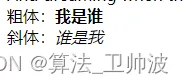
粗体:<Strong>我是谁</Strong>
斜体:<em>谁是我</em>
效果:
2.5 注释和特殊符号
<!--注释--> 快捷键ctrl+/ <br/> 特殊符号如: 空格: 我是 谁 我是 谁 连续多个普通空格只会显示一个 html中空格用 来表示
效果:

2.6 块元素和行内元素
块元素:一块一块表现出来的,比如 段落标签和标题标签
行内元素; 展现的内容是在一行内拓展开来
三、图像标签
<img stc = "填写图片的相对路径或者绝对路径" alt="照片找不到就会显示alt内的内容" title ="鼠标悬停在照片上会显示内容" width="宽度" height="高度" ..其他可以另外设置>
效果:
照片路经找到:

没有找到路径:
四、链接标签
4.1 文本超链接和图片超链接
<a href="path链接路径" target="目标窗口 _self 本窗口 _blank另开窗口">链接文本或者图像 图像的话 可以塞在里面</a>
4.2 页面间链接
<a href ="http://www.baidu.com" target=“_blank”>点击此处跳转到百度</a>
4.3 锚链接
<a name = "top"></a>
<a href = "#top">回到顶部</a>
//
<a href = "http://www.baidu.com">跳转到百度底部</a>
4.4功能性链接
<!--邮箱链接-->
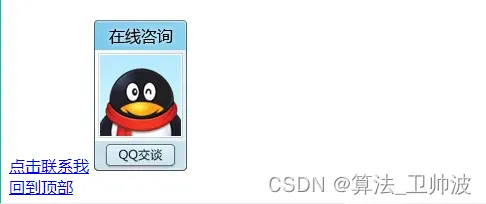
<a href = "mailto:123456789!@qq.com">点击联系我</a>;
<!--qq链接-->
<a target="_blank" href="http://wpa.qq.com/msgrd?v=3&uin=&site=qq&menu=yes"><img border="0" src="http://wpa.qq.com/pa?p=2:输入qq号:53" alt="你好 加个好友吧" title="你好 加个好友吧"/></a>
效果:
五、列表和表格
5.1 有序列表
<!--  有序-->
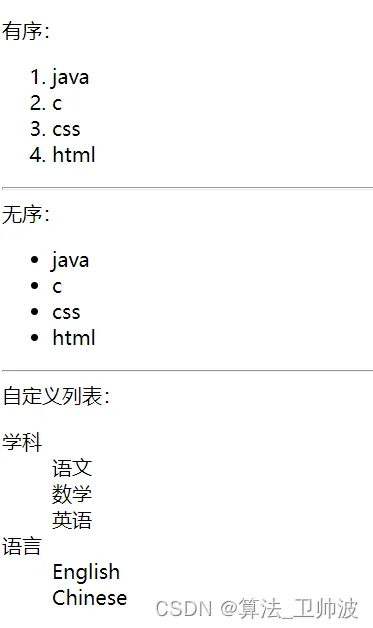
有序:
<ol>
    <li>java</li>
    <li>c</li>
    <li>css</li>
    <li>html</li>
</ol>
5.2 无序列表
<!--  无序-->
无序:
<ul>
    <li>java</li>
    <li>c</li>
    <li>css</li>
    <li>html</li>
5.3 自定义列表
<!--  有序-->
自定义列表:
<dl>
    <dt>学科</dt>
    <dd>语文</dd>
    <dd>数学</dd>
    <dd>英语</dd>
    <dt>语言</dt>
    <dd>English</dd>
    <dd>Chinese</dd>
</dl>
效果:
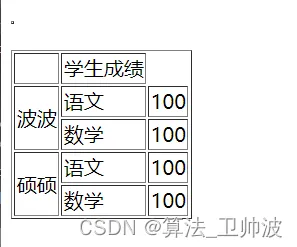
<tr> 表示行
<td> 表示列
<table border="lpx">
    <table border = "lpx">
        <tr>
            <td></td>
            <td colspan="">学生成绩</td>
        </tr>
        <tr>
            <td rowspan="2">波波</td>
            <td >语文</td>
            <td >100</td>
        </tr>
        <tr>
            <td >数学</td>
            <td >100</td>
        </tr>
        <tr>
            <td rowspan = "2">硕硕</td>
            <td >语文</td>
            <td>100</td>
        </tr><tr>
        <td >数学</td>
        <td>100</td>
    </tr>
效果:
六、视频,音频和表单
6.1 视频
<video src = "文件路径" controls(控制台) autoplay (自动播放)></video>
6.2 音频
<audio src="文件路径" controls(控制台)autoplay(自动播放)></video>
6.3 文本框和单选框 多选框 搜索框 滑块 数字验证 文本域 邮箱验证
<form actioin="http://www.baidu.com" method="get">
<!--    文本输入框:input type= "text"-->
    <p>名字:<input type="text" name="userName" value = ""></p>
<!--    密码版:input type ="password"-->
    <p>密码:<input type="password" name="pwd"></p>
<!--    单选框标签-->
    <p>性别:<input type ="radio" value="boy" name ="sex" checked/>男
            <input type ="radio" value="girl" name="sex"/>女
    </p>
<!--    多选框-->
    <p>爱好:
        <input type="checkbox" value="sleep" name="hobby">睡觉
        <input type="checkbox" value="code" name="hobby" checked>敲代码
        <input type="checkbox" value="chat" name="hobby">聊天
        <input type="checkbox" value="game" name="hobby">游戏
    </p>
<!--    按钮-->
    <p>
    <input type="button" name="btn1" value="点击变长">
        <input type="image" src="../source//image/1.jpg" width="200"  height="200">
    </p>
<!--下拉框-->
    <p>国家
    <select name="列表名称">
        <option value="选项的值">中国</option>
        <option value="选项的值">美国</option>
        <option value="选项的值">瑞士</option>
        <option value="选项的值">印度</option>
    </select>
    </p>
<!--   文本域-->
    <p>
        <textarea name="textarea" cols="50" rows="10"></textarea>
    </p>
<!--   文件域 -->
    <p>
        <input type="file" name="files">
        <input>
    </p>
<!--    邮箱验证-->
    <p>邮箱
        <input type="email" name="email">
    </p>
<!--   URL验证 -->
    <p>url
        <input type="utl" name="url">
    </p>
<!--    数字验证-->
    <p>商品数量
        <input type="number" name="num" max="100" min="0" step="10">
    </p>
<!--    滑块-->
    <p>滑块
        <input type="range" name="voice" min="0" max="100" step="2">
    </p>
<!--    搜索框-->
    <p>搜索
        <input type="search" name="search">
    </p>
    <p>
        <input type="submit">
        <input type="reset">
    </p>
</form>