SpringBoot 整合 FreeMarker
按照 SpringBoot 整合 BootStrap 的Maven方式创建相应的项目。
将模板 ftl 文件放置在 resources/templates 目录下
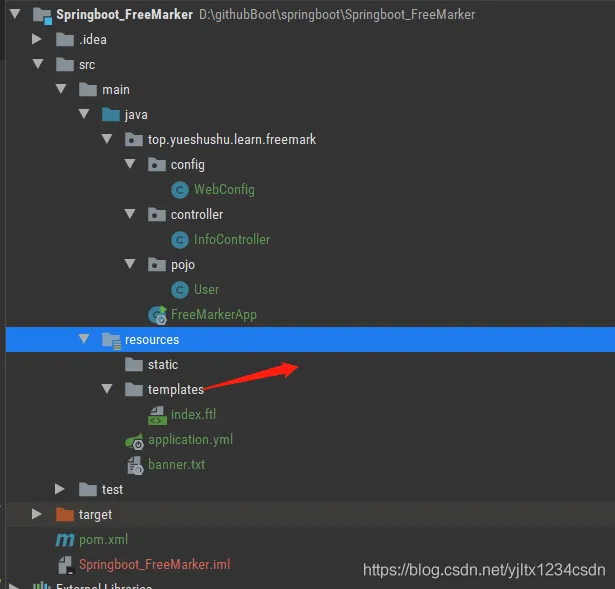
一. 一 pom.xml 添加相应的依赖
 <!--引入 spring-boot-starter-freemarker的依赖-->
        <dependency>
            <groupId>org.springframework.boot</groupId>
            <artifactId>spring-boot-starter-freemarker</artifactId>
        </dependency>
        <!--添加一个webjar jquery-->
        <dependency>
            <groupId>org.webjars</groupId>
            <artifactId>jquery</artifactId>
            <version>3.5.1</version>
        </dependency>
        <!--引入bootstrap-->
        <dependency>
            <groupId>org.webjars</groupId>
            <artifactId>bootstrap</artifactId>
            <version>3.4.1</version>
        </dependency>
一.二 application.yml 配置文件中配置 FreeMarker的相关信息
# 引入 数据库的相关配置
spring:
  datasource:
    driver-class-name: com.mysql.cj.jdbc.Driver
    url: jdbc:mysql://localhost:3306/springboot?serverTimezone=GMT%2B8&useUnicode=true&characterEncoding=UTF-8&useSSL=false&allowMultiQueries=true
    username: root
    password: abc123
    type: com.alibaba.druid.pool.DruidDataSource
  # 配置freemark的相关的信息
  freemarker:
    # 设置文件的路径,对应的是 directoryForTemplateLoading 属性
    # 关闭缓存,及时进行刷新。 上线生产环境,需要改成 true
    cache: false
    # 设置编码的样式
    charset: UTF-8
    #是否检查模板的位置
    check-template-location: false
    # 模板的样式
    content-type: text/html
    # 是否曝露
    expose-request-attributes: true
    expose-session-attributes: true
    request-context-attribute: request
    # 后缀
    suffix: .ftl
    template-loader-path: classpath:/templates/
一.三 配置资源映射
@Configuration
public class WebConfig extends WebMvcConfigurerAdapter {
    /**
     * 配置静态的资源信息
     * @param registry
     */
    @Override
    public void addResourceHandlers(ResourceHandlerRegistry registry) {
        registry.addResourceHandler("doc.html").addResourceLocations("classpath:/META-INF/resources/");
        registry.addResourceHandler("swagger-ui.html").addResourceLocations("classpath:/META-INF/resources/");
        //映射 static 目录
        registry.addResourceHandler("/static/**").addResourceLocations("classpath:/static/");
        //放置其他 业务页面资源
        registry.addResourceHandler("/**").addResourceLocations("classpath:/templates/");
    }
}
一.四 静态资源 index.ftl
放置在 resources/templates 目录下
用的是 webjars 的 bootstrap 的样式。
<html>
<head>
    <title>Welcome ${web} </title>
    <link rel="StyleSheet" href="webjars/bootstrap/3.4.1/css/bootstrap.css" type="text/css">
</head>
<body>
<h1>Welcome ${user}!</h1>
<p>Girl:
    <a href="${info.url}">${info.name}</a>!
<table class="table table-hover">
    <th><td>id编号</td>
    <td>名称</td>
    <td>年龄</td>
    <td>性别</td>
    <td>描述</td>
    </th>
    <#if userList??>
        <#list userList as u>
            <tr><td>${u.id}</td>
                <td>${u.name}</td>
                <td>${u.age}</td>
                <td><#if u.sex==1>男<#else>女</#if></td>
                <td>${u.description}</td>
            </tr>
        </#list>
    <#-- 如果为空的话, #else 表示为空的意义-->
    <#else>
        <tr>
            没有数据
        </tr>
    </#if>
</table>
<script type="text/javascript" src="webjars/jquery/3.5.1/jquery.js"></script>
<script type="text/javascript" src="webjars/bootstrap/3.4.1/js/bootstrap.js"></script>
</body>
</html>
一.五 InfoController 类
老蝴蝶这儿只列举一个简单的查询的方法
@Controller
public class InfoController {
    @RequestMapping("/index")
    public String info(Model model){
        model.addAttribute("web","FreeMarker展示信息");
        model.addAttribute("user","两个蝴蝶飞");
        Map<String,Object> info=new HashMap<>();
        info.put("url","www.yueshushu.top");
        info.put("name","周小欢");
        model.addAttribute("info",info);
        model.addAttribute("userList",getUserList());
        return "index";
    }
    // 不采用数据库查询的方法
    private List<User> getUserList() {
        List<User> userList=new ArrayList<>();
        for(int i=1;i<=10;i++){
            User user=new User();
            user.setId(i);
            user.setName("蝴蝶"+i);
            user.setAge(i*3+1);
            user.setSex(i%2);
            user.setDescription("一个简单的描述");
            userList.add(user);
        }
        return userList;
    }
}
一.六 输入网址,进行访问
http://localhost:8081/FreeMarker/index
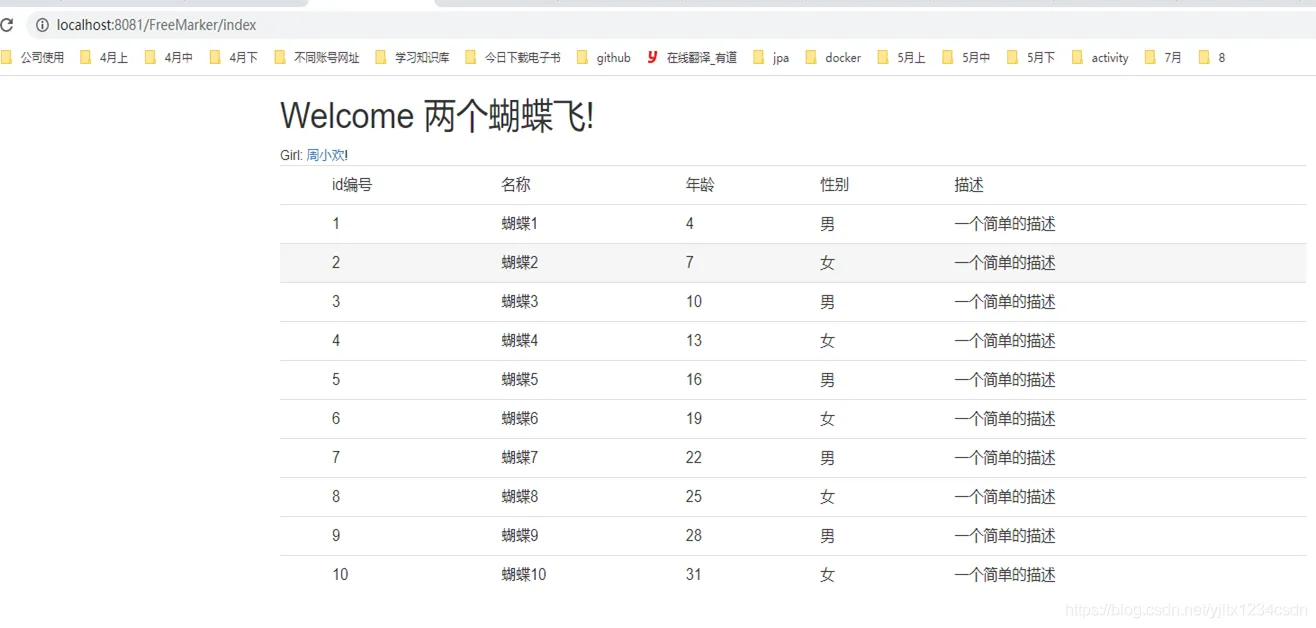
SpringBoot整合 FreeMarker 模板,整合成功。
本章节的代码放置在 github 上:
https://github.com/yuejianli/springboot/tree/develop/Springboot_FreeMarker
谢谢您的观看,如果喜欢,请关注我,再次感谢 !!!