爬前叨叨
2018年就要结束了,还有4天,就要开始写2019年的教程了,没啥感动的,一年就这么过去了,今天要爬取一个网站叫做酷安,是一个应用商店,大家可以尝试从手机APP爬取,不过爬取APP的博客,我打算在50篇博客之后在写,所以现在就放一放啦~~~

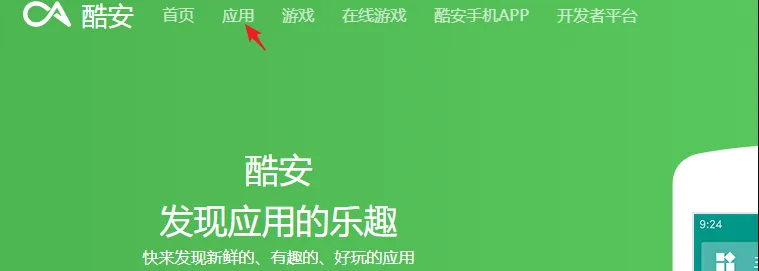
酷安网站打开首页之后是一个广告页面,点击头部的应用即可
页面分析
分页地址找到,这样就可以构建全部页面信息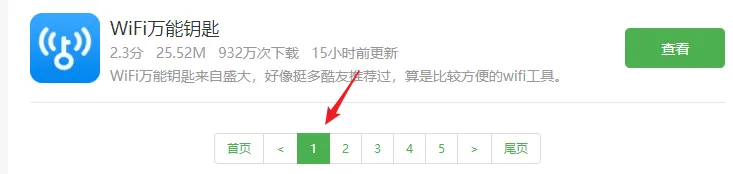
我们想要保存的数据找到,用来后续的数据分析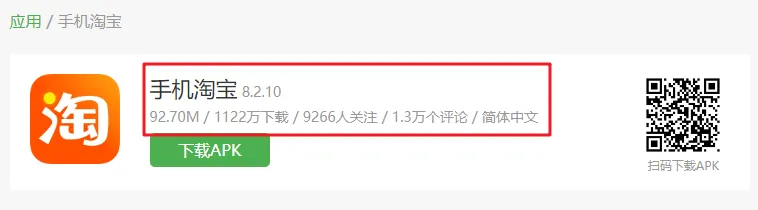
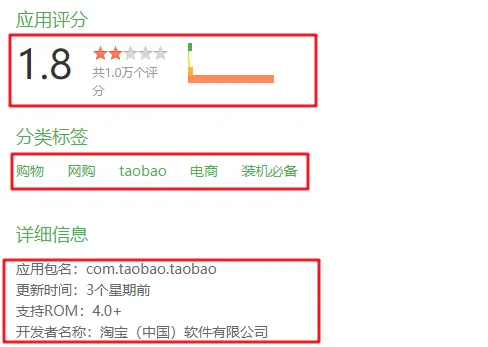
上述信息都是我们需要的信息,接下来,只需要爬取即可,本篇文章使用的还是scrapy,所有的代码都会在文章中出现,阅读全文之后,你就拥有完整的代码啦
import scrapy

from apps.items import AppsItem  # 导入item类
import re  # 导入正则表达式类

class AppsSpider(scrapy.Spider):
    name = 'Apps'
    allowed_domains = ['www.coolapk.com']
    start_urls = ['https://www.coolapk.com/apk?p=1']
    custom_settings = {
        "DEFAULT_REQUEST_HEADERS" :{
            'Accept': 'text/html,application/xhtml+xml,application/xml;q=0.9,*/*;q=0.8',
            'Accept-Language': 'en',
            'User-Agent':'Mozilla/5.0 你的UA'

        }
    }
代码讲解
custom_settings 第一次出现,目的是为了修改默认
setting.py文件中的配置
    def parse(self, response):
        list_items = response.css(".app_left_list>a")
        for item in list_items:
            url = item.css("::attr('href')").extract_first()

            url = response.urljoin(url)

            yield scrapy.Request(url,callback=self.parse_url)

        next_page = response.css('.pagination li:nth-child(8) a::attr(href)').extract_first()
        url = response.urljoin(next_page)
        yield scrapy.Request(url, callback=self.parse)
代码讲解
- response.css 可以解析网页,具体的语法,你可以参照上述代码,重点阅读 ::attr('href') 和 ::text
- response.urljoin 用来合并URL
- next_page 表示翻页
parse_url函数用来解析内页,本函数内容又出现了3个辅助函数,分别是` self.getinfo(response),self.gettags(response), self.getappinfo(response) 还有response.css().re `支持正则表达式匹配,可以匹配文字内部内容
   def parse_url(self,response):
        item = AppsItem()

        item["title"] = response.css(".detail_app_title::text").extract_first()
        info = self.getinfo(response)

        item['volume'] = info[0]
        item['downloads'] = info[1]
        item['follow'] = info[2]
        item['comment'] = info[3]

        item["tags"] = self.gettags(response)
        item['rank_num'] = response.css('.rank_num::text').extract_first()
        item['rank_num_users'] = response.css('.apk_rank_p1::text').re("共(.*?)个评分")[0]
        item["update_time"],item["rom"],item["developer"] = self.getappinfo(response)

        yield item
三个辅助方法如下
    def getinfo(self,response):

        info = response.css(".apk_topba_message::text").re("\s+(.*?)\s+/\s+(.*?)下载\s+/\s+(.*?)人关注\s+/\s+(.*?)个评论.*?")
        return info

    def gettags(self,response):
        tags = response.css(".apk_left_span2")
        tags = [item.css('::text').extract_first() for item in tags]

        return tags

    def getappinfo(self,response):
        #app_info = response.css(".apk_left_title_info::text").re("[\s\S]+更新时间:(.*?)")
        body_text = response.body_as_unicode()

        update = re.findall(r"更新时间:(.*)?[<]",body_text)[0]
        rom =  re.findall(r"支持ROM:(.*)?[<]",body_text)[0]
        developer = re.findall(r"开发者名称:(.*)?[<]", body_text)[0]
        return update,rom,developer
保存数据
数据传输的item在这个地方就不提供给你了,需要从我的代码中去推断一下即可,哈哈
import pymongo

class AppsPipeline(object):

    def __init__(self,mongo_url,mongo_db):
        self.mongo_url = mongo_url
        self.mongo_db = mongo_db

    @classmethod
    def from_crawler(cls,crawler):
        return cls(
            mongo_url=crawler.settings.get("MONGO_URL"),
            mongo_db=crawler.settings.get("MONGO_DB")
        )

    def open_spider(self,spider):
        try:
            self.client = pymongo.MongoClient(self.mongo_url)
            self.db = self.client[self.mongo_db]

        except Exception as e:
            print(e)

    def process_item(self, item, spider):
        name = item.__class__.__name__

        self.db[name].insert(dict(item))
        return item

    def close_spider(self,spider):
        self.client.close()
代码解读
- open_spider 开启爬虫时,打开Mongodb
- process_item 存储每一条数据
- close_spider 关闭爬虫
- 重点查看本方法 from_crawler 是一个类方法,在初始化的时候,从setting.py中读取配置
SPIDER_MODULES = ['apps.spiders']
NEWSPIDER_MODULE = 'apps.spiders'
MONGO_URL = '127.0.0.1'
MONGO_DB = 'KuAn'
得到数据
调整一下爬取速度和并发数
DOWNLOAD_DELAY = 3
# The download delay setting will honor only one of:
CONCURRENT_REQUESTS_PER_DOMAIN = 8
代码走起,经过一系列的努力,得到数据啦!!!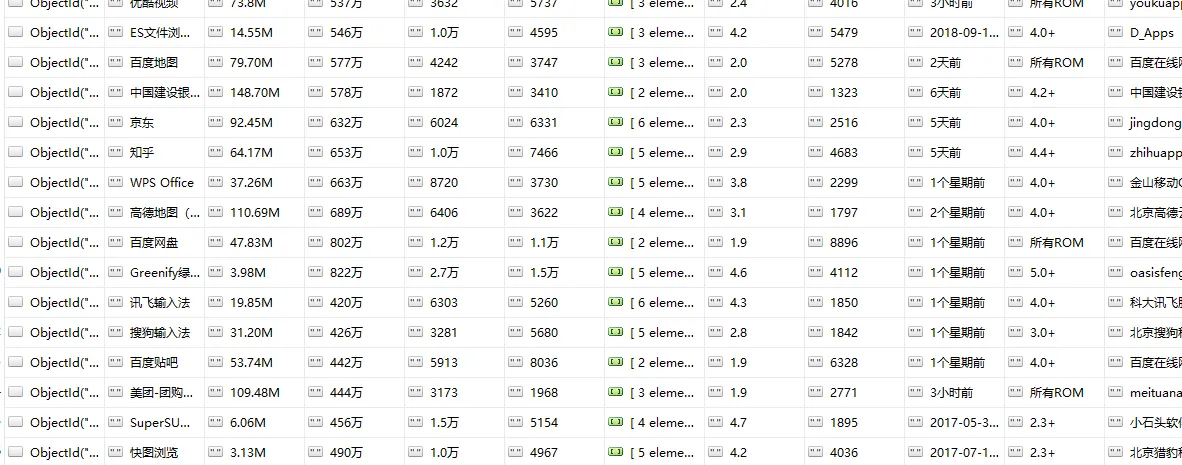
抽空写个酷安的数据分析,有需要源码的,自己从头到尾的跟着写一遍就O98K了