今天重新学习了一下观察者模式,对我的思路产生了启发。进程监控程序之前写过几个,这回换一种思路,改用委托和事件来实现。我已经用序号将关键的几步标注,方便大家理顺思路。代码如下:
using System;
using System.Collections.Generic;
using System.ComponentModel;
using System.Data;
using System.Diagnostics;
using System.Drawing;
using System.Linq;
using System.Text;
using System.Threading.Tasks;
using System.Windows.Forms;

namespace ProcessMonitor
{
    public partial class ProcessMonitorForm : Form
    {
        public ProcessMonitorForm()
        {
            InitializeComponent();
            //Add the processes into the combox.
            var processes = Process.GetProcesses();
            foreach (var process in processes)
            {
                processComboBox.Items.Add(process.ProcessName.ToString());
            }
        }
        //The method that starts the monitor.
        private void startButton_Click(object sender, EventArgs e)
        {
            //4.Register the monitor.
            ProcessExit += new ProcessMonitor(ProExit);
            //Start the check.
            CheckProcess();
        }
        //The mothod that checks the process.
        private void CheckProcess()
        {
            bool flag = true;
            do
            {
                var processes = Process.GetProcesses();
                int count = 0;
                foreach (var process in processes)
                {
                    if (string.Compare(process.ProcessName, processComboBox.Text, true) == 0)
                    {
                        count++;
                    }
                }
                if (count == 0)
                {
                    //5.The event appears.
                    ProcessExit(this, new EventArgs());
                    flag = false;
                }
            } while (flag);
        }
        //1.The delegate that monitor the process.
        public delegate void ProcessMonitor(object sender, EventArgs strEventArg);
        //2.The event that encapsulates the delegate.
        public event ProcessMonitor ProcessExit;
        //3.The method that the delegate calls.
        private void ProExit(object sender, EventArgs strEventArg)
        {
            MessageBox.Show("The target process has been dispeared.");
        }
    }
}
为了不长篇累牍,效果只是简单实现,实际工作中可以随便扩展(选择进程,点击Start按钮进行监控。):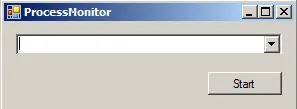
目标程序消失后弹出提示:
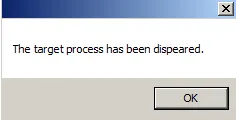
再附上一个脱去委托和事件的版本,代码如下(实现效果相同):
using System;
using System.Collections.Generic;
using System.ComponentModel;
using System.Data;
using System.Diagnostics;
using System.Drawing;
using System.Linq;
using System.Text;
using System.Threading.Tasks;
using System.Windows.Forms;

namespace ProcessMonitor
{
    public partial class ProcessMonitorForm : Form
    {
        public ProcessMonitorForm()
        {
            InitializeComponent();
            //Add the processes into the combox.
            var processes = Process.GetProcesses();
            foreach (var process in processes)
            {
                processComboBox.Items.Add(process.ProcessName.ToString());
            }
        }
        //The method that starts the monitor.
        private void startButton_Click(object sender, EventArgs e)
        {
            //Start the check.
            CheckProcess();
        }
        //The mothod that checks the process.
        private void CheckProcess()
        {
            bool flag = true;
            do
            {
                var processes = Process.GetProcesses();
                int count = 0;
                foreach (var process in processes)
                {
                    if (string.Compare(process.ProcessName, processComboBox.Text, true) == 0)
                    {
                        count++;
                    }
                }
                if (count == 0)
                {
                    ProExit();
                    flag = false;
                }
            } while (flag);
        }
        private void ProExit()
        {
            MessageBox.Show("The target process has been dispeared.");
        }
    }
}
如果用Action内置委托类型来完成的话就更方便了,代码如下(已经用序号标注关键步骤):
using System;
using System.Collections.Generic;
using System.ComponentModel;
using System.Data;
using System.Diagnostics;
using System.Drawing;
using System.Linq;
using System.Text;
using System.Threading.Tasks;
using System.Windows.Forms;

namespace ProcessMonitor
{
    public partial class ProcessMonitorForm : Form
    {
        public ProcessMonitorForm()
        {
            InitializeComponent();
            //Add the processes into the combox.
            var processes = Process.GetProcesses();
            foreach (var process in processes)
            {
                processComboBox.Items.Add(process.ProcessName.ToString());
            }
        }
        //The method that starts the monitor.
        private void startButton_Click(object sender, EventArgs e)
        {
            //Start the check.
            CheckProcess();
        }
        //The mothod that checks the process.
        private void CheckProcess()
        {
            //1.Define the action.
            Action<string> processExit = s => MessageBox.Show(s);
            bool flag = true;
            do
            {
                var processes = Process.GetProcesses();
                int count = 0;
                foreach (var process in processes)
                {
                    if (string.Compare(process.ProcessName, processComboBox.Text, true) == 0)
                    {
                        count++;
                    }
                }
                if (count == 0)
                {
                    //2.Active the action.
                    processExit("The target process has been dispeared.");
                    flag = false;
                }
            } while (flag);
        }
    }
}
脱去委托和事件的版本代码量明显比用委托和事件的代码量少了,为什么我们还要选择用委托和事件来做这件事呢?到底什么情况下,更适合用委托和事件的方式来完成?书中说,委托可以提高方法扩展性,没错,是这样的,说白了就是因为更高级!个人意见哈,在代码量少,以后不需要扩展方法的情况下,用不着用委托和事件的方式去完成,直接调用方法就好了。如果我说错了,欢迎指正我。
利用C#6.0中的语法糖扩展方法来替代foreach循环,代码量将更少。代码如下:
using System;
using System.Collections.Generic;
using System.ComponentModel;
using System.Data;
using System.Diagnostics;
using System.Drawing;
using System.Linq;
using System.Text;
using System.Threading.Tasks;
using System.Windows.Forms;

namespace ProcessMonitor
{
    public partial class ProcessMonitorForm : Form
    {
        public ProcessMonitorForm()
        {
            InitializeComponent();
            //Add the processes into the combox.
            var processes = Process.GetProcesses();
            foreach (var process in processes)
            {
                processComboBox.Items.Add(process.ProcessName.ToString());
            }
        }
        //The method that starts the monitor.
        private void startButton_Click(object sender, EventArgs e)
        {
            //Start the check.
            CheckProcess();
        }
        //The mothod that checks the process.
        private void CheckProcess()
        {
            //1.Define the action.
            Action<string> processExit = s => MessageBox.Show(s);
            bool flag = true;
            do
            {
                var processes = Process.GetProcesses();
                var countVar = processes.Where(i => i.ProcessName == processComboBox.Text);
                if (countVar.Count() == 0)
                {
                    //2.Active the action.
                    processExit("The target process has been dispeared.");
                    flag = false;
                }
            } while (flag);
        }
    }
}