需求
1、在A、B两个AP的log中筛出某个关键字,将比较结果输出
输入:
A log
2023-02-01 17:13:51.988  INFO 48500 --- [pool-1-thread-1707] c.n.fileloader.service.RabbitMQService   : [PARAM-PRINT] 文件名:A1450AOIH05.TXT 开始行:1007  剩余解析数量:0
2023-02-01 17:13:51.997  INFO 48500 --- [pool-1-thread-2942] c.n.fileloader.service.RabbitMQService   : [PARAM-PRINT] 文件名:L2111SEAI01.TXT 开始行:7267  剩余解析数量:1
B log
2023-02-01 17:13:51.988  INFO 48500 --- [pool-1-thread-1707] c.n.fileloader.service.RabbitMQService   : [PARAM-PRINT] 文件名:A1450AOIH05.TXT 开始行:1008  剩余解析数量:0
2023-02-01 17:13:51.997  INFO 48500 --- [pool-1-thread-2942] c.n.fileloader.service.RabbitMQService   : [PARAM-PRINT] 文件名:L2111SEAI01.TXT 开始行:7267  剩余解析数量:1
输出
如果两个日志文件中的指定key的value相等则为true,否则为false
A1450AOIH05 1007 1008 false
2、A和B 中是否有关键字 “开始解析”
            A B
C1310MACR02 0 0
C1310MACR02 0 1
C1310MACR02 1 1
3、B 中是否有关键字 “本次解析结束”
          B
C1310MACR02 0
indexname 1
生成index脚本
#!/bin/bash
# author: ninesun
# date: 2023年2月8日08:55:21
# desc: generate fl redis key
indexprefix=${1-'/202302/08'}
echo '' > /tmp/indexfile
echo '' > /tmp/startline.txt
echo '' > /tmp/lineurl.txt
echo "start generate ..."
# acf
cd /dfs/acf/INDEX/${indexprefix}
for i in `ls | grep -E "^A|^C"`;do echo START_LINE:/INDEX${indexprefix}/$i >> /tmp/startline.txt ;done
for i in `ls | grep -E "^A|^C"`;do echo LINE_URL:/INDEX/202302/02/$i >> /tmp/lineurl.txt ;done
# oc
cd /dfs/oc/INDEX/${indexprefix}
for i in `ls | grep -E "^L"`;do echo LINE_URL:/INDEX${indexprefix}/$i >> /tmp/lineurl.txt ;done
for i in `ls | grep -E "^L"`;do echo START_LINE:/INDEX${indexprefix}/$i >> /tmp/startline.txt ;done
cat /tmp/lineurl.txt | cut -d / -f5| grep -Ev '^$' >> /tmp/indexfile
qty=$(wc -l /tmp/indexfile)
echo "end generate ...,total index: ${qty}"
生成的记过类似于这个. 下面的

shell脚本实现
根据index比较新旧两个log的差异
#!/bin/bash
# date: 2023年2月1日17:48:37
# author: ninesun
# para: 1.old-fl.log 2.new-fl.log 3. indexFile
set -e
pushd `dirname $0` > /dev/null
SCRIPT_PATH=`pwd -P`
popd > /dev/null
SCRIPT_FILE=`basename $0`
if [ $# -eq 3 ];then
    oldLog=${1-'/dev/null'}
    newLog=$2
    indexFile=$3
else
    echo "参数有误"
    exit 8
fi
oldtar=/tmp/old-filter
newtar=/tmp/nwe-filter
startparsekey="开始解析:"
parseendkey="本次解析结束"
part1key="文件名:"
part1key2=" 开始行"
strparseoldtar=/tmp/old-strparse
strparsenewtar=/tmp/nwe-strparse
parseendtar=/tmp/parseend-tar
parseendresult=/tmp/parseend-result
echo '' >${oldtar}
echo '' >${newtar}
echo '' >${strparsenewtar}
echo '' >${strparseoldtar}
echo '' >${parseendtar}
echo '' > /tmp/fl-com-result
echo '' > /tmp/fl-com-result-parse
echo '' > ${parseendresult}
echo "begin filter"
date +"%F %T"
while read line;do
    # 遍历A old log
    oldv=$(grep -E ${part1key}${line} ${oldLog}  | tail -n1 | awk '{print $(NF-2),$(NF-1)}' | tr -dc '0-9.a-zA-Z' | sed 's/txt/txt,/gi')
    # 判空
    [[ -n ${oldv} ]] && echo ${oldv} >> ${oldtar} || echo "${line},NA" >>${oldtar}
    # 遍历B new log
    newv=$(grep -E ${part1key}${line}  ${newLog}  | tail -n1  |awk '{print $(NF-2),$(NF-1)}' | tr -dc '0-9.a-zA-Z' | sed 's/txt/txt,/gi')
    # 判空
    [[ -n ${newLog} ]] && echo ${newv} >> ${newtar} ||  echo "${line},NA" >>${newtar}
    start_parse_line=$(echo ${line} | cut -d . -f1)
done < ${indexFile}
date +"%F %T"
echo "END filter"
function merge () {
    for old in `cat ${oldtar}`;do
        for new in `cat ${newtar}`;do
            #echo "old:$old new:$new"
            indexOld=`echo ${old} | cut -d , -f1`
            indexOldVal=`echo ${old} | cut -d , -f2`
            indexNew=`echo ${new} | cut -d , -f1`
            indexNewVal=`echo ${new} | cut -d , -f2`
            #echo "${indexOld} ${indexOldVal} ${indexNew} ${indexNewVal}"
             if [[ ${indexOld} == ${indexNew} && ${indexOldVal} == ${indexNewVal} ]];then
                echo "${indexOld},${indexOldVal},${indexNewVal},true"  >>/tmp/fl-com-result
                break;
             fi
             if [[ ${indexOld} == ${indexNew} && ${indexOldVal} != ${indexNewVal} ]];then
                 echo "${indexOld},${indexOldVal},${indexNewVal},false"  >>/tmp/fl-com-result
                 break;
             fi
        done
    done
}
function begin-parse () {
    grep -E ${startparsekey} ${oldLog}  | awk '{print $NF}'  | awk -F : '{print $NF}' >> ${strparseoldtar}
    grep -E ${startparsekey} ${newLog}  | awk '{print $NF}'  | awk -F : '{print $NF}' >> ${strparsenewtar}
    for old in `cat ${strparseoldtar}`;do
         #echo "old:$old"
         # grep ${old} ${strparsenewtar} |wc -l
         if [[ `grep ${old} ${strparsenewtar} |wc -l` -eq 1 ]];then
            echo "${old},1,1"  >>/tmp/fl-com-result-parse
         else
             echo "${old},1,0"  >>/tmp/fl-com-result-parse
         fi
    done
}
function parseend(){
    grep -E ${parseendkey} ${newLog}  | awk '{print $NF}'  | awk -F / '{print $NF}' >> ${parseendtar}
    for line in `cat ${parseendtar}`;do
       #echo $line
      if [[ `grep ${line} ${indexFile} |wc -l` -eq 1 ]];then
        echo "${line},1" >> ${parseendresult}
      else
        echo "${line},0" >> ${parseendresult}
      fi
    done
}
echo "----------------------------------------------"
echo "part1 begin"
date +"%F %T"
merge
date +"%F %T"
echo "part1 end,please check,path is : /tmp/fl-com-result"
echo "----------------------------------------------"
echo "part2 begin"
date +"%F %T"
begin-parse
date +"%F %T"
echo "part2 end,please check,path is : /tmp/fl-com-result-parse"
echo "----------------------------------------------"
echo "part3 begin"
date +"%F %T"
parseend
date +"%F %T"
echo "part3 end,please check,path is : /tmp/parseend-result"
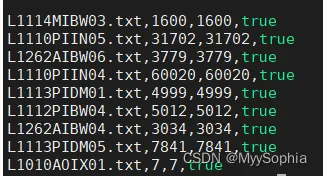
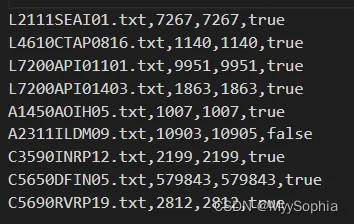
输出字段解释
index,Alog 行号,Blog行号,是否一致
运行脚本:
第1、2个参数是输入的AP日志
第3个参数是变量的indexList(你理解为一个关键字就可以)
bash fl-compare.sh info.log.2023-02-02.12.log info.log.2023-02-02.0.log indexfile
begin filter
2023-02-06 15:07:13
2023-02-06 15:11:31
END filter
----------------------------------------------
part1 begin
2023-02-06 15:11:31
2023-02-06 16:21:23
part1 end,please check,path is : /tmp/fl-com-result
----------------------------------------------
part2 begin
2023-02-06 16:21:23
2023-02-06 16:22:26
part2 end,please check,path is : /tmp/fl-com-result-parse
----------------------------------------------
part3 begin
2023-02-06 16:22:26
2023-02-06 16:22:37
part3 end,please check,path is : /tmp/parseend-result
多线程并发shell实现
测试的log大概100行,而正式区的log大约在100W行左右,甚至更多。
当在正式区单个日志大概158W, 也就是300 W 的级别文本比较。
这时候如果你的机器是多个核心,就可以充分利用并发处理来加快速度。
以下代码为优化后的多线程并发脚本
#!/bin/bash
# date: 2023年2月1日17:48:37
# author: ninesun
# para: 1.old-fl.log 2.new-fl.log 3. indexFile
set -e
pushd `dirname $0` > /dev/null
SCRIPT_PATH=`pwd -P`
popd > /dev/null
SCRIPT_FILE=`basename $0`
if [ $# -eq 4 ];then
    oldLog=${1-'/dev/null'}
    newLog=$2
    indexFile=$3
    threadCount=${4-'5'} # 默认五个线程
else
    echo "参数有误"
    exit 8
fi
rm -rf /tmp/fl.fifo
fifoname=/tmp/fl.fifo
mkfifo ${fifoname}
exec 8<> ${fifoname}
echo "thread count is total ${threadCount}"
for line in `seq ${threadCount}`;do
        echo >&8
done
oldtar=/tmp/old-filter
newtar=/tmp/nwe-filter
startparsekey="开始解析:"
parseendkey="本次解析结束"
part1key="文件名:"
part1key2=" 开始行"
strparseoldtar=/tmp/old-strparse
strparsenewtar=/tmp/nwe-strparse
parseendtar=/tmp/parseend-tar
parseendresult=/tmp/parseend-result
echo '' >${oldtar}
echo '' >${newtar}
echo '' >${strparsenewtar}
echo '' >${strparseoldtar}
echo '' >${parseendtar}
echo '' > /tmp/fl-com-result
echo '' > /tmp/fl-com-result-parse
echo '' > ${parseendresult}
echo "begin filter"
date +"%F %T"
while read line;do
     read -u 8 # 从文件描述符8中读取一行
     {
            # 遍历A old log
        oldv=$(grep -E ${part1key}${line} ${oldLog}  | tail -n1 | awk '{print $(NF-2),$(NF-1)}' | tr -dc '0-9.a-zA-Z' | sed 's/txt/txt,/gi')
        # 判空
        [[ -n ${oldv} ]] && echo ${oldv} >> ${oldtar} || echo "${line},NA" >>${oldtar}
        # 遍历B new log
        newv=$(grep -E ${part1key}${line}  ${newLog}  | tail -n1  |awk '{print $(NF-2),$(NF-1)}' | tr -dc '0-9.a-zA-Z' | sed 's/txt/txt,/gi')
        # 判空
        [[ -n ${newLog} ]] && echo ${newv} >> ${newtar} ||  echo "${line},NA" >>${newtar}
        start_parse_line=$(echo ${line} | cut -d . -f1)
        echo >&8
     } &
done < ${indexFile}
# exec 8>&-
wait
date +"%F %T"
echo "END filter"
function merge () {
    for old in `cat ${oldtar}`;do
        read -u 8
        {
        for new in `cat ${newtar}`;do
                    #echo "old:$old new:$new"
                    indexOld=`echo ${old} | cut -d , -f1`
                    indexOldVal=`echo ${old} | cut -d , -f2`
                    indexNew=`echo ${new} | cut -d , -f1`
                    indexNewVal=`echo ${new} | cut -d , -f2`
                    #echo "${indexOld} ${indexOldVal} ${indexNew} ${indexNewVal}"
                    if [[ ${indexOld} == ${indexNew} && ${indexOldVal} == ${indexNewVal} ]];then
                        echo "${indexOld},${indexOldVal},${indexNewVal},true"  >>/tmp/fl-com-result
                        break;
                    fi
                    if [[ ${indexOld} == ${indexNew} && ${indexOldVal} != ${indexNewVal} ]];then
                        echo "${indexOld},${indexOldVal},${indexNewVal},false"  >>/tmp/fl-com-result
                        break;
                    fi
                done
            echo >&8
        }&
    done
    exec 8>&-
    wait
}
function begin-parse () {
    grep -E ${startparsekey} ${oldLog}  | awk '{print $NF}'  | awk -F : '{print $NF}' >> ${strparseoldtar}
    grep -E ${startparsekey} ${newLog}  | awk '{print $NF}'  | awk -F : '{print $NF}' >> ${strparsenewtar}
    for old in `cat ${strparseoldtar}`;do
         #echo "old:$old"
         # grep ${old} ${strparsenewtar} |wc -l
         if [[ `grep ${old} ${strparsenewtar} |wc -l` -eq 1 ]];then
            echo "${old},1,1"  >>/tmp/fl-com-result-parse
         else
             echo "${old},1,0"  >>/tmp/fl-com-result-parse
         fi
    done
}
function parseend(){
    grep -E ${parseendkey} ${newLog}  | awk '{print $NF}'  | awk -F / '{print $NF}' >> ${parseendtar}
    for line in `cat ${parseendtar}`;do
       #echo $line
      if [[ `grep ${line} ${indexFile} |wc -l` -eq 1 ]];then
        echo "${line},1" >> ${parseendresult}
      else
        echo "${line},0" >> ${parseendresult}
      fi
    done
}
echo "----------------------------------------------"
echo "part1 begin"
date +"%F %T"
merge
date +"%F %T"
echo "part1 end,please check,path is : /tmp/fl-com-result"
echo "----------------------------------------------"
echo "part2 begin"
date +"%F %T"
begin-parse
date +"%F %T"
echo "part2 end,please check,path is : /tmp/fl-com-result-parse"
echo "----------------------------------------------"
echo "part3 begin"
date +"%F %T"
parseend
date +"%F %T"
echo "part3 end,please check,path is : /tmp/parseend-result"
性能比较
测试机器配置:
48c256g
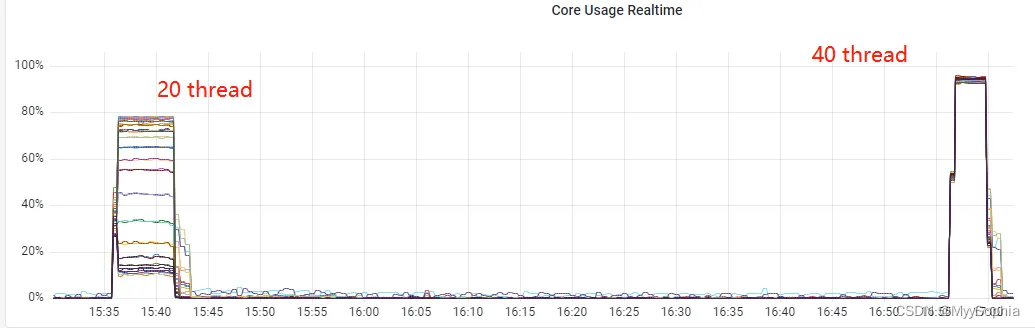
以下测试是 并发20的case
20代表并发数
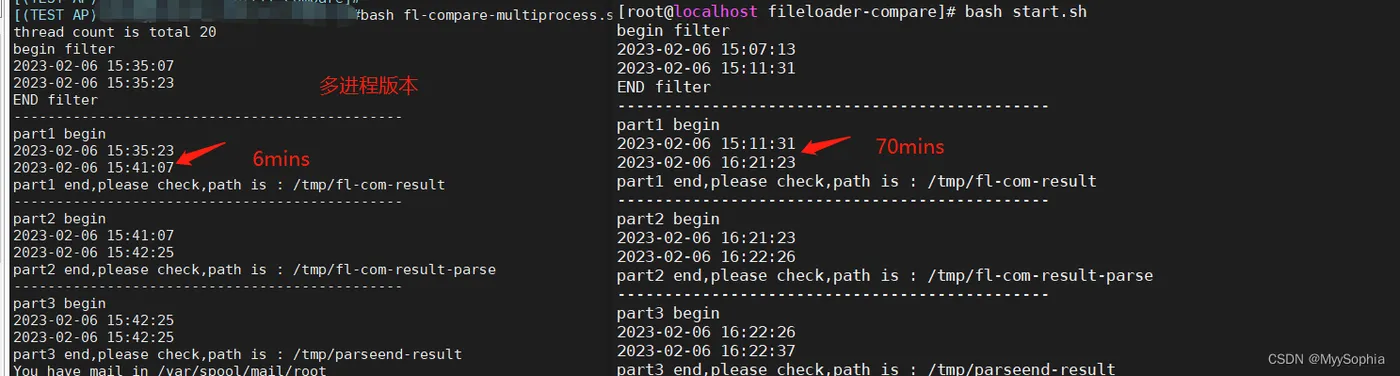
bash fl-compare-multiprocess.sh info.log.2023-02-02.0.log info.log.2023-02-02.12.log indexfile 20
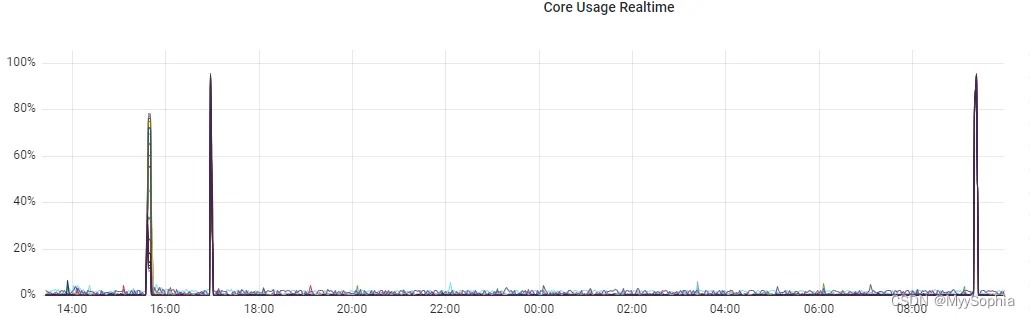
cpu大致能打到50%.
运行输出
thread count is total 20
begin filter
2023-02-06 15:35:07
2023-02-06 15:35:23
END filter
----------------------------------------------
part1 begin
2023-02-06 15:35:23
2023-02-06 15:41:07
part1 end,please check,path is : /tmp/fl-com-result
----------------------------------------------
part2 begin
2023-02-06 15:41:07
2023-02-06 15:42:25
part2 end,please check,path is : /tmp/fl-com-result-parse
----------------------------------------------
part3 begin
2023-02-06 15:42:25
2023-02-06 15:42:25
part3 end,please check,path is : /tmp/parseend-result
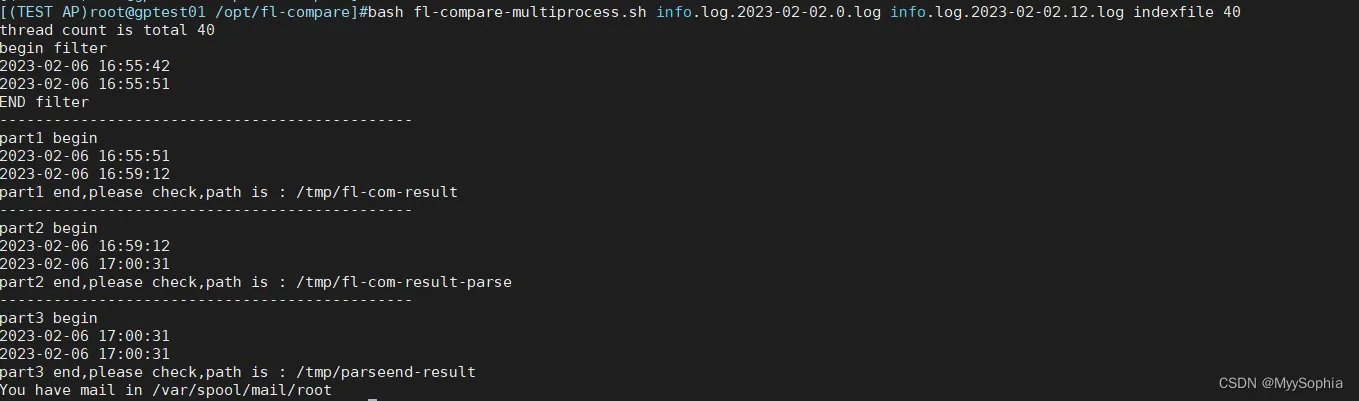
40代表并发数测试
bash fl-compare-multiprocess.sh info.log.2023-02-02.0.log info.log.2023-02-02.12.log indexfile 40
cpu大致能打到90%往上
从prometheus监控看到的结果
重新开启一个窗口看进程数变化
]#while true;do ps -ef | grep "fl-compare-multiprocess.sh info"  | grep -v grep |wc -l; sleep 1s;done
21
20
21
21
21
21
21
21
21
21
21
21
21
21
21
21
21
21
21
21
21
....
优化前后性能比对
20个thread的情况下大致是10倍的速度提升.