easyswoole作为swoole入门最简单的框架,其框架的定义就是适合大众php,更好的利用swoole扩展进行开发,
以下是本人使用easyswoole,看easyswoole文档总结出来的,关于easyswoole开发普通web网站的一些步骤
看下文之前,请先安装easyswoole框架
本文适用于es2.x版本,现在es3.x版本已经完全稳定,文档,demo完善,可移步www.easyswoole.com
查看文档以及demo
也可查看最新文章:easyswoole快速实现一个网站的api接口程序
一:使用nginx代理easyswoole http
nginx增加配置:
server {
    root /data/wwwroot/;
    server_name local.easyswoole.com;
    location / {
        proxy\_http\_version 1.1;
        proxy\_set\_header Connection "keep-alive";
        proxy\_set\_header X-Real-IP $remote_addr;
        if (!-e $request_filename) {
             proxy_pass http://127.0.0.1:9501;
        }
        if (!-f $request_filename) {
             proxy_pass http://127.0.0.1:9501;
        }
    }
}
二:使用nginx访问静态文件
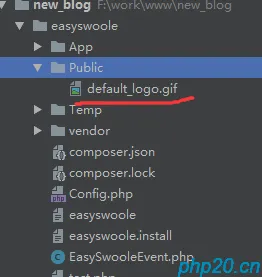
只需要在easyswoole根目录下增加一个Public文件夹,访问时,只需要访问域名/Public/xx.css
如图:

三:引入自定义配置
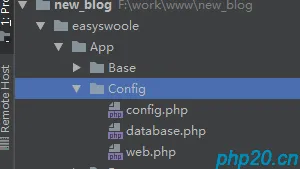
1: 在App/Config/下增加database.php,web.php,config.php
2:在全局配置文件EasySwooleEvent.php中参照以下代码:
<?php
namespace EasySwoole;
use \\EasySwoole\\Core\\AbstractInterface\\EventInterface;
use EasySwoole\\Core\\Utility\\File;
Class EasySwooleEvent implements EventInterface
{
    public static function frameInitialize(): void
    {
        date\_default\_timezone_set('Asia/Shanghai');
        // 载入项目 Conf 文件夹中所有的配置文件
        self::loadConf(EASYSWOOLE_ROOT . '/Conf');
    }
    public static function loadConf($ConfPath)
    {
        $Conf  = Config::getInstance();
        $files = File::scanDir($ConfPath);
        if (!is_array($files)) {
            return;
        }
        foreach ($files as $file) {
            $data = require_once $file;
            $Conf->setConf(strtolower(basename($file, '.php')), (array)$data);
        }
    }
}
3:调用方法:
// 获得配置
    $Conf = Config::getInstance()->getConf(文件名);
四:使用ThinkORM
1:安装
composer require topthink/think-orm
2:创建配置文件
在App/Config/database.php增加以下配置:
<?php
/**
 * Created by PhpStorm.
 * User: tioncico
 * Date: 2018/7/19
 * Time: 17:53
 */
return \[
    'resultset_type' => '\\think\\Collection',
    // 数据库类型
    'type' => 'mysql',
    // 服务器地址
    'hostname' => '127.0.0.1',
    // 数据库名
    'database' => 'test',
    // 用户名
    'username' => 'root',
    // 密码
    'password' => 'root',
    // 端口
    'hostport' => '3306',
    // 数据库表前缀
    'prefix' => 'xsk_',
    // 是否需要断线重连
    'break_reconnect' => true,
\];
3:在EasySwooleEvent.php参照以下代码
<?php
namespace EasySwoole;
use \\EasySwoole\\Core\\AbstractInterface\\EventInterface;
use EasySwoole\\Core\\Utility\\File;
Class EasySwooleEvent implements EventInterface
{
    public static function frameInitialize(): void
    {
        date\_default\_timezone_set('Asia/Shanghai');
        // 载入项目 Conf 文件夹中所有的配置文件
        self::loadConf(EASYSWOOLE_ROOT . '/Conf');
        self::loadDB();
    }
    public static function loadDB()
    {
        // 获得数据库配置
        $dbConf = Config::getInstance()->getConf('database');
        // 全局初始化
        Db::setConfig($dbConf);
    }
}
4:查询实例
和thinkphp5查询一样
Db::table('user')
    ->data(\['name'=>'thinkphp','email'=>'thinkphp@qq.com'\])
    ->insert();    Db::table('user')->find();Db::table('user')
    ->where('id','>',10)
    ->order('id','desc')
    ->limit(10)
    ->select();Db::table('user')
    ->where('id',10)
    ->update(\['name'=>'test'\]);    Db::table('user')
    ->where('id',10)
    ->delete();
5:Model
只需要继承think\Model类,在App/Model/下新增User.php
namespace App\\Model;
use App\\Base\\Tool;
use EasySwoole\\Core\\AbstractInterface\\Singleton;
use think\\Db;
use think\\Model;
Class user extends Model
{
}
即可使用model
use App\\Model\\User;
 function index(){
    $member = User::get(1);
    $member->username = 'test';
    $member->save();
    $this->response()->write('Ok');}
五:使用tp模板引擎
1:安装
composer require topthink/think-template
2:建立view基类
<?php
namespace App\\Base;
use EasySwoole\\Config;
use EasySwoole\\Core\\Http\\AbstractInterface\\Controller;
use EasySwoole\\Core\\Http\\Request;
use EasySwoole\\Core\\Http\\Response;
use EasySwoole\\Core\\Http\\Session\\Session;
use think\\Template;
/**
 * 视图控制器
 * Class ViewController
 * @author  : evalor <master@evalor.cn>
 * @package App
 */
abstract class ViewController extends Controller
{
    private $view;
    /**
     * 初始化模板引擎
     * ViewController constructor.
     * @param string   $actionName
     * @param Request  $request
     * @param Response $response
     */
    public function __construct(string $actionName, Request $request, Response $response)
    {
        $this->init($actionName, $request, $response);
//        var_dump($this->view);
        parent::__construct($actionName, $request, $response);
    }
    /**
     * 输出模板到页面
     * @param  string|null $template 模板文件
     * @param array        $vars 模板变量值
     * @param array        $config 额外的渲染配置
     * @author : evalor <master@evalor.cn>
     */
    public function fetch($template=null, $vars = \[\], $config = \[\])
    {
        ob_start();
        $template==null&&$template=$GLOBALS\['base'\]\['ACTION_NAME'\];
        $this->view->fetch($template, $vars, $config);
        $content = ob\_get\_clean();
        $this->response()->write($content);
    }
    /**
     * @return Template
     */
    public function getView(): Template
    {
        return $this->view;
    }
    public function init(string $actionName, Request $request, Response $response)
    {
        $this->view             = new Template();
        $tempPath               = Config::getInstance()->getConf('TEMP_DIR');     # 临时文件目录
        $class\_name\_array       = explode('\\\', static::class);
        $class\_name\_array\_count = count($class\_name_array);
        $controller_path
                                = $class\_name\_array\[$class\_name\_array\_count - 2\] . DIRECTORY\_SEPARATOR . $class\_name\_array\[$class\_name\_array\_count - 1\] . DIRECTORY\_SEPARATOR;
//        var_dump(static::class);
        $this->view->config(\[
                                'view\_path' => EASYSWOOLE\_ROOT . DIRECTORY\_SEPARATOR . 'App' . DIRECTORY\_SEPARATOR . 'Views' . DIRECTORY\_SEPARATOR . $controller\_path,
                                # 模板文件目录
                                'cache\_path' => "{$tempPath}/templates\_c/",               # 模板编译目录
                            \]);
//        var\_dump(EASYSWOOLE\_ROOT . DIRECTORY\_SEPARATOR . 'App' . DIRECTORY\_SEPARATOR . 'Views' . DIRECTORY\_SEPARATOR . $controller\_path);
    }
}
控制器继承ViewController类
<?php
namespace App\\HttpController\\Index;
use App\\Base\\HomeBaseController;
use App\\Base\\ViewController;
use EasySwoole\\Core\\Http\\Request;
use EasySwoole\\Core\\Http\\Response;
use think\\Db;
/**
 * Class Index
 * @package App\\HttpController
 */
class Index extends ViewController
{
    public function __construct(string $actionName, Request $request, Response $response)
    {
        parent::__construct($actionName, $request, $response);
    }
    protected function onRequest($action): ?bool
    {
        return parent::onRequest($action); // TODO: Change the autogenerated stub
    }
    public function index()
    {
        $sql = "show tables";
        $re = Db::query($sql);
        var_dump($re);
        $assign = array(
            'test'=>1,
            'db'=>$re
        );
        $this->getView()->assign($assign);
        $this->fetch('index');
    }
}
在App/Views/Index/Index/建立index.html
test:{$test}<br>
即可使用模板引擎