内置函数
Flink Table API/SQL提供了⼤量的内置函数:
https://nightlies.apache.org/flink/flink-docs-release-1.14/docs/dev/table/functions/systemfunctions/
自定义函数
分类
说到UDF函数,⽤过HiveSQL的⼈会想到UDF、UDAF、UDTF,在Flink Table API/SQL中没有可以提这⼏个概念
Flink Table API/SQL提供如下⼏种函数:
函数类型 |
对标 |
说明 |
输入 |
输出 |
Scalar Functions(标量 函数 |
UDF |
一进一出 |
0个/1个/多个标量值 |
1个标量值 |
Table functions |
UDTF |
一进多出(炸裂) |
输入1个/多个标量值 |
输出任意⾏(每⼀⾏ 可以是多个字段) |
Aggregate functions |
UDAF |
多进一出 |
多⾏的标量 值 |
输出1个标量值 |
Table aggregate functions |
UDATF |
多进多出(先聚合后炸裂),思考下window top N 场景 |
||
Async table functions |
无 |
异步表函数,是用于table source 执行lookup 操作的特殊函数 |
注意:⼏进⼏出说的是⾏,不是列
注册和使用UDF
package com.blink.sb.udfs.udf;
import org.apache.flink.table.annotation.DataTypeHint;
import org.apache.flink.table.api.DataTypes;
import org.apache.flink.table.api.EnvironmentSettings;
import org.apache.flink.table.api.Table;
import org.apache.flink.table.api.TableEnvironment;
import org.apache.flink.table.functions.ScalarFunction;
import static org.apache.flink.table.api.Expressions.*;
import static org.apache.flink.table.api.Expressions.row;
/**
 * 标量函数使用
 */
public class FlinkBaseScalarFunction {
    public static void main(String[] args) {
        EnvironmentSettings settings = EnvironmentSettings
                .newInstance()
                .build();
        TableEnvironment tEnv = TableEnvironment.create(settings);
        Table userinfo = tEnv.fromValues(
                DataTypes.ROW(
                        DataTypes.FIELD("id", DataTypes.DECIMAL(10, 2)),
                        DataTypes.FIELD("name", DataTypes.STRING()),
                        DataTypes.FIELD("introduction", DataTypes.STRING())
                ),
                row(1, "zhangsan","In my spare time, I like to do anything relating to English such as listening to English songs, watching English movies or TV programs, or even attending the activities held by some English clubs or institutes. I used to go abroad for a short- term English study. During that time, I learned a lot of daily life English and saw a lot of different things. I think language is very interesting. I could express one substance by using different sounds. So I wish I could study and read more English literatures and enlarge my knowledge"),
                row(2L, "lisi","In my spare time, I like to do anything relating to English such as listening to English songs, watching English movies or TV programs, or even attending the activities held by some English clubs or institutes. I used to go abroad for a short- term English study. During that time, I learned a lot of daily life English and saw a lot of different things. I think language is very interesting. I could express one substance by using different sounds. So I wish I could study and read more English literatures and enlarge my knowledge")
        ).select($("id"), $("name"),$("introduction"));
        tEnv.createTemporaryView("users",userinfo);
        // 调用方式1:以call函数内联方式调用(不需要注册)
        tEnv.from("users").select($("id"), $("name"),call(SubstringFunction.class, $("introduction"), 5, 13))
                .execute()
                .print();
        //调用方式2:先注册在通过注册的名字调用
        //注册函数
        tEnv.createTemporarySystemFunction("SubstringFunction", SubstringFunction.class);
        // Table API使用:使用call函数调用已注册的UDF
        tEnv.from("users").select($("id"), $("name"),call(
                "SubstringFunction",
                $("introduction"), 5, 13
            )
        )
                .execute()
                .print();
        // SQL使用
        Table result = tEnv.sqlQuery("SELECT id,name,SubstringFunction(introduction, 5, 13) FROM users");
        result.printSchema();
        result.execute().print();
    }
    /**
     * 最简单的标量函数:
     */
    public static class SubstringFunction extends ScalarFunction {
        public String eval(String s, Integer begin, Integer end) {
            return s.substring(begin, end);
        }
    }
}
UDF实现要点
基类
UDF需要继承对应的基类,例如ScalarFunction(该类必须声明为公共、⾮抽象、全局可访问的。 因此,不允许使 ⽤⾮静态内部类或匿名类; 必须有默认构造⽅法(因为Flink需要实例化并注册到catalog中)
eval方法实现
必须提供公共的、有明确定义的参数的eval方法(可以重载,可变参数,继承)
publicstaticclassSumFunctionextendsScalarFunction {
publicIntegereval(Integera, Integerb) {
returna+b;
 }
publicIntegereval(Stringa, Stringb) {
returnInteger.valueOf(a) +Integer.valueOf(b);
 }
publicIntegereval(Double... d) {
doubleresult=0;
for (doublevalue : d)
result+=value;
return (int) result;
 }
}
类型推断
一般情况下Flink可以⾃动推断eval⽅法返回值和参数的类型,复杂情况下可以⽤@DataTypeHint and @FunctionHint两个数据类型提示注解来辅助⾃动类型推断
/具有重载eval⽅法的UDF函数publicstaticclassOverloadedFunctionextendsScalarFunction { // 没有hintpublicLongeval(longa, longb) { returna+b; } // 定义DECIMAL的精度public("DECIMAL(12, 3)") BigDecimaleval(doublea, doubleb) { returnBigDecimal.valueOf(a+b); } // 定义嵌套数据类型("ROW<s STRING, t TIMESTAMP_LTZ(3)>") publicRoweval(inti) { returnRow.of(String.valueOf(i), Instant.ofEpochSecond(i)); } //允许任意类型输⼊和⾃定义序列化输出(value="RAW", bridgedTo=ByteBuffer.class) publicByteBuffereval((inputGroup=InputGroup.ANY) Objecto) { returnMyUtils.serializeToByteBuffer(o); } }
// 具有重载eval⽅法的UDF函数// 全局定义输出类型(返回类型)(output=("ROW<s STRING, i INT>")) publicstaticclassOverloadedFunctionextendsTableFunction<Row> { publicvoideval(inta, intb) { collect(Row.of("Sum", a+b)); } publicvoideval() { collect(Row.of("Empty args", -1)); } }
/将类型推断与eval⽅法分离, 类型推断完全由函数提示决定
( input= {("INT"), ("INT")}, output=("INT") ) ( input= {("BIGINT"), ("BIGINT")}, output=("BIGINT") ) ( input= {}, output=("BOOLEAN") ) publicstaticclassOverloadedFunctionextendsTableFunction<Object> { publicvoideval(Object... o) { if (o.length==0) { collect(false); } collect(o[0]); } }
⾃定义类型推断
⼤多数情况下Flink可以⾃⾏推断类型,⼤不了⽤Hint给与提示,特殊情况下需要⾃定义推断类型,覆盖 getTypeInference⽅法即可
publicstaticclassLiteralFunctionextendsScalarFunction { publicObjecteval(Strings, Stringtype) { switch (type) { case"INT": returnInteger.valueOf(s); case"DOUBLE": returnDouble.valueOf(s); case"STRING": default: returns; } } //⼀旦覆盖了getTypeInference⽅法,基于反射的类型推断会⾃动被禁⽤,并替换为getTypeInference⽅法的逻辑publicTypeInferencegetTypeInference(DataTypeFactorytypeFactory) { returnTypeInference.newBuilder() //指定参数类型 .typedArguments(DataTypes.STRING(), DataTypes.STRING()) // 为函数的结果数据类型指定策略 .outputTypeStrategy(callContext-> { if (!callContext.isArgumentLiteral(1) ||callContext.isArgumentNull(1)) { throwcallContext.newValidationError("Literal expected for secondargument."); } // return a data type based on a literalfinalStringliteral=callContext.getArgumentValue(1, String.class).orElse("STRING"); switch (literal) { case"INT": returnOptional.of(DataTypes.INT().notNull()); case"DOUBLE": returnOptional.of(DataTypes.DOUBLE().notNull()); case"STRING": default: returnOptional.of(DataTypes.STRING()); } }) .build(); } }
使用运行时
UDF基类的open、close⽅法可以被覆盖,分别⽤于⾃定义UDF初始化和清理逻辑。 在open⽅法中,提供FunctionContext参数,通过它可以获取Runtime环境的各种信息
方法 |
作用 |
getMetricGroup() |
获取当前⼦任务的metricGroup |
getCachedFile(name) |
获取分布式缓存⽂件的本地临时⽂件副本 |
getJobParameter(name, defaultValue) |
获取job参数 |
getExternalResourceInfos(resourceName) |
获取外部资源信息 |
publicstaticclassHashCodeFunctionextendsScalarFunction { privateintfactor=0; publicvoidopen(FunctionContextcontext) throwsException { factor=Integer.parseInt(context.getJobParameter("hashcode_factor", "12")); } publicinteval(Strings) { returns.hashCode() *factor; } }
UDF
packagecom.blink.sb.udfs.udf;
importorg.apache.flink.table.annotation.DataTypeHint;
importorg.apache.flink.table.api.DataTypes;
importorg.apache.flink.table.api.EnvironmentSettings;
importorg.apache.flink.table.api.Table;
importorg.apache.flink.table.api.TableEnvironment;
importorg.apache.flink.table.functions.ScalarFunction;
importstaticorg.apache.flink.table.api.Expressions.*;
importstaticorg.apache.flink.table.api.Expressions.row;
/*** 标量函数使用*/publicclassFlinkBaseScalarFunction {
publicstaticvoidmain(String[] args) {
EnvironmentSettingssettings=EnvironmentSettings                .newInstance()
                .build();
TableEnvironmenttEnv=TableEnvironment.create(settings);
Tableuserinfo=tEnv.fromValues(
DataTypes.ROW(
DataTypes.FIELD("id", DataTypes.DECIMAL(10, 2)),
DataTypes.FIELD("name", DataTypes.STRING()),
DataTypes.FIELD("introduction", DataTypes.STRING())
                ),
row(1, "zhangsan","In my spare time, I like to do anything relating to English such as listening to English songs, watching English movies or TV programs, or even attending the activities held by some English clubs or institutes. I used to go abroad for a short- term English study. During that time, I learned a lot of daily life English and saw a lot of different things. I think language is very interesting. I could express one substance by using different sounds. So I wish I could study and read more English literatures and enlarge my knowledge"),
row(2L, "lisi","In my spare time, I like to do anything relating to English such as listening to English songs, watching English movies or TV programs, or even attending the activities held by some English clubs or institutes. I used to go abroad for a short- term English study. During that time, I learned a lot of daily life English and saw a lot of different things. I think language is very interesting. I could express one substance by using different sounds. So I wish I could study and read more English literatures and enlarge my knowledge")
        ).select($("id"), $("name"),$("introduction"));
tEnv.createTemporaryView("users",userinfo);
// 调用方式1:以call函数内联方式调用(不需要注册)tEnv.from("users").select($("id"), $("name"),call(SubstringFunction.class, $("introduction"), 5, 13))
                .execute()
                .print();
//调用方式2:先注册在通过注册的名字调用//注册函数tEnv.createTemporarySystemFunction("SubstringFunction", SubstringFunction.class);
// Table API使用:使用call函数调用已注册的UDFtEnv.from("users").select($("id"), $("name"),call(
"SubstringFunction",
$("introduction"), 5, 13            )
        )
                .execute()
                .print();
// SQL使用Tableresult=tEnv.sqlQuery("SELECT id,name,SubstringFunction(introduction, 5, 13) FROM users");
result.printSchema();
result.execute().print();
    }
/*** 最简单的标量函数:*/publicstaticclassSubstringFunctionextendsScalarFunction {
publicStringeval(Strings, Integerbegin, Integerend) {
returns.substring(begin, end);
        }
    }
}
参数化标量函数
packagecom.blink.sb.udfs.udf;
importorg.apache.flink.table.api.DataTypes;
importorg.apache.flink.table.api.EnvironmentSettings;
importorg.apache.flink.table.api.Table;
importorg.apache.flink.table.api.TableEnvironment;
importorg.apache.flink.table.functions.ScalarFunction;
importstaticorg.apache.flink.table.api.Expressions.*;
importstaticorg.apache.flink.table.api.Expressions.row;
/*** 标量函数使用*/publicclassFlinkParameterizableScalarFunction {
publicstaticvoidmain(String[] args) {
EnvironmentSettingssettings=EnvironmentSettings                .newInstance()
                .build();
TableEnvironmenttEnv=TableEnvironment.create(settings);
Tableuserinfo=tEnv.fromValues(
DataTypes.ROW(
DataTypes.FIELD("id", DataTypes.DECIMAL(10, 2)),
DataTypes.FIELD("name", DataTypes.STRING()),
DataTypes.FIELD("introduction", DataTypes.STRING())
                ),
row(1, "zhangsan","In my spare time, I like to do anything relating to English such as listening to English songs, watching English movies or TV programs, or even attending the activities held by some English clubs or institutes. I used to go abroad for a short- term English study. During that time, I learned a lot of daily life English and saw a lot of different things. I think language is very interesting. I could express one substance by using different sounds. So I wish I could study and read more English literatures and enlarge my knowledge"),
row(2L, "lisi","In my spare time, I like to do anything relating to English such as listening to English songs, watching English movies or TV programs, or even attending the activities held by some English clubs or institutes. I used to go abroad for a short- term English study. During that time, I learned a lot of daily life English and saw a lot of different things. I think language is very interesting. I could express one substance by using different sounds. So I wish I could study and read more English literatures and enlarge my knowledge")
        ).select($("id"), $("name"),$("introduction"));
tEnv.createTemporaryView("users",userinfo);
// 调用方式1:以call函数内联方式调用(不需要注册)//tEnv.from("MyTable").select(call(SubstringFunction.class, $("myField"), 5, 13));tEnv.from("users").select(call(newSubstringFunction(true), $("introduction"), 5, 13))
                .execute()
                .print();
//调用方式2:先注册在通过注册的名字调用//注册函数//tEnv.createTemporarySystemFunction("SubstringFunction", SubstringFunction.class);tEnv.createTemporarySystemFunction("SubstringFunction", newSubstringFunction(true));
// Table API使用:使用call函数调用已注册的UDFtEnv.from("users").select(call("SubstringFunction", $("introduction"), 5, 13))
                .execute()
                .print();
// SQL使用tEnv.sqlQuery("SELECT SubstringFunction(introduction, 5, 13) FROM users")
                .execute()
                .print();
    }
/*** 参数化标量函数*/publicstaticclassSubstringFunctionextendsScalarFunction {
privatebooleanendInclusive;
publicSubstringFunction(booleanendInclusive) {
this.endInclusive=endInclusive;
        }
publicStringeval(Strings, Integerbegin, Integerend) {
returns.substring(begin, endInclusive?end+1 : end);
        }
    }
}
通配符标量函数
packagecom.blink.sb.udfs.udf; importorg.apache.flink.table.annotation.DataTypeHint; importorg.apache.flink.table.annotation.InputGroup; importorg.apache.flink.table.api.DataTypes; importorg.apache.flink.table.api.EnvironmentSettings; importorg.apache.flink.table.api.Table; importorg.apache.flink.table.api.TableEnvironment; importorg.apache.flink.table.functions.ScalarFunction; importjava.util.Arrays; importjava.util.stream.Collectors; importstaticorg.apache.flink.table.api.Expressions.*; /*** 标量函数使用*/publicclassFlinkWildcardScalarFunction { publicstaticvoidmain(String[] args) { EnvironmentSettingssettings=EnvironmentSettings .newInstance() .build(); TableEnvironmenttEnv=TableEnvironment.create(settings); Tableuserinfo=tEnv.fromValues( DataTypes.ROW( DataTypes.FIELD("id", DataTypes.DECIMAL(10, 2)), DataTypes.FIELD("name", DataTypes.STRING()), DataTypes.FIELD("age", DataTypes.INT()) ), row(1, "zhangsan",23), row(2L, "lisi",18) ).select($("id"), $("name"),$("age")); tEnv.createTemporaryView("users",userinfo); // 调用方式1:以call函数内联方式调用(不需要注册)tEnv.from("users").select(call(MyConcatFunction.class, $("*"))) .execute() .print(); //调用方式2:先注册在通过注册的名字调用//注册函数//tEnv.createTemporarySystemFunction("SubstringFunction", SubstringFunction.class);tEnv.createTemporarySystemFunction("MyConcatFunction", newMyConcatFunction()); // Table API使用:使用call函数调用已注册的UDFtEnv.from("users").select(call("MyConcatFunction", $("id"), $("name"))) .execute() .print(); // SQL使用(注意:通配符参数类型UDF函数,Flink SQL中不能使用,下面两段会报错)tEnv.sqlQuery("SELECT SubstringFunction(*) FROM users") .execute() .print(); tEnv.sqlQuery("SELECT SubstringFunction(id,name) FROM users") .execute() .print(); } /*** 支持通配符的标量函数*/publicstaticclassMyConcatFunctionextendsScalarFunction { publicStringeval((inputGroup=InputGroup.ANY) Object... fields) { returnArrays.stream(fields) .map(Object::toString) .collect(Collectors.joining(",")); } } }
UDTF
- Table functions(表函数)⼀进多出(炸裂),继承TableFunction,提供⽆返回值的eval⽅法,使⽤collect来输 出。
- Table functions的返回值是⼀个表,需要跟原来的表join才能得到最终结果,因此要⽤到侧写表(不明⽩的可 以研究下LATERAL TABLE)
现有需求如下:
学⽣成绩在⼀个字段⾥:1zhangsanChinese:90,Math:74,English:100需要按照学科拆分为多⾏记录:
1zhangsanChinese901zhangsanMath741zhangsanEnglish100
packagecom.blink.sb.udfs.udtf; importorg.apache.flink.table.annotation.DataTypeHint; importorg.apache.flink.table.annotation.FunctionHint; importorg.apache.flink.table.api.DataTypes; importorg.apache.flink.table.api.EnvironmentSettings; importorg.apache.flink.table.api.Table; importorg.apache.flink.table.api.TableEnvironment; importorg.apache.flink.table.functions.TableFunction; importorg.apache.flink.types.Row; importstaticorg.apache.flink.table.api.Expressions.*; /*** Table Functions*/publicclassFlinkTableFunction { publicstaticvoidmain(String[] args) { EnvironmentSettingssettings=EnvironmentSettings .newInstance() .build(); TableEnvironmenttEnv=TableEnvironment.create(settings); Tablescores=tEnv.fromValues( DataTypes.ROW( DataTypes.FIELD("id", DataTypes.DECIMAL(10, 2)), DataTypes.FIELD("name", DataTypes.STRING()), DataTypes.FIELD("scores", DataTypes.STRING()) ), row(1, "zhangsan","Chinese:90,Math:74,English:100"), row(2L, "lisi","Chinese:86,Math:99,English:92") ).select($("id"), $("name"),$("scores")); tEnv.createTemporaryView("scoresTable",scores); //注册函数tEnv.createTemporarySystemFunction("ScoresSplitFunction", newScoresSplitFunction()); // Table API使用:使用call函数调用已注册的UDF//这样直接使用是不可以的// tEnv.from("scoresTable")// .select($("id"), $("name"),call("ScoresSplitFunction", $("scores")))// .execute()// .print();//必须跟joinLateral(内连接)或者leftOuterJoinLateral(左外连接)搭配使用tEnv.from("scoresTable") .joinLateral(call(ScoresSplitFunction.class, $("scores")) .as("subject","score") ) .select($("id"), $("name"),$("subject"),$("score")) .execute() .print(); tEnv.from("scoresTable") .leftOuterJoinLateral(call(ScoresSplitFunction.class, $("scores")) .as("subject","score") ) .select($("id"), $("name"),$("subject"),$("score")) .execute() .print(); // SQL使用tEnv.sqlQuery("SELECT id, name, subject,score "+//诈裂出的字段得跟UDF中定义的字段名一样"FROM scoresTable,"+//注意有个逗号"LATERAL TABLE(ScoresSplitFunction(scores))") .execute() .print(); tEnv.sqlQuery("SELECT id, name, subject1,score1 "+"FROM scoresTable "+"LEFT JOIN LATERAL TABLE(ScoresSplitFunction(scores)) AS sc(subject1, score1) ON TRUE") .execute() .print(); } /*** 学生成绩在一个字段里:* 1 zhangsan Chinese:90,Math:74,English:100* 需要按照成绩拆分为多行记录:* 1 zhangsan Chinese 90* 1 zhangsan Math 74* 1 zhangsan English 100*/(output=("ROW<subject STRING, score INT>")) publicstaticclassScoresSplitFunctionextendsTableFunction { publicvoideval(Stringstr) { for (Strings : str.split(",")) { String[] arr=s.split(":"); //使用collect方法发出新的行collect(Row.of(arr[0], Integer.parseInt(arr[1]))); } } } }
UDAF
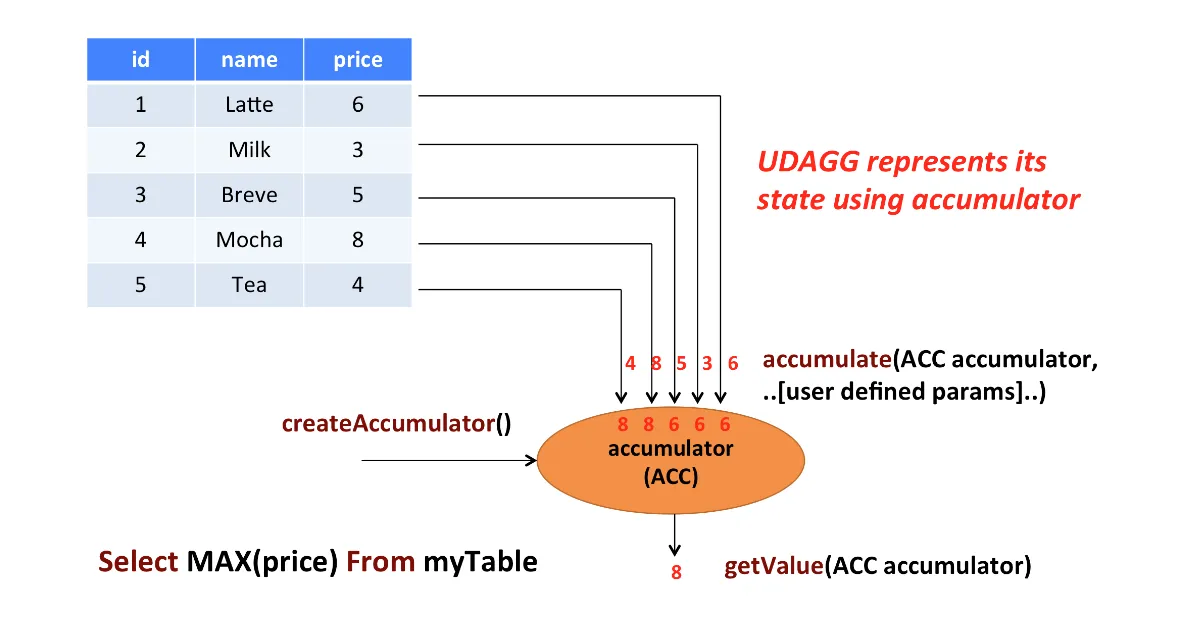
Aggregate functions(聚合函数)将多⾏的标量值映射到新的标量值(多进⼀出),聚合函数⽤到了累加器,下图是聚 合过程:
- 继承AggregateFunction
- 必须覆盖createAccumulator(初始化时创建空的累加器)和getValue (结束时获取累加结果)
- 提供accumulate⽅法(每来一条数据调用accumulate方法进行累加)
- retract⽅法在OVER windows上才是必须的
- merge有界聚合以及会话窗⼝和滑动窗⼝聚合都需要(对性能优化也有好处)
需求:计算学⽣的各学科平均分
输⼊:+--------------+--------------------------------+--------------------------------+-------------+|id|name|subject|score|+--------------+--------------------------------+--------------------------------+-------------+|1.00|zhangsan|Chinese|90||1.00|zhangsan|Math|74||1.00|zhangsan|English|100||2.00|lisi|Chinese|86||2.00|lisi|Math|99||2.00|lisi|English|92|+--------------+--------------------------------+--------------------------------+-------------+输出:+--------------------------------+-----------------+|subject|score_avg|+--------------------------------+-----------------+|Chinese|86.5||Math|74||English|96|+--------------------------------+-----------------+
packagecom.blink.sb.udfs.udaf; importlombok.*; importorg.apache.flink.table.api.DataTypes; importorg.apache.flink.table.api.EnvironmentSettings; importorg.apache.flink.table.api.Table; importorg.apache.flink.table.api.TableEnvironment; importorg.apache.flink.table.functions.AggregateFunction; importstaticorg.apache.flink.table.api.Expressions.*; /*** Table Functions*/publicclassFlinkAggFunction { publicstaticvoidmain(String[] args) { EnvironmentSettingssettings=EnvironmentSettings .newInstance() .build(); TableEnvironmenttEnv=TableEnvironment.create(settings); Tablescores=tEnv.fromValues( DataTypes.ROW( DataTypes.FIELD("id", DataTypes.DECIMAL(10, 2)), DataTypes.FIELD("name", DataTypes.STRING()), DataTypes.FIELD("subject", DataTypes.STRING()), DataTypes.FIELD("score", DataTypes.DOUBLE()) ), row(1, "zhangsan","Chinese","90"), row(1, "zhangsan","Math","74"), row(1, "zhangsan","English","100"), row(2L, "lisi","Chinese","86"), row(2L, "lisi","Math","99"), row(2L, "lisi","English","92") ).select($("id"), $("name"),$("subject"),$("score")); tEnv.createTemporaryView("scoresTable",scores); //注册函数tEnv.createTemporarySystemFunction("AvgFunction", newAvgFunction()); // Table API使用:使用call函数调用已注册的UDFtEnv.from("scoresTable") .groupBy($("subject")) .select($("subject"), call("AvgFunction",$("score")).as("score_avg")) .execute() .print(); // SQL使用tEnv.sqlQuery("SELECT subject, AvgFunction(score) as score_avg FROM scoresTable GROUP BY subject") .execute() .print(); } /*** 可变累加器的数据结构* 商品分类的平均值(sum/count)*/publicstaticclassAvgAccumulator { publicdoublesum=0.0; publicintcount=0; } publicstaticclassAvgFunctionextendsAggregateFunction<Double,AvgAccumulator> { publicDoublegetValue(AvgAccumulatoraccumulator) { if (accumulator.count==0) { returnnull; } else { returnaccumulator.sum/accumulator.count; } } publicAvgAccumulatorcreateAccumulator() { returnnewAvgAccumulator(); } publicvoidaccumulate(AvgAccumulatoracc, Doubleprice) { acc.setSum(acc.sum+price); acc.setCount(acc.count+1); } //在OVER windows上才是必须的// public void retract(AvgAccumulator acc, Double price) {// acc.setSum(acc.sum-price);// acc.setCount(acc.count-1);// }//有界聚合以及会话窗口和滑动窗口聚合都需要(对性能优化也有好处)// public void merge(AvgAccumulator acc, Iterable<AvgAccumulator> it) {// for (AvgAccumulator a : it) {// acc.setSum(acc.sum+a.getSum());// acc.setCount(acc.count+a.getCount());// }// }//publicvoidresetAccumulator(AvgAccumulatoracc) { acc.count=0; acc.sum=0.0d; } } }
UDATF
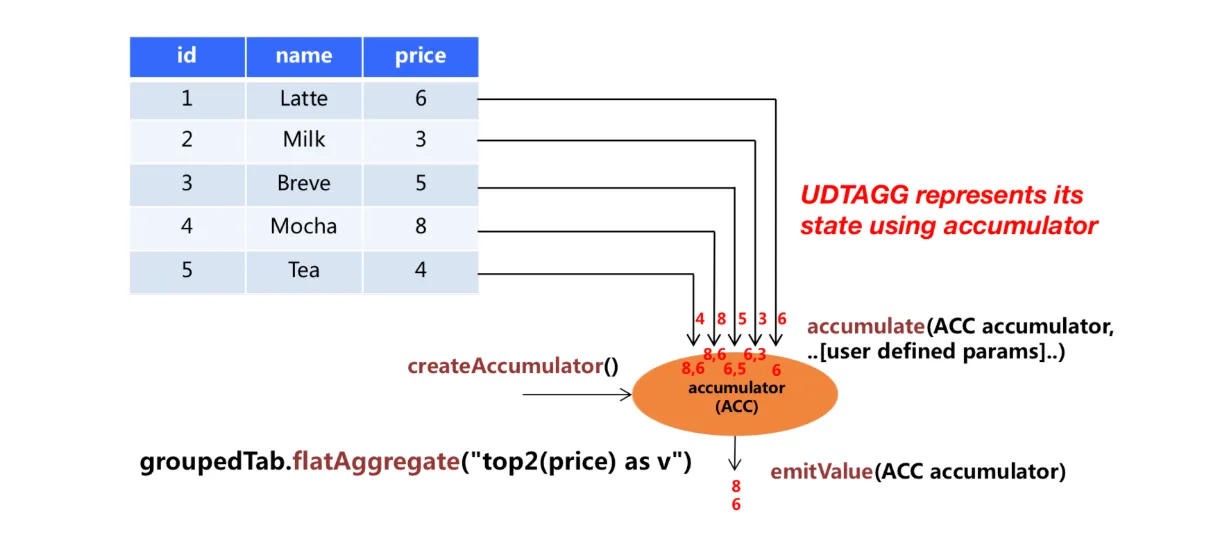
Table aggregate functions(表聚合函数)多进多出(先聚合后炸裂),聚合过程如下图:
- 继承TableAggregateFunction
- 必须覆盖createAccumulator
- 提供1个或者多个accumulate⽅法,⼀般就1个,实现更新累加器逻辑
- 提供emitValue(...)或者emitUpdateWithRetract(...),实现获取计算结果的逻辑
- retract⽅法在OVER windows上才是必须的
- merge有界聚合以及会话窗⼝和滑动窗⼝聚合都需要(对性能优化也有好处)
- emitValue有界窗⼝聚合是必须的,⽆界场景⽤emitUpdateWithRetract可以提⾼性能 如果累加器需要保存⼤的状态,可以使⽤org.apache.flink.table.api.dataview.ListView或者 org.apache.flink.table.api.dataview.MapView以使⽤Flink状态后端
- 必须跟flatAggregate搭配使⽤
需求:找出各学科前两名
输⼊:+-----+---------------------------+--------------------------------+--------------------------------+|id|name|subject|score|+-----+---------------------------+--------------------------------+--------------------------------+|2|lisi|Chinese|86.0||2|lisi|Math|96.0||2|lisi|English|92.0||1|zhangsan|Chinese|90.0||1|zhangsan|Math|74.0||1|zhangsan|English|88.0||3|mary|Chinese|59.0||3|mary|Math|99.0||3|mary|English|100.0|+-----+---------------------------+--------------------------------+--------------------------------+输出:+----+--------------------------------+--------------------------------+-------------+|op|subject|score|rank|+----+--------------------------------+--------------------------------+-------------+|+I|Math|99.0|1||+I|Math|96.0|2||+I|Chinese|90.0|1||+I|Chinese|86.0|2||+I|English|100.0|1||+I|English|92.0|2|+----+--------------------------------+--------------------------------+-------------+
代码实现:
packagecom.blink.sb.udfs.udatf; importlombok.AllArgsConstructor; importlombok.Data; importlombok.NoArgsConstructor; importorg.apache.flink.api.java.tuple.Tuple2; importorg.apache.flink.table.api.DataTypes; importorg.apache.flink.table.api.EnvironmentSettings; importorg.apache.flink.table.api.Table; importorg.apache.flink.table.api.TableEnvironment; importorg.apache.flink.table.functions.TableAggregateFunction; importorg.apache.flink.util.Collector; importstaticorg.apache.flink.table.api.Expressions.*; /*** TableAggregateFunction*/publicclassFlinkUdatfFunction { publicstaticvoidmain(String[] args) { EnvironmentSettingssettings=EnvironmentSettings .newInstance() .build(); TableEnvironmenttEnv=TableEnvironment.create(settings); Tablescores=tEnv.fromValues( DataTypes.ROW( DataTypes.FIELD("id", DataTypes.INT()), DataTypes.FIELD("name", DataTypes.STRING()), DataTypes.FIELD("subject", DataTypes.STRING()), DataTypes.FIELD("score", DataTypes.DOUBLE()) ), row(1, "zhangsan","Chinese","90"), row(1, "zhangsan","Math","74"), row(1, "zhangsan","English","88"), row(2, "lisi","Chinese","86"), row(2, "lisi","Math","96"), row(2, "lisi","English","92"), row(3, "mary","Chinese","59"), row(3, "mary","Math","99"), row(3, "mary","English","100") ).select($("id"), $("name"),$("subject"),$("score")); scores.execute().print(); tEnv.createTemporaryView("scoresTable",scores); //注册函数tEnv.createTemporarySystemFunction("Top2Func", newTop2Func()); // Table API使用:使用call函数调用已注册的UDFtEnv.from("scoresTable") .groupBy($("subject"))//groupby不是必须的//必须咋flatAggregate中调用 .flatAggregate(call("Top2Func",$("score")).as("score","rank")) .select($("subject"),$("score"),$("rank")) // .select($("score"),$("rank")) .execute() .print(); } /*** 可变累加器的数据结构*/publicstaticclassTop2Accumulator { //为啥不保存top n的记录的全部信息/*** top 1的值*/publicDoubletopOne=Double.MIN_VALUE; /*** top 2的值*/publicDoubletopTwo=Double.MIN_VALUE; } publicstaticclassTop2FuncextendsTableAggregateFunction<Tuple2<Double, Integer>, Top2Accumulator> { publicTop2AccumulatorcreateAccumulator() { returnnewTop2Accumulator(); } publicvoidaccumulate(Top2Accumulatoracc, Doublevalue) { if (value>acc.topOne) { acc.topTwo=acc.topOne; acc.topOne=value; } elseif (value>acc.topTwo) { acc.topTwo=value; } } publicvoidmerge(Top2Accumulatoracc, Iterable<Top2Accumulator>it) { for (Top2AccumulatorotherAcc : it) { accumulate(acc, otherAcc.topOne); accumulate(acc, otherAcc.topTwo); } } publicvoidemitValue(Top2Accumulatoracc, Collector<Tuple2<Double, Integer>>out) { if (acc.topOne!=Double.MIN_VALUE) { out.collect(Tuple2.of(acc.topOne, 1)); } if (acc.topTwo!=Double.MIN_VALUE) { out.collect(Tuple2.of(acc.topTwo, 2)); } } } }