三、ViewGroup | dispatchTouchEvent 方法返回
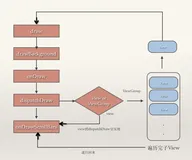
在 【Android 事件分发】事件分发源码分析 ( Activity 中各层级的事件传递 | Activity -> PhoneWindow -> DecorView -> ViewGroup ) 博客中分析了从 Activity -> PhoneWindow -> DecorView -> ViewGroup 的调用链 ;
Activity | dispatchTouchEvent 方法调用 PhoneWindow | superDispatchTouchEvent 方法 ,
PhoneWindow | superDispatchTouchEvent 方法调用 DecorView | superDispatchTouchEvent 方法 ,
DecorView | superDispatchTouchEvent 方法调用 ViewGroup | dispatchTouchEvent 方法 ;
ViewGroup 的 dispatchTouchEvent 事件分发方法执行完毕后 ,
先返回到 DecorView | superDispatchTouchEvent 方法 ,
然后返回到 PhoneWindow | superDispatchTouchEvent 方法 .
最终返回到 Activity 的 dispatchTouchEvent ;
如果在 Activity 的 dispatchTouchEvent 方法中 , PhoneWindow 的 superDispatchTouchEvent 方法的返回值是 true , 即 ViewGroup 的 dispatchTouchEvent 方法返回 true ;
则直接返回 , 不再向后执行 ;
// getWindow() 获取的是 PhoneWindow 窗口
  // 调用 PhoneWindow 的 superDispatchTouchEvent ;
        if (getWindow().superDispatchTouchEvent(ev)) {
            return true;
        }
相关源码 :
public class Activity extends ContextThemeWrapper
        implements LayoutInflater.Factory2,
        Window.Callback, KeyEvent.Callback,
        OnCreateContextMenuListener, ComponentCallbacks2,
        Window.OnWindowDismissedCallback, WindowControllerCallback,
        AutofillManager.AutofillClient {
    /**
     * Called to process touch screen events.  You can override this to
     * intercept all touch screen events before they are dispatched to the
     * window.  Be sure to call this implementation for touch screen events
     * that should be handled normally.
     *
     * @param ev The touch screen event.
     *
     * @return boolean Return true if this event was consumed.
     */
    public boolean dispatchTouchEvent(MotionEvent ev) {
        if (ev.getAction() == MotionEvent.ACTION_DOWN) {
          // 判定是否是第一次按下
          // 该方法与事件传递机制流程无关
          // 提供给用户按下时可以执行的业务逻辑
            onUserInteraction();
        }
  // getWindow() 获取的是 PhoneWindow 窗口
  // 调用 PhoneWindow 的 superDispatchTouchEvent ;
        if (getWindow().superDispatchTouchEvent(ev)) {
            return true;
        }
        return onTouchEvent(ev);
    }
    public void onUserInteraction() {
    }
}
源码路径 : /frameworks/base/core/java/android/app/Activity.java