目录
- 问题
- 解决
- 结尾
问题
操作容器应该是属于服务器开发同学的常规操作,经常我们会遇到系统缺少对应的工具的情况,比如我们进入容器后,想使用 vim 修改某个文件,但是发现该容器没有安装 vim 工具。这个时候,一般都需要自己手动安装,比如在 unbuntu 系统中,可以使用 apt-get 包管理命令。
但是,执行 apt-get install vim 命令时,提示没有仓库记录,因此,需要先更新包管理仓库列表,也就是执行 apt-get update 命令,但是遇到了如下报错信息:
root@al-bj-boom-hb-backstage-01:/etc/nginx# apt-get update
Get:1 http://security.debian.org/debian-security buster/updates InRelease [65.4 kB]
Err:1 http://security.debian.org/debian-security buster/updates InRelease
  Couldn't create temporary file /tmp/apt.conf.IRqbCz for passing config to apt-key
Get:2 http://deb.debian.org/debian buster InRelease [122 kB]
Err:2 http://deb.debian.org/debian buster InRelease
  Couldn't create temporary file /tmp/apt.conf.Afcu25 for passing config to apt-key
Get:3 http://deb.debian.org/debian buster-updates InRelease [51.9 kB]
Err:3 http://deb.debian.org/debian buster-updates InRelease
  Couldn't create temporary file /tmp/apt.conf.fztemY for passing config to apt-key
Reading package lists... Done
W: GPG error: http://security.debian.org/debian-security buster/updates InRelease: Couldn't create temporary file /tmp/apt.conf.IRqbCz for passing config to apt-key
E: The repository 'http://security.debian.org/debian-security buster/updates InRelease' is not signed.
N: Updating from such a repository can't be done securely, and is therefore disabled by default.
N: See apt-secure(8) manpage for repository creation and user configuration details.
W: GPG error: http://deb.debian.org/debian buster InRelease: Couldn't create temporary file /tmp/apt.conf.Afcu25 for passing config to apt-key
E: The repository 'http://deb.debian.org/debian buster InRelease' is not signed.
N: Updating from such a repository can't be done securely, and is therefore disabled by default.
N: See apt-secure(8) manpage for repository creation and user configuration details.
W: GPG error: http://deb.debian.org/debian buster-updates InRelease: Couldn't create temporary file /tmp/apt.conf.fztemY for passing config to apt-key
E: The repository 'http://deb.debian.org/debian buster-updates InRelease' is not signed.
N: Updating from such a repository can't be done securely, and is therefore disabled by default.
N: See apt-secure(8) manpage for repository creation and user configuration details.
解决
解决方法总结下来也非常简单,执行下面的命令就可以了:
chmod 777 /tmp
执行后,再执行 apt-get update 命令,终于成功啦!
执行过程如下:
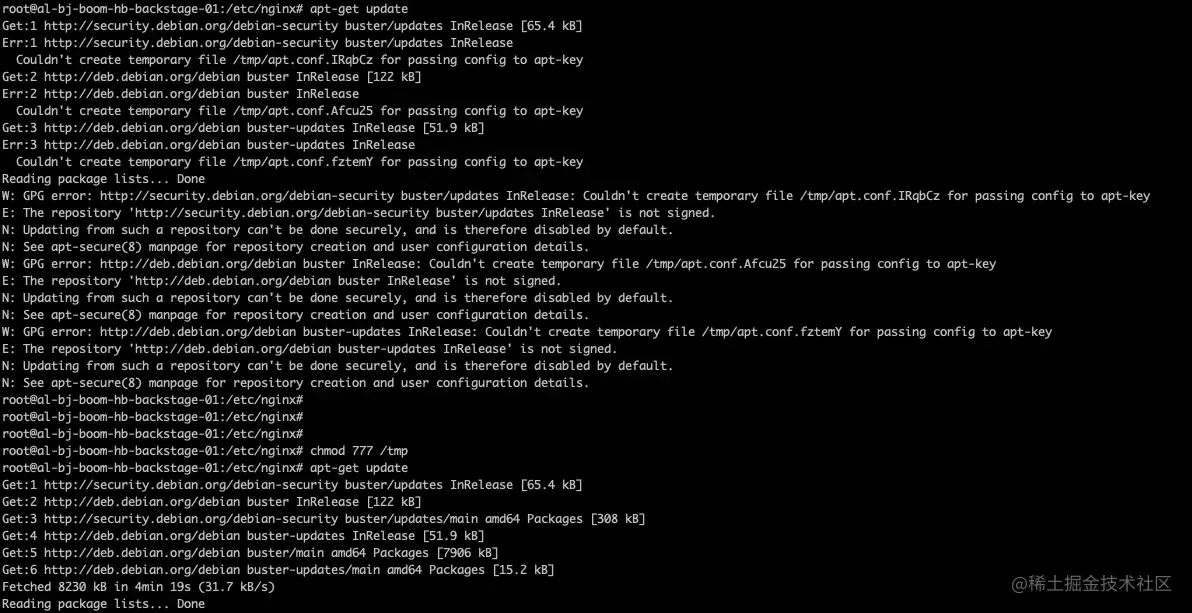
root@al-bj-boom-hb-backstage-01:/etc/nginx# chmod 777 /tmp
root@al-bj-boom-hb-backstage-01:/etc/nginx# apt-get update
Get:1 http://security.debian.org/debian-security buster/updates InRelease [65.4 kB]
Get:2 http://deb.debian.org/debian buster InRelease [122 kB]
Get:3 http://security.debian.org/debian-security buster/updates/main amd64 Packages [308 kB]
Get:4 http://deb.debian.org/debian buster-updates InRelease [51.9 kB]
Get:5 http://deb.debian.org/debian buster/main amd64 Packages [7906 kB]
Get:6 http://deb.debian.org/debian buster-updates/main amd64 Packages [15.2 kB]
Fetched 8230 kB in 4min 19s (31.7 kB/s)
Reading package lists... Done
整体过程截图如下:
结尾
更新完 apt-get 的工具库列表,我们就可以正常安装和使用 vim 工具啦!实时证明:确实好用。
作者简介:大家好,我是 liuzhen007,是一位音视频技术爱好者,同时也是CSDN博客专家、华为云享专家(共创编辑)、InfoQ 签约作者,欢迎关注我分享更多干货!