文章首发于公众号《程序员果果》
地址:https://mp.weixin.qq.com/s/T1mxjy_IwbnMhubio_8VLQ
简介
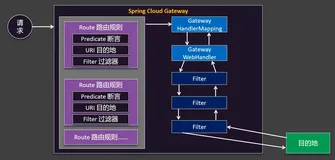
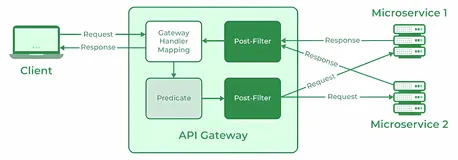
上几篇主要讲解了网关在单个服务的使用,在实际的工作中,服务的相互调用都是依赖于服务中心提供的入口来使用,服务中心往往注册了很多服务,如果每个服务都需要单独配置的话,非常麻烦。Spring Cloud Gateway 提供了一种默认转发的能力,只要将 Spring Cloud Gateway 注册到服务中心,Spring Cloud Gateway 默认就会代理服务中心的所有服务,下面就具体讲解下。
工程介绍
本节案例中一共有四个工程,如下:
| 工程名 | 端口 | 作用 |
|---|---|---|
| sc-eureka-server | 8760 | 注册中心 |
| sc-service-gateway | 8761 | 路由网关 |
| sc-service-hi | 8762 | 服务提供者 |
工程详情
注册中心
pom.xml
<dependency>
    <groupId>org.springframework.cloud</groupId>
    <artifactId>spring-cloud-starter-netflix-eureka-server</artifactId>
</dependency>
application.yml
server:
  port: 8760

eureka:
  instance:
    hostname: localhost
  client:
    registerWithEureka: false
    fetchRegistry: false
    serviceUrl:
      defaultZone: http://${eureka.instance.hostname}:${server.port}/eureka/

spring:
  application:
    name: sc-eurka-server
路由网关
pom.xml
<dependency>
    <groupId>org.springframework.cloud</groupId>
    <artifactId>spring-cloud-starter-gateway</artifactId>
</dependency>
<dependency>
    <groupId>org.springframework.cloud</groupId>
    <artifactId>spring-cloud-starter-netflix-eureka-client</artifactId>
</dependency>
application.yml
server:
  port: 8761

spring:
  application:
    name: sc-service-gateway
  cloud:
    gateway:
      discovery:
        locator:
          enabled: true
          lowerCaseServiceId: true

eureka:
  client:
    service-url:
      defaultZone: http://localhost:8760/eureka/
配置说明:
- spring.cloud.gateway.discovery.locator.enabled:是否与服务注册于发现组件进行结合,通过 serviceId 转发到具体的服务实例。默认为 false,设为 true 便开启通过服务中心的自动根据 serviceId 创建路由的功能。
- pring.cloud.gateway.discovery.locator.lowerCaseServiceId:是将请求路径上的服务名配置为小写(因为服务注册的时候,向注册中心注册时将服务名转成大写的了)。
- eureka.client.service-url.defaultZone:指定注册中心的地址,以便使用服务发现功能。
- logging.level.org.springframework.cloud.gateway:调整相 gateway 包的 log 级别,以便排查问题。
服务提供者
pom.xml
<dependency>
    <groupId>org.springframework.boot</groupId>
    <artifactId>spring-boot-starter-web</artifactId>
</dependency>
<dependency>
    <groupId>org.springframework.cloud</groupId>
    <artifactId>spring-cloud-starter-netflix-eureka-client</artifactId>
</dependency>
application.yml
server:
  port: 8762

spring:
  application:
    name: sc-service-hi

eureka:
  client:
    serviceUrl:
      defaultZone: http://localhost:8760/eureka/
启动类
@SpringBootApplication
@EnableEurekaClient
@RestController
public class ScServiceHiApplication {

    public static void main(String[] args) {
        SpringApplication.run( ScServiceHiApplication.class, args );
    }

    @Value("${server.port}")
    String port;

    @GetMapping("/hi")
    public String home(@RequestParam(value = "name", defaultValue = "zhangsan") String name) {
        return "hi " + name + " ,i am from port:" + port;
    }


}
启动三个项目后,访问 http://localhost:8761/sc-service-hi/hi?name=zhangsan~,返回如下:
hi zhangsan~ ,i am from port:8762说明服务网关转发成功了。
自定义请求路径
在上面的例子中,向sc-service-gateway发送的请求时,url必须带上服务名sc-service-hi这个前缀,才能转发到sc-service-hi上,转发之前会将sc-service-hi去掉。有时服务名称过长,不易使用,需要自定义路径并转发到具体的服务上。配置如下:
server:
  port: 8761

spring:
  application:
    name: sc-service-gateway
  cloud:
    gateway:
      discovery:
        locator:
          enabled: false
          lowerCaseServiceId: true
      routes:
        - id: sc-service-hi
          uri: lb://SC-SERVICE-HI
          predicates:
          - Path=/demo/**
          filters:
          - StripPrefix=1

eureka:
  client:
    service-url:
      defaultZone: http://localhost:8760/eureka/

logging:
  level:
    org.springframework.cloud.gateway: debug
在上面的配置中,配置了一个Path 的 predict,将以/demo/**开头的请求都会转发到uri为lb://SC-SERVICE-HI的地址上,lb://SC-SERVICE-HI即sc-service-hi服务的负载均衡地址,并用StripPrefix的filter 在转发之前将/demo去掉。同时将spring.cloud.gateway.discovery.locator.enabled改为false,如果不改的话,之前的localhost:8761/sc-service-hi/hi?name=zhangsan~这样的请求地址也能正常访问,因为这时为每个服务创建了2个router。
重启sc-service-gateway项目后,访问 http://localhost:8761/demo/hi?name=zhangsan~ ,返回如下:
hi zhangsan~ ,i am from port:8762服务网关转发成功,说明自定义请求路径生效了。
源码
https://github.com/gf-huanchupk/SpringCloudLearning/tree/master/chapter13