准备工作
- Elasticsearch镜像,我以Elasticsearch官方镜像的5.6.10版本为基础创建的。
Dockerfile
FROM docker.elastic.co/elasticsearch/elasticsearch:5.6.10
MAINTAINER leo.lee(lis85@163.com)
WORKDIR /usr/share/elasticsearch
USER root
# copying custom-entrypoint.sh and configuration (elasticsearch.yml, log4j2.properties)
# to their respective directories in /usr/share/elasticsearch (already the WORKDIR)
COPY custom-entrypoint.sh bin/
COPY elasticsearch.yml config/
COPY log4j2.properties config/

# assuring "elasticsearch" user have appropriate access to configuration and custom-entrypoint.sh
# make sure custom-entrypoint.sh is executable
RUN chown elasticsearch:elasticsearch config/elasticsearch.yml config/log4j2.properties bin/custom-entrypoint.sh && \
    chmod +x bin/custom-entrypoint.sh

# start by running the custom entrypoint (as root)
CMD ["/bin/bash", "bin/custom-entrypoint.sh"]
custom-entrypoint.sh
#!/bin/bash
# This is expected to run as root for setting the ulimits

set -e
##################################################################################
# ensure increased ulimits - for nofile - for the Elasticsearch containers
# the limit on the number of files that a single process can have open at a time (default is 1024)
ulimit -n 65536

# ensure increased ulimits - for nproc - for the Elasticsearch containers
# the limit on the number of processes that elasticsearch can create
# 2048 is min to pass the linux checks (default is 50)
# https://www.elastic.co/guide/en/elasticsearch/reference/current/max-number-threads-check.html
ulimit -u 2048

# swapping needs to be disabled for performance and node stability
# in ElasticSearch config we are using: [bootstrap.memory_lock=true]
# this additionally requires the "memlock: true" ulimit; specifically set for each container
# -l: max locked memory
ulimit -l unlimited

# running command to start elasticsearch
# passing all inputs of this entry point script to the es-docker startup script
# NOTE: this entry point script is run as root; but executes the es-docker
# startup script as the elasticsearch user, passing all the root environment-variables
# to the elasticsearch user
su elasticsearch bin/es-docker "$@"
elasticsearch.yml
# attaching the namespace to the cluster.name to differentiate different clusters
# ex. elasticsearh-acceptance, elasticsearh-production, elasticsearh-monitoring
cluster.name: "elasticsearch-${NAMESPACE}"

# we provide a node.name that is the POD_NAME-NAMESPACE
# ex. elasticsearh-0-acceptance, elasticsearh-1-acceptance, elasticsearh-2-acceptance
node.name: "${POD_NAME}-${NAMESPACE}"

network.host: ${POD_IP}

# A hostname that resolves to multiple IP addresses will try all resolved addresses
# we provide the name for the headless service
# which resolves to the ip addresses of all the live attached pods
# alternatively we can directly reference the hostnames of the pods
discovery.zen.ping.unicast.hosts: es-discovery-svc

# minimum_master_nodes need to be explicitly set when bound on a public IP
# set to 1 to allow single node clusters
# more info: https://github.com/elastic/elasticsearch/pull/17288
discovery.zen.minimum_master_nodes: 2

bootstrap.memory_lock: true

#-------------------------------------------------------------------------------------
# RECOVERY: https://www.elastic.co/guide/en/elasticsearch/guide/current/important-configuration-changes.html
# SETTINGS TO avoid the excessive shard swapping that can occur on cluster restarts
#-------------------------------------------------------------------------------------
# how many nodes shall be present to consider the cluster functional;
# prevents Elasticsearch from starting recovery until these nodes are available
gateway.recover_after_nodes: 2

# how many nodes are expected in the cluster
gateway.expected_nodes: 3

# how long we want to wait after [gateway.recover_after_nodes] is reached in order to start recovery process (if applicable).
gateway.recover_after_time: 5m
#-------------------------------------------------------------------------------------

# The following settings control the fault detection process using the discovery.zen.fd prefix:
# How often a node gets pinged. Defaults to 1s.
discovery.zen.fd.ping_interval: 1s

# How long to wait for a ping response, defaults to 30s.
discovery.zen.fd.ping_timeout: 10s

# How many ping failures / timeouts cause a node to be considered failed. Defaults to 3.
discovery.zen.fd.ping_retries: 2
log4j2.properties
status = error
appender.console.type = Console
appender.console.name = console
appender.console.layout.type = PatternLayout
appender.console.layout.pattern = [%d{ISO8601}][%-5p][%-25c{1.}] %marker%m%n
rootLogger.level = info
rootLogger.appenderRef.console.ref = console
将这4个文件放入同一级目录下,然后在该目录下使用命令创建镜像
docker build -t [image name]:[version] .
创建完成后将镜像上传到私有镜像仓库中。
- ES需要用到存储,需要提前创建持久卷(PV)
persistent-volume-es.yaml
kind: PersistentVolume
apiVersion: v1
metadata:
  name: k8s-pv-es1
  labels:
    type: local
spec:
  storageClassName: gce-standard-sc
  capacity:
    storage: 20Gi
  accessModes:
    - ReadWriteOnce
  hostPath:
    path: "/usr/share/elasticsearch/data"
  persistentVolumeReclaimPolicy: Recycle
---
kind: PersistentVolume
apiVersion: v1
metadata:
  name: k8s-pv-es2
  labels:
    type: local
spec:
  storageClassName: gce-standard-sc
  capacity:
    storage: 20Gi
  accessModes:
    - ReadWriteOnce
  hostPath:
    path: "/usr/share/elasticsearch/data"
  persistentVolumeReclaimPolicy: Recycle
---
kind: PersistentVolume
apiVersion: v1
metadata:
  name: k8s-pv-es3
  labels:
    type: local
spec:
  storageClassName: gce-standard-sc
  capacity:
    storage: 20Gi
  accessModes:
    - ReadWriteOnce
  hostPath:
    path: "/usr/share/elasticsearch/data"
  persistentVolumeReclaimPolicy: Recycle
使用如下命令创建
kubectl create -f persistent-volume-es.yaml
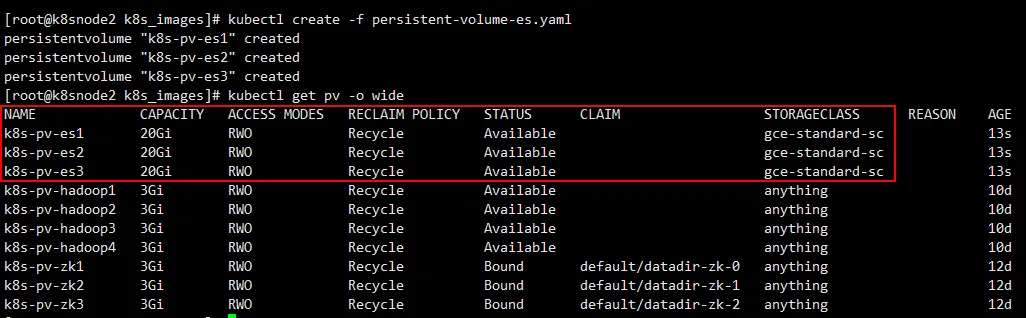
create pv
部署Elasticsearch集群
elasticsearch.yaml
#create the statefulset headless service
apiVersion: v1
kind: Service
metadata:
  name: es-discovery-svc
  labels:
    app: es-discovery-svc
spec:
  # the set of Pods targeted by this Service are determined by the Label Selector
  selector:
    app: elasticsearch
  # exposing elasticsearch transport port (only)
  # this service will be used by es-nodes for discovery;
  # communication between es-nodes happens through
  # the transport port (9300)
  ports:
  - protocol: TCP
    # port exposed by the service (service reacheable at)
    port: 9300
    # port exposed by the Pod(s) the service abstracts (pod reacheable at)
    # can be a string representing the name of the port @the pod (ex. transport)
    targetPort: 9300
    name: transport
  # specifying this is a headless service by providing ClusterIp "None"
  clusterIP: None
---
#create the cluster-ip service
apiVersion: v1
kind: Service
metadata:
  name: es-ia-svc
  labels:
    app: es-ia-svc
spec:
  selector:
    app: elasticsearch
  ports:
  - name: http
    port: 9200
    protocol: TCP
  - name: transport
    port: 9300
    protocol: TCP
---
#create the stateful set
apiVersion: apps/v1beta1
kind: StatefulSet
metadata:
  name: elasticsearch
  labels:
    app: elasticsearch
spec:
  # the headless-service that governs this StatefulSet
  # responsible for the network identity of the set.
  serviceName: es-discovery-svc
  replicas: 3
  # Template is the object that describes the pod that will be created
  template:
    metadata:
      labels:
        app: elasticsearch
    spec:
      securityContext:
        # allows read/write access for mounted volumes
        # by users that belong to a group with gid: 1000
        fsGroup: 1000
      initContainers:
      # init-container for setting the mmap count limit
      - name: sysctl
        image: busybox
        imagePullPolicy: IfNotPresent
        command: ["sysctl", "-w", "vm.max_map_count=262144"]
        securityContext:
          privileged: true
      containers:
      - name: elasticsearch
        securityContext:
          # applying fix in: https://github.com/kubernetes/kubernetes/issues/3595#issuecomment-287692878
          # https://docs.docker.com/engine/reference/run/#operator-exclusive-options
          capabilities:
            add:
              # Lock memory (mlock(2), mlockall(2), mmap(2), shmctl(2))
              - IPC_LOCK
              # Override resource Limits
              - SYS_RESOURCE
        image: registry.docker.uih/library/leo-elsticsearch:5.6.10
        imagePullPolicy: IfNotPresent
        ports:
        - containerPort: 9300
          name: transport
          protocol: TCP
        - containerPort: 9200
          name: http
          protocol: TCP
        env:
        # environment variables to be directly refrenced from the configuration
        - name: NAMESPACE
          valueFrom:
            fieldRef:
              fieldPath: metadata.namespace
        - name: POD_NAME
          valueFrom:
            fieldRef:
              fieldPath: metadata.name
        - name: POD_IP
          valueFrom:
            fieldRef:
              fieldPath: status.podIP
        # elasticsearch heapsize (to be adjusted based on need)
        - name: "ES_JAVA_OPTS"
          value: "-Xms2g -Xmx2g"
        # mounting storage persistent volume completely on the data dir
        volumeMounts:
        - name: es-data-vc
          mountPath: /usr/share/elasticsearch/data
  # The StatefulSet guarantees that a given [POD] network identity will
  # always map to the same storage identity
  volumeClaimTemplates:
  - metadata:
      name: es-data-vc
    spec:
      accessModes: [ "ReadWriteOnce" ]
      resources:
        requests:
          # elasticsearch mounted data directory size (to be adjusted based on need)
          storage: 20Gi
      storageClassName: gce-standard-sc
      # no LabelSelector  defined
      # claims can specify a label selector to further filter the set of volumes
      # currently, a PVC with a non-empty selector can not have a PV dynamically provisioned for it
      # no volumeName is provided
使用如下命令进行部署
kubectl create -f elasticsearch.yaml
部署完后发现还没运行起来,通过日志查出是用户对文件夹【/usr/share/elasticsearch】没有权限引起的,文件夹的权限是root用户,这里可以在外面通过root用户手动修改文件夹权限,将文件夹权限赋给普通用户即可。