2. 分布式日志收集框架Flume

2.1 业务现状分析
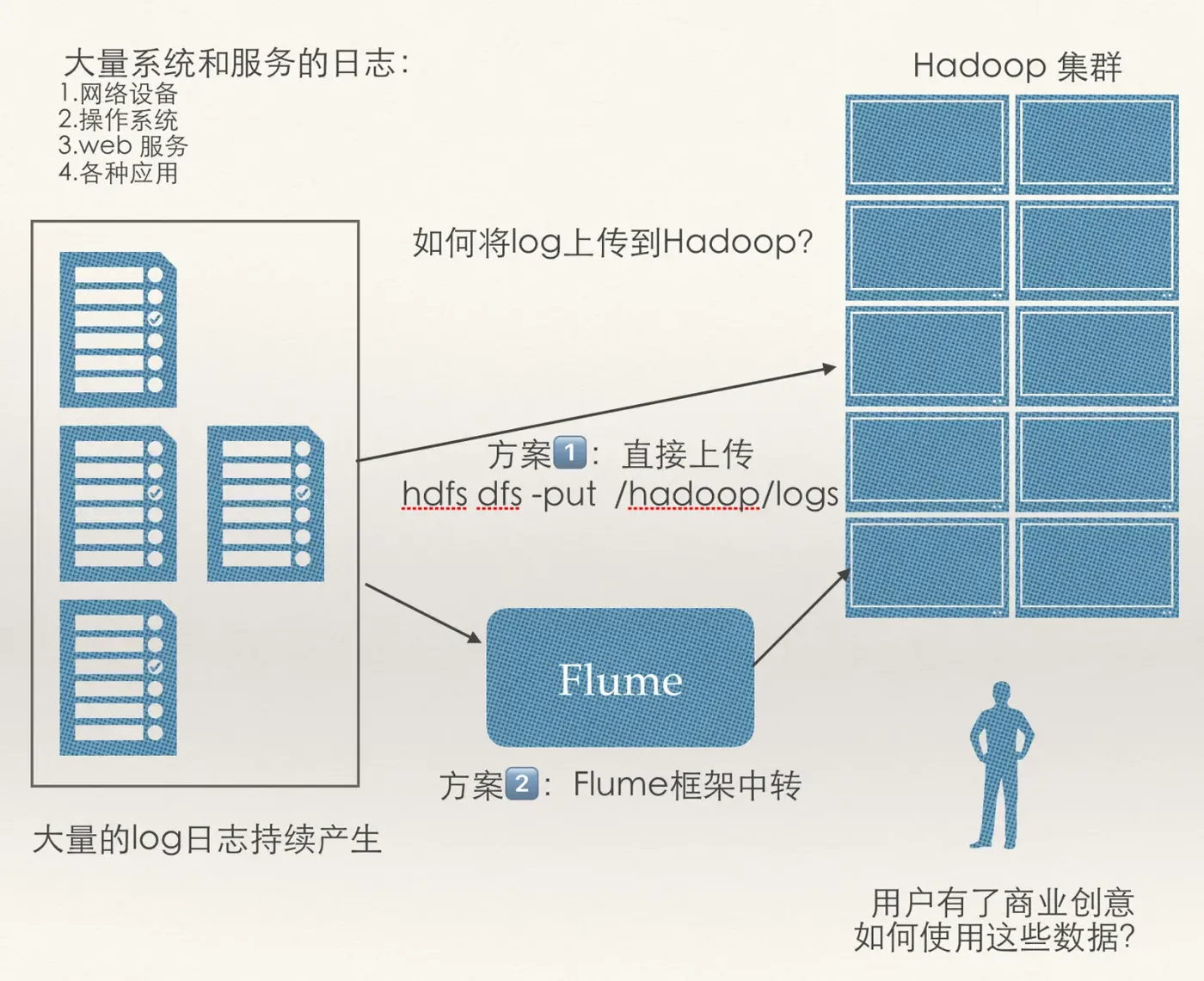
如上图,大量的系统和各种服务的日志数据持续生成。用户有了很好的商业创意想要充分利用这些系统日志信息。比如用户行为分析,轨迹跟踪等等。
如何将日志上传到Hadoop集群上?
对比方案存在什么问题,以及有什么优势?
- 方案1: 容错,负载均衡,高延时等问题如何消除?
- 方案2: Flume框架
2.2 Flume概述
flume官网 http://flume.apache.org
Flume is a distributed, reliable, and available service for efficiently collecting(收集), aggregating(聚合), and moving(移动)large amounts of log data. It has a simple and flexible architecture based on streaming data flows. It is robust and fault tolerant with tunable reliability mechanisms and many failover and recovery mechanisms. It uses a simple extensible data model that allows for online analytic application.
Flume是有Cloudera提供的一个分布式、高可靠、高可用的服务,用于分布式的海量日志的高效收集、聚合、移动的系统
Flume的设计目标
- 可靠性
- 扩展性
- 管理性(agent有效的管理者)
业界同类产品对比
- Flume(*): Cloudera/Apache Java
- Scribe: Facebook C/C++ 不再维护
- Chukwa:Yahoo/Apache Java 不再维护
- Fluentd:Ruby
- Logstash(*):ELK(ElasticSearch,Kibana)
Flume发展史
- Cloudera 0.9.2 Flume-OG
- flume-728 Flume-NG => Apache
- 2012.7 1.0
- 2015.5 1.6 (* +)
- ~ 1.8
2.3 Flume架构及核心组件
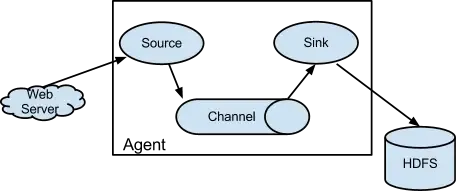
- Source(收集)
- Channel(聚合)
- Sink(输出)
multi-agent flow

In order to flow the data across multiple agents or hops, the sink of the previous agent and source of the current hop need to be avro type with the sink pointing to the hostname (or IP address) and port of the source.
A very common scenario in log collection is a large number of log producing clients sending data to a few consumer agents that are attached to the storage subsystem. For example, logs collected from hundreds of web servers sent to a dozen of agents that write to HDFS cluster.
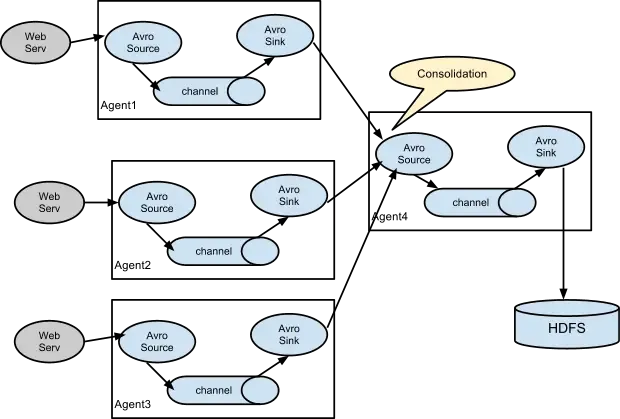
This can be achieved in Flume by configuring a number of first tier agents with an avro sink, all pointing to an avro source of single agent (Again you could use the thrift sources/sinks/clients in such a scenario). This source on the second tier agent consolidates the received events into a single channel which is consumed by a sink to its final destination.
Multiplexing the flow
Flume supports multiplexing the event flow to one or more destinations. This is achieved by defining a flow multiplexer that can replicate or selectively route an event to one or more channels.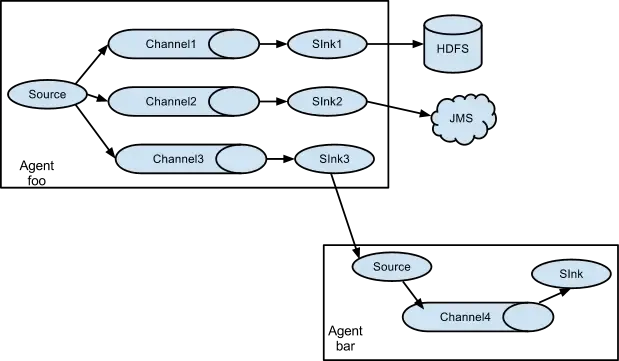
The above example shows a source from agent “foo” fanning out the flow to three different channels. This fan out can be replicating or multiplexing. In case of replicating flow, each event is sent to all three channels. For the multiplexing case, an event is delivered to a subset of available channels when an event’s attribute matches a preconfigured value. For example, if an event attribute called “txnType” is set to “customer”, then it should go to channel1 and channel3, if it’s “vendor” then it should go to channel2, otherwise channel3. The mapping can be set in the agent’s configuration file.
2.4 Flume环境部署
前置条件
- Java Runtime Environment - Java 1.8 or later
- Memory - Sufficient memory for configurations used by sources, channels or sinks
- Disk Space - Sufficient disk space for configurations used by channels or sinks
- Directory Permissions - Read/Write permissions for directories used by agent
安装JDK
- 下载JDK包
- 解压JDK包
tar -zxvf jdk-8u162-linux-x64.tar.gz  [install dir]
* 配置JAVA环境变量:
修改系统配置文件 /etc/profile  或者  ~/.bash_profile
export JAVA_HOME=[jdk install dir]
export PATH = $JAVA_HOME/bin:$PATH
执行指令
source /etc/profile  或者
source ~/.bash_profile
使得配置生效。
执行指令
java -version
检测环境配置是否生效。
安装Flume
- 下载Flume包
wget http://www.apache.org/dist/flume/1.7.0/apache-flume-1.7.0-bin.tar.gz- 解压Flume包
tar -zxvf apache-flume-1.7.0-bin.tar.gz -C [install dir]- 配置Flume环境变量
vim /etc/profile  或者
vim ~/.bash_profile
export FLUME_HOME=[flume install dir]
export PATH = $FLUME_HOME/bin:$PATH
执行指令
source /etc/profile  或者
source ~/.bash_profile
使得配置生效。- 修改flume-env.sh脚本文件
export JAVA_HOME=[jdk install dir]
执行指令
flume-ng version
检测安装情况
2.5 Flume实战
- 需求1:从指定的网络端口采集数据输出到控制台
使用Flume的关键就是写配置文件
- 配置source
- 配置Channel
- 配置Sink
- 把以上三个组件链接起来
a1: agent名称
r1: source的名称
k1: sink的名称
c1: channel的名称
单一节点 Flume 配置
# example.conf: A single-node Flume configuration

# Name the components on this agent
a1.sources = r1
a1.sinks = k1
a1.channels = c1

# Describe/configure the source
a1.sources.r1.type = netcat
a1.sources.r1.bind = localhost
a1.sources.r1.port = 44444

# Describe the sink
a1.sinks.k1.type = logger

# Use a channel which buffers events in memory
a1.channels.c1.type = memory
a1.channels.c1.capacity = 1000
a1.channels.c1.transactionCapacity = 100

# Bind the source and sink to the channel
a1.sources.r1.channels = c1
a1.sinks.k1.channel = c1
启动Flume agent
flume-ng agent \
--name a1 \
--conf  $FLUME_HOME/conf    \
--conf-file  $FLUME_HOME/conf/example.conf \
-Dflume.root.logger=INFO,console
使用telnet或者nc进行测试
telnet [hostname]  [port]     或者
nc [hostname]  [port]
Event = 可选的headers + byte array
Event: { headers:{} body: 74 68 69 73 20 69 73 20 61 20 74 65 73 74 20 70 this is a test p }- 需求2:监控一个文件实时采集新增的数据输出到控制台
技术(Agent)选型:exec source + memory channel + logger sink
# example.conf: A single-node Flume configuration

# Name the components on this agent
a1.sources = r1
a1.sinks = k1
a1.channels = c1

# Describe/configure the source
a1.sources.r1.type = exec
a1.sources.r1.command = tail -f  /root/data/data.log
a1.sources.r1.shell = /bin/bash -c

# Describe the sink
a1.sinks.k1.type = logger

# Use a channel which buffers events in memory
a1.channels.c1.type = memory
a1.channels.c1.capacity = 1000
a1.channels.c1.transactionCapacity = 100

# Bind the source and sink to the channel
a1.sources.r1.channels = c1
a1.sinks.k1.channel = c1
启动Flume agent
flume-ng agent \
--name a1 \
--conf  $FLUME_HOME/conf    \
--conf-file  $FLUME_HOME/conf/example.conf \
-Dflume.root.logger=INFO,console
修改data.log文件,监测是否数据是否输出到控制台
echo hello >> data.log
echo world >> data.log
echo welcome >> data.log
控制台输出
2018-09-02 03:55:00,672 (SinkRunner-PollingRunner-DefaultSinkProcessor) [INFO - org.apache.flume.sink.LoggerSink.process(LoggerSink.java:95)] Event: { headers:{} body: 68 65 6C 6C 6F                                  hello }
2018-09-02 03:55:06,748 (SinkRunner-PollingRunner-DefaultSinkProcessor) [INFO - org.apache.flume.sink.LoggerSink.process(LoggerSink.java:95)] Event: { headers:{} body: 77 6F 72 6C 64                                  world }
2018-09-02 03:55:22,280 (SinkRunner-PollingRunner-DefaultSinkProcessor) [INFO - org.apache.flume.sink.LoggerSink.process(LoggerSink.java:95)] Event: { headers:{} body: 77 65 6C 63 6F 6D 65                            welcome }
至此,需求2成功实现。
- 需求3(*):将A服务器上的日志实时采集到B服务器上(重点掌握)
技术(Agent)选型:
exec source + memory channel + avro sink
avro source + memory channel + logger sink 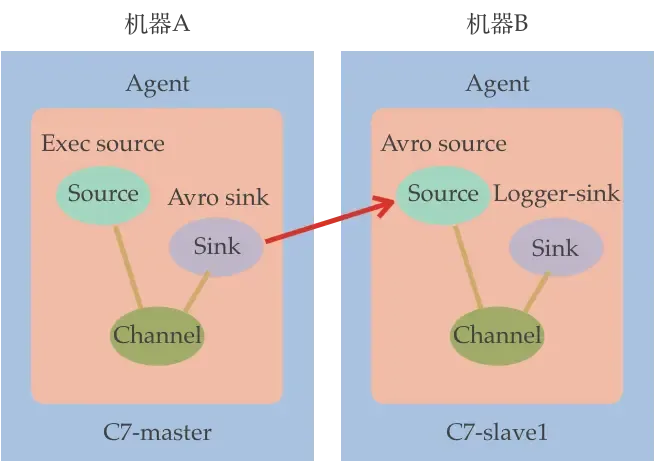
# exec-memory-avro.conf: A single-node Flume configuration

# Name the components on this agent
exec-memory-avro.sources = exec-source
exec-memory-avro.sinks = avro-sink
exec-memory-avro.channels = memory-channel

# Describe/configure the source
exec-memory-avro.sources.exec-source.type = exec
exec-memory-avro.sources.exec-source.command = tail -f  /root/data/data.log
exec-memory-avro.sources.exec-source.shell = /bin/bash -c

# Describe the sink
exec-memory-avro.sinks.avro-sink.type = avro
exec-memory-avro.sinks.avro-sink.hostname = c7-master
exec-memory-avro.sinks.avro-sink.port = 44444

# Use a channel which buffers events in memory
exec-memory-avro.channels.memory-channel.type = memory
exec-memory-avro.channels.memory-channel.capacity = 1000
exec-memory-avro.channels.memory-channel.transactionCapacity = 100

# Bind the source and sink to the channel
exec-memory-avro.sources.exec-source.channels = memory-channel
exec-memory-avro.sinks.avro-sink.channel = memory-channel
# avro-memory-logger.conf: A single-node Flume configuration
# Name the components on this agent
avro-memory-logger.sources = avro-source
avro-memory-logger.sinks = logger-sink
avro-memory-logger.channels = memory-channel
# Describe/configure the source
avro-memory-logger.sources.avro-source.type = avro
avro-memory-logger.sources.avro-source.bind = c7-master
avro-memory-logger.sources.avro-source.port = 44444
# Describe the sink
avro-memory-logger.sinks.logger-sink.type = logger
# Use a channel which buffers events in memory
avro-memory-logger.channels.memory-channel.type = memory
avro-memory-logger.channels.memory-channel.capacity = 1000
avro-memory-logger.channels.memory-channel.transactionCapacity = 100
# Bind the source and sink to the channel
avro-memory-logger.sources.avro-source.channels = memory-channel
avro-memory-logger.sinks.logger-sink.channel = memory-channel优先启动 avro-memory-logger agent
flume-ng agent \
--name avro-memory-logger \
--conf  $FLUME_HOME/conf    \
--conf-file  $FLUME_HOME/conf/avro-memory-logger.conf \
-Dflume.root.logger=INFO,console
再启动 exec-memory-avro agent
flume-ng agent \
--name exec-memory-avro \
--conf  $FLUME_HOME/conf    \
--conf-file  $FLUME_HOME/conf/exec-memory-avro.conf \
-Dflume.root.logger=INFO,console
日志收集过程:
1)机器A上监控一个文件,当我们访问主站时会有用户行为日志记录到access.log中
2)avro sink把新产生的日志输出到对应的avro source指定的hostname:port主机上。
3)通过avro source对应的agent将我们的日志输出到控制台。