一、虚拟主机配置
1、基于域名的虚拟主机
基于域名的虚拟主机就是通过不同的域名来区分提供web服务的主机
|
1
2
3
4
5
6
7
8
9
10
11
12
13
14
15
16
17
18
19
20
21
22
23
24
25
26
27
28
29
30
31
32
33
34
35
36
37
38
39
40
41
42
43
44
45
46
47
48
49
50
51
52
53
54
55
56
57
58
59
60
61
|
1.配置nginx配置文件
[root@Nginx conf]
# vim server.conf
将nginx.conf配置文件中的server段取出创建了server.conf,在nginx.conf中include server.conf
[root@Nginx html]
# grep -E -v "#|^$" ../conf/server.conf
server {
listen 80;
server_name xn2.51cto.com;
location / {
root html
/xn2
;
index index.html;
}
}
server {
listen 80;
server_name xn3.51cto.com;
location / {
root html
/xn3
;
index index.html;
}
}
server {
listen 80;
server_name xn1.51cto.com;
location / {
root html
/xn1
;
index index.html index.htm;
}
error_page 500 502 503 504
/50x
.html;
location =
/50x
.html {
root html;
}
}
2.创建虚拟主机目录及文件
[root@Nginx conf]
# cd ../html/
[root@Nginx html]
# mkdir -pv xn{1,2,3}
mkdir
: 已创建目录
"xn1"
mkdir
: 已创建目录
"xn2"
mkdir
: 已创建目录
"xn3"
[root@Nginx html]
# echo "This is xn1" >> xn1/index.html
[root@Nginx html]
# echo "This is xn2" >> xn2/index.html
[root@Nginx html]
# echo "This is xn3" >> xn3/index.html
[root@Nginx html]
# cat xn1/index.html
This is xn1
3.平滑重启nginx
[root@Nginx html]
# nginx -t
nginx: the configuration
file
/usr/local/nginx/conf/nginx
.conf syntax is ok
nginx: configuration
file
/usr/local/nginx/conf/nginx
.conf
test
is successful
[root@Nginx html]
# nginx -s reload
4.修改hosts文件,并测试nginx虚拟主机
[root@Nginx html]
# echo "192.168.0.110 xn1.51cto.com" >> /etc/hosts
[root@Nginx html]
# echo "192.168.0.110 xn2.51cto.com" >> /etc/hosts
[root@Nginx html]
# echo "192.168.0.110 xn3.51cto.com" >> /etc/hosts
[root@Nginx html]
# curl xn1.51cto.com
This is xn1
[root@Nginx html]
# curl xn2.51cto.com
This is xn2
[root@Nginx html]
# curl xn3.51cto.com
This is xn3
|
2、基于端口的虚拟主机
|
1
2
3
4
5
6
7
8
9
10
11
12
13
14
15
16
17
18
19
20
21
22
23
24
25
26
27
28
29
30
31
32
33
34
35
36
37
38
39
40
41
42
43
|
1.配置
[root@Nginx conf]
# vim server.conf
[root@Nginx conf]
# grep -E -v "#|^$" server.conf
server {
listen 8002;
server_name xn2.51cto.com;
location / {
root html
/xn2
;
index index.html;
}
}
server {
listen 8003;
server_name xn3.51cto.com;
location / {
root html
/xn3
;
index index.html;
}
}
server {
listen 80;
server_name xn1.51cto.com;
location / {
root html
/xn1
;
index index.html index.htm;
}
error_page 500 502 503 504
/50x
.html;
location =
/50x
.html {
root html;
}
}
2.测试
[root@Nginx conf]
# nginx -t
nginx: the configuration
file
/usr/local/nginx/conf/nginx
.conf syntax is ok
nginx: configuration
file
/usr/local/nginx/conf/nginx
.conf
test
is successful
[root@Nginx conf]
# nginx -s reload
[root@Nginx conf]
# curl 192.168.0.110:80
This is xn1
[root@Nginx conf]
# curl 192.168.0.110:8002
This is xn2
[root@Nginx conf]
# curl 192.168.0.110:8003
This is xn3
|
3、基于IP的虚拟主机
|
1
2
3
4
5
6
7
8
9
10
11
12
13
14
15
16
17
18
19
20
21
22
23
24
25
26
27
28
29
30
31
32
33
34
35
36
37
38
39
40
41
42
43
44
45
46
47
|
1.为网卡配置多个IP
[root@Nginx conf]
# ip addr add 192.168.0.10/24 dev eth0
[root@Nginx conf]
# ip addr add 192.168.0.20/24 dev eth0
[root@Nginx conf]
# ip add | grep eth0
2: eth0: <BROADCAST,MULTICAST,UP,LOWER_UP> mtu 1500 qdisc pfifo_fast state UNKNOWN qlen 1000
inet 192.168.0.110
/24
brd 192.168.0.255 scope global eth0
inet 192.168.0.10
/24
scope global secondary eth0
inet 192.168.0.20
/24
scope global secondary eth0
之后
ping
测试IP连通性
2.配置Nginx
[root@Nginx conf]
# grep -E -v "#|^$" server.conf
server {
listen 192.168.0.10:8002;
server_name xn2.51cto.com;
location / {
root html
/xn2
;
index index.html;
}
}
server {
listen 192.168.0.20:8003;
server_name xn3.51cto.com;
location / {
root html
/xn3
;
index index.html;
}
}
server {
listen 80;
server_name xn1.51cto.com;
location / {
root html
/xn1
;
index index.html index.htm;
}
error_page 500 502 503 504
/50x
.html;
location =
/50x
.html {
root html;
}
}
3.测试
[root@Nginx conf]
# curl 192.168.0.10:8002
This is xn2
[root@Nginx conf]
# curl 192.168.0.20:8003
This is xn3
[root@Nginx conf]
# curl 192.168.0.110
This is xn1
|
基于域名,IP,端口可混用,具体使用是基于域名使用的较多。基于域名的虚拟主机可配置多个域名,中间以空格分开。
更多虚拟主机的配置详见官方站点:http://nginx.org/en/docs/http/request_processing.html
二、Nginx状态信息模块
1、ngx_http_stub_status_module模块提供Nginx的基本访问状态信息,在编译时要加入--with-http_stub_status_module参数
|
1
2
3
4
5
6
7
8
9
10
11
12
13
14
15
16
17
18
19
20
21
22
23
24
25
26
27
|
1.编辑配置文件
[root@Nginx conf]
# grep -E -v "#|^$" server.conf
server {
listen 80;
location / {
root html
/xn1
;
index index.html index.htm;
}
location =
/status
{
stub_status on;
access_log off;
allow 192.168.0.0
/24
;
deny all;
}
error_page 500 502 503 504
/50x
.html;
location =
/50x
.html {
root html;
}
}
其中状态信息页访问不记录日志,并设置了可访问的IP段。
2.测试访问
[root@Nginx conf]
# curl http://192.168.0.110/status
Active connections: 1
server accepts handled requests
30 30 35
Reading: 0 Writing: 1 Waiting: 0
|
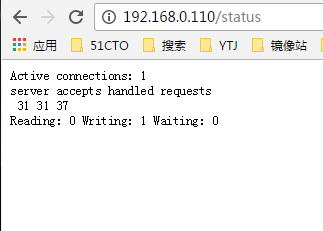
status显示结果详解:
Active connections: 1 :活动连接数
server accepts handled requests:处理的连接,创建的握手,总共处理多少次请求
Reading: 读取客户端的信息数
Writing: 返回给客户端的信息数
Waiting: 开启keep-alive时,waiting = active - (reading + writing)
更多详细信息请看:http://nginx.org/en/docs/http/ngx_http_stub_status_module.html
三、Nginx访问认证
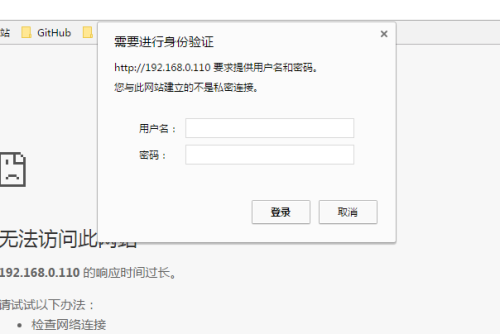
Nginx访问认证为网站设置帐号密码,每次请求都要先认证帐号密码才可以访问网站。
|
1
2
3
4
5
6
7
8
9
10
11
12
13
14
15
16
17
18
19
20
21
22
23
24
25
26
27
28
29
30
31
32
33
34
|
1、配置文件
[root@Nginx conf]
# grep -E -v "#|^$" server.conf
server {
listen 80;
location / {
root html
/xn1
;
index index.html index.htm;
}
location =
/status
{
stub_status on;
access_log off;
allow 192.168.0.0
/24
;
deny all;
auth_basic
"please imput user and password:"
;
auth_basic_user_file
/usr/local/nginx/conf/htpasswd
;
}
error_page 500 502 503 504
/50x
.html;
location =
/50x
.html {
root html;
}
}
Note:
auth_basic:后跟提示信息
auth_basic_user_file:帐号密码认证文件的路径
auth_basic_user_file文件的格式为name:password ,password为加密的
2、准备认证文件
使用apache自带的htpasswd命令直接生成
[root@Nginx conf]
# htpasswd -bc /usr/local/nginx/conf/htpasswd jym 123456
Adding password
for
user jym
[root@Nginx conf]
# cat htpasswd
jym:Rq5uy9jvgi.gc
[root@Nginx conf]
# chmod 400 htpasswd
[root@Nginx conf]
# chown nginx htpasswd
|
3、测试访问
更多详细信息请看:http://nginx.org/en/docs/http/ngx_http_auth_basic_module.html
本文转自 元婴期 51CTO博客,原文链接:http://blog.51cto.com/jiayimeng/1895069