实现效果:
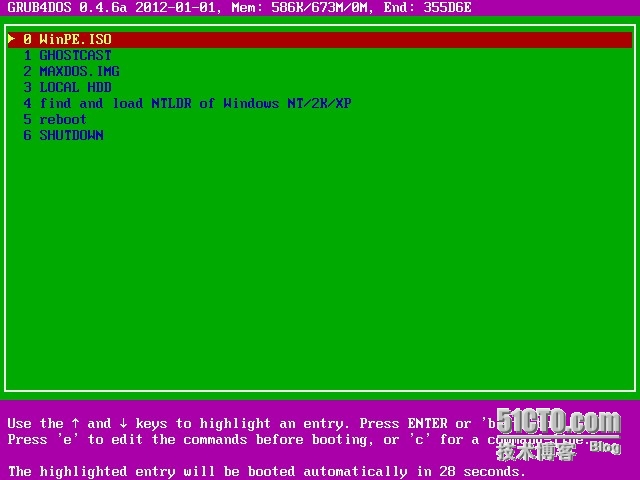
通过网络启动,直接启动WINPE,网络GHOST,MAXDOS或本地硬盘
需要的软件:
ghost-v8.3或11.X企业版
SymantecGhost11.5
3comdabs网络启动镜像工具
grub4dos-0.4.6a
TONPE
MAXDOS.IMG
1、参照前篇博文搭建好DHCP、GHOSTCAST服务器
2、解压缩grub4dos,把grldr,menu.lst文件保存在C:\TFTP目录中
3、使用TONPE生成winpe.iso,上网下载MAXDOS.IMG,把此两文件复制到C:\TFTP目录中
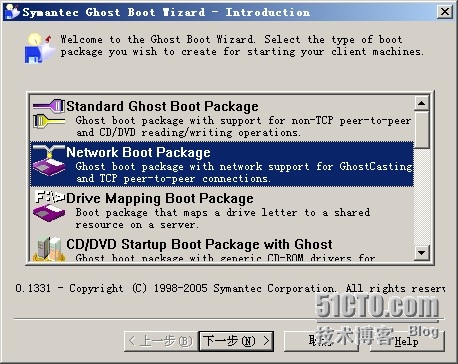
4、使用Ghost Boot Wizard生成ghost.iso启动镜像:
"开始"--"程序"--"Symantec Ghost"--"Ghost Boot Wizard"--"Network Boot Package"

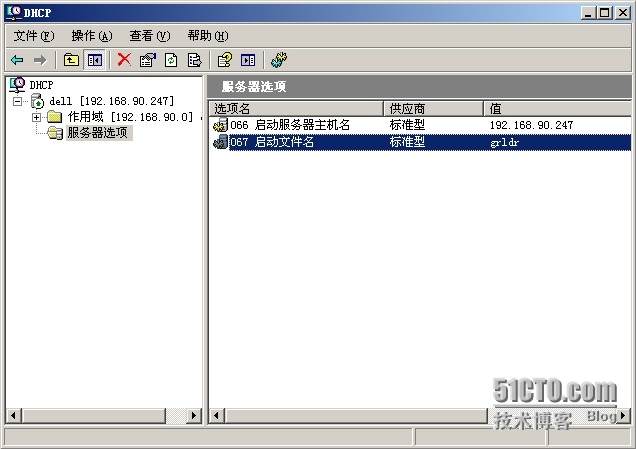
5、修改DHCP启动文件名为grldr
6、编写menu.lst文件
我的这样写的:
# This is a sample menu.lst file. You should make some changes to it.
# The old install method of booting via the stage-files has been removed.
# Please install GRLDR boot strap code to MBR with the bootlace.com
# utility under DOS/Win9x or Linux.
color blue/green yellow/red white/magenta white/magenta
timeout 30
## menu border color
color border=0xEEFFEE
## set vbe mode
graphicsmode -1 640 480:800
## loading splashimage
splashimage /boot/grub/splashimage.xpm || splashimage /boot/grub/splashimage.bmp
default /default
## Menu AutoNumber
write 0x8274 0x2001
title WinPE.ISO
map /WinPE.ISO (0xff) || map --mem(pd) /WinPE.ISO (0xff)
map --hook
root(0xff)
chainloader (0xff)
title GHOSTCAST
map /ghost.iso (0xff) || map --mem(pd) /ghost.iso (0xff)
map --hook
root(0xff)
chainloader (0xff)
title MAXDOS.IMG
find --set-root --ignore-floppies /MAXDOS.IMG
map --mem /MAXDOS.IMG (fd0)
map --hook
chainloader (fd0)+1
rootnoverify (fd0)
title LOCAL HDD
rootnoverify (hd0,0)
makeactive
chainloader +1
title find and load NTLDR of Windows NT/2K/XP\n find and load NTLDR of Windows NT/2K/XP
fallback 1
find --set-root --ignore-floppies --ignore-cd /ntldr
map () (hd0)
map (hd0) ()
map --rehook
find --set-root --ignore-floppies --ignore-cd /ntldr
chainloader /ntldr
savedefault --wait=2
#iftitle only show when command in [] returns true
# set a variable named bootmgr where /bootmgr is found.
iftitle [find --set-root --devices=h /bootmgr && call set bootmgr=%@root^%] load BOOTMGR of Windows VISTA/WIN7/WIN2008 on %bootmgr%
chainloader %bootmgr%/bootmgr
savedefault --wait=2
title reboot
reboot
title SHUTDOWN
halt
7、在客户端设置网卡启动,选择对应启动项,加载即可。如果使用GHOSTCAST,注意启动GHOSTCAST服务器。
加载中文菜单:
A,使用(0.4.5b以前)中文版grldr配合内置命令 fontfile 加载中文字库来显示中文菜单(菜单文件需使用 ANSI 文本编码模式,否则中文会显示为乱码);
B,使用(0.4.6a以后)英文版grldr配合内置命令 font 加载中文字库来显示中文菜单(菜单文件需使用 UTF-8 文本编码模式,否则中文会显示为乱码);
C,使用内置命令 gfxmenu 加载 message 文件来显示中文菜单(菜单文件需使用 UTF-8 文本编码模式,否则中文会显示为乱码);
(正常情况下方式C显示效果最好,但有可能出错)。

checkrange 0x21 read 0x8280 && pxe detect NotExist
timeout 30
default 0
foreground ffff00
font /unifont.hex.gz
gfxmenu /message
title WinPE启动
map /WinPE.ISO (0xff) || map --mem(pd) /WinPE.ISO (0xff)
map --hook
root(0xff)
chainloader (0xff)
title GHOSTCAST网络还原
map /ghost+.iso (0xff) || map --mem(pd) /ghost+.iso (0xff)
map --hook
root(0xff)
chainloader (0xff)
title MAXDOS工具箱
find --set-root --ignore-floppies /MAXDOS.IMG
map --mem /MAXDOS.IMG (fd0)
map --hook
chainloader (fd0)+1
rootnoverify (fd0)
title 本地磁盘
rootnoverify (hd0,0)
makeactive
chainloader +1
title Windows NT/2K/XP启动
find and load NTLDR of Windows NT/2K/XP\n find and load NTLDR of Windows NT/2K/XP
fallback 1
find --set-root --ignore-floppies --ignore-cd /ntldr
map () (hd0)
map (hd0) ()
map --rehook
find --set-root --ignore-floppies --ignore-cd /ntldr
chainloader /ntldr
savedefault --wait=2
#iftitle only show when command in [] returns true
# set a variable named bootmgr where /bootmgr is found.
if
title NT6.X启动
[find --set-root --devices=h /bootmgr && call set bootmgr=%@root^%] load BOOTMGR of Windows VISTA/WIN7/WIN2008 on %bootmgr%
chainloader %bootmgr%/bootmgr
savedefault --wait=2
title Reboot
reboot
title Shutdown
halt