
公司已经搭建号nagios,通过nagiosql界面管理,下面通过微信企业公众号实现微信告警!
首先注册个微信公共平台账号
申请企业公众号地址:https://qy.weixin.qq.com/
帐号类型选择企业号,注册步骤略过,申请好后登陆公众号后台创建应用。
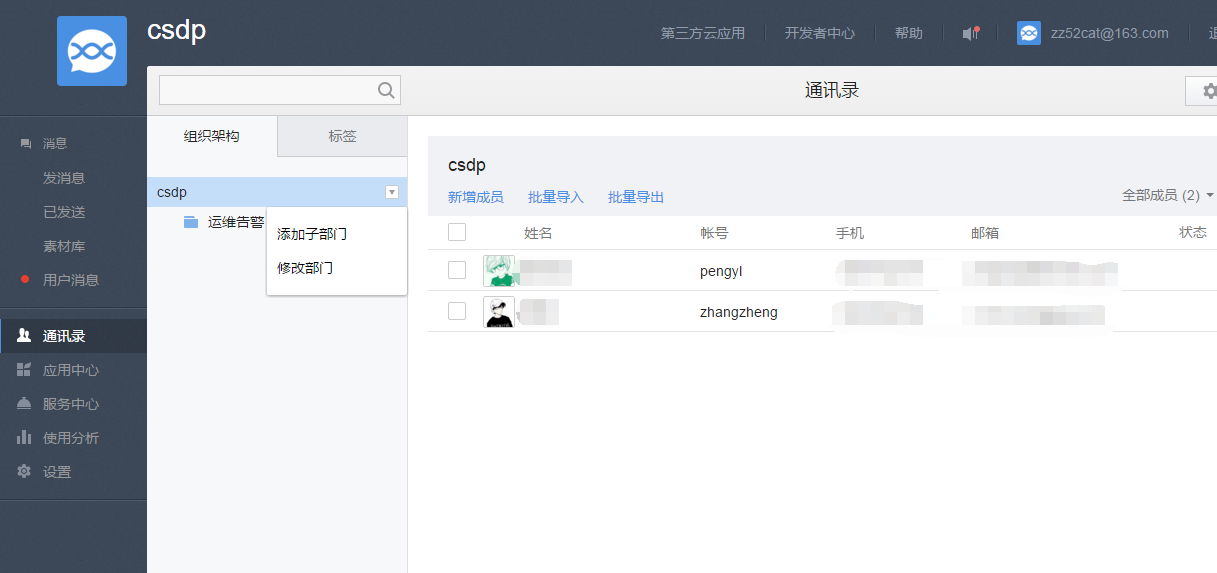
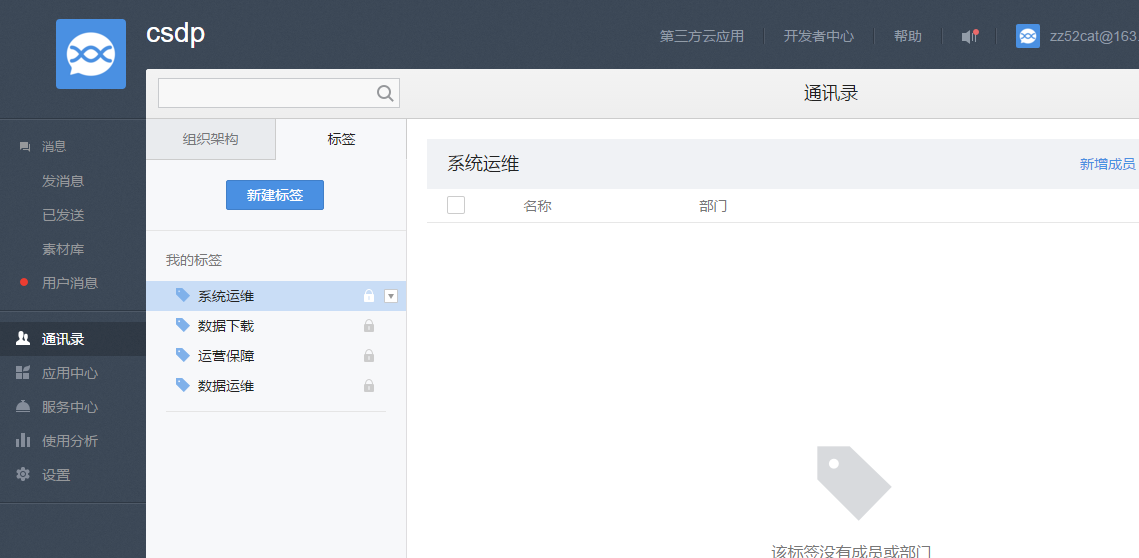
通讯录-创建组织架构、标签
添加通讯录人员信息,可以手动一个个添加,也可以批量导入。
我们要提前把成员信息添加进组织部门,必填项+手机号或者微信号,这样别人扫描二维码的时候才能成功关注企业号。
注意:这里有两个我们要用到信息,一个组织部门的ID,一个部门成员的账号(账号是自己手动指定的,不同于微信号,最好是字母加数字)
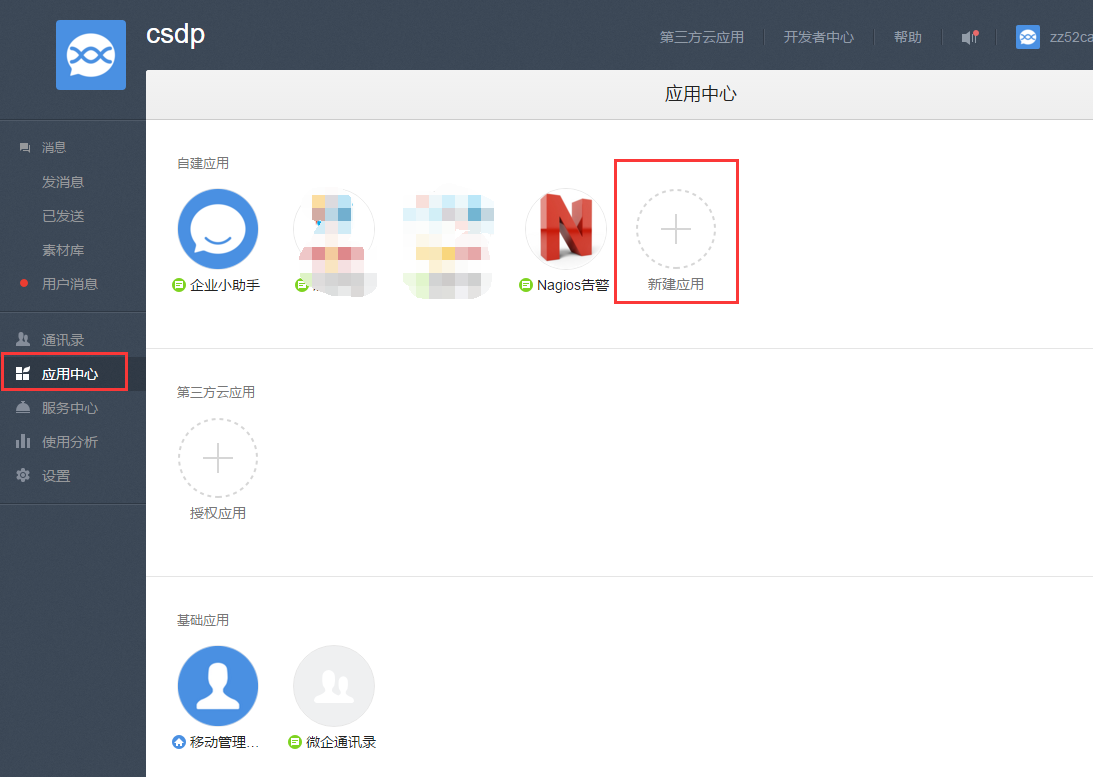
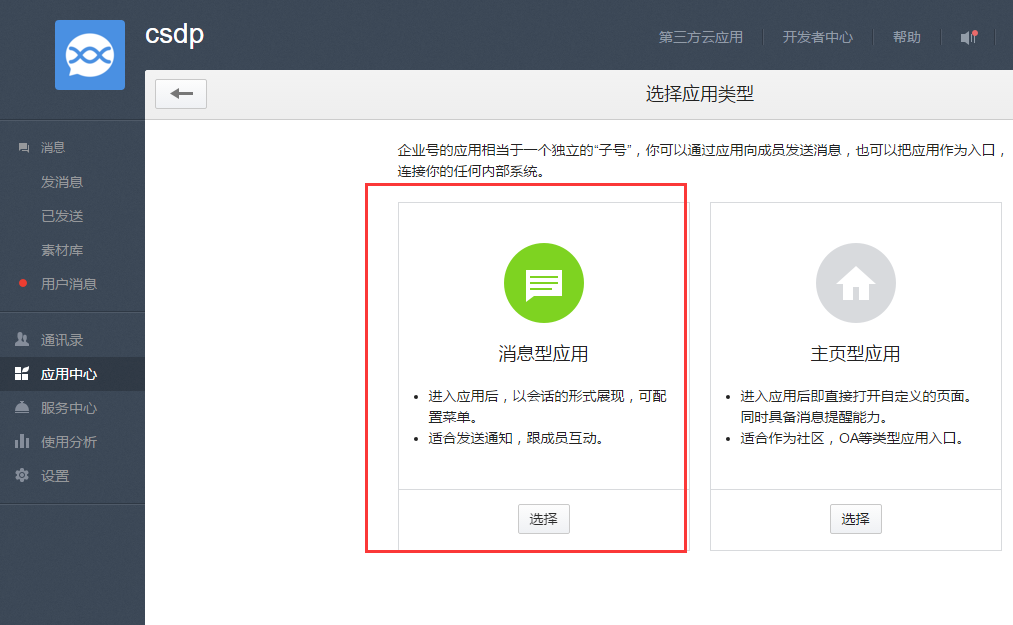
应用中心-新建应用-消息型应用-设置头像、名称、应用范围等

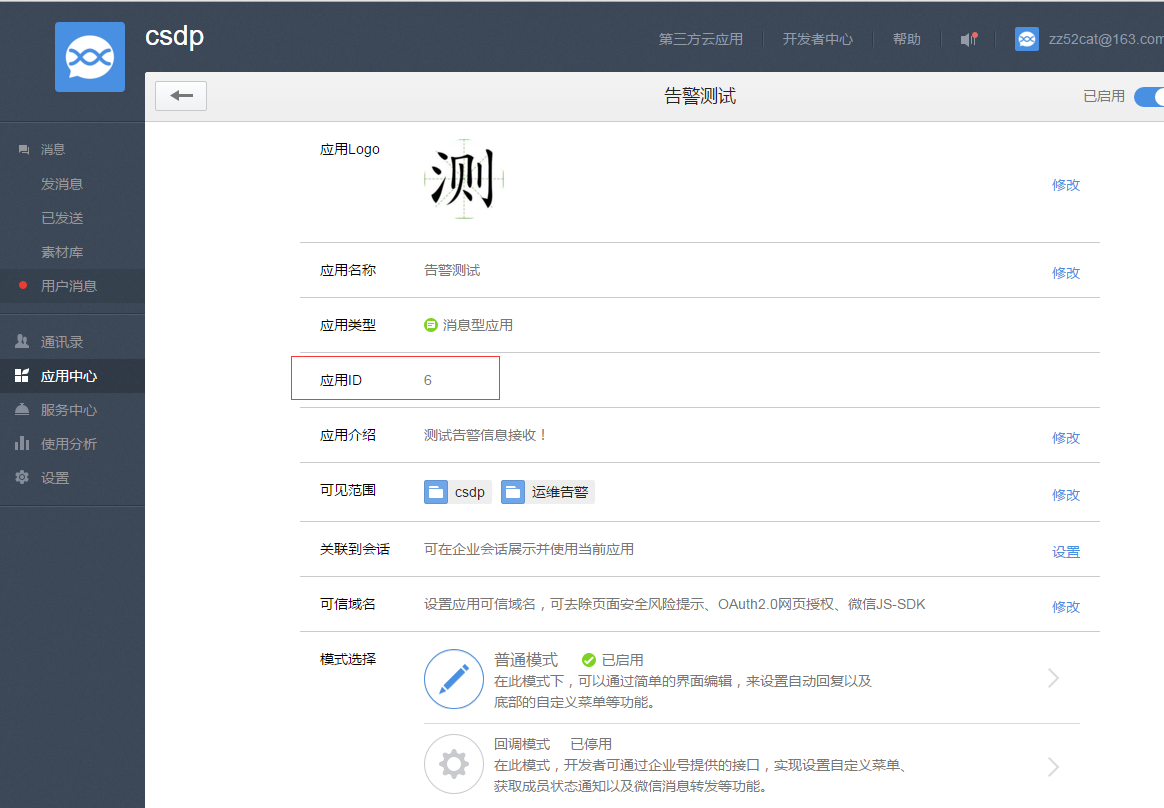
点击应用中心-告警测试应用
可以查看该应用的应用ID(这个ID后面会用到)

设置-权限管理-新建-配置管理组


这里的CorpID、Secret后面会用到。接受告警信息的用户关注该企业号,完成身份认证。
通过脚本发送微信告警信息
第一步 获取access_token
正常情况下AccessToken有效期为7200秒,之后需要重新获取,参考文档http://qydev.weixin.qq.com/wiki/index.php?title=%E4%B8%BB%E5%8A%A8%E8%B0%83%E7%94%A8
Https请求方式:
https://qyapi.weixin.qq.com/cgi-bin/gettoken?corpid=id&corpsecret=secrect
id、Secret对应上面应用中的信息。替换上续信息后直接浏览器里打开或者linux cur http://...就可以获取access_token信息,

微信企业号接口调试工具方式:
地址:http://qydev.weixin.qq.com/debug

第二步 发送消息
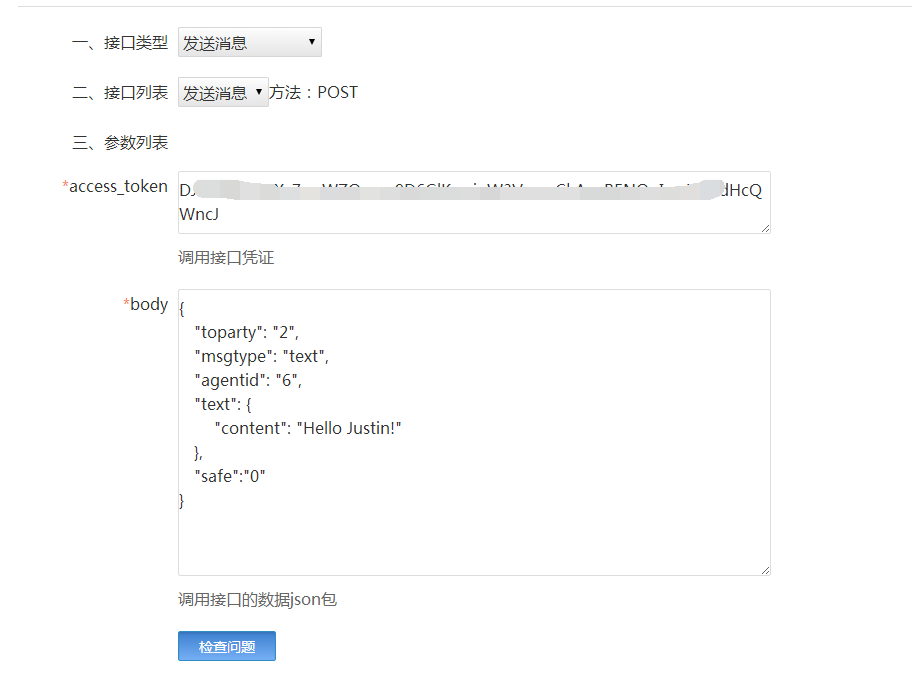
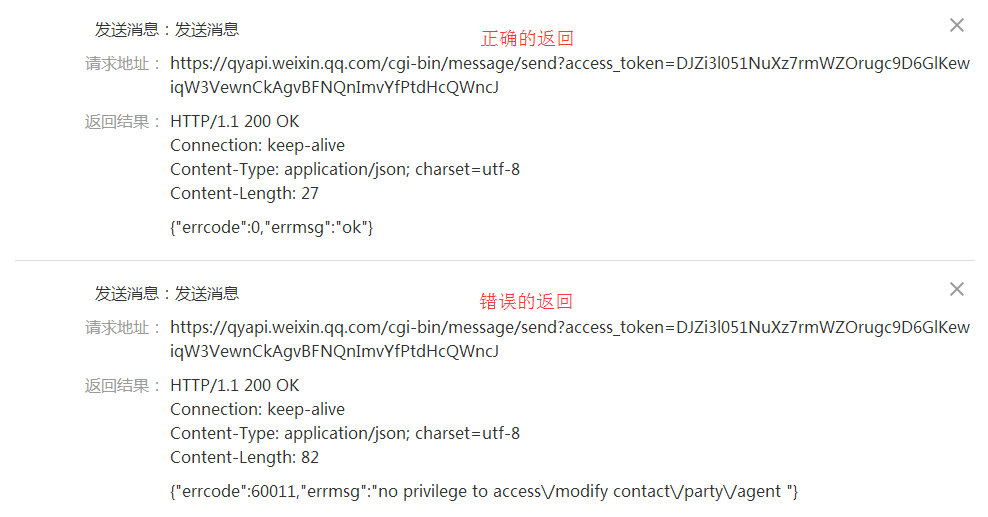
通过微信企业号接口调试工具来发送消息
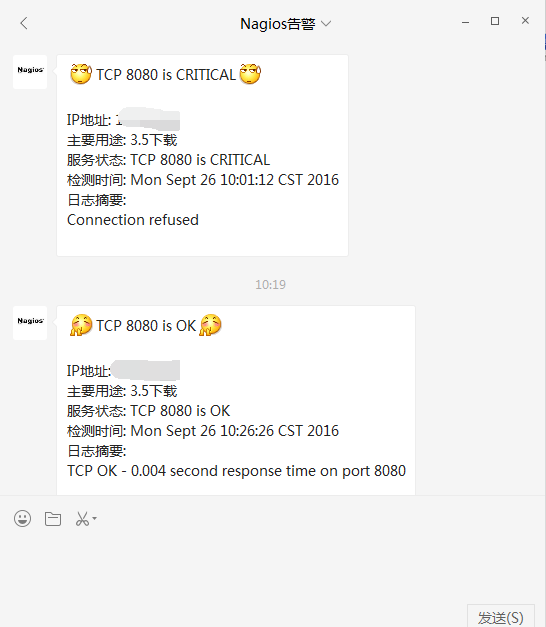
查看公众号里信息:

其中的body部分可以这样定义
{
"toparty": "2", //2 通讯录中对应的部门ID,
"msgtype": "text", //text 消息类型
"agentid": "6", //6 企业应用的id,这里对应的是上面创建的测试应用ID
"text": {
"content": "Hello Justin!" //消息内容
},
"safe":"0" //表示是否是保密消息,0表示否,1表示是,默认0
}
具体参数可以参考官方文档:
http://qydev.weixin.qq.com/wiki/index.php?title=消息类型及数据格式#text.E6.B6.88.E6.81.AF
通过curl方式
|
1
2
3
4
5
6
7
8
9
10
|
[root@localhost sh]
# curl https://qyapi.weixin.qq.com/cgi-bin/message/send?access_token=DJZi3l051NuXz7rmWZOrugc9D6GlKewiqW3VewnCkAgvBFNQngImvYfPtdfHcQWncJ -d "{ \
> \"toparty\": \"2\", \
> \"msgtype\": \"text\", \
> \"agentid\": 6, \
> \"text\": { \
> \"content\": \"Hello Justin_peng! \" \
> }, \
> \"safe\":\"0\" \
> }"
{
"errcode"
:0,
"errmsg"
:
"ok"
}[root@localhost sh]
#
|


部门ID可以在通讯录中选择修改部门查看对应ID


至此微信端配置完成,下面在nagios上配置
安装Python-3.4
安装openssl与openssl-devel包,否则使用python发送微信连接时会报urllib2.URLError: <urlopen error unknown url type: https>这个错误,是因为python没有SSL模块,需重新编译安装python
|
1
2
3
4
5
6
7
8
9
10
11
12
13
14
|
[root@localhost libexec]
# yum -y install openssl openssl-devel
[root@localhost libexec]
# wget
[root@localhost libexec]
# tar zxvf Python-3.4.3.tgz
[root@localhost libexec]
# cd Python-3.4.3/Modules/
[root@localhost Modules]
# vim Setup.dist
# Socket module helper for SSL support; you must comment out the other
# socket line above, and possibly edit the SSL variable:
SSL=
/usr/local/ssl
_ssl _ssl.c \
-DUSE_SSL -I$(SSL)
/include
-I$(SSL)
/include/openssl
\
-L$(SSL)
/lib
-lssl -lcrypto
# The crypt module is now disabled by default because it breaks builds
[root@localhost Modules]
#
|
修改Setup.dist,去掉以上几行的注释,使其支持发送https请求。
|
1
2
3
4
5
6
7
8
9
10
11
12
13
14
15
16
17
18
19
20
21
22
23
24
25
26
27
28
29
30
31
32
33
34
35
36
37
38
39
40
41
42
43
44
45
46
47
48
49
50
51
52
53
54
55
56
57
58
59
60
61
62
63
64
65
66
67
68
69
70
71
72
73
74
75
76
77
78
79
80
81
82
83
84
85
86
87
88
89
90
91
92
93
94
95
96
97
98
99
100
101
102
103
104
105
106
107
108
109
110
111
112
113
114
115
116
117
118
119
120
121
122
123
124
125
126
127
128
129
130
131
132
133
134
135
136
137
|
[root@localhost Modules]
# cd ..
[root@localhost Python-3.4.3]
# ./configure --prefix=/usr/local/python-3.4
[root@localhost Python-3.4.3]
# make && make install
[root@localhost Python-3.4.3]
# vim /etc/profile
export
PATH=
"/usr/local/python-3.4/bin:$PATH"
#文末添加
[root@localhost Python-3.4.3]
# source /etc/profile
[root@localhost Python-3.4.3]
# cd /usr/local/nagios/python/
[root@localhost python]
# vim Notify-host-by-weixin-party.py
import
urllib.request
import
json
import
sys
#以上是导入模块
#创建获取AccessToken的方法
def gettoken(corp_id,corp_secret):
gettoken_url =
'https://qyapi.weixin.qq.com/cgi-bin/gettoken?corpid='
+ corp_id +
'&corpsecret='
+ corp_secret
try:
token_file = urllib.request.urlopen(gettoken_url)
except urllib.error.HTTPError as e:
print(e.code)
print(e.
read
().decode(
"utf8"
))
token_data = token_file.
read
().decode(
'utf-8'
)
token_json = json.loads(token_data)
token_json.keys()
token = token_json[
'access_token'
]
return
token
#这里是发送消息的方法
def senddata(access_token,notify_str):
send_url =
'https://qyapi.weixin.qq.com/cgi-bin/message/send?access_token='
+ access_token
#我传入的参数是一段字符串每个信息用separator连起来,只要再用字符串的split("separator")方法分开信息就可以了。
notifydata = notify_str.
split
(
"separator"
)
party = notifydata[0]
cationtype = notifydata[1]
name = notifydata[2]
state = notifydata[3]
address = notifydata[4]
output = notifydata[5]
datatime = notifydata[6]
# content = '[擦汗]Host Notification[擦汗]\n\n类型: ' + cationtype + '\n主机名: ' + name + '\n状态: ' + state + '\nIP地址: ' + address + '\n摘要: ' + output + '\n时间: ' + datatime + '\n'
if
cationtype ==
"RECOVERY"
:
content =
'[嘘]'
+ address +
' is '
+ state +
'[嘘]\n\nIP地址: '
+ address +
'\n主要用途: '
+ name +
'\n当前状态: '
+ state +
'\n\n日志摘要: '
+ output +
'\n检测时间: '
+ datatime +
'\n'
else
:
content =
'[擦汗]'
+ address +
' is '
+ state +
'[擦汗]\n\nIP地址: '
+ address +
'\n主要用途: '
+ name +
'\n当前状态: '
+ state +
'\n\n日志摘要: '
+ output +
'\n检测时间: '
+ datatime +
'\n'
send_values = {
"toparty"
:party,
"totag"
:
"2"
,
"msgtype"
:
"text"
,
"agentid"
:
"15"
,
"text"
:{
"content"
:content
},
"safe"
:
"0"
}
send_data = json.dumps(send_values, ensure_ascii=False).encode(encoding=
'UTF8'
)
#设置为非ascii解析,使其支持中文
send_request = urllib.request.Request(send_url, send_data)
response = urllib.request.urlopen(send_request)
#这个是返回微信公共平台的信息,调试时比较有用
msg = response.
read
()
return
msg
default_encoding =
'utf-8'
if
sys.getdefaultencoding() != default_encoding:
reload(sys)
sys.setdefaultencoding(default_encoding)
#我编辑的脚本是要获取nagios传入的一段参数的(字符串),下面这条代码是获取执行脚本后获取的第一个参数(经测试nagios只能传入一个参进python,所以把所有包括用户名跟报警主机报警信息放进一个字符串里)
notifystr = str(sys.argv[1])
corpid =
'wxb6162862801114c9da602'
corpsecret =
'2nCsNcHxepBCV4U9Lcf-23By1RGzU1Zs422tdJpKTQzqjQ1b26IFxP76ydG2rKkchGN6E'
accesstoken = gettoken(corpid,corpsecret)
msg = senddata(accesstoken,notifystr)
print(msg)
[root@localhost python]
# vim Notify-service-by-weixin-party.py
import
urllib.request
import
json
import
sys
def gettoken(corp_id,corp_secret):
gettoken_url =
'https://qyapi.weixin.qq.com/cgi-bin/gettoken?corpid='
+ corp_id +
'&corpsecret='
+ corp_secret
try:
token_file = urllib.request.urlopen(gettoken_url)
except urllib.error.HTTPError as e:
print(e.code)
print(e.
read
().decode(
"utf8"
))
token_data = token_file.
read
().decode(
'utf-8'
)
token_json = json.loads(token_data)
token_json.keys()
token = token_json[
'access_token'
]
return
token
def senddata(access_token,notify_str):
send_url =
'https://qyapi.weixin.qq.com/cgi-bin/message/send?access_token='
+ access_token
notifydata = notify_str.
split
(
"separator"
)
party = notifydata[0]
cationtype = notifydata[1]
desc = notifydata[2]
alias
= notifydata[3]
address = notifydata[4]
state = notifydata[5]
datatime = notifydata[6]
output = notifydata[7]
# content ='[擦汗]Service Notification [擦汗]\n\n类型: ' + cationtype + '\n\n服务名: ' + desc + '\n主机名: ' + alias + '\nIP址: ' + address + '\n状态: ' + state + '\n时间: ' + datatime + '\n摘要:\n' + output + '\n'
if
cationtype ==
"RECOVERY"
:
content =
'[鼓掌]'
+ desc +
' is '
+ state +
'[鼓掌]\n\nIP地址: '
+ address +
'\n主要用途: '
+
alias
+
'\n服务状态: '
+ desc +
' is '
+ state +
'\n检测时间: '
+ datatime +
'\n日志摘要: \n'
+ output +
'\n'
else
:
content =
'[擦汗]'
+ desc +
' is '
+ state +
'[擦汗]\n\nIP地址: '
+ address +
'\n主要用途: '
+
alias
+
'\n服务状态: '
+ desc +
' is '
+ state +
'\n检测时间: '
+ datatime +
'\n日志摘要: \n'
+ output +
'\n'
send_values = {
"toparty"
:party,
"totag"
:
"2"
,
"msgtype"
:
"text"
,
"agentid"
:
"15"
,
"text"
:{
"content"
:content
},
"safe"
:
"0"
}
send_data = json.dumps(send_values, ensure_ascii=False).encode(encoding=
'UTF8'
)
send_request = urllib.request.Request(send_url, send_data)
response = urllib.request.urlopen(send_request)
msg = response.
read
()
return
msg
default_encoding =
'utf-8'
if
sys.getdefaultencoding() != default_encoding:
reload(sys)
sys.setdefaultencoding(default_encoding)
notifystr = str(sys.argv[1])
corpid =
'wxb616286d28ds01114c9da602'
corpsecret =
'2nCsNcHxepBCdtgV4U9Lcf-23By1RGzUgh1Zs422tdJpKTQzqjQ1b26IFxP76ydG2rKkchGN6E'
accesstoken = gettoken(corpid,corpsecret)
msg = senddata(accesstoken,notifystr)
print(msg)
[root@localhost python]
# chmod +x Notify-host-by-weixin-party.py
[root@localhost python]
# chmod +x Notify-service-by-weixin-party.py
[root@localhost python]
# ll Notify-host-by-weixin-party.py Notify-service-by-weixin-party.py
-rwxr-xr-x. 1 root root 3040 Aug 22 14:32 Notify-host-by-weixin-party.py
-rwxr-xr-x. 1 root root 2498 Aug 19 14:55 Notify-service-by-weixin-party.py
[root@localhost python]
#
|
上面脚本需要修改以下几处成自己的信息:
send_values = {
"toparty":party,
"totag":"2",
"msgtype":"text",
"agentid":"15",
"text":{
"content":content
},
"safe":"0"
}
corpid = 'wxb6162862sf80113e14c9da602'
corpsecret = '2nCsNcHxepBCV4U9Lcf-23By1RGzU1Zs422tdJdpKTQzqjQ1gjyb26IFxP76ydG2rKkchGN6E'
通过命令行测试脚本
[root@localhost python]# /usr/local/python-3.4/bin/python3.4 /usr/local/nagios/python/Notify-host-by-weixin-party.py "微信通讯录组id号separator时间标题separator主机名separator主机状态separator主机地址separator主机输出信息separator时间"
成功后会有 b'{"errcode":0,"errmsg":"ok"}' 的提示。
|
1
2
3
|
[root@localhost python]
# /usr/local/python-3.4/bin/python3.4 /usr/local/nagios/python/notify-host-by-weixin-test.py "2separator20160923separatortest_serverseparatorupseparator10.10.2.132separatortestseparator17:30"
b
'{"errcode":0,"errmsg":"ok"}'
[root@localhost python]
#
|


上面第一条命令报错,提示权限问题,检测脚本里CorpID、Secret对应的管理组是否给了权限:设置-权限管理-对应的管理组-应用权限。我这里是没把告警测试应用加到脚本里CorpID、Secret对应的管理组的应用权限里。
接下来需要对接nagios报警了
定义发送微信的命令,修改commands.cfg文件,定义主机报警命令notify-host-by-weixin,及服务报警命令notify-service-by-weixin。然后修改templates.cfg文件,添加微信报警。我这里通过nagiosql管理nagios的。
在命令栏里定义报警命令:
notify-host-by-weixin-Party-Address4
/usr/local/python-3.4/bin/python3.4 /usr/local/nagios/python/Notify-host-by-weixin-party.py "$CONTACTADDRESS4$separator$NOTIFICATIONTYPE$separator$HOSTALIAS$separator$HOSTSTATE$separator$HOSTADDRESS$separator$HOSTOUTPUT$separator$LONGDATETIME$"
notify-service-by-weixin-Party-Address4
/usr/local/python-3.4/bin/python3.4 /usr/local/nagios/python/Notify-service-by-weixin-party.py "$CONTACTADDRESS4$separator$NOTIFICATIONTYPE$separator$SERVICEDESC$separator$HOSTALIAS$separator$HOSTADDRESS$separator$SERVICESTATE$separator$LONGDATETIME$separator$SERVICEOUTPUT$"

我这里是发送消息到组,
告警栏里添加微信告警人信息,上面命令中$CONTACTADDRESS4$调取的是附加地址4,我们把组ID写到该栏,然后选择主机命令、服务命令
 至此,nagios通过微信告警完成!
本文转自 justin_peng 51CTO博客,原文链接:http://blog.51cto.com/ityunwei2017/1775702,如需转载请自行联系原作者
