品茶:这是与大神JSBBA一块交流而录的视频,结果视频出问题了,不能正常,所以无法播放。看到老版后进入了新版页面,结果全是商业版的功能,不过有些东西理解好了
#nginx upstream
我是品茶 还有大神JSBBA 一起交流
负载均衡
硬件-F5
开源-{
lvs+keepalived
haproxy
nginx
}
nginx upstream
ups {
web1
web2
web3 标注为不可用
}
upstreamModule:
优点:iphash hash(remote_addr)
nginx hashmap{
"7675334710322792576":"web1"
}
1、
client1(100.2) > nginx -hash(remmote_addr) > web1
2、
client1(100.2) > nginx -hash(remmote_addr) > web1
3、
client2(200.3) > nginx -hash(remmote_addr) > web2
反向代理:
client >> 反向代理{
web1
web2
web3
} >>server
反向代理 接近服务器的
正向代理 接近客户端的也就是自己的
透明代理 客户端完全不知道有代理这个东西
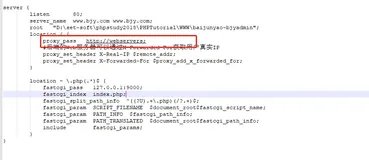
proxy_pass ups;
upstream backend {
server backend1.example.com weight=5;
server backend2.example.com:8080;
server unix:/tmp/backend3;
server backup1.example.com:8080 backup;
server backup2.example.com:8080 backup;
}
http{
server{
localtion{
image_fillter_module
proxy_pass
}
}
}
server {
location / {
proxy_pass http://backend;
}
}
说明:
syntax:upstream name { ... }
default: —
context:http
syntax:server address [parameters];
default: —
context:upstream
server parameters {
weight=number 1
masx_fails=number 1
fail_timeout=time 10
slow_start=time 0(商业版本才有的功能)
backup 备机
down 停用 (ip_hash)
route=string
}
syntax:match name { ... }
default: —
context:http
syntax:zone name size;
default: —
context:upstream
间隔 5 连续失败 1连续通过 1 url / 检测状态
syntax:health_check [interval=time] [fails=number] [passes=number] [uri=uri] [match=name];
default: —
context:location
syntax:keepalive connections;
default: —
context:upstream
This directive appeared in version 1.1.4.
upstream appservers {
zone appservers 64k;
server appserv1.example.com weight=5;
server appserv2.example.com:8080 fail_timeout=5s slow_start=30s;
server 192.0.2.1 max_fails=3;
server reserve1.example.com:8080 backup;
server reserve2.example.com:8080 backup;
}
server {
location / {
proxy_pass http://appservers;
health_check;
}
location /upstream_conf {
upstream_conf;
allow 127.0.0.1;
deny all;
}
}
check www.baidu.com 80
if status == "200"
open 127.0.0.1/upstream_conf?upstream=ups&server=appserv1.example.com&weight=8
pass
NB:
http://127.0.0.1/upstream_conf?add=&upstream=appservers&server=127.0.0.1:8080&weight=2&max_fails=3&fail_timeout=3s&down=
任务:
upstream池两个,通过upstream_conf添加一个
check /
down
check /bbs
check /blog
location /bbs {
proxy_pass http://192.168.100.102;
}
location /blog {
proxy_pass http://192.168.100.103;
}
health_check uri="/bbs" match=200
http://www.a.com/ ok
http://www.a.com/bbs not ok
keepalied 500 501连接的时候,
pool{
501
2
3
4}