应领导要求,对公司几个主要站点的域名访问情况进行监控。下面分享一个监控脚本,并利用sendemail进行邮件发送。
监控脚本如下:
下面是写了一个多线程的网站状态检测脚本,直接从文件中读出站点地址,然后用curl去检测返回码,发现速度非常好,基本几秒钟内就能出结果。
[root@bastion-IDC ~]# cat url-monit.sh
#!/bin/bash
#取出网站数据
data=`cat /root/url.list`
if [ -z "$data" ];then
echo "Faild to connect database!"
exit 1
fi
test -f result.log && rm -f result.log
function delay {
sleep 2
}
tmp_fifofile=/tmp/$$.fifo
mkfifo $tmp_fifofile
exec 6<>$tmp_fifofile
rm $tmp_fifofile
#定义并发线程数,需根据vps配置进行调整。
thread=100
for ((i=0 ;i<$thread;i++ ))
do
echo
done>&6
#开始多线程循环检测
for url in $data
do
read -u6
{
#curl抓取网站http状态码
code=`curl -o /dev/null --retry 3 --retry-max-time 8 -s -w %{http_code} $url`
echo "HTTP Status of $url is $code ">>result.log
#判断子线程是否执行成功,并输出结果
delay && {
echo "HTTP Status of $url is $code"
} || {
echo "Check thread error!"
}
echo >& 6
}&
done
#等待所有线程执行完毕
wait
exec 6>&-
exit 0
[root@bastion-IDC ~]# cat url.list
www.fangfull.com
www.huanqiu.com
erp.fangfull.com
fanghuadmin.huanqiu.com
www.hqsbtime.com
qmjjr.huanqiu.com
admin.huanqiu.com
m.huanqiu.com
fq.huanqiu.com
mfq.huanqiu.com
zc.huanqiu.com
mzc.huanqiu.com
uc.huanqiu.com
fanghu.huanqiu.com
img.huanqiu.com
app.huanqiu.com
www.fangfull.cn
www.huanqiu.wang.com
执行脚本:
[root@bastion-IDC ~]# sh url-monit.sh
HTTP Status of app.huanqiu.com is 301
HTTP Status of fanghu.huanqiu.com is 301
HTTP Status of www.huanqiu.com is 301
HTTP Status of fanghuadmin.huanqiu.com is 301
HTTP Status of admin.huanqiu.com is 301
HTTP Status of mfq.huanqiu.com is 301
HTTP Status of zc.huanqiu.com is 301
HTTP Status of erp.fangfull.com is 302
HTTP Status of www.fangfull.com is 200
HTTP Status of fq.huanqiu.com is 301
HTTP Status of img.huanqiu.com is 301
HTTP Status of www.hqsbtime.com is 200
HTTP Status of mzc.huanqiu.com is 301
HTTP Status of www.fangfull.cn is 000
HTTP Status of uc.huanqiu.com is 301
HTTP Status of qmjjr.huanqiu.com is 301
HTTP Status of m.huanqiu.com is 301
HTTP Status of www.huanqiu.wang.com is 000
测试利用上面的多线程的网站状态检测脚本的执行时间,如下,12s多执行完毕!
[root@bastion-IDC ~]# time sh url-monit.sh
HTTP Status of app.huanqiu.com is 301
HTTP Status of fanghu.huanqiu.com is 301
HTTP Status of www.huanqiu.com is 301
HTTP Status of fanghuadmin.huanqiu.com is 301
HTTP Status of admin.huanqiu.com is 301
HTTP Status of mfq.huanqiu.com is 301
HTTP Status of zc.huanqiu.com is 301
HTTP Status of erp.fangfull.com is 302
HTTP Status of www.fangfull.com is 200
HTTP Status of fq.huanqiu.com is 301
HTTP Status of img.huanqiu.com is 301
HTTP Status of www.hqsbtime.com is 200
HTTP Status of mzc.huanqiu.com is 301
HTTP Status of www.fangfull.cn is 000
HTTP Status of uc.huanqiu.com is 301
HTTP Status of qmjjr.huanqiu.com is 301
HTTP Status of m.huanqiu.com is 301
HTTP Status of www.huanqiu.wang.com is 000
real 0m12.782s
user 0m0.085s
sys 0m0.096s
下面再测试直接curl监测网站状态的时间:
[root@bastion-IDC ~]# cat testurl-monit.sh
#!/bin/bash
for url in `cat /root/url.list`
do
code=`curl -I -s $url | head -1 | cut -d " " -f2`
echo "HTTP Status of $url is $code "
done
如下,这个脚本执行时间要30s多!
[root@bastion-IDC ~]# time sh testurl-monit.sh
HTTP Status of www.fangfull.com is 200
HTTP Status of www.huanqiu.com is 301
HTTP Status of erp.fangfull.com is 302
HTTP Status of fanghuadmin.huanqiu.com is 301
HTTP Status of www.hqsbtime.com is 200
HTTP Status of qmjjr.huanqiu.com is 301
HTTP Status of admin.huanqiu.com is 301
HTTP Status of m.huanqiu.com is 301
HTTP Status of fq.huanqiu.com is 301
HTTP Status of mfq.huanqiu.com is 301
HTTP Status of zc.huanqiu.com is 301
HTTP Status of mzc.huanqiu.com is 301
HTTP Status of uc.huanqiu.com is 301
HTTP Status of fanghu.huanqiu.com is 301
HTTP Status of img.huanqiu.com is 301
HTTP Status of app.huanqiu.com is 301
HTTP Status of www.fangfull.cn is
HTTP Status of www.huanqiu.wang.com is
real 0m31.689s
user 0m0.067s
sys 0m0.124s
显然多线程的测试脚本执行速度要快点!所以保留第一个脚本url-monit.sh!
-------------------------------------------------------------------------------------------------------
下面是邮件报警设置:
1)先下载安装包到本地,解压。
[root@bastion-IDC ~]# cd /usr/local/src/
[root@bastion-IDC src]# wget -c http://caspian.dotconf.net/menu/Software/SendEmail/sendEmail-v1.56.tar.gz
[root@bastion-IDC src]# tar -zvxf sendEmail-v1.56.tar.gz
[root@bastion-IDC src]# cd sendEmail-v1.56
[root@bastion-IDC sendEmail-v1.56]# cp -a sendEmail /usr/local/bin/
[root@bastion-IDC sendEmail-v1.56]# chmod +x /usr/local/bin/sendEmail
[root@bastion-IDC sendEmail-v1.56]# file /usr/local/bin/sendEmail
/usr/local/bin/sendEmail: a /usr/bin/perl -w script text executable
2)安装下依赖
[root@bastion-IDC sendEmail-v1.56]# yum install perl-Net-SSLeay perl-IO-Socket-SSL -y
3)部署发送脚本
这里由于一些域名做了跳转,所以如果发现域名访问后的结果不是200,301,302,那么就是不能正常访问状态,需要发送报警邮件!
如下,报警邮件发送给wangshibo@huanqiu.cn和hugang@huanqiu.cn两个邮箱:
[root@bastion-IDC ~]# cat url-mail.sh
#!/bin/bash
NUM=$(/bin/sh /root/url-monit.sh|grep -v "200"|grep -v "301"|grep -v "302"|wc -l)
DOMAIN=$(/bin/sh /root/url-monit.sh|grep -v "200"|grep -v "301"|grep -v "302"|awk -F" " '{print $4}')
if [ $NUM -ne 0 ];then
for url in $DOMAIN;do
/usr/local/bin/sendEmail -f ops@huanqiu.cn -t wangshibo@huanqiu.cn -s smtp.huanqiu.cn -u "Domain monitoring" -o message-content-type=html -o message-charset=utf8 -xu ops@huanqiu.cn -xp zh@123bj -m "[$url] can not normally access,please deal with it as soon as possible "
/usr/local/bin/sendEmail -f ops@huanqiu.cn -t hugang@huanqiu.cn -s smtp.huanqiu.cn -u "Domain monitoring" -o message-content-type=html -o message-charset=utf8 -xu ops@huanqiu.cn -xp zh@123bj -m "[$url] can not normally access,please deal with it as soon as possible "
done
else
echo "it is OK"
fi
-----------------------------------------------------------------
邮件发送参数说明:
命令说明:
/usr/local/bin/sendEmail #命令主程序
-f from@uhanqiu.cn #发件人邮箱
-t to@huanqiu.cn #收件人邮箱
-s smtp.huanqi.cn #发件人邮箱的smtp服务器
-u "....." #邮件的标题
-o message-content-type=html #邮件内容的格式,html表示它是html格式
-o message-charset=utf8 #邮件内容编码
-xu from@huanqiu.cn #发件人邮箱的用户名
-xp zh@123bj #发件人邮箱密码
-m "......" #邮件的具体内容
-----------------------------------------------------------------
[root@bastion-IDC ~]# sh -x url-mail.sh
++ /bin/sh /root/url-monit.sh
++ grep -v 200
++ grep -v 301
++ grep -v 302
++ wc -l
+ NUM=2
++ /bin/sh /root/url-monit.sh
++ grep -v 200
++ grep -v 301
++ grep -v 302
++ awk '-F ' '{print $4}'
+ DOMAIN='www.fangfull.cn
www.huanqiu.wang.com'
+ '[' 2 -ne 0 ']'
+ for url in '$DOMAIN'
+ /usr/local/bin/sendEmail -f ops@huanqiu.cn -t wangshibo@huanqiu.cn -s smtp.huanqiu.cn -u 'Domain monitoring' -o message-content-type=html -o message-charset=utf8 -xu ops@huanqiu.cn -xp zh@123bj -m '[www.fangfull.cn] can not normally access,please deal with it as soon as possible '
Oct 25 19:21:43 bastion-idc sendEmail[19668]: Email was sent successfully!
+ for url in '$DOMAIN'
+ /usr/local/bin/sendEmail -f ops@huanqiu.cn -t wangshibo@huanqiu.cn -s smtp.huanqiu.cn -u 'Domain monitoring' -o message-content-type=html -o message-charset=utf8 -xu ops@huanqiu.cn -xp zh@123bj -m '[www.huanqiu.wang.com] can not normally access,please deal with it as soon as possible '
Oct 25 19:21:47 bastion-idc sendEmail[19672]: Email was sent successfully!
+ for url in '$DOMAIN'
+ /usr/local/bin/sendEmail -f ops@huanqiu.cn -t huang@huanqiu.cn -s smtp.huanqiu.cn -u 'Domain monitoring' -o message-content-type=html -o message-charset=utf8 -xu ops@huanqiu.cn -xp zh@123bj -m '[www.fangfull.cn] can not normally access,please deal with it as soon as possible '
Oct 25 19:21:43 bastion-idc sendEmail[19668]: Email was sent successfully!
+ for url in '$DOMAIN'
+ /usr/local/bin/sendEmail -f ops@huanqiu.cn -t hugang@huanqiu.cn -s smtp.huanqiu.cn -u 'Domain monitoring' -o message-content-type=html -o message-charset=utf8 -xu ops@huanqiu.cn -xp zh@123bj -m '[www.huanqiu.wang.com] can not normally access,please deal with it as soon as possible '
Oct 25 19:21:47 bastion-idc sendEmail[19672]: Email was sent successfully!
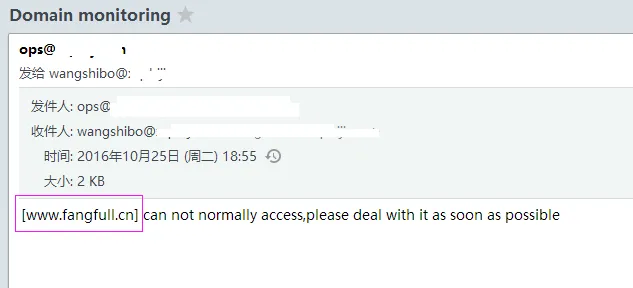
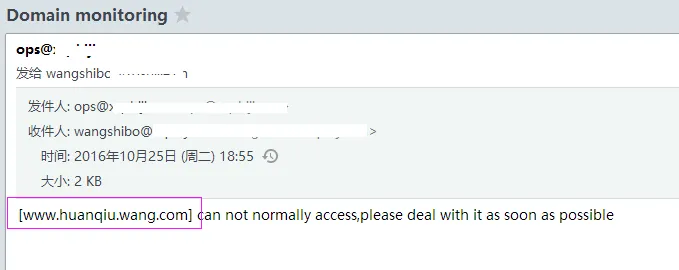
登陆wangshibo@huanqiu.cn邮箱,发现已经收到报警邮件了!
最后添加计划任务,每5分钟执行一次
[root@bastion-IDC ~]# crontab -l
#domain monit
*/5 * * * * /bin/bash -x /root/url-mail.sh >/dev/null 2>&1