代码图理解复杂代码

类图
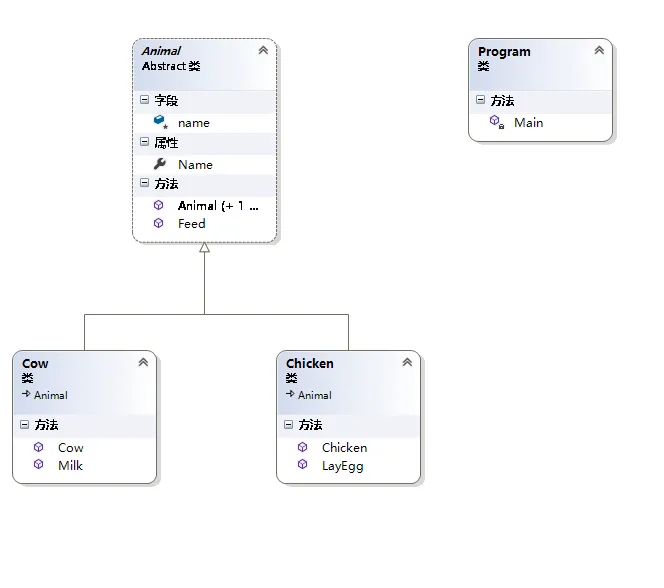
1.抽象动物类Animal
using System;
using System.Collections.Generic;
using System.Linq;
using System.Text;
using System.Threading.Tasks;

namespace Demo2
{
    public abstract class Animal
    {
        protected string name;

        public string Name
        {
            get
            {
                return name;
            }

            set
            {
                name = value;
            }
        }

        public Animal()
        {
            name = "The animal with no name";
        }

        public Animal(string newName)
        {
            name = newName;
        }

        public void Feed()
        {
            Console.WriteLine("{0} has been fed.",name);
        }
    }
}
2.牛类Cow
using System;
using System.Collections.Generic;
using System.Linq;
using System.Text;
using System.Threading.Tasks;

namespace Demo2
{
    public class Cow:Animal
    {
        public void Milk()
        {
            Console.WriteLine("{0} has been milked.",name);
        }

        public Cow(string newName):base(newName) // 继承了父类
        {

        }
    }
}
3.鸡类Chicken
using System;
using System.Collections.Generic;
using System.Linq;
using System.Text;
using System.Threading.Tasks;

namespace Demo2
{
    public class Chicken:Animal
    {
        public void LayEgg()
        {
            Console.WriteLine("{0} has laid an egg.",name);
        }

        public Chicken(string newName) :base(newName)
        {

        }
    }
}
4.主类Program,用到了数组和集合Array,ArrayList
using System;
using System.Collections; // 集合
using System.Collections.Generic;
using System.Linq;
using System.Text;
using System.Threading.Tasks;

namespace Demo2
{
    class Program
    {
        static void Main(string[] args)
        {

            // 数组的形式
            Console.WriteLine("Create an array type collection of Animal objects and use it:");
            Animal[] animalArray = new Animal[2];
            Cow myCow1 = new Cow("Deirdre");
            Chicken myChicken1 = new Chicken("Ken");
            animalArray[0] = myCow1;
            animalArray[1] = myChicken1;

            foreach (Animal myAnimal in animalArray)
            {
                Console.WriteLine("New {0} object added to Array collection,Name = {1}", myAnimal.ToString(),myAnimal.Name);
            }

            Console.WriteLine("Array collection contains {0} objects.",animalArray.Length);

            animalArray[0].Feed();
            ((Chicken)animalArray[1]).LayEgg();

            // 集合的形式
            Console.WriteLine("Create an ArrayList type collection of Animal objects and use it:");
            ArrayList animalArrayList = new ArrayList();
            Cow myCow2 = new Cow("Hayley");
            animalArrayList.Add(myCow2);
            animalArrayList.Add(new Chicken("Roy"));
            foreach (Animal myAnimal in animalArrayList)
            {
                Console.WriteLine("New {0} object added to ArrayList collection,Name = {1}", myAnimal.ToString(), myAnimal.Name);
            }
            Console.WriteLine("Array collection contains {0} objects.", animalArrayList.Count); // 注意这里是Count
            ((Animal)animalArrayList[0]).Feed();
            ((Chicken)animalArrayList[1]).LayEgg();

            Console.ReadKey();

        }
    }
}
两种效果差不多,细节略有区别!
再看下面,改造
定义Animals类,不需要通过ArrayList了。Animals就是ArrayList。
Animals.cs
using System;
using System.Collections; // 集合
using System.Collections.Generic;
using System.Linq;
using System.Text;
using System.Threading.Tasks;

namespace Demo2
{
    public class Animals : CollectionBase
    {
        public void Add(Animal newAnimal)
        {
            List.Add(newAnimal);
        }

        public void Remove(Animal newAnimal)
        {
            List.Remove(newAnimal);
        }

        public Animal this[int animalIndex]
        {
            get
            {
                return (Animal)List[animalIndex];
            }
            set
            {
                List[animalIndex] = value;
            }
        }
    }
}
使用Animals
using System;
using System.Collections; // 集合
using System.Collections.Generic;
using System.Linq;
using System.Text;
using System.Threading.Tasks;

namespace Demo2
{
    class Program
    {
        static void Main(string[] args)
        {

            Animals animalCollection = new Animals();
            animalCollection.Add(new Cow("Jack"));
            animalCollection.Add(new Chicken("Vera"));
            foreach(Animal myAnimal in animalCollection)
            {
                myAnimal.Feed();
            }

            Console.ReadKey();

        }
    }
}
Array可以包涵基本类型和对象类型,ArrayList只能包涵对象类型。
Array大小是固定的,ArrayList的大小是动态变化的。
ArrayList提供了更多的方法和特性,比如:addAll(),removeAll(),iterator()等等。
对于基本数据类型,集合使用自动装箱来减少编码的工作量。但是当处理固定大小的基本数据类型的时候这种方式相对比较慢。
方法论:
实践加理论!多查查相关的资料,总结一下!
本文转自TBHacker博客园博客,原文链接:http://www.cnblogs.com/jiqing9006/p/6782323.html,如需转载请自行联系原作者