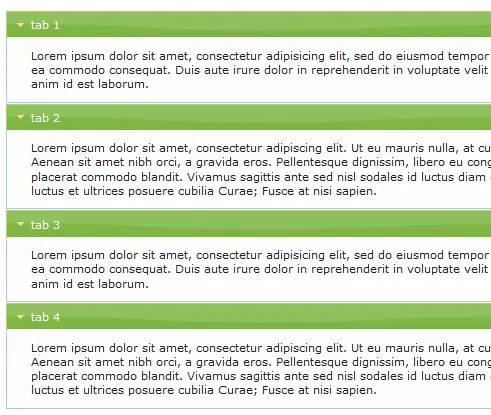
原文:
jquery.ui.accordion的修改(支持展开多个)
背景:原jquery.ui.accordion插件,最多只能展开一个,不能展开多个,后来在网上找到了一个基于它的一个修改版(https://code.google.com/p/jquery-multi-open-accordion/),但使用后发现它给Array加了一个方法(Array.prototype.hasObject),这样就导致了一个问题:在其它页面使用js遍历一个数组的时候,发现此数组多了一个hasObject值。故做了下修改,希望写JS的prototype不要乱用!!!!!!!!!!!!!
修改版如下:
注:$('#multiOpenAccordion').multiAccordion("option", "active", "all");用set的方式写,all和none才会和效!此插件怎么用,请参考jquery UI文档。
(function ($) {

    $.widget('ui.multiAccordion', {
        options: {
            active: 0,
            showAll: null,
            hideAll: null,
            _classes: {
                accordion: 'ui-accordion ui-widget ui-helper-reset ui-accordion-icons',
                h3: 'ui-accordion-header ui-helper-reset ui-state-default ui-corner-all',
                div: 'ui-accordion-content ui-helper-reset ui-widget-content ui-corner-bottom',
                divActive: 'ui-accordion-content-active',
                span: 'ui-icon ui-icon-triangle-1-e',
                stateDefault: 'ui-state-default',
                stateHover: 'ui-state-hover'
            }
        },

        _create: function () {
            var self = this,

			options = self.options,

			$this = self.element,

			$h3 = $this.children('h3'),

			$div = $this.children('div');

            $this.addClass(options._classes.accordion);

            $h3.each(function (index) {
                var $this = $(this);
                $this.addClass(options._classes.h3).prepend('<span class="{class}"></span>'.replace(/{class}/, options._classes.span));
                if (self._isActive(index)) {
                    self._showTab($this)
                }
            }); // end h3 each

            $this.children('div').each(function (index) {
                var $this = $(this);
                $this.addClass(options._classes.div);
            }); // end each

            $h3.bind('click', function (e) {
                // preventing on click to navigate to the top of document
                e.preventDefault();
                var $this = $(this);
                var ui = {
                    tab: $this,
                    content: $this.next('div')
                };
                self._trigger('click', null, ui);
                if ($this.hasClass(options._classes.stateDefault)) {
                    self._showTab($this);
                } else {
                    self._hideTab($this);
                }
            });


            $h3.bind('mouseover', function () {
                $(this).addClass(options._classes.stateHover);
            });

            $h3.bind('mouseout', function () {
                $(this).removeClass(options._classes.stateHover);
            });

            // triggering initialized
            self._trigger('init', null, $this);

        },

        // destroying the whole multi open widget
        destroy: function () {
            var self = this;
            var $this = self.element;
            var $h3 = $this.children('h3');
            var $div = $this.children('div');
            var options = self.options;
            $this.children('h3').unbind('click mouseover mouseout');
            $this.removeClass(options._classes.accordion);
            $h3.removeClass(options._classes.h3).removeClass('ui-state-default ui-corner-all ui-state-active ui-corner-top').children('span').remove();
            $div.removeClass(options._classes.div + ' ' + options._classes.divActive).show();
        },

        // private helper method that used to show tabs
        _showTab: function ($this) {
            var $span = $this.children('span.ui-icon');
            var $div = $this.next();
            var options = this.options;
            $this.removeClass('ui-state-default ui-corner-all').addClass('ui-state-active ui-corner-top');
            $span.removeClass('ui-icon-triangle-1-e').addClass('ui-icon-triangle-1-s');
            $div.slideDown('fast', function () {
                $div.addClass(options._classes.divActive);
            });
            var ui = {
                tab: $this,
                content: $this.next('div')
            }
            this._trigger('tabShown', null, ui);
        },

        // private helper method that used to show tabs
        _hideTab: function ($this) {
            var $span = $this.children('span.ui-icon');
            var $div = $this.next();
            var options = this.options;
            $this.removeClass('ui-state-active ui-corner-top').addClass('ui-state-default ui-corner-all');
            $span.removeClass('ui-icon-triangle-1-s').addClass('ui-icon-triangle-1-e');
            $div.slideUp('fast', function () {
                $div.removeClass(options._classes.divActive);
            });
            var ui = {
                tab: $this,
                content: $this.next('div')
            }
            this._trigger('tabHidden', null, ui);
        },

        // helper method to determine wether passed parameter is an index of an active tab or not
        _isActive: function (num) {
            var options = this.options;
            // if array
            if (typeof options.active == "boolean" && !options.active) {
                return false;
            } else {
                if (options.active.length != undefined) {
                    for (var i = 0; i < options.active.length; i++) {
                        if (options.active[i] == num)
                            return true;
                    }
                } else {
                    return options.active == num;
                }
            }
            return false;
        },

        // return object contain currently opened tabs
        _getActiveTabs: function () {
            var $this = this.element;
            var ui = [];
            $this.children('div').each(function (index) {
                var $content = $(this);
                if ($content.is(':visible')) {
                    //ui = ui ? ui : [];
                    ui.push({
                        index: index,
                        tab: $content.prev('h3'),
                        content: $content
                    });
                }
            });
            return (ui.length == 0 ? undefined : ui);
        },

        getActiveTabs: function () {
            var el = this.element;
            var tabs = [];
            el.children('div').each(function (index) {
                if ($(this).is(':visible')) {
                    tabs.push(index);
                }
            });
            return (tabs.length == 0 ? [-1] : tabs);
        },

        // setting array of active tabs
        _setActiveTabs: function (tabs) {
            var self = this;
            var $this = this.element;
            if (typeof tabs != 'undefined') {
                $this.children('div').each(function (index) {
                    var $tab = $(this).prev('h3');
                    if (jQuery.inArray(index, tabs) != -1) {
                        self._showTab($tab);
                    } else {
                        self._hideTab($tab);
                    }
                });
            }
        },

        // active option passed by plugin, this method will read it and convert it into array of tab indexes
        _generateTabsArrayFromOptions: function (tabOption) {
            var tabs = [];
            var self = this;
            var $this = self.element;
            var size = $this.children('h3').size();
            if ($.type(tabOption) === 'array') {
                return tabOption;
            } else if ($.type(tabOption) === 'number') {
                return [tabOption];
            } else if ($.type(tabOption) === 'string') {
                switch (tabOption.toLowerCase()) {
                    case 'all':
                        var size = $this.children('h3').size();
                        for (var n = 0; n < size; n++) {
                            tabs.push(n);
                        }
                        return tabs;
                        break;
                    case 'none':
                        tabs = [-1];
                        return tabs;
                        break;
                    default:
                        return undefined;
                        break;
                }
            }
        },

        // required method by jquery ui widget framework, used to provide the ability to pass options
        // currently only active option is used here, may grow in the future
        _setOption: function (option, value) {
            $.Widget.prototype._setOption.apply(this, arguments);
            var el = this.element;
            switch (option) {
                case 'active':
                    this._setActiveTabs(this._generateTabsArrayFromOptions(value));
                    break;
                case 'getActiveTabs':
                    var el = this.element;
                    var tabs;
                    el.children('div').each(function (index) {
                        if ($(this).is(':visible')) {
                            tabs = tabs ? tabs : [];
                            tabs.push(index);
                        }
                    });
                    return (tabs.length == 0 ? [-1] : tabs);
                    break;
            }
        }

    });
})(jQuery);