最近我把一个 MCP SSE 服务 Demo 部署到了 Azure App Service,并先用 MCP Inspector 直接连接后端服务做了验证。后端服务本身可以正常响应 MCP 调用。(注:MCP SSE Demo的源码见附录)
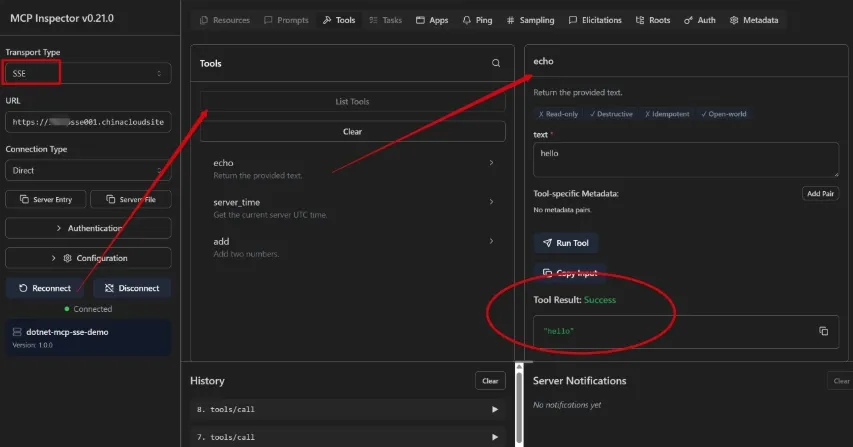
接下来的目标是:把这个已经可以工作的 MCP SSE Server 接入 Azure API Management(APIM),让 APIM 作为统一入口来透传 MCP 请求。
背景:为什么需要用 REST API 配置
我参考的是官方文档:在 API 管理中以编程方式管理 MCP 服务器。文档中提到,APIM 的 MCP Server 可以支持两类透传传输方式:
streamable:当前 MCP Streamable HTTP 传输方式。sse:HTTP + Server-Sent Events 传输方式,需要同时配置sse和message两个端点。
不过在我的 APIM 门户页面里,目前没有看到可以把 Transport Type 设置成 SSE 的 UI 控件,门户上默认显示的是 HTTP 相关配置。
因此这次实验选择直接调用 APIM Management REST API 来创建 MCP API。
环境与目标架构
这次环境在 Azure 中国区,几个关键点如下:
- 后端 MCP SSE 服务:部署在 Azure App Service。
- API 网关:Azure API Management。
- 管理面 endpoint:
https://management.chinacloudapi.cn。 - APIM Gateway endpoint:
https://{apim-name}.azure-api.cn。 - MCP Transport:
sse。 - SSE endpoint:
/sse。 - Message endpoint:
/messages。
整体调用链路如下:
MCP Inspector
|
| https://{apim-name}.azure-api.cn/my-mcp-sse/sse
v
Azure API Management MCP API
|
| backend
v
Azure App Service 上的 MCP SSE Server
创建 SSE Transport 的 MCP API
在创建SSE MCP Server之前,需要先在 APIM 中创建了一个 Backend,Backend ID 为 mcpssebackend01,指向 App Service 的根地址。
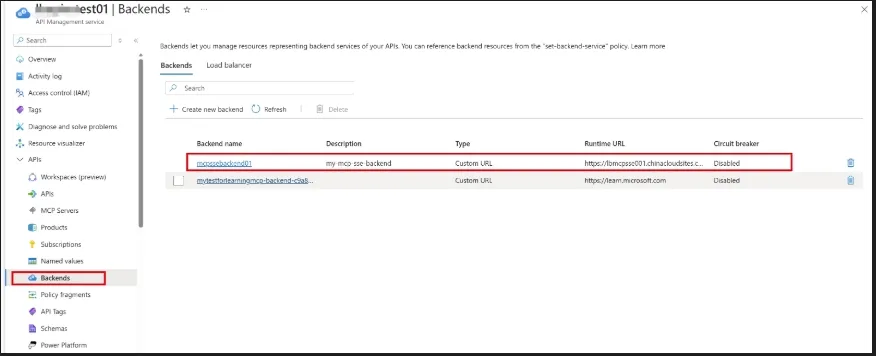
这是因为MCP API 不能只依赖 serviceUrl。对于透传的 MCP SSE Server,需要设置 `backendId',否则会遇见如下错误。
{
"error": {
"code": "ValidationError",
"details": [
{
"message": "Either BackendId or MCP tools must be set, but not both for MCP API."
}
]
}
}
此外,还遇见了另一个问题:API version (2025-09-01-preview) 在 Azure 中国区不支持。
错误消息:
{
"error": {
"code": "NoRegisteredProviderFound",
"message": "No registered resource provider found for location 'chinanorth3' and API version '2025-09-01-preview' for type 'service'. The supported api-versions are ... '2024-10-01-preview'."
}
}
这个错误说明:当前区域和云环境下,Microsoft.ApiManagement/service 还没有注册或开放 2025-09-01-preview。
解决方法是改用错误信息中列出的可用版本,本次测试使用的是 2024-10-01-preview。
最终,把如下CMD脚本中占位符(<your-subscription-id> ,<your-resource-group> ,<your-apim-name>)替换为Azure上APIM资源的信息后,就可以直接Windows CMD窗口执行:
set "SUBSCRIPTION_ID=<your-subscription-id>"
set "RESOURCE_GROUP=<your-resource-group>"
set "APIM_NAME=<your-apim-name>"
set "API_VERSION=2024-10-01-preview"
set "MCP_SERVER_ID=my-mcp-sse"
set "BACKEND_ID=mcpssebackend01"
set "BASE_URL=https://management.chinacloudapi.cn/subscriptions/%SUBSCRIPTION_ID%/resourceGroups/%RESOURCE_GROUP%/providers/Microsoft.ApiManagement/service/%APIM_NAME%"
for /f "delims=" %T in ('az account get-access-token --resource https://management.chinacloudapi.cn --query accessToken -o tsv') do set "TOKEN=%T"
set "BODY_FILE=%TEMP%\apim-mcp-body.json"
(
echo {
echo "properties": {
echo "type": "mcp",
echo "path": "my-mcp-sse",
echo "displayName": "My SSE MCP Server",
echo "description": "Passthrough MCP server using SSE transport",
echo "protocols": ["https"],
echo "backendId": "%BACKEND_ID%",
echo "mcpProperties": {
echo "transportType": "sse",
echo "endpoints": {
echo "sse": {
echo "uriTemplate": "/sse"
echo },
echo "message": {
echo "uriTemplate": "/messages"
echo }
echo }
echo }
echo }
echo }
) > "%BODY_FILE%"
curl -s -X PUT ^
"%BASE_URL%/apis/%MCP_SERVER_ID%?api-version=%API_VERSION%" ^
-H "Authorization: Bearer %TOKEN%" ^
-H "Content-Type: application/json" ^
-H "If-Match: *" ^
-d "@%BODY_FILE%"
注意:因为调用APIM配置接口需要认证, 所以需要登录到Azure China,以便脚本中的“for /f "delims=" %T in ('az account get-access-token --resource https://management.chinacloudapi.cn --query accessToken -o tsv') do set "TOKEN=%T"” 设置TOKEN。
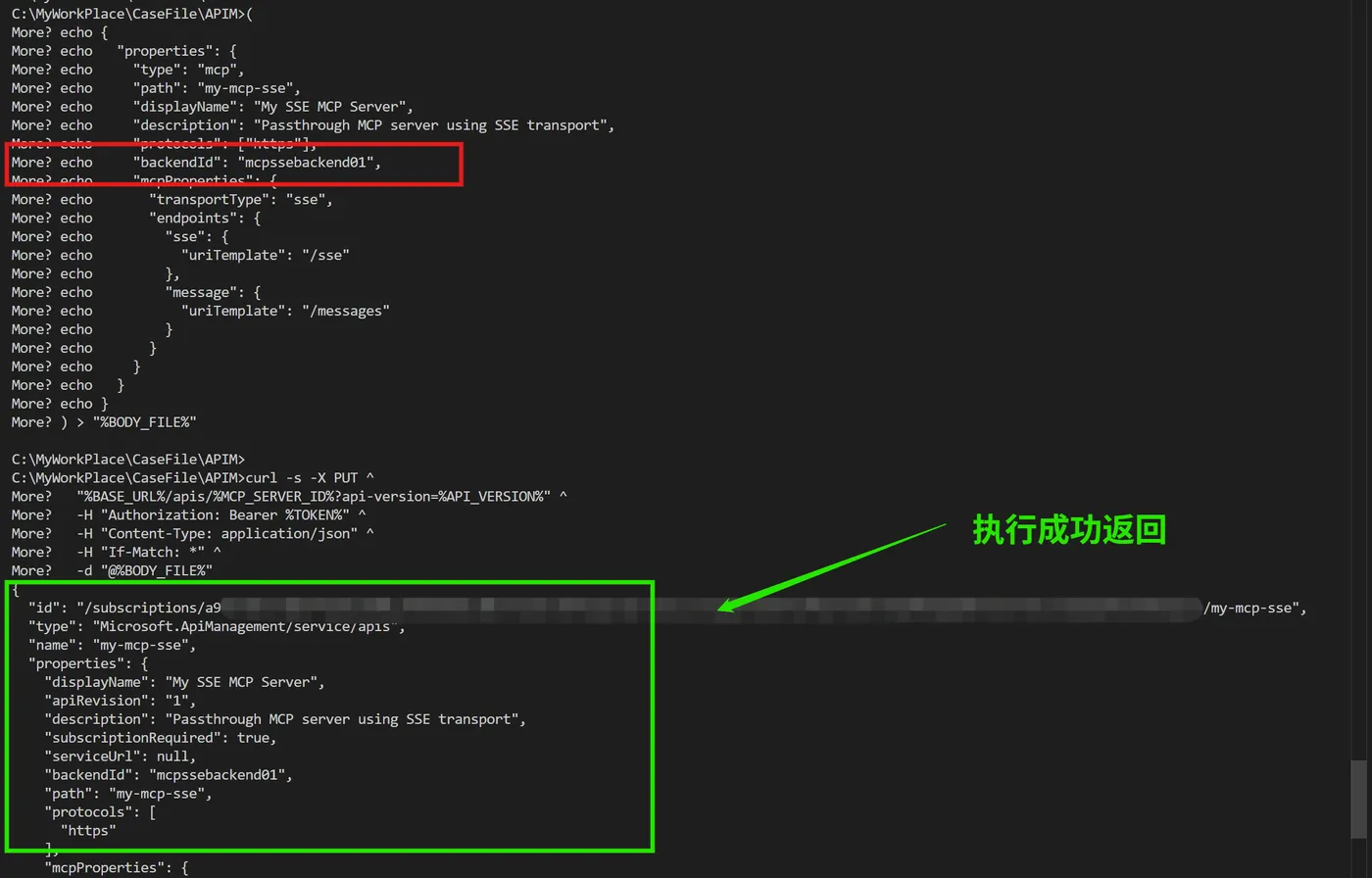
执行的结果如下图:
关键配置解释
这段请求体里最关键的是:
type: "mcp":告诉 APIM 这是一个 MCP 类型的 API。path: "my-mcp-sse":决定客户端访问 APIM Gateway 时的路径前缀。backendId:引用已经创建好的 APIM Backend。transportType: "sse":声明后端 MCP Server 使用 SSE Transport。endpoints.sse.uriTemplate:SSE 事件流端点。endpoints.message.uriTemplate:客户端消息发送端点。
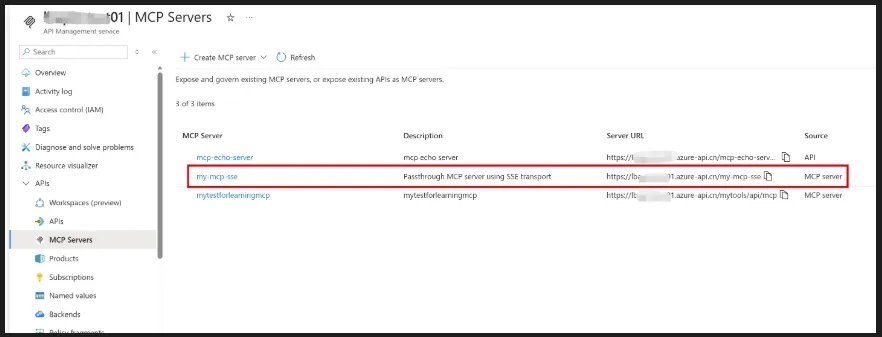
在 APIM 门户中也可以看到已经创建好的 MCP API。
用 MCP Inspector 测试 APIM MCP SSE
创建完成后,可以用 MCP Inspector 测试 APIM 暴露出来的 SSE endpoint。
连接地址格式如下:https://{apim-name}.azure-api.cn/{mcp-path}/sse
对应本次示例就是:https://{apim-name}.azure-api.cn/my-mcp-sse/sse
在中国区Azure上测试APIM MCP Service(SSE),无法连接到MCP服务。
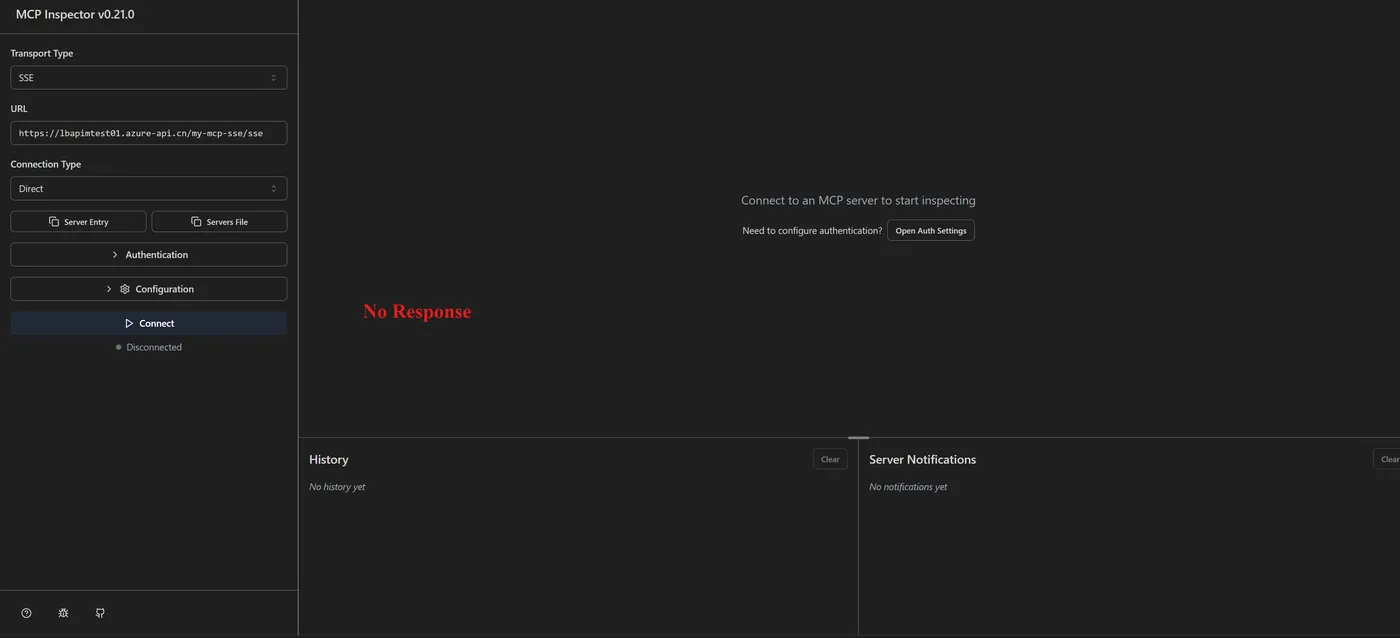
测试失败。目前推测还是APIM服务自身的某些设定没有完成,还不能完全支持SSE协议
结论
在 Azure China 环境中,MCP SSE 透传配置可创建,但最终集成测试未通过,说明 APIM 侧对 SSE 仍存在能力限制。
附录: .NET MCP SSE Demo
using System.Collections.Concurrent;
using System.Text.Json;
using System.Text.Json.Nodes;
using System.Threading.Channels;
var builder = WebApplication.CreateBuilder(args);
builder.Services.AddCors(options =>
{
    options.AddDefaultPolicy(policy => policy
        .AllowAnyOrigin()
        .AllowAnyHeader()
        .AllowAnyMethod());
});
var app = builder.Build();
var sessions = new ConcurrentDictionary<string, SseClient>();
var jsonOptions = new JsonSerializerOptions(JsonSerializerDefaults.Web)
{
    WriteIndented = false
};
app.UseCors();
app.MapGet("/", () => Results.Json(new
{
    name = "MCP SSE Demo",
    endpoints = new
    {
        sse = "/sse",
        messages = "/messages?sessionId={sessionId}",
        hello = "/api/hello?name=World",
        add = "/api/add"
    }
}));
app.MapGet("/health", () => Results.Ok(new { status = "ok", time = DateTimeOffset.UtcNow }));
app.MapGet("/api/hello", (string? name) => Results.Ok(new
{
    message = $"Hello, {(string.IsNullOrWhiteSpace(name) ? "World" : name)}!",
    time = DateTimeOffset.UtcNow
}));
app.MapPost("/api/add", (AddRequest request) => Results.Ok(new
{
    request.A,
    request.B,
    sum = request.A + request.B
}));
app.MapGet("/sse", async (HttpContext context) =>
{
    var sessionId = Guid.NewGuid().ToString("N");
    var client = new SseClient(Channel.CreateUnbounded<string>());
    sessions[sessionId] = client;
    context.Response.Headers.CacheControl = "no-cache";
    context.Response.Headers.Connection = "keep-alive";
    context.Response.Headers.ContentType = "text/event-stream";
    // Use a relative message endpoint so reverse proxies/APIM can resolve it
    // against the public MCP SSE URL instead of leaking the backend host.
    var endpoint = $"/messages?sessionId={sessionId}";

    context.Response.Headers.CacheControl = "no-cache, no-transform";
    context.Response.Headers["X-Mcp-Endpoint-Source"] = "relative-v2";
    context.Response.Headers["X-Mcp-Endpoint-Value"] = endpoint;
    Console.WriteLine($"Writing MCP endpoint event: {endpoint}");
    await WriteSseAsync(context.Response, endpoint, "endpoint", context.RequestAborted);
    try
    {
        while (!context.RequestAborted.IsCancellationRequested)
        {
            var messageAvailable = client.Messages.Reader.WaitToReadAsync(context.RequestAborted).AsTask();
            var heartbeat = Task.Delay(TimeSpan.FromSeconds(15), context.RequestAborted);
            var completed = await Task.WhenAny(messageAvailable, heartbeat);
            if (completed == heartbeat)
            {
                await WriteSseAsync(context.Response, DateTimeOffset.UtcNow.ToString("O"), "ping", context.RequestAborted);
                continue;
            }
            if (!await messageAvailable)
            {
                break;
            }
            while (client.Messages.Reader.TryRead(out var payload))
            {
                await WriteSseAsync(context.Response, payload, "message", context.RequestAborted);
            }
        }
    }
    catch (OperationCanceledException)
    {
        // Client disconnected.
    }
    finally
    {
        sessions.TryRemove(sessionId, out _);
    }
});
app.MapPost("/messages", async (HttpContext context) =>
{
    var sessionId = context.Request.Query["sessionId"].ToString();
    if (string.IsNullOrWhiteSpace(sessionId) || !sessions.TryGetValue(sessionId, out var client))
    {
        return Results.NotFound(new { error = "Unknown or expired sessionId. Connect to /sse first." });
    }
    JsonNode? rpc;
    try
    {
        rpc = await JsonNode.ParseAsync(context.Request.Body, cancellationToken: context.RequestAborted);
    }
    catch (JsonException ex)
    {
        await client.Messages.Writer.WriteAsync(CreateError(null, -32700, $"Parse error: {ex.Message}"), context.RequestAborted);
        return Results.Accepted();
    }
    if (rpc is not JsonObject request)
    {
        await client.Messages.Writer.WriteAsync(CreateError(null, -32600, "Invalid JSON-RPC request."), context.RequestAborted);
        return Results.Accepted();
    }
    var response = HandleJsonRpc(request);
    if (response is not null)
    {
        await client.Messages.Writer.WriteAsync(response, context.RequestAborted);
    }
    return Results.Accepted();
});
app.Run();
string? HandleJsonRpc(JsonObject request)
{
    var id = request["id"];
    var method = request["method"]?.GetValue<string>();
    if (string.IsNullOrWhiteSpace(method))
    {
        return CreateError(id, -32600, "Missing JSON-RPC method.");
    }
    if (method.StartsWith("notifications/", StringComparison.Ordinal))
    {
        return null;
    }
    return method switch
    {
        "initialize" => CreateResult(id, new JsonObject
        {
            ["protocolVersion"] = "2024-11-05",
            ["capabilities"] = new JsonObject
            {
                ["tools"] = new JsonObject
                {
                    ["listChanged"] = false
                }
            },
            ["serverInfo"] = new JsonObject
            {
                ["name"] = "dotnet-mcp-sse-demo",
                ["version"] = "1.0.0"
            }
        }),
        "tools/list" => CreateResult(id, BuildToolsList()),
        "tools/call" => CreateResult(id, CallTool(request["params"] as JsonObject)),
        "resources/list" => CreateResult(id, new JsonObject { ["resources"] = new JsonArray() }),
        "prompts/list" => CreateResult(id, new JsonObject { ["prompts"] = new JsonArray() }),
        _ => CreateError(id, -32601, $"Method not found: {method}")
    };
}
JsonObject BuildToolsList() => new()
{
    ["tools"] = new JsonArray
    {
        new JsonObject
        {
            ["name"] = "echo",
            ["description"] = "Return the provided text.",
            ["inputSchema"] = new JsonObject
            {
                ["type"] = "object",
                ["properties"] = new JsonObject
                {
                    ["text"] = new JsonObject
                    {
                        ["type"] = "string",
                        ["description"] = "Text to echo."
                    }
                },
                ["required"] = new JsonArray("text")
            }
        },
        new JsonObject
        {
            ["name"] = "server_time",
            ["description"] = "Get the current server UTC time.",
            ["inputSchema"] = new JsonObject
            {
                ["type"] = "object",
                ["properties"] = new JsonObject()
            }
        },
        new JsonObject
        {
            ["name"] = "add",
            ["description"] = "Add two numbers.",
            ["inputSchema"] = new JsonObject
            {
                ["type"] = "object",
                ["properties"] = new JsonObject
                {
                    ["a"] = new JsonObject { ["type"] = "number" },
                    ["b"] = new JsonObject { ["type"] = "number" }
                },
                ["required"] = new JsonArray("a", "b")
            }
        }
    }
};
JsonObject CallTool(JsonObject? parameters)
{
    var name = parameters?["name"]?.GetValue<string>();
    var arguments = parameters?["arguments"] as JsonObject ?? new JsonObject();
    var text = name switch
    {
        "echo" => arguments["text"]?.GetValue<string>() ?? string.Empty,
        "server_time" => DateTimeOffset.UtcNow.ToString("O"),
        "add" => Add(arguments),
        _ => $"Unknown tool: {name}"
    };
    return new JsonObject
    {
        ["content"] = new JsonArray
        {
            new JsonObject
            {
                ["type"] = "text",
                ["text"] = text
            }
        }
    };
}
static string Add(JsonObject arguments)
{
    var a = arguments["a"]?.GetValue<double>() ?? 0;
    var b = arguments["b"]?.GetValue<double>() ?? 0;
    return $"{a} + {b} = {a + b}";
}
string CreateResult(JsonNode? id, JsonNode result)
{
    return new JsonObject
    {
        ["jsonrpc"] = "2.0",
        ["id"] = CloneNode(id),
        ["result"] = result
    }.ToJsonString(jsonOptions);
}
string CreateError(JsonNode? id, int code, string message)
{
    return new JsonObject
    {
        ["jsonrpc"] = "2.0",
        ["id"] = CloneNode(id),
        ["error"] = new JsonObject
        {
            ["code"] = code,
            ["message"] = message
        }
    }.ToJsonString(jsonOptions);
}
static JsonNode? CloneNode(JsonNode? node) => node is null ? null : JsonNode.Parse(node.ToJsonString());
static async Task WriteSseAsync(HttpResponse response, string data, string? eventName, CancellationToken cancellationToken)
{
    if (!string.IsNullOrWhiteSpace(eventName))
    {
        await response.WriteAsync($"event: {eventName}\n", cancellationToken);
    }
    var lines = data.Replace("\r\n", "\n", StringComparison.Ordinal).Split('\n');
    foreach (var line in lines)
    {
        await response.WriteAsync($"data: {line}\n", cancellationToken);
    }
    await response.WriteAsync("\n", cancellationToken);
    await response.Body.FlushAsync(cancellationToken);
}
public sealed record AddRequest(double A, double B);
public sealed record SseClient(Channel<string> Messages);
当在复杂的环境中面临问题,格物之道需:浊而静之徐清,安以动之徐生。 云中,恰是如此!