1.介绍
Spring AI Alibaba 开源项目基于 Spring AI 构建,是阿里云通义系列模型及服务在 Java AI 应用开发领域的最佳实践,提供高层次的 AI API 抽象与云原生基础设施集成方案和企业级 AI 应用生态集成。
2.基础使用
2.1 前置
所有调用均基于 OpenAI协议标准或者SpringAI Aalibaba官方推荐模型服务灵积(DashScope)整合规则,实现一致的接口设计与规范,确保多模型切换的便利性,提供高度可扩展的开发支持.
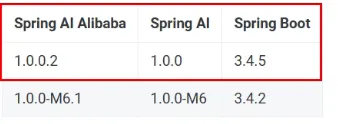
版本兼容性:
 编辑
编辑
接入阿里百炼平台的通义模型
https://bailian.console.aliyun.com/
2.2 调用实例
依赖引入:
<!--spring-ai-alibaba dashscope-->
        <dependency>
            <groupId>com.alibaba.cloud.ai</groupId>
            <artifactId>spring-ai-alibaba-starter-dashscope</artifactId>
        </dependency>

配置文件:
application配置文件配置beseURL,模型名,api-key
server.port=8001
#大模型对话中文乱码UTF8编码处理
server.servlet.encoding.enabled=true
server.servlet.encoding.force=true
server.servlet.encoding.charset=UTF-8
spring.application.name=SAA-01HelloWorld
# ====SpringAIAlibaba Config=============
spring.ai.dashscope.api-key=sk-ea422ccad9354bc0afb3784e46154364
spring.ai.dashscope.base-url=https://dashscope.aliyuncs.com/compatible-mode/v1
spring.ai.dashscope.chat.options.model=deepseek-v3

配置类:
注册DashScopeApi为Bean,这是灵积平台的规范接口实现,是 ChatModel 接口的一个具体实现类,专门用于对接阿里云。
import com.alibaba.cloud.ai.dashscope.api.DashScopeApi;
import com.alibaba.cloud.ai.dashscope.chat.DashScopeChatModel;
import org.springframework.beans.factory.annotation.Value;
import org.springframework.context.annotation.Bean;
import org.springframework.context.annotation.Configuration;
@Configuration
public class SaaLLMConfig
{
    /**
     * 方式1:${}
     * 持有yml文件配置:spring.ai.dashscope.api-key=${aliQwen-api}
     */
//    @Value("${spring.ai.dashscope.api-key}")
//    private String apiKey;
//
//    @Bean
//    public DashScopeApi dashScopeApi()
//    {
//        return DashScopeApi.builder().apiKey(apiKey).build();
//    }
    /**
     * 方式2:System.getenv("环境变量")
     * 持有yml文件配置:spring.ai.dashscope.api-key=${aliQwen-api}
     * @return
     */
    @Bean
    public DashScopeApi dashScopeApi()
    {
        return DashScopeApi.builder()
                .apiKey(System.getenv("aliQwen-api"))
            .build();
    }
}

模型调用实现:
分别实现通用调用和流式调用
import com.alibaba.cloud.ai.dashscope.api.DashScopeApi;
import jakarta.annotation.Resource;
import org.springframework.ai.chat.client.ChatClient;
import org.springframework.ai.chat.messages.UserMessage;
import org.springframework.ai.chat.model.ChatModel;
import org.springframework.boot.context.properties.bind.DefaultValue;
import org.springframework.web.bind.annotation.GetMapping;
import org.springframework.web.bind.annotation.RequestParam;
import org.springframework.web.bind.annotation.RestController;
import reactor.core.publisher.Flux;
@RestController
public class ChatHelloController
{
    @Resource // 对话模型,调用阿里云百炼平台
    private ChatModel chatModel;
    /**
     * 通用调用
     * @param msg
     * @return
     */
    @GetMapping(value = "/hello/dochat")
    public String doChat(@RequestParam(name = "msg",defaultValue="你是谁") String msg)
    {
        String result = chatModel.call(msg);
        return result;
    }
    /**
     * 流式返回调用
     * @param msg
     * @return
     */
    @GetMapping(value = "/hello/streamchat")
    public Flux<String> stream(@RequestParam(name = "msg",defaultValue="你是谁") String msg)
    {
        return chatModel.stream(msg);
    }
}

3.Ollama本地对接
Ollama使用在大模型应用专栏其他博客已说明,现不再赘述。
Ollama对接:
依赖引入:
<!--ollama-->
        <dependency>
            <groupId>org.springframework.ai</groupId>
            <artifactId>spring-ai-starter-model-ollama</artifactId>
            <version>1.0.0</version>
        </dependency>

配置文件:
server.port=8002
server.servlet.encoding.enabled=true
server.servlet.encoding.force=true
server.servlet.encoding.charset=UTF-8
spring.application.name=SAA-02Ollama
# ====ollama Config=============
spring.ai.dashscope.api-key=${aliQwen-api}
spring.ai.ollama.base-url=http://localhost:11434
spring.ai.ollama.chat.model=qwen2.5:latest

调用:
import jakarta.annotation.Resource;
import org.springframework.ai.chat.model.ChatModel;
import org.springframework.beans.factory.annotation.Qualifier;
import org.springframework.web.bind.annotation.GetMapping;
import org.springframework.web.bind.annotation.RequestParam;
import org.springframework.web.bind.annotation.RestController;
import reactor.core.publisher.Flux;
@RestController
public class OllamaController
{
    /*@Resource(name = "ollamaChatModel")
    private ChatModel chatModel;*/
    //方式2
    @Resource
    @Qualifier("ollamaChatModel")
    private ChatModel chatModel;
    /**auther zzyybs@126.com
     * http://localhost:8002/ollama/chat?msg=你是谁
     * @param msg
     * @return
     */
    @GetMapping("/ollama/chat")
    public String chat(@RequestParam(name = "msg") String msg)
    {
        String result = chatModel.call(msg);
        System.out.println("---结果:" + result);
        return result;
    }
    @GetMapping("/ollama/streamchat")
    public Flux<String> streamchat(@RequestParam(name = "msg",defaultValue = "你是谁") String msg)
    {
        return chatModel.stream(msg);
    }
}

4.ChatClient与ChatModel对比
4.1 基础介绍
ChatClient 提供了与 AI 模型通信的 Fluent API,它支持同步和反应式(Reactive)编程模型。与 ChatModel、Message、ChatMemory 等原子 API 相比,使用 ChatClient 可以将与 LLM 及其他组件交互的复杂性隐藏在背后。ChatClient 类似于应用程序开发中的服务层,它为应用程序直接提供 AI 服务,开发者可以使用 ChatClient Fluent API 快速完成一整套 AI 交互流程的组装。
包括一些基础功能,如:
- 定制和组装模型的输入(Prompt)
- 格式化解析模型的输出(Structured Output)
- 调整模型交互参数(ChatOptions)
还支持更多高级功能:
- 聊天记忆(Chat Memory)
- 工具/函数调用(Function Calling)
- RAG
4.2基础使用
配置文件:
配置ChatClient为Bean
import com.alibaba.cloud.ai.dashscope.api.DashScopeApi;
import org.springframework.ai.chat.model.ChatModel;
import org.springframework.ai.chat.client.ChatClient;
import org.springframework.context.annotation.Bean;
import org.springframework.context.annotation.Configuration;
@Configuration
public class SaaLLMConfig
{
    @Bean
    public DashScopeApi dashScopeApi()
    {
        return DashScopeApi.builder()
                    .apiKey(System.getenv("aliQwen-api"))
                .build();
    }
    /**
     * 知识出处:
     * https://java2ai.com/docs/1.0.0.2/tutorials/basics/chat-client/?spm=5176.29160081.0.0.2856aa5cmUTyXC#%E5%88%9B%E5%BB%BA-chatclient
     * @param dashscopeChatModel
     * @return
     */
    @Bean
    public ChatClient chatClient(ChatModel dashscopeChatModel)
    {
        return ChatClient.builder(dashscopeChatModel).build();
    }
}

调用:
import jakarta.annotation.Resource;
import org.springframework.ai.chat.client.ChatClient;
import org.springframework.ai.chat.model.ChatModel;
import org.springframework.beans.factory.annotation.Autowired;
import org.springframework.web.bind.annotation.GetMapping;
import org.springframework.web.bind.annotation.RequestParam;
import org.springframework.web.bind.annotation.RestController;
/**
 * @auther zzyybs@126.com
 * @create 2025-07-23 19:22
 * 知识出处:
 * https://java2ai.com/docs/1.0.0.2/tutorials/basics/chat-client/?spm=5176.29160081.0.0.2856aa5cmUTyXC#%E5%88%9B%E5%BB%BA-chatclient
 */
@RestController
public class ChatClientController
{
    private final ChatClient dashScopeChatClient;
    /** zzyybs@126.com
     * ChatClient不支持自动输入,依赖ChatModel对象接口,ChatClient.builder(dashScopeChatModel).build();
     * @param dashScopeChatModel
     */
    public ChatClientController(ChatModel dashScopeChatModel)
    {
        this.dashScopeChatClient = ChatClient.builder(dashScopeChatModel).build();
    }
    @GetMapping("/chatclient/dochat")
    public String doChat(@RequestParam(name = "msg",defaultValue = "2加9等于几") String msg)
    {
        return dashScopeChatClient.prompt().user(msg).call().content();
    }
}

import com.alibaba.cloud.ai.dashscope.api.DashScopeApi;
import jakarta.annotation.Resource;
import org.springframework.ai.chat.client.ChatClient;
import org.springframework.ai.chat.model.ChatModel;
import org.springframework.web.bind.annotation.GetMapping;
import org.springframework.web.bind.annotation.RequestParam;
import org.springframework.web.bind.annotation.RestController;
/**
 * @auther zzyy
 * @create 2025-07-23 19:31
 */
@RestController
public class ChatClientControllerV2
{
    @Resource
    private ChatModel chatModel;
    @Resource
    private ChatClient dashScopechatClientv2;
    /**
     * http://localhost:8003/chatclientv2/dochat
     * @param msg
     * @return
     */
    @GetMapping("/chatclientv2/dochat")
    public String doChat(@RequestParam(name = "msg",defaultValue = "你是谁") String msg)
    {
        String result = dashScopechatClientv2.prompt().user(msg).call().content();
        System.out.println("ChatClient响应:" + result);
        return result;
    }
    /**
     * http://localhost:8003/chatmodelv2/dochat
     * @param msg
     * @return
     */
    @GetMapping("/chatmodelv2/dochat")
    public String doChat2(@RequestParam(name = "msg",defaultValue = "你是谁") String msg)
    {
        String result = chatModel.call(msg);
        System.out.println("ChatModel响应:" + result);
        return result;
    }
}

5.流式调用
5.1 SSE介绍
流式输出是一种逐步返回大模型生成结果的技术,生成一点返回一点,允许服务器将响应内容分批次实时传输给客户端,而不是等待全部内容生成完毕后再一次性返回。这种机制能显著提升用户体验,尤其适用于大模型响应较慢的场景。
SSE是一种允许服务端可以持续推送数据片段到前端的Web技术。通过单向的HTTP长连接,使用一个长期存在的链接,让服务器可以主动将数据推给客户端,SSE是轻量级的单项通信协议,适合AI对话这类服务端主导的场景。
SSE的核心思想是:客户端发起一个请求,服务端保持这个连接打开并在有新数据时,通过这个连接将数据发送给客户端。
Server-Sent:由服务器发送。
Events:事件,指服务器主动推送给客户端的数据或消息
Server-SentEvents(SSE)服务器发送事件实现流式输出,是一种让服务器能够主动、持续地向客户端(比如你的网页浏览器)推送数据的技术。
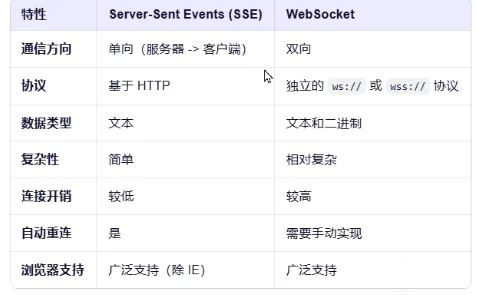
SSE与WS区别:
 编辑
编辑
SSE下一代(Stream able Http)可以实现双向连接。
5.2 SSE实现流式输出
配置多模型的ChatModel以及ChatClient的Bean:
import com.alibaba.cloud.ai.dashscope.api.DashScopeApi;
import com.alibaba.cloud.ai.dashscope.chat.DashScopeChatModel;
import com.alibaba.cloud.ai.dashscope.chat.DashScopeChatOptions;
import org.springframework.ai.chat.client.ChatClient;
import org.springframework.ai.chat.model.ChatModel;
import org.springframework.ai.chat.prompt.ChatOptions;
import org.springframework.beans.factory.annotation.Qualifier;
import org.springframework.context.annotation.Bean;
import org.springframework.context.annotation.Configuration;
/**
 * @auther zzyybs@126.com
 * @create 2025-07-25 18:53
 * @Description ChatModel+ChatClient+多模型共存
 */
@Configuration
public class SaaLLMConfig
{
    // 模型名称常量定义,一套系统多模型共存
    private final String DEEPSEEK_MODEL = "deepseek-v3";
    private final String QWEN_MODEL = "qwen-max";
    @Bean(name = "deepseek")
    public ChatModel deepSeek()
    {
        return DashScopeChatModel.builder()
                .dashScopeApi(DashScopeApi.builder().apiKey(System.getenv("aliQwen-api")).build())
                .defaultOptions(DashScopeChatOptions.builder().withModel(DEEPSEEK_MODEL).build())
                .build();
    }
    @Bean(name = "qwen")
    public ChatModel qwen()
    {
        return DashScopeChatModel.builder()
                .dashScopeApi(DashScopeApi.builder().apiKey(System.getenv("aliQwen-api")).build())
                .defaultOptions(DashScopeChatOptions.builder().withModel(QWEN_MODEL).build())
                .build();
    }
    @Bean(name = "deepseekChatClient")
    public ChatClient deepseekChatClient(@Qualifier("deepseek") ChatModel deepseek)
    {
        return
            ChatClient.builder(deepseek)
                .defaultOptions(ChatOptions.builder().model(DEEPSEEK_MODEL).build())
            .build();
    }
    @Bean(name = "qwenChatClient")
    public ChatClient qwenChatClient(@Qualifier("qwen") ChatModel qwen)
    {
        return
                ChatClient.builder(qwen)
                        .defaultOptions(ChatOptions.builder().model(QWEN_MODEL).build())
                        .build();
    }
}

分别实现多模型的流式输出:
import jakarta.annotation.Resource;
import org.springframework.ai.chat.client.ChatClient;
import org.springframework.ai.chat.model.ChatModel;
import org.springframework.web.bind.annotation.GetMapping;
import org.springframework.web.bind.annotation.RequestParam;
import org.springframework.web.bind.annotation.RestController;
import reactor.core.publisher.Flux;
/**
 * @auther zzyybs@126.com
 * @create 2025-07-25 18:53
 * @Description 流式输出
 */
@RestController
public class StreamOutputController
{
    //V1 通过ChatModel实现stream实现流式输出
    @Resource(name = "deepseek")
    private ChatModel deepseekChatModel;
    @Resource(name = "qwen")
    private ChatModel qwenChatModel;
    @GetMapping(value = "/stream/chatflux1")
    public Flux<String> chatflux(@RequestParam(name = "question",defaultValue = "你是谁") String question)
    {
        return deepseekChatModel.stream(question);
    }
    @GetMapping(value = "/stream/chatflux2")
    public Flux<String> chatflux2(@RequestParam(name = "question",defaultValue = "你是谁") String question)
    {
        return qwenChatModel.stream(question);
    }
    //V2 通过ChatClient实现stream实现流式输出
    @Resource(name = "deepseekChatClient")
    private ChatClient deepseekChatClient;
    @Resource(name = "qwenChatClient")
    private ChatClient qwenChatClient;
    @GetMapping(value = "/stream/chatflux3")
    public Flux<String> chatflux3(@RequestParam(name = "question",defaultValue = "你是谁") String question)
    {
        return deepseekChatClient.prompt(question).stream().content();
    }
    @GetMapping(value = "/stream/chatflux4")
    public Flux<String> chatflux4(@RequestParam(name = "question",defaultValue = "你是谁") String question)
    {
        return qwenChatClient.prompt(question).stream().content();
    }
}

前端测试:
<!DOCTYPE html>
<html>
<head>
    <title>SSE流式ChatModel+ChatClient+多模型共存</title>
    <style>
        body {
            font-family: Arial, sans-serif;
            background-color: #f4f4f4;
            margin: 0;
            padding: 20px;
        }
        #messageInput {
            width: 90%;
            padding: 10px;
            font-size: 16px;
            border: 1px solid #ccc;
            border-radius: 4px;
            margin-bottom: 10px;
        }
        button {
            padding: 10px 20px;
            font-size: 16px;
            background-color: #007bff;
            color: white;
            border: none;
            border-radius: 4px;
            cursor: pointer;
        }
        button:hover {
            background-color: #0056b3;
        }
        #messages {
            margin-top: 20px;
            padding: 15px;
            background-color: #f9f9f9;
            border: 1px solid #ddd;
            border-radius: 8px;
            max-height: 300px;
            overflow-y: auto;
            box-shadow: 0 2px 4px rgba(0, 0, 0, 0.1);
        }
        #messages div {
            padding: 8px 0;
            border-bottom: 1px solid #eee;
            font-size: 14px;
            color: #333;
        }
        #messages div:last-child {
            border-bottom: none;
        }
    </style>
</head>
<body>
    <textarea id="messageInput" rows="4" cols="50" placeholder="请输入你的问题..."></textarea><br>
    <button onclick="sendMsg()">发送提问</button>
    <div id="messages"></div>
    <script>
        function sendMsg()
        {
            // 获取用户输入的消息
            const message = document.getElementById('messageInput').value;
            if (message == "") return false;
            //1 客户端使用 JavaScript 的 EventSource 对象连接到服务器上的一个特定端点(URL)
            const eventSource = new EventSource('stream/chatflux2?question='+message);
            //2 监听消息事件
            eventSource.onmessage = function (event)
            {
                //2.1 获得流式返回的数据
                const data = event.data;
                //2.2 将收获到的数据展示到页面回答窗口上
                const messagesDiv = document.getElementById('messages');
                //2.3 类似java里面append追加的形式将数据批次的显示
                messagesDiv.innerHTML += data;
            }
            //3 监听错误事件,当连接发生错误(包括断开)时触发。
            eventSource.onerror = function (error){
                console.error('EventSource发生了错误: ',error);
                eventSource.close();//关闭链接
            }
        }
    </script>
</body>
</html>

6.Prompt
6.1 基础示例
配置ChatClient和ChatModel实现多模型:
import com.alibaba.cloud.ai.dashscope.api.DashScopeApi;
import com.alibaba.cloud.ai.dashscope.chat.DashScopeChatModel;
import com.alibaba.cloud.ai.dashscope.chat.DashScopeChatOptions;
import org.springframework.ai.chat.client.ChatClient;
import org.springframework.ai.chat.model.ChatModel;
import org.springframework.ai.chat.prompt.ChatOptions;
import org.springframework.beans.factory.annotation.Qualifier;
import org.springframework.context.annotation.Bean;
import org.springframework.context.annotation.Configuration;
/**
 * @auther zzyybs@126.com
 * @create 2025-07-25 18:53
 * @Description ChatModel+ChatClient+多模型共存
 */
@Configuration
public class SaaLLMConfig
{
    // 模型名称常量定义
    private final String DEEPSEEK_MODEL = "deepseek-v3";
    private final String QWEN_MODEL = "qwen-plus";
    @Bean(name = "deepseek")
    public ChatModel deepSeek()
    {
        return DashScopeChatModel.builder()
                        .dashScopeApi(DashScopeApi.builder()
                                    .apiKey(System.getenv("aliQwen-api"))
                                .build())
                .defaultOptions(
                        DashScopeChatOptions.builder().withModel(DEEPSEEK_MODEL).build()
                )
                .build();
    }
    @Bean(name = "qwen")
    public ChatModel qwen()
    {
        return DashScopeChatModel.builder().dashScopeApi(DashScopeApi.builder()
                        .apiKey(System.getenv("aliQwen-api"))
                        .build())
                .defaultOptions(
                        DashScopeChatOptions.builder()
                                .withModel(QWEN_MODEL)
                                .build()
                )
                .build();
    }
    @Bean(name = "deepseekChatClient")
    public ChatClient deepseekChatClient(@Qualifier("deepseek") ChatModel deepSeek)
    {
        return ChatClient.builder(deepSeek)
                .defaultOptions(ChatOptions.builder()
                        .model(DEEPSEEK_MODEL)
                        .build())
                .build();
    }
    @Bean(name = "qwenChatClient")
    public ChatClient qwenChatClient(@Qualifier("qwen") ChatModel qwen)
    {
        return ChatClient.builder(qwen)
                .defaultOptions(ChatOptions.builder()
                        .model(QWEN_MODEL)
                        .build())
                .build();
    }
}

系统提示词配置:
import jakarta.annotation.Resource;
import org.springframework.ai.chat.client.ChatClient;
import org.springframework.ai.chat.messages.AssistantMessage;
import org.springframework.ai.chat.messages.SystemMessage;
import org.springframework.ai.chat.messages.ToolResponseMessage;
import org.springframework.ai.chat.messages.UserMessage;
import org.springframework.ai.chat.model.ChatModel;
import org.springframework.ai.chat.model.ChatResponse;
import org.springframework.ai.chat.prompt.Prompt;
import org.springframework.web.bind.annotation.GetMapping;
import org.springframework.web.bind.annotation.RestController;
import reactor.core.publisher.Flux;
import java.util.List;
/**
 * @auther zzyybs@126.com
 * @create 2025-07-25 21:25
 * @Description 知识出处,https://java2ai.com/docs/1.0.0.2/tutorials/basics/prompt/?spm=5176.29160081.0.0.2856aa5cdeol7a
 */
@RestController
public class PromptController
{
    @Resource(name = "deepseek")
    private ChatModel deepseekChatModel;
    @Resource(name = "qwen")
    private ChatModel qwenChatModel;
    @Resource(name = "deepseekChatClient")
    private ChatClient deepseekChatClient;
    @Resource(name = "qwenChatClient")
    private ChatClient qwenChatClient;
    // http://localhost:8005/prompt/chat?question=火锅介绍下
    @GetMapping("/prompt/chat")
    public Flux<String> chat(String question)
    {
        return deepseekChatClient.prompt()
                // AI 能力边界
                .system("你是一个法律助手,只回答法律问题,其它问题回复,我只能回答法律相关问题,其它无可奉告")
                .user(question)
                .stream()
                .content();
    }
    /**
     * http://localhost:8005/prompt/chat2?question=葫芦娃
     * @param question
     * @return
     */
    @GetMapping("/prompt/chat2")
    public Flux<ChatResponse> chat2(String question)
    {
        // 系统消息
        SystemMessage systemMessage = new SystemMessage("你是一个讲故事的助手,每个故事控制在300字以内");
        // 用户消息
        UserMessage userMessage = new UserMessage(question);
        Prompt prompt = new Prompt(userMessage, systemMessage);
        return deepseekChatModel.stream(prompt);
    }
    /**
     * http://localhost:8005/prompt/chat3?question=葫芦娃
     * @param question
     * @return
     */
    @GetMapping("/prompt/chat3")
    public Flux<String> chat3(String question)
    {
        // 系统消息
        SystemMessage systemMessage = new SystemMessage("你是一个讲故事的助手," +
                "每个故事控制在600字以内且以HTML格式返回");
        // 用户消息
        UserMessage userMessage = new UserMessage(question);
        Prompt prompt = new Prompt(userMessage, systemMessage);
        return deepseekChatModel.stream(prompt)
                .map(response -> response.getResults().get(0).getOutput().getText());
    }
    /**
     * http://localhost:8005/prompt/chat4?question=葫芦娃
     * @param question
     * @return
     */
    @GetMapping("/prompt/chat4")
    public String chat4(String question)
    {
        AssistantMessage assistantMessage = deepseekChatClient.prompt()
                    .user(question)
                    .call()
                    .chatResponse()
                    .getResult()
                    .getOutput();
        return assistantMessage.getText();
    }
    /**
     * http://localhost:8005/prompt/chat5?city=北京
     * 近似理解Tool后面章节讲解......
     * @param city
     * @return
     */
    @GetMapping("/prompt/chat5")
    public String chat5(String city)
    {
        String answer = deepseekChatClient.prompt()
                .user(city + "未来3天天气情况如何?")
                .call()
                .chatResponse()
                .getResult()
                .getOutput()
                .getText();
        ToolResponseMessage toolResponseMessage =
                new ToolResponseMessage(
                        List.of(new ToolResponseMessage.ToolResponse("1","获得天气",city)
                        )
                );
        String toolResponse = toolResponseMessage.getText();
        String result = answer + toolResponse;
        return result;
    }
}

6.2 提示词模板引入
讲一个关于{topic}的故事,并以{output_format}格式输出。

import jakarta.annotation.Resource;
import org.springframework.ai.chat.client.ChatClient;
import org.springframework.ai.chat.messages.Message;
import org.springframework.ai.chat.messages.SystemMessage;
import org.springframework.ai.chat.messages.UserMessage;
import org.springframework.ai.chat.model.ChatModel;
import org.springframework.ai.chat.prompt.Prompt;
import org.springframework.ai.chat.prompt.PromptTemplate;
import org.springframework.ai.chat.prompt.SystemPromptTemplate;
import org.springframework.web.bind.annotation.GetMapping;
import org.springframework.web.bind.annotation.RestController;
import reactor.core.publisher.Flux;
import org.springframework.beans.factory.annotation.Value;
import java.util.List;
import java.util.Map;
/**
 * @auther zzyybs@126.com
 * @create 2025-07-26 16:25
 * @Description TODO
 */
@RestController
public class PromptTemplateController
{
    @Resource(name = "deepseek")
    private ChatModel deepseekChatModel;
    @Resource(name = "qwen")
    private ChatModel qwenChatModel;
    @Resource(name = "deepseekChatClient")
    private ChatClient deepseekChatClient;
    @Resource(name = "qwenChatClient")
    private ChatClient qwenChatClient;
    @Value("classpath:/prompttemplate/atguigu-template.txt")
    private org.springframework.core.io.Resource userTemplate;
    /**
     * @Description: PromptTemplate基本使用,使用占位符设置模版 PromptTemplate
     * @Auther: zzyybs@126.com
     * 测试地址
     * http://localhost:8006/prompttemplate/chat?topic=java&output_format=html&wordCount=200
     */
    @GetMapping("/prompttemplate/chat")
    public Flux<String> chat(String topic, String output_format, String wordCount)
    {
        PromptTemplate promptTemplate = new PromptTemplate("" +
                "讲一个关于{topic}的故事" +
                "并以{output_format}格式输出," +
                "字数在{wordCount}左右");
        // PromptTempate -> Prompt
        Prompt prompt = promptTemplate.create(Map.of(
                "topic", topic,
                "output_format",output_format,
                "wordCount",wordCount));
        return deepseekChatClient.prompt(prompt).stream().content();
    }
    /**
     * @Description: PromptTemplate读取模版文件实现模版功能
     * @Auther: zzyybs@126.com
     * 测试地址
     * http://localhost:8006/prompttemplate/chat2?topic=java&output_format=html
     */
    @GetMapping("/prompttemplate/chat2")
    public String chat2(String topic,String output_format)
    {
        PromptTemplate promptTemplate = new PromptTemplate(userTemplate);
        Prompt prompt = promptTemplate.create(Map.of("topic", topic, "output_format", output_format));
        return deepseekChatClient.prompt(prompt).call().content();
    }
    /**
     *  @Auther: zzyybs@126.com
     * @Description:
     * 系统消息(SystemMessage):设定AI的行为规则和功能边界(xxx助手/什么格式返回/字数控制多少)。
     * 用户消息(UserMessage):用户的提问/主题
     * http://localhost:8006/prompttemplate/chat3?sysTopic=法律&userTopic=知识产权法
     *
     * http://localhost:8006/prompttemplate/chat3?sysTopic=法律&userTopic=夫妻肺片
     */
    @GetMapping("/prompttemplate/chat3")
    public String chat3(String sysTopic, String userTopic)
    {
        // 1.SystemPromptTemplate
        SystemPromptTemplate systemPromptTemplate = new SystemPromptTemplate("你是{systemTopic}助手,只回答{systemTopic}其它无可奉告,以HTML格式的结果。");
        Message sysMessage = systemPromptTemplate.createMessage(Map.of("systemTopic", sysTopic));
        // 2.PromptTemplate
        PromptTemplate userPromptTemplate = new PromptTemplate("解释一下{userTopic}");
        Message userMessage = userPromptTemplate.createMessage(Map.of("userTopic", userTopic));
        // 3.组合【关键】 多个 Message -> Prompt
        Prompt prompt = new Prompt(List.of(sysMessage, userMessage));
        // 4.调用 LLM
        return deepseekChatClient.prompt(prompt).call().content();
    }
    /**
     * @Description: 人物角色设定,通过SystemMessage来实现人物设定,本案例用ChatModel实现
     * 设定AI为”医疗专家”时,仅回答医学相关问题
     * 设定AI为编程助手”时,专注于技术问题解答
     * @Auther: zzyybs@126.com
     * http://localhost:8006/prompttemplate/chat4?question=牡丹花
     */
    @GetMapping("/prompttemplate/chat4")
    public String chat4(String question)
    {
        //1 系统消息
        SystemMessage systemMessage = new SystemMessage("你是一个Java编程助手,拒绝回答非技术问题。");
        //2 用户消息
        UserMessage userMessage = new UserMessage(question);
        //3 系统消息+用户消息=完整提示词
        //Prompt prompt = new Prompt(systemMessage, userMessage);
        Prompt prompt = new Prompt(List.of(systemMessage, userMessage));
        //4 调用LLM
        String result = deepseekChatModel.call(prompt).getResult().getOutput().getText();
        System.out.println(result);
        return result;
    }
    /**
     * @Description: 人物角色设定,通过SystemMessage来实现人物设定,本案例用ChatClient实现
     * 设定AI为”医疗专家”时,仅回答医学相关问题
     * 设定AI为编程助手”时,专注于技术问题解答
     * @Auther: zzyybs@126.com
     * http://localhost:8006/prompttemplate/chat5?question=火锅
     */
    @GetMapping("/prompttemplate/chat5")
    public Flux<String> chat5(String question)
    {
        return deepseekChatClient.prompt()
                .system("你是一个Java编程助手,拒绝回答非技术问题。")
                .user(question)
                .stream()
                .content();
    }
}

7.格式化输出
Structured Output可以协助将ChatModel/ChatClient方法的返回类型从String更改为其他类型,SpringAI的结构化输出转换器有助于将LLM输出转化为结构化格式。
多模型配置:
import com.alibaba.cloud.ai.dashscope.api.DashScopeApi;
import com.alibaba.cloud.ai.dashscope.chat.DashScopeChatModel;
import com.alibaba.cloud.ai.dashscope.chat.DashScopeChatOptions;
import org.springframework.ai.chat.client.ChatClient;
import org.springframework.ai.chat.model.ChatModel;
import org.springframework.ai.chat.prompt.ChatOptions;
import org.springframework.beans.factory.annotation.Qualifier;
import org.springframework.context.annotation.Bean;
import org.springframework.context.annotation.Configuration;
/**
 * @auther zzyybs@126.com
 * @create 2025-07-25 18:53
 * @Description ChatModel+ChatClient+多模型共存
 */
@Configuration
public class SaaLLMConfig
{
    // 模型名称常量定义
    private final String DEEPSEEK_MODEL = "deepseek-v3";
    private final String QWEN_MODEL = "qwen-plus";
    @Bean(name = "deepseek")
    public ChatModel deepSeek()
    {
        return DashScopeChatModel.builder()
                        .dashScopeApi(DashScopeApi.builder()
                                    .apiKey(System.getenv("aliQwen-api"))
                                .build())
                .defaultOptions(
                        DashScopeChatOptions.builder().withModel(DEEPSEEK_MODEL).build()
                )
                .build();
    }
    @Bean(name = "qwen")
    public ChatModel qwen()
    {
        return DashScopeChatModel.builder().dashScopeApi(DashScopeApi.builder()
                        .apiKey(System.getenv("aliQwen-api"))
                        .build())
                .defaultOptions(
                        DashScopeChatOptions.builder()
                                .withModel(QWEN_MODEL)
                                .build()
                )
                .build();
    }
    @Bean(name = "qwenChatClient")
    public ChatClient qwenChatClient(@Qualifier("qwen") ChatModel qwen)
    {
        return ChatClient.builder(qwen)
                .defaultOptions(ChatOptions.builder()
                        .model(QWEN_MODEL)
                        .build())
                .build();
    }
    @Bean(name = "deepseekChatClient")
    public ChatClient deepseekChatClient(@Qualifier("deepseek") ChatModel deepSeek)
    {
        return ChatClient.builder(deepSeek)
                .defaultOptions(ChatOptions.builder()
                        .model(DEEPSEEK_MODEL)
                        .build())
                .build();
    }
}

定义实体类:
/**
 * @auther zzyybs@126.com
 * @create 2025-09-08 16:53
 * @Description jdk14以后的新特性,记录类record = entity + lombok
 */
public record StudentRecord(String id, String sname,String major,String email) { }

import lombok.Data;
import java.util.Objects;
/**
 * @auther zzyybs@126.com
 * @create 2025-07-27 21:01
 * @Description 传统entity
 */
@Data
public class Book
{
    //Field
    int id;
    String bookName;
    public Book()
    {
    }
    public Book(int id, String bookName)
    {
        this.id = id;
        this.bookName = bookName;
    }
    public int getId()
    {
        return id;
    }
    public void setId(int id)
    {
        this.id = id;
    }
    @Override
    public boolean equals(Object o)
    {
        if (this == o) return true;
        if (o == null || getClass() != o.getClass()) return false;
        Book book = (Book) o;
        return id == book.id && Objects.equals(bookName, book.bookName);
    }
    @Override
    public int hashCode()
    {
        return Objects.hash(id, bookName);
    }
    @Override
    public String toString()
    {
        return "Book{" +
                "id=" + id +
                ", bookName='" + bookName + '\'' +
                '}';
    }
}

结构化输出:
import com.atguigu.study.records.StudentRecord;
import jakarta.annotation.Resource;
import org.springframework.ai.chat.client.ChatClient;
import org.springframework.web.bind.annotation.GetMapping;
import org.springframework.web.bind.annotation.RequestParam;
import org.springframework.web.bind.annotation.RestController;
import java.util.function.Consumer;
/**
 * @auther zzyybs@126.com
 * @create 2025-07-26 17:16
 * @Description TODO
 */
@RestController
public class StructuredOutputController
{
    @Resource(name = "qwenChatClient")
    private ChatClient qwenChatClient;
    /**
     * http://localhost:8007/structuredoutput/chat?sname=李四&email=zzyybs@126.com
     * @param sname
     * @return
     */
    @GetMapping("/structuredoutput/chat")
    public StudentRecord chat(@RequestParam(name = "sname") String sname,
                              @RequestParam(name = "email") String email) {
        return qwenChatClient.prompt().user(new Consumer<ChatClient.PromptUserSpec>()
        {
            @Override
            public void accept(ChatClient.PromptUserSpec promptUserSpec)
            {
                promptUserSpec.text("学号1001,我叫{sname},大学专业计算机科学与技术,邮箱{email}")
                        .param("sname",sname)
                        .param("email",email);
            }
        }).call().entity(StudentRecord.class);
    }
    /**
     * http://localhost:8007/structuredoutput/chat2?sname=孙伟&email=zzyybs@126.com
     * @param sname
     * @return
     */
    @GetMapping("/structuredoutput/chat2")
    public StudentRecord chat2(@RequestParam(name = "sname") String sname,
                               @RequestParam(name = "email") String email) {
        String stringTemplate = """
               学号1002,我叫{sname},大学专业软件工程,邮箱{email}
                """;
        return qwenChatClient.prompt()
                .user(promptUserSpec -> promptUserSpec.text(stringTemplate)
                .param("sname",sname)
                .param("email",email))
                .call()
                .entity(StudentRecord.class);
    }
}

8.Memory
依赖引入:
<!--spring-ai-alibaba memory-redis-->
        <dependency>
            <groupId>com.alibaba.cloud.ai</groupId>
            <artifactId>spring-ai-alibaba-starter-memory-redis</artifactId>
        </dependency>
        <!--jedis-->
        <dependency>
            <groupId>redis.clients</groupId>
            <artifactId>jedis</artifactId>
        </dependency>

配置文件:
server.port=8008
# 设置响应的字符编码
server.servlet.encoding.charset=utf-8
server.servlet.encoding.enabled=true
server.servlet.encoding.force=true
spring.application.name=SAA-08Persistent
# ====SpringAIAlibaba Config=============
spring.ai.dashscope.api-key=${aliQwen-api}
# ==========redis config ===============
spring.data.redis.host=localhost
spring.data.redis.port=6379
spring.data.redis.database=0
spring.data.redis.connect-timeout=3
spring.data.redis.timeout=2

RedisMemory配置:
import com.alibaba.cloud.ai.memory.redis.RedisChatMemoryRepository;
import org.springframework.ai.chat.memory.ChatMemory;
import org.springframework.beans.factory.annotation.Value;
import org.springframework.context.annotation.Bean;
import org.springframework.context.annotation.Configuration;
/**
 * @auther zzyybs@126.com
 * @create 2025-07-28 18:24
 * @Description TODO
 */
@Configuration
public class RedisMemoryConfig
{
    @Value("${spring.data.redis.host}")
    private String host;
    @Value("${spring.data.redis.port}")
    private int port;
    @Bean
    public RedisChatMemoryRepository redisChatMemoryRepository()
    {
        return RedisChatMemoryRepository.builder()
                    .host(host)
                    .port(port)
                .build();
    }
}

ChatModel/ChatClient配置:
import com.alibaba.cloud.ai.dashscope.api.DashScopeApi;
import com.alibaba.cloud.ai.dashscope.chat.DashScopeChatModel;
import com.alibaba.cloud.ai.dashscope.chat.DashScopeChatOptions;
import com.alibaba.cloud.ai.memory.redis.RedisChatMemoryRepository;
import jakarta.annotation.Resource;
import org.springframework.ai.chat.client.ChatClient;
import org.springframework.ai.chat.client.advisor.MessageChatMemoryAdvisor;
import org.springframework.ai.chat.memory.MessageWindowChatMemory;
import org.springframework.ai.chat.model.ChatModel;
import org.springframework.ai.chat.prompt.ChatOptions;
import org.springframework.beans.factory.annotation.Qualifier;
import org.springframework.context.annotation.Bean;
import org.springframework.context.annotation.Configuration;
/**
 * @auther zzyybs@126.com
 * @create 2025-07-25 18:53
 * @Description ChatModel+ChatClient+多模型共存
 */
@Configuration
public class SaaLLMConfig
{
    // 模型名称常量定义
    private final String DEEPSEEK_MODEL = "deepseek-v3";
    private final String QWEN_MODEL = "qwen-plus";
    @Bean(name = "deepseek")
    public ChatModel deepSeek()
    {
        return DashScopeChatModel.builder()
                        .dashScopeApi(DashScopeApi.builder()
                                    .apiKey(System.getenv("aliQwen-api"))
                                .build())
                .defaultOptions(
                        DashScopeChatOptions.builder().withModel(DEEPSEEK_MODEL).build()
                )
                .build();
    }
    @Bean(name = "qwen")
    public ChatModel qwen()
    {
        return DashScopeChatModel.builder().dashScopeApi(DashScopeApi.builder()
                        .apiKey(System.getenv("aliQwen-api"))
                        .build())
                .defaultOptions(
                        DashScopeChatOptions.builder()
                                .withModel(QWEN_MODEL)
                                .build()
                )
                .build();
    }
    @Bean(name = "qwenChatClient")
    public ChatClient qwenChatClient(@Qualifier("qwen") ChatModel qwen,
                                     RedisChatMemoryRepository redisChatMemoryRepository)
    {
        MessageWindowChatMemory windowChatMemory = MessageWindowChatMemory.builder()
                            .chatMemoryRepository(redisChatMemoryRepository)
                            .maxMessages(10)
                        .build();
        return ChatClient.builder(qwen)
                    .defaultOptions(ChatOptions.builder().model(QWEN_MODEL).build())
                    .defaultAdvisors(MessageChatMemoryAdvisor.builder(windowChatMemory).build())
                .build();
    }
    /**
     * 家庭作业,按照上述模范qwen完成基于deepseek的模型存储
     * @param deepSeek
     * @return
     */
    @Bean(name = "deepseekChatClient")
    public ChatClient deepseekChatClient(@Qualifier("deepseek") ChatModel deepSeek)
    {
        return ChatClient.builder(deepSeek)
                .defaultOptions(ChatOptions.builder()
                        .model(DEEPSEEK_MODEL)
                        .build())
                .build();
    }
}

会话:
import jakarta.annotation.Resource;
import org.springframework.ai.chat.client.ChatClient;
import org.springframework.web.bind.annotation.GetMapping;
import static org.springframework.ai.chat.memory.ChatMemory.CONVERSATION_ID;
import org.springframework.web.bind.annotation.RestController;
import java.util.function.Consumer;
/**
 * @auther zzyybs@126.com
 * @create 2025-07-28 18:40
 * @Description TODO
 */
@RestController
public class ChatMemory4RedisController
{
    @Resource(name = "qwenChatClient")
    private ChatClient qwenChatClient;
    /**
     * zzyybs@126.com
     * @param msg
     * @param userId
     * @return
     */
    @GetMapping("/chatmemory/chat")
    public String chat(String msg, String userId)
    {
        /*return qwenChatClient.prompt(msg).advisors(new Consumer<ChatClient.AdvisorSpec>()
        {
            @Override
            public void accept(ChatClient.AdvisorSpec advisorSpec)
            {
                advisorSpec.param(CONVERSATION_ID, userId);
            }
        }).call().content();*/
        return qwenChatClient
                .prompt(msg)
                .advisors(advisorSpec -> advisorSpec.param(CONVERSATION_ID, userId))
                .call()
                .content();
    }
}

9.文生图实例
配置文件:
server.port=8009
# 设置响应的字符编码
server.servlet.encoding.charset=utf-8
server.servlet.encoding.enabled=true
server.servlet.encoding.force=true
spring.application.name=SAA-09Text2image
# ====SpringAIAlibaba Config=============
spring.ai.dashscope.api-key=

接口调用:
import com.alibaba.cloud.ai.dashscope.audio.DashScopeSpeechSynthesisModel;
import com.alibaba.cloud.ai.dashscope.audio.DashScopeSpeechSynthesisOptions;
import com.alibaba.cloud.ai.dashscope.audio.synthesis.SpeechSynthesisModel;
import com.alibaba.cloud.ai.dashscope.audio.synthesis.SpeechSynthesisOptions;
import com.alibaba.cloud.ai.dashscope.audio.synthesis.SpeechSynthesisPrompt;
import com.alibaba.cloud.ai.dashscope.audio.synthesis.SpeechSynthesisResponse;
import com.alibaba.cloud.ai.dashscope.image.DashScopeImageOptions;
import jakarta.annotation.Resource;
import org.springframework.ai.chat.model.ChatModel;
import org.springframework.ai.image.ImageModel;
import org.springframework.ai.image.ImagePrompt;
import org.springframework.web.bind.annotation.GetMapping;
import org.springframework.web.bind.annotation.RequestParam;
import org.springframework.web.bind.annotation.RestController;
import java.io.File;
import java.io.FileOutputStream;
import java.nio.ByteBuffer;
import java.util.UUID;
/**
 * @auther zzyybs@126.com
 * @create 2025-07-28 20:10
 * @Description 知识出处
 * https://help.aliyun.com/zh/model-studio/text-to-image?spm=a2c4g.11186623.help-menu-2400256.d_0_5_0.1a457d9dv6o7Kc&accounttraceid=6ec3bf09599f424a91a2a88b27b31570nrdd
 */
@RestController
public class Text2ImageController
{
    // img model
    public static final String IMAGE_MODEL = "wanx2.1-t2i-turbo";
    @Resource
    private ImageModel imageModel;
    /**
     * zzyybs@126.com
     * http://localhost:8009/t2i/image
     * @param prompt
     * @return
     */
    @GetMapping(value = "/t2i/image")
    public String image(@RequestParam(name = "prompt",defaultValue = "刺猬") String prompt)
    {
        return imageModel.call(
                    new ImagePrompt(prompt, DashScopeImageOptions.builder().withModel(IMAGE_MODEL).build())
                )
                .getResult()
                .getOutput()
                .getUrl();
    }
}

10.文生音实例
import com.alibaba.cloud.ai.dashscope.audio.DashScopeSpeechSynthesisOptions;
import com.alibaba.cloud.ai.dashscope.audio.synthesis.SpeechSynthesisModel;
import com.alibaba.cloud.ai.dashscope.audio.synthesis.SpeechSynthesisPrompt;
import com.alibaba.cloud.ai.dashscope.audio.synthesis.SpeechSynthesisResponse;
import jakarta.annotation.Resource;
import org.springframework.web.bind.annotation.GetMapping;
import org.springframework.web.bind.annotation.RequestParam;
import org.springframework.web.bind.annotation.RestController;
import java.io.FileOutputStream;
import java.nio.ByteBuffer;
import java.util.UUID;
/**
 * @auther zzyybs@126.com
 * @create 2025-07-29 18:35
 * @Description TODO
 */
@RestController
public class Text2VoiceController
{
    @Resource
    private SpeechSynthesisModel speechSynthesisModel;
    // voice model
    public static final String BAILIAN_VOICE_MODEL = "cosyvoice-v2";
    // voice timber 音色列表:https://help.aliyun.com/zh/model-studio/cosyvoice-java-sdk#722dd7ca66a6x
    public static final String BAILIAN_VOICE_TIMBER = "longyingcui";//龙应催
    /**
     * http://localhost:8010/t2v/voice
     * @param msg
     * @return
     */
    @GetMapping("/t2v/voice")
    public String voice(@RequestParam(name = "msg",defaultValue = "温馨提醒,支付宝到账100元请注意查收") String msg)
    {
        String filePath = "d:\\" + UUID.randomUUID() + ".mp3";
        //1 语音参数设置
        DashScopeSpeechSynthesisOptions options = DashScopeSpeechSynthesisOptions.builder()
                .model(BAILIAN_VOICE_MODEL)
                .voice(BAILIAN_VOICE_TIMBER)
                .build();
        //2 调用大模型语音生成对象
        SpeechSynthesisResponse response = speechSynthesisModel.call(new SpeechSynthesisPrompt(msg, options));
        //3 字节流语音转换
        ByteBuffer byteBuffer = response.getResult().getOutput().getAudio();
        //4 文件生成
        try (FileOutputStream fileOutputStream = new FileOutputStream(filePath))
        {
            fileOutputStream.write(byteBuffer.array());
        } catch (Exception e) {
            System.out.println(e.getMessage());
        }
        //5 生成路径OK
        return filePath;
    }
}

11.向量化
向量数据库依赖:
<!-- 添加 Redis 向量数据库依赖 -->
        <dependency>
            <groupId>org.springframework.ai</groupId>
            <artifactId>spring-ai-starter-vector-store-redis</artifactId>
        </dependency>

配置文件:
server.port=8011
# 设置响应的字符编码
server.servlet.encoding.charset=utf-8
server.servlet.encoding.enabled=true
server.servlet.encoding.force=true
spring.application.name=SAA-11Embed2vector
# ====SpringAIAlibaba Config=============
spring.ai.dashscope.api-key=
spring.ai.dashscope.chat.options.model=qwen-plus
spring.ai.dashscope.embedding.options.model=text-embedding-v3
# =======Redis Stack==========
spring.data.redis.host=localhost
spring.data.redis.port=6379
spring.data.redis.username=default
spring.data.redis.password=
spring.ai.vectorstore.redis.initialize-schema=true
spring.ai.vectorstore.redis.index-name=custom-index
spring.ai.vectorstore.redis.prefix=custom-prefix

使用:
import com.alibaba.cloud.ai.dashscope.embedding.DashScopeEmbeddingOptions;
import jakarta.annotation.Resource;
import lombok.extern.slf4j.Slf4j;
import org.springframework.ai.document.Document;
import org.springframework.ai.embedding.EmbeddingModel;
import org.springframework.ai.embedding.EmbeddingRequest;
import org.springframework.ai.embedding.EmbeddingResponse;
import org.springframework.ai.vectorstore.SearchRequest;
import org.springframework.ai.vectorstore.VectorStore;
import org.springframework.web.bind.annotation.GetMapping;
import org.springframework.web.bind.annotation.RequestParam;
import org.springframework.web.bind.annotation.RestController;
import java.util.Arrays;
import java.util.List;
/**
 * @auther zzyybs@126.com
 * @create 2025-07-29 19:54
 * @Description TODO
 */
@RestController
@Slf4j
public class Embed2VectorController
{
    @Resource
    private EmbeddingModel embeddingModel;
    @Resource
    private VectorStore vectorStore;
    /**
     * 文本向量化
     * http://localhost:8011/text2embed?msg=射雕英雄传
     *
     * @param msg
     * @return
     */
    @GetMapping("/text2embed")
    public EmbeddingResponse text2Embed(String msg)
    {
        //EmbeddingResponse embeddingResponse = embeddingModel.call(new EmbeddingRequest(List.of(msg), null));
        EmbeddingResponse embeddingResponse = embeddingModel.call(new EmbeddingRequest(List.of(msg),
                DashScopeEmbeddingOptions.builder().withModel("text-embedding-v3").build()));
        System.out.println(Arrays.toString(embeddingResponse.getResult().getOutput()));
        return embeddingResponse;
    }
    /**
     * 文本向量化 后存入向量数据库RedisStack
     */
    @GetMapping("/embed2vector/add")
    public void add()
    {
        List<Document> documents = List.of(
                new Document("i study LLM"),
                new Document("i love java")
        );
        vectorStore.add(documents);
    }
    /**
     * 从向量数据库RedisStack查找,进行相似度查找
     * http://localhost:8011/embed2vector/get?msg=LLM
     * @param msg
     * @return
     */
    @GetMapping("/embed2vector/get")
    public List getAll(@RequestParam(name = "msg") String msg)
    {
        SearchRequest searchRequest = SearchRequest.builder()
                .query(msg)
                .topK(2)
                .build();
        List<Document> list = vectorStore.similaritySearch(searchRequest);
        System.out.println(list);
        return list;
    }
}

12.RAG
配置文件:
server.port=8012
# 设置全局编码格式
server.servlet.encoding.enabled=true
server.servlet.encoding.force=true
server.servlet.encoding.charset=UTF-8
spring.application.name=SAA-12RAG4AiDatabase
# ====SpringAIAlibaba Config=============
spring.ai.dashscope.api-key=${aliQwen-api}
spring.ai.dashscope.chat.options.model=deepseek-r1
spring.ai.dashscope.embedding.options.model=text-embedding-v3
# =======Redis Stack==========
spring.data.redis.host=localhost
spring.data.redis.port=6379
spring.data.redis.username=default
spring.data.redis.password=
spring.ai.vectorstore.redis.initialize-schema=true
spring.ai.vectorstore.redis.index-name=atguigu-index
spring.ai.vectorstore.redis.prefix=atguigu-prefix

Redis配置类:
import lombok.extern.slf4j.Slf4j;
import org.springframework.context.annotation.Bean;
import org.springframework.context.annotation.Configuration;
import org.springframework.data.redis.connection.RedisConnectionFactory;
import org.springframework.data.redis.core.RedisTemplate;
import org.springframework.data.redis.serializer.GenericJackson2JsonRedisSerializer;
import org.springframework.data.redis.serializer.StringRedisSerializer;
/**
 * @auther zzyybs@126.com
 * @create 2025-07-30 14:06
 * @Description TODO
 */
@Configuration
@Slf4j
public class RedisConfig
{
    /**
     * RedisTemplate配置
     * redis序列化的工具配置类,下面这个请一定开启配置
     * 127.0.0.1:6379> keys *
     * 1) "ord:102"  序列化过
     * 2) "\xac\xed\x00\x05t\x00\aord:102"   野生,没有序列化过
     * this.redisTemplate.opsForValue(); //提供了操作string类型的所有方法
     * this.redisTemplate.opsForList(); // 提供了操作list类型的所有方法
     * this.redisTemplate.opsForSet(); //提供了操作set的所有方法
     * this.redisTemplate.opsForHash(); //提供了操作hash表的所有方法
     * this.redisTemplate.opsForZSet(); //提供了操作zset的所有方法
     * @param redisConnectionFactor
     * @return
     */
    @Bean
    public RedisTemplate<String, Object> redisTemplate(RedisConnectionFactory redisConnectionFactor)
    {
        RedisTemplate<String,Object> redisTemplate = new RedisTemplate<>();
        redisTemplate.setConnectionFactory(redisConnectionFactor);
        //设置key序列化方式string
        redisTemplate.setKeySerializer(new StringRedisSerializer());
        //设置value的序列化方式json,使用GenericJackson2JsonRedisSerializer替换默认序列化
        redisTemplate.setValueSerializer(new GenericJackson2JsonRedisSerializer());
        redisTemplate.setHashKeySerializer(new StringRedisSerializer());
        redisTemplate.setHashValueSerializer(new GenericJackson2JsonRedisSerializer());
        redisTemplate.afterPropertiesSet();
        return redisTemplate;
    }
}

向量知识库初始化:
import cn.hutool.crypto.SecureUtil;
import jakarta.annotation.PostConstruct;
import org.springframework.ai.document.Document;
import org.springframework.ai.reader.TextReader;
import org.springframework.ai.transformer.splitter.TokenTextSplitter;
import org.springframework.ai.vectorstore.AbstractVectorStoreBuilder;
import org.springframework.ai.vectorstore.VectorStore;
import org.springframework.beans.factory.annotation.Autowired;
import org.springframework.beans.factory.annotation.Qualifier;
import org.springframework.beans.factory.annotation.Value;
import org.springframework.context.annotation.Configuration;
import org.springframework.core.io.Resource;
import org.springframework.data.redis.core.RedisTemplate;
import java.nio.charset.Charset;
import java.util.List;
/**
 * @auther zzyybs@126.com
 * @create 2025-07-30 12:16
 * @Description TODO
 */
@Configuration
public class InitVectorDatabaseConfig
{
    @Autowired
    private VectorStore vectorStore;
    @Autowired
    private RedisTemplate<String,String> redisTemplate;
    @Value("classpath:ops.txt")
    private Resource opsFile;
    @PostConstruct
    public void init()
    {
        //1 读取文件
        TextReader textReader = new TextReader(opsFile);
        textReader.setCharset(Charset.defaultCharset());
        //2 文件转换为向量(开启分词)
        List<Document> list = new TokenTextSplitter().transform(textReader.read());
        //3 写入向量数据库RedisStack
        //vectorStore.add(list);
        // 解决上面第3步,向量数据重复问题,使用redis setnx命令处理
        //4 去重复版本
        String sourceMetadata = (String)textReader.getCustomMetadata().get("source");
        String textHash = SecureUtil.md5(sourceMetadata);
        String redisKey = "vector-xxx:" + textHash;
        // 判断是否存入过,redisKey如果可以成功插入表示以前没有过,可以假如向量数据
        Boolean retFlag = redisTemplate.opsForValue().setIfAbsent(redisKey, "1");
        System.out.println("****retFlag : "+retFlag);
        if(Boolean.TRUE.equals(retFlag))
        {
            //键不存在,首次插入,可以保存进向量数据库
            vectorStore.add(list);
        }else {
            //键已存在,跳过或者报错
            //throw new RuntimeException("---重复操作");
            System.out.println("------向量初始化数据已经加载过,请不要重复操作");
        }
    }
}

模型配置:
import com.alibaba.cloud.ai.dashscope.api.DashScopeApi;
import com.alibaba.cloud.ai.dashscope.chat.DashScopeChatModel;
import com.alibaba.cloud.ai.dashscope.chat.DashScopeChatOptions;
import org.springframework.ai.chat.client.ChatClient;
import org.springframework.ai.chat.model.ChatModel;
import org.springframework.ai.chat.prompt.ChatOptions;
import org.springframework.ai.rag.advisor.RetrievalAugmentationAdvisor;
import org.springframework.ai.rag.retrieval.search.VectorStoreDocumentRetriever;
import org.springframework.ai.vectorstore.VectorStore;
import org.springframework.beans.factory.annotation.Autowired;
import org.springframework.beans.factory.annotation.Qualifier;
import org.springframework.context.annotation.Bean;
import org.springframework.context.annotation.Configuration;
/**
 * @auther zzyybs@126.com
 * @create 2025-07-25 18:53
 * @Description ChatModel+ChatClient+多模型共存
 */
@Configuration
public class SaaLLMConfig
{
    // 模型名称常量定义
    private final String DEEPSEEK_MODEL = "deepseek-v3";
    private final String QWEN_MODEL = "qwen-plus";
    @Bean(name = "deepseek")
    public ChatModel deepSeek()
    {
        return DashScopeChatModel.builder()
                        .dashScopeApi(DashScopeApi.builder()
                                    .apiKey(System.getenv("aliQwen-api"))
                                .build())
                .defaultOptions(
                        DashScopeChatOptions.builder().withModel(DEEPSEEK_MODEL).build()
                )
                .build();
    }
    @Bean(name = "qwen")
    public ChatModel qwen()
    {
        return DashScopeChatModel.builder().dashScopeApi(DashScopeApi.builder()
                        .apiKey(System.getenv("aliQwen-api"))
                        .build())
                .defaultOptions(
                        DashScopeChatOptions.builder()
                                .withModel(QWEN_MODEL)
                                .build()
                )
                .build();
    }
    @Bean(name = "deepseekChatClient")
    public ChatClient deepseekChatClient(@Qualifier("deepseek") ChatModel deepSeek)
    {
        return ChatClient.builder(deepSeek)
                .defaultOptions(ChatOptions.builder()
                        .model(DEEPSEEK_MODEL)
                        .build())
                .build();
    }
    @Bean(name = "qwenChatClient")
    public ChatClient qwenChatClient(@Qualifier("qwen") ChatModel qwen)
    {
        return ChatClient.builder(qwen)
                .defaultOptions(ChatOptions.builder()
                        .model(QWEN_MODEL)
                        .build())
                .build();
    }
}

模型调用:
/**
 * @auther zzyybs@126.com
 * @create 2025-07-30 12:21
 * @Description 知识出处:
 * https://docs.spring.io/spring-ai/reference/api/retrieval-augmented-generation.html#_advanced_rag
 */
@RestController
public class RagController
{
    @Resource(name = "qwenChatClient")
    private ChatClient chatClient;
    @Resource
    private VectorStore vectorStore;
    /**
     * http://localhost:8012/rag4aiops?msg=00000
     * http://localhost:8012/rag4aiops?msg=C2222
     * @param msg
     * @return
     */
    @GetMapping("/rag4aiops")
    public Flux<String> rag(String msg)
    {
        String systemInfo = """
                你是一个运维工程师,按照给出的编码给出对应故障解释,否则回复找不到信息。
                """;
        RetrievalAugmentationAdvisor advisor = RetrievalAugmentationAdvisor.builder()
                .documentRetriever(VectorStoreDocumentRetriever.builder().vectorStore(vectorStore).build())
                .build();
        return chatClient
                .prompt()
                .system(systemInfo)
                .user(msg)
                .advisors(advisor)
                .stream()
                .content();
    }
}

13.ToolCalling
模型配置:
import org.springframework.ai.chat.client.ChatClient;
import org.springframework.ai.chat.model.ChatModel;
import org.springframework.context.annotation.Bean;
import org.springframework.context.annotation.Configuration;
/**
 * @auther zzyybs@126.com
 * @create 2025-07-31 20:47
 * @Description TODO
 */
@Configuration
public class SaaLLMConfig
{
    @Bean
    public ChatClient chatClient(ChatModel chatModel)
    {
        return ChatClient.builder(chatModel).build();
    }
}

回调工具:
import org.springframework.ai.tool.annotation.Tool;
import java.time.LocalDateTime;
/**
 * @auther zzyybs@126.com
 * @create 2025-07-31 20:39
 * @Description TODO
 */
public class DateTimeTools
{
    /**
     * 1.定义 function call(tool call)
     * 2. returnDirect
     *    true = tool直接返回不走大模型,直接给客户
     *    false = 默认值,拿到tool返回的结果,给大模型,最后由大模型回复
     */
    @Tool(description = "获取当前时间", returnDirect = false)
    public String getCurrentTime()
    {
        return LocalDateTime.now().toString();
    }
}

调用:
import com.alibaba.cloud.ai.dashscope.api.DashScopeApi;
import jakarta.annotation.Resource;
import org.springframework.ai.chat.model.ChatModel;
import org.springframework.web.bind.annotation.GetMapping;
import org.springframework.web.bind.annotation.RequestParam;
import org.springframework.web.bind.annotation.RestController;
import reactor.core.publisher.Flux;
/**
 * @auther zzyybs@126.com
 * @create 2025-07-31 20:26
 * @Description TODO
 */
@RestController
public class NoToolCallingController
{
    @Resource
    private ChatModel chatModel;
    /**
     * http://localhost:8013/notoolcall/chat
     * @param msg
     * @return
     */
    @GetMapping("/notoolcall/chat")
    public Flux<String> chat(@RequestParam(name = "msg",defaultValue = "你是谁现在几点") String msg)
    {
        return chatModel.stream(msg);
    }
}

import com.atguigu.study.utils.DateTimeTools;
import jakarta.annotation.Resource;
import org.springframework.ai.chat.client.ChatClient;
import org.springframework.ai.chat.model.ChatModel;
import org.springframework.ai.chat.prompt.ChatOptions;
import org.springframework.ai.chat.prompt.Prompt;
import org.springframework.ai.model.tool.ToolCallingChatOptions;
import org.springframework.ai.support.ToolCallbacks;
import org.springframework.ai.tool.ToolCallback;
import org.springframework.web.bind.annotation.GetMapping;
import org.springframework.web.bind.annotation.RequestParam;
import org.springframework.web.bind.annotation.RestController;
import reactor.core.publisher.Flux;
/**
 * @auther zzyybs@126.com
 * @create 2025-07-31 20:40
 * @Description TODO
 */
@RestController
public class ToolCallingController
{
    @Resource
    private ChatModel chatModel;
    @GetMapping("/toolcall/chat")
    public String chat(@RequestParam(name = "msg",defaultValue = "你是谁现在几点") String msg)
    {
        // 1.工具注册到工具集合里
        ToolCallback[] tools = ToolCallbacks.from(new DateTimeTools());
        // 2.将工具集配置进ChatOptions对象
        ChatOptions options = ToolCallingChatOptions.builder().toolCallbacks(tools).build();
        // 3.构建提示词
        Prompt prompt = new Prompt(msg, options);
        // 4.调用大模型
        return chatModel.call(prompt).getResult().getOutput().getText();
    }
    @Resource
    private ChatClient chatClient;
    @GetMapping("/toolcall/chat2")
    public Flux<String> chat2(@RequestParam(name = "msg",defaultValue = "你是谁现在几点") String msg)
    {
        return chatClient.prompt(msg)
                .tools(new DateTimeTools())
                .stream()
                .content();
    }
}

14.MCP
14.1 MCP介绍
之前每个大模型(如DeepSeek、ChatGPT)需要为每个工具单独开发接口(FunctionCalling),导致重复劳动。开发者只需写一次MCP服务端,所有兼容MCP协议的模型都能调用,MCP让大模型从"被动应答”变为”主动调用工具”。我调用一个MCP服务器就等价调用一个带有多个功能的Utils工具类,自己还不用受累携带。
MCP是Java界的SpringCloud Openfeign,只不过Openfeign是用于微服务通讯的,而MCP用于大模型通讯的,但它们都是为了通讯获取某项数据的一种机制。MCP提供了一种标准化的方式来连接 LLMs 需要的上下文,MCP 就类似于一个 Agent 时代的 Type-C协议,希望能将不同来源的数据、工具、服务统一起来供大模型调用。
MCP核心组成部分:
MCP 主机(MCP Hosts):发起请求的 AI 应用程序,比如聊天机器人、AI 驱动的 IDE 等。
MCP 客户端(MCP Clients):在主机程序内部,与 MCP 服务器保持 1:1 的连接。
MCP 服务器(MCP Servers):为 MCP 客户端提供上下文、工具和提示信息。
本地资源(Local Resources):本地计算机中可供 MCP 服务器安全访问的资源,如文件、数据库。
远程资源(Remote Resources):MCP 服务器可以连接到的远程资源,如通过 API 提供的数据
在MCP通信协议中,一般有两种模式:
STDIO(标准输入/输出):支持标准输入和输出流进行通信,主要用于本地集成、命令行工具等场景
SSE (Server-Sent Events):支持使用 HTTP POST 请求进行服务器到客户端流式处理,以实现客户端到服务器的通信。
14.2 MCP基础案例
14.2.1 服务端
依赖引入:
<dependency>
            <groupId>org.springframework.boot</groupId>
            <artifactId>spring-boot-starter</artifactId>
        </dependency>
        <!--注意事项(重要)
    spring-ai-starter-mcp-server-webflux不能和<artifactId>spring-boot-starter-web</artifactId>依赖并存,
    否则会使用tomcat启动,而不是netty启动,从而导致mcpserver启动失败,但程序运行是正常的,mcp客户端连接不上。
-->
        <!--mcp-server-webflux-->
        <dependency>
            <groupId>org.springframework.ai</groupId>
            <artifactId>spring-ai-starter-mcp-server-webflux</artifactId>
        </dependency>

配置文件:
server.port=8014
# 设置全局编码格式
server.servlet.encoding.enabled=true
server.servlet.encoding.force=true
server.servlet.encoding.charset=UTF-8
spring.application.name=SAA-14LocalMcpServer
# ====mcp-server Config=============
spring.ai.mcp.server.type=async
spring.ai.mcp.server.name=customer-define-mcp-server
spring.ai.mcp.server.version=1.0.0

定义工具:
import org.springframework.ai.tool.annotation.Tool;
import org.springframework.stereotype.Service;
import java.util.Map;
/**
 * @auther bs@126.com
 * @create 2025-07-31 21:07
 * @Description TODO
 */
@Service
public class WeatherService
{
    @Tool(description = "根据城市名称获取天气预报")
    public String getWeatherByCity(String city)
    {
        Map<String, String> map = Map.of(
                "北京", "11111降雨频繁,其中今天和后天雨势较强,部分地区有暴雨并伴强对流天气,需注意",
                "上海", "22222多云,15℃~27℃,南风3级,当前温度27℃。",
                "深圳", "333333多云40天,阴16天,雨30天,晴3天"
        );
        return map.getOrDefault(city, "抱歉:未查询到对应城市!");
    }
}

配置工具:
import com.atguigu.study.service.WeatherService;
import org.springframework.ai.tool.ToolCallbackProvider;
import org.springframework.ai.tool.method.MethodToolCallbackProvider;
import org.springframework.context.annotation.Bean;
import org.springframework.context.annotation.Configuration;
/**
 * @auther zzyybs@126.com
 * @create 2025-07-31 21:08
 * @Description TODO
 */
@Configuration
public class McpServerConfig
{
    /**
     * 将工具方法暴露给外部 mcp client 调用
     * @param weatherService
     * @return
     */
    @Bean
    public ToolCallbackProvider weatherTools(WeatherService weatherService)
    {
        return MethodToolCallbackProvider.builder()
                .toolObjects(weatherService)
                .build();
    }
}

14.2.2 客户端
依赖引入:
<!-- 2.mcp-clent 依赖 -->
        <dependency>
            <groupId>org.springframework.ai</groupId>
            <artifactId>spring-ai-starter-mcp-client</artifactId>
        </dependency>

配置文件:
server.port=8015
# 设置全局编码格式
server.servlet.encoding.enabled=true
server.servlet.encoding.force=true
server.servlet.encoding.charset=UTF-8
spring.application.name=SAA-15LocalMcpClient
# ====SpringAIAlibaba Config=============
spring.ai.dashscope.api-key=${aliQwen-api}
# ====mcp-client Config=============
spring.ai.mcp.client.type=async
spring.ai.mcp.client.request-timeout=60s
spring.ai.mcp.client.toolcallback.enabled=true
spring.ai.mcp.client.sse.connections.mcp-server1.url=http://localhost:8014

配置类:
import org.springframework.ai.chat.client.ChatClient;
import org.springframework.ai.chat.model.ChatModel;
import org.springframework.ai.tool.ToolCallbackProvider;
import org.springframework.context.annotation.Bean;
import org.springframework.context.annotation.Configuration;
/**
 * @auther zzyybs@126.com
 * @create 2025-07-31 20:47
 * @Description TODO
 */
@Configuration
public class SaaLLMConfig
{
    @Bean
    public ChatClient chatClient(ChatModel chatModel, ToolCallbackProvider tools)
    {
        return ChatClient.builder(chatModel)
                .defaultToolCallbacks(tools.getToolCallbacks())  //mcp协议,配置见yml文件
                .build();
    }
}

调用:
import jakarta.annotation.Resource;
import org.springframework.ai.chat.client.ChatClient;
import org.springframework.ai.chat.model.ChatModel;
import org.springframework.web.bind.annotation.GetMapping;
import org.springframework.web.bind.annotation.RequestMapping;
import org.springframework.web.bind.annotation.RequestParam;
import org.springframework.web.bind.annotation.RestController;
import reactor.core.publisher.Flux;
/**
 * @auther zzyybs@126.com
 * @create 2025-07-31 21:14
 * @Description TODO
 */
@RestController
public class McpClientController
{
    @Resource
    private ChatClient chatClient;//使用mcp支持
    @Resource
    private ChatModel chatModel;//没有纳入tool支持,普通调用
    // http://localhost:8015/mcpclient/chat?msg=上海
    @GetMapping("/mcpclient/chat")
    public Flux<String> chat(@RequestParam(name = "msg",defaultValue = "北京") String msg)
    {
        System.out.println("使用了mcp");
        return chatClient.prompt(msg).stream().content();
    }
    @RequestMapping("/mcpclient/chat2")
    public Flux<String> chat2(@RequestParam(name = "msg",defaultValue = "北京") String msg)
    {
        System.out.println("未使用mcp");
        return chatModel.stream(msg);
    }
}

14.3 MCP实现案例
完整依赖引入:
<?xml version="1.0" encoding="UTF-8"?>
<project xmlns="http://maven.apache.org/POM/4.0.0" xmlns:xsi="http://www.w3.org/2001/XMLSchema-instance"
         xsi:schemaLocation="http://maven.apache.org/POM/4.0.0 https://maven.apache.org/xsd/maven-4.0.0.xsd">
    <modelVersion>4.0.0</modelVersion>
    <parent>
        <groupId>com.atguigu.study</groupId>
        <artifactId>SpringAIAlibaba-atguiguV1</artifactId>
        <version>1.0-SNAPSHOT</version>
    </parent>
    <artifactId>SAA-16ClientCallBaiduMcpServer</artifactId>
    <dependencies>
        <dependency>
            <groupId>org.springframework.boot</groupId>
            <artifactId>spring-boot-starter-web</artifactId>
        </dependency>
        <!--spring-ai-alibaba dashscope-->
        <dependency>
            <groupId>com.alibaba.cloud.ai</groupId>
            <artifactId>spring-ai-alibaba-starter-dashscope</artifactId>
        </dependency>
        <!-- 2.mcp-clent 依赖 -->
        <dependency>
            <groupId>org.springframework.ai</groupId>
            <artifactId>spring-ai-starter-mcp-client</artifactId>
        </dependency>
        <!--lombok-->
        <dependency>
            <groupId>org.projectlombok</groupId>
            <artifactId>lombok</artifactId>
            <version>1.18.38</version>
        </dependency>
        <!--hutool-->
        <dependency>
            <groupId>cn.hutool</groupId>
            <artifactId>hutool-all</artifactId>
            <version>5.8.22</version>
        </dependency>
        <dependency>
            <groupId>org.springframework.boot</groupId>
            <artifactId>spring-boot-starter-test</artifactId>
            <scope>test</scope>
        </dependency>
    </dependencies>
    <build>
        <plugins>
            <plugin>
                <groupId>org.springframework.boot</groupId>
                <artifactId>spring-boot-maven-plugin</artifactId>
            </plugin>
            <plugin>
                <groupId>org.apache.maven.plugins</groupId>
                <artifactId>maven-compiler-plugin</artifactId>
                <version>3.11.0</version>
                <configuration>
                    <compilerArgs>
                        <arg>-parameters</arg>
                    </compilerArgs>
                    <source>21</source>
                    <target>21</target>
                </configuration>
            </plugin>
        </plugins>
    </build>
    <repositories>
        <repository>
            <id>spring-milestones</id>
            <name>Spring Milestones</name>
            <url>https://repo.spring.io/milestone</url>
            <snapshots>
                <enabled>false</enabled>
            </snapshots>
        </repository>
    </repositories>
</project>

配置文件:
server.port=8016
# 设置全局编码格式
server.servlet.encoding.enabled=true
server.servlet.encoding.force=true
server.servlet.encoding.charset=UTF-8
spring.application.name=SAA-16ClientCallBaiduMcpServer
# ====SpringAIAlibaba Config=============
spring.ai.dashscope.api-key=${aliQwen-api}
# ====mcp-client Config=============
spring.ai.mcp.client.request-timeout=20s
spring.ai.mcp.client.toolcallback.enabled=true
spring.ai.mcp.client.stdio.servers-configuration=classpath:/mcp-server.json5

{
  "mcpServers":
  {
    "baidu-map":
    {
      "command": "cmd",
      "args": ["/c", "npx", "-y", "@baidumap/mcp-server-baidu-map"],
      "env":  {"BAIDU_MAP_API_KEY": "yHWFqCBXiiwVrk4psrl7IvqE7IsiBgQ6"}
    }
  }
}
// 构建McpTransport协议
//cmd:启动 Windows 命令行解释器。
///c:告诉 cmd 执行完后面的命令后关闭自身。
//npx:npx = npm execute package,Node.js 的一个工具,用于执行 npm 包中的可执行文件。
//-y 或 --yes:自动确认操作(类似于默认接受所有提示)。
//@baidumap/mcp-server-baidu-map:要通过 npx 执行的 npm 包名
//BAIDU_MAP_API_KEY 是访问百度地图开放平台API的AK

配置类:
import org.springframework.ai.chat.client.ChatClient;
import org.springframework.ai.chat.model.ChatModel;
import org.springframework.ai.tool.ToolCallbackProvider;
import org.springframework.context.annotation.Bean;
import org.springframework.context.annotation.Configuration;
/**
 * @auther zzyybs@126.com
 * @create 2025-07-31 20:47
 * @Description TODO
 */
@Configuration
public class SaaLLMConfig
{
    @Bean
    public ChatClient chatClient(ChatModel chatModel, ToolCallbackProvider tools)
    {
        return ChatClient.builder(chatModel)
                //mcp协议,配置见yml文件,此处只赋能给ChatClient对象
                .defaultToolCallbacks(tools.getToolCallbacks())
                .build();
    }
}

服务调用:
import jakarta.annotation.Resource;
import org.springframework.ai.chat.client.ChatClient;
import org.springframework.ai.chat.model.ChatModel;
import org.springframework.web.bind.annotation.GetMapping;
import org.springframework.web.bind.annotation.RequestMapping;
import org.springframework.web.bind.annotation.RestController;
import reactor.core.publisher.Flux;
/**
 * @auther zzyybs@126.com
 * @create 2025-08-01 15:57
 * @Description TODO
 */
@RestController
public class McpClientCallBaiDuMcpController
{
    @Resource
    private ChatClient chatClient; //添加了MCP调用能力
    @Resource
    private ChatModel chatModel; //没有添加MCP调用能力
    /**
     * 添加了MCP调用能力
     * http://localhost:8016/mcp/chat?msg=查询北纬39.9042东经116.4074天气
     * http://localhost:8016/mcp/chat?msg=查询61.149.121.66归属地
     * http://localhost:8016/mcp/chat?msg=查询昌平到天安门路线规划
     * @param msg
     * @return
     */
    @GetMapping("/mcp/chat")
    public Flux<String> chat(String msg)
    {
        return chatClient.prompt(msg).stream().content();
    }
    /**
     * 没有添加MCP调用能力
     * http://localhost:8016/mcp/chat2?msg=查询北纬39.9042东经116.4074天气
     * @param msg
     * @return
     */
    @RequestMapping("/mcp/chat2")
    public Flux<String> chat2(String msg)
    {
        return chatModel.stream(msg);
    }
}

15.SpringAIalibaba生态
15.1 云上RAG
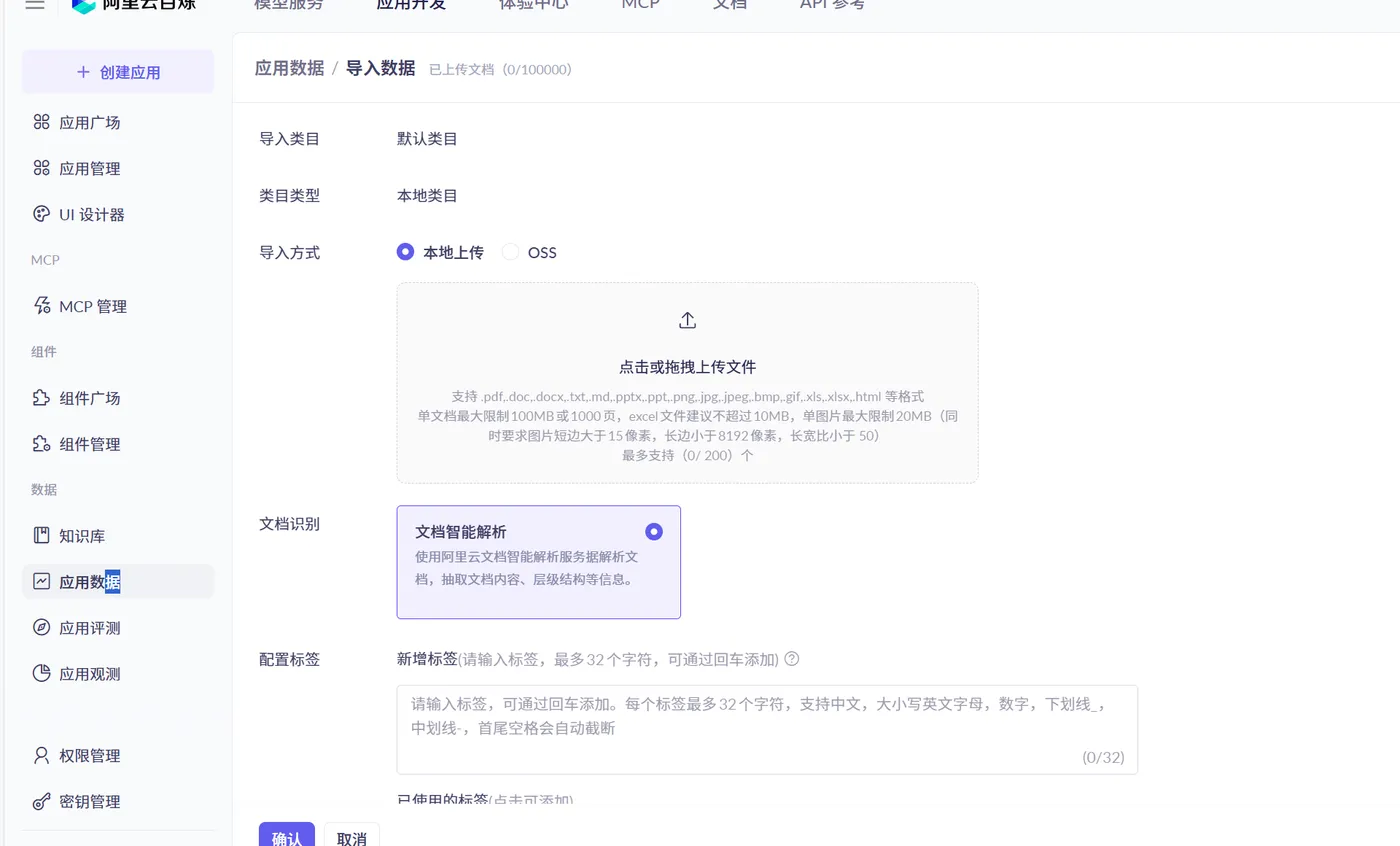
导入知识库:
 编辑
编辑
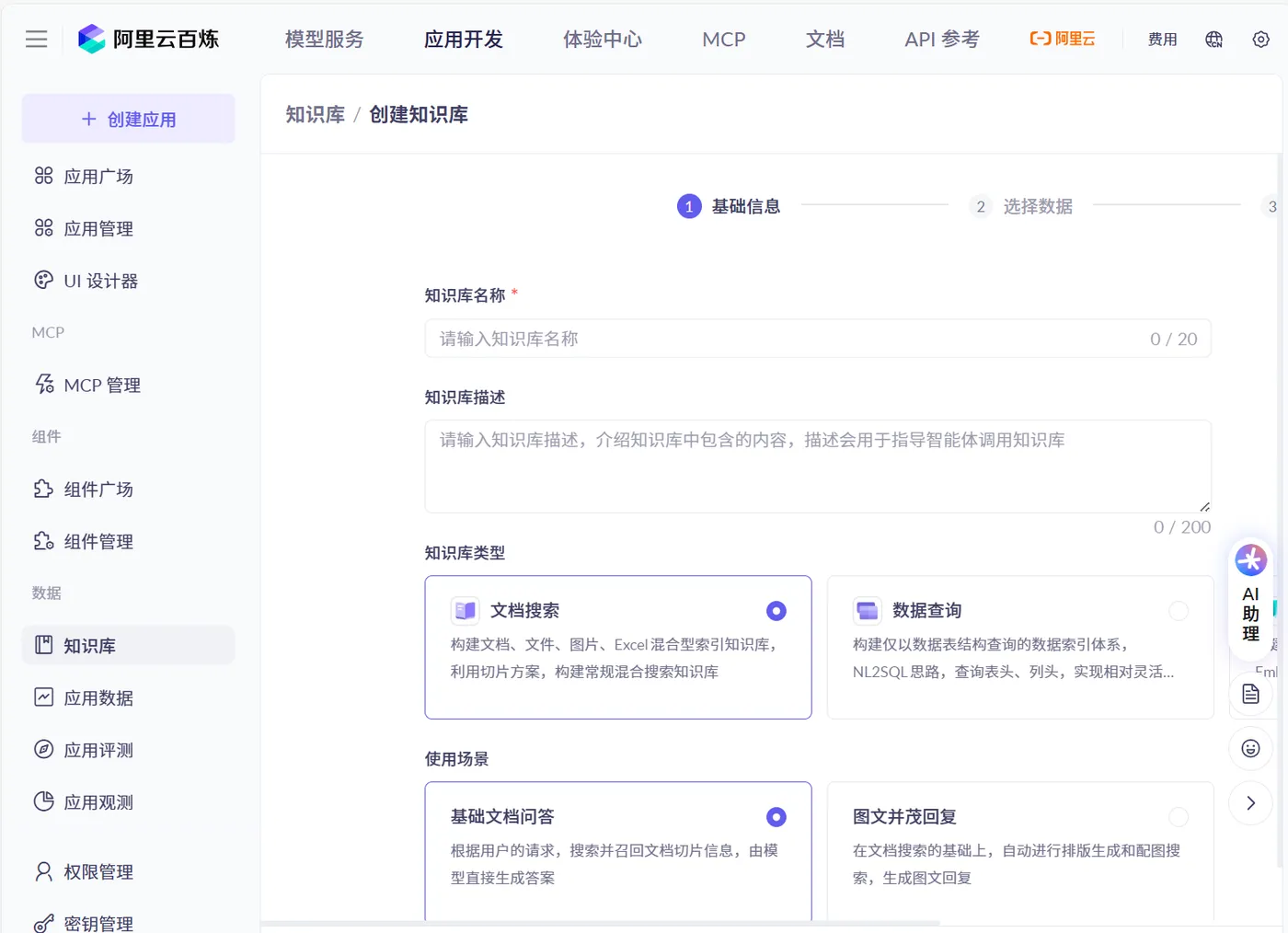
创建数据库:
 编辑
编辑
配置:
import com.alibaba.cloud.ai.dashscope.api.DashScopeApi;
import org.springframework.ai.chat.client.ChatClient;
import org.springframework.ai.chat.model.ChatModel;
import org.springframework.beans.factory.annotation.Value;
import org.springframework.context.annotation.Bean;
import org.springframework.context.annotation.Configuration;
@Configuration
public class DashScopeConfig
{
    @Value("${spring.ai.dashscope.api-key}")
    private String apiKey;
    @Bean
    public DashScopeApi dashScopeApi() {
        return DashScopeApi.builder()
                .apiKey(apiKey)
                .workSpaceId("llm-3as714s6flm80yc1")
                .build();
    }
    @Bean
    public ChatClient chatClient(ChatModel dashscopeChatModel) {
        return ChatClient.builder(dashscopeChatModel).build();
    }
}

调用:
import com.alibaba.cloud.ai.advisor.DocumentRetrievalAdvisor;
import com.alibaba.cloud.ai.dashscope.api.DashScopeApi;
import com.alibaba.cloud.ai.dashscope.rag.DashScopeDocumentRetriever;
import com.alibaba.cloud.ai.dashscope.rag.DashScopeDocumentRetrieverOptions;
import jakarta.annotation.Resource;
import org.springframework.ai.chat.client.ChatClient;
import org.springframework.ai.rag.retrieval.search.DocumentRetriever;
import org.springframework.web.bind.annotation.GetMapping;
import org.springframework.web.bind.annotation.RequestParam;
import org.springframework.web.bind.annotation.RestController;
import reactor.core.publisher.Flux;
/**
 * @auther zzyybs@126.com
 * @create 2025-08-01 16:51
 * @Description TODO
 */
@RestController
public class BailianRagController
{
    @Resource
    private ChatClient chatClient;
    @Resource
    private DashScopeApi dashScopeApi;
    /**
     * http://localhost:8017/bailian/rag/chat
     * http://localhost:8017/bailian/rag/chat?msg=A0001
     * @param msg
     * @return
     */
    @GetMapping("/bailian/rag/chat")
    public Flux<String> chat(@RequestParam(name = "msg",defaultValue = "00000错误信息") String msg)
    {
        // 百炼 RAG 构建器
        DocumentRetriever retriever = new DashScopeDocumentRetriever(dashScopeApi,
                DashScopeDocumentRetrieverOptions.builder()
                        .withIndexName("ops") // 知识库名称
                        .build()
        );
        return chatClient.prompt()
                .user(msg)
                .advisors(new DocumentRetrievalAdvisor(retriever))
                .stream()
                .content();
    }
}

15.2 工作流
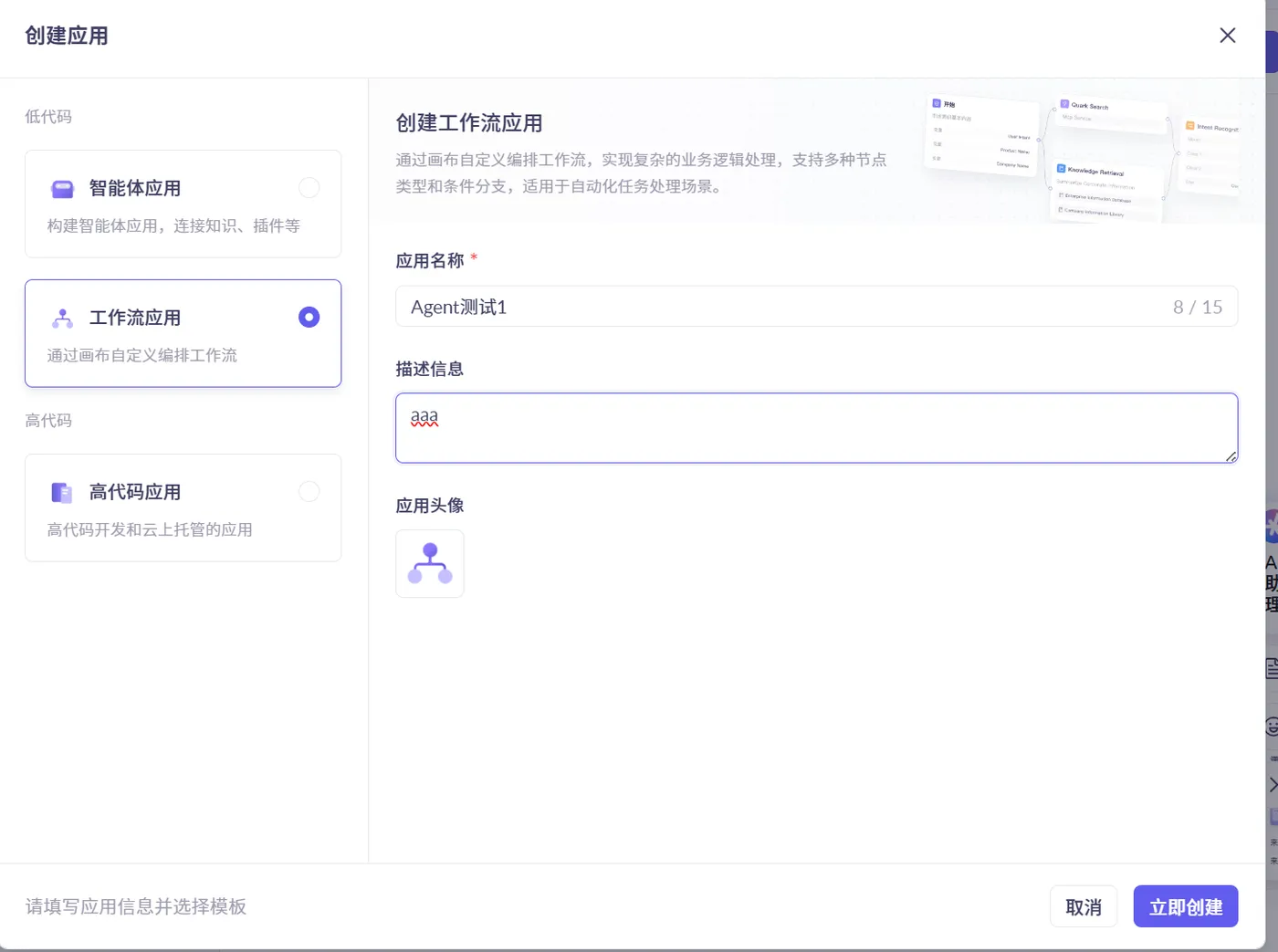
创建工作流应用:
 编辑
编辑
创建完毕后发布:
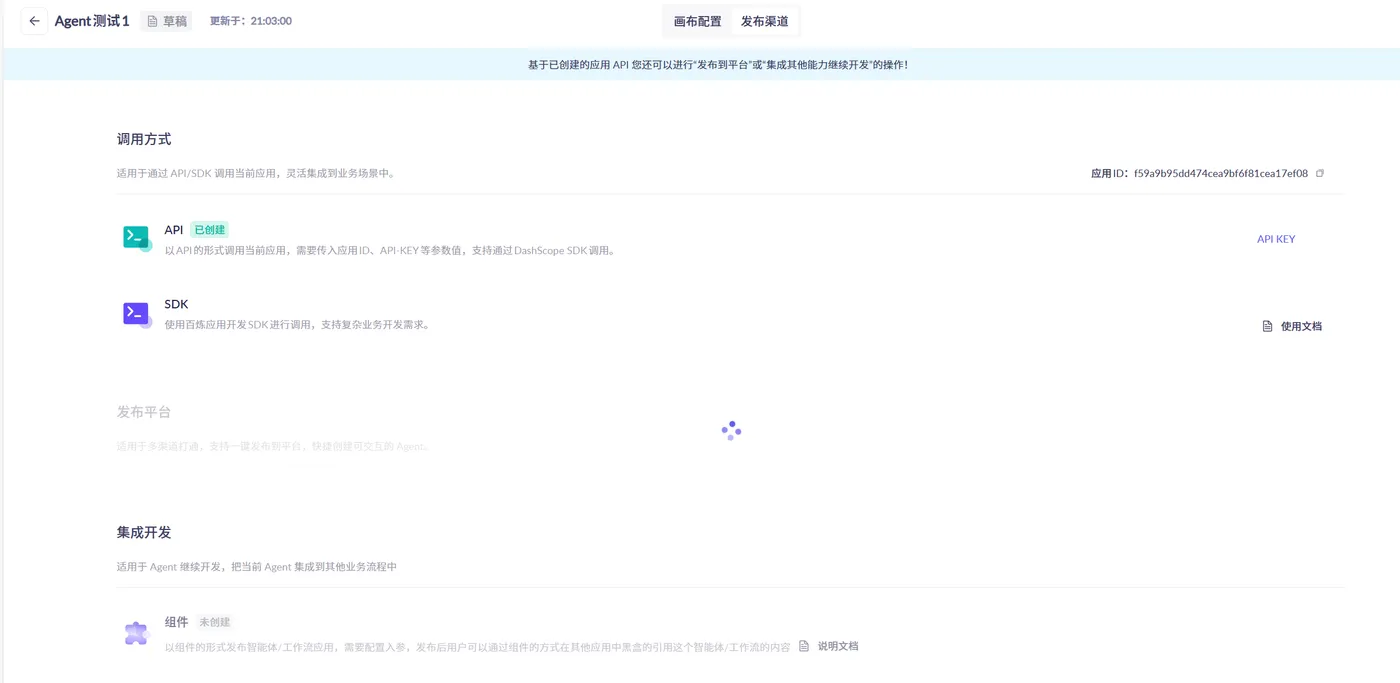
 编辑
编辑
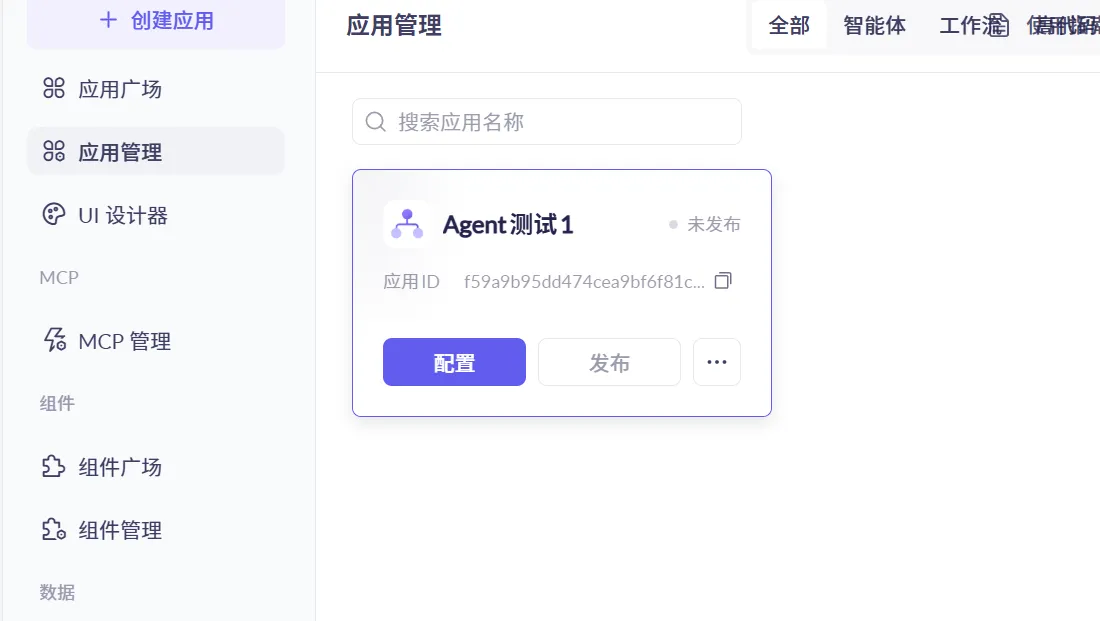
 编辑
编辑
本地调用配置:
server.port=8018
# 设置全局编码格式
server.servlet.encoding.enabled=true
server.servlet.encoding.force=true
server.servlet.encoding.charset=UTF-8
spring.application.name=SAA-18TodayMenu
# ====SpringAIAlibaba Config=============
spring.ai.dashscope.api-key=${aliQwen-api}
# SAA PlatForm today's menu Agent app-id
spring.ai.dashscope.agent.options.app-id=5b642a2c4abb45e3bd83d14eeb5fc5d2

配置类:
import com.alibaba.cloud.ai.dashscope.api.DashScopeApi;
import org.springframework.ai.chat.client.ChatClient;
import org.springframework.ai.chat.model.ChatModel;
import org.springframework.beans.factory.annotation.Value;
import org.springframework.context.annotation.Bean;
import org.springframework.context.annotation.Configuration;
@Configuration
public class DashScopeConfig
{
    @Value("${spring.ai.dashscope.api-key}")
    private String apiKey;
    @Bean
    public DashScopeApi dashScopeApi() {
        return DashScopeApi.builder()
                .apiKey(apiKey)
                .workSpaceId("llm-3as714s6flm80yc1")
                .build();
    }
    @Bean
    public ChatClient chatClient(ChatModel dashscopeChatModel) {
        return ChatClient.builder(dashscopeChatModel).build();
    }
}

调用:
import com.alibaba.cloud.ai.dashscope.agent.DashScopeAgent;
import com.alibaba.cloud.ai.dashscope.agent.DashScopeAgentOptions;
import com.alibaba.cloud.ai.dashscope.api.DashScopeAgentApi;
import org.springframework.ai.chat.prompt.Prompt;
import org.springframework.beans.factory.annotation.Value;
import org.springframework.web.bind.annotation.GetMapping;
import org.springframework.web.bind.annotation.RequestParam;
import org.springframework.web.bind.annotation.RestController;
/**
 * @auther zzyybs@126.com
 * @create 2025-09-11 19:04
 * @Description TODO
 */
@RestController
public class MenuCallAgentController
{
    // 百炼平台的appid
    @Value("${spring.ai.dashscope.agent.options.app-id}")
    private String appId;
    // 百炼云平台的智能体接口对象
    private DashScopeAgent dashScopeAgent;
    public MenuCallAgentController(DashScopeAgentApi dashScopeAgentApi)
    {
        this.dashScopeAgent = new DashScopeAgent(dashScopeAgentApi);
    }
    @GetMapping(value = "/eatAgent")
    public String eatAgent(@RequestParam(name = "msg",defaultValue = "今天吃什么") String msg)
    {
        DashScopeAgentOptions options = DashScopeAgentOptions.builder().withAppId(appId).build();
        Prompt prompt = new Prompt(msg, options);
        return dashScopeAgent.call(prompt).getResult().getOutput().getText();
    }
}