继Z-Image-Turbo蒸馏版本发布并在Artificial Analysis文本生图排行榜上取得开源模型第一名的优异成绩后,Z-Image(造相)团队正式开源Z-Image标准版。作为Z-Image系列的主要社区基础模型,标准版是非蒸馏的完整模型,在生成质量、风格灵活性和二次开发支持上更具优势,旨在为社区开发者提供一个强大且灵活的图像生成底座,释放更多定制化开发和精细微调的可能性。
魔搭AIGC专区一键体验
魔搭ModelScope AIGC专区已全面支持Z-Image模型,开发者可使用免费GPU资源在线生图,并训练专属LoRA模型。
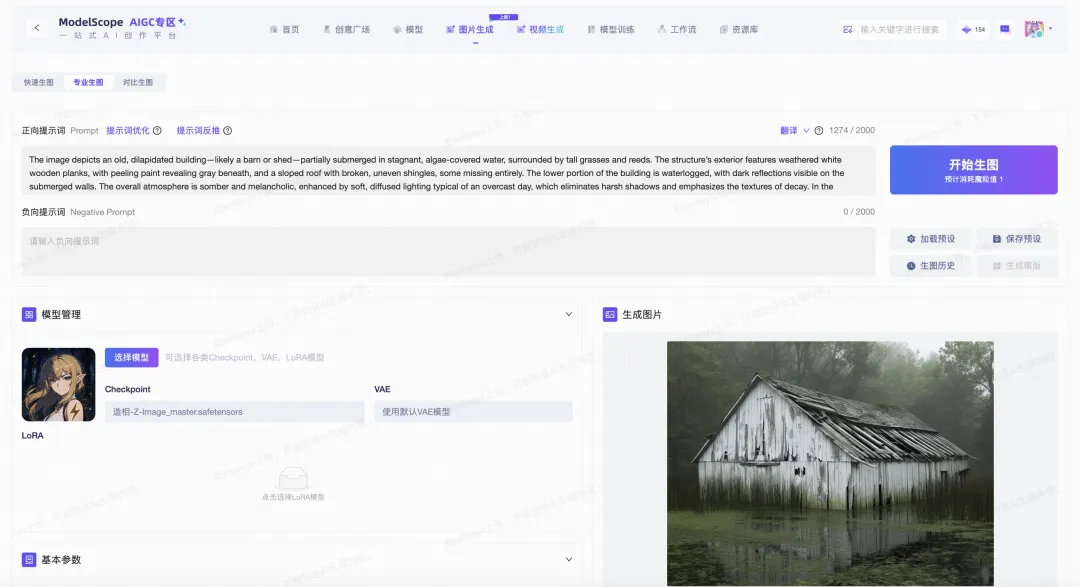
在线体验地址:https://www.modelscope.cn/aigc/imageGeneration
模型下载地址:https://modelscope.cn/models/Tongyi-MAI/Z-Image
核心特性
多样的美学与艺术风格
Z-Image在保持高度照片写实性的同时,支持更广泛的艺术风格。与通过强化学习高度优化写实效果的Turbo版本不同,标准版模型保留了更多风格多样性,更适合动漫、数字艺术、插画等创意类型的生成,能够满足不同创作场景对艺术表现力的需求。
面向社区的微调友好型基座
作为一个非蒸馏的基础生成模型,Z-Image特别适合社区开发者进行二次开发和定制化微调(LoRA、ControlNet等)。
- 完整CFG支持:
与通常绕过分类器自由引导的蒸馏模型不同,标准版模型保留了完整的CFG支持,实现精确的提示词控制 - 训练稳定性强:
模型的内部多样性和权重分布使其在下游训练时更容易学习新概念,相比低步数变体具有更好的训练稳定性
更高的生成多样性
Z-Image 专注于解决现代生成器常见的同质化问题:
- 避免"相同脸"问题:
不同的随机种子能够生成明显不同的面孔和构图,每次生成都具有独特性 - 多主体场景优化:
在包含多人的提示词中,标准版模型能生成具有独特特征的不同个体,避免了高速模型中常见的"克隆效应"
Negative Prompt增强控制
Z-Image 对负面提示词(Negative Prompt)的响应尤为敏感和有效。开发者可以通过精心设计的负面提示词,更精确地控制生成内容,避免不希望出现的元素,实现更加可控的图像生成。
模型架构
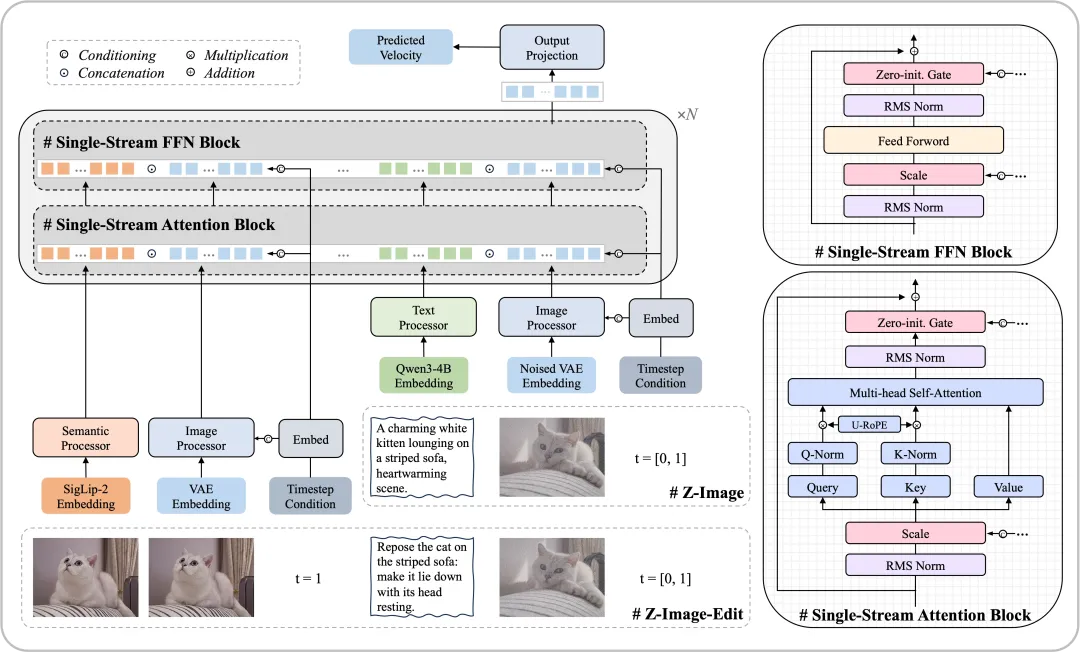
Z-Image采用了创新的可扩展单流扩散Transformer(Scalable Single-Stream DiT, S3-DiT)架构。这一设计理念与传统的双流架构形成鲜明对比,在参数效率上具有显著优势。
统一序列建模
在S3-DiT架构中,文本、视觉语义tokens和图像VAE tokens在序列层面进行拼接,形成统一的输入流。这种单流设计最大化了参数利用效率,相比双流方法能够用更少的参数实现更强的多模态理解能力。
训练流程
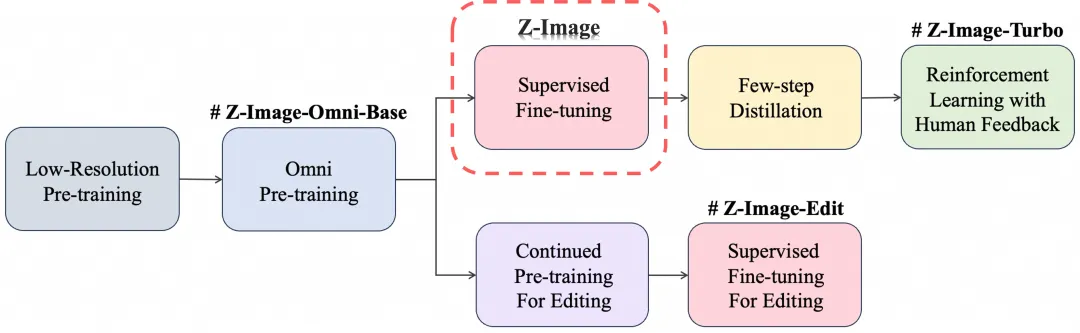
Z-Image系列模型的训练分为三个阶段:预训练(Pre-Training)→ 有监督微调(SFT)→ 强化学习(RL)。Z-Image位于有监督微调阶段,这使其在保持高视觉质量的同时,具备较高的生成多样性和易于微调的特性。
模型推理
1、官方仓库原生推理
git clone https://github.com/Tongyi-MAI/Z-Image.git
cd Z-Image
pip install -e .
python inference.py
2、使用diffusers推理
pip install git+https://github.com/huggingface/diffusers
import torch
from diffusers import ZImagePipeline
# Use bfloat16 for optimal performance on supported GPUs
pipe = ZImagePipeline.from_pretrained(
    "Tongyi-MAI/Z-Image-",
    torch_dtype=torch.bfloat16,
    low_cpu_mem_usage=False,
)
pipe.to("cuda")
# [Optional] Attention Backend
# Diffusers uses SDPA by default. Switch to Flash Attention for better efficiency if supported:
# pipe.transformer.set_attention_backend("flash")    # Enable Flash-Attention-2
# pipe.transformer.set_attention_backend("_flash_3") # Enable Flash-Attention-3
# [Optional] Model Compilation
# Compiling the DiT model accelerates inference, but the first run will take longer to compile.
# pipe.transformer.compile()
# [Optional] CPU Offloading
# Enable CPU offloading for memory-constrained devices.
# pipe.enable_model_cpu_offload()
prompt = "Young Chinese woman in red Hanfu, intricate embroidery. Impeccable makeup, red floral forehead pattern. Elaborate high bun, golden phoenix headdress, red flowers, beads. Holds round folding fan with lady, trees, bird. Neon lightning-bolt lamp (⚡️), bright yellow glow, above extended left palm. Soft-lit outdoor night background, silhouetted tiered pagoda (西安大雁塔), blurred colorful distant lights."
negative_prompt = ""
image = pipe(
    prompt=prompt, negative_prompt=negative_prompt,
    height=1024,
    width=1024, cfg_normalization=True,
    num_inference_steps=50,  # This actually results in 8 DiT forwards
    guidance_scale=4.0,     # Guidance should be 0 for the Turbo models
    generator=torch.Generator("cuda").manual_seed(42),
).images[0]
image.save("example.png")
3、使用diffsynth-studio推理
pip install diffsynth==2.0.3
from diffsynth.pipelines.z_image import ZImagePipeline, ModelConfig
import torch
pipe = ZImagePipeline.from_pretrained(
    torch_dtype=torch.bfloat16,
    device="cuda",
    model_configs=[
        ModelConfig(model_id="Tongyi-MAI/Z-Image", origin_file_pattern="transformer/*.safetensors"),
        ModelConfig(model_id="Tongyi-MAI/Z-Image-Turbo", origin_file_pattern="text_encoder/*.safetensors"),
        ModelConfig(model_id="Tongyi-MAI/Z-Image-Turbo", origin_file_pattern="vae/diffusion_pytorch_model.safetensors"),
    ],
    tokenizer_config=ModelConfig(model_id="Tongyi-MAI/Z-Image-Turbo", origin_file_pattern="tokenizer/"),
)
prompt = "a cat"
image = pipe(prompt=prompt, seed=42, rand_device="cuda", num_inference_steps=50, cfg_scale=4)
image.save("image.jpg")
模型微调
Z-Image 作为基础模型,特别适合进行定制化微调:
使用diffsynth-studio框架微调
魔搭的DiffSynth-Studio团队提供了易用的微调工具链,降低了微调门槛,适合快速实验和风格迁移。
git clone https://github.com/modelscope/DiffSynth-Studio.git
cd DiffSynth-Studio
pip install -e .
accelerate launch examples/z_image/model_training/train.py \
  --dataset_base_path data/example_image_dataset \
  --dataset_metadata_path data/example_image_dataset/metadata.csv \
  --max_pixels 1048576 \
  --dataset_repeat 50 \
  --model_id_with_origin_paths "Tongyi-MAI/Z-Image:transformer/*.safetensors,Tongyi-MAI/Z-Image-Turbo:text_encoder/*.safetensors,Tongyi-MAI/Z-Image-Turbo:vae/diffusion_pytorch_model.safetensors" \
  --learning_rate 1e-4 \
  --num_epochs 5 \
  --remove_prefix_in_ckpt "pipe.dit." \
  --output_path "./models/train/Z-Image_lora" \
  --lora_base_model "dit" \
  --lora_target_modules "to_q,to_k,to_v,to_out.0,w1,w2,w3" \
  --lora_rank 32 \
  --use_gradient_checkpointing \
  --dataset_num_workers 8
便捷训练环境
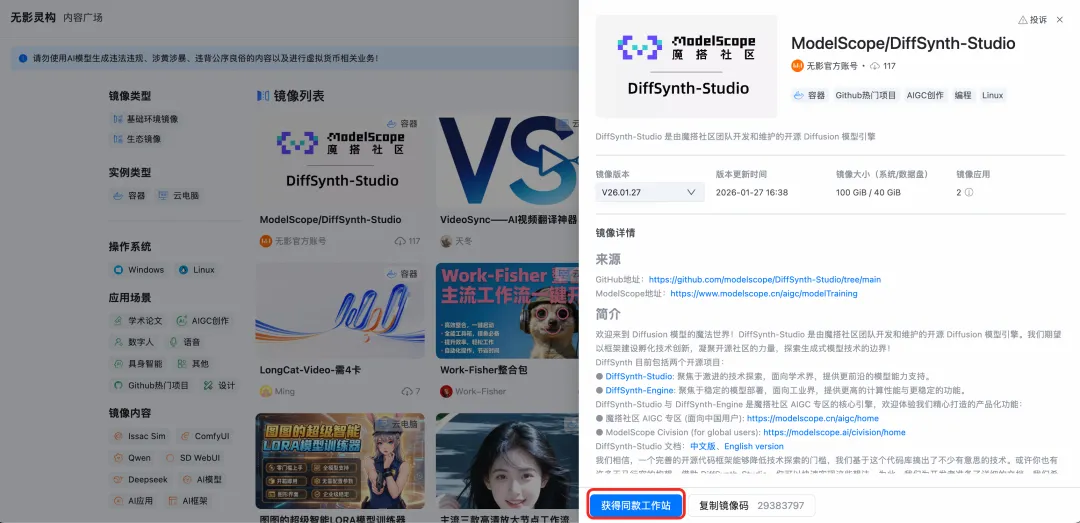
为了降低开发者的环境配置成本,提供了基于DiffSynth-Studio的无影灵构镜像,预装了完整的训练环境和工具链,并提供企业级 GPU 算力、新手友好的 AI 环境与图形化交互体验。开启工作站后,上传数据集,直接通过JupyterLab进行模型训练。新用户可享3~4小时高性能GPU体验时长。
图生LoRA模型
DiffSynth-Studio 团队同步发布了Z-Image-i2L(图生LoRA)模型。该模型接收单张图片作为输入,直接输出针对该图片风格特征训练好的LoRA模型,实现了个性化风格特征的快速提取。
核心优势
- 无需手动标注和训练过程
- 从一张图快速获得风格LoRA
- 支持风格迁移和特征提取
- 大幅降低个性化模型制作门槛
资源链接
- 模型:https://modelscope.cn/models/DiffSynth-Studio/Z-Image-i2L
- 在线体验:https://modelscope.cn/studios/DiffSynth-Studio/Z-Image-i2L
效果展示
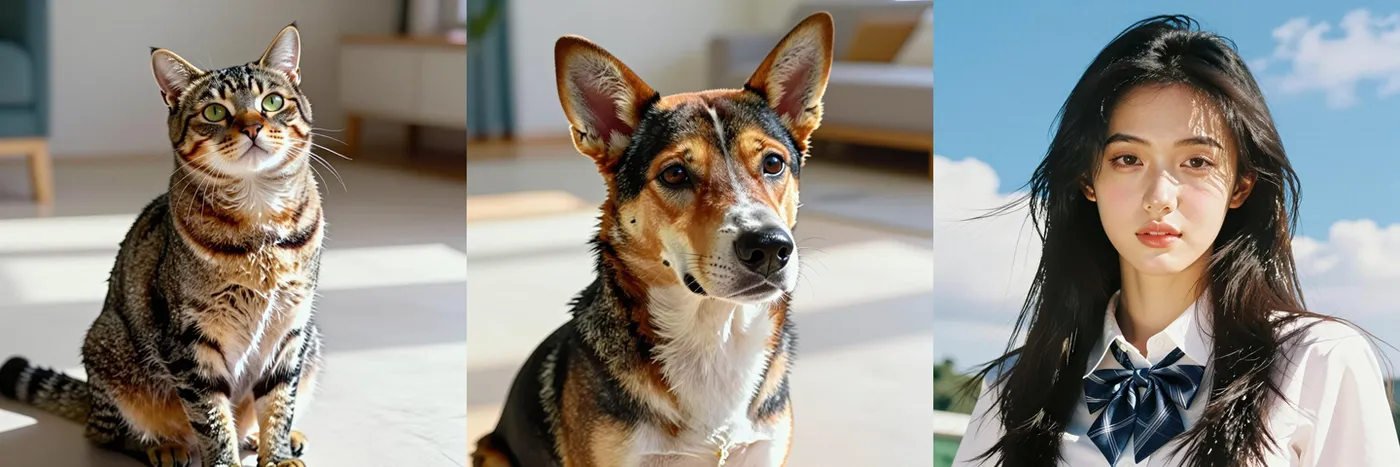
使用相同的提示词"a cat"、"a dog"、"a girl"和随机种子0,Z-Image-i2L能够提取输入图像的风格特征,生成保持一致风格的新图像。
样例1:水彩绘画
输入图:

输出图:

样例2:写实细节
输入图:

输出图:
样例3:缤纷色块
输入图:

输出图:

更多模型即将开源
Z-Image团队将陆续开源更多模型:
- Z-Image-Edit:
专为图像编辑任务优化的模型,支持基于自然语言指令的创意编辑和图生图任务,拥有出色的双语指令理解能力 - Z-Image-Omni-Base:
全能基础模型,同时支持图像生成和编辑任务的统一底座,为构建多功能视觉应用提供更灵活的基础
我们期待看到社区基于Z-Image系列创造出更多精彩的应用和创新,共同推动AI图像生成技术的发展与普及!