4.@EnableAutoConfiguration注解
我们简单了解下SpringFramework的装配吧:
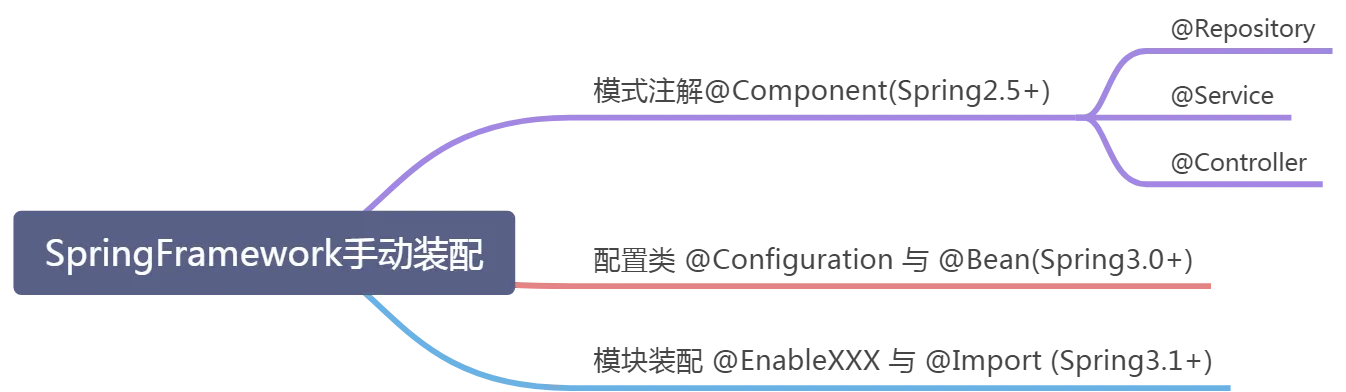
其中:@Repository,@Service,@Controller为Component的衍生注解,后面配置实现可以参考这里:链接
【SpringFramework总结】
基于以上三种任意一种方式(我们常用的还是第一种注解模式),就可以实现对应的装配机制,所谓的装配就是告诉我们的Spring我们要用哪些Bean,顶层的BeanFactory的子类ApplicationContext帮我们实现底层细节【IOC接口体系2.3小结有简略版】,IOC容器帮我们完成Bean的注入实现,其缓存机制帮我们规避循环依赖,以实现一个装配体系。
【SpringBoot自动装配开始】
这里我觉得还是直接拷贝其官方解释更好,也顺便翻译一下(个人理解可能会有偏差)
Enable auto-configuration of the Spring Application Context, attempting to guess and
configure beans that you are likely to need. Auto-configuration classes are usually
applied based on your classpath and what beans you have defined. For example, if you
have {@code tomcat-embedded.jar} on your classpath you are likely to want a
{@link TomcatServletWebServerFactory} (unless you have defined your own
{@link ServletWebServerFactory} bean).
-- Spring的自动配置上下文,会大致预估你需要使用的Bean,其依据就是项目中classpath中的jar、配置文件+我们自己定义的Bean(借助于上面SpringFramework的方式之一),举例:比如引入了tomcat-embedded.jar,那么自动配置认为你大概率会使用TomcatServletWebServerFactory,于是就帮你初始化,除非你自己定义了一个自定义Bean:ServletWebServerFactory,即:自定义的优先级>系统默认配置,同级覆盖

When using {@link SpringBootApplication @SpringBootApplication}, the auto-configuration
of the context is automatically enabled and adding this annotation has therefore no
additional effect.
-- 当使用@SpringBootApplication注解时,自动配置注解再加到主启动类上不会有什么用,也是因为@SpringBootApplication注解是组合注解,其内部已经包含了自动配置的注解

Auto-configuration tries to be as intelligent as possible and will back-away as you
define more of your own configuration. You can always manually {@link #exclude()} any
configuration that you never want to apply (use {@link #excludeName()} if you don't
have access to them). You can also exclude them via the
{@code spring.autoconfigure.exclude} property. Auto-configuration is always applied
after user-defined beans have been registered.
 -- 自动化配置会尽可能地智能化,当你的配置和自动化配置一致时,自动化配置自动就会失效。即用户配置>自动化配置权限。对于你不需要自动化配置的,可以通过exclude进行手动排除(就像上面2.3小结我们举例的
@ComponentScan(excludeFilters = {@ComponentScan.Filter(type = FilterType.ASSIGNABLE_TYPE, classes = {TestBean.class})})),当然你也可以在配置文件中进行排除:spring.autoconfigure.exclude。
  最后说了下,自动化配置的永远在用户定义的Bean注册之后进行。

The package of the class that is annotated with {@code @EnableAutoConfiguration},
usually via {@code @SpringBootApplication}, has specific significance and is often used
as a 'default'. For example, it will be used when scanning for {@code @Entity} classes.
It is generally recommended that you place {@code @EnableAutoConfiguration} (if you're
not using {@code @SpringBootApplication}) in a root package so that all sub-packages
and classes can be searched.
-- 就是说@SpringBootApplication,@EnableAutoConfiguration标注的类是具备意义的,一般会被系统认作默认配置启动类,因此建议标注有 @SpringBootApplication注解的文件最好放在根包中,这样所有的子包才能被扫描到。

Auto-configuration classes are regular Spring {@link Configuration @Configuration}
beans. They are located using the {@link SpringFactoriesLoader} mechanism (keyed
against this class). Generally auto-configuration beans are
{@link Conditional @Conditional} beans (most often using
{@link ConditionalOnClass @ConditionalOnClass} and
{@link ConditionalOnMissingBean @ConditionalOnMissingBean} annotations).

-- 被@Configuration标注的Spring的Bean就被认为是一个配置类,等同于ApplicationContext.xml,采用SpringFactoriesLoader机制,自动装配Bean常用以下注解实现:@Conditional,@ConditionalOnClass,@ConditionalOnMissingBean
其完整代码如下所示,可看到它也是一个组合注解,主要包括4个元注解+2个自定义注解,所以这两个注解应该就是帮我们实现自动化配置的核心所在了。

4.1 @AutoConfigurationPackage注解概述

这个注解看起来就比较简单了,没有特别的代码,也只有4个元注解+1个自定义注解,但是可以看到这个注解@Import和上面的@EnableAutoConfiguration内部的value还是不一样的,区别在4.2讲解。
- @EnableAutoConfiguration:AutoConfigurationImportSelector.class
- @AutoConfigurationPackage:AutoConfigurationPackages.Registrar.class
前面我们也有提到,主启动类必须放在所有自定义组件的包的最外层,以保证Spring能扫描到它们,就是@AutoConfigurationPackage发挥的作用,【作用小结】:保证Spring扫描到所有子包,完成资源的加载.
其实现原理如下4.1.1:
4.2 AutoConfigurationPackage实现原理
在4.1的图可看到,他引入了一个@Import注解,这个注解引入了AutoConfigurationPackages.Registrar

Register 实现了 ImportBeanDefinitionRegister 接口,通过它实现向IOC容器手动注册组件,在重写的 registerBeanDefinitions 方法中,调用外部类的 AutoConfigurationPackages 的 register 方法,其中传参为:new PackageImport(metadata).getPackageName(),而实例化PackageImport的有参构造方法:
PackageImport(AnnotationMetadata metadata) {
    this.packageName = ClassUtils.getPackageName(metadata.getClassName());
}
可看到是通过metadata的类名来获取所在的包名,所以需要明确下metadata是什么?怎么获取的?为什么通过这个就可以获取到对应根包路径?
/**
 * Register bean definitions as necessary based on the given annotation metadata of
 * the importing {@code @Configuration} class.
 * <p>Note that {@link BeanDefinitionRegistryPostProcessor} types may <em>not</em> be
 * registered here, due to lifecycle constraints related to {@code @Configuration}
 * class processing.
 * <p>The default implementation is empty.
 * @param importingClassMetadata annotation metadata of the importing class
 * @param registry current bean definition registry
 */
default void registerBeanDefinitions(AnnotationMetadata importingClassMetadata, BeanDefinitionRegistry registry) {
}
4.2.1.metadata是什么及获取方式?
这个是官方提供的registerBeanDefinitions方法的释义,重点就在:
@param importingClassMetadata annotation metadata of the importing class,即:传参是导入类的原信息,实际就是被@Import标注的class信息,实际就是我们每个SpringBoot启动类的类信息【这里我们能知道,他通过Register类重写的registerBeanDefinitions方法获取被@Import标注的类信息,即SpringBoot启动类的类信息,而启动类我们都是放在根包下面的,所以大概知道个端倪了】
4.2.2.metadata能做什么?
拿到了metadata这个形参,具体做什么就是这个方法要做的了,所以我们再回头看下这个4.1.1中的register方法。

大致思路是:首先会判断当前IOC容器中,是否已经有这个AutoConfigurationPackages,其中的BEAN是这个类的静态变量:private static final String BEAN = AutoConfigurationPackages.class.getName();
如果已经有了,则将其添加到basePackage【这个我们前面也有提到,实际就是一个去重之后是String数组,存储根包及所有子包组件,包含系统默认组件+用户自定义组件】中
如果没有,会创建一个新的Bean【存放在一个ConcurrentHashMap中维护,初始化size=256】,在else逻辑第三行会发现调用了一样方法:addIndexedArgumentValue,不同之处在于这里的第二个参数是直接传入的packageNames,即直接将主启动类的包名添加到basePackage中.即该注解还会帮我们完成Bean的注册与缓存。
4.2.3.问题:basePackages去重?为什么if-else两套?
【面试题】:register方法能获取所有的basePackage你刚讲到了,但是他怎么做到去重的呢?为什么这里需要有if-else两套逻辑,而且两套逻辑里的packageNames一个是直接添加,一个是调用方法呢?
【个人理解】:去重就是借助于一个Set<String>做到的,如下源码:
private static String[] addBasePackages(ConstructorArgumentValues constructorArguments, String[] packageNames) {
    String[] existing = (String[]) constructorArguments.getIndexedArgumentValue(0, String[].class).getValue();
    Set<String> merged = new LinkedHashSet<>();
    // 添加现有全部
    merged.addAll(Arrays.asList(existing));
    // 添加此次
    merged.addAll(Arrays.asList(packageNames));
    // 返回全部
    return StringUtils.toStringArray(merged);
}
之所以就if-else两套逻辑,也是和Spring的Bean的IOC工厂一样,Bean是有缓存的,Bean的创建是单例+缓存进行存储的,底层是借助于一个size=256的ConcurrentHashMap【可能会问你Map体系了,顺便转移话题深度】进行存储,可以规避一些性能损耗,也可以快速响应,第一次那就先创建再添加,第一次创建的肯定没有添加到basePackage中,之后可能就已经添加过了,就需要进行去重了。一句带过就是:首次创建的Bean不会存在packageNames重复问题,而已存在的Bean可能已经添加过,需要借助于Set<String>进行去重,保证最后的basePackages都是唯一的。
4.2.4.小结
结合以上,我们能知道SpringBoot的自动配置,重要的一环就是获取全部的basePackage,而获取的方式是借助于@AutoConfigurationPackage 注解所引入的AutoConfigurationPackages.Register,对应的就是AutoConfigurationPackages下面的Register方法,该方法重写的registerBeanDefinitions方法帮我们获取全部的basePackages,同时帮我们做Bean注入,缓存,packageNames去重处理,以保证获取的name均为唯一。
4.3 AutoConfigurationImportSelector[核心]
注意每一层调用关系不要混乱,4.1-4.2平级,4.1.1是4.1的调用,4.1主要作用是获取basePackage,4.1.1是它的实现细节。

下面是AutoConfigurationImportSelector的继承关系视图,可以看到他继承了一系列的Aware接口,这也就保证了Bean在被初始化之后,能够获取对应的Aware资源【Aware系列在Spring的Bean声明周期中有强烈存在感,不是很清楚的可以百度下】

4.3.1 @DeferredImportSelector
DeferredImportSelector继承自ImportSelector,DeferredImportSelector 的执行时机,是在 @Configuration 注解中的其他逻辑被处理完毕之后(包括对 @ImportResource、@Bean 这些注解的处理)再执行 ,即DeferredImportSelector 的执行时机比 ImportSelector 更晚。
4.3.2 实现原理[核心]

【步骤1】:判断系统配置项是否开启了自动配置,也就是 isEnabled 方法,该方法默认true,未开启直接结束。
protected boolean isEnabled(AnnotationMetadata metadata) {
    if (getClass() == AutoConfigurationImportSelector.class) {
        return getEnvironment().getProperty(EnableAutoConfiguration.ENABLED_OVERRIDE_PROPERTY, Boolean.class, true);
    }
    return true;
}
getProperty方法三个参数
- 第一个:当前环境变量配置的key,会通过这个key查找配置文件配置的value
- 第二个:返回类型,转义成Boolean
- 第三个:默认值true
【步骤2】:获取元数据,入参path:META-INF/spring-autoconfigure-metadata.properties
static AutoConfigurationMetadata loadMetadata(ClassLoader classLoader, String path) {
    try {
        Enumeration<URL> urls = (classLoader != null) ? classLoader.getResources(path)
            : ClassLoader.getSystemResources(path);
        Properties properties = new Properties();
        while (urls.hasMoreElements()) {
            properties.putAll(PropertiesLoaderUtils.loadProperties(new UrlResource(urls.nextElement())));
        }
        return loadMetadata(properties);
    }
    catch (IOException ex) {
        throw new IllegalArgumentException("Unable to load @ConditionalOnClass location [" + path + "]", ex);
    }
}
可以看到在三目运算符中,用户配置>系统配置,AutoConfigurationMetadata是借助于属性文件实现的内部类进行返回的。
【步骤3】:核心是加载自动配置类,上来还是判断是否开启了自动配置,没则直接结束
protected AutoConfigurationEntry getAutoConfigurationEntry(AutoConfigurationMetadata autoConfigurationMetadata,
      AnnotationMetadata annotationMetadata) {
    if (!isEnabled(annotationMetadata)) {
        return EMPTY_ENTRY;
    }
    // 1.获取所有的attributes
    AnnotationAttributes attributes = getAttributes(annotationMetadata);

    // 2.SPI机制加载自动配置类configurations
    List<String> configurations = getCandidateConfigurations(annotationMetadata, attributes);

    // 3.步骤2结果去重
    configurations = removeDuplicates(configurations);

     // 4.基于1获取全部去重的Exclusion【过滤限制的配置项】
    Set<String> exclusions = getExclusions(annotationMetadata, attributes);

    /**
     * 5.检查是否有无效Exclusion,有则抛出IllegalStateException
     * The following classes could not be excluded because they are not auto-configuration classes
   * 不能排除下列类,因为它们不是自动配置类
     */
    checkExcludedClasses(configurations, exclusions);

    // 6.清空configurations中的exclusions
    configurations.removeAll(exclusions);

     // 7.重新生成configurations,前面4.2的继承体系在这里发挥作用
    configurations = filter(configurations, autoConfigurationMetadata);
    fireAutoConfigurationImportEvents(configurations, exclusions);
    return new AutoConfigurationEntry(configurations, exclusions);
}
其中方法调用链路粗略绘制,如下所示:
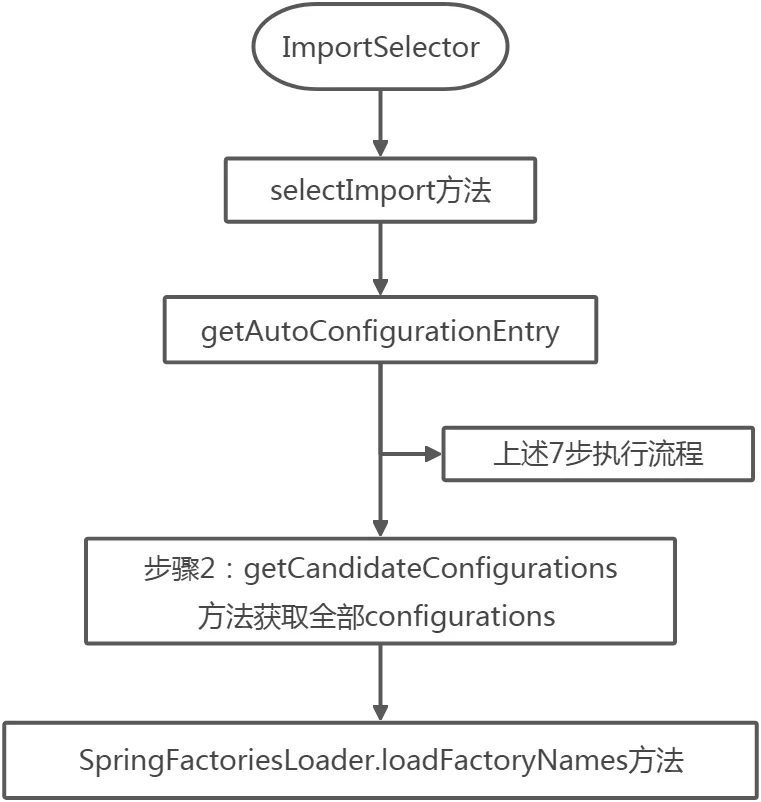
关于SpringFactoriesLoader.loadFactoryNames方法,这里还是需要说明一下,关键就在于这个方法,帮我们实现的全局自动配置

所以自动装配最后还是会回到配置文件,基于配置文件spring.factories的: org.springframework.boot.autoconfigure.EnableAutoConfiguration=\,去加载自动配置类的全限定类名,这个结果会是一个很长的字符串,如下:

之后装配到IOC容器中,之后的自动配置类就可以通过 ImportSelector 和 @Import 的机制被创建出,开始生效。
【SpringBoot自动装配结束】
4.3.3 自动装配做了什么
自动装配的最大好处,我觉得以下面这个例子说明应该就比较直观了。在传统的SSM框架中,我们使用Redis时候,需要在xml中定义Bean才可以使用,如:
<!-- redis template definition -->
<bean id="redisTemplate" class="org.springframework.data.redis.core.RedisTemplate">
  <property name="connectionFactory" ref="jedisConnectionFactory" />
  <property name="keySerializer">
    <bean class="org.springframework.data.redis.serializer.StringRedisSerializer" />
  </property>
  <property name="valueSerializer">
    <bean class="org.springframework.data.redis.serializer.JdkSerializationRedisSerializer" />
  </property>
  <property name="hashKeySerializer">
    <bean class="org.springframework.data.redis.serializer.StringRedisSerializer" />
  </property>
  <property name="hashValueSerializer">
    <bean class="org.springframework.data.redis.serializer.JdkSerializationRedisSerializer" />
  </property>
  <!--开启事务  -->
  <property name="enableTransactionSupport" value="true"></property>
</bean>
用的时候就这样声明式调用:
@Autowired
public RedisTemplate redisTemplate;
但是在SpringBoot框架中,我们引入jar包之后,只需要下面这样就可以直接使用,仔细看下你的SpringBoot项目是不是直接使用的,原因就在于自动化配置帮我们实现了。这应该就是最直观的感受了。

5.总结
@SpringBootApplication这个组合注解,主要分4个元注解+3个自定义注解:
@ComponentScan告诉去哪里扫描,如果遇到不想在启动初期加载进IOC容器的,主启动类组件通过TypeExcludeFilter,自动配置组件通过AutoConfigurationExcludeFilter进行过滤。
@SpringBootConfiguration标注主启动类,声明为一个配置类,为@EnableAutoConfiguration服务。
@EnableAutoConfiguration是自动化配置的核心,标识开启自动配置,是一个派生注解,其两个核心:@AutoConfigurationPackage帮助完成Bean注册,获取全部去重的packageNames;@AutoConfigurationImportSelector核心是借助于ImportSelector接口的selectImport方法实现,层层调用之后,最终会获取spring.factories文件下的配置信息,取到EnableAutoConfiguration指定的值,将这些值作为自动配置类导入到容器中,自动配置类就生效,帮我们进行自动配置工作。以前我们需要自己配置的东西,自动配置类都帮我们完成了。