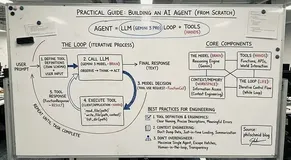
CrewAI是一个可以专门用来编排自主 AI 智能体(Autonomous AI Agents) 的Python 框架,你可以把它理解为在代码层面组建一个“虚拟团队”,给每个 Agent 分配特定的角色、目标,让它们协同处理那些单个 LLM 搞不定的复杂任务。
CrewAI 介绍
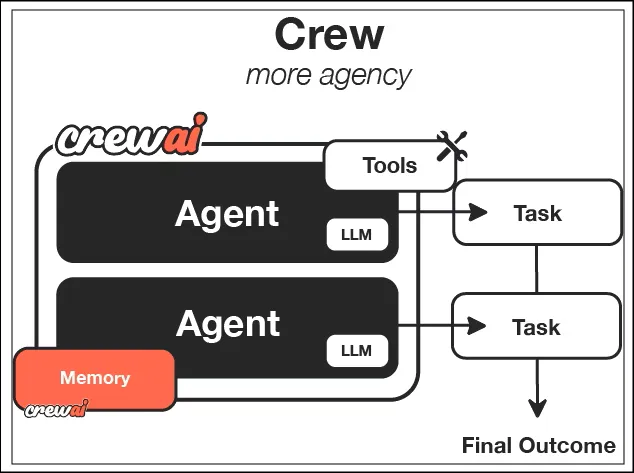
CrewAI 包含以下组件:
Agents 是具体的执行实体,有角色设定和能力边界;Tasks 是具体的任务指令;Crews 是把“人”和事儿撮合到一起的团队容器;Tools 则是 Agent 手里的工具(比如搜索、读文件、调 API等等);Processes 决定了活儿怎么干,比如说是大家排队干(顺序)还是层级汇报(层级)。
CrewA最适合的是那种链条长、环节多的工作流。比如你要搞个深度研报,需要先全网搜集信息,然后整理分析,写初稿,最后润色发布,这种“研究-写作-编辑”的流水线就非常契合。同理商业竞品分析、代码开发流程(设计-编码-测试)或者分工明确的客户支持系统,都是它的强项。
但有几种情况别用:
如果你的任务简单到一次 LLM 调用就能解决,用 CrewAI 就没有必要了而且还会增加复杂度和成本。对实时性要求极高的场景(比如毫秒级响应)也不合适,因为多 Agent 交互本来就慢。还有那种每一步都得让人盯着确认的流程,这种流程自动化程度太低也没必要上 Agent 编排。
安装与配置
环境准备很简单,基础包装上就行,如果需要额外的工具集,就把 tools 加上。
 # Install CrewAI
 pip install crewai crewai-tools

 # For additional tools
 pip install 'crewai[tools]'
基础示例:搭建内容创作团队
下面这段代码展示了如何把 Research Analyst(研究员)、Content Writer(撰稿人)和 Editor(编辑)这三个角色串起来。代码逻辑很简单:定义 Agent,定义 Task,最后塞进 Crew 里跑起来。
*注意观察
context
参数,它实现了任务间的数据流转。*
 from crewai import Agent, Task, Crew, Process
from crewai_tools import SerperDevTool, WebsiteSearchTool

# Initialize tools
search_tool = SerperDevTool()
web_tool = WebsiteSearchTool()

# Create Agents
researcher = Agent(
    role='Research Analyst',
    goal='Gather comprehensive information on {topic}',
    backstory='You are an expert researcher with a keen eye for detail and accuracy.',
    tools=[search_tool, web_tool],
    verbose=True,
    allow_delegation=False
)

writer = Agent(
    role='Content Writer',
    goal='Create engaging, well-structured content about {topic}',
    backstory='You are a skilled writer who transforms research into compelling narratives.',
    verbose=True,
    allow_delegation=False
)

editor = Agent(
    role='Editor',
    goal='Refine and polish content to ensure quality and clarity',
    backstory='You are a meticulous editor with an eye for grammar, style, and flow.',
    verbose=True,
    allow_delegation=False
)

# Define Tasks
research_task = Task(
    description='Research {topic} and gather key facts, statistics, and insights.',
    expected_output='A comprehensive research report with sources',
    agent=researcher
)

writing_task = Task(
    description='Using the research, write a 500-word blog post about {topic}',
    expected_output='A well-written blog post in markdown format',
    agent=writer,
    context=[research_task]  # Depends on research task
)

editing_task = Task(
    description='Edit the blog post for grammar, clarity, and engagement',
    expected_output='A polished, publication-ready blog post',
    agent=editor,
    context=[writing_task]
)

# Create Crew
crew = Crew(
    agents=[researcher, writer, editor],
    tasks=[research_task, writing_task, editing_task],
    process=Process.sequential,  # Tasks run in order
    verbose=True
)

# Execute
result = crew.kickoff(inputs={'topic': 'Artificial Intelligence in Healthcare'})
 print(result)
进阶示例:软件开发
对于更复杂的场景,比如软件开发,可能需要引入层级流程(Hierarchical Process)。这时候会有一个隐藏的 Manager Agent(通常用更强的模型如 GPT-5)来统筹分配任务,而不是简单的线性执行。
 from crewai import Agent, Task, Crew
from crewai_tools import FileReadTool, CodeInterpreterTool

# Tools
file_tool = FileReadTool()
code_tool = CodeInterpreterTool()

# Agents with specific expertise
architect = Agent(
    role='Software Architect',
    goal='Design scalable software architecture for {project}',
    backstory='Senior architect with 15 years of experience in system design.',
    verbose=True
)

developer = Agent(
    role='Python Developer',
    goal='Write clean, efficient Python code',
    backstory='Expert Python developer focused on best practices.',
    tools=[code_tool],
    verbose=True
)

qa_engineer = Agent(
    role='QA Engineer',
    goal='Ensure code quality through comprehensive testing',
    backstory='Detail-oriented QA engineer specializing in test automation.',
    tools=[code_tool],
    verbose=True
)

# Tasks
design_task = Task(
    description='Design architecture for a {project} including component breakdown',
    expected_output='Detailed architecture document with diagrams',
    agent=architect
)

development_task = Task(
    description='Implement the core functionality based on the architecture',
    expected_output='Working Python code with documentation',
    agent=developer,
    context=[design_task]
)

testing_task = Task(
    description='Write and execute unit tests for the developed code',
    expected_output='Test suite with coverage report',
    agent=qa_engineer,
    context=[development_task]
)

# Hierarchical process with manager agent
dev_crew = Crew(
    agents=[architect, developer, qa_engineer],
    tasks=[design_task, development_task, testing_task],
    process=Process.hierarchical,  # Manager coordinates tasks
    manager_llm='gpt-4',  # Manager uses GPT-4
    verbose=True
)

 result = dev_crew.kickoff(inputs={'project': 'RESTful API for task management'})
进阶功能:异步、人工介入与结构化输出
如果你追求性能,异步执行(Asynchronous Execution) 是一个可选项,特别是 IO 密集型任务。
 # Run crew asynchronously for better performance
 result = await crew.kickoff_async(inputs={'topic': 'AI trends'})

 # Run specific tasks in parallel
 from crewai import Task
 task1 = Task(description='Research topic A', agent=researcher, async_execution=True)
 task2 = Task(description='Research topic B', agent=researcher, async_execution=True)
有些关键节点不能完全信赖 AI,这时候开启 Human-in-the-Loop,Agent 执行到一半会停下来问你要反馈。
 agent = Agent(
     role='Decision Maker',
     goal='Make strategic decisions',
     human_input=True  # Will prompt for human feedback
 )
工程化最头疼的是输出格式不可控,CrewAI 支持 Pydantic 模型,强制 Agent 输出结构化数据,这对后续的数据清洗非常有帮助。
 from crewai import Task
from pydantic import BaseModel

class BlogPost(BaseModel):
    title: str
    content: str
    tags: list[str]

task = Task(
    description='Write a blog post',
    expected_output='Blog post with title and tags',
    agent=writer,
    output_json=BlogPost,  # Structured output
    output_file='output.json'  # Save to file
 )
生态与集成
官方内置了一堆工具库,覆盖了搜索(Google/Serper)、文件操作(File/Directory Read)、代码执行(CodeInterpreter)以及各种数据源(PDF, CSV, JSON, GitHub, YouTube)的读取。
模型支持方面利用了 LangChain 的生态,OpenAI, Anthropic, Google Gemini 都能切。想省钱或者数据敏感,用 Ollama 跑本地模型(Llama 3, Mistral)也没问题。
CrewAI vs 其他
经常有人问它和 AutoGen 的区别。简单说CrewAI 像是管理严密的正规军,强调角色(Role)和流程(Process);AutoGen 更像是一个聊天室,Agent 之间通过对话来解决问题,更灵活但也更难控制。至于 LangGraph,那是更底层的图编排工具,控制粒度极细,但上手门槛高。你可以理解为CrewAI 是在 LangChain 之上做了很好的封装,用起来简单。
补充规划、记忆与安全
新版本(0.30+)加入了 Planning Mode,Agent 开干前会先生成个计划书(现在Agent基本上都会有计划了)。记忆系统也升级了:支持短期记忆(本次执行内)、长期记忆(跨执行持久化)甚至实体记忆(记住具体的人和事)。
如果你需要监控整个 Crew 的运行状态,可以开启 Telemetry,导出 JSON 格式的日志做分析。
总结
CrewAI 在处理角色分工明确、流程复杂的知识型工作时表现非常出色。如果你是初学者:先别整太复杂的流程,2-3 个 Agent 起步,把目标定死,用 Pydantic 锁死输出格式,把缓存开起来。等熟悉了 Agent 的操作,再上复杂的层级结构和记忆系统。
https://avoid.overfit.cn/post/03c0bdbc21254d52b80f170a0fa2c567