
本文目标
1.了解claude-code的核心功能实现
目前github有两个比较好的逆向claude-code实现的仓库,但实际阅读起来还是有一些成本。比如内容实在太多、重复较多等等。其实期望能有一个roadmap,先了解最核心功能的最小实现链路,再去了解枝节问题。
所以下文每个功能会先介绍功能描述与实现流程,然后贴上最核心的几个函数实现。
2.了解并实践langgraph,构建简版claude-code
langgraph是当下最流行的agent应用框架(之一),提供了丰富的llm应用相关能力,同时也有很多新的概念,可以实践一下,我觉得最核心需要关心的是 状态机State、图节点workflow、工具Tool 三个方面。
所以下文在每个功能实现上会围绕这三个方面进行设计改动。
期望通过本文的实践可以对claude-code的核心设计以及langgraph框架有一个初步的了解。如何一步步从最初的简单ReActAgent升级到一个简版的claude-code agent。
开工前的背景介绍
1.claude-code的逆向工程
claude-code是anthropic公司出的一款cli工具,最近相当火,实际体验下来也很不错,个人认为是目前Code Agent领域的最佳实践。那么好学的程序员肯定会很好奇背后的实现原理。
1.https://github.com/shareAI-lab/analysis_claude_code
2.https://github.com/Yuyz0112/claude-code-reverse
以上两个仓库对claude-code进行了全面的逆向分析,把相关逆向的提示词也开源了,我们完全可以通过这份repo来了解claude-code的核心实现。
当然,这俩仓库的提示词信息量巨大,在llm逆向的过程中也会出现幻觉(确实会有一些前后矛盾的地方),整体还是不能无脑阅读,下面会结合这些分析以及个人的理解捋一遍核心实现。
2.langgraph介绍
langgraph是目前大模型应用开发最流行的框架之一,langchain衍生出的框架,专注于智能体应用的开发。
详细的介绍可以参见langgraph官网:
https://langchain-ai.github.io/langgraphjs/
这里根据我的理解简要概括一下主要功能:
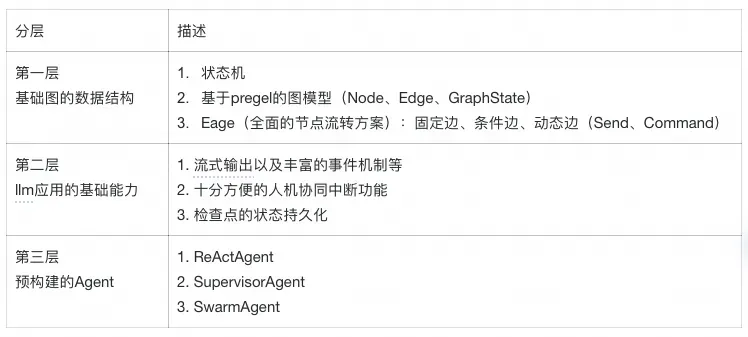
其中langgraph官方最引以为豪的两个特性:
- 实现偏底层,上层无过多抽象,用户可精准控制大模型的输入,这对llm上下文优化至关重要。
- 规则驱动和llm驱动相融合,可以在大模型的自主性和不确定性中间寻找平衡,让我们的系统具备较高的可靠性、可观测性。
对于不了解langgraph的朋友可能感知比较虚,没关系,在接下来的案例中,我们也可以深刻感受到这两点。
3.claude-code整体架构视图
claude-code整体有非常丰富的功能,按照逆向的分析我们整体分为 用户交互层、Agent调度层、工具执行与管理层(含工具生态系统)、存储与记忆层,我们将其实现与langgraph的功能点做一个对比,研究一下还需要建设哪些能力。
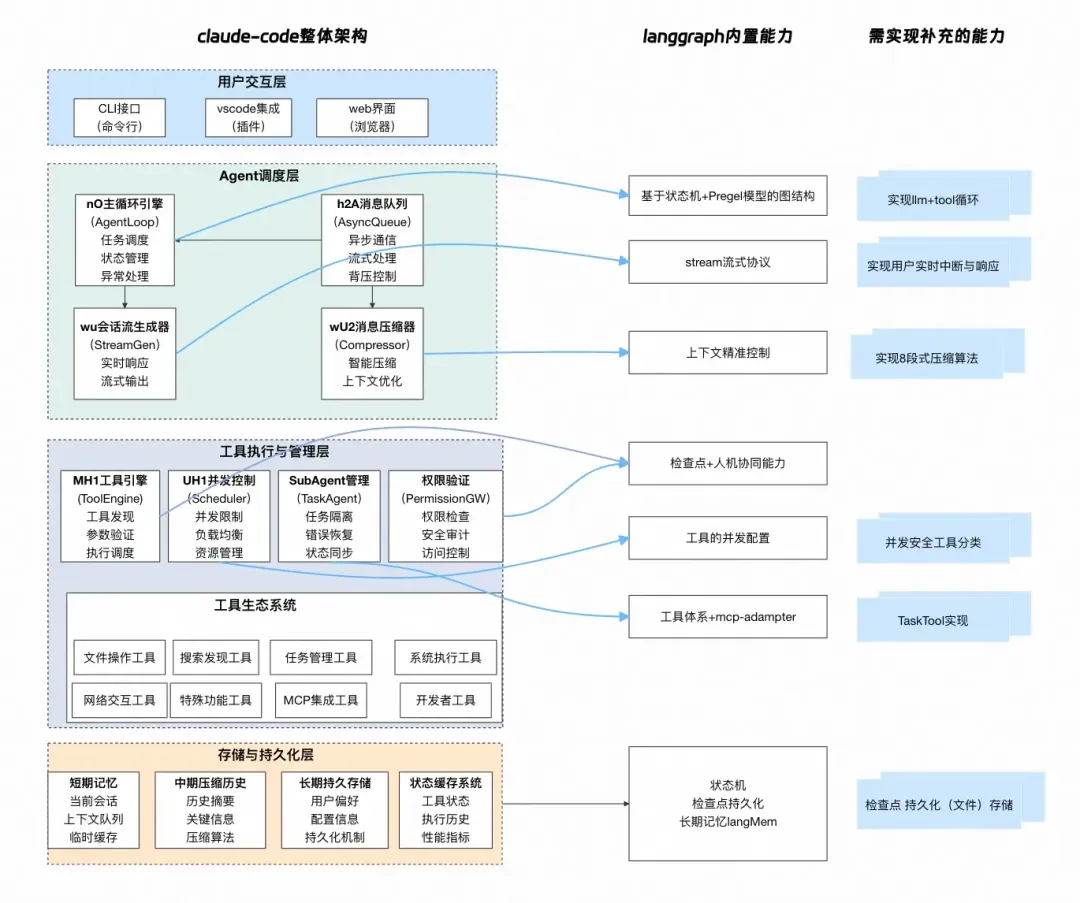
langgraph版ClaudeCode实现
1.梦开始的地方:最基础的ReActAgent
先从一个最简单的ReactAgent,来了解langgraph最基本的graph相关的操作。
const agentState = Annotation.Root({
  messages: Annotation<BaseMessage[]>({
    reducer: safeMessagesStateReducer,
    default: () => [],
  })
});

const toolNodeForGraph = new ToolNode(tools)

const shouldContinue = (state: typeof agentState.State) => {
  const { messages } = state;
  const lastMessage = messages[messages.length - 1];
  if ("tool_calls" in lastMessage && Array.isArray(lastMessage.tool_calls) && lastMessage.tool_calls?.length) {
      return"tools";
  }
  return END;
}

const callModel = async (state: typeof agentState.State) => {
  const { messages } = state;
  const response = await modelWithTools.invoke(messages);
  return { messages: response };
}


const workflow = new StateGraph(agentState)
  .addNode("llm", callModel)
  .addNode("tools", toolNodeForGraph)
  .addEdge(START, "llm")
  .addConditionalEdges("llm", shouldContinue, ["tools", END])
  .addEdge("tools", "llm");

const agent = workflow.compile()
这个简短的实现把langgraph十分核心的node、edge、state展示出来,节点运行图如下,这也是最最基本的一个能够调用tool的agent。
同时,通过streamEvent即可获取agent的流式输出事件,根据这些输出事件选取对应的格式输出给前端进行展示。
const config = {
  configurable: { thread_id: this.sessionId },
  streamMode: ['values', 'messages', 'updates'],
  version: 'v2' as const,
}
const stream = agent.streamEvents({messages: [inputMessage]}, config);
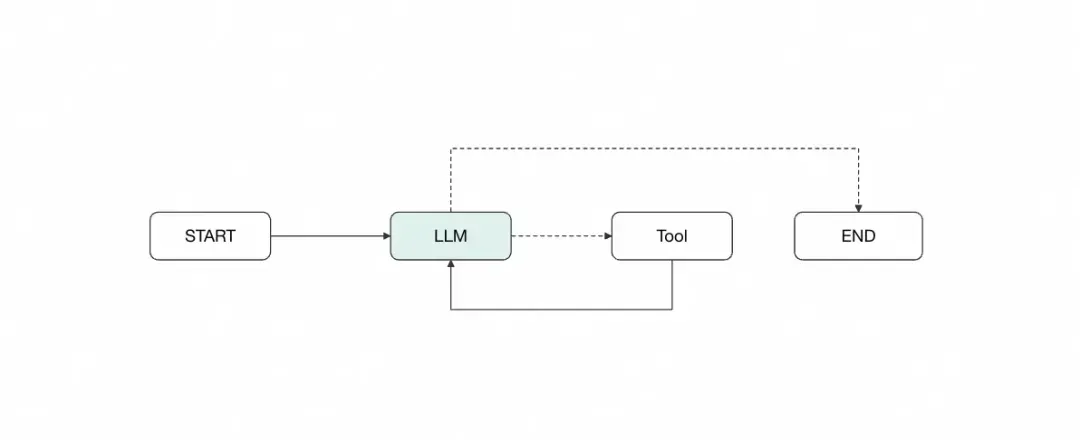
当然实际上,langgraph官方也提供了预构建的reactAgent,后续我们直接使用即可。我们将从这个图出发,一步步实现langClaudeCode。
2.人在环路:中断审查以及ckpt持久化
在使用claude-code的时候,如果需要查看or编辑某个文件,会询问用户权限,这其实是一种人工协同的方式。为了实现类似的功能,我们需要在原有的workflow基础上添加一个人工审查节点:
// 添加人工审查节点的workflow
const workflowWithReview = new StateGraph(MessagesAnnotation)
  .addNode("agent", callModel)
  .addNode("tools", toolNodeForGraph)
  .addNode("human_review", humanReviewNode)  // 新增:人工审查节点
  .addEdge(START, "agent")
  .addConditionalEdges("agent", shouldContinueWithReview, ["human_review", END])  // 修改:路由到审查节点
  .addConditionalEdges("human_review", checkUserApproval, ["tools", "agent"])  // 新增:审查结果路由
  .addEdge("tools", "agent");
2.1 人工审查节点实现
添加的human_review节点主要负责以下功能:
1.中断执行流程:在工具调用前暂停,等待用户决策;
2.提供操作选项:给用户提供批准、拒绝、修改等选项;
3.中断恢复:根据用户的回复决定是否下一个节点。
// 人工审查节点的具体实现
const humanReviewNode = async (state: typeof MessagesAnnotation.State) => {
  const lastMessage = state.messages[state.messages.length - 1];
  const humanAnswer = interrupt("确认是否执行");
  if(humanAnswer === "同意"){
    returnnew Command({
      goto: "tool",
      update: {
        messages: [new HumanMessage("确认执行")]
      }
    })
  }

  if(humanAnswer === "拒绝"){
    returnnew Command({
      goto: "agent",
      update: {
        messages: [new HumanMessage("xxxx")]
      }
    })
  }
};
这部分代码有两个重要知识点,两个重要的api,interrupt和Command
1.其中最重要的是 interrupt的设计,其实就是内部throw了一个error,强制图的运行中断(当前会话的检查点已经保存在图中),当调用resume恢复中断时,结合检查点的恢复,获取之前的运行状态进行恢复,详细介绍可以参见这里:
https://langchain-ai.github.io/langgraphjs/concepts/human_in_the_loop/#interrupt
2.Command是langgraph提供的一个可以动态选择的节点的api,我们可以在图的任意节点,通过Command实现任意节点的调整和状态机的更新。主要和图graph中的edge做对比,edge是代码中预置写死的边,而通过Command,我们可以在代码中通过根据不同情况灵活选择节点。比如这里通过用户输入进入不同的节点、也可以在某些场景下,根据大模型的输入进入不同的节点。
2.2 由大模型驱动决策是否需要人机协同
上面的人机协同节点是硬编码在图中,实际大模型应用开发的时候,人工协同的场景非常多(比如llm需求询问用户需求细节、需要用户确认规划等等),其实我们可以利用工具的特性(指模型根据提示词来驱动),让大模型自主决策是否需要人工协同。我们添加一个人工协同工具。
function createHumanLoopTool(){
    const executor = (arg, config) => {
      const msgs: BaseMessage[] = [
        new ToolMessage({
          content: 'Successfully askHuman,',
          name: 'askHuman',
          tool_call_id: config.toolCall.id,
        }),
      ];
      const state = getCurrentTaskInput();
      returnnew Command({
        goto: 'askHuman',
        graph: Command.PARENT,
        update: {
          messages: state.messages.concat(msgs),
        },
      });
    };
    return tool(executor, {
      name: 'ashHuman',
      description: '当需要向用户确认需求、询问补充信息、向用户提问时, 务必调用此工具',
      schema,
    });
  }
我们把这个工具给到大模型,修改工具的提示词,在大模型认为需要人工协同时就会调用此工具。
最核心的实现是“伪造”了一个工具给到大模型,让大模型根据工具的提示词来根据环境进行选择,工具内部的执行逻辑是跳转到人工协同节点(这个节点中会中断状态,寻求用户回答)。
同时,我们需要维持上下文消息的完整性,需要手动补充一个ToolMessage结果给到message中。
2.3 检查点持久化支持
到目前为之,我们已经成功实现了cc的人工协同功能(当然cc中人机协同的核心目的是工具权限校验),并且更强大。但cc是单机的,实际生产环境都是多个机器,在一次中断后,下一次请求可能会命中别的机器,检查点也就不存在,所以需要支持检查点持久化,这一点langgraph也提供了很成熟的解决方案。
import { MemorySaver } from "@langchain/langgraph";

const app = workflow.compile({
  checkpointer: new MemorySaver(),  // 状态持久化
});

// 使用示例
const config = { configurable: { thread_id: "review-session-1" } };
await app.invoke(initialState, config);

// 在用户审查后继续执行
await app.invoke(null, config);  // 从中断点继续
以上示例的MemorySaver是将检查点存储到机器内存中,而如果要持久化落库langgraph官方则提供了MongoDB等几种数据库持久化的方案。
我们生产环境大概率会用redis,可以参考这个实现 langgraph-redis github仓库 这个是python版本的,其实核心就是实现put、putWrites、getTuple几个方法,即检查点ckpt的存储和读取。这里就不展开了~
3.Agent分身与扩展:SubAgent的实现
3.1cc实现原理简析
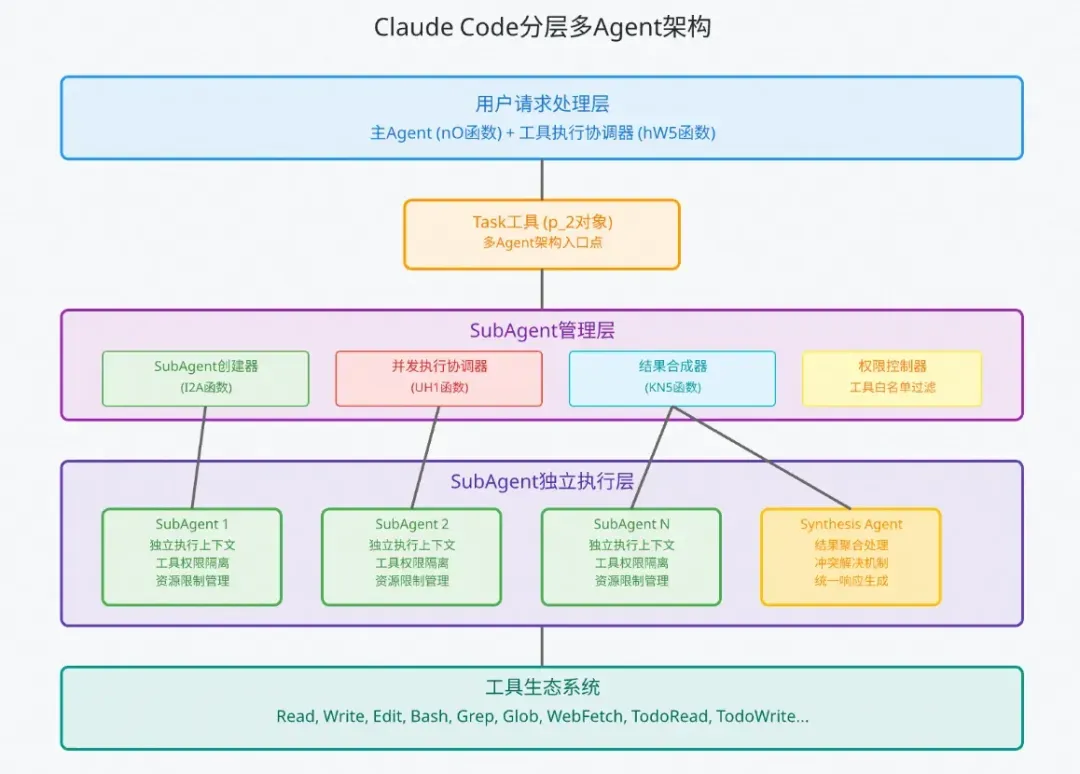
claude code 的多agent架构如图所示,整个流程如下:
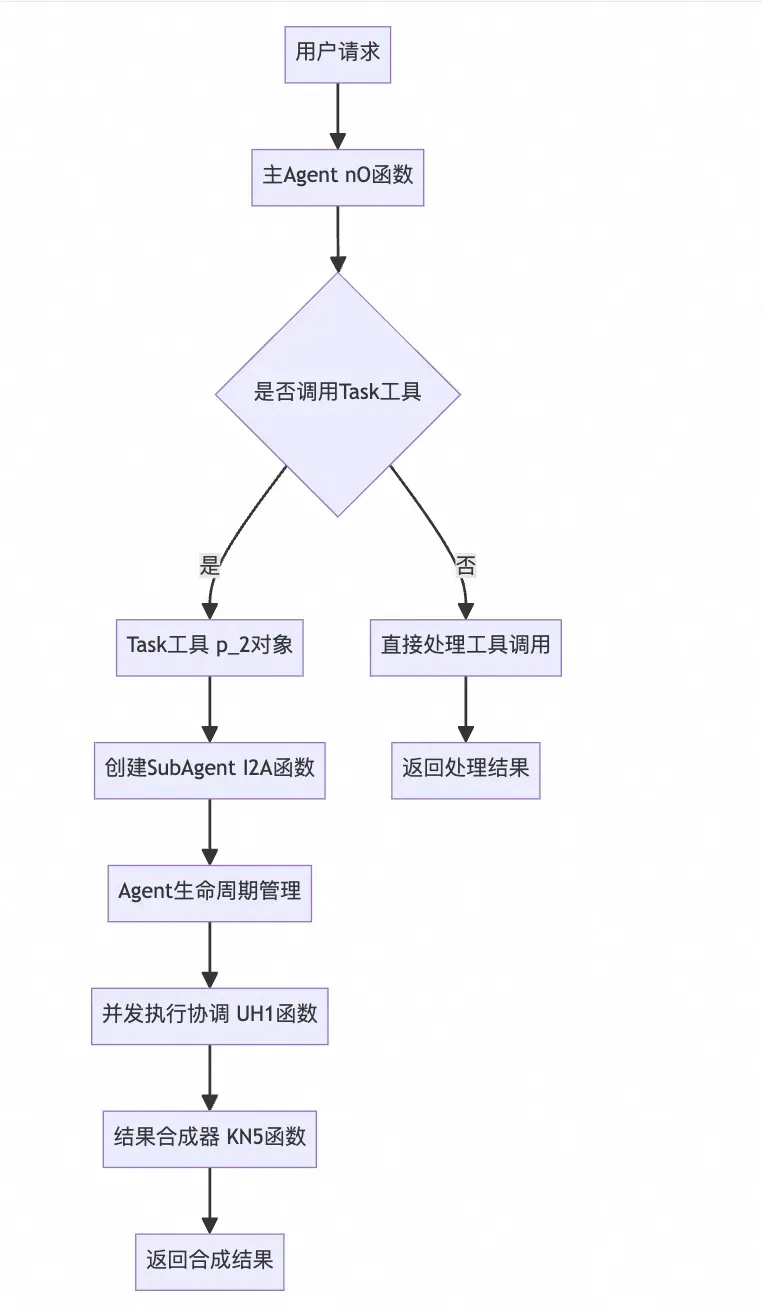
研究SubAgent的实现机制,我们从下面几个方面逐一研究,SubAgent创建流程、执行上下文分析、并发执行协调分析。
核心技术特点:
1.通过TaskTool根据任务复杂度创建SubAgent
2.完全隔离的执行环境:每个SubAgent在独立上下文中运行
3.智能并发调度:支持多Agent并发执行,动态负载均衡
4.安全权限控制:细粒度的工具权限管理和资源限制
5.结果合成:智能的多Agent结果聚合和冲突解决
3.2cc核心函数实现
以下是分析逆向仓库后,我认为最核心的一些函数,可以通过这些函数对流程有一个比较清晰的了解。
(1)Task工具作为多Agent架构入口点
Task工具 - 多Agent架构入口点
// Task工具对象结构 (p_2)
p_2 = {
    name: "Task",
    async call({ prompt }, context, globalConfig, parentMessage) {
        // 核心:通过Task工具内部创建和管理SubAgent
        if (config.parallelTasksCount > 1) {
            // 多Agent并发执行模式
            const agentTasks = Array(config.parallelTasksCount)
                .fill(`${prompt}\n\nProvide a thorough and complete analysis.`)
                .map((taskPrompt, index) => I2A(taskPrompt, index, executionContext, parentMessage, globalConfig));
        } else {
            // 单Agent执行模式
        }
    }
}
核心设计特点:
1.Task工具是SubAgent创建的唯一入口
2.支持单Agent和多Agent并发两种模式
3.通过配置parallelTasksCount控制并发度
4.每个SubAgent都是完全独立的执行实例
(2)SubAgent创建机制 (I2A函数)
I2A函数
// SubAgent启动函数
async function* I2A(taskPrompt, agentIndex, parentContext, globalConfig, options = {}){
    // 1. 生成唯一Agent ID
    const agentId = VN5();

    // 2. 创建隔离的执行上下文
    const executionContext = {
        abortController: parentContext.abortController,
        options: { ...parentContext.options },
        getToolPermissionContext: parentContext.getToolPermissionContext,
        readFileState: parentContext.readFileState,
        setInProgressToolUseIDs: parentContext.setInProgressToolUseIDs,
        tools: parentContext.tools.filter(tool => tool.name !== "Task") // 防止递归
    };

    // 3. 执行主Agent循环
    forawait(let agentResponse of nO(/* 主Agent循环 */)){
        // 处理Agent响应和工具调用
    }

    // 4. 返回最终结果
    yield { type: "result", data: { /* 结果数据 */ } };
}
核心特性:
1.完全隔离的执行环境
2.继承但过滤父级工具集(排除Task工具防止递归)
3.独立的资源限制和权限控制
4.支持进度事件流式输出
(3)并发执行协调器 (UH1函数)
UH1函数
// 并发执行调度器
async function* UH1(generators, maxConcurrency = Infinity){
    const wrapGenerator = (generator) => {
        const promise = generator.next().then(({ done, value }) => ({
            done, value, generator, promise
        }));
        return promise;
    };

    const remainingGenerators = [...generators];
    const activePromises = new Set();

    // 启动初始并发任务
    while (activePromises.size < maxConcurrency && remainingGenerators.length > 0) {
        const generator = remainingGenerators.shift();
        activePromises.add(wrapGenerator(generator));
    }

    // 并发执行循环
    while (activePromises.size > 0) {
        const { done, value, generator, promise } = await Promise.race(activePromises);
        activePromises.delete(promise);

        if (!done) {
            activePromises.add(wrapGenerator(generator));
            if (value !== undefined) yield value;
        } elseif (remainingGenerators.length > 0) {
            const nextGenerator = remainingGenerators.shift();
            activePromises.add(wrapGenerator(nextGenerator));
        }
    }
}
核心能力:
1.智能并发调度,支持限制最大并发数
2.Promise.race实现高效并发协调
3.动态任务调度,完成一个启动下一个
4.实时结果流式输出
(4)结果合成机制 (KN5函数)
KN5函数
// 多Agent结果合成器
function KN5(originalTask, agentResults){
    const sortedResults = agentResults.sort((a, b) => a.agentIndex - b.agentIndex);

    const agentResponses = sortedResults.map((result, index) => {
        const textContent = result.content
            .filter(content => content.type === "text")
            .map(content => content.text)
            .join("\n\n");

        return `== AGENT ${index + 1} RESPONSE ==\n${textContent}`;
    }).join("\n\n");

    return `Original task: ${originalTask}

I've assigned multiple agents to tackle this task. Each agent has analyzed the problem and provided their findings.

${agentResponses}

Based on all the information provided by these agents, synthesize a comprehensive and cohesive response...`;
}
合成策略:
1.按Agent索引排序保证一致性
2.提取每个Agent的文本内容
3.生成专门的合成提示词
4.创建独立的Synthesis Agent处理结果聚合
3.3langgraph实现思路简析
通过分析上述TaskTool工具作为创建入口、并发执行、结果合成等流程,在langgraph上其实有很多种实现思路,但我们整体思路是llm驱动、收敛到Tool中实现。那么对状态机无需改造,读图节点也无需改造(需要将TaskTool供给到图,以及针对TaskTool等内置工具无需作人工审查,这部分比较简单,就不展开了。)
所以我们重点放在TaskTool的实现,看看如何基于lg的能力快速实现。
3.4Task工具设计
3.4.1TaskTool的提示词和描述
function createTaskTool(baseTools: any[ ], model: any, subAgentConfigs: SubAgentConfig[ ]){
  return tool(
    async (args: { description: string; subagent_type: string }, config) => {
      // 具体工具内部实现,下文重点介绍
    },
    {
      name: "TaskTool",
      description: `Launch specialized SubAgents to autonomously handle complex multi-step tasks.

Available Agent types:
- general-purpose: General agent suitable forcomplex queries, file searches, and multi-step task execution (Tools: *)
- code-analyzer: Code analysis expert for code review, architecture analysis, performance optimization
- document-writer: Documentation expert for technical docs, user manuals, API documentation

Usage rules:
1. Use this tool when tasks are complexand require specialized handling
2. Each SubAgent invocation is independent and stateless
3. Provide detailed task descriptions; SubAgents will complete autonomously
4. After SubAgent completion, summarize key information for the user

When to use SubAgents:
- Complex multi-step analysis tasks
- Tasks requiring specialized skills (code analysis, documentation)
- Large-scale file search and processing
- Independent tasks that can be processed in parallel`,
      schema: z.object({
        description: z.string().describe("Detailed task description for the SubAgent"),
        subagent_type: z.enum(["general-purpose", "code-analyzer", "document-writer"]).describe("SubAgent type to use")
      })
    }
  );
}
3.4.2核心创建流程与上下文隔离
以下代码展示了工具的核心实现,核心需要关注不同子Agent的上下文隔离,主要体现在新增agent实例、独立的message队列、以及结果合成至主Agent。
function createTaskTool(baseTools: any[ ], model: any, subAgentConfigs: SubAgentConfig[ ]){
  // 为每种类型创建专门的ReActAgent实例
  const agentInstances = new Map<string, any>();

  // 初始化预定义的SubAgent类型
  subAgentConfigs.forEach(config => {
    const filteredTools = config.allowedTools
      ? baseTools.filter(tool => config.allowedTools.includes(tool.name))
      : baseTools.filter(tool => tool.name !== "TaskTool"); // 防止递归

    agentInstances.set(config.type, createReactAgent({
      llm: model,
      tools: filteredTools,
      systemMessage: config.systemPrompt
    }));
  });

  return tool(
    async (args: { description: string; subagent_type: string }, config) => {
      const { description, subagent_type } = args;

      // 获取指定类型的Agent
      const agent = agentInstances.get(subagent_type);
      if (!agent) {
        thrownew Error(`Unknown SubAgent type: ${subagent_type}`);
      }

      // 执行SubAgent
      try {
        console.log(`🤖 Launching SubAgent [${subagent_type}]: ${description}`);

        // 创建隔离的执行上下文
        const subAgentState = {
          messages: [{ role: "user", content: description }]
        };

        // 执行Agent并获取结果
        const result = await agent.invoke(subAgentState);

        // 提取最终响应
        const finalMessage = result.messages[result.messages.length - 1];
        const responseContent = finalMessage.content;

        console.log(`✅ SubAgent [${subagent_type}] completed`);

        // 返回格式化结果 - 模拟claude-code的结果格式
        return `SubAgent [${subagent_type}] execution completed:

Task: ${description}

Result:
${responseContent}

Note: This result was generated by a specialized SubAgent. Please summarize key information for the user as needed.`;

      } catch (error) {
        console.error(`❌ SubAgent [${subagent_type}] failed:`, error);
        return `SubAgent [${subagent_type}] execution failed: ${error.message}`;
      }
    },
    {
      name: "TaskTool",
      description: `提示词 略过`,
      schema: z.object({
        description: z.string().describe("Detailed task description for the SubAgent"),
        subagentType: z.enum(["general-purpose", "code-analyzer", "document-writer"]).describe("SubAgent type to use")
      })
    }
  );
}
这里也仿照claude-code给出subAgent的配置示例:
// SubAgent配置定义const subAgentConfigs: SubAgentConfig[ ] = [ { type: "general-purpose", systemPrompt: `You are a general-purpose AI assistant specialized in handling complex multi-step tasks.- Excel at file searches, content analysis, and code understanding- Approach complex problems systematically andbreak them down- Always provide detailed and accurate analysis results`, allowedTools: null }, { type: "code-analyzer", systemPrompt: `You are a code analysis expert focused on:- Code quality assessment and improvement recommendations- Architecture design analysis and optimization- Performance bottleneck identification and solutions- Security vulnerability detection and fix suggestionsPlease provide specific, actionable technical recommendations`, allowedTools: ["Read", "Edit", "Grep", "Glob", "LS"] }, { type: "document-writer", systemPrompt: `You are a technical writing expert focused on:- Clear and accurate technical documentation- User-friendly operation guides - Complete API documentation and examples- Structured project documentationEnsure readability and practicality of documentation`, allowedTools: ["Read", "Write", "Edit"] }];
3.4.3并发执行支持
langgraph中天然支持工具节点的并发调用,只不过不支持指定工具的并发。这里我们可以参考claude-code的工具管理,并将工具分为并发安全与并发不安全,放在不同的ToolNode节点。
// SubAgent配置定义
const subAgentConfigs: SubAgentConfig[ ] = [

  {
    type: "general-purpose",
    systemPrompt: `You are a general-purpose AI assistant specialized in handling complex multi-step tasks.
- Excel at file searches, content analysis, and code understanding
- Approach complex problems systematically andbreak them down
- Always provide detailed and accurate analysis results`,
    allowedTools: null
  },
  {
    type: "code-analyzer",
    systemPrompt: `You are a code analysis expert focused on:
- Code quality assessment and improvement recommendations
- Architecture design analysis and optimization
- Performance bottleneck identification and solutions
- Security vulnerability detection and fix suggestions
Please provide specific, actionable technical recommendations`,
    allowedTools: ["Read", "Edit", "Grep", "Glob", "LS"]
  },
  {
    type: "document-writer",
    systemPrompt: `You are a technical writing expert focused on:
- Clear and accurate technical documentation
- User-friendly operation guides
- Complete API documentation and examples
- Structured project documentation
Ensure readability and practicality of documentation`,
    allowedTools: ["Read", "Write", "Edit"]
  }
];
再调整图节点,将我们之前的tool节点换成safeConcurrencyToolNode和unSafeConcurrencyToolNode。同时,修改shouldContinue函数,获取agent调用的工具名,将其路由到safeConcurrencyToolNode或者unsafeConcurrencyToolNode。
// 将之前的tools节点调整为safeConcurrencyTools和unsafeConcurrencyTools
const graph = new StateGraph(agentState)
    .addNode("llm", callModel)
    // 主要改动
    .addNode("safeConcurrencyTools", safeConcurrencyToolNode)
    .addNode("unsafeConcurrencyTools", unsafeConcurrencyToolNode)


const shouldContinue = (state: typeof agentState.State) => {
  const { messages } = state;
  const lastMessage = messages[messages.length - 1];
  if ("tool_calls" in lastMessage && Array.isArray(lastMessage.tool_calls) && lastMessage.tool_calls?.length) {
    if (isSafeConcurrencyTool(lastToolMessage)) {
      return"safeConcurrencyTools";
    } else {
      return"unsafeConcurrencyTools";
    }
      return"tools";
  }
  return END;
}
基于langgraph现有的能力,结合claude-code的思路,也可以相对简单的完成TaskTool的subAgent并发执行。除此之外,理论上也可以通过继承扩展ToolNode等方式来实现。
当然,我觉得有了claude-code对并发安全工具和并发不安全工具的设计,langgraphjs后续也有可能将其作为基础能力沉淀下来。
4.复杂任务管理:Todo任务管理跟踪
4.1cc实现原理简析
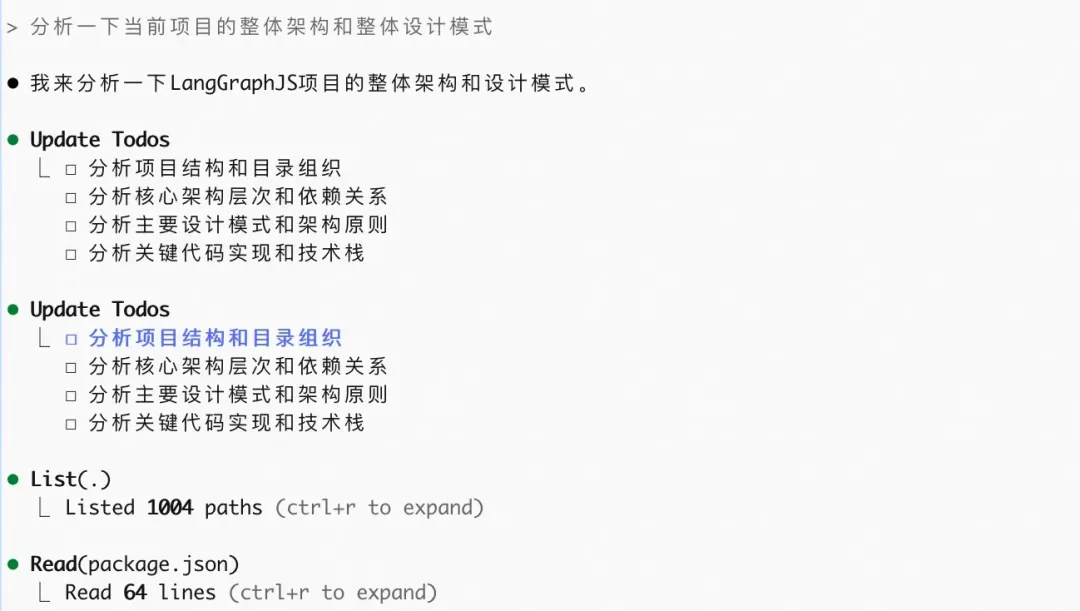
从实际体验以及逆向分析中发现,claude-code具有强大的任务管理能力:
1.结构化任务跟踪:通过TodoRead/TodoWrite工具管理任务状态
2.自主任务管理:agent通过提示词指导自主调用工具更新任务状态
3.任务状态管理:支持pending、in_progress、completed、blocked等状态
4.任务优先级:支持high、medium、low优先级分类
TodoList的任务管理,是我初次使用claude-code时觉得最亮眼的一点,十分流畅和简洁,但其实实现并不复杂,核心其实在于Todo工具以及提示词的设计,我们结合对提示词的分析来创建我们的Todo工具。
为了实现任务跟踪功能,我们只需要在现有workflow基础上:
1.扩展状态定义:添加任务列表状态,使用Todo工具进行读取和写入
2.集成任务工具:添加TodoRead/TodoWrite工具到主agent。
3.更新agent提示词:指导agent自主管理任务状态
4.2状态机设计变化
export interface TodoItem {
  id: string;
  name: string;
  desc: string;
  status: TaskStatus;
  startTime?: string;
  endTime?: string;
  error?: string;
}
const agentState = Annotation.Root({
  messages: Annotation<BaseMessage[]>({
    reducer: safeMessagesStateReducer,
    default: () => [],
  }),
  todoList: Annotation<TodoItem[]>({
    reducer: (x, y) => y,
    default: () => [],
  }),
});
主要在agentState中增加了todoList这一状态。如果参考claude-code或manus的设计,将todoList存储在外部文件中,也是一个很好的选择。当然基于langgraph,state状态机是最浅一层的内存存储,也可以基于checkpointer做定制持久化到文件系统中或者redis、mysql等外部数据库中。在这里我们只演示到state内存中。
4.3TodoTool工具设计
(1)首先添加TodoWrite工具
export function createTaskWriteTool(){
  const executor = (args, config) => {
    const state = getCurrentTaskInput() as (typeof MessagesAnnotation)['State'];
    const { todoLit } = args;

    // 一些任务处理加工逻辑

    returnnew Command({
      update: {
        todoLit: todoList,
        messages: state.messages.concat(responseMsgs),
      },
    });
  };

  return tool(executor, {
    name: TASK_TOOL_NAME_MAP.taskWrite,
    description: TODO_WRITE_PROMPT,
    schema: z.object({
      todoList: z
        .array(
          z.object({
            id: z.string().describe('任务唯一标识'),
            name: z.string().describe('任务名称'),
            desc: z.string().describe('任务具体描述'),
            status: z
              .nativeEnum(TaskStatus)
              .describe('任务状态:pending(待执行)、in_progress(执行中)、completed(已完成)、failed(失败)'),
            startTime: z.string().describe('任务开始时间').optional(),
            endTime: z.string().describe('任务结束时间').optional(),
            error: z.string().describe('失败原因(当状态为failed时必填)').optional(),
          }),
        )
        .describe('更新后的完整任务列表'),
    }),
  });
}
其实实现相对来说也比较简单,核心来说就是定义schema后,结合提示词llm会将基于当前内容构造出todoList内容和状态,我们只需要接受参数将其保存到todoList状态机中即可。
其实从TodoWirte工具的实现可以很好的体现大模型应用开发中 规则和智能的界限。
(2)TodoWrite提示词
原版提示词
Use this tool to create and manage a structured task listfor your current work session. This helps you track progress, organize complex tasks, and demonstrate thoroughness to the user.
It also helps the user understand the progress of the task and overall progress of their requests.

## When to Use This Tool
Use this tool proactively in these scenarios:
1. Complex multi-step tasks - When a task requires3or more distinct steps or actions
2. Non-trivial andcomplex tasks - Tasks that require careful planning or multiple operations
3. User explicitly requests todo list - When the user directly asks you to use the todo list
4. User provides multiple tasks - When users provide a list of things to be done(numbered or comma-separated)
5. After receiving new instructions - Immediately capture user requirements as todos
6. When you start working on a task - Mark it as in_progress BEFORE beginning work. Ideally you should only have one todo as in_progress at a time
7. After completing a task - Mark it as completed and add any new follow-up tasks discovered during implementation
## When NOT to Use This Tool
Skip usingthis tool when:
1. There is only a single, straightforward task
2. The task is trivial and tracking it provides no organizational benefit
3. The task can be completed in less than 3 trivial steps
4. The task is purely conversational or informational
NOTE that you should not use this tool if there is only one trivial task to do. In thiscase you are better off just doing the task directly.
## Examples of When to Use the Todo List
<example>
User: I want to add a dark mode toggle to the application settings. Make sure you run the tests and build when you're done!
Assistant: I'll help add a dark mode toggle to your application settings. Let me create a todo list to track this implementation.
*Creates todo list with the following items:*
1. Create dark mode toggle component in Settings page
2. Add dark mode state management(context/store)
3. Implement CSS-in-JS styles for dark theme
4. Update existing components to support theme switching
5. Run tests and build process, addressing any failures or errors that occur
*Begins working on the first task*
<reasoning>
The assistant used the todo list because:
1. Adding dark mode is a multi-step feature requiring UI, state management, and styling changes
2. The user explicitly requested tests and build be run afterward
3. The assistant inferred that tests and build need to pass by adding "Ensure tests and build succeed" as the final task
</reasoning>
</example>
<example>
User: Help me plan a comprehensive marketing campaign for our new product launch, including social media, email marketing, and press releases.
Assistant: I'll help you plan a comprehensive marketing campaign for your product launch. Let me create a todo list to organize all the components.
*Creates todo list with the following items:*
1. Define target audience and key messaging
2. Create social media content calendar and posting schedule
3. Design email marketing sequence and automation flows
4. Draft press release and identify media contacts
5. Set up tracking and analytics for campaign performance
6. Create visual assets and brand materials
7. Coordinate launch timeline and deliverables
*Begins working on the first task*
<reasoning>
The assistant used the todo list because:
1. Marketing campaign planning involves multiple distinct channels and activities
2. Each component requires careful coordination and planning
3. The systematic approach ensures all aspects of the launch are covered
4. Progress tracking helps maintain timeline and deliverables
</reasoning>
</example>
<example>
User: Help me rename the function getCwd to getCurrentWorkingDirectory across my project
Assistant: Let me first search through your codebase to find all occurrences of 'getCwd'.
*Uses search tools to locate all instances of getCwd in the codebase*
Assistant: I've found 15 instances of 'getCwd' across 8 different files. Let me create a todo list to track these changes.
*Creates todo list with specific items for each file that needs updating*
<reasoning>
The assistant used the todo list because:
1. First, the assistant searched to understand the scope of the task
2. Upon finding multiple occurrences across different files, it determined this was a complex task with multiple steps
3. The todo list helps ensure every instance is tracked and updated systematically
4. This approach prevents missing any occurrences and maintains consistency
</reasoning>
</example>
<example>
User: I need help organizing my home office: decluttering the desk, setting up a filing system, organizing digital files, and creating a daily workflow.
Assistant: I'll help you organize your home office systematically. Let me create a todo list to track each area of organization.
*Creates todo list with items like: 1) Sort and declutter desk items, 2) Set up physical filing system for documents, 3) Organize digital files and folders, 4) Create daily workflow and productivity systems, 5) Establish maintenance routines*
Let's start with decluttering your desk space to create a clean foundation for the other organizational systems.
<reasoning>
The assistant used the todo list because:
1. The user provided multiple distinct organizational tasks
2. Each area requires different approaches and careful planning
3. Home organization benefits from systematic, step-by-step completion
4. Progress tracking ensures all areas are addressed thoroughly
</reasoning>
</example>
## Examples of When NOT to Use the Todo List
<example>
User: How do I print 'Hello World' in Python?
Assistant: In Python, you can print "Hello World" with this simple code:
python
print("Hello World")
This will output the text "Hello World" to the console when executed.</assistant>
<reasoning>
The assistant did not use the todo list because this is a single, trivial task that can be completed in one step. There's no need to track multiple tasks or steps for such a straightforward request.
</reasoning>
</example>
<example>
User: What's the best way to water houseplants?
Assistant: The best way to water houseplants depends on the specific plant type, but here are some general guidelines:
- Check soil moisture by inserting your finger about 1-2 inches into the soil
- Water thoroughly when the top inch feels dry, allowing water to drain from the bottom
- Use room temperature water and water in the morning when possible
- Avoid overwatering, which is more harmful than underwatering for most plants
Different plants have different needs, so it's important to research your specific varieties for optimal care.
<reasoning>
The assistant did not use the todo list because this is an informational request with no actual tasks to complete. The user is simply asking for advice and explanation, notfor the assistant to perform multiple steps or activities.
</reasoning>
</example>
<example>
User: Can you add a comment to the calculateTotal function to explain what it does?
Assistant: Sure, let me add a comment to the calculateTotal function to explain what it does.
* Uses the Edit tool to add a comment to the calculateTotal function *
<reasoning>
The assistant did not use the todo list because this is a single, straightforward task confined to one location. Adding a comment doesn't require tracking multiple steps or systematic organization.
</reasoning>
</example>
<example>
User: What time is it in Tokyo right now?
Assistant: I'll check the current time in Tokyo for you.
*Searches for current time in Tokyo*
The current time in Tokyo, Japan is [current time]. Tokyo is in the Japan Standard Time(JST) zone, which is UTC+9.
<reasoning>
The assistant did not use the todo list because this is a single information lookup with immediate results. There are no multiple steps to track or organize, making the todo list unnecessary forthis straightforward request.
</reasoning>
</example>
可供快速查看的中文翻译版:
更新当前会话的任务列表。主动使用此工具来跟踪进度和管理任务执行。

## 何时使用此工具
在以下场景中主动使用此工具:

1. 开始任务时 - 将任务标记为in_progress(可单个或批量,但每批最多5个)
2. 完成任务后 - 将任务标记为completed(可单个或批量完成)
3. 任务失败时 - 将任务标记为failed并包含错误详情
4. 需要更新任务进度或添加详情时

## 任务状态和管理

1. **任务状态**:使用这些状态来跟踪进度:
   - pending: 任务尚未开始
   - in_progress: 当前正在执行(同一时间最多5个任务)
   - completed: 任务成功完成
   - failed: 任务遇到错误

2. **任务管理规则**:
   - 实时更新任务状态
   - 支持批量执行:可以将多个相似简单任务同时标记为in_progress或completed
   - 批量限制:同一时间最多5个任务处于in_progress状态
   - 顺序执行:必须按任务列表顺序处理,不能跳跃
   - 任务失败时,将其标记为failed并包含错误详情

3. **任务完成要求**:
   - 只有在完全完成任务时才标记为completed
   - 如果遇到错误,将任务标记为failed并包含错误详情
   - 在以下情况下绝不要将任务标记为completed:
     - 实现不完整
     - 遇到未解决的错误
     - 找不到必要的文件或依赖项

如有疑问,请使用此工具。主动进行任务管理可以展现专业性并确保您完成所有要求。


对应的英文版
(3)实现TodoRead工具
export function createTaskReadTool(){
  const executor = (args, config) => {
    const state = getCurrentTaskInput() as any;
    const currentTasks = state.taskList || [];

    const content = `请继续使用任务列表更新和读取功能来跟踪您的进度。当前任务列表: ${JSON.stringify(currentTasks)}`;

    returnnew ToolMessage({
      content,
      name: TASK_TOOL_NAME_MAP.taskRead,
      tool_call_id: config.toolCall.id,
    });
  };

  return tool(executor, {
    name: TASK_TOOL_NAME_MAP.taskRead,
    description:
      '读取当前会话的任务列表。主动且频繁地使用此工具,以确保您了解当前任务列表的状态。您应该尽可能多地使用此工具,特别是在开始工作、完成任务后或不确定下一步做什么时。',
    schema: z.object({}),
  });
}
在这里从state中读取了当前的todoList,返回给到llm。
(4)从TodoTool提示词中学到的
其实从真正实现来看,TodoTool的工程实现都挺简单的,因为很多逻辑是内置到提示词中了。作为软件开发的惯性,我在很长一段时间开发中其实是不太重视提示词的开发,认为提示词都比较简单 不如工程实现能够深入研究。但从claude-code的TodoTool实现中,可以发现提示词的优化巧思是很多的。比如:
- TodoRead工具中强调 llm
主动且频繁地使用此工具,以确保您了解当前任务列表的状态。您应该尽可能多地使用此工具,特别是在开始工作、完成任务后或不确定下一步做什么时。这两句话我觉得信息量还是很大的,实际实践下来可能会发现工程实现都差不多,但llm就是不如claude-code的todoList听话,而提示词中的这几句话,极大的加深了todoList的重要性和稳定性。 - TodoWrite中有很多few-shot,实际开发中我发现自己在写提示词样例的时候很偷懒,会觉得很麻烦,但是TodoWrite如果去掉这些few-shot,效果应该会打很大折扣。
(5)主agent工具管理
接下来在agent的系统提示词中集成任务管理逻辑,让agent自主调用工具:
const todoPrompt = `
You are an AI assistant with task management capabilities. Follow these guidelines:

1. **Task Management Rules**:
   - Use TodoRead to check current tasks before starting new work
   - Use TodoWrite to create tasks forcomplex requests (3+ steps)
   - Mark tasks as 'in_progress' when you start working on them
   - Mark tasks as 'completed' when you finish them
   - Break down complex requests into smaller, manageable tasks

2. **Task Organization**:
   - High priority: Urgent or blocking issues
   - Medium priority: Normal feature work
   - Low priority: Nice-to-have improvements

3. **Status Updates**:
   - Always update task status as you work
   - If you encounter issues, mark tasks as 'blocked'and explain why
   - Keep task descriptions clear and actionable

Current task context: ${state.taskList?.length || 0} tasks tracked
`
const systemPrompt = `
  // 原有提示词
  ${todoPrompt}
`
5.上下文工程:8段式压缩算法
5.1cc实现原理简析
从逆向分析中发现,claude-code在上下文超长时会进行message压缩处理。在token管理方面有几个核心特性,确保了长对话过程中的流畅体验:
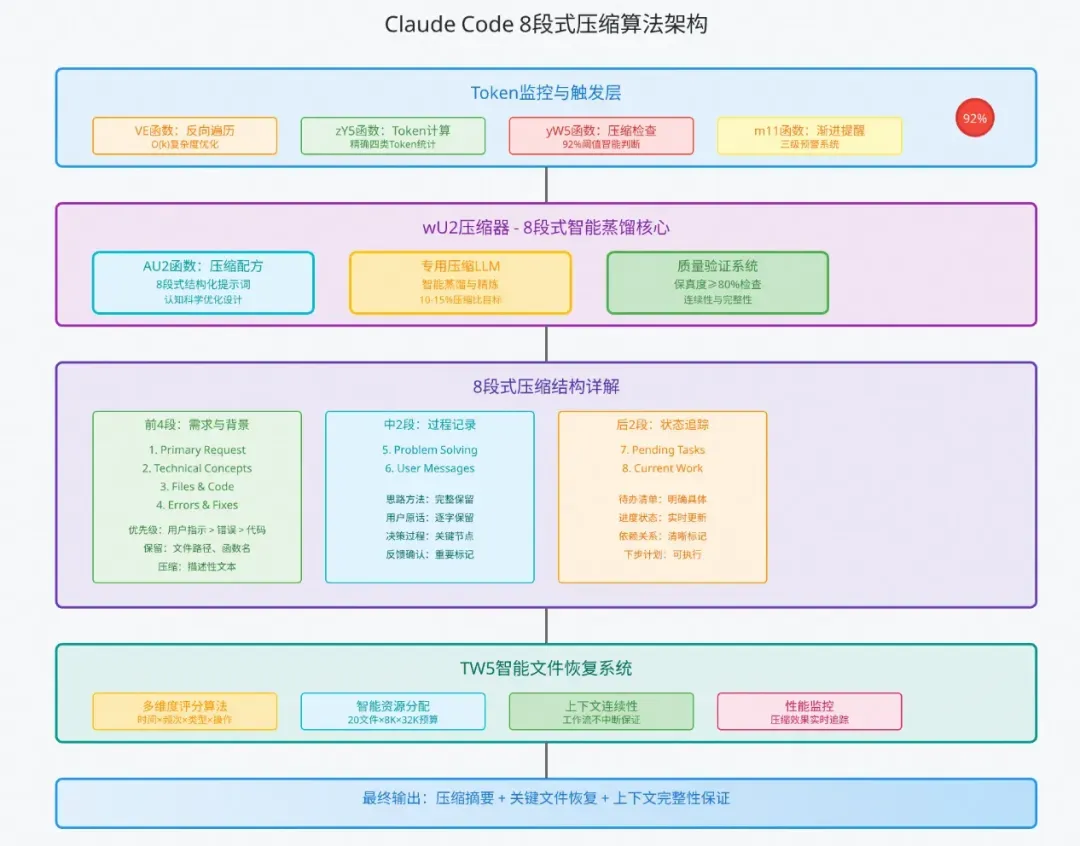
1.实时Token监控:在每次llm调用前检测token使用情况
2.智能压缩阈值:当token使用率超过92%时自动触发压缩
3.8段式压缩策略:将对话历史按重要性分为8个段落,渐进式压缩
其中也有一些细节,比如监控token通过倒序扫描usage信息,计算可用token时将模型输出也预留在内。
5.2cc核心函数实现
(1)反向遍历及触发-VE函数/yW5函数
// VE函数:反向遍历Token监控机制
getCurrentUsage() {
    console.log('🔍 检查记忆使用情况...');

    let totalTokens = 0;
    // 聪明的地方:从最新消息开始找,因为usage信息通常在最近的消息里
    for (let i = this.messages.length - 1; i >= 0; i--) {
      const message = this.messages[i];
      if (message.usage) {
        totalTokens += this.calculateTotalTokens(message.usage);
        break; // 找到就停止,不浪费时间
      }
    }

    return {
      used: totalTokens,
      total: this.maxTokens,
      percentage: totalTokens / this.maxTokens
    };
}
核心设计特点:
- 反向遍历优化:从最新消息往前找,时间复杂度从O(n)降到O(k)
- 92%精确阈值:经过A/B测试优化的最佳压缩点,平衡用户体验和性能
- 精确Token计算:涵盖input、cache_creation、cache_read、output四类Token
(2)8段式压缩策略-AU2函数
这里核心是8段式压缩的提示词,下面会单拎一节介绍。
除此之外,还有智能文件恢复(TW5函数)、渐进式告警处理等,这里非核心主流程就不再赘述了。
状态机设计变化
const agentState = Annotation.Root({
  messages: Annotation<BaseMessage[]>({
    reducer: messagesStateReducer,
    default: () => [],
  }),
  todoList: Annotation<TodoItem[]>({
    reducer: (x, y) => y,
    default: () => [],
  }),
  // 新增:压缩历史记录
  compressionHistory: {
    value: (x: CompressionRecord[ ], y: CompressionRecord[ ]) => [...(x || [ ]), ...(y || [ ])],
    default: () => [ ],
  },
});
图节点改造
在langgraph的体系之下,实现上下文压缩的方案有很多,这里简单列举几例:
1.直接在调用llm Node节点实现中,检查token是否超过,若超过直接压缩,压缩完毕将message给到agent。
2.添加压缩节点,通过压缩节点或Edge来判断是否进行压缩以及执行压缩。
这里选择直接添加压缩节点,这样的好处是:
- 清晰的控制流 - 压缩逻辑独立为单独节点,流程可视化
- 状态透明 - 压缩状态在StateGraph中明确表示,在langfuse等日志系统中也可以方便看到压缩节点运行情况。
- 易于调试 - 可以单独测试压缩节点
首先我们新增一个压缩节点
const workflow = new StateGraph(newAgentState)
  // 新增:压缩检查节点
  .addNode("compressionNode", compressionNode)
  // 原有节点
  .addNode("llm", callModel)
压缩节点的实现
在该节点中处理上下文message
function compressionNode(state){
  // 1. 倒序查找统计token使用
   const currentTokens = getLatestTokenUsage(state.messages);

  // 2. token可用性检查,判断是否需要压缩
  if(!needsCompress(state)){
    return {}
  }

  // 3. 生成8段式压缩提示词
  const compressionPrompt = this.generateCompressPrompt();

  // 4. 执行压缩LLM调用
  const compressedSummary = await this.callCompressionModel(
    compressionPrompt,
    state.messages
  );

  // 5. 压缩结果评估

  // 6. 删除历史消息(保留策略),并生成摘要及新上下文
  const summaryMsg = new AIMessage(compressedSummary);
    const messages = [...compressionResult.removeMessages, summaryMsg];
  return {
    messages,
  };
}
基于langgraph的message体系,结合claude-code的倒序查找思路,可以很方便查找当前token使用情况。
export function getLatestTokenUsage(messages: BaseMessage[]): number {
  // 倒序扫描,找到最新的usage信息
  for (let i = messages.length - 1; i >= 0; i--) {
    const msg = messages[i];
    if (isAIMessage(msg) && (msg as AIMessage)?.response_metadata?.usage) {
      const usage = msg.response_metadata.usage;
      return (usage.total_tokens || 0) + (usage.cache_creation_tokens || 0);
    }
  }
  // 如果没有usage信息,回退到估算
  return estimateTokens(messages);
}
在判断是否需要压缩的时候,需综合考虑模型上下文窗口、预留输出窗口、压缩比例等。
8段式压缩提示词
同样的,cc这份压缩的实现,提示词是必不可少的一部分,我们来详细研究分析一下这份提示词。
Your task is to create a detailed summary of the conversation so far,
paying close attention to the user's explicit requests and your previous actions.
This summary should be thorough in capturing technical details, code patterns,
and architectural decisions that would be essential for continuing development
work without losing context.

Before providing your final summary, wrap your analysis in <analysis> tags to
organize your thoughts and ensure you've covered all necessary points.

Your summary should include the following sections:

1. Primary Request and Intent: Capture all of the user's explicit requests and intents in detail
2. Key Technical Concepts: List all important technical concepts, technologies, and frameworks discussed.
3. Files and Code Sections: Enumerate specific files and code sections examined, modified, or created. Pay special attention to the most recent messages and include full code snippets where applicable.
4. Errors and fixes: List all errors that you ran into, and how you fixed them. Pay special attention to specific user feedback.
5. Problem Solving: Document problems solved and any ongoing troubleshooting efforts.
6. All user messages: List ALL user messages that are not tool results. These are critical for understanding the users' feedback and changing intent.
7. Pending Tasks: Outline any pending tasks that you have explicitly been asked to work on.
8. Current Work: Describe in detail precisely what was being worked on immediately before this summary request.
9. Optional Next Step: List the next step that you will take that is related to the most recent work you were doing.


对应中文版为:
你的任务是创建到目前为止对话的详细摘要,密切关注用户的明确请求和你之前的行动。此摘要应彻底捕获技术细节、代码模式和架构决策,这些对于在不丢失上下文的情况下继续开发工作至关重要。
在提供最终摘要之前,将你的分析包装在<analysis>标签中,以组织你的思考并确保你涵盖了所有必要的要点。

你的摘要应包括以下部分
**1. 主要请求和意图**:详细捕获用户的所有明确请求和意图
**2. 关键技术概念**:列出讨论的所有重要技术概念、技术和框架
**3. 文件和代码段**:枚举检查、修改或创建的特定文件和代码段。特别注意最近的消息,并在适用时包含完整的代码片段
**4. 错误和修复**:列出你遇到的所有错误以及修复方法。特别注意特定的用户反馈
**5. 问题解决**:记录已解决的问题和任何正在进行的故障排除工作
**6. 所有用户消息**:列出所有非工具结果的用户消息。这些对于理解用户的反馈和变化的意图至关重要
**7. 待处理任务**:概述你明确被要求处理的任何待处理任务
**8. 当前工作**:详细描述在此摘要请求之前正在进行的确切工作
**9. 可选的下一步**:列出与你最近正在做的工作相关的下一步
通过这份提示词,可以看出来cc将压缩分成了8个部分,分别为:
1. 主要请求和意图:详细捕获用户的所有明确请求和意图
2. 关键技术概念:列出讨论的所有重要技术概念、技术和框架
3. 文件和代码段:枚举检查、修改或创建的特定文件和代码段。特别注意最近的消息,并在适用时包含完整的代码片段
4. 错误和修复:列出你遇到的所有错误以及修复方法。特别注意特定的用户反馈
5. 问题解决:记录已解决的问题和任何正在进行的故障排除工作
6. 所有用户消息:列出所有非工具结果的用户消息。这些对于理解用户的反馈和变化的意图至关重要
7. 待处理任务:概述你明确被要求处理的任何待处理任务
8. 当前工作:详细描述在此摘要请求之前正在进行的确切工作
9. 可选的下一步:列出与你最近正在做的工作相关的下一步
其中值得学习的一点是,为了保证质量,强制使用<analysis>标签组织思考。
5.3更完整的上下文工程处理
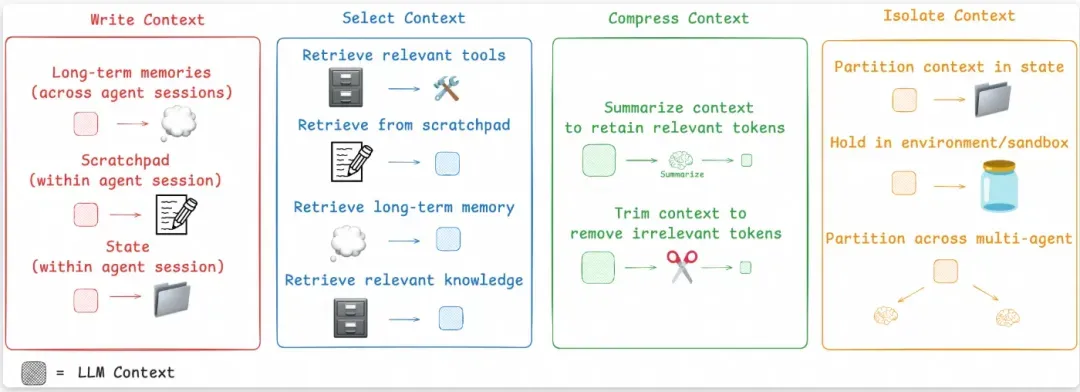
上图是最近非常经典的一张上下文工程处理方案图,在claude-code的设计中,对上下文的处理包含上下文压缩(8段式压缩)和上下文隔离(subAgent隔离上下文执行),对上下文的处理整体偏保守(因为上下文的任何加工和处理可能会带来副作用,丢失关键信息),属于“大力出奇迹”派的,这也导致claude-code的token消耗其实比较大。
如果想更完整的了解其他上下文工程的方法,或者稍微更激进一点的上下文处理,可以参考这个开源项目OpenDeepResearch (https://github.com/langchain-ai/open_deep_research) langchain官方出品,项目质量还是很高,对上下文工程有更丰富的实践。
6.更好的流式:Steering实时响应
6.1cc实时响应特点
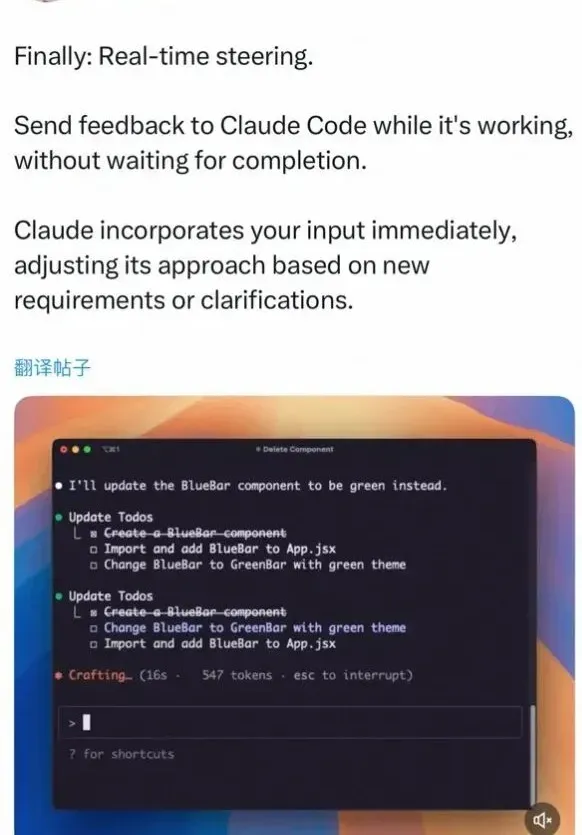
上图为claude-code的pm发的一条推文,从这条推文可以看到claude-code的响应最核心的特定便是实时响应,这也是steering和普通的流式不同的地方所在。
1.实时中断:用户可以在agent执行过程中随时输入新指令
2.立即响应:不需要等待当前任务完成,agent会立即处理新输入
3.上下文保持:中断后能够保持之前的执行状态和任务进度
这种机制让用户与AI的交互更加自然,就像与人类助手对话一样,可以随时调整任务方向或添加新要求。
6.2cc核心函数实现
核心函数在于h2A异步消息队列的实现以及消息协调机制如何和agentnO主循环进行交互。这个部分在逆向仓库中有介绍,由于和langgraph差别较远以及lg官方也有开箱即用的能力,这里就不赘述了。
6.3升级完善langgraph流式输出
langgraph原生虽然没有类似steerign这样的概念,但其提供了强大丰富的流式响应。在普通流式的基础上,我觉得cc的核心在于流式的中断和恢复,以及消息处理队列,我们可以借助abort signal实现中断能力、通过检查点ckpt来轻松实现恢复。
首先添加abort signal来监听agent的响应信号:
const config = {
  configurable: { thread_id: this.sessionId },
  streamMode: ['values', 'messages', 'updates'] as any,
  version: 'v2' as const,
  // 传入fetch请求的abortSignal, 若前端中断, 会透传到图中。
  signal: abortSignal,
}
const stream = agent.streamEvents({messages: [inputMessage]}, config);
只需前端fetch请求时传递abort signal即可:
const response = await fetch(api, {
  method: 'POST',
  body: JSON.stringify({}),
  headers: {
    'Content-Type': 'application/json',
  },
  signal: abortController.signal,
})
结合上文中提到的检查点持久化机制,当发生中断时,图的运行会立即中断,并且langgraph会自动将运行的检查点存储到内存或者redis中,当用户继续输入消息时,获取状态后再次运行。
我们可以通过工程上的手段模拟claude-code实时响应的效果,即不阻塞用户Input输入框,在用户输入完成后手动abort当前运行,并且发送新的消息,graph会恢复abort前的检查点并开始执行新命令。
当前claude-code做的十分完善,包含消息队列、背压控制、意图处理等等,这里就不再深究了,基于langgraph默认的stream流式 + abort signal与前端结合 + 检查点恢复机制,实现一个最基本的实时响应。
再回头看一眼langgraph的核心特性
6.1llm驱动与规则驱动的相融合:可靠性与灵活性的权衡。
当下大模型应用落地一个很大的问题是自主性较高的同时也会带来可控性的下降,这二者其实是相辅相成的,不同场景对这二者的容忍度也不一样。在很多场景下希望llm更灵活自主一点,可以接受可靠性弱一点,但很多场景是无法接受系统不可靠的。基于langgraph框架,我们可以在工程规则驱动 和 llm驱动之间(即可靠性和自主性灵活性)根据不同业务场景寻找一种平衡。
比如在本文实现的过程中,有些地方如token检测这部分期望工程侧严格校验的地方,我们使用节点以及固定边的方式保障运行;在是否决定调用todoList以及跟踪任务、根据任务难度是否创建subAgent时,我们通过工具的方式给到llm,让llm来决策。
6.2框架层不过多抽象,精准控制上下文
“不过多抽象” 这一点其实是相对于很多其他agent框架而言,很多框架基于对agent应用的理解 抽象了一套agent机制或者multi-agent协作机制,用户只需几行代码就可以直接构建agent,有点类似于lg prebuild中的SupervisorAgent。这样的好处是从0构建很快,但由于过度抽象导致用户并不知道框架内部实际给到llm的输入是什么,而在当下,agent应用的效果和上下文输入至关重要。
在上文实践中,当我们想参考claude-code对上下文进行8段式压缩时,这一点就体现了,我们可以精准控制上下文,也精准感知上下文。
claude-code 不止于此
上文我们对claude-code中的人工审查、SubAgents机制、TodoList实现、8段式压缩、steering流式输出进行了一个大概的介绍和langgraph简单版的实现,这些功能是我认为最p0的功能。
虽然我们的标题是实现一个claude-code,但实际上对于claude-code还有很多功能和优秀的设计并没有涉及,比如system-reminder机制、steering响应的背压控制、Hooks机制、PlanMode等等,并且cc还以非常快的速度不停迭代新功能。让我们持续关注,看看claude-code还会给我们带来哪些惊喜~~
来源 | 阿里云开发者公众号
作者 | 巷年
