2.3 二进制安装MariaDB
2.3.1 用户和组
# Rocky、Almalinux、CentOS、openEuler、AnolisOS、OpenCloudOS、 Kylin Server、UOS Server、Ubuntu、Debian
useradd -r -s /sbin/nologin -d /data/mariadb mysql

# openSUSE
groupadd -r mysql
useradd -s /sbin/nologin -d /data/mariadb -r -g mysql mysql
2.3.2 准备程序文件
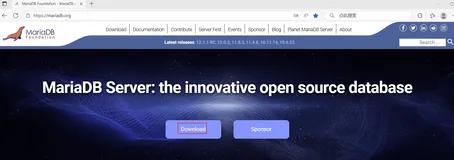
MariaDB二进制包下载,去“https://mariadb.org”网站下载,选择“Download”。
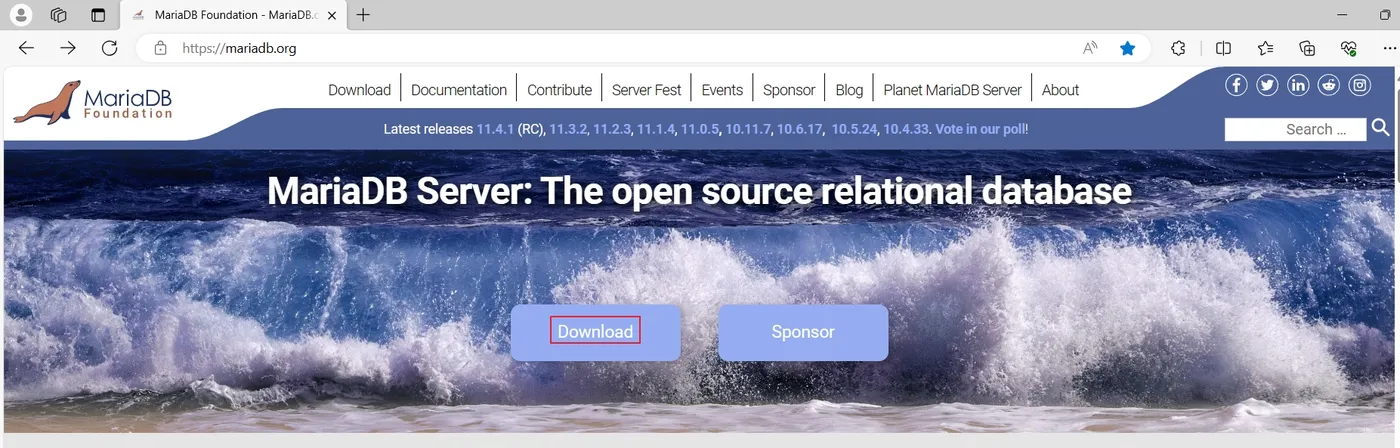
图8 MariaDB首页
在打开的网页,在“MariaDB Server”下面选择“MariaDB Server Version为:MariaDB Server 11.8.2”,选择“Operating System为:Linux”,选择“Architecture为:x86_64”,选择"Init System为:Systemd",然后选择“Mirror为:清华大学 TUNA 协会 (Tsinghua University TUNA Association)”,最后选择“Download”下载。
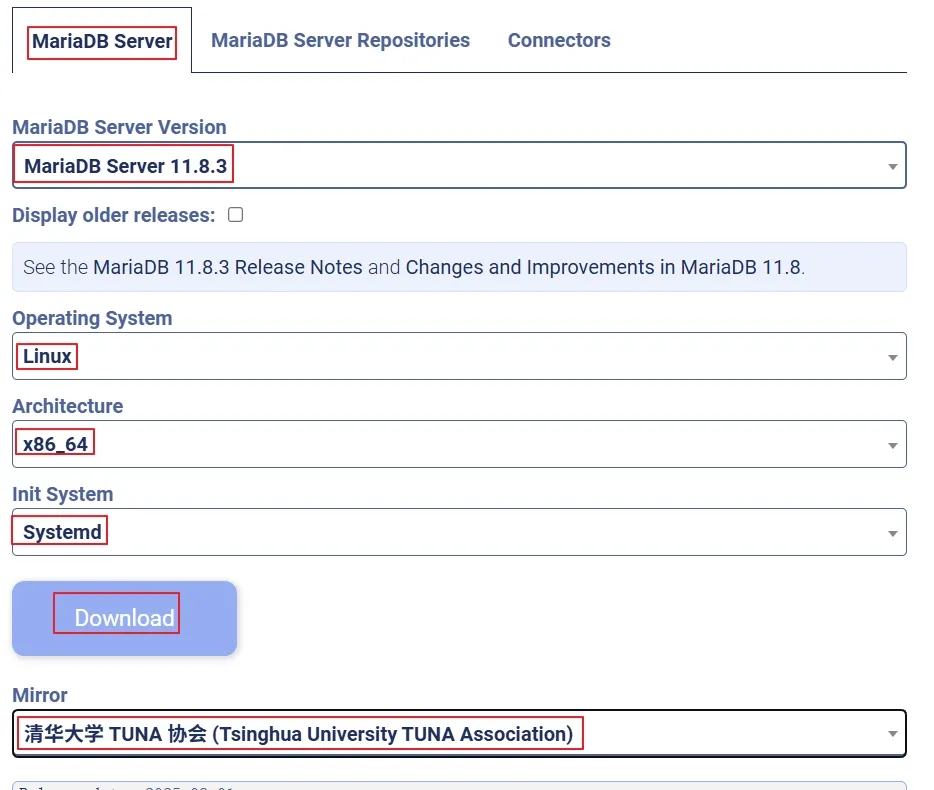
图9 MariaDB二进制包下载
# Rocky、Almalinux、CentOS、AnolisOS、OpenCloudOS、Kylin Server默认没有wget包,需要安装
yum install -y wget

# openEuler 22.03/24.03 LTS、AnolisOS 23、OpenCloudOS 9没有安装tar包,需要安装
yum install -y tar

# Rocky 8/9/10、Almalinux 8/9/10、CentOS Stream 8/9/10、openEuler 22.03/24.03 LTS、AnolisOS 8/23、OpenCloudOS 8/9、Kylin Server v10/v11、UOS Server v20、openSUSE 15、Ubuntu Server 18.04/20.04/22.04/24.04 LTS、Debian 11/12/13:
wget https://mirrors.tuna.tsinghua.edu.cn/mariadb///mariadb-11.8.3/bintar-linux-systemd-x86_64/mariadb-11.8.3-linux-systemd-x86_64.tar.gz
tar xf mariadb-11.8.3-linux-systemd-x86_64.tar.gz -C /usr/local
ln -s /usr/local/mariadb-11.8.3-linux-systemd-x86_64/ /usr/local/mysql

# CentOS 7
wget https://mirrors.tuna.tsinghua.edu.cn/mariadb///mariadb-11.4.8/bintar-linux-systemd-x86_64/mariadb-11.4.8-linux-systemd-x86_64.tar.gz
tar xf mariadb-11.4.8-linux-systemd-x86_64.tar.gz -C /usr/local
ln -s /usr/local/mariadb-11.4.8-linux-systemd-x86_64/ /usr/local/mysql

chown -R  mysql:mysql /usr/local/mysql/
2.3.3 准备环境变量
echo 'PATH=/usr/local/mysql/bin/:$PATH' > /etc/profile.d/mariadb.sh
. /etc/profile.d/mariadb.sh
2.3.4 准备配置文件
cat > /etc/my.cnf <<-EOF
[mariadb]
datadir=/data/mariadb
socket=/data/mariadb/mariadb.sock
log-error=/data/mariadb/mariadb.log
pid-file=/data/mariadb/mariadb.pid

[client]
socket=/data/mariadb/mariadb.sock
EOF
2.3.5 生成数据库文件
mkdir -p /data/mariadb

chown -R  mysql:mysql /data/mariadb

# 这里必须先要进入/usr/local/mysql/目录,在执行下面命令
cd /usr/local/mysql/
Rocky 10、AlmaLinux 10和CentOS Stream 10:
[root@rocky10 mysql]# ./scripts/mariadb-install-db --datadir=/data/mariadb/ --user=mysql
Installing MariaDB/MySQL system tables in '/data/mariadb/' ...
./bin/mariadbd: error while loading shared libraries: libcrypt.so.1: cannot open shared object file: No such file or directory # 提示,加载共享库时出错:libcrypt.so.1:无法打开共享对象文件:没有这样的文件或目录

Installation of system tables failed!  Examine the logs in
/data/mariadb/ for more information.

The problem could be conflicting information in an external
my.cnf files. You can ignore these by doing:

    shell> ./scripts/mariadb-install-db --defaults-file=~/.my.cnf

You can also try to start the mariadbd daemon with:

    shell> ./bin/mariadbd --skip-grant-tables --general-log &

and use the command line tool ./bin/mariadb
to connect to the mysql database and look at the grant tables:

    shell> ./bin/mariadb -u root mysql
    MariaDB> show tables;

Try './bin/mariadbd --help' if you have problems with paths.  Using
--general-log gives you a log in /data/mariadb/ that may be helpful.

The latest information about mariadb-install-db is available at
https://mariadb.com/kb/en/installing-system-tables-mysql_install_db
You can find the latest source at https://downloads.mariadb.org and
the MariaDB discuss email list at https://lists.mariadb.org/postorius/lists/discuss.lists.mariadb.org/

Please check all of the above before submitting a bug report
at https://mariadb.org/jira

# 安装libxcrypt-compat包
yum install -y libxcrypt-compat

[root@rocky10 mysql]# ./scripts/mariadb-install-db --datadir=/data/mariadb/ --user=mysql
Installing MariaDB/MySQL system tables in '/data/mariadb/' ...
OK

To start mariadbd at boot time you have to copy
support-files/mariadb.service to the right place for your system


Two all-privilege accounts were created.
One is root@localhost, it has no password, but you need to
be system 'root' user to connect. Use, for example, sudo mariadb
The second is mysql@localhost, it has no password either, but
you need to be the system 'mysql' user to connect.
After connecting you can set the password, if you would need to be
able to connect as any of these users with a password and without sudo

See the MariaDB Knowledgebase at https://mariadb.com/kb

You can start the MariaDB daemon with:
cd '.' ; ./bin/mariadbd-safe --datadir='/data/mariadb/'

You can test the MariaDB daemon with mariadb-test-run.pl
cd './mariadb-test' ; perl mariadb-test-run.pl

Please report any problems at https://mariadb.org/jira

The latest information about MariaDB is available at https://mariadb.org/.

Consider joining MariaDB's strong and vibrant community:
https://mariadb.org/get-involved/
Rocky 8/9、Almalinux 8/9、CentOS Stream 8/9、CentOS 7、openEuler 22.03/24.03 LTS、AnolisOS 8/23、OpenCloudOS 8/9、Kylin Server v10/v11、UOS Server v20、openSUSE 15、Ubuntu Server 18.04/20.04/22.04/24.04 LTS、Debian 11/12/13:
[root@rocky9 mysql]# ./scripts/mariadb-install-db --datadir=/data/mariadb/ --user=mysql
Installing MariaDB/MySQL system tables in '/data/mariadb/' ...
OK

To start mariadbd at boot time you have to copy
support-files/mariadb.service to the right place for your system


Two all-privilege accounts were created.
One is root@localhost, it has no password, but you need to
be system 'root' user to connect. Use, for example, sudo mariadb
The second is mysql@localhost, it has no password either, but
you need to be the system 'mysql' user to connect.
After connecting you can set the password, if you would need to be
able to connect as any of these users with a password and without sudo

See the MariaDB Knowledgebase at https://mariadb.com/kb

You can start the MariaDB daemon with:
cd '.' ; ./bin/mariadbd-safe --datadir='/data/mariadb/'

You can test the MariaDB daemon with mariadb-test-run.pl
cd './mariadb-test' ; perl mariadb-test-run.pl

Please report any problems at https://mariadb.org/jira

The latest information about MariaDB is available at https://mariadb.org/.

Consider joining MariaDB's strong and vibrant community:
https://mariadb.org/get-involved/
2.3.6 准备服务脚本和启动
# Rocky、Almalinux、CentOS、openEuler、AnolisOS、OpenCloudOS、Kylin Server、UOS Server、openSUSE:
cp /usr/local/mysql/support-files/systemd/mariadb.service /usr/lib/systemd/system/


# Ubuntu和Debian:
cp /usr/local/mysql/support-files/systemd/mariadb.service /lib/systemd/system/

systemctl daemon-reload && systemctl enable --now mariadb

[root@rocky10 mysql]# ls /data/mariadb/
aria_log.00000001  ib_buffer_pool  ibtmp1                multi-master.info   rocky10.pid  test     undo003
aria_log_control   ibdata1         mariadb.sock          mysql               sys          undo001
ddl_recovery.log   ib_logfile0     mariadb_upgrade_info  performance_schema  tc.log       undo002

[root@rocky10 mariadb]# mariadb -V
mariadb from 11.8.3-MariaDB, client 15.2 for linux-systemd (x86_64) using readline 5.1

[root@centos7 mariadb]# mariadb -V
mariadb from 11.4.8-MariaDB, client 15.2 for linux-systemd (x86_64) using readline 5.1
2.3.7 安全初始化
[root@rocky10 mysql]# mariadb
Welcome to the MariaDB monitor.  Commands end with ; or \g.
Your MariaDB connection id is 3
Server version: 11.8.3-MariaDB MariaDB Server

Copyright (c) 2000, 2018, Oracle, MariaDB Corporation Ab and others.

Type 'help;' or '\h' for help. Type '\c' to clear the current input statement.

MariaDB [(none)]> status
--------------
mariadb from 11.8.3-MariaDB, client 15.2 for linux-systemd (x86_64) using readline 5.1

Connection id:        3
Current database:
Current user:        root@localhost
SSL:            Cipher in use is TLS_AES_256_GCM_SHA384, cert is OK
Current pager:        stdout
Using outfile:        ''
Using delimiter:    ;
Server:            MariaDB
Server version:        11.8.3-MariaDB MariaDB Server
Protocol version:    10
Connection:        Localhost via UNIX socket
Server characterset:    utf8mb4
Db     characterset:    utf8mb4
Client characterset:    utf8mb4
Conn.  characterset:    utf8mb4
UNIX socket:        /data/mariadb/mariadb.sock
Uptime:            32 sec

Threads: 1  Questions: 4  Slow queries: 0  Opens: 17  Open tables: 10  Queries per second avg: 0.125
--------------

MariaDB [(none)]> show databases;
+--------------------+
| Database           |
+--------------------+
| information_schema |
| mysql              |
| performance_schema |
| sys                |
| test               | # 有test数据库
+--------------------+
5 rows in set (0.001 sec)

MariaDB [(none)]> select user,host from mysql.user;
+-------------+-----------+
| User        | Host      |
+-------------+-----------+
| PUBLIC      |           |
|             | localhost | # 有匿名用户
| mariadb.sys | localhost |
| mysql       | localhost |
| root        | localhost |
|             | rocky10   | # 有远程登录用户
+-------------+-----------+
6 rows in set (0.001 sec)

MariaDB [(none)]> exit
Bye

# 有test数据库、匿名用户和远程登录用户,需要安全初始化
[root@rocky10 mariadb]# mariadb-secure-installation

NOTE: RUNNING ALL PARTS OF THIS SCRIPT IS RECOMMENDED FOR ALL MariaDB
      SERVERS IN PRODUCTION USE!  PLEASE READ EACH STEP CAREFULLY!

In order to log into MariaDB to secure it, we'll need the current
password for the root user. If you've just installed MariaDB, and
haven't set the root password yet, you should just press enter here.

Enter current password for root (enter for none):  # 输入 root 的当前密码(不输入),直接敲回车
ERROR 2002 (HY000): Can't connect to local server through socket '/tmp/mysql.sock' (2) # 提示没有“/tmp/mysql.sock”文件

# 创建软链接
[root@rocky10 mariadb]# ln -s /data/mariadb/mariadb.sock /tmp/mysql.sock

[root@rocky10 mysql]# mariadb-secure-installation

NOTE: RUNNING ALL PARTS OF THIS SCRIPT IS RECOMMENDED FOR ALL MariaDB
      SERVERS IN PRODUCTION USE!  PLEASE READ EACH STEP CAREFULLY!

In order to log into MariaDB to secure it, we'll need the current
password for the root user. If you've just installed MariaDB, and
haven't set the root password yet, you should just press enter here.

Enter current password for root (enter for none):  # 输入 root 的当前密码(不输入),直接敲回车
OK, successfully used password, moving on...

Setting the root password or using the unix_socket ensures that nobody
can log into the MariaDB root user without the proper authorisation.

You already have your root account protected, so you can safely answer 'n'.

Switch to unix_socket authentication [Y/n] y # 输入y,切换到 unix_socket 身份验证
Enabled successfully!
Reloading privilege tables..
 ... Success!


You already have your root account protected, so you can safely answer 'n'.

Change the root password? [Y/n] n # 输入n,不设置root密码
 ... skipping.

By default, a MariaDB installation has an anonymous user, allowing anyone
to log into MariaDB without having to have a user account created for
them.  This is intended only for testing, and to make the installation
go a bit smoother.  You should remove them before moving into a
production environment.

Remove anonymous users? [Y/n] y # 输入y,移除匿名账户
 ... Success!

Normally, root should only be allowed to connect from 'localhost'.  This
ensures that someone cannot guess at the root password from the network.

Disallow root login remotely? [Y/n] y # 输入y,禁止 root 远程登录
 ... Success!

By default, MariaDB comes with a database named 'test' that anyone can
access.  This is also intended only for testing, and should be removed
before moving into a production environment.

Remove test database and access to it? [Y/n] y # 输入y,移除测试库
 - Dropping test database...
 ... Success!
 - Removing privileges on test database...
 ... Success!

Reloading the privilege tables will ensure that all changes made so far
will take effect immediately.

Reload privilege tables now? [Y/n] y # 输入y,重新加载权限表
 ... Success!

Cleaning up...

All done!  If you've completed all of the above steps, your MariaDB
installation should now be secure.

Thanks for using MariaDB!
2.3.8 测试登录
[root@rocky10 mysql]# mariadb
Welcome to the MariaDB monitor.  Commands end with ; or \g.
Your MariaDB connection id is 22
Server version: 11.8.3-MariaDB MariaDB Server

Copyright (c) 2000, 2018, Oracle, MariaDB Corporation Ab and others.

Type 'help;' or '\h' for help. Type '\c' to clear the current input statement.

MariaDB [(none)]> status
--------------
mariadb from 11.8.3-MariaDB, client 15.2 for linux-systemd (x86_64) using readline 5.1

Connection id:        22
Current database:
Current user:        root@localhost
SSL:            Cipher in use is TLS_AES_256_GCM_SHA384, cert is OK
Current pager:        stdout
Using outfile:        ''
Using delimiter:    ;
Server:            MariaDB
Server version:        11.8.3-MariaDB MariaDB Server
Protocol version:    10
Connection:        Localhost via UNIX socket
Server characterset:    utf8mb4
Db     characterset:    utf8mb4
Client characterset:    utf8mb4
Conn.  characterset:    utf8mb4
UNIX socket:        /data/mariadb/mariadb.sock
Uptime:            2 min 52 sec

Threads: 1  Questions: 46  Slow queries: 0  Opens: 18  Open tables: 11  Queries per second avg: 0.267
--------------

MariaDB [(none)]> show databases;
+--------------------+
| Database           |
+--------------------+
| information_schema |
| mysql              |
| performance_schema |
| sys                |
+--------------------+
4 rows in set (0.001 sec)
# 没有test数据库

MariaDB [(none)]> select user,host from mysql.user;
+-------------+-----------+
| User        | Host      |
+-------------+-----------+
| PUBLIC      |           |
| mariadb.sys | localhost |
| mysql       | localhost |
| root        | localhost |
+-------------+-----------+
4 rows in set (0.001 sec)
# 没有匿名用户和远程登录用户

MariaDB [(none)]> exit
Bye
2.3.9 一键安装MariaDB二进制包的脚本
Shell脚本源码地址:
Gitee:https://gitee.com/raymond9/shell
Github:https://github.com/raymond999999/shell
可以去上面的Gitee或Github代码仓库拉取脚本。
[root@rocky10 ~]# cat install_mariadb_binary_v2.sh
#!/bin/bash
#
#**********************************************************************************
#Author:        Raymond
#QQ:            88563128
#MP:            Raymond运维
#Date:          2025-09-15
#FileName:      install_mariadb_binary_v2.sh
#URL:           https://wx.zsxq.com/group/15555885545422
#Description:   The mariadb binary script install supports
#               “Rocky Linux 8, 9 and 10, Almalinux 8, 9 and 10, CentOS 7,
#               CentOS Stream 8, 9 and 10, openEuler 22.03 and 24.03 LTS,
#               AnolisOS 8 and 23, OpencloudOS 8 and 9, Kylin Server v10 and v11,
#               UOS Server v20, Ubuntu Server 18.04, 20.04, 22.04 and 24.04 LTS,
#               Debian 11 , 12 and 13, openSUSE 15“ operating systems.
#Copyright (C): 2025 All rights reserved
#**********************************************************************************
COLOR="echo -e \\033[01;31m"
END='\033[0m'

os(){

    . /etc/os-release
    MAIN_NAME=`sed -rn '/^NAME=/s@.*="([[:alpha:]]+).*"$@\1@p' /etc/os-release`
    if [ ${MAIN_NAME} == "Kylin" ];then
        MAIN_VERSION_ID=`sed -rn '/^VERSION_ID=/s@.*="([[:alpha:]]+)(.*)"$@\2@p' /etc/os-release`
    else
        MAIN_VERSION_ID=`sed -rn '/^VERSION_ID=/s@.*="?([0-9]+)\.?.*"?@\1@p' /etc/os-release`
    fi
    if [ ${MAIN_NAME} == "Ubuntu" -o ${MAIN_NAME} == "Debian" ];then
        FULL_NAME="${PRETTY_NAME}"
    elif [ ${MAIN_NAME} == "UOS" ];then
        FULL_NAME="${NAME}"
    else
        FULL_NAME="${NAME} ${VERSION_ID}"
    fi
}

os
DATA_DIR=/data/mariadb

# mariadb 11.8.3包下载地址:"https://mirrors.tuna.tsinghua.edu.cn/mariadb///mariadb-11.8.3/bintar-linux-systemd-x86_64/mariadb-11.8.3-linux-systemd-x86_64.tar.gz"
# mariadb 11.4.8包下载地址:"https://mirrors.tuna.tsinghua.edu.cn/mariadb///mariadb-11.4.8/bintar-linux-systemd-x86_64/mariadb-11.4.8-linux-systemd-x86_64.tar.gz"

if [ ${MAIN_NAME} == "CentOS" -a ${MAIN_VERSION_ID} == 7 ];then
    MARIADB_VERSION=11.4.8
else
    MARIADB_VERSION=11.8.3
fi
MARIADB_URL="https://mirrors.tuna.tsinghua.edu.cn/mariadb///mariadb-${MARIADB_VERSION}/bintar-linux-systemd-x86_64/"
MARIADB_FILE="mariadb-${MARIADB_VERSION}-linux-systemd-x86_64.tar.gz"

check_file(){

    if [ ${MAIN_NAME} == "Rocky" -o ${MAIN_NAME} == "AlmaLinux" -o ${MAIN_NAME} == "CentOS" -o ${MAIN_NAME} == "Anolis" -o ${MAIN_NAME} == "OpenCloudOS" -o ${MAIN_NAME} == "Kylin" ];then
        rpm -q wget &> /dev/null || {
    ${COLOR}"安装wget工具,请稍等......"${END};yum install -y wget &> /dev/null; }
    fi
    if [ ! -e ${MARIADB_FILE} ];then
        ${COLOR}"缺少${MARIADB_FILE}文件。"${END}
        ${COLOR}'开始下载MariaDB二进制安装包,请稍等......'${END}
        wget ${MARIADB_URL}${MARIADB_FILE} || {
    ${COLOR}"MariaDB二进制安装包下载失败。"${END}; exit; }
    else
        ${COLOR}"${MARIADB_FILE}文件已准备好。"${END}
    fi
}

install_mariadb(){

    [ -d /usr/local/mysql ] && {
    ${COLOR}"MariaDB数据库已存在,安装失败!"${END};exit; }
    ${COLOR}"开始安装MariaDB数据库,请稍等......"${END}
    if [ ${MAIN_NAME} == "openSUSE" ];then
        id mysql &> /dev/null || {
    groupadd -r mysql && useradd -s /sbin/nologin -d ${DATA_DIR} -r -g mysql mysql; ${COLOR}"成功创建mysql用户!"${END}; }
    else
        id mysql &> /dev/null || {
    useradd -r -s /sbin/nologin -d ${DATA_DIR} mysql ; ${COLOR}"成功创建mysql用户!"${END}; }
    fi
    if [ ${MAIN_NAME} == "openEuler" ];then
        if [ ${MAIN_VERSION_ID} == 22 -o ${MAIN_VERSION_ID} == 24 ];then
            yum install -y tar &> /dev/null
        fi
    fi
    if [ ${MAIN_NAME} == "Anolis" ];then
        if [ ${MAIN_VERSION_ID} == 23 ];then
            yum install -y tar &> /dev/null
        fi
    fi
    if [ ${MAIN_NAME} == "OpenCloudOS" ];then
        if [ ${MAIN_VERSION_ID} == 9 ];then
            yum install -y tar &> /dev/null
        fi
    fi
    tar xf ${MARIADB_FILE} -C /usr/local/
    MARIADB_DIR=`echo ${MARIADB_FILE}| sed -nr 's/^(.*[0-9]).*/\1/p'`
    ln -s  /usr/local/${MARIADB_DIR} /usr/local/mysql
    chown -R mysql:mysql /usr/local/mysql/
    echo 'PATH=/usr/local/mysql/bin/:$PATH' > /etc/profile.d/mariadb.sh
    . /etc/profile.d/mariadb.sh
    cat > /etc/my.cnf <<-EOF
[mariadb]
datadir=${DATA_DIR}
socket=${DATA_DIR}/mariadb.sock
log-error=${DATA_DIR}/mariadb.log
pid-file=${DATA_DIR}/mariadb.pid

[client]
socket=${DATA_DIR}/mariadb.sock
EOF
    [ -d ${DATA_DIR} ] || mkdir -p ${DATA_DIR} &> /dev/null
    chown -R mysql:mysql ${DATA_DIR}
    if [ ${MAIN_NAME} == "Rocky" ];then
        if [ ${MAIN_VERSION_ID} == 10 ];then
            yum install -y libxcrypt-compat &> /dev/null
        fi
    fi
    if [ ${MAIN_NAME} == "AlmaLinux" ];then
        if [ ${MAIN_VERSION_ID} == 10 ];then
            yum install -y libxcrypt-compat &> /dev/null
        fi
    fi
    if [ ${MAIN_NAME} == "CentOS" ];then
        if [ ${MAIN_VERSION_ID} == 10 ];then
            yum install -y libxcrypt-compat &> /dev/null
        fi
    fi
    cd /usr/local/mysql
    ./scripts/mysql_install_db --datadir=${DATA_DIR} --user=mysql
    if [ ${MAIN_NAME} == "Ubuntu" -o ${MAIN_NAME} == "Debian" ];then
        cp /usr/local/mysql/support-files/systemd/mariadb.service /lib/systemd/system/
    else
        cp /usr/local/mysql/support-files/systemd/mariadb.service /usr/lib/systemd/system/
    fi
    systemctl daemon-reload && systemctl enable --now mariadb &> /dev/null
    [ $? -ne 0 ] && {
    ${COLOR}"数据库启动失败,退出!"${END};exit; }
}

mariadb_secure(){

    ln -s ${DATA_DIR}/mariadb.sock /tmp/mysql.sock
    /usr/local/mysql/bin/mariadb-secure-installation <<EOF

y
n
y
y
y
y
EOF
    ${COLOR}"${FULL_NAME}操作系统,MariaDB数据库安装完成!"${END}
}

main(){

    check_file
    install_mariadb
    mariadb_secure
}

if [ ${MAIN_NAME} == "Rocky" ];then
    if [ ${MAIN_VERSION_ID} == 8 -o ${MAIN_VERSION_ID} == 9 -o ${MAIN_VERSION_ID} == 10 ];then
        main
    fi
elif [ ${MAIN_NAME} == "AlmaLinux" ];then
    if [ ${MAIN_VERSION_ID} == 8 -o ${MAIN_VERSION_ID} == 9 -o ${MAIN_VERSION_ID} == 10 ];then
        main
    fi
elif [ ${MAIN_NAME} == "CentOS" ];then
    if [ ${MAIN_VERSION_ID} == 7 -o ${MAIN_VERSION_ID} == 8 -o ${MAIN_VERSION_ID} == 9 -o ${MAIN_VERSION_ID} == 10 ];then
        main
    fi
elif [ ${MAIN_NAME} == "openEuler" ];then
    if [ ${MAIN_VERSION_ID} == 22 -o ${MAIN_VERSION_ID} == 24 ];then
        main
    fi
elif [ ${MAIN_NAME} == "Anolis" ];then
    if [ ${MAIN_VERSION_ID} == 8 -o ${MAIN_VERSION_ID} == 23 ];then
        main
    fi
elif [ ${MAIN_NAME} == 'OpenCloudOS' ];then
    if [ ${MAIN_VERSION_ID} == 8 -o ${MAIN_VERSION_ID} == 9 ];then
        main
    fi
elif [ ${MAIN_NAME} == "Kylin" ];then
    if [ ${MAIN_VERSION_ID} == 10 -o ${MAIN_VERSION_ID} == 11 ];then
        main
    fi
elif [ ${MAIN_NAME} == "UOS" ];then
    if [ ${MAIN_VERSION_ID} == 20 ];then
        main
    fi
elif [ ${MAIN_NAME} == "openSUSE" ];then
    if [ ${MAIN_VERSION_ID} == 15 ];then
        main
    fi
elif [ ${MAIN_NAME} == "Ubuntu" ];then
    if [ ${MAIN_VERSION_ID} == 18 -o ${MAIN_VERSION_ID} == 20 -o ${MAIN_VERSION_ID} == 22 -o ${MAIN_VERSION_ID} == 24 ];then
        main
    fi
elif [ ${MAIN_NAME} == 'Debian' ];then
    if [ ${MAIN_VERSION_ID} == 11 -o ${MAIN_VERSION_ID} == 12 -o ${MAIN_VERSION_ID} == 13 ];then
        main
    fi
else
    ${COLOR}"此脚本不支持${FULL_NAME}操作系统!"${END}
fi