
之前我们为您分享了【一步步开发AI运动小程序】开发系列博文,通过该系列博文,很多开发者开发出了很多精美的AI健身、线上运动赛事、AI学生体测、美体、康复锻炼等应用场景的AI运动小程序;为了帮助开发者继续深耕AI运动领域市场,今天开始我们将为您分享新系列【一步步开发AI运动APP】的博文,带您开发性能更强、体验更好的AI运动APP。
一、应用场景
在赛事活动多人PK对战、学生体测教学、运动角设备等开发应用场景中,经常存在需要同时检测多人运动需求;此需求在AI小程序时受限于小程序的运行环境,一直无法实现。而且APP版插件因为是原生执行环境,检测分析性能得以大幅提升,已可以实现同时检测多人姿态和运动能力了。
二、方案实现
根据下面的AI运动分析的流程图所示,要实现同时多人运动分析能力,须先实现多人的人体姿态检测,再将检出的多人人体结果,分别推送到不同的运动分析器实例,即可实现多人运动检测分析。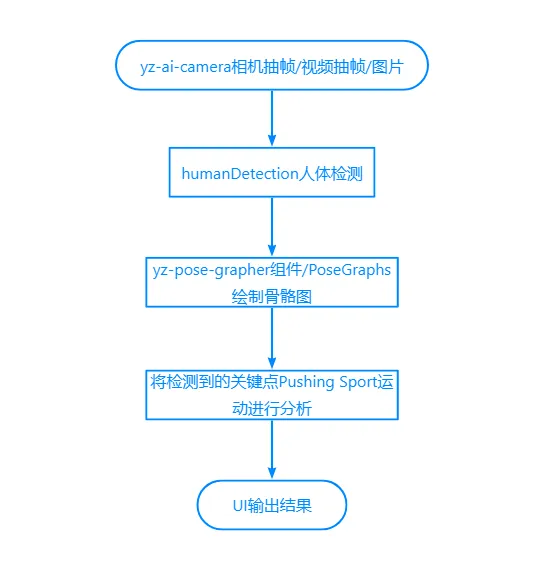
三、调用多人人体检测能力
详细的人体检测人体调用,请参考本系列第五章人体检测能力调用,将multiple选项参数设为true即可调用插件的多人人体检测能力,代码如下所示:
import {
   createHumanDetector} from "@/uni_modules/yz-ai-sport";
export default {

    data(){

        return {
   };
    }
    methods:{

        onDetecting(){

            let options = {

                multiple: true, //启用多人检测
                enabledGPU: true,
                highPerformance: false
            };
            const that = this;
            humanDetector = createHumanDetector(options);
            humanDetector.startExtractAndDetect({

                onDetected(result){

                    let humans = result.humans; //注意:多人人体结构不是每次按顺序输出,且不能保证每次都能检出3人
                    that.$refs.grapher.drawing(humans);
                }
            });
        }
    }
}
但是上面的代码仅仅只能检出图像中多人人体结果,还无法实现定位人员,提取那个站在中间、左边、右边,所以在获得检出结果后,还需要对人体结果进行定位处理。假设在应用场景中要求人员从左往右横排站立,最多检出3人,我们则可以通过人体中的鼻子关键点(nose)进行定位,nose点的x小于屏幕宽度33%则为左,大于33%小于66%则为中,大于66%则为右,代码调整如下:
import {
   createHumanDetector} from "@/uni_modules/yz-ai-sport";
export default {

    data(){

        return {
   };
    }
    methods:{

        locateHuamn(humans, begin, end) {

            if (!Array.isArray(humans))
                return;

            //页面为横屏状态,受检测人员从左往右站立
            //横向将屏幕图像区域平均分配,按区域提取人员

            const that = this;
            let loc = humans.find(hu => {

                let nose = hu.keypoints.find(x => x.name == 'nose');
                if (!nose)
                    return false;

                //人体结构中的坐标为相机图像中的坐标,计算出在屏幕中的渲染坐标
                let x = nose.x * that.previewRate + that.previewOffsetX;

                if (x <= that.previewWidth * begin)
                    return false;

                if (end && x > that.previewWidth * end)
                    return false;

                return true;
            });

            return loc;
        },
        onDetecting(){

            let options = {

                multiple: true, //启用多人检测
                enabledGPU: true,
                highPerformance: false
            };

            const that = this;
            humanDetector = createHumanDetector(options);
            humanDetector.startExtractAndDetect({

                onDetected(result){

                    let humans = result.humans; //注意:多人人体结构不是每次按顺序输出

                    if (humans.length < 1) {

                    that.$refs.grapher.clear();
                    return;
                }
                that.$refs.grapher.drawing(humans);

                //以nose.x进行人体定位为左、中、右
                let leftHuman = that.locateHuamn(humans, 0, 0.33);
                let centerHuman = that.locateHuamn(humans, 0.33, 0.66);
                let rightHuman = that.locateHuamn(humans, 0.66);

                }
            });
        }
    }
}
四、多个运动分析调用
在获得了多人人体结果后,便可以创建多个运动分析器实例来,来分别对每个人的姿态进行分析检测,实现计时计数了,代码如下:
import {
   createSport} from "@/uni_modules/yz-ai-sport";
export default {

    data(){

        return {

            ticks: [{

                    counts: 0,
                    times: 0,
                    timeText: '00:00'
                }, {

                    counts: 0,
                    times: 0,
                    timeText: '00:00',
                }, {

                    counts: 0,
                    times: 0,
                    timeText: '00:00',
            }]
        };
    }
    methods:{


    },
    onLoad(options) {

        let key = options.sportKey || 'jumping-jack';

        //批量创建运动
        sports = [];
        const ticks = this.ticks;
        for (let i = 0; i < ticks.length; i++) {

            let sport = createSport(key);

            //分别将运动计数结果推不同位置数组
            sport.onTick((counts, times) => {

                ticks[i].counts = counts;
                ticks[i].times = times;
                ticks[i].timeText = sport.toTimesString();
            });
            sports.push(sport);
        }
    }
}
五、完整实现
下面是完整的实现代码,也可插件的最新支持资料包中获得。
import {

        getCameraContext,
        createHumanDetector,
        createSport
    } from "@/uni_modules/yz-ai-sport";

    let humanDetector = null;
    let sports = null;

    export default {

        data() {


            const winfo = uni.getWindowInfo();
            const settings = uni.getSystemSetting();

            return {

                isLandscape: settings.deviceOrientation == 'landscape',
                cameraDevice: 'back',

                frameWidth: 480,
                frameHeight: 640,

                previewWidth: winfo.windowWidth,
                previewHeight: winfo.windowHeight,
                previewRate: 1,
                previewOffsetX: 0,
                previewOffsetY: 0,

                isExtracting: false,

                sportKey: '',
                sportName: '',
                ticks: [{

                    counts: 0,
                    times: 0,
                    timeText: '00:00'
                }, {

                    counts: 0,
                    times: 0,
                    timeText: '00:00',
                }, {

                    counts: 0,
                    times: 0,
                    timeText: '00:00',
                }]
            };
        },
        methods: {

            locateHuamn(humans, begin, end) {

                if (!Array.isArray(humans))
                    return;

                //页面为横屏状态,受检测人员从左往右站立
                //横向将屏幕图像区域平均分配,按区域提取人员

                const that = this;
                let loc = humans.find(hu => {

                    let nose = hu.keypoints.find(x => x.name == 'nose');
                    if (!nose)
                        return false;

                    //人体结构中的坐标为相机图像中的坐标,计算出在屏幕中的渲染坐标
                    let x = nose.x * that.previewRate + that.previewOffsetX;

                    if (x <= that.previewWidth * begin)
                        return false;

                    if (end && x > that.previewWidth * end)
                        return false;

                    return true;
                });

                return loc;
            },
            onDetecting(){

                let options = {

                    multiple: true, //启用多人检测
                    enabledGPU: true,
                    highPerformance: false
                };

                const that = this;
                humanDetector = createHumanDetector(options);
                humanDetector.startExtractAndDetect({

                    onDetected(result){

                        let humans = result.humans; //注意:多人人体结构不是每次按顺序输出

                        if (humans.length < 1) {

                            that.$refs.grapher.clear();
                            return;
                        }
                        that.$refs.grapher.drawing(humans);

                        //以nose.x进行人体定位为左、中、右
                        let leftHuman = that.locateHuamn(humans, 0, 0.33);
                        let centerHuman = that.locateHuamn(humans, 0.33, 0.66);
                        let rightHuman = that.locateHuamn(humans, 0.66);

                    }
                });
            }
        },
        onLoad(options) {

            let key = options.sportKey || 'jumping-jack';

            //批量创建运动
            sports = [];
            const ticks = this.ticks;
            for (let i = 0; i < ticks.length; i++) {

                let sport = createSport(key);

                //分别将运动计数结果推不同位置数组
                sport.onTick((counts, times) => {

                    ticks[i].counts = counts;
                    ticks[i].times = times;
                    ticks[i].timeText = sport.toTimesString();
                });
                sports.push(sport);
            }
        }
    }

