Metasploit Framework 6.4.55 (macOS, Linux, Windows) - 开源渗透测试框架

简介: Metasploit Framework 6.4.55 (macOS, Linux, Windows) - 开源渗透测试框架

Metasploit Framework 6.4.55 (macOS, Linux, Windows) - 开源渗透测试框架

Rapid7 Penetration testing, updated Apr 2025

请访问原文链接:https://sysin.org/blog/metasploit-framework-6/ 查看最新版。原创作品,转载请保留出处。

作者主页:sysin.org


sysin

世界上最广泛使用的渗透测试框架

知识就是力量,尤其是当它被分享时。作为开源社区和 Rapid7 之间的合作,Metasploit 帮助安全团队做的不仅仅是验证漏洞、管理安全评估和提高安全意识 (sysin);它使防守队员能够始终领先比赛一步(或两步)。

Dashboard

新增功能

请参看:Metasploit Framework 6.4 Released, Mar 25, 2024

版本比较

Open Source: Metasploit Framework

下载:Metasploit Framework 6.4.55 (macOS, Linux, Windows) - 开源渗透测试框架

Commercial Support: Metasploit Pro

All Features Pro Framework
- Collect
De-facto standard for penetration testing with more than 1,500 exploits ✅ ✅
Import of network data scan ✅ ✅
Network discovery ✅ ❌
Basic exploitation ✅ ❌
MetaModules for discrete tasks such as network segmentation testing ✅ ❌
Integrations via Remote API ✅ ❌
- Automate
Simple web interface ✅ ❌
Smart Exploitation ✅ ❌
Automated credentials brute forcing ✅ ❌
Baseline penetration testing reports ✅ ❌
Wizards for standard baseline audits ✅ ❌
Task chains for automated custom workflows ✅ ❌
Closed-Loop vulnerability validation to prioritize remediation ✅ ❌
- Infiltrate
Basic command-line interface ❌ ✅
Manual exploitation ❌ ✅
Manual credentials brute forcing ❌ ✅
Dynamic payloads to evade leading anti-virus solutions ✅ ❌
Phishing awareness management and spear phishing ✅ ❌
Choice of advance command-line (Pro Console) and web interface ✅ ❌

下载地址

macOS:metasploit-framework-VERSION.x86_64.dmg

Windows:metasploit-framework-VERSION-x64.exe

Debian/Ubuntu:
Linux deb x64:metasploit-framework_VERSION_amd64.deb
Linux deb x86:metasploit-framework_VERSION_i386.deb
Linux deb arm64:metasploit-framework_VERSION_arm64.deb

RHEL/Fedora:
Linux rpm x64:metasploit-framework-VERSION.el6.x86_64.rpm

相关产品:Metasploit Pro 4.22.7 (Linux, Windows) - 专业渗透测试框架

更多:HTTP 协议与安全

目录
相关文章
|
安全 Linux 生物认证
Nexpose 8.25.0 for Linux & Windows - 漏洞扫描
700 0
Nexpose 8.25.0 for Linux & Windows - 漏洞扫描
|
安全 Linux 生物认证
Nexpose 8.24.0 for Linux & Windows - 漏洞扫描
658 17
Nexpose 8.24.0 for Linux & Windows - 漏洞扫描
|
SQL 安全 Linux
Metasploit Pro 4.22.8-20251014 (Linux, Windows) - 专业渗透测试框架
644 1
Metasploit Pro 4.22.8-20251014 (Linux, Windows) - 专业渗透测试框架
|
Linux 虚拟化 iOS开发
VMware Remote Console 13.0.1 for macOS, Linux, Windows - vSphere 虚拟机控制台的桌面客户端
2517 0
VMware Remote Console 13.0.1 for macOS, Linux, Windows - vSphere 虚拟机控制台的桌面客户端
|
Linux 应用服务中间件 Shell
二、Linux文本处理与文件操作核心命令
熟悉了Linux的基本“行走”后,就该拿起真正的“工具”干活了。用grep这个“放大镜”在文件里搜索内容,用find这个“探测器”在系统中寻找文件,再用tar把东西打包带走。最关键的是要学会使用管道符|,它像一条流水线,能把这些命令串联起来,让简单工具组合出强大的功能,比如 ps -ef | grep 'nginx' 就能快速找出nginx进程。
1172 1
二、Linux文本处理与文件操作核心命令
linux命令—stat
`stat` 是 Linux 系统中用于查看文件或文件系统详细状态信息的命令。相比 `ls -l`,它提供更全面的信息,包括文件大小、权限、所有者、时间戳(最后访问、修改、状态变更时间)、inode 号、设备信息等。其常用选项包括 `-f` 查看文件系统状态、`-t` 以简洁格式输出、`-L` 跟踪符号链接,以及 `-c` 或 `--format` 自定义输出格式。通过这些选项,用户可以灵活获取所需信息,适用于系统调试、权限检查、磁盘管理等场景。
887 137
|
JSON 自然语言处理 Linux
linux命令—tree
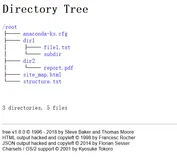
tree是一款强大的Linux命令行工具,用于以树状结构递归展示目录和文件,直观呈现层级关系。支持多种功能,如过滤、排序、权限显示及格式化输出等。安装方法因系统而异常用场景包括:基础用法(显示当前或指定目录结构)、核心参数应用(如层级控制-L、隐藏文件显示-a、完整路径输出-f)以及进阶操作(如磁盘空间分析--du、结合grep过滤内容、生成JSON格式列表-J等)。此外,还可生成网站目录结构图并导出为HTML文件。注意事项:使用Tab键补全路径避免错误;超大目录建议限制遍历层数;脚本中推荐禁用统计信息以优化性能。更多详情可查阅手册mantree。
1458 143
linux命令—tree
|
安全 Ubuntu Unix
一、初识 Linux 与基本命令
玩转Linux命令行,就像探索一座新城市。首先要熟悉它的“地图”,也就是/根目录下/etc(放配置)、/home(住家)这些核心区域。然后掌握几个“生存口令”:用ls看周围,cd去别处,mkdir建新房,cp/mv搬东西,再用cat或tail看文件内容。最后,别忘了随时按Tab键,它能帮你自动补全命令和路径,是提高效率的第一神器。
1867 58
|
存储 安全 Linux
Linux卡在emergency mode怎么办?xfs_repair 命令轻松解决
Linux虚拟机遇紧急模式?别慌!多因磁盘挂载失败。本文教你通过日志定位问题,用`xfs_repair`等工具修复文件系统,三步快速恢复。掌握查日志、修磁盘、验重启,轻松应对紧急模式,保障系统稳定运行。
1807 2
|
Unix Linux 程序员
Linux文本搜索工具grep命令使用指南
以上就是对Linux环境下强大工具 `grep` 的基础到进阶功能介绍。它不仅能够执行简单文字查询任务还能够处理复杂文字处理任务,并且支持强大而灵活地正则表达规范来增加查询精度与效率。无论您是程序员、数据分析师还是系统管理员,在日常工作中熟练运用该命令都将极大提升您处理和分析数据效率。
1084 16