DIY可视化可视化表单可视化是一种高效、灵活、易用的表单设计工具。它通过拖拽式操作、属性配置、所见即所得等特性降低了表单设计的门槛,提高了开发效率和灵活性。
拖拽式操作
用户可以通过拖拽组件到设计区域,快速构建表单布局。这种操作方式简单直观,降低了表单设计的门槛。

属性配置
支持对表单组件进行属性配置,如字段名、数据类型、验证规则等。用户可以根据自己的需求,灵活设置表单组件的属性。
表单默认支持表单及JSON两种数据格式数据的提交,其中表单提交地址是必须的,它会当你发起表单提交数据时,请求此地址。

所见即所得
在设计过程中,用户可以直接看到表单的渲染效果,便于及时调整和优化。这种所见即所得的特性,提高了设计的准确性和效率。
表单提前后逻辑加工
在实际操作过程中,表单可能涉及到表单数据的二次加工,此时我们支持在提交前增加自己的逻辑代码,同样支持提交后逻辑处理。

表单提交前后处理举例
可以结合生成的表单代码进行增加自己的逻辑代码。以页面模板里,表单提交为例。

设置表单提交按钮
拖个按钮组件或者其他类型的组件,在组件上配置点击事件,选择表单提交事件。有个重点,必须是把此组件同样放在表单组件里。
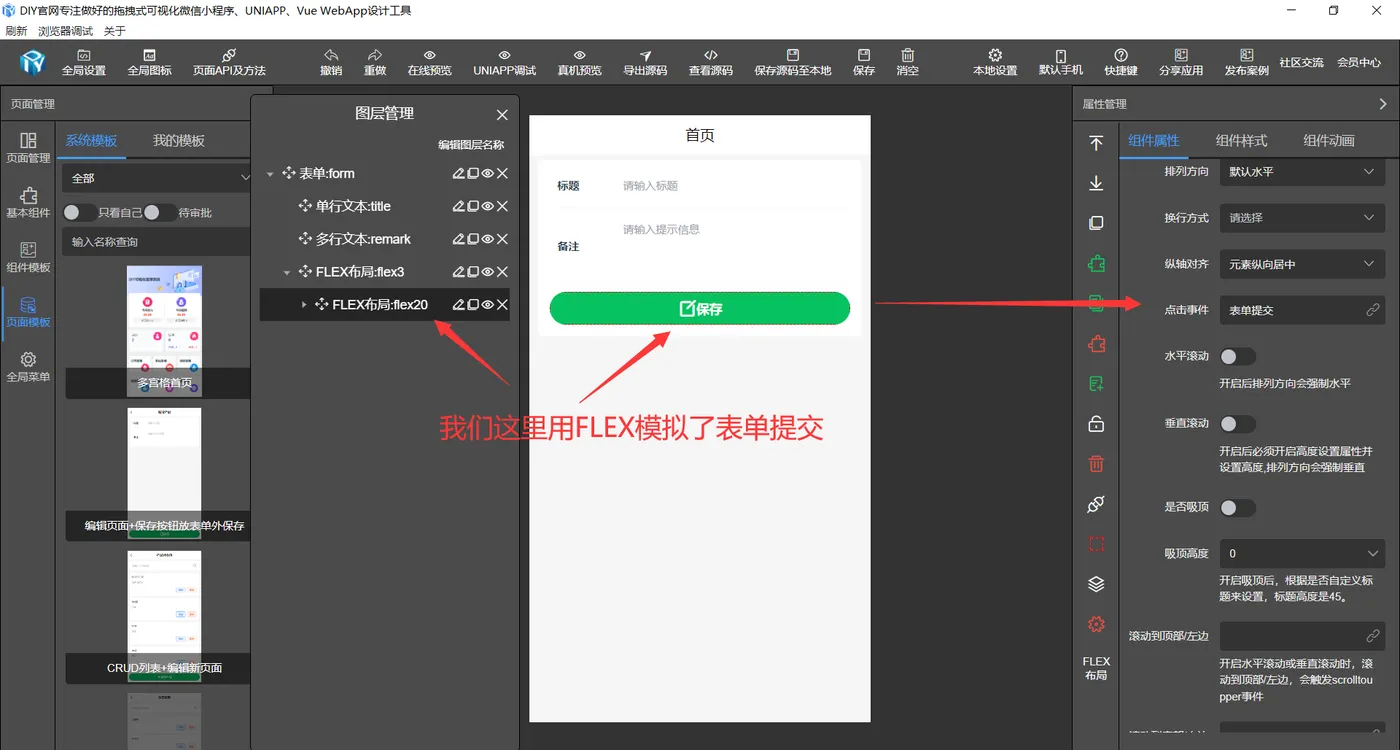

表单外部配置点击提交事件
可以先拖个按钮组件进表单组件,配置上点击事件提交表单,点击查看源码。


表单验证
输入组件非空判断
我们找到验证规则里增加非空判断。

密码一致性判断
经常见到密码一致性判断,采用一致性判断,数值为字段标识路径

自定义验证
这里支持非空判断及自定义验证,支持提交API进行唯一性判断 。
自定义验证代码参考,大家根据自己的自定义验证规则来改变下面的代码即可。
validator: async (rule, val, callback) => {
  if (!val) {
    return Promise.reject("用户名不能为空");
  }
  let http_url = '验证地址';
  let http_header = {};
  let data = await this.$http.post(http_url, http_data, http_header, 'json');
  //验证通过用Promise.resolve(),不通过用Promise.reject("用户名已存在")
  if (data.code=200) {
    return Promise.resolve();
  }else {
    return Promise.reject("用户名已存在");
  }
}

至此,表单组件常规用法就到这里了,表单里输入组件更多的配置属性大家根据自己需求来设置。
DIY可视化表单优势
提高开发效率:通过拖拽、配置等操作,快速生成表单,减少开发时间。
降低开发成本:无需专业开发人员,降低人力成本。
灵活性强:支持自定义表单组件和属性,满足不同场景的需求。
易于维护:表单设计与代码分离,便于后续维护和升级。
组件丰富:提供了丰富表单组件库以满足多样化需求。
表单代码生成多样化
设计好的可以一键生成Vue代码、Uniapp、uView代码、微信小程序原生代码、支付宝小程序原生代码等。 其中生成的Uniapp源码,可发布到iOS、Android、H5、以及各种小程序(微信/支付宝/百度/头条/QQ/钉钉/FinClip)等多个平台

生成Uniapp uView代码
<template>
  <view class="container container327193">
    <view class="flex flex-wrap diygw-col-24 flex-direction-column items-center flex7-clz">
      <!-- #ifdef MP-WEIXIN -->
      <view class="flex flex-wrap diygw-col-24 flex-direction-column flex8-clz"> </view>
      <!--  #endif -->
    </view>
    <u-form :model="form" :rules="formRules" :errorType="['message', 'toast']" ref="formRef" class="flex diygw-form diygw-col-24">
      <view class="flex diygw-col-24">
        <!-- #ifdef MP-WEIXIN -->
        <button open-type="chooseAvatar" class="diygw-avatar diygw-avatar-button avatar-avatar radius" @chooseavatar="chooseFormAvatar">
          <image mode="aspectFit" class="diygw-avatar-img radius" :src="form.avatar"></image>
        </button>
        <!--  #endif -->
        <!-- #ifndef MP-WEIXIN -->
        <view class="diygw-avatar diygw-avatar-button radius" @tap="uploadFormAvatar">
          <image mode="aspectFit" class="diygw-avatar-img radius" :src="form.avatar"></image>
        </view>
        <!--  #endif -->
      </view>
      <text class="diygw-col-24 text-clz"> 点击上方图标设置头像 </text>
      <u-form-item class="diygw-col-24 username-clz" labelPosition="top" prop="username">
        <text class="diy-icon-people margin-right-xs" style="color: #676767; font-size: 32rpx"></text>
        <u-input :focus="formData.usernameFocus" placeholder="请输入登录名" v-model="form.username"></u-input>
      </u-form-item>
      <u-form-item class="diygw-col-24 nickname-clz" labelPosition="top" prop="nickname">
        <text class="diy-icon-people margin-right-xs" style="color: #636363; font-size: 32rpx"></text>
        <u-input :focus="formData.nicknameFocus" placeholder="请输入显示名" v-model="form.nickname"></u-input>
      </u-form-item>
      <u-form-item class="diygw-col-24 password-clz" labelPosition="top" prop="password">
        <text class="diy-icon-lock margin-right-xs" style="color: #636363; font-size: 32rpx"></text>
        <u-input :focus="formData.passwordFocus" placeholder="请输入密码" v-model="form.password" type="password" :password-icon="true"></u-input>
      </u-form-item>
      <u-form-item class="diygw-col-24 confirmpassword-clz" labelPosition="top" prop="confirmpassword">
        <text class="diy-icon-lock margin-right-xs" style="color: #636363; font-size: 32rpx"></text>
        <u-input :focus="formData.confirmpasswordFocus" placeholder="请输入确认密码" v-model="form.confirmpassword" type="password" :password-icon="true"></u-input>
      </u-form-item>
      <view class="flex diygw-col-24 justify-between flex-nowrap flex1-clz">
        <view class="flex flex-wrap diygw-col-0" @tap="navigateTo" data-type="page" data-url="/pages/null" data-redirect="1">
          <text class="diygw-col-0"> 已有账号,立即登录。 </text>
          <text @tap="navigateTo" data-type="page" data-url="/pages/login" class="diygw-col-0 text2-clz"> 登录 </text>
        </view>
      </view>
      <text @click="submitForm" class="diygw-col-24 gradual-green text4-clz"> 注册 </text>
      <view class="flex flex-wrap diygw-col-0 items-center flex3-clz">
        <view class="flex flex-wrap diygw-col-0 items-center" @tap="navigateTo" data-type="agreeFunction">
          <text v-if="globalData.agree == '1'" class="flex icon3 diygw-col-0 icon3-clz diy-icon-roundcheck"></text>
          <text v-if="globalData.agree != '1'" class="flex icon2 diygw-col-0 icon2-clz diy-icon-round"></text>
          <text class="diygw-col-0"> 注册即同意并接受 </text>
        </view>
        <text @tap="navigateTo" data-type="page" data-url="/pages/null" data-newstype="privacy" class="diygw-col-0 text11-clz"> 《隐私权政策》 </text>
        <text class="diygw-col-0"> 和 </text>
        <text @tap="navigateTo" data-type="page" data-url="/pages/null" data-newstype="user" class="diygw-col-0 text13-clz"> 《用户协议》 </text>
      </view>
    </u-form>
    <view class="clearfix"></view>
  </view>
</template>

<script>
  export default {
    data() {
      return {
        //用户全局信息
        userInfo: {},
        //页面传参
        globalOption: {},
        //自定义全局变量
        globalData: { logintype: '0', agree: '0' },
        form: {
          avatar: '/static/avatar.png',
          username: '',
          nickname: '',
          password: '',
          confirmpassword: ''
        },
        formRules: {
          username: [
            {
              trigger: ['change', 'blur'],
              required: true,
              validator: async (rule, val, callback) => {
                if (!val) {
                  return Promise.reject('用户名不能为空');
                }
                let http_url = '验证地址';
                let http_header = {};
                let data = await this.$http.post(http_url, http_data, http_header, 'json');
                //验证通过用Promise.resolve(),不通过用Promise.reject("用户名已存在")
                if ((data.code = 200)) {
                  return Promise.resolve();
                } else {
                  return Promise.reject('用户名已存在');
                }
              }
            }
          ],
          nickname: [
            {
              trigger: ['change', 'blur'],
              required: true,
              message: '显示名不能为空'
            }
          ],
          password: [
            {
              trigger: ['change', 'blur'],
              required: true,
              message: '密码不能为空'
            }
          ],
          confirmpassword: [
            {
              trigger: ['change', 'blur'],
              required: true,
              message: '确认密码不能为空'
            },

            {
              trigger: ['change', 'blur'],
              message: '请输入相同密码',
              validator: (rule, val, callback) => {
                return val == this.form.password;
              }
            }
          ]
        },
        formData: {
          usernameFocus: false,
          nicknameFocus: false,
          passwordFocus: false,
          confirmpasswordFocus: false
        }
      };
    },
    onShow() {
      this.setCurrentPage(this);
    },
    onLoad(option) {
      this.setCurrentPage(this);
      if (option) {
        this.setData({
          globalOption: this.getOption(option)
        });
      }

      this.init();
    },
    onReady() {
      this.$refs.formRef?.setRules(this.formRules);
    },
    methods: {
      async init() {
        await this.initResetform();
      },
      // 同意或不同意 自定义方法
      async agreeFunction(param) {
        let thiz = this;
        //如果不同意,改为同意
        this.globalData.agree = this.globalData.agree == '1' ? '0' : '1';
      },

      // 验证码登录或密码登录 自定义方法
      async codeFunction(param) {
        let thiz = this;
        //如果1表示验证码登录,0表进密码登录
        this.globalData.logintype = this.globalData.logintype == '1' ? '0' : '1';
      },
      chooseFormAvatar(e) {
        const { avatarUrl } = e.detail;
        let baseavatarUrl = 'data:image/png;base64,' + wx.getFileSystemManager().readFileSync(avatarUrl, 'base64');
        this.form.avatar = baseavatarUrl;
      },
      async uploadFormAvatar(e) {
        await this.uploadImage(this, 'form.avatar', 'formData.avatarDatas', '/sys/storage/upload', 1, 'avatar');
      },
      initResetform() {
        this.initform = JSON.stringify(this.form);
      },
      resetForm() {
        this.form = JSON.parse(this.initform);
      },

      async submitForm(e) {
        this.$refs.formRef?.setRules(this.formRules);

        this.$nextTick(async () => {
          let valid = await this.$refs.formRef.validate();
          if (valid) {
            //保存数据
            let param = this.form;
            let header = {};
            let url = '/admin/login/register';

            if (this.globalData.agree != '1') {
              this.showToast('请点击同意授权协议');
              return;
            }
            param.logintype = this.globalData.logintype;
            let res = await this.$http.post(url, param, header, 'json');
            if (res.code == 200) {
              this.$session.setUser(res.data);
              this.showToast(res.msg, 'success');
              this.navigateTo({
                type: 'page',
                url: 'index'
              });
            } else {
              this.showToast(res.msg, 'error');
            }
            if (res.code == 200) {
              this.showToast(res.msg, 'success');
            } else {
              this.showModal(res.msg, '提示', false);
            }
          } else {
            console.log('验证失败');
          }
        });
      }
    }
  };
</script>

<style lang="scss" scoped>
  .flex7-clz {
    padding-top: 80rpx;
    padding-left: 10rpx;
    padding-bottom: 40rpx;
    padding-right: 10rpx;
  }
  .flex8-clz {
    height: 120rpx;
  }
  .text-clz {
    color: #717070;
    text-align: center;
  }
  .username-clz {
    margin-left: 10rpx;
    width: calc(100% - 10rpx - 10rpx) !important;
    font-size: 28rpx !important;
    margin-top: 10rpx;
    margin-bottom: 10rpx;
    margin-right: 10rpx;
  }
  .nickname-clz {
    margin-left: 10rpx;
    width: calc(100% - 10rpx - 10rpx) !important;
    font-size: 28rpx !important;
    margin-top: 10rpx;
    margin-bottom: 10rpx;
    margin-right: 10rpx;
  }
  .password-clz {
    margin-left: 10rpx;
    width: calc(100% - 10rpx - 10rpx) !important;
    font-size: 28rpx !important;
    margin-top: 10rpx;
    margin-bottom: 10rpx;
    margin-right: 10rpx;
  }
  .confirmpassword-clz {
    margin-left: 10rpx;
    width: calc(100% - 10rpx - 10rpx) !important;
    font-size: 28rpx !important;
    margin-top: 10rpx;
    margin-bottom: 10rpx;
    margin-right: 10rpx;
  }
  .flex1-clz {
    padding-top: 16rpx;
    padding-left: 30rpx;
    padding-bottom: 16rpx;
    padding-right: 30rpx;
  }
  .text2-clz {
    color: #39b54a;
  }
  .text4-clz {
    padding-top: 20rpx;
    border-bottom-left-radius: 120rpx;
    color: #ffffff;
    font-weight: bold;
    letter-spacing: 6rpx !important;
    padding-left: 10rpx;
    font-size: 32rpx !important;
    padding-bottom: 20rpx;
    border-top-right-radius: 120rpx;
    margin-right: 30rpx;
    margin-left: 30rpx;
    box-shadow: 0rpx 6rpx 14rpx rgba(64, 195, 3, 0.35);
    overflow: hidden;
    width: calc(100% - 30rpx - 30rpx) !important;
    border-top-left-radius: 120rpx;
    margin-top: 10rpx;
    border-bottom-right-radius: 120rpx;
    margin-bottom: 10rpx;
    text-align: center;
    padding-right: 10rpx;
  }
  .flex3-clz {
    padding-top: 16rpx;
    padding-left: 30rpx;
    padding-bottom: 16rpx;
    padding-right: 30rpx;
  }
  .icon3-clz {
    color: #39b54a;
  }
  .icon3 {
    font-size: 40rpx;
  }
  .icon2-clz {
    color: #39b54a;
  }
  .icon2 {
    font-size: 40rpx;
  }
  .text11-clz {
    color: #39b54a;
  }
  .text13-clz {
    color: #39b54a;
  }
  .container327193 {
    background-image: url(/static/mbz704.png);
    background-position: top center;
    background-size: contain;
    background-repeat: no-repeat;
  }
</style>