问题描述
在App Service中部署镜像文件,发现镜像一直没有部署,重启App Service服务也无效果。
DockerFile如下:
FROM crunchgeek/php-fpm:7.0
# 设置时区
RUN ln -sf /usr/share/zoneinfo/Asia/Shanghai /etc/localtime
RUN echo 'Asia/Shanghai' >/etc/timezone
# apt 安装supervisor nginx python-pip
RUN sed -i "s@http://deb.debian.org@http://mirrors.aliyun.com@g" /etc/apt/sources.list \
    && apt-get clean && apt-get update
RUN apt-get install -y openssh-server supervisor nginx python-pip imagemagick
RUN pip install -i https://mirrors.aliyun.com/pypi/simple XlsxWriter
# 开启ssh
RUN echo "root:Docker!" | chpasswd
COPY conf/ssh/sshd_config /etc/ssh/
RUN mkdir -p /tmp
COPY conf/ssh/ssh_setup.sh /tmp
RUN chmod +x /tmp/ssh_setup.sh \
    && (sleep 1;/tmp/ssh_setup.sh 2>&1 > /dev/null)
# 配置supervisor
RUN mkdir -p /var/log/supervisor
COPY conf/supervisor/supervisord.conf /etc/supervisor/supervisord.conf
# 配置nginx
RUN mkdir -p /var/log/nginx
COPY conf/nginx/nginx.conf /etc/nginx/nginx.conf
COPY conf/nginx/phpdemotest.conf /etc/nginx/conf.d/phpdemotest.conf
# 配置php
RUN mkdir -p /var/log/php
COPY conf/php/php.ini /usr/local/etc/php/php.ini
COPY conf/php/www.conf /usr/local/etc/php-fpm.d/www.conf
# 暴露端口
EXPOSE 80
EXPOSE 2222
# 处理项目文件
WORKDIR /
COPY app /app
RUN mkdir -p /app/phpdemotest/cache && mkdir -p /app/phpdemotest/uploads
RUN chmod -R 777 /app

# 启动脚本
COPY run.sh /run.sh
RUN chmod +x /run.sh
ENTRYPOINT ["/run.sh"]
在App Service的 Default Docker 日志文件中发现错误:
2022-02-06T23:59:17.443332417Z + /usr/bin/supervisord -c /etc/supervisor/supervisord.conf
2022-02-06T23:59:17.443373922Z + /usr/sbin/sshd
2022-02-06T23:59:18.452607133Z 2022-02-07 07:59:18,452 CRIT Supervisor running as root (no user in config file)
2022-02-06T23:59:18.456877344Z 2022-02-07 07:59:18,456 INFO supervisord started with pid 8
2022-02-06T23:59:19.465631733Z 2022-02-07 07:59:19,463 INFO spawned: 'nginx' with pid 12
2022-02-06T23:59:19.466909186Z 2022-02-07 07:59:19,466 INFO spawned: 'php-fpm' with pid 13
2022-02-06T23:59:19.494100139Z 2022-02-07 07:59:19,493 INFO exited: nginx (exit status 1; not expected)
2022-02-06T23:59:20.857528223Z 2022-02-07 07:59:20,853 INFO spawned: 'nginx' with pid 31
2022-02-06T23:59:20.857568522Z 2022-02-07 07:59:20,854 INFO success: php-fpm entered RUNNING state, process has stayed up for > than 1 seconds (startsecs)
2022-02-06T23:59:20.870432633Z 2022-02-07 07:59:20,870 INFO exited: nginx (exit status 1; not expected)
2022-02-06T23:59:22.879193415Z 2022-02-07 07:59:22,878 INFO spawned: 'nginx' with pid 32
2022-02-06T23:59:22.893106810Z 2022-02-07 07:59:22,892 INFO exited: nginx (exit status 1; not expected)
2022-02-06T23:59:25.913145415Z 2022-02-07 07:59:25,907 INFO spawned: 'nginx' with pid 33
2022-02-06T23:59:25.922158533Z 2022-02-07 07:59:25,921 INFO exited: nginx (exit status 1; not expected)
2022-02-06T23:59:26.927725113Z 2022-02-07 07:59:26,927 INFO gave up: nginx entered FATAL state, too many start retries too quickly
2022-02-07T00:09:25.488220881Z + /usr/bin/supervisord -c /etc/supervisor/supervisord.conf
2022-02-07T00:09:25.488718279Z + /usr/sbin/sshd
2022-02-07T00:09:26.467977299Z 2022-02-07 08:09:26,467 CRIT Supervisor running as root (no user in config file)
2022-02-07T00:09:26.471996285Z 2022-02-07 08:09:26,471 INFO supervisord started with pid 8
2022-02-07T00:09:27.477601588Z 2022-02-07 08:09:27,475 INFO spawned: 'nginx' with pid 12
2022-02-07T00:09:27.479159791Z 2022-02-07 08:09:27,478 INFO spawned: 'php-fpm' with pid 13
2022-02-07T00:09:27.504344436Z 2022-02-07 08:09:27,504 INFO exited: nginx (exit status 1; not expected)
2022-02-07T00:09:28.696030787Z 2022-02-07 08:09:28,695 INFO spawned: 'nginx' with pid 31
2022-02-07T00:09:28.696917389Z 2022-02-07 08:09:28,696 INFO success: php-fpm entered RUNNING state, process has stayed up for > than 1 seconds (startsecs)
2022-02-07T00:09:28.709830112Z 2022-02-07 08:09:28,709 INFO exited: nginx (exit status 1; not expected)
2022-02-07T00:09:30.721563220Z 2022-02-07 08:09:30,718 INFO spawned: 'nginx' with pid 32
2022-02-07T00:09:30.733000942Z 2022-02-07 08:09:30,732 INFO exited: nginx (exit status 1; not expected)
2022-02-07T00:09:33.753600087Z 2022-02-07 08:09:33,750 INFO spawned: 'nginx' with pid 33
2022-02-07T00:09:33.770204819Z 2022-02-07 08:09:33,769 INFO exited: nginx (exit status 1; not expected)
2022-02-07T00:09:33.771144421Z 2022-02-07 08:09:33,770 INFO gave up: nginx entered FATAL state, too many start retries too quickly
2022-02-07T00:18:34.847730464Z + /usr/bin/supervisord -c /etc/supervisor/supervisord.conf
2022-02-07T00:18:34.852556800Z + /usr/sbin/sshd
2022-02-07T00:18:35.682198497Z 2022-02-07 08:18:35,681 CRIT Supervisor running as root (no user in config file)
2022-02-07T00:18:35.685920425Z 2022-02-07 08:18:35,685 INFO supervisord started with pid 8
2022-02-07T00:18:36.693576944Z 2022-02-07 08:18:36,691 INFO spawned: 'nginx' with pid 12
2022-02-07T00:18:36.695261854Z 2022-02-07 08:18:36,694 INFO spawned: 'php-fpm' with pid 13
2022-02-07T00:18:36.720480795Z 2022-02-07 08:18:36,720 INFO exited: nginx (exit status 1; not expected)
2022-02-07T00:18:37.903152006Z 2022-02-07 08:18:37,898 INFO spawned: 'nginx' with pid 31
2022-02-07T00:18:37.905742221Z 2022-02-07 08:18:37,903 INFO success: php-fpm entered RUNNING state, process has stayed up for > than 1 seconds (startsecs)
2022-02-07T00:18:37.920186002Z 2022-02-07 08:18:37,919 INFO exited: nginx (exit status 1; not expected)
2022-02-07T00:18:39.933674870Z 2022-02-07 08:18:39,930 INFO spawned: 'nginx' with pid 32
2022-02-07T00:18:39.942568331Z 2022-02-07 08:18:39,942 INFO exited: nginx (exit status 1; not expected)
2022-02-07T00:18:42.961585686Z 2022-02-07 08:18:42,955 INFO spawned: 'nginx' with pid 33
2022-02-07T00:18:42.973046638Z 2022-02-07 08:18:42,972 INFO exited: nginx (exit status 1; not expected)
2022-02-07T00:18:42.974184633Z 2022-02-07 08:18:42,973 INFO gave up: nginx entered FATAL state, too many start retries too quickly
问题解答
从错误消息中发现,是 Nginx启动时候遇见错误 “ nginx entered FATAL state, too many start retries too quickly”。 最后发现是Nginx.config配置文件中格式错误,在修改后发布镜像后,App Service确没有拉取新的镜像,所以没有新镜像的部署日志。
这是因为App Service没有开启持续部署,当开启持续部署后,App Service会主动拉取最新的更新并自动完成部署。
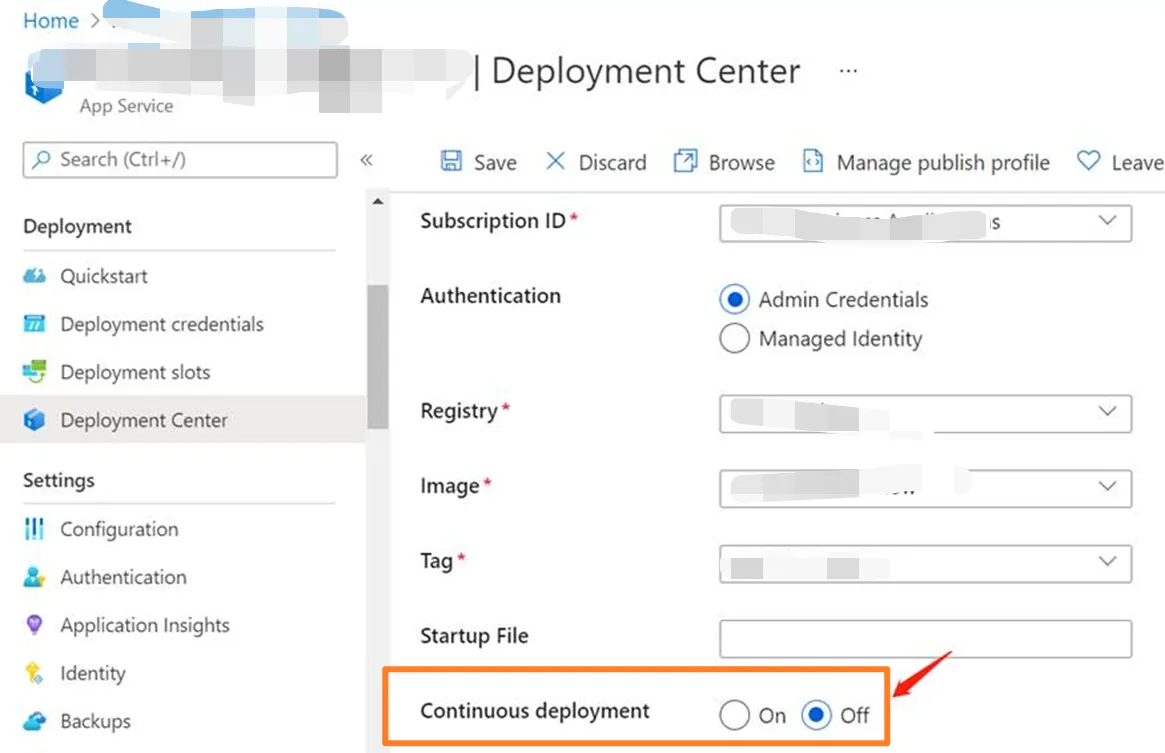
PS: 当遇见镜像无法启动时,先在本地环境中验证镜像是否能成功启动,然后查看App Service的日志,从日志中定位具体问题。
参考资料
持续部署到 Azure 应用服务:https://docs.azure.cn/zh-cn/app-service/deploy-continuous-deployment?tabs=local