问题描述
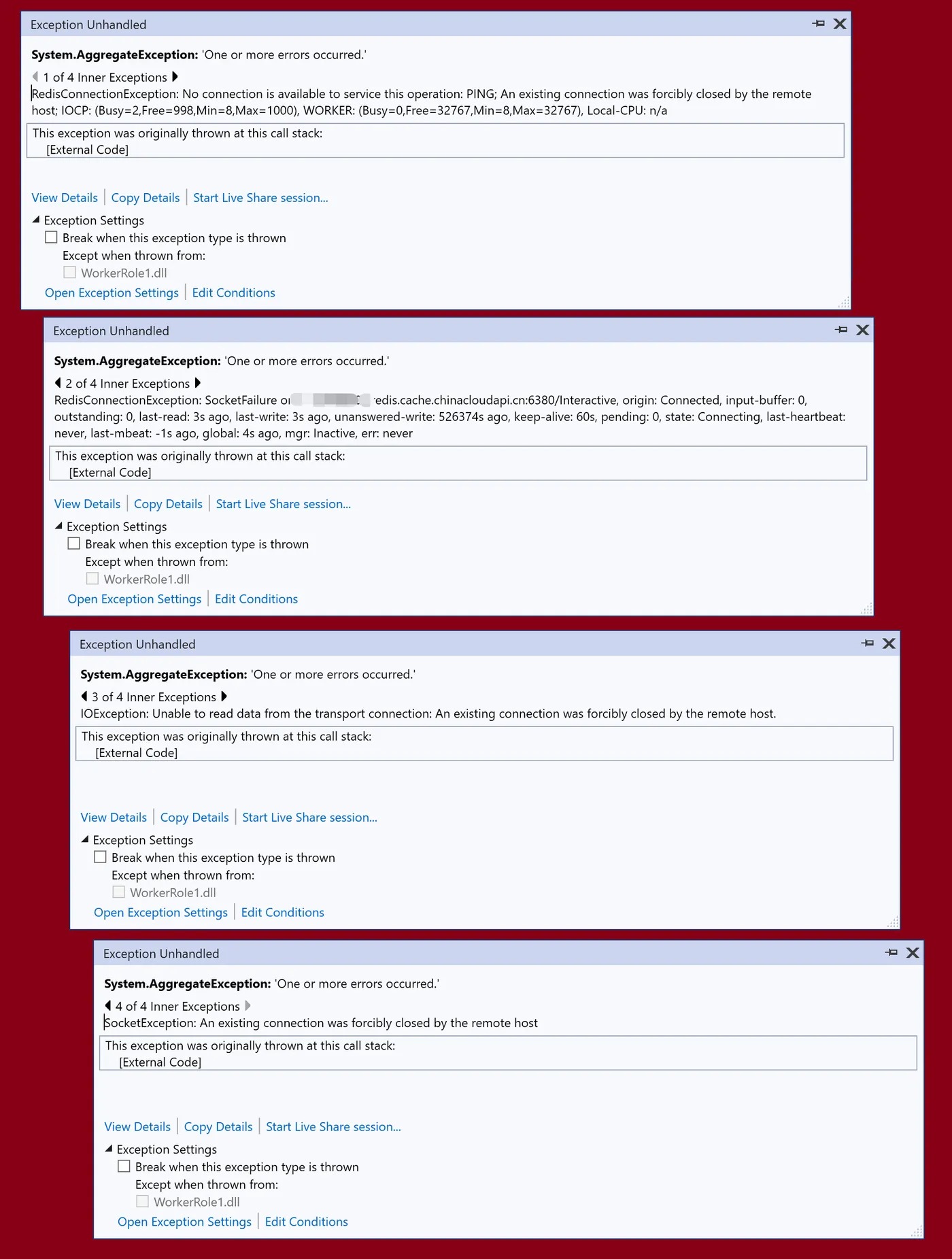
在Visual Studio 2019中,通过Cloud Service模板创建了一个Worker Role的角色,在角色中使用StackExchange.Redis来连接Redis。遇见了一系列的异常:
- RedisConnectionException: No connection is available to service this operation: PING; It was not possible to connect to the redis server(s); ConnectTimeout; IOCP: (Busy=0,Free=1000,Min=8,Max=1000), WORKER: (Busy=2,Free=32765,Min=8,Max=32767), Local-CPU: n/a
- RedisConnectionException: UnableToConnect on xxxxxx.redis.cache.chinacloudapi.cn:6380/Interactive, origin: ResetNonConnected, input-buffer: 0, outstanding: 0, last-read: 5s ago, last-write: 5s ago, unanswered-write: 524763s ago, keep-alive: 60s, pending: 0, state: Connecting, last-heartbeat: never, last-mbeat: -1s ago, global: 5s ago, mgr: Inactive, err: never
- IOException: Unable to read data from the transport connection: An existing connection was forcibly closed by the remote host.
- SocketException: An existing connection was forcibly closed by the remote host
异常截图:
问题分析
根据异常信息 Socket Exception, 在建立连接的时候被Remote Host关闭,也就是Redis服务端强制关闭了此连接。那么就需要进一步分析,为什么Redis会强制关闭连接呢? 查看Redis的连接字符串:
xxxxxx.redis.cache.chinacloudapi.cn:6380,password=<access key>,ssl=True,abortConnect=False
使用6380端口,建立SSL连接,在连接字符串中已经启用SSL。在创建Azure Redis的资源中,会发现一段提示:TLS1.0,1.1已不被支持。需要使用TLS1.2版本。
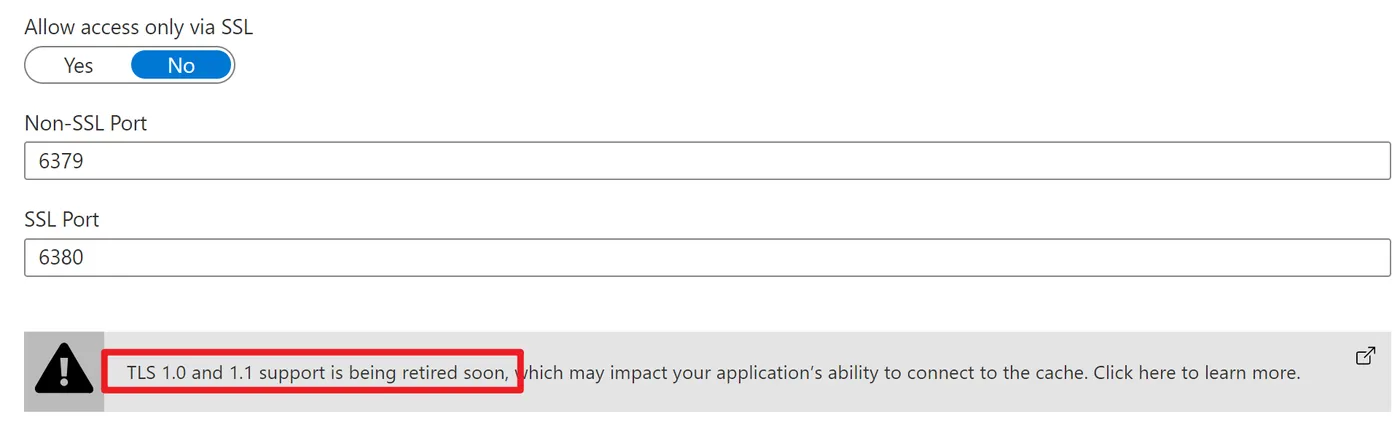
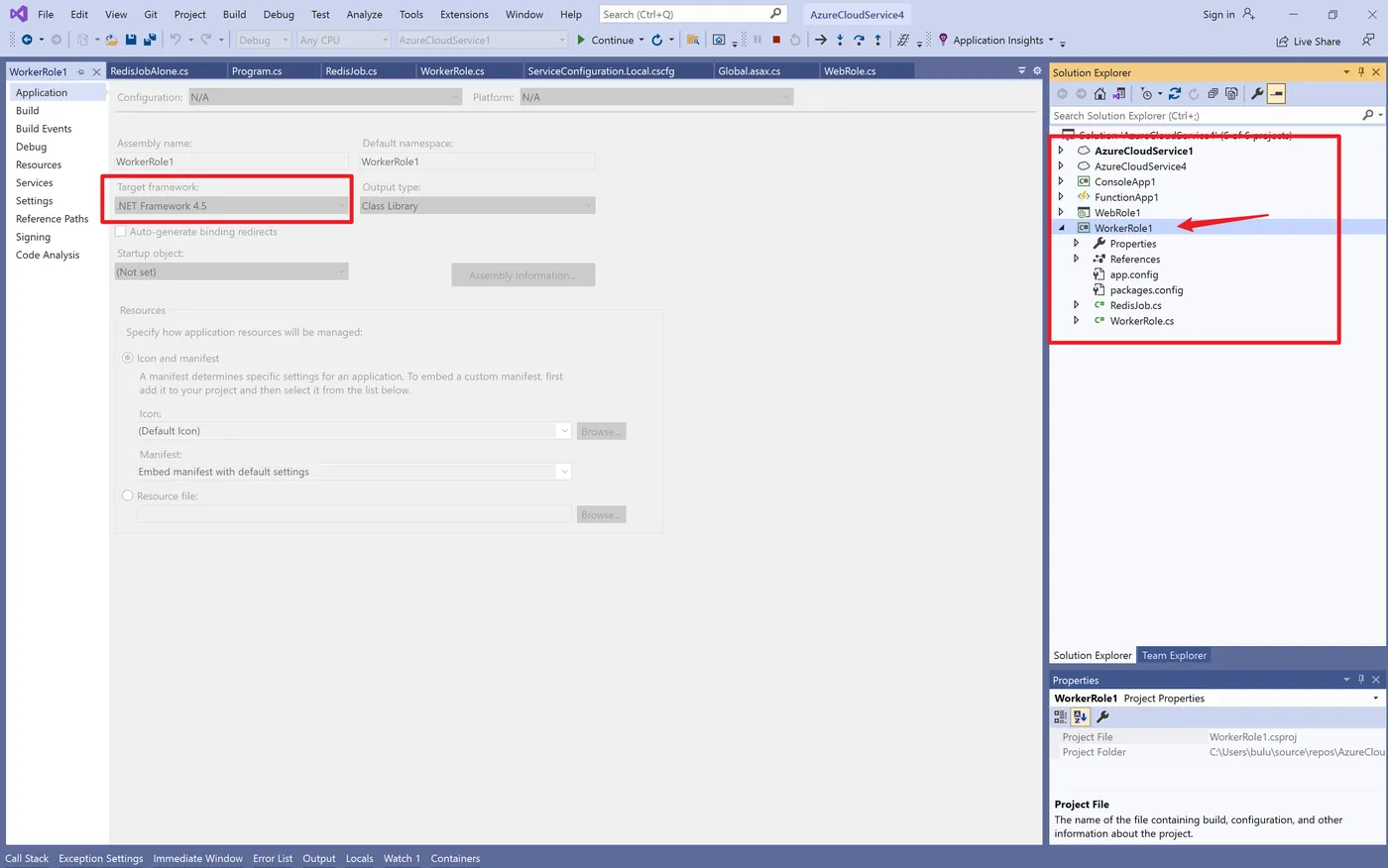
而当前的Cloud Service使用的是.NET Framework 4.5。 而恰巧,在 .NET Framework 4.5.2 或更低版本上,Redis .NET 客户端默认使用最低的 TLS 版本;在 .NET Framework 4.6 或更高版本上,则使用最新的 TLS 版本。
所以如果使用的是较旧版本的 .NET Framework,需要手动启用 TLS 1.2: StackExchange.Redis: 在连接字符串中设置 ssl=true 和 sslprotocols=tls12。
问题解决
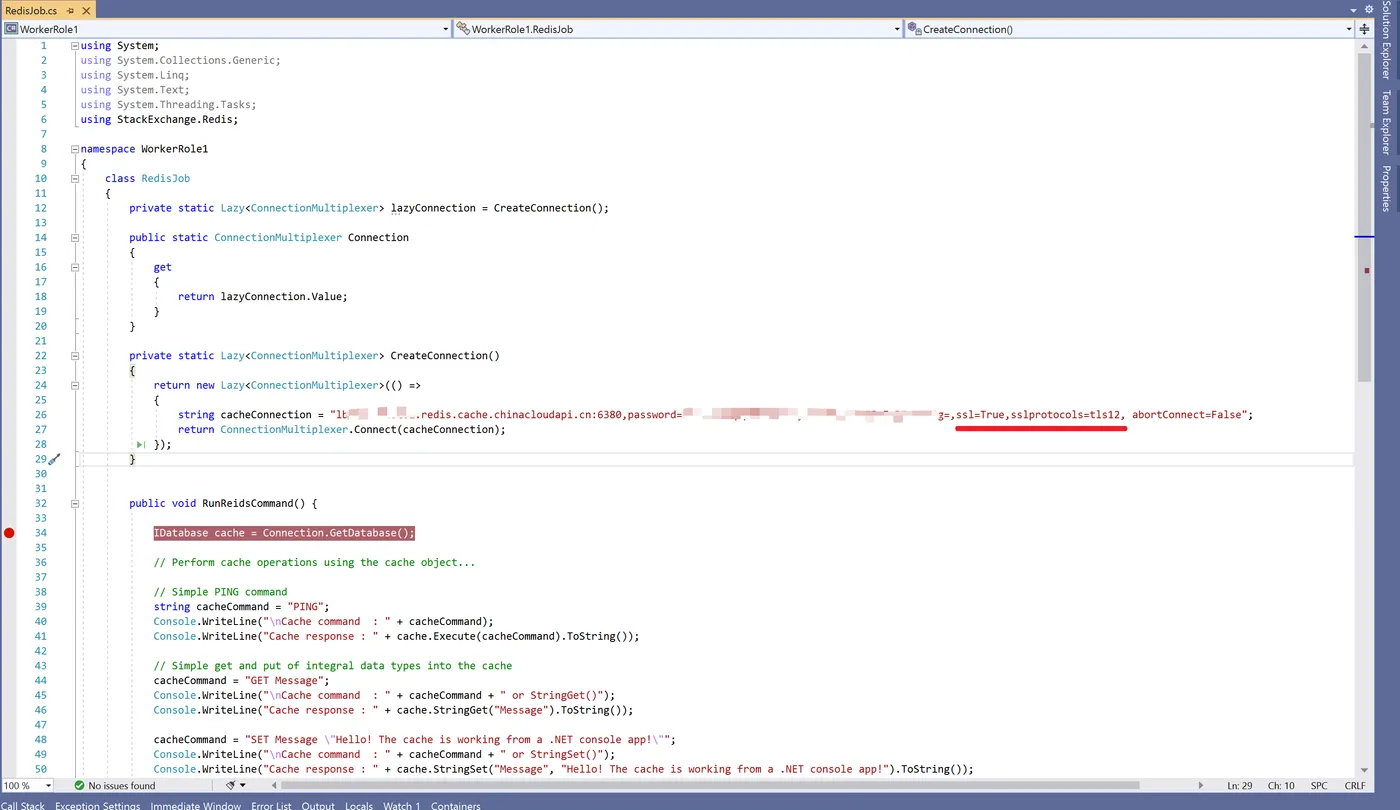
在字符串中添加 ssl=True,sslprotocols=tls12, 完整字符串为:
string cacheConnection = "xxxxxx.redis.cache.chinacloudapi.cn:6380,password=xxxxxxxxx+xxx+xxxxxxx=,ssl=True,sslprotocols=tls12, abortConnect=False";
在Visual Studio 2019代码中的效果如:
Could Service 与 Redis 使用的简单代码片段为
WorkerRole:
using Microsoft.WindowsAzure;
using Microsoft.WindowsAzure.Diagnostics;
using Microsoft.WindowsAzure.ServiceRuntime;
using System;
using System.Collections.Generic;
using System.Diagnostics;
using System.Linq;
using System.Net;
using System.Threading;
using System.Threading.Tasks;
namespace WorkerRole1
{
    public class WorkerRole : RoleEntryPoint
    {
        private readonly CancellationTokenSource cancellationTokenSource = new CancellationTokenSource();
        private readonly ManualResetEvent runCompleteEvent = new ManualResetEvent(false);
        private RedisJob redisjob1 = new RedisJob();
        public override void Run()
        {
            Trace.TraceInformation("WorkerRole1 is running");
            try
            {
                this.RunAsync(this.cancellationTokenSource.Token).Wait();
            }
            finally
            {
                this.runCompleteEvent.Set();
            }
        }
        public override bool OnStart()
        {
            // Set the maximum number of concurrent connections
            ServicePointManager.DefaultConnectionLimit = 12;
            //ServicePointManager.SecurityProtocol = SecurityProtocolType.Tls12;
            // For information on handling configuration changes
            // see the MSDN topic at https://go.microsoft.com/fwlink/?LinkId=166357.
            bool result = base.OnStart();
            Trace.TraceInformation("WorkerRole1 has been started");
            return result;
        }
        public override void OnStop()
        {
            Trace.TraceInformation("WorkerRole1 is stopping");
            this.cancellationTokenSource.Cancel();
            this.runCompleteEvent.WaitOne();
            base.OnStop();
            Trace.TraceInformation("WorkerRole1 has stopped");
        }
        private async Task RunAsync(CancellationToken cancellationToken)
        {
            // TODO: Replace the following with your own logic.
            while (!cancellationToken.IsCancellationRequested)
            {
                Trace.TraceInformation("Working");
                redisjob1.RunReidsCommand();
                await Task.Delay(10000);
            }
        }
    }
}
RedisJob:
using System;
using System.Collections.Generic;
using System.Linq;
using System.Text;
using System.Threading.Tasks;
using StackExchange.Redis;
namespace WorkerRole1
{
    class RedisJob
    {
        private static Lazy<ConnectionMultiplexer> lazyConnection = CreateConnection();
        public static ConnectionMultiplexer Connection
        {
            get
            {
                return lazyConnection.Value;
            }
        }
        private static Lazy<ConnectionMultiplexer> CreateConnection()
        {
            return new Lazy<ConnectionMultiplexer>(() =>
            {
                string cacheConnection = "xxxxxx.redis.cache.chinacloudapi.cn:6380,password=xxxxxx+xxx+xxxx=,ssl=True,sslprotocols=tls12, abortConnect=False";
                return ConnectionMultiplexer.Connect(cacheConnection);
            });
        }
        public void RunReidsCommand() {
            IDatabase cache = Connection.GetDatabase();
            // Perform cache operations using the cache object...
            // Simple PING command
            string cacheCommand = "PING";
            Console.WriteLine("\nCache command  : " + cacheCommand);
            Console.WriteLine("Cache response : " + cache.Execute(cacheCommand).ToString());
            // Simple get and put of integral data types into the cache
            cacheCommand = "GET Message";
            Console.WriteLine("\nCache command  : " + cacheCommand + " or StringGet()");
            Console.WriteLine("Cache response : " + cache.StringGet("Message").ToString());
            cacheCommand = "SET Message \"Hello! The cache is working from a .NET console app!\"";
            Console.WriteLine("\nCache command  : " + cacheCommand + " or StringSet()");
            Console.WriteLine("Cache response : " + cache.StringSet("Message", "Hello! The cache is working from a .NET console app!").ToString());
            // Demonstrate "SET Message" executed as expected...
            cacheCommand = "GET Message";
            Console.WriteLine("\nCache command  : " + cacheCommand + " or StringGet()");
            Console.WriteLine("Cache response : " + cache.StringGet("Message").ToString());
        }
    }
}
参考资料
删除与 Azure Cache for Redis 配合使用的 TLS 1.0 和 1.1: https://docs.microsoft.com/zh-cn/azure/azure-cache-for-redis/cache-remove-tls-10-11
将应用程序配置为使用 TLS 1.2
大多数应用程序使用 Redis 客户端库来处理与缓存的通信。 这里说明了如何将以各种编程语言和框架编写的某些流行客户端库配置为使用 TLS 1.2。
.NET Framework
在 .NET Framework 4.5.2 或更低版本上,Redis .NET 客户端默认使用最低的 TLS 版本;在 .NET Framework 4.6 或更高版本上,则使用最新的 TLS 版本。 如果使用的是较旧版本的 .NET Framework,则可以手动启用 TLS 1.2:
- StackExchange.Redis: 在连接字符串中设置
ssl=true和sslprotocols=tls12。- ServiceStack.Redis: 请按照 ServiceStack.Redis 说明操作,并至少需要 ServiceStack.Redis v5.6。
.NET Core
Redis .NET Core 客户端默认为操作系统默认 TLS 版本,此版本明显取决于操作系统本身。
根据操作系统版本和已应用的任何修补程序,有效的默认 TLS 版本可能会有所不同。 有一个关于此内容的信息源,也可以访问此处,阅读适用于 Windows 的相应文章。
但是,如果你使用的是旧操作系统,或者只是想要确保我们建议通过客户端手动配置首选 TLS 版本。
Java
Redis Java 客户端基于 Java 版本 6 或更早版本使用 TLS 1.0。 如果在缓存中禁用了 TLS 1.0,则 Jedis、Lettuce 和 Redisson 无法连接到 Azure Cache for Redis。 升级 Java 框架以使用新的 TLS 版本。
对于 Java 7,Redis 客户端默认不使用 TLS 1.2,但可以配置为使用此版本。 Jedis 允许你使用以下代码片段指定基础 TLS 设置:
SSLSocketFactory sslSocketFactory = (SSLSocketFactory) SSLSocketFactory.getDefault();
SSLParameters sslParameters = new SSLParameters();
sslParameters.setEndpointIdentificationAlgorithm("HTTPS");
sslParameters.setProtocols(new String[]{"TLSv1.2"});

URI uri = URI.create("rediss://host:port");
JedisShardInfo shardInfo = new JedisShardInfo(uri, sslSocketFactory, sslParameters, null);

shardInfo.setPassword("cachePassword");

Jedis jedis = new Jedis(shardInfo);
Lettuce 和 Redisson 客户端尚不支持指定 TLS 版本,因此,如果缓存仅接受 TLS 1.2 连接,这些客户端将无法工作。 我们正在审查这些客户端的修补程序,因此请检查那些包是否有包含此支持的更新版本。
在 Java 8 中,默认情况下会使用 TLS 1.2,并且在大多数情况下都不需要更新客户端配置。 为了安全起见,请测试你的应用程序。
Node.js
Node Redis 和 IORedis 默认使用 TLS 1.2。
PHP
Predis
- 低于 PHP 7 的版本:Predis 仅支持 TLS 1.0。 这些版本不支持 TLS 1.2;必须升级才能使用 TLS 1.2。
- PHP 7.0 到 PHP 7.2.1:默认情况下,Predis 仅使用 TLS 1.0 或 TLS 1.1。 可以通过以下变通办法来使用 TLS 1.2。 在创建客户端实例时指定 TLS 1.2:
•
$redis=newPredis\Client([
    'scheme'=>'tls',
    'host'=>'host',
    'port'=>6380,
    'password'=>'password',
    'ssl'=>[
        'crypto_type'=>STREAM_CRYPTO_METHOD_TLSv1_2_CLIENT,
    ],
]);
•
- PHP 7.3 及更高版本:Predis 使用最新的 TLS 版本。
PhpRedis
PhpRedis 在任何 PHP 版本上均不支持 TLS。
Python
Redis-py 默认使用 TLS 1.2。
GO
Redigo 默认使用 TLS 1.2。
【完】