更多ruoyi-nbcio功能请看演示系统
gitee源代码地址
前后端代码: https://gitee.com/nbacheng/ruoyi-nbcio
演示地址:RuoYi-Nbcio后台管理系统
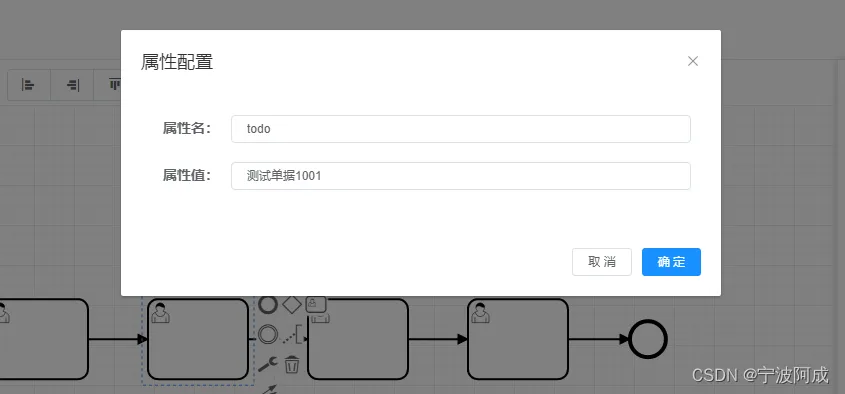
1、在每个节点可以设置扩展属性是todo的属性值,如下:
2、在需要审批或启动的时候获取这个扩展属性,同时赋值到变量里
如下:
/**
     * 完成任务
     *
     * @param taskBo 请求实体参数
     */
    @Transactional(rollbackFor = Exception.class)
    @Override
    public void complete(WfTaskBo taskBo) {
        Task task = taskService.createTaskQuery().taskId(taskBo.getTaskId()).singleResult();
        if (Objects.isNull(task)) {
            throw new ServiceException("任务不存在");
        }
        //获取流程当前节点设置的扩展属性值,需要的时候可以使用
        Map<String, Object> flowProperties = getFlowProperties(taskBo.getProcInsId());
        Map<String, Object> newVariables = new HashMap<String, Object>();
        if(Objects.nonNull(taskBo.getVariables())) {
          newVariables = taskBo.getVariables();
        }
        log.info("flowProperties="+flowProperties.get("todo"));
        newVariables.put("todo", flowProperties.get("todo"));
        // 获取 bpmn 模型
        BpmnModel bpmnModel = repositoryService.getBpmnModel(task.getProcessDefinitionId());
        if (DelegationState.PENDING.equals(task.getDelegationState())) {
            taskService.addComment(taskBo.getTaskId(), taskBo.getProcInsId(), FlowComment.DELEGATE.getType(), taskBo.getComment());
            taskService.resolveTask(taskBo.getTaskId());
        } else {
            taskService.addComment(taskBo.getTaskId(), taskBo.getProcInsId(), FlowComment.NORMAL.getType(), taskBo.getComment());
            taskService.setAssignee(taskBo.getTaskId(), TaskUtils.getUserName());
            if (ObjectUtil.isNotEmpty(newVariables)) {
                // 获取模型信息
                String localScopeValue = ModelUtils.getUserTaskAttributeValue(bpmnModel, task.getTaskDefinitionKey(), ProcessConstants.PROCESS_FORM_LOCAL_SCOPE);
                boolean localScope = Convert.toBool(localScopeValue, false);
                taskService.complete(taskBo.getTaskId(), newVariables, localScope);
            } else {
                taskService.complete(taskBo.getTaskId());
            }
        }
同时在创建待办的时候就可以获取这个变量来动态修改标题
@Slf4j
@Component
@RequiredArgsConstructor
public class TaskCreateListener implements FlowableEventListener {

    private final TaskService taskService;

    @Resource
    private CommonService commonService;

    @Resource
  protected RepositoryService repositoryService;

  @Resource
    protected HistoryService historyService;

    @Override
    public void onEvent(FlowableEvent flowableEvent) {
      FlowableEventType type = flowableEvent.getType();
      if (type == FlowableEngineEventType.TASK_ASSIGNED) {
        if(flowableEvent instanceof org.flowable.engine.delegate.event.impl.FlowableEntityEventImpl ) {
          TaskEntity taskEntity = (TaskEntity) ((org.flowable.engine.delegate.event.impl.FlowableEntityEventImpl) flowableEvent).getEntity();
          String taskId = taskEntity.getId();
              String procInsId = taskEntity.getProcessInstanceId();
              HistoricProcessInstance historicProcessInstance = historyService.createHistoricProcessInstanceQuery()
                      .processInstanceId(procInsId)
                      .singleResult();
          String businessKey =  historicProcessInstance.getBusinessKey();
          String deployId = historicProcessInstance.getDeploymentId();
          String startUserId = historicProcessInstance.getStartUserId();
              //获取任务接收人
          String receiver = taskEntity.getAssignee();
              if (StringUtils.isNotEmpty(receiver)) {
                  //发送提醒消息
                String category = "";
                if(taskService.getVariables(taskId).get("category") != null) {
                  category = taskService.getVariables(taskId).get("category").toString();
                }

                LoginUser loginUser = commonService.getLoginUser();
                String taskMessageUrl;
                if(StringUtils.isNotBlank(businessKey)) {
                taskMessageUrl = "<a href=" + commonService.getBaseUrl() + procInsId + "?taskId="
                              + taskId + "&businessKey=" + businessKey + "&category="
                              + category + "&processed=true"  + ">点击这个进行处理</a>" ;
              }
              else {
                taskMessageUrl = "<a href=" + commonService.getBaseUrl() + procInsId + "?taskId="
                             + taskId + "&businessKey" + "&category="
                             + category + "&processed=true" + ">点击这个进行处理</a>" ;
              }
                String title="";
                if(taskService.getVariables(taskId).get("todo") != null) {
                  title = taskService.getVariables(taskId).get("todo").toString();
                  log.info("title="+title);
                }
                String msgContent ="流程待办通知" + taskMessageUrl;
                if(!StringUtils.equals((loginUser.getUserId()).toString(),receiver)) {//发起人或登录人自己不发送
                  log.info("流程待办通知给:" + receiver);
                  commonService.sendSysNotice(loginUser.getUserId().toString(), receiver, title+"流程待办通知", msgContent, Constants.MSG_CATEGORY_3);//setMsgCategory=3是待办
                }
              }
        }
      }
    }
    @Override
    public boolean isFailOnException() {
        return false;
    }
    @Override
    public boolean isFireOnTransactionLifecycleEvent() {
        return false;
    }
    @Override
    public String getOnTransaction() {
        return null;
    }
}