一、前言
做性能测试脚本是一个实际下功夫的地方,工作中常见也就 是 key-value,json 方式比较多,那么 nGrinder 脚本咱们怎么编写以下简单介绍。
二、实现一个get 请求 demo
首先,通过 SpringBoot 编写一个工程实现增删改查,通过 Get 请求获取:
http://localhost:8888/findinfo?username=600128
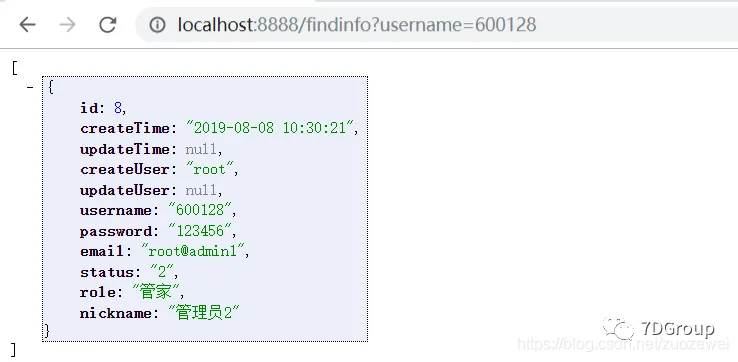
该工程 controller 层中用最简单 Get 请求查询数据,该代码为:
@GetMapping("/findinfo")
@ResponseBody
public List<UserTable> findUser(UserTable userInfo) {


    List<UserTable> UserInfo = userService.findinfo(userInfo);
    return UserInfo;
}
@ResponseBody 注解会自动转换 Json 显示到页面。该工程很简单,就不展示其他代码,大家在做练习的时候,可以找自己公司的项目或者自己写一个 demo 工程,进行练习。
接口层:
public interface UserService {


List<UserTable> findinfo(UserTable userInfo);
}
实现层:
@Service
public class UserServiceImpl implements UserService {


@Override
public List<UserTable> findinfo(UserTable userInfo) {


    UserTableExample example = new UserTableExample();
    UserTableExample.Criteria criteria = example.createCriteria();
    criteria.andUsernameEqualTo(userInfo.getUsername());
    return userTableMapper.selectByExample(example);
}

}
数据库 Dao 层:
- 该层通过 Generator 插件生成
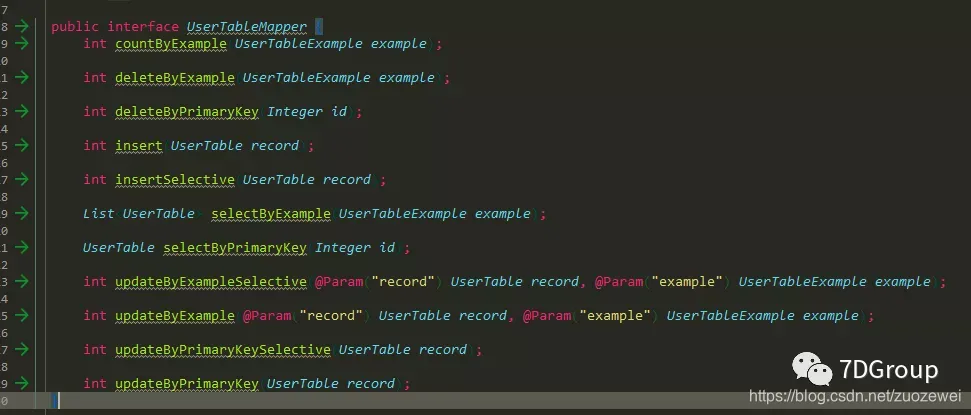
Generator 插件参考代码:
<?xml version="1.0" encoding="UTF-8"?>
<!DOCTYPE generatorConfiguration
        PUBLIC "-//mybatis.org//DTD MyBatis Generator Configuration 1.0//EN"
        "http://mybatis.org/dtd/mybatis-generator-config_1_0.dtd">
<generatorConfiguration>
    <!-- 数据库驱动:选择你的本地硬盘上面的数据库驱动包-->
    <classPathEntry location="..\mysql-manager\lib\mysql-connector-java-5.1.6.jar"/>
    <context id="DB2Tables" targetRuntime="MyBatis3">
        <commentGenerator>
            <property name="suppressDate" value="true"/>
            <!-- 是否去除自动生成的注释 true:是 :false:否 -->
            <property name="suppressAllComments" value="true"/>
        </commentGenerator>
        <!--数据库链接URL,用户名、密码 -->
        <jdbcConnection driverClass="com.mysql.jdbc.Driver" connectionURL="jdbc:mysql://localhost:3306/7d"
                        userId="root" password="123456">
        </jdbcConnection>
        <javaTypeResolver>
            <property name="forceBigDecimals" value="false"/>
        </javaTypeResolver>
        <!-- 生成模型的包名和位置-->
        <javaModelGenerator targetPackage="com.sevendgrop.pojo" targetProject="src/main/java">
            <property name="enableSubPackages" value="true"/>
            <property name="trimStrings" value="true"/>
        </javaModelGenerator>
        <!-- 生成映射文件的包名和位置-->
        <sqlMapGenerator targetPackage="mapping" targetProject="src/main/resources">
            <property name="enableSubPackages" value="true"/>
        </sqlMapGenerator>
        <!-- 生成DAO的包名和位置-->
        <javaClientGenerator type="XMLMAPPER" targetPackage="com.sevendgrop.mapper" targetProject="src/main/java">
            <property name="enableSubPackages" value="true"/>
        </javaClientGenerator>
        <!-- 要生成的表 tableName是数据库中的表名或视图名 domainObjectName是实体类名-->
        <table schema="" tableName="case_table"></table>
    </context>
</generatorConfiguration>
Pom.xml 配置:
    <build>
        <plugins>
            <plugin>
                <groupId>org.springframework.boot</groupId>
                <artifactId>spring-boot-maven-plugin</artifactId>
                <configuration>
                    <fork>true</fork>
                </configuration>
            </plugin>
            <!--             mybatis generator 自动生成代码插件-->
            <plugin>
                <groupId>org.mybatis.generator</groupId>
                <artifactId>mybatis-generator-maven-plugin</artifactId>
                <version>1.3.2</version>
                <configuration>
                    <configurationFile>${basedir}/src/main/resources/generator/generatorConfig.xml</configurationFile>
                    <overwrite>true</overwrite>
                    <verbose>true</verbose>
                </configuration>
            </plugin>
        </plugins>
    </build>
maven 插件编写参考: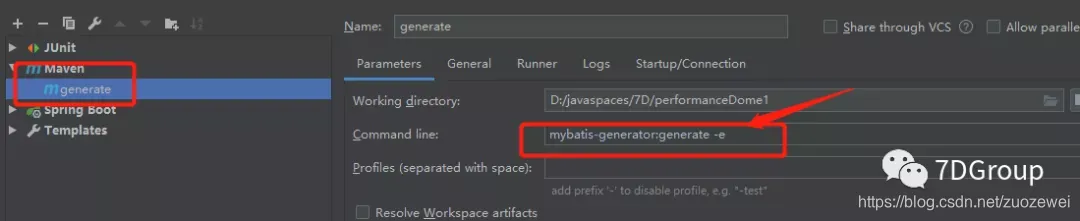
配置上面后点击:
运行即可就能生成数据库连接 SQL 语句。
三、脚本编写
打开上一节使用源码部署的工程,在介绍源码运行脚本地方新建一个脚本,参考如下代码修改成自己练习的脚本。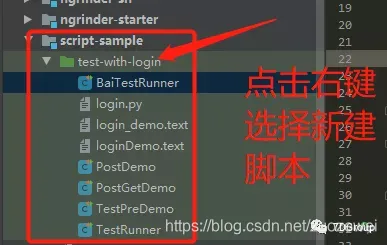
在 nGrinder 中新建的脚本编写如下代码:
import org.junit.FixMethodOrder
import static net.grinder.script.Grinder.grinder
import static org.junit.Assert.*
import static org.hamcrest.Matchers.*
import net.grinder.plugin.http.HTTPRequest
import net.grinder.plugin.http.HTTPPluginControl
import net.grinder.script.GTest
import net.grinder.script.Grinder
import net.grinder.scriptengine.groovy.junit.GrinderRunner
import net.grinder.scriptengine.groovy.junit.annotation.BeforeProcess
import net.grinder.scriptengine.groovy.junit.annotation.BeforeThread
import org.junit.Before
import org.junit.BeforeClass
import org.junit.Test
import org.junit.runner.RunWith
import java.util.Date
import java.util.List
import java.util.ArrayList
import HTTPClient.Cookie
import HTTPClient.CookieModule
import HTTPClient.HTTPResponse
import HTTPClient.NVPair

@RunWith(GrinderRunner)
class PostGetDemo {


    public static GTest test
    // 定义 HTTPRequest 静态变量 request,用于发送 HTTP 请求
    public static HTTPRequest request
    // 定义 NVPair 数组 headers ,用于存放通用的请求头数据
    public static NVPair[] headers = []
    // 定义 NVPair 数组 params ,用于存放请求参数数据
    public static NVPair[] params = []
    // 定义 Cookie 数组 cookies ,用于存放通用的 cookie 数据
    public static Cookie[] cookies = []

    @BeforeProcess
    public static void beforeProcess() {


        // 设置请求响应超时时间(ms)
        HTTPPluginControl.getConnectionDefaults().timeout = 6000
        // 创建GTest对象,第一个参数1代表有多个请求/事务时的执行顺序ID,第二个参数是请求/事务的名称,会显示在summary结果中,有多个请求/事务时,要创建多个GTest对象
        test = new GTest(1, "localhost:8888")
        //创建 HTTPRequest 对象,用于发起 HTTP 请求
        request = new HTTPRequest()
        // Set header datas
        List<NVPair> headerList = new ArrayList<NVPair>()
        headerList.add(new NVPair("Content-Type","application/x-www-form-urlencoded"))
        headerList.add(new NVPair("Connection", "keep-alive"))
        headers = headerList.toArray()
        // Set param datas
        List<NVPair> paramList = new ArrayList<NVPair>()
        paramList.add(new NVPair("username", "600128"))
        params = paramList.toArray()
        // Set cookie datas
        List<Cookie> cookieList = new ArrayList<Cookie>()
        cookieList.add(new Cookie("Cookie", "Idea-96adee05=87213429-7753-4183-99d0-c1c3362ce5d0; Hm_lvt_eb54a8c74fe4cb91ad8ca004e48cd3f9=1545999605; Pycharm-5b892e29=6772acb9-e87b-4d37-98e3-bff82e412d17; csrftoken=KDr8oYtD0gKh7UbS5fWSROzEOX6rjX3CN26pz9PQu9AczLMGFhw53ZrjAhoIOTE7; Hm_lvt_f2c884fc06fca522c4105429259b8a73=1558506687; Webstorm-173930bd=052a6829-b802-4eb0-a1e2-e348f1012604; _ga=GA1.1.1061327805.1562753587; UM_distinctid=16c02a6b049e1-02b6b032525db4-e343166-144000-16c02a6b04a120; CNZZDATA4617777=cnzz_eid%3D1637582848-1563412391-%26ntime%3D1563412391; Hm_lvt_0cb375a2e834821b74efffa6c71ee607=1563412574; bad_id22bdcd10-6250-11e8-917f-9fb8db4dc43c=a32ab941-a8f9-11e9-9989-93f7b4f25032; Idea-2b3f02ca=87213429-7753-4183-99d0-c1c3362ce5d0; cookie_lang=0; JSESSIONID=801DE60D9A00C391F80ABE0CD94A6E25", "localhost:8888", "", new Date(), true))
        cookies = cookieList.toArray()
        grinder.logger.info("before process.");

    }
    @BeforeThread
    public void beforeThread() {


        //注册事件,启动test,第二个参数要与@Test注解的方法名保持一致,有多个请求/事务时,要注册多个事件
        test.record(this, "test")
        //配置延迟报告统计结果
        grinder.statistics.delayReports = true;
        grinder.logger.info("before thread.");
    }
    @Before
    public void before() {


        //在这里可以添加headers属性和cookies
        //request.setHeaders(headers)
        cookies.each {

    CookieModule.addCookie(it, HTTPPluginControl.getThreadHTTPClientContext()) }
        grinder.logger.info("before thread. init headers and cookies");

    }
    @Test
    public void test() {


        //发送GET请求
        HTTPResponse result = request.GET("http://localhost:8888/findinfo", params)
        def text = result.getText()
        grinder.logger.info(text)
        //断言HTTP请求状态码
        assertThat(result.statusCode, is(200))
    }

}
再次运行:
点击运行配置加上:
-javaagent:D:\maven\repository\net\sf\grinder\grinder-dcr-agent\3.9.1\grinder-dcr-agent-3.9.1.jar
配置说明如下:
之后点击运行即可:
结果如下:
关键点需要注意这里:
List<NVPair> headerList = new ArrayList<NVPair>()
headerList.add(new NVPair("Content-Type", "application/x-www-form-urlencoded"))
headerList.add(new NVPair("Connection", "keep-alive"))
headers = headerList.toArray()
注意头信息:
public static NVPair[] headers = []
public static NVPair[] params = []
public static Cookie[] cookies = []
查看源码就知道怎么传值,这里列举 cookie 源码传值说明: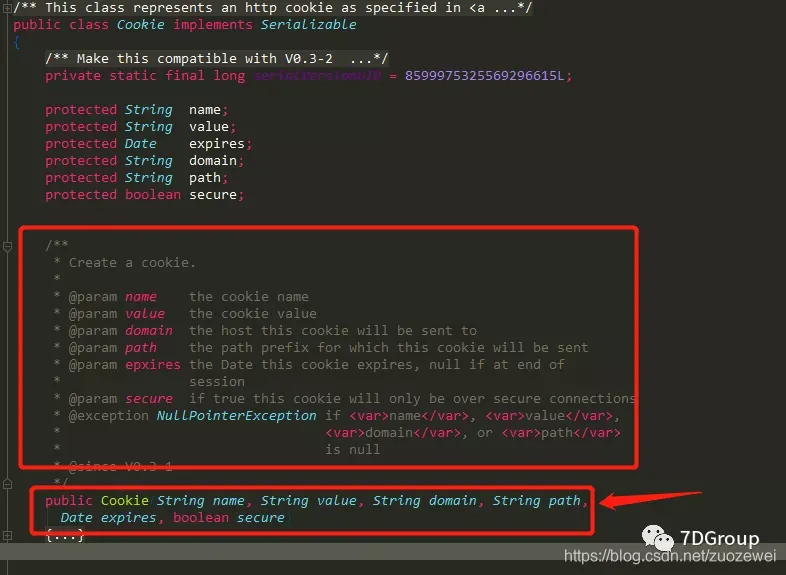
通过源码查看得知如果传 cookie 需要 new cookie 实体通过构造方法进行传值入:
    List<Cookie> cookieList = new ArrayList<Cookie>()
        cookieList.add(new Cookie("Cookie", "Idea-96adee05=87213429-7753-4183-99d0-c1c3362ce5d0; Hm_lvt_eb54a8c74fe4cb91ad8ca004e48cd3f9=1545999605; Pycharm-5b892e29=6772acb9-e87b-4d37-98e3-bff82e412d17; csrftoken=KDr8oYtD0gKh7UbS5fWSROzEOX6rjX3CN26pz9PQu9AczLMGFhw53ZrjAhoIOTE7; Hm_lvt_f2c884fc06fca522c4105429259b8a73=1558506687; Webstorm-173930bd=052a6829-b802-4eb0-a1e2-e348f1012604; _ga=GA1.1.1061327805.1562753587; UM_distinctid=16c02a6b049e1-02b6b032525db4-e343166-144000-16c02a6b04a120; CNZZDATA4617777=cnzz_eid%3D1637582848-1563412391-%26ntime%3D1563412391; Hm_lvt_0cb375a2e834821b74efffa6c71ee607=1563412574; bad_id22bdcd10-6250-11e8-917f-9fb8db4dc43c=a32ab941-a8f9-11e9-9989-93f7b4f25032; Idea-2b3f02ca=87213429-7753-4183-99d0-c1c3362ce5d0; cookie_lang=0; JSESSIONID=801DE60D9A00C391F80ABE0CD94A6E25", "localhost:8888", "", new Date(), true))

        cookies = cookieList.toArray()
        grinder.logger.info("before process.");
查看@BeforeThread注解下会执行 test.record方法源码如下:
/**
 * Instrument the supplied {@code target} object's method which has the given name. Subsequent
 * calls to {@code target}'s given method will be recorded against the statistics for this
 * {@code Test}.
 * 提供的具有给定名称的{@code target}对象方法。

  后继的对{@code target}给定方法的调用将根据此方法的统计信息进行记录

 * @param target     Object to instrument.
 * @param methodName method name to instrument
 * @throws NonInstrumentableTypeException If {@code target} could not be instrumented.
 * @since 3.2.1
 */
public final void record(Object target, String methodName) throws NonInstrumentableTypeException {


   if (StringUtils.isNotEmpty(context)) {


      record(target, new MethodNameFilter(methodName));
   }
}
解释:
- target:指脚本对象,这里是 this;
- methodNam:是需要统计的方法名,通常都是被
@Test注释的方法。如果未配置,方法会正常执行,但是没有统计结果数据;
以下代码是可以复制出来修改的代码
import org.junit.FixMethodOrder

import static net.grinder.script.Grinder.grinder
import static org.junit.Assert.*
import static org.hamcrest.Matchers.*
import net.grinder.plugin.http.HTTPRequest
import net.grinder.plugin.http.HTTPPluginControl
import net.grinder.script.GTest
import net.grinder.script.Grinder
import net.grinder.scriptengine.groovy.junit.GrinderRunner
import net.grinder.scriptengine.groovy.junit.annotation.BeforeProcess
import net.grinder.scriptengine.groovy.junit.annotation.BeforeThread
import org.junit.Before
import org.junit.BeforeClass
import org.junit.Test
import org.junit.runner.RunWith

import java.util.Date
import java.util.List
import java.util.ArrayList
import HTTPClient.Cookie
import HTTPClient.CookieModule
import HTTPClient.HTTPResponse
import HTTPClient.NVPair

@RunWith(GrinderRunner)
class PostGetDemo {


    public static GTest test
    // 定义 HTTPRequest 静态变量 request,用于发送 HTTP 请求
    public static HTTPRequest request
    // 定义 NVPair 数组 headers ,用于存放通用的请求头数据
    public static NVPair[] headers = []
    // 定义 NVPair 数组 params ,用于存放请求参数数据
    public static NVPair[] params = []
    // 定义 Cookie 数组 cookies ,用于存放通用的 cookie 数据
    public static Cookie[] cookies = []


    @BeforeProcess
    public static void beforeProcess() {


        // 设置请求响应超时时间(ms)
        HTTPPluginControl.getConnectionDefaults().timeout = 6000
        // 创建GTest对象,第一个参数1代表有多个请求/事务时的执行顺序ID,第二个参数是请求/事务的名称,会显示在summary结果中,有多个请求/事务时,要创建多个GTest对象
        test = new GTest(1, "localhost:8888")
        //创建 HTTPRequest 对象,用于发起 HTTP 请求
        request = new HTTPRequest()
        // Set header datas
        List<NVPair> headerList = new ArrayList<NVPair>()
        headerList.add(new NVPair("Content-Type", "application/x-www-form-urlencoded"))
        headerList.add(new NVPair("Connection", "keep-alive"))
        headers = headerList.toArray()
        // Set param datas
        List<NVPair> paramList = new ArrayList<NVPair>()
        paramList.add(new NVPair("username", "600128"))

        params = paramList.toArray()
        // Set cookie datas
        List<Cookie> cookieList = new ArrayList<Cookie>()
        cookieList.add(new Cookie("Cookie", "Idea-96adee05=87213429-7753-4183-99d0-c1c3362ce5d0; Hm_lvt_eb54a8c74fe4cb91ad8ca004e48cd3f9=1545999605; Pycharm-5b892e29=6772acb9-e87b-4d37-98e3-bff82e412d17; csrftoken=KDr8oYtD0gKh7UbS5fWSROzEOX6rjX3CN26pz9PQu9AczLMGFhw53ZrjAhoIOTE7; Hm_lvt_f2c884fc06fca522c4105429259b8a73=1558506687; Webstorm-173930bd=052a6829-b802-4eb0-a1e2-e348f1012604; _ga=GA1.1.1061327805.1562753587; UM_distinctid=16c02a6b049e1-02b6b032525db4-e343166-144000-16c02a6b04a120; CNZZDATA4617777=cnzz_eid%3D1637582848-1563412391-%26ntime%3D1563412391; Hm_lvt_0cb375a2e834821b74efffa6c71ee607=1563412574; bad_id22bdcd10-6250-11e8-917f-9fb8db4dc43c=a32ab941-a8f9-11e9-9989-93f7b4f25032; Idea-2b3f02ca=87213429-7753-4183-99d0-c1c3362ce5d0; cookie_lang=0; JSESSIONID=801DE60D9A00C391F80ABE0CD94A6E25", "localhost:8888", "", new Date(), true))

        cookies = cookieList.toArray()
        grinder.logger.info("before process.");

    }

    @BeforeThread
    public void beforeThread() {


        //注册事件,启动test,第二个参数要与@Test注解的方法名保持一致,有多个请求/事务时,要注册多个事件
        test.record(this, "test")

        //配置延迟报告统计结果
        grinder.statistics.delayReports = true;
        grinder.logger.info("before thread.");
    }

    @Before
    public void before() {


        //在这里可以添加headers属性和cookies
        //request.setHeaders(headers)
        cookies.each {

    CookieModule.addCookie(it, HTTPPluginControl.getThreadHTTPClientContext()) }
        grinder.logger.info("before thread. init headers and cookies");

    }

    @Test
    public void test() {


        //发送GET请求
        HTTPResponse result = request.GET("http://localhost:8888/findinfo", params)
        def text = result.getText()

        grinder.logger.info(text)
        // 断言HTTP请求状态码
        assertThat(result.statusCode, is(200))
    }
源码地址: