前文【【AI的未来 - AI Agent系列】【MetaGPT】5. 更复杂的Agent实战 - 实现技术文档助手】我们用Action实现了一个技术文档助手,在学习了ActionNode技术之后,我们用ActionNode来尝试重写一下这个技术文档助手。
0. 前置推荐阅读
- 【AI的未来 - AI Agent系列】【MetaGPT】5. 更复杂的Agent实战 - 实现技术文档助手
- 【AI的未来 - AI Agent系列】【MetaGPT】4. ActionNode从理论到实战
- 【AI的未来 - AI Agent系列】【MetaGPT】4.1 细说我在ActionNode实战中踩的那些坑
1. 重写WriteDirectory Action
根据我们之前的需求,WriteDirectory Action实现的其实就是根据用户输入的内容,直接去询问大模型,然后生成一份技术文档大纲目录。
1.1 实现WriteDirectory的ActionNode:DIRECTORY_WRITE
# 命令文本
DIRECTORY_STRUCTION = """
    You are now a seasoned technical professional in the field of the internet.
    We need you to write a technical tutorial".
    您现在是互联网领域的经验丰富的技术专业人员。
    我们需要您撰写一个技术教程。
    """
# 实例化一个ActionNode,输入对应的参数
DIRECTORY_WRITE = ActionNode(
    # ActionNode的名称
    key="Directory Write",
    # 期望输出的格式
    expected_type=str,
    # 命令文本
    instruction=DIRECTORY_STRUCTION,
    # 例子输入,在这里我们可以留空
    example="",
 )
1.2 将 DIRECTORY_WRITE 包进 WriteDirectory中
class WriteDirectory(Action):

    language: str = "Chinese"

    def __init__(self, name: str = "", language: str = "Chinese", *args, **kwargs):
        super().__init__()
        self.language = language

    async def run(self, topic: str, *args, **kwargs) -> Dict:
        DIRECTORY_PROMPT = """
        The topic of tutorial is {topic}. Please provide the specific table of contents for this tutorial, strictly following the following requirements:
        1. The output must be strictly in the specified language, {language}.
        2. Answer strictly in the dictionary format like {{"title": "xxx", "directory": [{{"dir 1": ["sub dir 1", "sub dir 2"]}}, {{"dir 2": ["sub dir 3", "sub dir 4"]}}]}}.
        3. The directory should be as specific and sufficient as possible, with a primary and secondary directory.The secondary directory is in the array.
        4. Do not have extra spaces or line breaks.
        5. Each directory title has practical significance.
        教程的主题是{topic}。请按照以下要求提供本教程的具体目录:
        1. 输出必须严格符合指定语言,{language}。
        2. 回答必须严格按照字典格式,如{{"title": "xxx", "directory": [{{"dir 1": ["sub dir 1", "sub dir 2"]}}, {{"dir 2": ["sub dir 3", "sub dir 4"]}}]}}。
        3. 目录应尽可能具体和充分,包括一级和二级目录。二级目录在数组中。
        4. 不要有额外的空格或换行符。
        5. 每个目录标题都具有实际意义。
        """

        # 我们设置好prompt,作为ActionNode的输入
        prompt = DIRECTORY_PROMPT.format(topic=topic, language=self.language)
        # resp = await self._aask(prompt=prompt)
        # 直接调用ActionNode.fill方法,注意输入llm
        # 该方法会返回self,也就是一个ActionNode对象
        resp_node = await DIRECTORY_WRITE.fill(context=prompt, llm=self.llm, schema="raw")
        # 选取ActionNode.content,获得我们期望的返回信息
        resp = resp_node.content
        return OutputParser.extract_struct(resp, dict)
重点是这一句 resp_node = await DIRECTORY_WRITE.fill(context=prompt, llm=self.llm, schema="raw"),将原来的直接拿Prompt询问大模型获取结果,变成了使用ActionNode的fill函数,去内部询问大模型并获取结果。
2. 重写WriteContent Action
2.1 思考重写方案
WriteContent的目的是根据目录标题询问大模型,生成具体的技术文档内容。
最直观的重写方法:每个WriteContent包一个ActionNode,像WriteDirectory一样,如下图:

像不用ActionNode一样,每个WriteContent执行完毕返回结果到Role中进行处理和组装,然后执行下一个WriteContent Action。可能你也看出来了,这种重写方法其实就是将WriteContent直接调用大模型改成了使用ActionNode调用大模型,其它都没变。我认为这种重写方法的意义不大,没体现出ActionNode的作用和价值。
于是我想到了第二种重写方法,如下图:
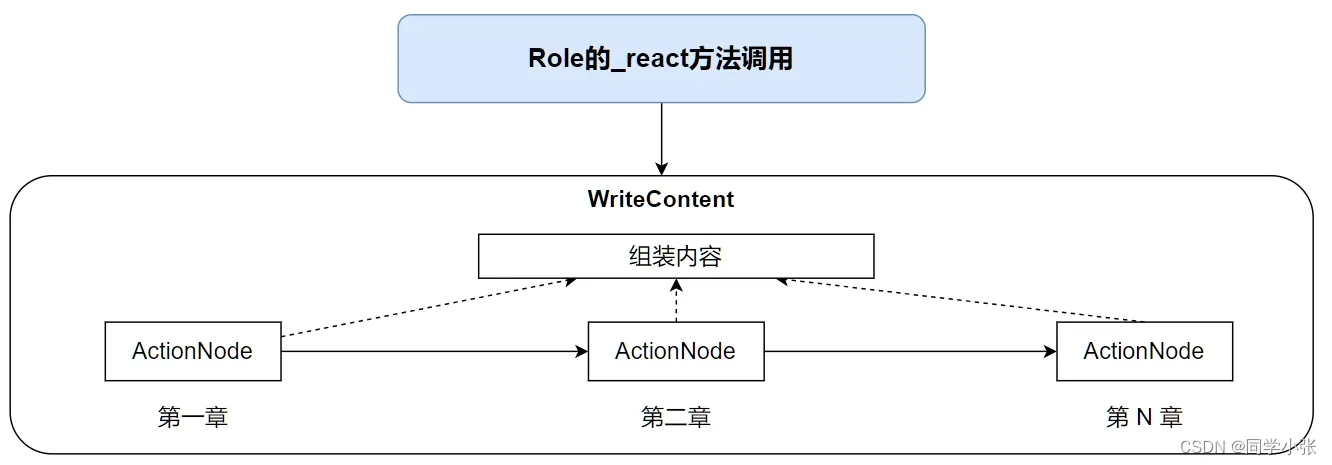
将每一个章节内容的书写作为一个ActionNode,一起放到WriteContent动作里执行,这样外部Role只需执行一次WriteContent动作,所有内容就都完成了,可以实现ActionNode设计的初衷:突破需要在Role的_react内循环执行的限制,达到更好的CoT效果。
2.2 实现WriteContent的ActionNode
CONTENT_WRITE = ActionNode(
    key="Content Write",
    expected_type=str,
    instruction="",
    example="",
)
这里可以将instruction放空,后面用context设置prompt可以实现相同的效果。
2.3 改写WriteContent Action
主要修改点:
(1)初始化时接收一个ActionNode List,使用这个List初始化 self.node,作为父节点
(2)run方法中不再直接调用大模型,而是依次执行子节点的simple_fill函数获取结果
(3)在调用子节点的simple_fill函数前,记得更新prompt
(4)子节点返回的内容进行组装
(5)最后返回组装后的结果
更多代码细节注释请看下面:
class WriteContent(Action):
    """Action class for writing tutorial content.
    Args:
        name: The name of the action.
        directory: The content to write.
        language: The language to output, default is "Chinese".
    """
    language: str = "Chinese"
    directory: str = ""
    total_content: str = "" ## 组装所有子节点的输出

    def __init__(self, name: str = "", action_nodes: list = [], language: str = "Chinese", *args, **kwargs):
        super().__init__()
        self.language = language
        self.node = ActionNode.from_children("WRITE_CONTENT_NODES", action_nodes) ## 根据传入的action_nodes列表,生成一个父节点
    async def run(self, topic: str, *args, **kwargs) -> str:
        COMMON_PROMPT = """
        You are now a seasoned technical professional in the field of the internet.
        We need you to write a technical tutorial with the topic "{topic}".
        """
        CONTENT_PROMPT = COMMON_PROMPT + """
        Now I will give you the module directory titles for the topic.
        Please output the detailed principle content of this title in detail.
        If there are code examples, please provide them according to standard code specifications.
        Without a code example, it is not necessary.
        The module directory titles for the topic is as follows:
        {directory}
        Strictly limit output according to the following requirements:
        1. Follow the Markdown syntax format for layout.
        2. If there are code examples, they must follow standard syntax specifications, have document annotations, and be displayed in code blocks.
        3. The output must be strictly in the specified language, {language}.
        4. Do not have redundant output, including concluding remarks.
        5. Strict requirement not to output the topic "{topic}".
        """

        for _, i in self.node.children.items():
            time.sleep(20) ## 避免OpenAI的API调用频率过高
            prompt = CONTENT_PROMPT.format(
                topic=topic, language=self.language, directory=i.key)
            i.set_llm(self.llm) ## 这里要设置一下llm,即使设置为None,也可以正常工作,但不设置就没法正常工作
            ## 为子节点设置context,也就是Prompt,ActionNode中我们将instruction放空,instruction和context都会作为prompt给大模型
            ## 所以两者有一个为空也没关系,只要prompt完整就行
            i.set_context(prompt)
            child = await i.simple_fill(schema="raw", mode="auto") ## 这里的schema注意写"raw"
            self.total_content += child.content ## 组装所有子节点的输出
        logger.info("writecontent:", self.total_content)
        return self.total_content
3. 改写TutorialAssistant Role
TutorialAssistant Role的作用是执行以上两个Action,输出最终结果。改写内容如下:
(1)将原本的生成Action List改为生成ActionNode List
- 注意细节:生成的ActionNode的key为每个章节的目录标题,在WriteContent中更新每个node的prompt时使用了
(2)将ActionNode List传给WriteContent Action进行WriteContent Action的初始化
(3)将WriteContent初始化到Role的动作中
- 注意细节:这里不再是之前每个first_dir创建一个WriteContent了,而是最后只初始化一个。
更多代码细节注释请看下面:
async def _handle_directory(self, titles: Dict) -> Message:
        self.main_title = titles.get("title")
        directory = f"{self.main_title}\n"
        self.total_content += f"# {self.main_title}"
        action_nodes = list()
        for first_dir in titles.get("directory"):
            logger.info(f"================== {first_dir}")
            action_nodes.append(ActionNode( ## 每个章节初始化一个ActionNode
                key=f"{first_dir}",  ## 注意key为本章目录标题
                expected_type=str,
                instruction="",
                example=""))
            key = list(first_dir.keys())[0]
            directory += f"- {key}\n"
            for second_dir in first_dir[key]:
                directory += f"  - {second_dir}\n"

        self._init_actions([WriteContent(language=self.language, action_nodes=action_nodes)]) ## 初始化一个WriteContent Action,不是多个了
        self.rc.todo = None
        return Message(content=directory)
4. 完整代码及执行结果
# 加载 .env 到环境变量
from dotenv import load_dotenv, find_dotenv
_ = load_dotenv(find_dotenv())
import asyncio
import re
import time
from typing import Dict
from metagpt.actions.action import Action
from metagpt.actions.action_node import ActionNode
from metagpt.logs import logger
from metagpt.roles import Role
from metagpt.schema import Message
from metagpt.utils.common import OutputParser
from metagpt.const import TUTORIAL_PATH
from datetime import datetime
from metagpt.utils.file import File
# 命令文本
DIRECTORY_STRUCTION = """
    You are now a seasoned technical professional in the field of the internet.
    We need you to write a technical tutorial".
    您现在是互联网领域的经验丰富的技术专业人员。
    我们需要您撰写一个技术教程。
    """
# 实例化一个ActionNode,输入对应的参数
DIRECTORY_WRITE = ActionNode(
    # ActionNode的名称
    key="Directory Write",
    # 期望输出的格式
    expected_type=str,
    # 命令文本
    instruction=DIRECTORY_STRUCTION,
    # 例子输入,在这里我们可以留空
    example="",
 )
CONTENT_WRITE = ActionNode(
    key="Content Write",
    expected_type=str,
    instruction="",
    example="",
)
class WriteDirectory(Action):

    language: str = "Chinese"

    def __init__(self, name: str = "", language: str = "Chinese", *args, **kwargs):
        super().__init__()
        self.language = language

    async def run(self, topic: str, *args, **kwargs) -> Dict:
        DIRECTORY_PROMPT = """
        The topic of tutorial is {topic}. Please provide the specific table of contents for this tutorial, strictly following the following requirements:
        1. The output must be strictly in the specified language, {language}.
        2. Answer strictly in the dictionary format like {{"title": "xxx", "directory": [{{"dir 1": ["sub dir 1", "sub dir 2"]}}, {{"dir 2": ["sub dir 3", "sub dir 4"]}}]}}.
        3. The directory should be as specific and sufficient as possible, with a primary and secondary directory.The secondary directory is in the array.
        4. Do not have extra spaces or line breaks.
        5. Each directory title has practical significance.
        教程的主题是{topic}。请按照以下要求提供本教程的具体目录:
        1. 输出必须严格符合指定语言,{language}。
        2. 回答必须严格按照字典格式,如{{"title": "xxx", "directory": [{{"dir 1": ["sub dir 1", "sub dir 2"]}}, {{"dir 2": ["sub dir 3", "sub dir 4"]}}]}}。
        3. 目录应尽可能具体和充分,包括一级和二级目录。二级目录在数组中。
        4. 不要有额外的空格或换行符。
        5. 每个目录标题都具有实际意义。
        """

        # 我们设置好prompt,作为ActionNode的输入
        prompt = DIRECTORY_PROMPT.format(topic=topic, language=self.language)
        # resp = await self._aask(prompt=prompt)
        # 直接调用ActionNode.fill方法,注意输入llm
        # 该方法会返回self,也就是一个ActionNode对象
        resp_node = await DIRECTORY_WRITE.fill(context=prompt, llm=self.llm, schema="raw")
        # 选取ActionNode.content,获得我们期望的返回信息
        resp = resp_node.content
        return OutputParser.extract_struct(resp, dict)
class WriteContent(Action):
    """Action class for writing tutorial content.
    Args:
        name: The name of the action.
        directory: The content to write.
        language: The language to output, default is "Chinese".
    """
    language: str = "Chinese"
    directory: str = ""
    total_content: str = "" ## 组装所有子节点的输出

    def __init__(self, name: str = "", action_nodes: list = [], language: str = "Chinese", *args, **kwargs):
        super().__init__()
        self.language = language
        self.node = ActionNode.from_children("WRITE_CONTENT_NODES", action_nodes) ## 根据传入的action_nodes列表,生成一个父节点
    async def run(self, topic: str, *args, **kwargs) -> str:
        COMMON_PROMPT = """
        You are now a seasoned technical professional in the field of the internet.
        We need you to write a technical tutorial with the topic "{topic}".
        """
        CONTENT_PROMPT = COMMON_PROMPT + """
        Now I will give you the module directory titles for the topic.
        Please output the detailed principle content of this title in detail.
        If there are code examples, please provide them according to standard code specifications.
        Without a code example, it is not necessary.
        The module directory titles for the topic is as follows:
        {directory}
        Strictly limit output according to the following requirements:
        1. Follow the Markdown syntax format for layout.
        2. If there are code examples, they must follow standard syntax specifications, have document annotations, and be displayed in code blocks.
        3. The output must be strictly in the specified language, {language}.
        4. Do not have redundant output, including concluding remarks.
        5. Strict requirement not to output the topic "{topic}".
        """

        for _, i in self.node.children.items():
            time.sleep(20) ## 避免OpenAI的API调用频率过高
            prompt = CONTENT_PROMPT.format(
                topic=topic, language=self.language, directory=i.key)
            i.set_llm(self.llm) ## 这里要设置一下llm,即使设置为None,也可以正常工作,但不设置就没法正常工作
            ## 为子节点设置context,也就是Prompt,ActionNode中我们将instruction放空,instruction和context都会作为prompt给大模型
            ## 所以两者有一个为空也没关系,只要prompt完整就行
            i.set_context(prompt)
            child = await i.simple_fill(schema="raw", mode="auto") ## 这里的schema注意写"raw"
            self.total_content += child.content ## 组装所有子节点的输出
        logger.info("writecontent:", self.total_content)
        return self.total_content
class TutorialAssistant(Role):

    topic: str = ""
    main_title: str = ""
    total_content: str = ""
    language: str = "Chinese"
    def __init__(
        self,
        name: str = "Stitch",
        profile: str = "Tutorial Assistant",
        goal: str = "Generate tutorial documents",
        constraints: str = "Strictly follow Markdown's syntax, with neat and standardized layout",
        language: str = "Chinese",
    ):
        super().__init__()
        self._init_actions([WriteDirectory(language=language)])
        self.language = language
    async def _think(self) -> None:
        """Determine the next action to be taken by the role."""
        logger.info(self.rc.state)
        # logger.info(self,)
        if self.rc.todo is None:
            self._set_state(0)
            return
        if self.rc.state + 1 < len(self.states):
            self._set_state(self.rc.state + 1)
        else:
            self.rc.todo = None
    async def _handle_directory(self, titles: Dict) -> Message:
        self.main_title = titles.get("title")
        directory = f"{self.main_title}\n"
        self.total_content += f"# {self.main_title}"
        action_nodes = list()
        # actions = list()
        for first_dir in titles.get("directory"):
            logger.info(f"================== {first_dir}")
            action_nodes.append(ActionNode(
                key=f"{first_dir}",
                expected_type=str,
                instruction="",
                example=""))
            key = list(first_dir.keys())[0]
            directory += f"- {key}\n"
            for second_dir in first_dir[key]:
                directory += f"  - {second_dir}\n"

        self._init_actions([WriteContent(language=self.language, action_nodes=action_nodes)])
        self.rc.todo = None
        return Message(content=directory)
    async def _act(self) -> Message:
        """Perform an action as determined by the role.
        Returns:
            A message containing the result of the action.
        """
        todo = self.rc.todo
        if type(todo) is WriteDirectory:
            msg = self.rc.memory.get(k=1)[0]
            self.topic = msg.content
            resp = await todo.run(topic=self.topic)
            logger.info(resp)
            return await self._handle_directory(resp)
        resp = await todo.run(topic=self.topic)
        logger.info(resp)
        if self.total_content != "":
            self.total_content += "\n\n\n"
        self.total_content += resp
        return Message(content=resp, role=self.profile)
    async def _react(self) -> Message:
        """Execute the assistant's think and actions.
        Returns:
            A message containing the final result of the assistant's actions.
        """
        while True:
            await self._think()
            if self.rc.todo is None:
                break
            msg = await self._act()
        root_path = TUTORIAL_PATH / datetime.now().strftime("%Y-%m-%d_%H-%M-%S")
        logger.info(f"Write tutorial to {root_path}")
        await File.write(root_path, f"{self.main_title}.md", self.total_content.encode('utf-8'))
        return msg
async def main():
    msg = "Git 教程"
    role = TutorialAssistant()
    logger.info(msg)
    result = await role.run(msg)
    logger.info(result)
asyncio.run(main())
- 执行结果

下一篇继续实战ActionNode:【AI Agent系列】【MetaGPT】7. 实战:只用两个字,让MetaGPT写一篇小说