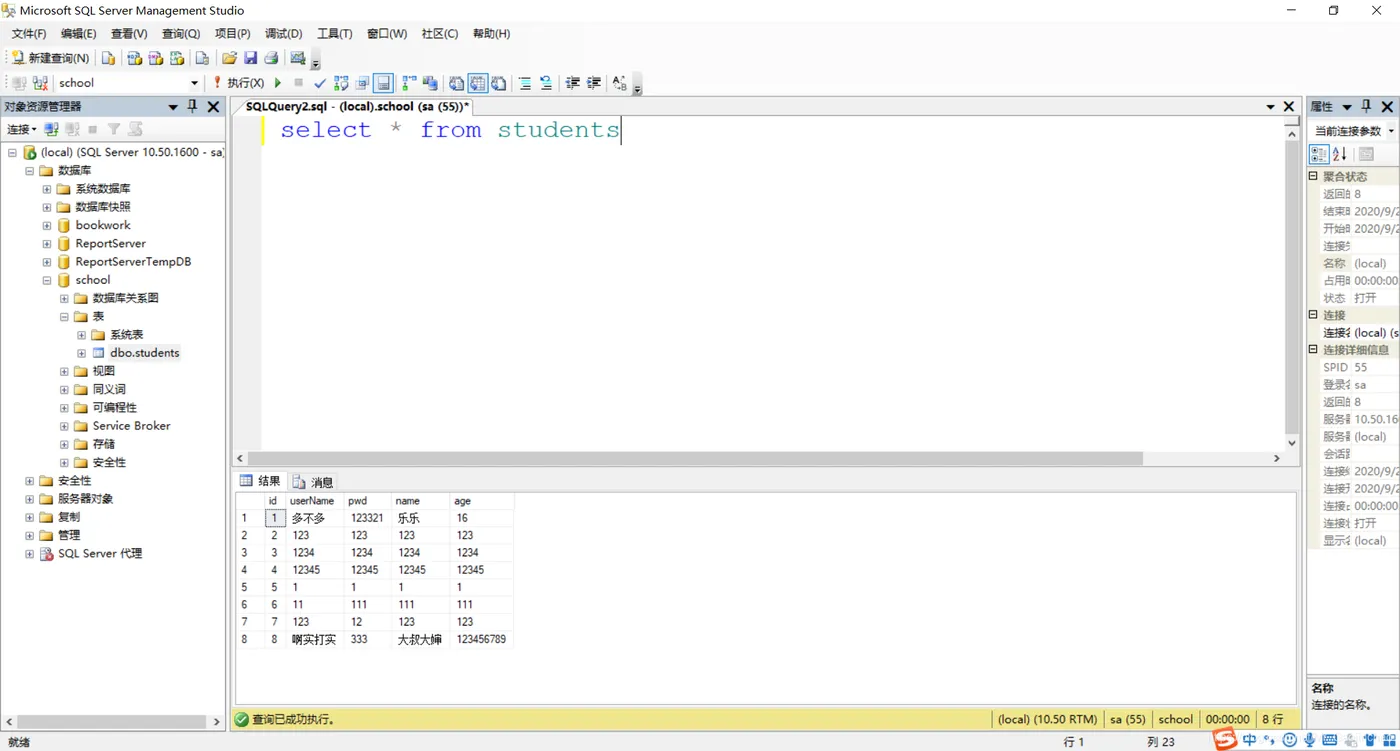
需求
- 注册页面添加登录链接
- 登录页面添加注册链接
- 注册成功跳转到登录页面
- 注册失败跳转到注册页面
- 登录成功跳转到用户列表页面
- 登录失败跳转到登录页面
分析
- 建库建表
- 一个连接数据库的DBUtil工具类
- 一个用户列表的model包
- 注册,登录,用户列表三个.java代码页面
- 三个.jsp页面
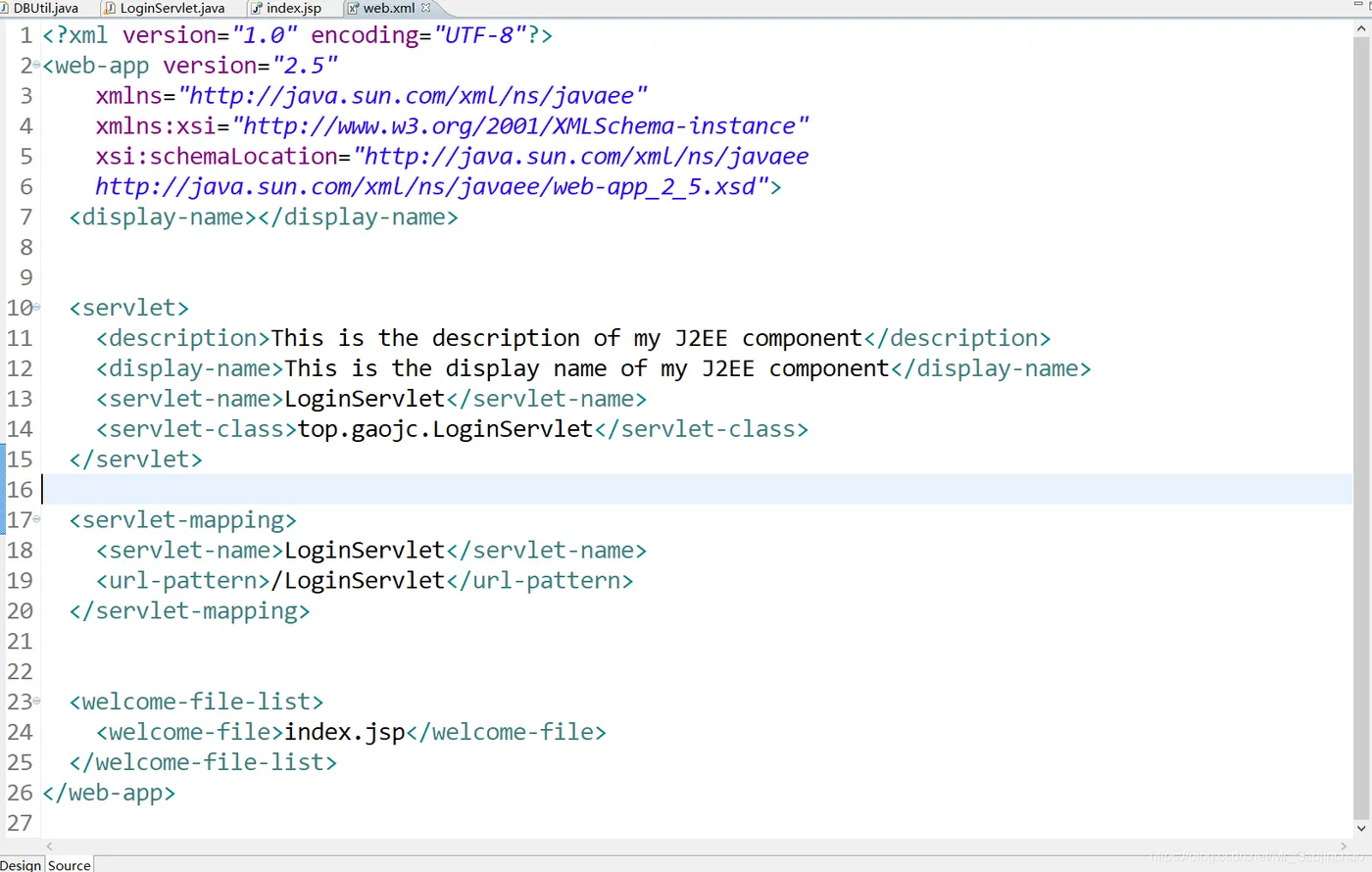
- 一个web.xml文件
代码实现
1. 创建DBUtil工具类
增删改查共同代码
package top.gaojc;
import java.sql.Connection;
import java.sql.DriverManager;
import java.sql.PreparedStatement;
import java.sql.ResultSet;
import java.sql.SQLException

public class DBUtil {

  static{
    //1:添加驱动程序
    try {
      Class.forName("com.microsoft.sqlserver.jdbc.SQLServerDriver");
    } catch (ClassNotFoundException e) {
      e.printStackTrace();
    }
  }

  public static Connection getConn(){
    //2:连接数据库
    Connection conn = null;
    try {
    conn = DriverManager.getConnection("jdbc:sqlserver://localhost:1433;databaseName=school", "sa", "1");
    } catch (SQLException e) {
      e.printStackTrace();
    }
    return conn;
  }

  public static void close(Connection conn,PreparedStatement ps,ResultSet rs){
    // 7:关闭资源
    try {
      if(conn != null)
      conn.close();
    } catch (SQLException e) {
      e.printStackTrace();
    }

    try {
      if(ps != null)
      ps.close();
    } catch (SQLException e) {
      e.printStackTrace();
    }

    try {
      if(rs != null)
      rs.close();
    } catch (SQLException e) {
      e.printStackTrace();
    }
  }
}
2. 创建model包书写students.java代码
package top.gaojc.model;

public class Students {

  private Integer id;
  private String userName;
  private String pwd;
  private String name;
  private Integer age;

  public Integer getId() {
    return id;
  }
  public void setId(Integer id) {
    this.id = id;
  }
  public String getUserName() {
    return userName;
  }
  public void setUserName(String userName) {
    this.userName = userName;
  }
  public String getPwd() {
    return pwd;
  }
  public void setPwd(String pwd) {
    this.pwd = pwd;
  }
  public String getName() {
    return name;
  }
  public void setName(String name) {
    this.name = name;
  }
  public Integer getAge() {
    return age;
  }
  public void setAge(Integer age) {
    this.age = age;
  }
  @Override
  public String toString() {
    return "<tr>"
        +"<td class='left'>"+id+"</td>"
        +"<td class='left'>"+userName+"</td>"
        +"<td class='left'>"+pwd+"</td>"
        +"<td class='left'>"+name+"</td>"
        +"<td class='left'>"+age+"</td>"
      +"</tr>";
  }

  public Students(Integer id, String userName, String pwd, String name,
      Integer age) {
    super();
    this.id = id;
    this.userName = userName;
    this.pwd = pwd;
    this.name = name;
    this.age = age;
  }

  public Students( String userName, String pwd, String name,
      Integer age) {
    super();
    this.userName = userName;
    this.pwd = pwd;
    this.name = name;
    this.age = age;
  }

  public Students() {
    super();
    // TODO Auto-generated constructor stub
  }
}
3. 注册.java代码
Servlet代码+注册页面代码
package top.gaojc;

import java.io.*;
import java.sql.*;

import javax.servlet.ServletException;
import javax.servlet.http.HttpServlet;
import javax.servlet.http.HttpServletRequest;
import javax.servlet.http.HttpServletResponse;

public class RegServlet extends HttpServlet {

  public void doGet(HttpServletRequest request, HttpServletResponse response)
      throws ServletException, IOException {
    doPost(request, response);
  }

  public void doPost(HttpServletRequest request, HttpServletResponse response)
      throws ServletException, IOException {

    // 1:首先要把编码全部改为utf-8
    // 将请求中的编码设置为utf-8
    request.setCharacterEncoding("utf-8");

    // 将响应中的编码设置为utf-8
    response.setCharacterEncoding("utf-8");

    // 设置响应的显示格式(类型)
    response.setContentType("text/html");

    //2:处理请求
    String userName = request.getParameter("userName");
    String pwd = request.getParameter("pwd");
    String name = request.getParameter("name");
    String ageStr = request.getParameter("age");
    Integer age = Integer.parseInt(ageStr);

    //  我们未来将要添加的代码区域
    // 注册---> 新增---> insert into book(title,author,classify,versions) values
    // (?,?,?,?)

    boolean isTrue = false; // 注册是否成功

    // 3:添加sql语句
    Connection conn = DBUtil.getConn();
    String sql = "insert into students(userName,pwd,name,age) values (?,?,?,?)";

    // 4:获取结果
    PreparedStatement ps = null;
    try {
      ps = conn.prepareStatement(sql);
      ps.setString(1, userName);
      ps.setString(2, pwd);
      ps.setString(3, name);
      ps.setInt(4, age);

      // 5:接收结果
      int count = ps.executeUpdate();

      // 6:输出结果
      if (count > 0) {
        // 注册成功!
        isTrue = true;
      }else{
        // 注册失败!
        isTrue = false;
      }

    } catch (SQLException e) {
      e.printStackTrace();
    }
    DBUtil.close(conn, ps, null);
    //3:处理响应
    if (isTrue) {
      response.sendRedirect("login.jsp");
    }else{
      response.sendRedirect("reg.jsp");
    }
  }
}
4. 登录.java代码
package top.gaojc;

import java.io.IOException;
import java.io.PrintWriter;
import java.sql.Connection;
import java.sql.PreparedStatement;
import java.sql.ResultSet;
import java.sql.SQLException;

import javax.servlet.ServletException;
import javax.servlet.http.HttpServlet;
import javax.servlet.http.HttpServletRequest;
import javax.servlet.http.HttpServletResponse;

public class LoginServlet extends HttpServlet {

  public void doGet(HttpServletRequest request, HttpServletResponse response)
      throws ServletException, IOException {
    doPost(request, response);
  }

  public void doPost(HttpServletRequest request, HttpServletResponse response)
      throws ServletException, IOException {

    //1:设置编码问题
    // 设置请求的编码问题
    request.setCharacterEncoding("utf-8");

    //设置响应编码问题
    response.setCharacterEncoding("utf-8");
    //设置响应的显示格式
    response.setContentType("text/html");
    //2:处理请求
    String userName = request.getParameter("userName");
    String pwd = request.getParameter("pwd");
    // 验证登录是否成功
    boolean isTrue = false;
    // 登录业务 --->查询 ---> select * from school where userName=? and pwd=?
    //jdbc
    Connection conn = DBUtil.getConn();
    // 3:添加sql语句
    String sql = "select * from students where userName=? and pwd=?";
    // 4:获取
    PreparedStatement ps = null;
    // 5:转换
    ResultSet rs = null;
    try {
      ps = conn.prepareStatement(sql);
      ps.setString(1, userName);
      ps.setString(2, pwd);
      rs = ps.executeQuery();
      if (rs.next()) {
        isTrue = true;
      }else{
        isTrue = false;
      }

    } catch (SQLException e) {
      e.printStackTrace();
    }
    DBUtil.close(conn, ps, rs);
    // 处理响应
    if (isTrue) {
      response.sendRedirect("ListServlet");
    }else{
      response.sendRedirect("login.jsp");
    }
  }
}
5. 列表.java代码
package top.gaojc;

import java.io.IOException;
import java.io.PrintWriter;
import java.sql.Connection;
import java.sql.PreparedStatement;
import java.sql.ResultSet;
import java.sql.SQLException;
import java.util.ArrayList;

import javax.servlet.ServletException;
import javax.servlet.http.HttpServlet;
import javax.servlet.http.HttpServletRequest;
import javax.servlet.http.HttpServletResponse;

public class ListServlet extends HttpServlet {

  public void doGet(HttpServletRequest request, HttpServletResponse response)
      throws ServletException, IOException {
    doPost(request, response);
  }

  public void doPost(HttpServletRequest request, HttpServletResponse response)
      throws ServletException, IOException {

    // 1:首先要把编码全部改为utf-8
    // 将请求中的编码设置为utf-8
    request.setCharacterEncoding("utf-8");

    // 将响应中的编码设置为utf-8
    response.setCharacterEncoding("utf-8");

    // 设置响应的显示格式(类型)
    response.setContentType("text/html");

    // 我们未来将要添加的代码区域
    // 列表---> 查询---> select * from students
    // (?,?,?,?)


    // jdbc
    //1:添加驱动程序
    //2:连接数据库
    Connection conn = DBUtil.getConn();
    // 3:添加sql语句
    String sql = "select * from students";

    ArrayList<Students> studentsList = new ArrayList<Students>();
    PreparedStatement ps = null;
    ResultSet rs = null;
    try {
      // 4:获取结果
      ps = conn.prepareStatement(sql);
      // 5:接收结果
      rs = ps.executeQuery();
      // 6:输出结果
      while (rs.next()) {
        Students students = new Students();
        students.setId(rs.getInt("id"));
        students.setUserName(rs.getString("userName"));
        students.setPwd(rs.getString("pwd"));
        students.setName(rs.getString("name"));
        students.setAge(rs.getInt("age"));
        studentsList.add(students);
      }
      //3:处理响应
      PrintWriter out = response.getWriter();
      out.println("<!DOCTYPE HTML PUBLIC \"-//W3C//DTD HTML 4.01 Transitional//EN\">");
      out.println("<HTML>");
      out.println("  <HEAD><TITLE>A Servlet</TITLE>");
      out.println("<style type=\"text/css\">"
          + ".left{width:100px;text-align: center;}"
          + ".right{width: 200px;}" + "table{margin: 0 auto;}"
          + "th{font-size: 30px;color: red;}" + "td{height: 50px;}"
          + "h1{text-align: center; color:red;font-size: 50px;}</style>");
      out.println("</HEAD>");
      out.println("  <BODY>");
      out.println("  <h1>列表页面</h1>");
      // 输出
      out.println("<table border=\"1\" cellspacing=\"0\" cellpadding=\"0\">"
          + "<tr>"
          + " <td class=\"left\">编号</td>"
          + " <td class=\"left\">用户名</td>"
          + " <td class=\"left\">密码</td>"
          + " <td class=\"left\">姓名</td>"
          + " <td class=\"left\">年龄</td>"+ "</tr>");
      for (Students students : studentsList) {
        out.println(students.toString());
      }
      out.println("  </BODY>");
      out.println("</HTML>");
      out.flush();
      out.close();
    } catch (SQLException e) {
      e.printStackTrace();
    }

    // 7:关闭资源
    DBUtil.close(conn, ps, rs);
  }
}
6. 注册.jsp文件(HTML代码)
<%@ page language="java" import="java.util.*" pageEncoding="utf-8"%>
<%
  String path = request.getContextPath();
  String basePath = request.getScheme() + "://"
      + request.getServerName() + ":" + request.getServerPort()
      + path + "/";
%>

<!DOCTYPE HTML PUBLIC "-//W3C//DTD HTML 4.01 Transitional//EN">
<html>
<head>
<base href="<%=basePath%>">

<title>注册页面</title>
<meta http-equiv="pragma" content="no-cache">
<meta http-equiv="cache-control" content="no-cache">
<meta http-equiv="expires" content="0">
<meta http-equiv="keywords" content="keyword1,keyword2,keyword3">
<meta http-equiv="description" content="This is my page">
<!--
  <link rel="stylesheet" type="text/css" href="styles.css">
  -->

<style type="text/css">
.model {
  text-align: center;
  color: red;
  font-size: 30px;
}
</style>

</head>

<body>
  <div class="model">
    <form action="RegServlet" method="post">
      <table border="1" cellspacing="0" cellpadding="1" align="center">
        注册页面
        <tr>
          <td><center>账号:</center>
          </td>
          <td><input type="text" name="userName" />
          </td>
        </tr>
        <tr>
          <td><center>密码:</center>
          </td>
          <td><input type="password" name="pwd" />
          </td>
        </tr>
        <tr>
          <td><center>确认密码:</center>
          </td>
          <td><input type="password" name="pwd" />
          </td>
        </tr>
        <tr>
          <td><center>姓名:</center>
          </td>
          <td><input type="text" name="name" />
          </td>
        </tr>
        <tr>
          <td><center>年龄:</center>
          </td>
          <td><input type="text" name="age" />
          </td>
        </tr>
        <tr>
          <td align="center" colspan="2"><input type="submit" value="注册">
            <a href='login.jsp'><input type="button" value="登录">
          </a></td>
        </tr>
      </table>
    </form>
  </div>
</body>
</html>
7. 登录.jsp文件(HTML代码)
<%@ page language="java" import="java.util.*" pageEncoding="utf-8"%>
<%
  String path = request.getContextPath();
  String basePath = request.getScheme() + "://"
      + request.getServerName() + ":" + request.getServerPort()
      + path + "/";
%>

<!DOCTYPE HTML PUBLIC "-//W3C//DTD HTML 4.01 Transitional//EN">
<html>
<head>
<base href="<%=basePath%>">

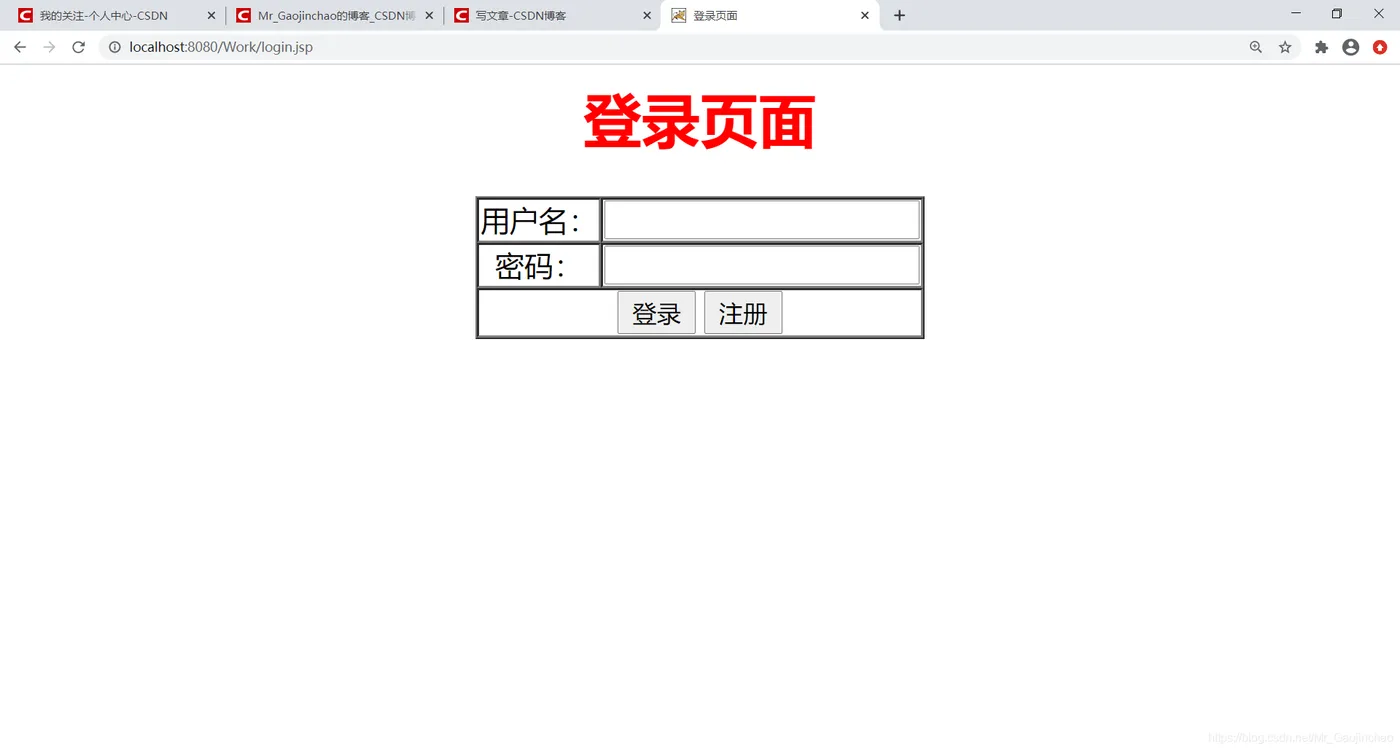
<title>登录页面</title>
<meta http-equiv="pragma" content="no-cache">
<meta http-equiv="cache-control" content="no-cache">
<meta http-equiv="expires" content="0">
<meta http-equiv="keywords" content="keyword1,keyword2,keyword3">
<meta http-equiv="description" content="This is my page">
<!--
  <link rel="stylesheet" type="text/css" href="styles.css">
  -->
</head>

<body>
  <form action="LoginServlet" method="post">
    <table border="1" cellspacing="0" cellpadding="1" align="center">
    <h1 style=text-align:center;color:red;>登录页面</h1>
      <tr>
        <td><center>用户名:</center></td>
        <td><input type="text" name="userName"></td>
      </tr>
      <tr>
        <td><center>密码:</center></td>
        <td><input type="password" name="pwd"></td>
      </tr>
      <tr>
        <td align="center" colspan="2">
        <input type="submit" value="登录" />
        <a href="reg.jsp"><input type="button" value="注册"></a>
        </td>
      </tr>
    </table>
  </form>
</body>
</html>
8. 列表.jsp文件(HTML代码)
<%@ page language="java" import="java.util.*" pageEncoding="utf-8"%>
<%
  String path = request.getContextPath();
  String basePath = request.getScheme() + "://"
      + request.getServerName() + ":" + request.getServerPort()
      + path + "/";
%>

<!DOCTYPE HTML PUBLIC "-//W3C//DTD HTML 4.01 Transitional//EN">
<html>
<head>
<base href="<%=basePath%>">

<title>用户详情页面</title>
<meta http-equiv="pragma" content="no-cache">
<meta http-equiv="cache-control" content="no-cache">
<meta http-equiv="expires" content="0">
<meta http-equiv="keywords" content="keyword1,keyword2,keyword3">
<meta http-equiv="description" content="This is my page">
<!--
  <link rel="stylesheet" type="text/css" href="styles.css">
  -->
</head>

<body>
  <form action="ListServlet" method="post">
  </form>
</body>
</html>
9. 编写web.xml文件
一、手动写入:
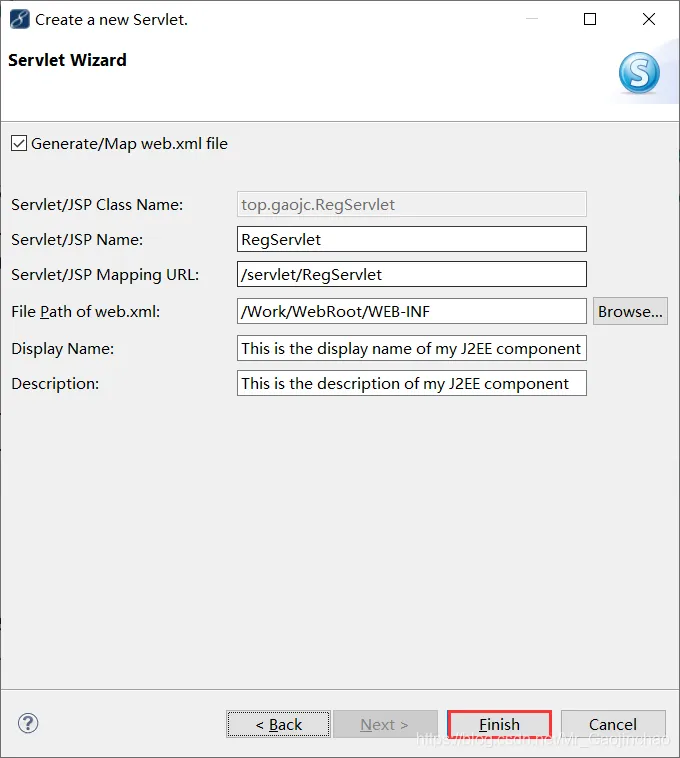
二、自动写入(直接new一个Servlet文件)
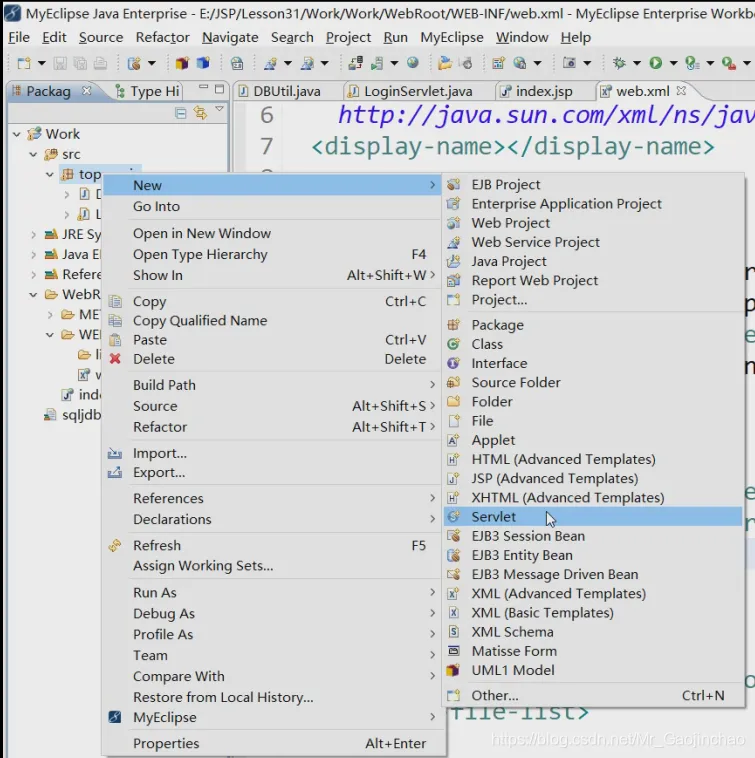
勾选doGet和doPost这两种方法就可以了,点击Next
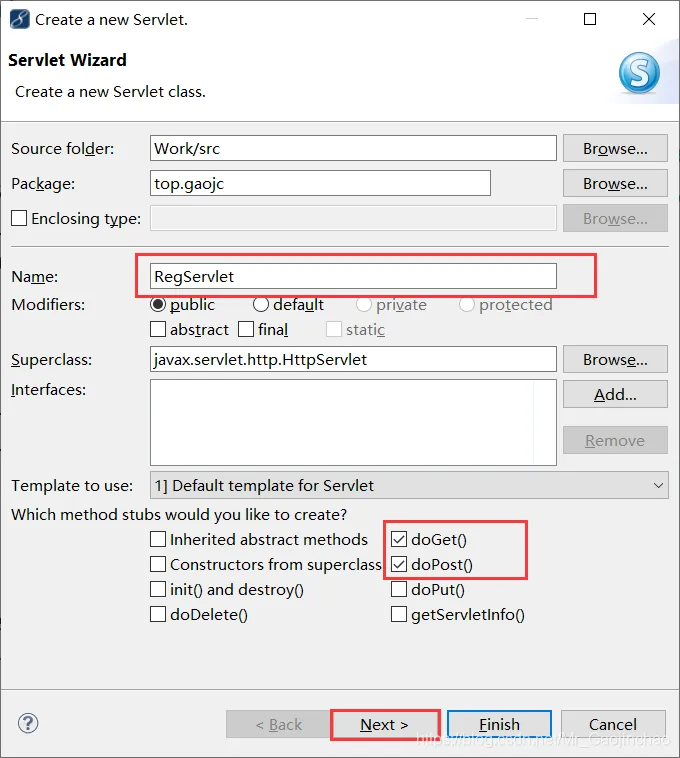
直接点击Finish就可以了
效果演示
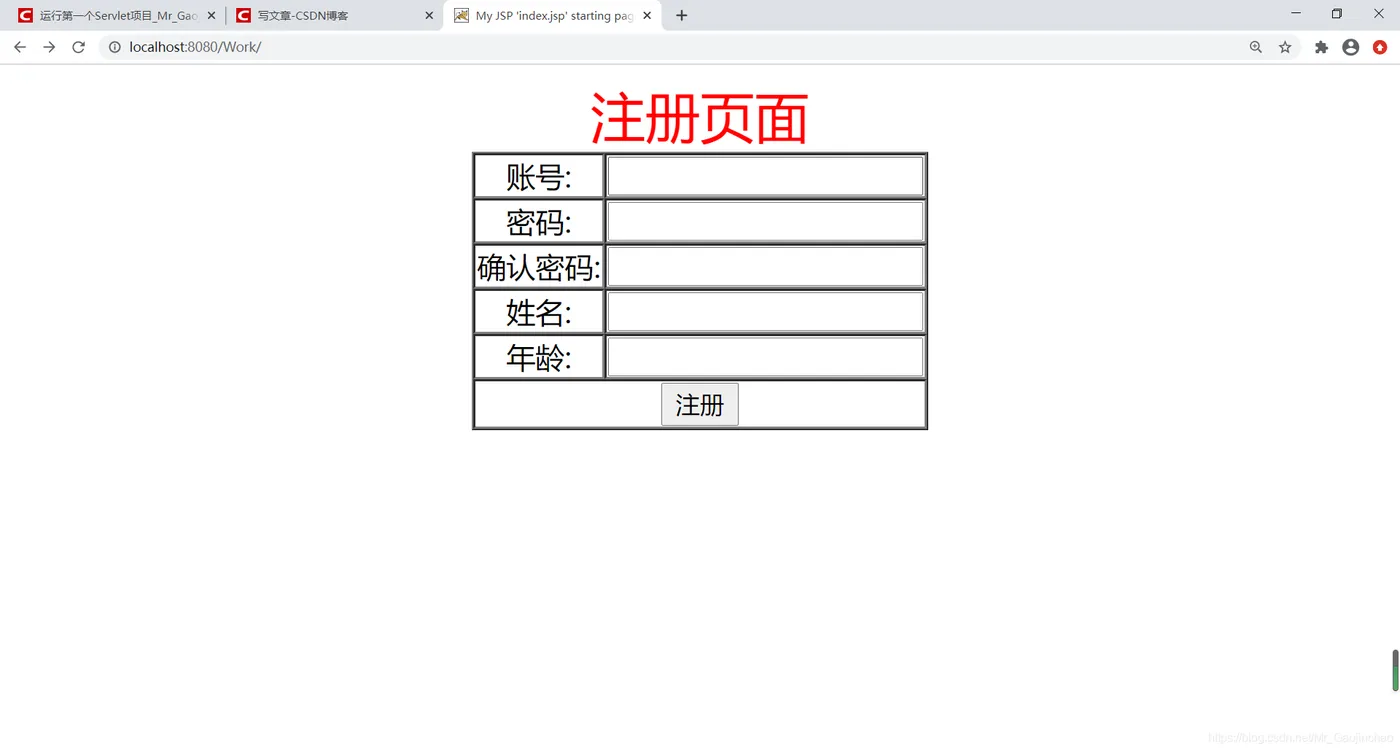
注册页面
启动tomcat,配置详情页见MyEclipse Tomcat配置方法
导航栏输入:localhost:8080/Work/ 运行即可出现以下页面
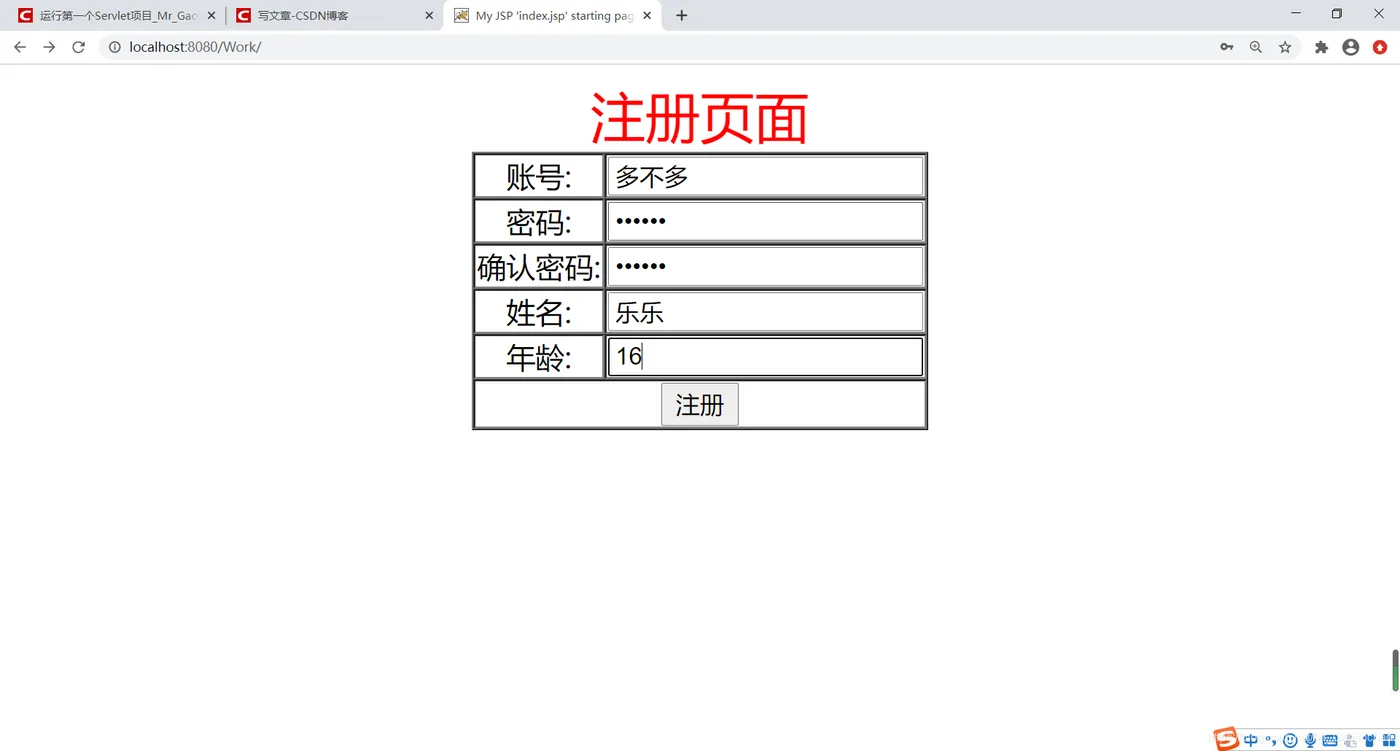
输入内容点击注册
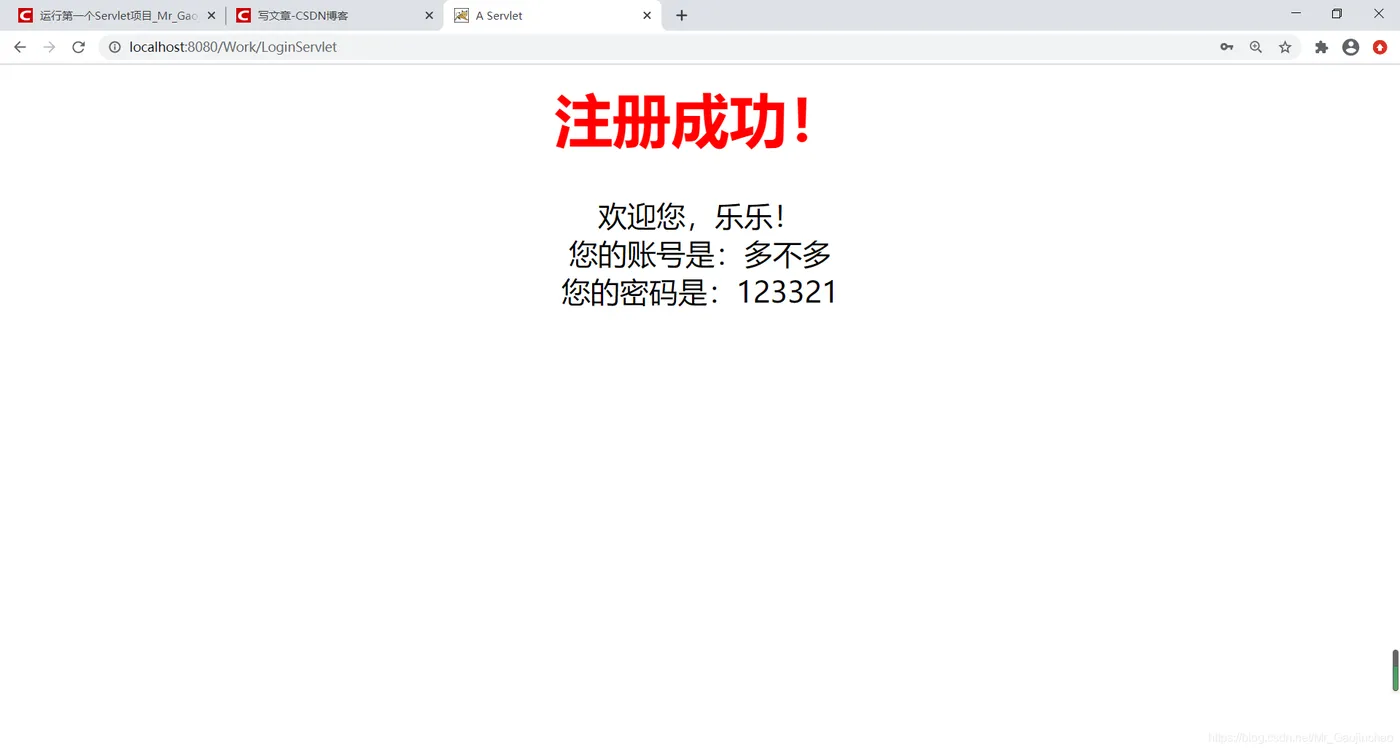
出现注册成功就OK了
登录页面
列表页面
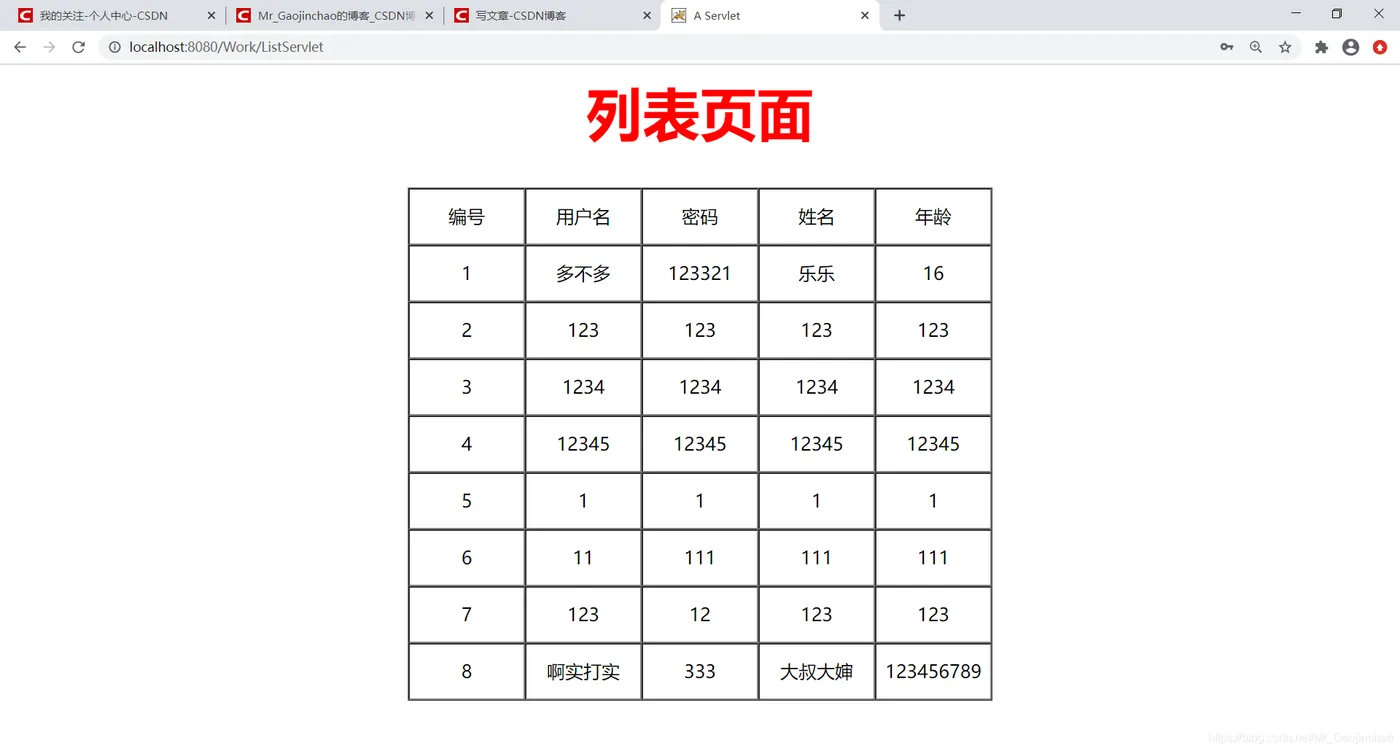
查询数据库数据